To avoid these ads, REGISTER NOW!

Wifi Meross Device

stok5

New member
Joined
Jul 31, 2024
Messages
2
Hi,

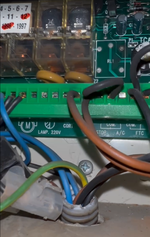
I've a Beninca control panel (I don't see the model but it's almost the same as da93am).

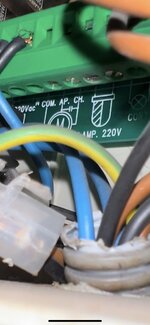
I would like to know where to connect the red and black cable of Meross MSG100.

I think that the red cable goes into AP (open abbreviation in Italian) and the black cable goes into COM (the AP and COM comes from M (Motor)). I suppose that CH (close) is not necessary?

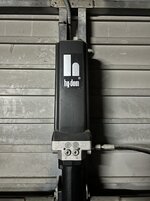
I attatched an image of this and an image of hydraulic motor (I think in the motor is not necessary to do anything).

Can you confirm is that correct?

Thanks!
 

Attachments

  • IMG_0944.PNG_compressed.JPEG
    IMG_0944.PNG_compressed.JPEG
    198.7 KB · Views: 12
  • IMG_0939.HEIC_compressed.JPEG
    IMG_0939.HEIC_compressed.JPEG
    703.6 KB · Views: 13
  • 2024-07-31_10-45.png
    2024-07-31_10-45.png
    503.6 KB · Views: 13
  • 2024-07-31_10-44.png
    2024-07-31_10-44.png
    319.1 KB · Views: 10
To avoid these ads, REGISTER NOW!

dogdog

Well-known member
Joined
Nov 15, 2011
Messages
12,711
Dunno anything about what your controller is.

*** a guess
I guess if you were to decipher this the pic with the com, ap, ch , if ap means open and ch means close it’s one of those split phase motors that dependent which lead you apply current “first”, the motor turns one way and turns the other.

So does your motor have 3 wires like those HF hoist - ac motors ?

So where to put a jumper cable dependents on your hydraulic motor?
 
To avoid these ads, REGISTER NOW!
OP
S

stok5

New member
Joined
Jul 31, 2024
Messages
2
I don't know how to answer those questions :')

I send a video of the controller:

According to chatgpt it would be correct to connect the red cable of the Meross to 'AP' and the black cable to 'COM':

Steps to Connect the Meross Device

  1. Turn Off the Power to avoid any electrical hazards.
  2. Check Existing Connections:
    • COM: If there is already a wire connected, you can simply add the black wire from the Meross device alongside the existing wire.
    • AP (Aperture): If there is already a wire connected, you can simply add the red wire from the Meross device alongside the existing wire.

Connecting the Meross Device

  1. Loosen the Terminals on COM and AP if necessary.
  2. Insert the Meross Wires:
    • Red Wire into the AP terminal alongside the existing wire.
    • Black Wire into the COM terminal alongside the existing wire.
  3. Ensure that the connections are tight and secure.
  4. Reconnect the Power.

 
To avoid these ads, REGISTER NOW!
Top Bottom