To avoid these ads, REGISTER NOW!

WiFi Mesh - eero or TP-Link?

rharman

Well-known member
Joined
Apr 22, 2012
Messages
8,743
Location
SoCal
We've been having some connectivity issues on our Spectrum network. Roku devices buffering, etc. And, it seemed to affect the hard-wired PC as well.

Spectrum was out twice today. Replaced modem & router and replaced cable ends at the demarc from the pole cable and the feed to the modem. Everything looked good but, later, issues again. Called and they scheduled another tech to come back this evening. I will say that Spectrum was really on top of it. I called originally at 12:00pm and the tech showed up at 1:15pm. Second call was at 3:00pm and tech showed up at 6:00pm.

Second tech replaced modem and router - different/newer router this time - and added a splitter inline to bring down the signal. Said they've seen issues with the downstream signal level being too high.

Anyway, we were still having some issues so we disconnected almost everything from the router and I'll be adding them back one by one to see if I have a problem cable. I'll probably run most/all the hard-wired stuff through my unmanaged NetGear switch instead of using the router ports for certain devices. Right now, with some devices disconnected, it seems OK... so far.

The cable guy suggested looking into mesh wifi extenders - something I have considered in the past. I know 5g has more issues with signal strength/penetration. Our house is 2-story, about 2700 sqft. I'm thinking 3 devices - 1 at the modem, 1 centralized downstairs, and 1 centralized upstairs.

Two questions....
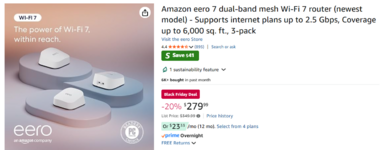
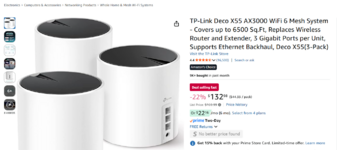
  1. TP-Link or eero? TP-Link I'm looking at is wifi-6 and reasonably priced. eero is more expensive but more future proofed (WiFi 7). I'm OK with that if it's a better system. The TP-Link wifi-7 I've seen is WAY expensive.
  2. It sounds like the device at the modem can replace the Spectrum supplied router. Is that correct? Or, is there any advantage/disadvantage to just plugging it into one port of the Spectrum router and going that route?
I'm a software guy so I'm kind of out of my comfort zone here. When I had IT department management responsibilities in the past, I was fortunate, and smart enough, to hire sharp network guys to deal with the plumbing.

Any help would be greatly appreciated. Our needs are not exhaustive. 4 wifi Roku devices/TV's, hard-wired PC, printer, NVR, alarm panel, laptop either wifi or, typically, hard-wired. Thanks!
1764220136592.png

1764220080818.png
 
To avoid these ads, REGISTER NOW!

wyliesdiesels

Well-known member
Joined
Aug 14, 2012
Messages
19,994
Location
Modesto, CA
If your neighbors have an AP on the same channel as yours and the signal is strong or even mediocre inside your house, you will have issues. no amount of equipment or visits from the Cable Co will fix this

you need to do a wifi scan and see what channel your neighbors are operating on and then adjust to a free or somewhat free channel

having said that, a house that size will definitely need more than 1 AP. 1 per floor at least. the built-in antenna in ISP equipment *****

personally i cant stand eerro or wireless meshing. Hard wire to each AP will do wonders but of course you may not be able to do so
 
OP
R

rharman

Well-known member
Joined
Apr 22, 2012
Messages
8,743
Location
SoCal
Thanks. Yeah, hard wire is always my preference - my laptops have been on hardwire since day one. Like you surmised, running new wire isn't going to happen. Given that, wireless mesh appears to be my only option. 30+ years ago, I had thought about having a path to the upstairs for future wiring when we remodeled but didn't do it. Probably would have been in the wrong spot anyway. :dunno:

Long ago, I had changed the channel on my wifi to one I thought would be unused. I guess I need to download a scanner app for my phone and see what I can find. I know the routers are designed to switch channels to, I assume, avoid interference - but, I believe I can set it to something and have it stick. I'd be shocked if anyone is using other than a default. The Roku are supposedly 2.4 Ghz only but Spectrum support said they saw them on the 5 Ghz band. I know they show the channel in their settings.

I've also ordered a Klein tone generator/probe/ethernet tester. I can check if there are any shorts or opens on my existing cabling. Don't think anything has gotten under the house to gnaw at them but it's cheap insurance. I need to map them out anyway.
 

tmp

Active member
Joined
Sep 12, 2023
Messages
41
Eero is very much the “it just works” solution. I was really hesitant about making the switch since they lack a lot of advanced settings (or in some cases they exist but are difficult to configure) but I got a system for free a few years ago and it has been rock solid. Honestly, this is the most stable wireless network I’ve ever had with the least amount of screwing around with settings.

TP-Link has been under a lot of scrutiny for security issues related to ties to the Chinese government. I’ll leave my opinions out of it and let you look into that on your own.

You should eliminate the spectrum router with either option, and just go from modem straight to one of your new routers. Leaving the spectrum router would be another possible point of failure / interference.

I think your statement about being a software guy who is a bit out of his comfort zone makes this an easy win for Eero.
 

wyliesdiesels

Well-known member
Joined
Aug 14, 2012
Messages
19,994
Location
Modesto, CA
I guess I need to download a scanner app for my phone and see what I can find. I know the routers are designed to switch channels to, I assume, avoid interference - but, I believe I can set it to something and have it stick. I'd be shocked if anyone is using other than a default.
default is typically auto and so the unit just picks whatever channel it thinks is good.
you really have to scan the airwaves and see what is being used. and remember, 2.4Ghz only has 3 non-overlapping channels.
 
OP
R

rharman

Well-known member
Joined
Apr 22, 2012
Messages
8,743
Location
SoCal
default is typically auto and so the unit just picks whatever channel it thinks is good.
you really have to scan the airwaves and see what is being used. and remember, 2.4Ghz only has 3 non-overlapping channels.
Yep. Downloaded an app - WiFi Analyzer by olgor - this morning. Pretty interesting to see the level of detail. Now I just need to interpret it. Splurged on a $6 annual subscription to get the diagnostics including channel interference.
I see a few eero routers listed and one TP-Link.

If I understand correctly, if I end up with 3 access points, I should assign a different channel to each for the 2.4ghz band?

With some very brief testing this morning, it *appears* that plugging the NVR directly into the router induces a problem. Plugging it into the NetGear switch has, so far, been OK. Going to leave that for the day before I make any other changes. More work ahead.
 

wyliesdiesels

Well-known member
Joined
Aug 14, 2012
Messages
19,994
Location
Modesto, CA
yes every AP needs to be on a different channel for 2.4 and 5

tried to find channels that your neighbors arent using or dont have strong signal in your house
 

mikedodge

Well-known member
Joined
Jun 27, 2017
Messages
2,760
Never had a problem with TP link. I'd trust thst brand over any of the cheap brands or less common ones.
 

manwithtools

ALLIANCE MEMBER
Joined
Aug 24, 2015
Messages
13,683
Location
Lebanon, TN
I have had the Eero's systems in two houses over the last 5 years. Both are around 3500 sq. ft. One router, two extenders in each house. Rock solid and very reliable. This house, I have a Ring alarm base station with Eero built it. It just works.
 
Last edited:

ericm

Well-known member
Joined
Apr 17, 2016
Messages
1,963
Location
Southern Oregon
I've been happy with the Netgear Orbi systems I've set up. It's always been in rural areas where there's not much worry about competing signals from next door. But they should do as well for that as any other mesh system.

The Orbis still have a fully featured admin panel that you can do everything from. I do not want to use an app if I don't have to. For anything.

When you are having problems it's good to do some testing to see if it's your wifi/router/network or if it's the ISP. Given that they replaced your modem, Spectrum probably has at least some indication that it's their fault. Being able to log into the wifi router is useful because you can run tests from there, bypassing the wifi and your network.
 
OP
R

rharman

Well-known member
Joined
Apr 22, 2012
Messages
8,743
Location
SoCal
I've been happy with the Netgear Orbi systems I've set up. It's always been in rural areas where there's not much worry about competing signals from next door. But they should do as well for that as any other mesh system.

The Orbis still have a fully featured admin panel that you can do everything from. I do not want to use an app if I don't have to. For anything.

When you are having problems it's good to do some testing to see if it's your wifi/router/network or if it's the ISP. Given that they replaced your modem, Spectrum probably has at least some indication that it's their fault. Being able to log into the wifi router is useful because you can run tests from there, bypassing the wifi and your network.
Checking just now on the WiFi Analyzer app, there are 34 AP's in range at 2.4, 19 @5, and 1 @ 6.

I would definitely prefer a web based interface over an app as well. Not commonplace these days. I used to buy various protocol converters, data acquisition devices, etc. from "Black Box" that all had built-in web server & interface. Of course that predated cell phone apps.

Definitely. When the support guy online was running a speed test, he let out an "Uh Oh". I said "That doesn't sound good". He agreed - said our link speed was around 5mb. Said they would send a tech out. Soonest appointment was 1:00pm - 2:00pm. I said "Today?" and he confirmed. That blew me away since it was noon when I called. Turned out the tech lives very near to me and was at home having lunch with no pending calls.

Signal from the pole to the house was great.
 

wyliesdiesels

Well-known member
Joined
Aug 14, 2012
Messages
19,994
Location
Modesto, CA
I would definitely prefer a web based interface over an app as well. Not commonplace these days.
If you want to be able to scan the airwaves for whats out there you will need TP-Link Omada APs or Unifi APs. The lower grade consumer wifi routers do not have that capability from what Ive seen
 
To avoid these ads, REGISTER NOW!
OP
R

rharman

Well-known member
Joined
Apr 22, 2012
Messages
8,743
Location
SoCal
Going to pull the trigger on the eero wifi-7 3-pack.

As @wyliesdiesels mentioned, they'll do dynamic channel selection on each band to pick the least congested available. I did check and you can't override that. It's dual band so no 6Ghz but I don't see that as anything I need to worry about.

Going to knock $10 off my Spectrum bill every month!

Thanks to all for your input. Much appreciated. Fingers crossed....
 
Last edited:
OP
R

rharman

Well-known member
Joined
Apr 22, 2012
Messages
8,743
Location
SoCal
Update....

Hooked up the eero gateway a couple of weeks ago. It's been somewhat of a struggle, which was surprising.

I had it plugged in for a short time after the Spectrum router just to poke around at the app interface. It got assigned a 192.168.4.??? address. I would have expected a 192.168.0.???.

When I removed the Spectrum router and configured the eero, I manually set it to 192.168.0.1 as all my devices were in the that range. WiFi worked fine but none of my wired devices were working. Really frustrating. After a LOT (too much - my fault) of troubleshooting, I narrowed it down to a faulty cable connecting the eero to my NetGear switch. Ugh! Brand new cable. Tested the cable with my new Klein RJ11/RJ45 tester and found it has an open. UGH again! Grabbed a known good cable and everything popped up.

Since then, we've been having a fair number of short dropouts of service - both wired and WiFi. Could be Spectrum but it seemed excessive. After doing some research, I found recommendations to set the eero to "bridge" mode. They seemed more directed at Spectrum combo modem/routers but not exclusively. I reached out to Spectrum and they said "Oh yes, put it in bridge mode". So I did.

Bridge mode made everything so much worse. I couldn't connect at all. Power cycled everything but no luck there. So, I tried setting the eero to "Automatic" and another power cycle. Bingo! Devices started coming back online. A couple of devices had been set to hard-coded IP and gateway so I had to change those to automatic. Found that, once again, the eero got set to 192.168.4.1. I can live with that since everyone now has an IP in that range and I'm aware of it.

Given what I know now, after more research, bridge mode was a no-go from the start. I'm guessing Spectrum thought I had a combo modem/router or just looked up the wrong thing. As I mentioned in the first post, I'm a software guy and know just enough networking to get by - and, apparently, get myself into trouble. But... I got myself out of it - as far as I know.

I'm hoping that the dropouts stop. It's puzzling in that I can't see how manually assigning an IP to the eero and letting it handle DHCP would cause it. We'll see over the next couple of weeks.

If I'm completely misunderstanding this, let me know. Education is always good.

Now, I need to add the additional two nodes.
 

wyliesdiesels

Well-known member
Joined
Aug 14, 2012
Messages
19,994
Location
Modesto, CA
Update....

Hooked up the eero gateway a couple of weeks ago. It's been somewhat of a struggle, which was surprising.

what is the Eero gateway connected to on the WAN port? you mentioned a netgear switch below. It should be connected to either the spectrum router (which then would be set to IP pass thru/bridge mode so the Eero gateway gets a public IP address and handles the network) or the spectrum cable modem. there shouldnt be a switch ahead of the eero.

I had it plugged in for a short time after the Spectrum router just to poke around at the app interface. It got assigned a 192.168.4.??? address. I would have expected a 192.168.0.???.

that is most likely the subnet the spectrum router is setup to assign to DHCP clients.

When I removed the Spectrum router and configured the eero, I manually set it to 192.168.0.1 as all my devices were in the that range. WiFi worked fine but none of my wired devices were working. Really frustrating. After a LOT (too much - my fault) of troubleshooting, I narrowed it down to a faulty cable connecting the eero to my NetGear switch. Ugh! Brand new cable. Tested the cable with my new Klein RJ11/RJ45 tester and found it has an open. UGH again! Grabbed a known good cable and everything popped up.

Is the netgear switch plugged into the WAN or LAN port on the eero?

Since then, we've been having a fair number of short dropouts of service - both wired and WiFi. Could be Spectrum but it seemed excessive. After doing some research, I found recommendations to set the eero to "bridge" mode. They seemed more directed at Spectrum combo modem/routers but not exclusively. I reached out to Spectrum and they said "Oh yes, put it in bridge mode". So I did.

When you say dropouts, what exactly does that mean? the device tells you there is no internet or the wifi signal drops?

The bridge mode setting would be on the spectrum router or modem NOT the eero. The bridge mode tells the spectrum router which device on your network should be getting the public IP address (the eero gateway).

Bridge mode made everything so much worse. I couldn't connect at all. Power cycled everything but no luck there. So, I tried setting the eero to "Automatic" and another power cycle. Bingo! Devices started coming back online. A couple of devices had been set to hard-coded IP and gateway so I had to change those to automatic. Found that, once again, the eero got set to 192.168.4.1. I can live with that since everyone now has an IP in that range and I'm aware of it.

Because the bridge mode setting should be done on the ISP equipment NOT the Eero.

Given what I know now, after more research, bridge mode was a no-go from the start. I'm guessing Spectrum thought I had a combo modem/router or just looked up the wrong thing. As I mentioned in the first post, I'm a software guy and know just enough networking to get by - and, apparently, get myself into trouble. But... I got myself out of it - as far as I know.

I'm hoping that the dropouts stop. It's puzzling in that I can't see how manually assigning an IP to the eero and letting it handle DHCP would cause it. We'll see over the next couple of weeks.

If I'm completely misunderstanding this, let me know. Education is always good.

Now, I need to add the additional two nodes.

What ISP equipment do you have?
 
OP
R

rharman

Well-known member
Joined
Apr 22, 2012
Messages
8,743
Location
SoCal
Here's the topology...

Spectrum ISP -> Spectrum Modem (only) -> eero -> NetGear unmanaged switch -> <various hard-wired devices)
And, various WiFi devices connected to eero

The modem is plugged into port 1 on the eero and port 2 goes to the switch - although the documentation says they're identical and they auto-discriminate between wan & lan. There is no Spectrum router in this config.

Since the modem has no routing capability, bridging appears to be a non-issue - as long as it's not enabled on the eero as you've then lost all network management. So, I set it back to "automatic" which is the default.

Dropouts are how I describe a short-term loss of activity/progress. Click on a link and nothing happens or, on a Roku, the spinny wheel buffering. These could last 20 to 60 seconds. No indication of a complete drop of the connection.

ISP equipment is a Hitron Technologies E31N2V1 cable modem w/analog phone port - which we do use for our landline. The Spectrum router is a model #SAX1V1K WiFi 6 dual-band.

As of this afternoon, I've gone back to the Spectrum router (no eero) and am seriously considering returning the eero gear. I put the Spectrum router back in and everything works as expected.

An interesting issue that popped up with the eero was that my NVR started rebooting every 20 minutes or so and, quite often 1 or more cameras would not come online when the NVR came back up. The cameras are on their own 10.151.***.*** network internal to the NVR. With the eero out of the config, those issues seem to have gone away.

I originally went with the eero thinking that broader coverage would be a good thing but I'm now in the mindset of....

1767660594527.png
1767660824052.png
 

wyliesdiesels

Well-known member
Joined
Aug 14, 2012
Messages
19,994
Location
Modesto, CA
Here's the topology...

Spectrum ISP -> Spectrum Modem (only) -> eero -> NetGear unmanaged switch -> <various hard-wired devices)
And, various WiFi devices connected to eero

The modem is plugged into port 1 on the eero and port 2 goes to the switch - although the documentation says they're identical and they auto-discriminate between wan & lan. There is no Spectrum router in this config.

Since the modem has no routing capability, bridging appears to be a non-issue - as long as it's not enabled on the eero as you've then lost all network management. So, I set it back to "automatic" which is the default.

so since you only have a modem, you are correct that you dont need to setup IP Pass thru (bridging is different thing but all the ISP use that term interchangeably with IP pass thru so whatever).

the spectrum modem should be giving your eero router a public IP address on the WAN interface

Dropouts are how I describe a short-term loss of activity/progress. Click on a link and nothing happens or, on a Roku, the spinny wheel buffering. These could last 20 to 60 seconds. No indication of a complete drop of the connection.

this isnt an indication necessarily that your internet has dropped connection. its more of an indication that the website server is lagging or is having issues.

When i encounter a website request that doesnt respond, i will open a new browser tab on the computer and my phone and check another website to determine if its my internet, my device, or the site's hosting service. almost always the case is the web server followed by an issue with my device

I have connection monitoring with my peplink router so it alerts me when my comcast circuit goes down. every time a webpage fails or is slow to load, its definitely not my internet circuit

all that to say you shouldnt assume its your internet circuit dropping out. could be congestion on the internet or the server

one thing you can try is a website like isitdownrightnow.com if the web server is down this site will tell you. if its up and its an issue with your device it will tell you as well

ISP equipment is a Hitron Technologies E31N2V1 cable modem w/analog phone port - which we do use for our landline. The Spectrum router is a model #SAX1V1K WiFi 6 dual-band.

As of this afternoon, I've gone back to the Spectrum router (no eero) and am seriously considering returning the eero gear. I put the Spectrum router back in and everything works as expected.

An interesting issue that popped up with the eero was that my NVR started rebooting every 20 minutes or so and, quite often 1 or more cameras would not come online when the NVR came back up. The cameras are on their own 10.151.***.*** network internal to the NVR. With the eero out of the config, those issues seem to have gone away.

I originally went with the eero thinking that broader coverage would be a good thing but I'm now in the mindset of...

sounds like an issue with the eero. my limited experience with them has shown that its junky equipment. i would get a more reputable brand and try that out
 
OP
R

rharman

Well-known member
Joined
Apr 22, 2012
Messages
8,743
Location
SoCal
so since you only have a modem, you are correct that you dont need to setup IP Pass thru (bridging is different thing but all the ISP use that term interchangeably with IP pass thru so whatever).
That's what I've surmised as well.
My first bit of research led me down the wrong path and Spectrum jumped right in and said "YES! Do that!"

the spectrum modem should be giving your eero router a public IP address on the WAN interface
Yes

this isnt an indication necessarily that your internet has dropped connection. its more of an indication that the website server is lagging or is having issues.
True, except we're talking multiple devices concurrently doing different things - unless it's an ISP thing.

When i encounter a website request that doesnt respond, i will open a new browser tab on the computer and my phone and check another website to determine if its my internet, my device, or the site's hosting service. almost always the case is the web server followed by an issue with my device
I do the same - But, see previous comment re: concurrency

I have connection monitoring with my peplink router so it alerts me when my comcast circuit goes down. every time a webpage fails or is slow to load, its definitely not my internet circuit

all that to say you shouldnt assume its your internet circuit dropping out. could be congestion on the internet or the server
True - I'm not saying the internet connection is dropping out but, rather, something in the pipeline - be it on my side or the ISP - is an issue. I expect it occasionally but the eero really seemed to exacerbate it.

one thing you can try is a website like isitdownrightnow.com if the web server is down this site will tell you. if its up and its an issue with your device it will tell you as well
Hard to do when a new tab is unresponsive as well and my wife, sitting 6' away, is having the same issue

sounds like an issue with the eero. my limited experience with them has shown that its junky equipment. i would get a more reputable brand and try that out
It got rave reviews online and here but, at this point, I'm going to agree with you on that. For now, I'm in the "If it ain't broke, don't fix it" camp. Might be revisited down the road as the Spectrum router (new model to me) seems to have a reputation for dropping out. Ugh!
Thanks for the feedback. It's much appreciated.

Comments inline above....
 

Steve_P

Well-known member
Joined
Sep 15, 2010
Messages
5,181
I'm no expert, but I have Spectrum and it pretty much *****- frequent outages for a few hours at a time, and if it's windy and/or a thunderstorm it can be out for 12+ hours. I now have fiber in my subdivision and need to talk to my neighbors and see if they're happy with it. I don't need the speed, but better reliability would be nice.

I've had a TP-link router for 5+ years and no issues with it.
 
OP
R

rharman

Well-known member
Joined
Apr 22, 2012
Messages
8,743
Location
SoCal
I'm no expert, but I have Spectrum and it pretty much *****- frequent outages for a few hours at a time, and if it's windy and/or a thunderstorm it can be out for 12+ hours. I now have fiber in my subdivision and need to talk to my neighbors and see if they're happy with it. I don't need the speed, but better reliability would be nice.

I've had a TP-link router for 5+ years and no issues with it.
We've seen short outages - 1 to 2 minutes - in rainy weather. But, they happen several times per hour when it occurs.

I believe the only fiber option in our area is Frontier. I remember when they took over our landline phone service from Verizon. They gave new meaning to the phrase "this company *****". Definitely not interested in their offerings.
 

BurtEggley

Well-known member
Joined
Oct 8, 2024
Messages
853
Usually the ISP provides a modem/router/wifi combination. If they provide a modem only, you use it. If they provide a modem/router combo, or modem/router/wifi combo and you have your own router-wifi, then you run your ISP one in bridge mode so it only acts as a modem. You then use YOUR router/wifi for the firewall, router and wifi.

192.168.X.X are private IP address ranges not used on the Internet. You can use 192.168.0.X, or 192.168.1.X. 192.168.100.X etc or whatever you want for your LAN as long as it in on your LAN and not going onto the WAN. (192.168.0.X to 192.168.255.X are private.)

Lots of things can hose wi-fi connections including smart power meters that are broadcasting. You can get an app for your phone to see what channels are being used near you.

You do not want to double NAT your system by using their router and your router*. Also, IPV6 is common now and many routers just pass it thru. The security concept for IPV6 is that there are so many addresses that the hackers can't find you. I use modems that either turn off IPV6 or have security build into it.

TP-Link is china sponsored and in trouble with the US government from what I understand. I think EERO is amazon owned and there have been some concerns of Amazon accessing private data. Between the two I would do like you did and choose EERO. Almost any brand or model these days in the consumer product line has some kind of issues with it.

*If you use their router, and put yours in bridge mode then you might as well have bought another switch. You do it the other way. You use theirs in bridge mode and yours in router mode.
 

wyliesdiesels

Well-known member
Joined
Aug 14, 2012
Messages
19,994
Location
Modesto, CA
If multiple devices are having lagging issues accessing the internet, try accessing or pinging a LAN host such as a printer. If you cant access that either then you know its an issue with your network hardware.
 

ericm

Well-known member
Joined
Apr 17, 2016
Messages
1,963
Location
Southern Oregon
We've seen short outages - 1 to 2 minutes - in rainy weather. But, they happen several times per hour when it occurs.

I believe the only fiber option in our area is Frontier. I remember when they took over our landline phone service from Verizon. They gave new meaning to the phrase "this company *****". Definitely not interested in their offerings.

Frontier is so terrible. We had their land lines on the ground for years. It took three different linemen before they'd put the one we were using back up. The other lines they just left there.

When Frontier brought fiber to our neighborhood we didn't even bother signing up.

At our new place we have Spectrum fiber. It's been great with zero down time but its only been a couple months.

Being an old nerd I use ping and traceroute to debug network issues. If it's to the outside I use 1.1.1.1 which is short to type and always up. It helps to do traceroute to that when things are working well so you know what to look for when they are not. I can often spot where the trouble is within the ISP's network.

Sometimes the problem is that their DNS is down, in which case you can use a flag to ping and traceroute to not resolve addresses.
 
OP
R

rharman

Well-known member
Joined
Apr 22, 2012
Messages
8,743
Location
SoCal
Frontier is so terrible. We had their land lines on the ground for years. It took three different linemen before they'd put the one we were using back up. The other lines they just left there.

When Frontier brought fiber to our neighborhood we didn't even bother signing up.

At our new place we have Spectrum fiber. It's been great with zero down time but its only been a couple months.

Being an old nerd I use ping and traceroute to debug network issues. If it's to the outside I use 1.1.1.1 which is short to type and always up. It helps to do traceroute to that when things are working well so you know what to look for when they are not. I can often spot where the trouble is within the ISP's network.

Sometimes the problem is that their DNS is down, in which case you can use a flag to ping and traceroute to not resolve addresses.
I've always used Google's DNS 8.8.8.8 to do a ping test. Haven't used tracert in quite a while - well, since I retired 12/31/2021.
 

dcg9381

Well-known member
Joined
Jun 20, 2018
Messages
11,635
Location
Austin, TX
If multiple devices are having lagging issues accessing the internet, try accessing or pinging a LAN host such as a printer. If you cant access that either then you know its an issue with your network hardware.
This. Need more info.

PingForLife (free app). Use it.
Setup a continuous ping from your hard wired PC:
1) Your ISPs DNS
2) Google DNS (8.8.8.8)
3) A local endpoint on your LAN (a wireless one)
4) Your LAN gateway (usually 192.168.x.1)

Report back. This tells us where the problem is.

Mesh is great, but wired access points are superior if you can do them.
 
To avoid these ads, REGISTER NOW!
Top Bottom