To avoid these ads, REGISTER NOW!

WiFi to new garage

mikereno1

Well-known member
Joined
Jan 26, 2014
Messages
65
Location
Reno, NV
Finally finished the new garage and I'd like to extend our WiFi signal out there. We have ATT Uverse DSL internet with the gateway modem/router that reaches fine in the house but not to the garage.

The modem/router is in the middle of the house, our bedroom is about 75ft from the garage and closest we can get from inside the house. Would a simple WiFi extender do the trick?

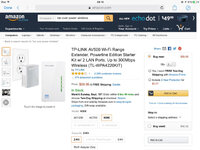
https://www.amazon.com/dp/B010S6SG3S/?tag=atomicindus08-20

Any other simple/cheap suggestions?
 
To avoid these ads, REGISTER NOW!

Empty Pockets

Well-known member
Joined
Sep 21, 2015
Messages
4,942
Location
Rural New York
That extender looks like it would work in the house. how often are you going to use the internet in the garage? Might be easier to use your smart phone as a hot spot
 

Ralf99

Well-known member
Joined
Apr 14, 2011
Messages
440
Location
S.W.Victoria, Australia
I have a similar setup to a garage and shed at around 120' or a little more from the router - works fine, but range extenders are slower than the primary wifi signal.

An alternative could be a LAN over power setup.

d6b3972c876dc90c4afdb0d66f3901cf.jpg
 
OP
M

mikereno1

Well-known member
Joined
Jan 26, 2014
Messages
65
Location
Reno, NV
I thought about the LAN over wire but I'd like to have WiFi in the yard around the garage as well, kids playhouse and such.

I don't think i will use it a ton out there but out 4G coverage isnt great, wifi much faster for watching youtube how to videos
 

nehog

Well-known member
Joined
Jan 2, 2010
Messages
7,935
Location
Jaffrey, NH
How far from the house is the garage? If you can run Cat 5/5e/6 then any cheap WiFi box will work. I can find a link to show how to hook them up (there are even YouTube videos) and it works well. If you can't run a wire, then a wireless extender probably will work.

I use two WiFi boxes (one in the house, one in the garage). Different channels, same ID/Password, and devices switch effortlessly between the two. I even have WiFi calling on my cell phone since my garage (metal) has no cell coverage.
 

meburdick

Well-known member
Joined
Jul 21, 2011
Messages
211
Extenders are "ok" and are really ideal for situations where you're trying to cover a second floor in a house or similar. Beyond that, I haven't had much success with them.

The powerline extenders work well, but I believe that each of the outlets that you plug the devices into has to share a bus in the breaker box. Otherwise, the signal won't cross between them correctly.

Your absolute best method would be to run Cat5E or Cat6 to the garage and plop down a basic WiFi router out there. If you only connect the LAN port to the inside, set the SSID the same, and turn off the DHCP server, you'll get decent results without having to reprogram your devices. Be sure you're using WPA2 security on the SSID and don't try "hiding" the SSID as that is problematic for many devices and does zip to secure your network.
 

gtae07

Well-known member
Joined
Mar 6, 2015
Messages
2,973
Location
Fayetteville, GA
I use an extender in my shop, on the wall closest to the house. It works fine for the most part. The trick is that for some reason my phone really prefers the extender even when I'm standing right next to the main router, so I had to use different SSIDs and put a manual swap shortcut on my home screen.
 

Jazz1

Well-known member
Joined
Jan 3, 2016
Messages
4,188
Location
Thunder Bay On.
Keep your receipts. I tried a couple wireless options,, none of which worked. $40 d-link did the trick but it is not wireless. Signal travels through power lines,, or so I'm led to believe. My garage is only 30' from house and only way wireless works is if my gArage door is open,, which its not 6 months of the year
 

RWorth

Well-known member
Joined
Aug 29, 2016
Messages
592
Location
Cape Cod , Mass.
What Jazz1 said, my house is a black hole for wifi, a geek buddy of mine set me up with 3 wireless routers after I tried a few different things myself that failed. they're ASUS RT-N16 I think. Now I have 5 bars anywhere on my property. I had to bite the bullet, I think they were 100 bux a piece.
 

kaje36

Well-known member
Joined
Mar 9, 2016
Messages
46
I had the same problem, and did the Lan over Power option Ralf99 listed. It works very well, I have the same SSID broadcast from the garage, and its a seamless transition as I walk from the house to the garage.
My garage is metal, but the signal still extends around a 100 feet outside of it, and I had no signal in the garage before!.
 

meburdick

Well-known member
Joined
Jul 21, 2011
Messages
211
What Jazz1 said, my house is a black hole for wifi, a geek buddy of mine set me up with 3 wireless routers after I tried a few different things myself that failed. they're ASUS RT-N16 I think. Now I have 5 bars anywhere on my property. I had to bite the bullet, I think they were 100 bux a piece.

I had two older routers covering my house. Connectivity started getting spotty because I there are so many people in the house using devices. I swapped to an ASUS AC3100 and no more problems. Like you, I had to fork over some cash (it's a $300 router), but everything gets signal all around the house and even around the perimeter of the house in the yard.
 
To avoid these ads, REGISTER NOW!

bowhuntr311

Well-known member
Joined
Aug 3, 2016
Messages
135
Location
North Central Minnesota
Possibly look at an external outdoor omni-antenna on the outside of your house.

Ive setup a few of these for customers in a similar situation, I turn the wifi OFF inside the house; run a cat5 from the modem/router to the antenna on the eve of the house and let the antenna carry 100% of the traffic.

ethernet-over-power stuff is handy aswell aslong as they will communicate with each other between the garage and house.
 

pgray007

Well-known member
Joined
Jul 25, 2007
Messages
573
Location
Charlotte, NC area
You can also use a WiFi bridge and directional antenna (Unifi, who you mentioned, makes several). Essentially you're replacing a long run of cable with a narrow, focused, high-bandwidth radio signal. This is done all the time in commercial situations to run networks between buildings, etc.

In this case, you'd need 3 WiFi radios: 2X wireless bridges to go between home and outbuilding with directional antenna, and 1X standard WiFi access point in your outbuilding.

No digging, but you're probably in $4-800 in hardware and antennas. There are cheaper "DIY" methods (google "Pringles Can Antenna") but I'd probably try the powerline thing first, or investigate if there's any way to run cable. You could probably do direct burial CAT5e and not need to mess with conduit.
 

TK-421

Well-known member
Joined
Dec 29, 2015
Messages
1,398
Location
Pflugerville, TX
Run a cable underground and set up an access point inside the garage, adding an external antenna if you also want internet outside the garage.
 
OP
M

mikereno1

Well-known member
Joined
Jan 26, 2014
Messages
65
Location
Reno, NV
Hmm, burying cat wire isn't really an option, all concrete to the new garage. Might be able to run it to the far end of our old garage and then put a router there.

The new garage has a separate circuit in our main board and then large gauge wires to a subpanel in the new garage. Would power over Lan work for this? Might be worth a shot and then definitely keep receipts
 

Ralf99

Well-known member
Joined
Apr 14, 2011
Messages
440
Location
S.W.Victoria, Australia
It's worth a try - worst case if it doesn't work on the garage circuit is that you can locate it within the house near a window to the backyard and have a full speed wifi repeater to the back yard and possibly the garage as well.
If it was my money, I'd take a punt for the $60 cost..
 

kaje36

Well-known member
Joined
Mar 9, 2016
Messages
46
the Lan over power will work with anything until it reaches a transformer. So technically your neighbor could join your network too. But they built in encryption into the units, so its extremely unlikely your neighbor will be able to, unless you let him. and if he is good enough to get in on his own.. your wifi isnt safe anyway, lol

Mine is off a different breaker, but feeds from the same panel. I have heard of guys using them in campgrounds and large places like that.
 

NoPressure

Well-known member
Joined
Jul 1, 2011
Messages
182
Location
Hazel Green, AL
Question for those recommending direct bury cat5/6. So all you do is plug into your main router (inside house), drop it into the crawl space, trench to the shop, and plug in to a second router in the shop?

I was going to do the same thing but spilt my coaxial cable from the house. Is the cat cable the better option?
 

meburdick

Well-known member
Joined
Jul 21, 2011
Messages
211
Splitting the coax will result in needing two modems, two routers, and two distinct connections to the Internet. They will not be able to talk to one another without some "advanced" configuration on the routers, and your devices may or may not seamlessly switch between the two distinct connections. Plus, there's the extra cost of hardware and needing to pay for multiple connections to the provider.

Using a CAT5/6 cable to interconnect the two buildings means that you are directly extending your local area network (LAN) between buildings. One modem and one router are required in the main location. At the second location, you can use an Access Point -or- a router (there is a little bit of semi-advanced configuration here, but it isn't at all hard).

Much cheaper in terms of initial cash outlay for hardware you own, and ZERO additional recurring charges to the cable company.
 

Moose364

Well-known member
Joined
Oct 21, 2014
Messages
282
Location
East Texas
The TP-link stuff is cheap and really good, I had 1 bar of WiFi standing in the door of my shop, 5' in and I had nothing, got a cheap TP link router and plugged in a extender in the plug right by my shop door, I have full signal all over my shop, and can stream video's my shop is at least 125' from the house router, plus with boosting the signal in my shop, we now have full signal around our pool
 

minytrker

Well-known member
Joined
Sep 19, 2012
Messages
1,390
Location
Brenham TX
Im in the same boat, have 2 wireless routers for the house (fairly large) and I can get 1 bar wifi in the shop. Im debating more wifi or running cat5 underground out there.
 

Bigbandguy

Well-known member
Joined
Oct 18, 2014
Messages
1,169
Location
North Carolina
My workshop is about 75 feet from the house. There is a window in the shop that faces the house. Being cheap I tried a cheap solution that worked perfectly. Obtain one each Pringles can, one pedestal type USB cord and adapter and one USB WiFi dongle.. receiver . Cost about 15 for the works including a can of pringles chips. Cut a hole the size of the dongle about 1/4 of the way from the closed end of the can and insert the dongle. If you want to get elegant about it place the dongle such that the can tilts at a slight up angle and hot glue it to the can. insert the dongle in the USB pedistal and point the whole thing toward the house and plug the receiver into your computer. (you may have to disable an internal wifi if you are using a laptop.) I have an old desktop computer in the workshop and this setup brings in a strong signal. YMMV but it sure works for me.
 
To avoid these ads, REGISTER NOW!
Top Bottom