To avoid these ads, REGISTER NOW!

Win 11 on old (unsupported) laptop

cgrutt

Well-known member
Joined
Mar 4, 2016
Messages
8,203
I recently purchased a Pico Scope and need to use it tomorrow to help (well, try to anyway, lol) a friend track down a problem he's been having with his transmission going into limp mode on his 2013 Chrysler 300C with 5.7L Hemi. Unfortunately, my laptop crashed and I can't get it to boot. Had an older laptop running Win 8.1 Pro and loaded the Pico7 software, which seemed to run fine except it would not connect to the scope. Put in a question to Pico and was advised laptop was too old to run Pico7 but would probably run Pico6. They told me min recommendation is i5 eighth gen with min 8GB RAM.

My old Toshiba is i7 fourth gen (2014) with 12 GB Ram. Was told it's too old won't run.
I hate being told it can't be done LOL.

So tried to change operating system to Win10 but apparently Microsoft isn't making it available (at least easily) for download. I decided to give Win11 a shot knowing full well the hardware is out of date and not supported.

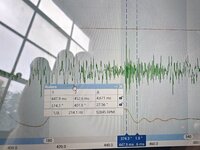
Well guess what, it works! App seems to take a bit longer than usual to load but once it's loaded it seems to run fine. Only tested it with one channel and a 1.5V battery but it works just fine. I need to buy another license to activate Windows but I'll take care of that next week.

Was considering trying Linux but don't have any experience with it and I need to purchase some diagnostic software for my boat (Rinda Diacom) and I think it only runs on Windows. Going to keep this as my diagnostics laptop until I can upgrade. Also want to download the BMW diagnostics software for my son's car. I like this Laptop because it still has a CD Rom and also a Serial port, which I needed for an EEProm programmer to fix an issue with a module in son's car.

Just wanted to share in case anybody else has an old Laptop around that doesn't work with some newer technology.

20240802_161251.jpg
 
To avoid these ads, REGISTER NOW!

desertdog256

Well-known member
Joined
Nov 22, 2015
Messages
103
Excellent! Congratulations!

Recently I have been playing around with this. I was at an estate sale recently and walked out with an HP All-in-One computer for $28. It’s from about 2012 or 2013 and it’s now running Win 11. Works like a champ. It’s a third gen AMD something-or-another cpu.

I also picked up (several) used Thinkcentre Mini PCs for cheap and they also run Win11 just fine. I think those are third gen Core i5 machines.

I watched a Youtube called something like “Installing Windows 11 on Unsupported Hardware” and then created a bootable Win11 USB drive. Easy, peasy.

I have also had some success activating Windows 11 with Windows 10 or even Windows 8 keys. Not 100% of the time, but it mostly works. The computers seem to see it as an upgrade instead of a new install.
 
OP
C

cgrutt

Well-known member
Joined
Mar 4, 2016
Messages
8,203
On phone with my buddy he's doing some stuff remotely I'll update soon
 
OP
C

cgrutt

Well-known member
Joined
Mar 4, 2016
Messages
8,203
How did you get around Microsoft's hardware nannies?

Where did you get Win11?
I didn't really do anything just installed it. Downloaded copy of win 11 iso file from Microsoft. Tried to use Rufus to create Bootable flash drive but it failed. Used another app (have to go back and see which one) to create Bootable flash drive. Installed windows. It worked but requires a key. I think my buddy has one he buys them really cheap somewhere and keeps a bunch on hand. He's making some changes to see if he can get better performance out of it. Doing it all remotely pretty cool. I'll let you know how it works.
 
OP
C

cgrutt

Well-known member
Joined
Mar 4, 2016
Messages
8,203
Excellent! Congratulations!

Recently I have been playing around with this. I was at an estate sale recently and walked out with an HP All-in-One computer for $28. It’s from about 2012 or 2013 and it’s now running Win 11. Works like a champ. It’s a third gen AMD something-or-another cpu.

I also picked up (several) used Thinkcentre Mini PCs for cheap and they also run Win11 just fine. I think those are third gen Core i5 machines.

I watched a Youtube called something like “Installing Windows 11 on Unsupported Hardware” and then created a bootable Win11 USB drive. Easy, peasy.

I have also had some success activating Windows 11 with Windows 10 or even Windows 8 keys. Not 100% of the time, but it mostly works. The computers seem to see it as an upgrade instead of a new install.
I think I watched that same video. Rufus didn't work for me. Got through entire process but failed on last step. The other installer worked.
 

desertdog256

Well-known member
Joined
Nov 22, 2015
Messages
103
I have been using Ventoy on the USB stick. I have various iso files on one drive (Windows and Linux). Boot the USB and pick the one you want to install. Works great for me.

I love playing around with this stuff. Just don’t ask and don’t tell my wife how many computers I have laying around. 🤫
 

N8sToolz

Well-known member
Joined
Oct 27, 2022
Messages
97
I've had good luck using netbooks for various tasks machines. For $200 ish a pop one can be for pico, another for various diagnostic software. I have a couple refurbished dell laptops that have been holding up well too.
 

gungatim

Well-known member
Joined
Jan 8, 2013
Messages
8,101
Location
west mich
FYI: You can get win 10 right on microsoft's site for free. I just downloaded and burned a disc literally last week. Needed to install a windows virtual box on my linux system, that's how I know it's still available.

As far as Win11, I thought it had to have a special encryption/security chip on the MOBO to run. Is that not really true?
 
OP
C

cgrutt

Well-known member
Joined
Mar 4, 2016
Messages
8,203
I was on call with my buddy for 7-1/2 hrs yeaterday yeash!!! So the Win11 actually seems to be running fine on the machine but the harddrive is an older mechanical one and causing some delays in performance. He wants me to get a new digital drive and he's going to make a clean install once we get everything set up the way he wants it. I'm having an issue with battery not charging and we spent alot of time trying to resolve it (the battery is new as of about a year ago but it never worked properly). The battery problem prevented him from updating the bios and we spent alot of time chasing that. He gave me a new key and upgraded OS to Win11 Pro apparently he buys these keys in bulk from authorized Microsoft dealer for ridiculously cheap I think he said $11 per license. Works for me!

I actually like this old laptop very much esp the keyboard it has a full numeric keypad on it which I tend to use more often than not. I may upgrade the harddrive and get another battery.

The Win11 file itself was free and downloaded directly from Microsofts website. I didn't have a valid key for Win11 but the software worked without it I believe you just can't personalize settings until activated. We also needed to activate before he was able to install client that allowed him to work on machine remotely.

Anyway I'm off to my other buddy's place about 2-1/2 hrs drive. Hopefully will get this transmission issue resolved he hasn't been able to use car for about two months.
 
OP
C

cgrutt

Well-known member
Joined
Mar 4, 2016
Messages
8,203
I've had good luck using netbooks for various tasks machines. For $200 ish a pop one can be for pico, another for various diagnostic software. I have a couple refurbished dell laptops that have been holding up well too.
I know you can get a Pico for around that but unfortunately those models don't work with their automotive software, which is where the real value is IMO. I spent over $2,000 for a four channel scope with leads. Crazy expensive esp for somebody like me who is just a diyer but I needed it for a complicated issue with my son's car and paid for itself the first time I used it. There is another thread about that and I couldn't have done it without help of some GJ members!
 
To avoid these ads, REGISTER NOW!

N8sToolz

Well-known member
Joined
Oct 27, 2022
Messages
97
I know you can get a Pico for around that but unfortunately those models don't work with their automotive software, which is where the real value is IMO. I spent over $2,000 for a four channel scope with leads. Crazy expensive esp for somebody like me who is just a diyer but I needed it for a complicated issue with my son's car and paid for itself the first time I used it. There is another thread about that and I couldn't have done it without help of some GJ members!

I was talking about the laptop not the pico. I went all in with a 4425a and WPS a couple years ago. To be honest I don't use the automotive software very often, just regular t+m. I've also been utilizing a knock sensor lately to diagnose engine noises.
 

Attachments

  • IMG20240723120127.jpg
    IMG20240723120127.jpg
    918.8 KB · Views: 4
  • IMG20240723120127.jpg
    IMG20240723120127.jpg
    918.8 KB · Views: 4
OP
C

cgrutt

Well-known member
Joined
Mar 4, 2016
Messages
8,203
I was talking about the laptop not the pico. I went all in with a 4425a and WPS a couple years ago. To be honest I don't use the automotive software very often, just regular t+m. I've also been utilizing a knock sensor lately to diagnose engine noises.
Got ya sorry I misunderstood. What a great idea with knock sensor thanks!
 

djbmw

Well-known member
Joined
Jun 20, 2013
Messages
1,126
Location
Ottawa, Ontario, Canada
Re: windows copies.... its good to be a pirate, arrrggg!

Re: bmw tools (inpa, ista/d, ista/p, winpfk, tool32 etc.), these are all available via various bmw forums/groups to download. You might need to ask a member for a new/fresh link... and be prepared for gigabytes of files
 

danski0224

Well-known member
Joined
Jan 29, 2005
Messages
13,376
Location
Near Naperville, IL
Is that not really true?

It depends.

If you want to do the automatic "in place" upgrade, the hardware needs the TPM(?) certification or whatever it is.

On the other hand, if you are comfortable doing a relatively easy couple of characters change in the registry, you can upgrade almost any Windows OS to W11. Maybe even back to XP.

There are numerous videos out there that explain the process.

It's easy enough that I did it, and didn't lose anything.

There have been "rumors" that some future Microsoft update may pick up on the changed registry line and cause "some problems". I suppose that is actually possible, but will it happen?

I did it almost 3 years ago on a used laptop running W10 and have had zero issues with software or automatic updates. I use it every day.
 

u2slow

Well-known member
Joined
Nov 20, 2011
Messages
3,585
Location
BC
I run a couple of old laptops with win 10 also. (2008 & 2012) They came with win 7 and auto-updated to 10 when that was a thing.

One hiccup with that is if you have to reload the system from scratch, you don't have a valid license key. IIRC, there is a method to extract a current license key so you have it for a re-load.
 

gungatim

Well-known member
Joined
Jan 8, 2013
Messages
8,101
Location
west mich
I run a couple of old laptops with win 10 also. (2008 & 2012) They came with win 7 and auto-updated to 10 when that was a thing.

One hiccup with that is if you have to reload the system from scratch, you don't have a valid license key. IIRC, there is a method to extract a current license key so you have it for a re-load.
Or you can just use a keygen. several good ones out there that will validate Adobe, Windows, Office, etc. You can also get pre-activated versions of them off ebay. or Pbay.
 

pizza

Well-known member
Joined
Dec 4, 2019
Messages
1,739
Location
Midwest, USA
he buys them really cheap somewhere
no need to ever buy windows or office key. just use mass grave. yes, it's legit. lol
 

ihateminimumwage

Well-known member
Joined
Jan 26, 2012
Messages
3,960
So tried to change operating system to Win10 but apparently Microsoft isn't making it available (at least easily) for download. I decided to give Win11 a shot knowing full well the hardware is out of date and not supported.

Just recently had to setup a WIN10 and WINPE boot USBs for a project.

Like N8sToolz said, throwaway HPs are like $200 now. I'm running a little mini one with all my diagnostic software and service manuals on it.
 

Cruzan80

Well-known member
Joined
Jul 22, 2015
Messages
4,191
Location
Denver, CO
no need to ever buy windows or office key. just use mass grave. yes, it's legit. lol
Quote from your link...
So while it may be "legit", it isn't legal
This is the second time someone reported here that it's being used by Microsoft support agents. It's not official and not legal," writes WindowsAddict, a Massgrave staff member.
 
OP
C

cgrutt

Well-known member
Joined
Mar 4, 2016
Messages
8,203
So I've been doing a little more work with this laptop. Replaced the battery now it runs on its own and seems to be charging. I replaced the CMOS battery while I had it open. Also replaced the old hard drive with a new Samsung SSD, holy cow, what a difference that made! It had been taking literally minutes to boot up now it boots in about 5 seconds. Crazy fast, I'm really impressed by the improvement and it was under $100 for both batteries and the new SSD.

Of course that meant I needed to download windows again. I did a completely new install. Got stuck with the minimum requirements this time couldn't get past initial install it stopped and said Windows 11 couldn't be installed on machine because it didn't meet minimum requirements. It was running just fine (albeit slow) before. Found a workaround online needed to add some keys in registry files to bypass some of the minimum requirements checks. Once I did that the system loaded with no problems and, as said, its running super fast now.

Loaded the Pico 7 Automotive software and that seems to be working fine as well. Pico telling me the machine was too old is how this all started, lol. The Pico 7 software didn't actually work with Windows 8.1 so glad I upgraded. May actually use this laptop for other stuff now that its running good!

Going to order another Samsung SSD and try to fix my other laptop.
 

desertdog256

Well-known member
Joined
Nov 22, 2015
Messages
103
“Going to order another Samsung SSD and try to fix my other laptop.”

Sounds like me. I checked out a closet at church and found two old PC’s that had been retired. A new SSD and fresh install of Windows and both are running fine and are back in use.

I discovered something else on one of them. That computer, a Dell, originally had Windows 8 I think. When I put in the new SSD and installed Windows 11 the OEM key just activated Windows automagically. It never even asked me for a key. Now I had the Win11 Pro install file, but it activated as Win11 Home. I think because it was originally 8 Home.
 
To avoid these ads, REGISTER NOW!
Top Bottom