To avoid these ads, REGISTER NOW!

wireed and wireless internet

Oldyote

New member
Joined
Sep 10, 2019
Messages
1
Location
Duluth MN
Good Day

We are having a detached garage built adjacent to our house. The garage is close we are already running a few things from the house including Cat5e cables to connect a couple of Sonos amps. This is a two story building with separate heat zones. I already use Nest thermostats in the house so I'd like to put two more in the garage. Nest is wireless only so I would like to have those Nest thermostats on the same wireless network as my house. I also have a wireless garage door opener.

What is the best way to get the same wireless network to the garage. From prior experience Sonos speakers do not play nice with each other if some of them are on a powerline extender. Since we have other cable and gas lines that we are running underground from the house I'm wondering if there is a wired solution where I could run a cable from my existing wireless router to the garage and hook it up to another device that would broadcast on the same network?
 
To avoid these ads, REGISTER NOW!

Milton Shaw

Well-known member
Joined
Feb 11, 2011
Messages
4,835
Open mesh routers will direct the signal to the best router and do what you want. I just installed 3 Google open mesh routers. I have good signal in all my house and even down at neighbors porch. I direct wired (cat 6 wire) them all and can stream multiple devices anywhere. Simple install with iphone and scan code on back of routers.
 

mbarone

Member
Joined
Jan 2, 2019
Messages
11
Location
Sacramento
As Milton suggested, look at mesh wifi options. there are a more than a few companies with good hardware out now at various price ranges.

depending on your (or a friends) knowledge of network configuration, it may require replacing your in house main unit with a compatible pack of 2-3 wifi mesh units that you can spread around for better coverage. but buying in a pack will make configuration much easier and centrally managed.

I would upgrade to cat6 (if still possible) for the data lines between buildings and run at least 2, at this point the cost difference is not much compared to pulling better cable later if you need more bandwidth.

you can also setup a smaller (gigabit) switch in the garage to handle all the wired connections on that end and have a few extra ports for future expansion/more sonos or a garage pc/etc. this will allow you to utilize just 1 cable between buildings (why i recommend cat6) for the main connection and leave the other cat6 cables as backups or for future use.
 

Git

Well-known member
Joined
May 18, 2008
Messages
6,894
Location
S Cal
What are you currently using as a router, how old is it and do you have a budget in mind?
 

KenB

Well-known member
Joined
Dec 8, 2008
Messages
334
Location
Pittsburgh, PA
I’d definitely recommend a cat6 connection from a client port on your router to a gigabit switch in the garage. Connect an access point (or wireless router with dhcp disabled) to the switch. Then you can provide wired or wireless on your existing network to the garage devices as needed.

Ken
 
Last edited:

Showkey

"MEMBER EMERITUS"
Joined
Aug 9, 2014
Messages
8,638
Location
Wausau WI
Hashed and rehashed at least 10 times in recent threads.

Summed up,
Electrical guys ( electrician) always want CAT6 Wired. Think they get paid by the foot but know it’s obsolete the day it’s installed. We are talking home shop WiFi not a 400 room hotel or 50,000 sqft office space.

The rest of us use MESH routers with several satellites cover several acres ( or an 5000 sqft home and 2000 sqft detached shop) with WiFi at a fraction of the cost and hassle. The MESH system WiFi does NOT suffer bandwidth loss like WiFi extenders of years gone by.


Learn more about mesh systems:

https://thewirecutter.com/reviews/best-wi-fi-mesh-networking-kits/

https://www.pcmag.com/roundup/350795/the-best-wi-fi-mesh-network-systems

https://www.tomsguide.com/us/best-mesh-router,review-5191.html
 
Last edited:

wssix99

Well-known member
Joined
Mar 2, 2011
Messages
5,156
Location
Chicago, IL
You an also install self-managed wireless access points, which will plug into your router and act as a single network, like the mesh systems. They are a little more costly and probably require a little more research to purchase/procure but you could get better performance, (because they are plugged in) depending on how you load the network up and how things are distributed.

With these advanced plug-in systems, you can walk from one area controlled by an access point to another and your network traffic is seamlessly transferred from access point to access point.
 

matt_i

Well-known member
Joined
Mar 14, 2008
Messages
10,724
Location
SE Michigan
If you are going to trench for an electrical service already then why not run the Cat 5/6.

A copper wire is going to be going some decades after the freaky el cheapo electronics **** out. :eek2:
 

Kaizen

Well-known member
Joined
Jan 9, 2015
Messages
6,946
Location
New England
I have a plug in range extender. Plugged it in at furthest point in house and connected to it from garage about 30 feet away.
Going to run cat6 in conduit and move the extender out there after.
Simple


Sent from my iPhone using Tapatalk
 

wes73

Well-known member
Joined
Nov 18, 2013
Messages
218
Location
South Central PA
I’d definitely recommend a cat6 connection from a client port on your router to a gigabit switch in the garage. Connect an access point (or wireless router with dhcp disabled) to the switch. Then you can provide wired or wireless on your existing network to the garage devices as needed.

Ken

This...then setup access points in the garage using the same SSID and password.
 

Max

ALLIANCE MEMBER
Joined
Jun 16, 2018
Messages
3,323
Location
Georgia
What wes73 said. OP already said he is going to run cable, so this is the best option. Mesh systems are fine, but they generally cost more than a mixed wired/wireless setup. And without rehashing too much of prior discussions, mesh systems lose net bandwidth due to wireless backhaul channels as well as the normal RvR loss due to wireless.

Max
 
Last edited:

Andy Kraus

Well-known member
Joined
Aug 26, 2012
Messages
52
Location
Pittsburgh PA
As a Data Centre operations Engineer for one of the biggest cybersecurity companies out there....

In my home shop I have 5 runs of Cat6, and I put another router inside the shop for WiFi for phones, tablets etc if anyone brought a device over.

Simple networking protocols from the house to the shop can be achieved and you can have both wired and wireless RELIABLY.

Granted, I have a full sized server rack, managed switch and a **** ton of gear between the house and shop....but you could easily do everything you need cheaply with some cat6 cable and two routers.
 

stonesfan68

Well-known member
Joined
Apr 19, 2012
Messages
2,758
Location
Houston, TX
In my home shop I have 5 runs of Cat6, and I put another router inside the shop for WiFi for phones, tablets etc if anyone brought a device over.

Simple networking protocols from the house to the shop can be achieved and you can have both wired and wireless RELIABLY.

I ran a single Cat6 cable over to the garage and installed a wireless access point (in my case an Apple Airport Express) with the same WiFi network name as in the house. It works great.
 

Git

Well-known member
Joined
May 18, 2008
Messages
6,894
Location
S Cal
I would just add if your going to run Cat6 to your garage - add an extra line or two. Cat6 is pretty cheap and you never know
 

Augus7us

Well-known member
Joined
Jan 14, 2017
Messages
1,190
Location
Central Ohio
I don’t think you can run at 1g on cat5e. I’d pull cat 6 if possible.

I’m doing this in my detached shop and I’m going to put another wireless router in the shop and use it as an access point. Not terribly difficult if you are somewhat tech savvy.
 

Git

Well-known member
Joined
May 18, 2008
Messages
6,894
Location
S Cal
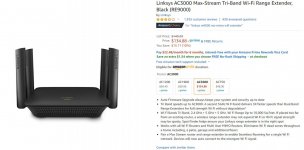
Linksys makes an Access Point that is real easy to work with. But as noted above, you can take any old router and set it into bridge mode and do basically the same thing

Here is the Linksys for example. The nice thing about this one, is if you have a Linksys 'Max Stream' router, the system is smart enough to connect to whichever device has the strongest signal, even as you move around

It can work with an ethernet connection or just the wifi from your router

attachment.php
 

Attachments

  • GR8-957.jpg
    GR8-957.jpg
    102.3 KB · Views: 369

Whitworth

Well-known member
Joined
Dec 26, 2011
Messages
2,084
Google mesh 3 pack, best bang for the buck.

For the Cat5, Cat6 guys, .....You are aware you can't even plug a LAN cable into most new devices, no?
 

Git

Well-known member
Joined
May 18, 2008
Messages
6,894
Location
S Cal
ya, the lan cable is for the backhaul.

Personally, I would choose any other mesh system besides Google's. I think they have enough of my data already - I ain't giving them any more

See - Cables:
attachment.php
 

Attachments

  • GR8-964.jpg
    GR8-964.jpg
    39.4 KB · Views: 374
To avoid these ads, REGISTER NOW!

csi123

Well-known member
Joined
Mar 26, 2013
Messages
97
If you already have cat5e cable to the garage then just get a cheap router and use it as an access point in the garage.
Btw you want them to be on the same *network*, you do NOT want them on the same *wireless network*. Despite what some people believe, most wifi devices do not always pick the strongest signal. If your garage is close to your house there is a chance they will connect to the weaker signal ( ie your house's router) if you use the same SSID. And there is no point to buy expensive mesh network gear unless your Nest and Sonis have legs.
 

Showkey

"MEMBER EMERITUS"
Joined
Aug 9, 2014
Messages
8,638
Location
Wausau WI
ya, the lan cable is for the backhaul.

Personally, I would choose any other mesh system besides Google's. I think they have enough of my data already - I ain't giving them any more

See - Cables:
attachment.php


Cables are NOT needed for backhaul. The beauty of the mesh is no cables no backhaul issues.
 

machsnell

Well-known member
Joined
Jun 12, 2010
Messages
942
Location
Northern Virginia
I know next to nothing about setting up networks.

FWIW, when I did mine I was instructed to use a fiber cable between the building for lightning I believe and not being on the same grounding rod?

I dont really count on ever needing and I dont really subscribe to the chicken little train of thought but I did it anyway.

I use managed switch to ubiquiti AP's. Works really well amd seamless switching to next stronger signal.

Sent from my SM-G960U using Tapatalk
 

larry4406

Well-known member
Joined
Jan 27, 2006
Messages
19,062
Location
Northern Virginia
.... I was instructed to use a fiber cable between the building for lightning I believe and not being on the same grounding rod?...

That seems to be the near constant recommendation when the subject of getting internet to a detached structure comes up or the use of wireless. The resident sparkies all frown on the wired method.

Surprised the mods haven't moved this over to the electrical forum.
 

HooverCo

New member
Joined
Jan 16, 2018
Messages
3
Location
Missoula, MT
I just moved to a new house and am 100% work from home. I went with a wireless mesh router system from Costco (Orbi?) and its been great. Main unit on the main floor, with one additional satellite unit in the basement and one in the upstairs office gives me great wifi coverage throughout my house, garage and 3/4 acre yard.

We live in an area with virtually no cellular signal, so if the wifi doesn't work, we are out of luck!
 

Fasthotrod

Well-known member
Joined
Dec 14, 2015
Messages
218
Location
Oklahoma
I run this router in my living room:

https://www.asus.com/us/Networking/RT-AC88U/

...and this one in the master closet:

https://www.asus.com/us/Networking/RTAC68U/

So far, the mesh system has been working great... I don't have a wired backhaul, but so far it seems as if I don't need it. I believe it's because the Asus routers have two sets of 5ghz radios... one for connected devices, the other for the backhaul. Zero issues for my devices switching between the two routers... it's been seamless so far.

Getting Wifi in the shop from the house has been hit or miss because it's a big metal box. (Faraday cage.) My intent is to run CAT-6 from the master closet up and into the attic, then down the outside of the house in conduit over to the shop where I'll have another router located in the office. (Likely another 68U.)

Mark
 

Showkey

"MEMBER EMERITUS"
Joined
Aug 9, 2014
Messages
8,638
Location
Wausau WI
Having an Ethernet backhaul is prefered but not necessary.

https://www.windowscentral.com/mesh-wi-fi-ethernet-backhaul

With ORBI it appears only remotely important in a few situations , the wireless backhaul on ORBI can handle 867 Mbps. In home shop situations it’s totally irrelevant.


From Orbi
5. You will normally only see Backhaul 1 & 2 networks. Backhaul 3 & 4 will only appear if the backhaul throughput is more than the 867 Mbps provided by the first Backhaul channel.
 

Falcon67

Well-known member
Joined
Jun 11, 2009
Messages
18,371
Location
Merkel, TX
AP in house uses some DHPC Scope. Run cable from house AP to shop, set up AP in shop to give out a different block of DHCP addresses, done. OR screw with bridge mode **** - works, how well it works depends on the AP.
 

Andy Kraus

Well-known member
Joined
Aug 26, 2012
Messages
52
Location
Pittsburgh PA
I don’t think you can run at 1g on cat5e. I’d pull cat 6 if possible.

I’m doing this in my detached shop and I’m going to put another wireless router in the shop and use it as an access point. Not terribly difficult if you are somewhat tech savvy.


You can but that's the limit on 5e pending distance, how many hops packets are taking and so forth.
 

Bad Habit

Well-known member
Joined
Mar 19, 2014
Messages
1,980
Location
Chumstick WA
With ORBI it appears only remotely important in a few situations , the wireless backhaul on ORBI can handle 867 Mbps. In home shop situations it’s totally irrelevant.


From Orbi
5. You will normally only see Backhaul 1 & 2 networks. Backhaul 3 & 4 will only appear if the backhaul throughput is more than the 867 Mbps provided by the first Backhaul channel.

I run an Orbi system too, works great. The remote provides an Ethernet port where I can connect a PoE switch and run cameras off of it. Currently 3 cameras and no issues with bandwidth. The Orbi is not a mesh system, it's a hub and spoke where all of the remotes connect back to the main unit, they do not interact between themselves.

My view is, if it's not mobile, and of course if its easily accomplished, I hardwire every thing I can. That leaves more bandwidth available to mobile devices. While Wifi has a lot of big numbers for speed, there's also a lot of overhead on the packets that eat up that number and lesson actual throughput. Cat5e is more than adequate to run 1G, many very large notable tech companies still run their workstations on Cat5e. New installs are going to Cat6, but that's more because of PoE (23 guage vs. 24 guage).
 

Andy Kraus

Well-known member
Joined
Aug 26, 2012
Messages
52
Location
Pittsburgh PA
I run an Orbi system too, works great. The remote provides an Ethernet port where I can connect a PoE switch and run cameras off of it. Currently 3 cameras and no issues with bandwidth. The Orbi is not a mesh system, it's a hub and spoke where all of the remotes connect back to the main unit, they do not interact between themselves.

My view is, if it's not mobile, and of course if its easily accomplished, I hardwire every thing I can. That leaves more bandwidth available to mobile devices. While Wifi has a lot of big numbers for speed, there's also a lot of overhead on the packets that eat up that number and lesson actual throughput. Cat5e is more than adequate to run 1G, many very large notable tech companies still run their workstations on Cat5e. New installs are going to Cat6, but that's more because of PoE (23 guage vs. 24 guage).


^^^Well said and 100% Accurate. I Hardwire EVERYTHING that I can.
 

Showkey

"MEMBER EMERITUS"
Joined
Aug 9, 2014
Messages
8,638
Location
Wausau WI
I run an Orbi system too, works great. The remote provides an Ethernet port where I can connect a PoE switch and run cameras off of it. Currently 3 cameras and no issues with bandwidth. The Orbi is not a mesh system, it's a hub and spoke where all of the remotes connect back to the main unit, they do not interact between themselves.

My view is, if it's not mobile, and of course if its easily accomplished, I hardwire every thing I can. That leaves more bandwidth available to mobile devices. While Wifi has a lot of big numbers for speed, there's also a lot of overhead on the packets that eat up that number and lesson actual throughput. Cat5e is more than adequate to run 1G, many very large notable tech companies still run their workstations on Cat5e. New installs are going to Cat6, but that's more because of PoE (23 guage vs. 24 guage).

Not that it really matters which terminology or interaction takes place.............because the system is very cost effective and it actually works, handles all that stuff automatically. Plus a monkey can do the install and setup in less than 10 minutes.

As for the hub and spoke......Not exactly what they say:

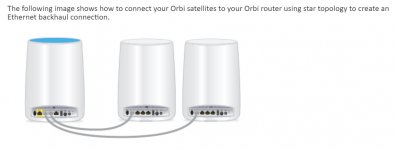
“Daisy chain is a networking term that describes one way that network devices can connect. With the latest firmware update, Orbi now supports both daisy chain and star network topologies.”

“With daisy chain networking, your satellites can connect to each other or to the router, depending on which connection is best. The following image shows a daisy chained Orbi system:”


I run 6 wireless cameras, video and audio stream, have 20 devices connected and the 100 Mbps at each device ( max my cable-internet provides) over a two acre 3 building property.
One six foot cable from the cable modem to the Orbi router then two wireless Orbi satellites.
 
Last edited:

Falcon67

Well-known member
Joined
Jun 11, 2009
Messages
18,371
Location
Merkel, TX
I don’t think you can run at 1g on cat5e. I’d pull cat 6 if possible.

We run gig over 5, no issues even at limits. We run over everything from 5 to 6a in old buildings. Testing shows that if you have issues, 80~90% are going to be how the ends are crimped and if the cables are pinned out correctly.
 

86turbodsl

Well-known member
Joined
Jul 1, 2005
Messages
6,554
Location
Michigan
I've done wireless and wired both. 300' run to detached shop. Only thing that's always worked has been the fiber run i put in. The others work sometimes.
If your building is metal, it might be all you can get out there. My cell is very spotty inside the shop. With the wifi access point on fiber backhaul, it always works.
 

HenryAZ

MEMBER EMERITUS
Joined
Sep 18, 2012
Messages
1,054
Location
South Congress AZ
I don’t think you can run at 1g on cat5e. I’d pull cat 6 if possible.
I've been running a 1Gbit home network on cat5e for 15 years. And I easily get 1 Gig speeds on machine-to-machine file transfers. If the need arose for a 10Gbit network in the future, I would probably skip Cat6 and go right to fiber (I had our home built with conduit to each network drop, so I can pull out the old and pull in the new).

Unless you anticipate the future need for a 10Gbit home network, Cat5e is still plenty good, and cheaper. If you are terminating them yourself, Cat6 is harder to work with due to larger gauge wires. And the whole installation (termination and cable run standards) is what makes a Cat5e or Cat6 network. Just using Cat6 cable does not in itself make it a Cat6 network.
 

Lucid Moments

Well-known member
Joined
Aug 9, 2015
Messages
1,775
Location
Gainesville, Ga
Cat 5e or cat 6, either should work just fine. You can get gigabit on cat 5e just not for as long a distance as you can with cat 6, and 5e isn't as fault tolerant as 6. But to be honest for personal use I suspect very very few people actually use anywhere close to gigabit transfer speeds. Stuff like that is mostly useful for groups of people. On the other hand the cost difference is pretty insignificant so why not go with cat 6?

I am in the process of finishing my house and shop. I have cat 6 to a few fixed locations in both buildings with one access point in each building as well. As it has been explained to me the system I have chosen will allow both access points to act as a mesh system in that it will show up as a single network to my mobile devices.
 
To avoid these ads, REGISTER NOW!
Top Bottom