To avoid these ads, REGISTER NOW!

WiFi Extender

Jakemedic

Well-known member
Joined
Jul 26, 2013
Messages
722
Location
Cornfields of SE Iowa
Greetings! I have fiber running to my house from the local internet provider. I have a Netgear NightHawk router which is in my utility room (Downstairs). From there, I have cat 6 underground in conduit to my workshop where I have another Netgear router. My bride would like to use wireless security cameras on our property. The NightHawk router will not reach outside very well. I got online, and located a WiFi extender and booster that connects with a network cable. The house is already wired with network connectivity. My question is can I simply add an extender upstairs for use with network cameras that will reside outside? I appreciate any help that can be provided. I read somewhere that the plug in extenders (into wall electric outlets) without ethernet cables don’t work well, so I am avoiding those.

 
To avoid these ads, REGISTER NOW!

Spacebar

Well-known member
Joined
May 30, 2023
Messages
77
Location
United States
The power line adapters that use your electrical wiring are the absolute best way to do this, but they really depend on your wiring. They are also the most expensive option.

Normal Wi-Fi extenders act similar to repeaters. They will keep boosting the signal, but they will lose some data (lower speeds) and they will introduce some latency. If this is just going to be Wi-Fi for a garage, it really shouldn’t matter that much. Not like you’re going to be gaming out there.

If you’re able to run an Ethernet cable out to your garage and use another router, you could do that too. Not sure how familiar you are with networking.

Hope that helps!

- Brody
 
Last edited by a moderator:

mcj115

Well-known member
Joined
Dec 4, 2018
Messages
297
Location
Hershey PA
I am not a techie person, but to me range extenders are worthless. Get/install a mesh network for your house instead.
 

bamawildcat

Well-known member
Joined
Jul 12, 2014
Messages
148
Easiest way to do this is transition your WiFi to a mesh system that offers "ethernet backhaul". Netgear Orbis are great at this. Same WiFi system in the house and workshop, and the shop WiFi connects to the house with your existing Cat6. One wireless name, unlimited possibilities.
 
OP
J

Jakemedic

Well-known member
Joined
Jul 26, 2013
Messages
722
Location
Cornfields of SE Iowa
Easiest way to do this is transition your WiFi to a mesh system that offers "ethernet backhaul". Netgear Orbis are great at this. Same WiFi system in the house and workshop, and the shop WiFi connects to the house with your existing Cat6. One wireless name, unlimited possibilities.
My shop Wi-Fi is the same as my house now. Seamless integration there. I could buy another router for upstairs, but seen the extenders and question if they would work for adding wireless security cameras. My main router doesn’t reach well outside.
 

dcg9381

Well-known member
Joined
Jun 20, 2018
Messages
11,883
Location
Austin, TX
I am not a techie person, but to me range extenders are worthless. Get/install a mesh network for your house instead.
"located a WiFi extender and booster that connects with a network cable."

This is wired backhaul. It's basically an access point. It should work better than a wifi-to-wifi extender.
 
Last edited:

mikedodge

Well-known member
Joined
Jun 27, 2017
Messages
2,837
How far does the signal have to reach? I use a wifi repeater that was $25 or so and it extends the signal a decent distance away from my building. I think it can also use a cable to connect it but it's too awkward to get one to it.
 
OP
J

Jakemedic

Well-known member
Joined
Jul 26, 2013
Messages
722
Location
Cornfields of SE Iowa
I just want to get to under my eaves and if I could reach far enough, out to my chicken coop 75’ away. I have a blink doorbell already (gift from a neighbor) so the type of cameras is already established. Thank you!
 

dcg9381

Well-known member
Joined
Jun 20, 2018
Messages
11,883
Location
Austin, TX
Is your workshop steel? In my 40x60, even with an AP on the nearest interior wall, the steel siding attenuates that signal so much that I couldn't get it do to much outside. I had to add an AP under the eve outside.

Stick/brick/wood structure, it's much easier to pass wifi.

Make sure those cameras are on 2.4 Ghz (if there is an option). The 5 ghz signal has substantially decreased range.
 
OP
J

Jakemedic

Well-known member
Joined
Jul 26, 2013
Messages
722
Location
Cornfields of SE Iowa
Is your workshop steel? In my 40x60, even with an AP on the nearest interior wall, the steel siding attenuates that signal so much that I couldn't get it do to much outside. I had to add an AP under the eve outside.

Stick/brick/wood structure, it's much easier to pass wifi.

Make sure those cameras are on 2.4 Ghz (if there is an option). The 5 ghz signal has substantially decreased range.
Thank you! The shop is not the problem. I have that squared away already. My issue is my house Wi-Fi. I need an extender for the house. The wireless access point is in the basement. I need better reception outside for cameras. I can plug in an Ethernet cable to any extenders on the main floor.
 

KSJeff

Well-known member
Joined
Dec 19, 2011
Messages
764
Location
Andover, Kansas
I'd just run a cat6/7 cable outside your house from your home router and install an acces point. You don't really need an extender. You can do the same in your outbulding. Run a cable from your router in there to an external access point. Depending on the layout, that should give you a lot of coverage. Access points will give you full bandwidth but you likely don't need it.
 
To avoid these ads, REGISTER NOW!

moab11

Well-known member
Joined
Nov 22, 2015
Messages
582
Location
Thunder Bay, Ontario
Wow, lots of people commenting that haven't read the OP's post here.

OP, you are looking for whats usually called an access point, and is probably how your router in the garage is configured. You can absolutely configure one or many more to extend your wifi coverage as needed. My only caution is to spend some time looking up wifi channel and signal strength, the more wifi routers or AP's you install in your house, the greater the chance that they can interfere with each other.

Most of the time when people talk about wifi extenders, they are talking about ones that connect wirelessly (also now being called Mesh systems). Since you have the cabling run, you are much better off going that route for the best speeds and service.
 
OP
J

Jakemedic

Well-known member
Joined
Jul 26, 2013
Messages
722
Location
Cornfields of SE Iowa
Wow, lots of people commenting that haven't read the OP's post here.

OP, you are looking for whats usually called an access point, and is probably how your router in the garage is configured. You can absolutely configure one or many more to extend your wifi coverage as needed. My only caution is to spend some time looking up wifi channel and signal strength, the more wifi routers or AP's you install in your house, the greater the chance that they can interfere with each other.

Most of the time when people talk about wifi extenders, they are talking about ones that connect wirelessly (also now being called Mesh systems). Since you have the cabling run, you are much better off going that route for the best speeds and service.
Thank you so much for taking the time to respond! So my question is how do I figure out Wi-Fi channels and signal strength so I do not interfere with my existing router in the house? The shop router is not an issue, as it is in my metal building with minimal strength outside the shop. Thanks!
 

mikedodge

Well-known member
Joined
Jun 27, 2017
Messages
2,837
Thank you so much for taking the time to respond! So my question is how do I figure out Wi-Fi channels and signal strength so I do not interfere with my existing router in the house? The shop router is not an issue, as it is in my metal building with minimal strength outside the shop. Thanks!

Don't worry about it. It's not a big chance of being an issue.
 

KSJeff

Well-known member
Joined
Dec 19, 2011
Messages
764
Location
Andover, Kansas
I use a product called wifi analyzer on my phone (Samsung). I'm sure apple has something same/similar. That will give you channel and signal strength.

If your house is wired for network, then you just need access points. You can put them inside by the windows, or get outside access points. I run a similar setup at my house. Modem/Router in one end of the house and then I run from the router to a switch in my basement. That feeds Cat6 to my house where I have access points on the other side of the house (hard wired to my router/switch) and then in my shop.

When you buy cameras, most of them will be 2.4ghz. They have better range than the 5Ghz devices, but less speed. Won't matter for a camera. That being said, I'd buy dual band access points (2.4ghz and 5ghz) so you can have high speed around the house on devices that support 5G. I'm a network engineer by profession so if you have questions, drop me a PM.
 

P0234

Well-known member
Joined
Aug 6, 2012
Messages
3,241
Location
NoVA
You can probably add another access point, but a Mesh network is a better option.
 

Spacebar

Well-known member
Joined
May 30, 2023
Messages
77
Location
United States
Thank you so much for taking the time to respond! So my question is how do I figure out Wi-Fi channels and signal strength so I do not interfere with my existing router in the house? The shop router is not an issue, as it is in my metal building with minimal strength outside the shop. Thanks!
If you get a second router, as long as the router is on a different channel, you should be good to go. Most routers will automatically scan WiFi networks near them and decide which channel will have the least amount of interference automatically. My Netgear Nighthawk does this. You can Google best WiFi channels to use.

If you had two routers on the same channel, it’s technically possible your devices could bounce between both connections, which isn’t good.


Houdini5150

Well-known member
Joined
Mar 17, 2022
Messages
570
Location
Arizona
Add another access point closest you can get to where you need the signal. Then use some wifi analyzer application to check for signal strength and channel.
 

MarcSeattle

Well-known member
Joined
Mar 25, 2010
Messages
575
Location
Seattle
It depends on your budget, but you might look into systems designed for more than one wifi antenna. For example, Peplink makes commercial gear and the software is set up to manage more than one access point. That software makes it easy to eliminate channel conflicts, set up guest logins, security, etc. It's also far faster than most typical big box store systems, that is, faster in real life rather than the cherry-picked specs of the typical stuff at Best Buy. They also have security that doesn't resemble swiss cheese.
 

NUTTSGT

Super Moderator
Staff member
Joined
Sep 14, 2009
Messages
51,094
Location
Northern Central Ohio
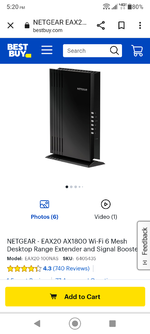
No tech guy here but if you put a Netgear extender in your attic, it should reach the cameras in the eaves.

I just wouldn't let anything else connect to them, "forget" them in settings.

I have one in the shop and it's hardwired with Cat5e. It allows me access outside of the shop too.

Can you get a spot in the attic to hook it up ?

I think this is the one I bought or a series prior.
Screenshot_20230614-172021.png
 

dcg9381

Well-known member
Joined
Jun 20, 2018
Messages
11,883
Location
Austin, TX
It depends on your budget, but you might look into systems designed for more than one wifi antenna. For example, Peplink makes commercial gear and the software is set up to manage more than one access point. That software makes it easy to eliminate channel conflicts, set up guest logins, security, etc. It's also far faster than most typical big box store systems, that is, faster in real life rather than the cherry-picked specs of the typical stuff at Best Buy. They also have security that doesn't resemble swiss cheese.
Most systems, including older wifi systems can be configured to be wired in and set up as a bridge or "access point". The master system doesn't have to know about it, it just looks like another wired device.

What you're talking about is a commercial or semi-commercial system like Unifi provides.. I know that myself and some others use unifi systems (I use UDM-Pro). They simply make adding access points a whole lot easier, but it can be done with old systems too. They support wired backhaul AND wireless mesh. And as you've mentioned, cool features like password-free "guest" networks that are isolated. They also self-tune channels etc.

For non-tech people I think the wireless mesh systems are as easy as you can get assuming you can get signals between APs.
 
To avoid these ads, REGISTER NOW!
Top Bottom