To avoid these ads, REGISTER NOW!

3d Printing Offshoot Thread: WHEELCHAIRS FOR TODDLERS

mike93lx

ALLIANCE MEMBER
Joined
Dec 9, 2013
Messages
37,847
Location
Richmond, VA
I'm slowly working on a better nested file to reduce print times. once im done on this trade show circuit and not sick I can focus there.
Thanks bud. Hope you get better soon.

If the 0.6 saves time and maintains the quality needed, I'm 100% there. Nozzles are way cheaper than time
 
To avoid these ads, REGISTER NOW!
OP
J

jeepxj

Well-known member
Joined
Mar 2, 2008
Messages
17,891
Thanks bud. Hope you get better soon.

If the 0.6 saves time and maintains the quality needed, I'm 100% there. Nozzles are way cheaper than time

at the print farm we run only .6 nozzles in production. every machine when bought it swapped over. I probably have 75 .4mm nozzles in a bin somewhere.
 

mike93lx

ALLIANCE MEMBER
Joined
Dec 9, 2013
Messages
37,847
Location
Richmond, VA
Anyone know of a program/excel script that already exists to optimize print order?

With these wheelchairs, I'm manually determining what order to run them in based on when they will start and finish so that I reduce idle time. It would be great to be able to specify blackout times (sleeping, school/work) and set the order around that. For this first one, I'm doing multicolor, which adds a little complexity, but after this, I think they'll be single color.
 

loganb

ALLIANCE MEMBER
Joined
Dec 29, 2011
Messages
5,613
Location
Omaha, NE
Anyone know of a program/excel script that already exists to optimize print order?

With these wheelchairs, I'm manually determining what order to run them in based on when they will start and finish so that I reduce idle time. It would be great to be able to specify blackout times (sleeping, school/work) and set the order around that. For this first one, I'm doing multicolor, which adds a little complexity, but after this, I think they'll be single color.

Well this was a fun rabbit hole and distraction from work(don't tell the bosses)

I gave AI a prompt for this (Claude paid version on Opus 4.6) and let it "cook" as the kids say after a bit of back and forth on inputs/outputs, etc....it had a very good handle on the expectations with minimal prompts. I told it to build in Google Sheets for hopefully easier compatibility and not requiring Excel VBA macros. I also went ahead and loaded the build plate details for the published .4mm layer height/256mm build plate version of the chair into it:

Load in some specific details the machine(s), it also has (untested yet) ability to send you email reminders lol
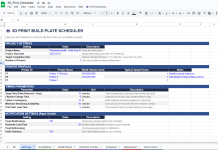
settings.png

Information on the build plates required:
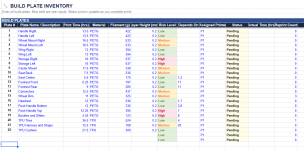
plates.png

Details on swap windows and any special available/unavailable:

Availability.png

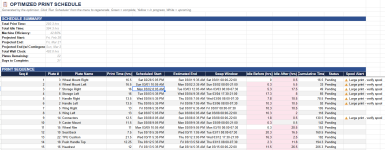
Then after running the Print Scheduler Script it kicks out a schedule
build schedule.png

That schedule is the initial result on the first run....it had some bugs but for generating 883 lines of code I'm pretty impressed

Dropped some screenshots back into Claude and provided some feedback on the bugs I was seeing and let it go...about 3 minutes later it had a fresh batch of code to copy/paste in....about 200 lines longer this time. Hit the Run Scheduler button and see this for a a bit

script.png

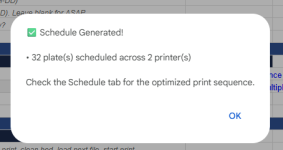
Took about a minute and got this message, I told it 2 printers for this run:
finished.png

It's not fully working yet as it hasn't gotten multi-printer logic going or correctly implemented plates needing reprinted multiple times....but it's working on v3 of the scheduler script....more to come. For a total expense of around 1.5 hours aka a long lunch break and the 20 bucks a month I already pay for Claude...the gap between "a software solution that does this" and having that solution is getting smaller and smaller
 

mike93lx

ALLIANCE MEMBER
Joined
Dec 9, 2013
Messages
37,847
Location
Richmond, VA
Well this was a fun rabbit hole and distraction from work(don't tell the bosses)

I gave AI a prompt for this (Claude paid version on Opus 4.6) and let it "cook" as the kids say after a bit of back and forth on inputs/outputs, etc....it had a very good handle on the expectations with minimal prompts. I told it to build in Google Sheets for hopefully easier compatibility and not requiring Excel VBA macros. I also went ahead and loaded the build plate details for the published .4mm layer height/256mm build plate version of the chair into it:

Load in some specific details the machine(s), it also has (untested yet) ability to send you email reminders lol

settings.png

Information on the build plates required:

plates.png

Details on swap windows and any special available/unavailable:

Availability.png

Then after running the Print Scheduler Script it kicks out a schedule

build schedule.png

That schedule is the initial result on the first run....it had some bugs but for generating 883 lines of code I'm pretty impressed

Dropped some screenshots back into Claude and provided some feedback on the bugs I was seeing and let it go...about 3 minutes later it had a fresh batch of code to copy/paste in....about 200 lines longer this time. Hit the Run Scheduler button and see this for a a bit

script.png

Took about a minute and got this message, I told it 2 printers for this run:

finished.png

It's not fully working yet as it hasn't gotten multi-printer logic going or correctly implemented plates needing reprinted multiple times....but it's working on v3 of the scheduler script....more to come. For a total expense of around 1.5 hours aka a long lunch break and the 20 bucks a month I already pay for Claude...the gap between "a software solution that does this" and having that solution is getting smaller and smaller
Love it! I'll go through this more later.

Don't forget that the wheels need to be printed 4x and the tires 2x
 

lovetap

Well-known member
Joined
Sep 23, 2021
Messages
249
Location
the last frontier
over 100 makers.
12 in progress builds.

and a map that is getting busy looking.

1770732733289.png

How much of the build requires a printer volume over 250X210x220? I would like to help but that is my largest printer size for now. Maybe someone with a larger printer would be interested in splitting the build list with me?
 

mike93lx

ALLIANCE MEMBER
Joined
Dec 9, 2013
Messages
37,847
Location
Richmond, VA
How much of the build requires a printer volume over 250X210x220? I would like to help but that is my largest printer size for now. Maybe someone with a larger printer would be interested in splitting the build list with me?
you can download the models and run through your slicer to check. Looks like a couple parts won't work

7317.jpg
 

lovetap

Well-known member
Joined
Sep 23, 2021
Messages
249
Location
the last frontier
Splitting a print, especially the bigger parts, will depend on where you live. I think there is an option to pair with other makers when you sign up.

Is your printer fast enough to make this practical?
Not sure how to benchmark it, but its a Prusa MK4S and it feels pretty speedy.
 

loganb

ALLIANCE MEMBER
Joined
Dec 29, 2011
Messages
5,613
Location
Omaha, NE
Love it! I'll go through this more later.

Don't forget that the wheels need to be printed 4x and the tires 2x

The reprints on the tires and rims was something it struggled with and took a couple iterations to get it working correctly, on v3.4 now and making tweaks to display status and running updates. It looks like it's updating and behaving as I might want it, some UI/UX improvements could be made to improve the look but for right now I think it's working

schedule final-ish.png

@mike93lx and @jeepxj I'll message you a link with the Google Drive sheet so you can see it and play with it/break it. Haven't ever tried to more broadly share a sheet with AppScripts in it so see what you think and can then figure out if it's helpful/useful to others.
 

mike93lx

ALLIANCE MEMBER
Joined
Dec 9, 2013
Messages
37,847
Location
Richmond, VA
The reprints on the tires and rims was something it struggled with and took a couple iterations to get it working correctly, on v3.4 now and making tweaks to display status and running updates. It looks like it's updating and behaving as I might want it, some UI/UX improvements could be made to improve the look but for right now I think it's working

schedule final-ish.png

@mike93lx and @jeepxj I'll message you a link with the Google Drive sheet so you can see it and play with it/break it. Haven't ever tried to more broadly share a sheet with AppScripts in it so see what you think and can then figure out if it's helpful/useful to others.
1770933256291.gif
 

mike93lx

ALLIANCE MEMBER
Joined
Dec 9, 2013
Messages
37,847
Location
Richmond, VA
Yeah, I know it is different in some way.

Regardless, this setup seems to be working fine. The first print is almost done and I'm going to kick off another for overnight... Basically non stop til Friday morning
spoke too soon...i have bubbles in the TPU print. I dried the material a week ago and bagged it, but it appears that wasn't good enough.

Going to finish a few PETG parts and let the TPU think about what it has done. Hopefully 36 hours at 60 degrees will work

7484.jpg
 

mike93lx

ALLIANCE MEMBER
Joined
Dec 9, 2013
Messages
37,847
Location
Richmond, VA
TPU needs to be very dry in order to print properly. I'd recommend printing from a AMS HT or something similar on the side, have the dryer running during printing to keep it as dry as possible
my sunlu drier can be fed from...maybe i need to try it from there
 
To avoid these ads, REGISTER NOW!

mike93lx

ALLIANCE MEMBER
Joined
Dec 9, 2013
Messages
37,847
Location
Richmond, VA
I'm working through time calculations for the change to a 0.6MM nozzle and came across something that surprised me.

I'm seeing expected reductions with PETG. Moving from the 0.4 to 0.6MM nozzles, especially when comparing 3 walls with the 0.4 and 2 walls with the 0.6 reduces time 20+%

in TPU, going from any wall count on 0.4 to any wall count on 0.6 is increasing print time significantly. is Bambu Studio just not optimized for settings on "Generic" TPU? any suggestions on changes to make?
 

pcrov

Well-known member
Joined
Feb 27, 2023
Messages
378
Location
Ontario, CA
in TPU, going from any wall count on 0.4 to any wall count on 0.6 is increasing print time significantly. is Bambu Studio just not optimized for settings on "Generic" TPU? any suggestions on changes to make?

You're likely running into the limit of just how fast it can extrude, i.e. max volumetric speed. Compare with Bambu's TPU for AMS or TPU 95A HF.
 

pcrov

Well-known member
Joined
Feb 27, 2023
Messages
378
Location
Ontario, CA
This is 95a. Guessing the default settings are for something softer

No, they're for 95A. Generic settings are usually a little conservative, but even Bambu's own regular 95A isn't that much faster (3.6 vs 3.2mm³/s here.) The 95A HF is made to print way faster and TPU for AMS is harder.
 

mike93lx

ALLIANCE MEMBER
Joined
Dec 9, 2013
Messages
37,847
Location
Richmond, VA
No, they're for 95A. Generic settings are usually a little conservative, but even Bambu's own regular 95A isn't that much faster (3.6 vs 3.2mm³/s here.) The 95A HF is made to print way faster and TPU for AMS is harder.
I'm confused. I get TPU for AMS is stiffer than 95A,but by how much? Feels like a huge gap in time between the two.

I really need to just try foaming TPU as its the better material for most of this. It would be easier if I had a machine setup just for that...

I really don't want to own a print farm... I really don't want to own a print farm...
 

ER70S-2

Well-known member
Joined
Jan 2, 2015
Messages
805
spoke too soon...i have bubbles in the TPU print. I dried the material a week ago and bagged it, but it appears that wasn't good enough.

Going to finish a few PETG parts and let the TPU think about what it has done. Hopefully 36 hours at 60 degrees will work

7484.jpg
Are you positive it's wet? I'm asking because I had the exact same issue. I dried my TPU to death, but it still looked like that. I then printed a test piece in vase mode and it looked perfect, so that proved that it wasn't moisture. To make a long story short, it was retraction. After getting that dialed in, my TPU is flawless.

So, I recommend printing a test in vase mode. It's a good test. If it looks perfect, it's not moisture, but some other setting.

There is a perfect TPU profile on Maker World. Try that out if you're still having problems. It's a pretty good starting point and much better than the generic Bambu profile imo.

I hope it's just wet. That's easier to fix.
 

mike93lx

ALLIANCE MEMBER
Joined
Dec 9, 2013
Messages
37,847
Location
Richmond, VA
Are you positive it's wet? I'm asking because I had the exact same issue. I dried my TPU to death, but it still looked like that. I then printed a test piece in vase mode and it looked perfect, so that proved that it wasn't moisture. To make a long story short, it was retraction. After getting that dialed in, my TPU is flawless.

So, I recommend printing a test in vase mode. It's a good test. If it looks perfect, it's not moisture, but some other setting.

There is a perfect TPU profile on Maker World. Try that out if you're still having problems. It's a pretty good starting point and much better than the generic Bambu profile imo.

I hope it's just wet. That's easier to fix.
Thanks for the suggestion. I assumed it was was moisture based on the defects, but it may not be. When I restart TPU tonight, a new roll will have been in the dryer for 3 days at 60 degrees. If this doesn't work, it's definitely not moisture
 
Last edited:

mike93lx

ALLIANCE MEMBER
Joined
Dec 9, 2013
Messages
37,847
Location
Richmond, VA
Are you positive it's wet? I'm asking because I had the exact same issue. I dried my TPU to death, but it still looked like that. I then printed a test piece in vase mode and it looked perfect, so that proved that it wasn't moisture. To make a long story short, it was retraction. After getting that dialed in, my TPU is flawless.

So, I recommend printing a test in vase mode. It's a good test. If it looks perfect, it's not moisture, but some other setting.

There is a perfect TPU profile on Maker World. Try that out if you're still having problems. It's a pretty good starting point and much better than the generic Bambu profile imo.

I hope it's just wet. That's easier to fix.
its better but not good enough so I disabled retraction and am going to try one of the parts again (4.5hr print)

I don't have much time in the day to mess with this, so if this doesn't work, I'll have to do some smaller scale testing tonight
 
OP
J

jeepxj

Well-known member
Joined
Mar 2, 2008
Messages
17,891
Just started attempt #2 on the TPU. Dryness will not be the reason if this one fails

7500.jpg

Also, last solid part for the chair just finished. Only TPU to go (seat cushion, headrest, handle cover, tires and harness).

I clearly struggle with a lack of symmetry 😂

7499.jpg

parts kit on the way. out for delivery actually.
 
To avoid these ads, REGISTER NOW!
Top Bottom