To avoid these ads, REGISTER NOW!

What to do with ground wire?

rpearlberg

Well-known member
Joined
Jun 20, 2012
Messages
413
Location
Fairfield, CT
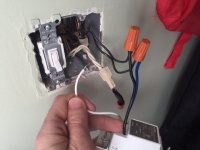
Installing a new light switch timer. My old switches used a ground wire, but the new timer doesn't have a place for a ground wire. What should I do with the ground wire in the box?
 
To avoid these ads, REGISTER NOW!
OP
R

rpearlberg

Well-known member
Joined
Jun 20, 2012
Messages
413
Location
Fairfield, CT
Does it require a neutral?

It does, and I have it connected....I think.

I have a hot, load, and then I had this neutral connected inside that cap (just removed to see what else I should try).

Nothing is coming up on the screen for the timer switch....
It's possible I have the hot and load reversed....maybe.
 

Attachments

  • IMG_5780.JPG
    IMG_5780.JPG
    82.1 KB · Views: 134

dw1

Well-known member
Joined
Jan 26, 2015
Messages
1,335
Location
Ky
It does, and I have it connected....I think.

I have a hot, load, and then I had this neutral connected inside that cap (just removed to see what else I should try).

Nothing is coming up on the screen for the timer switch....
It's possible I have the hot and load reversed....maybe.
See the black wire that ties into the other black with the wirenut on them, thats your hot wire, the single black is your load (light/fan ext) swap your wires on your switch
 
OP
R

rpearlberg

Well-known member
Joined
Jun 20, 2012
Messages
413
Location
Fairfield, CT
See the black wire that ties into the other black with the wirenut on them, thats your hot wire, the single black is your load (light/fan ext) swap your wires on your switch

I think that's how it is, just looks the other way.

I have the load going to the single black wire, the "line" is coming from the wire nut with the other black wires.
 

dw1

Well-known member
Joined
Jan 26, 2015
Messages
1,335
Location
Ky
Your single black wire going into the box is your load wire, tie it to the blue wire on your switch.

Or is it? I cant tell. Do you have a meter/voltage tester?
 
OP
R

rpearlberg

Well-known member
Joined
Jun 20, 2012
Messages
413
Location
Fairfield, CT
Your single black wire going into the box is your load wire, tie it to the blue wire on your switch.

Or is it? I cant tell. Do you have a meter/voltage tester?

The single black wire is tied to the blue (hard to tell from the pic). I have a just a voltage tester to make sure the power is off....
 

dw1

Well-known member
Joined
Jan 26, 2015
Messages
1,335
Location
Ky
if you bypass the switch and tie the two black wires together (that are under the orange wire nuts) does your light come on? either no power or possible bad switch
 
OP
R

rpearlberg

Well-known member
Joined
Jun 20, 2012
Messages
413
Location
Fairfield, CT
It's not the switch (I bought two and tried them both), but the old light switch was getting power before I undid it. I must have some wires in the wrong places...
 
To avoid these ads, REGISTER NOW!

myredracer

Well-known member
Joined
Nov 1, 2015
Messages
557
Location
Langley, BC
If it doesn't have a ground screw on it, there should be a metal ******** it so that any exposed metal surfaces like the screws for the plate (or if using a metal plate) will be automatically bonded to ground. If you have a metal box, the strap will thus be bonded to ground. If a plastic box, there should be a metal strap in it that also bonds the switch to ground.

If the timer has a ground screw, attach the ground wire. If not, tuck the wire into the rear of the box. If romex or BX, the incoming & outgoing ground wires should be connected together and also connected to the ground screw in the box.

AFAIK, a residential grade 120V 15A toggle/rocker switch normally doesn't have with a grounding screw and I have never seen one. Sometimes wiring devices like a timer or a 3 or 4-way switch will have them. Industrial, spec. or hospital grade switches have grounding screws though for reliability/safety reasons.

Can you post a pic of the timer and/or the make & model no.? Some timers require a neutral connection and depending on how your light and switch are wired, will not work.
 
Last edited:
OP
R

rpearlberg

Well-known member
Joined
Jun 20, 2012
Messages
413
Location
Fairfield, CT
If it doesn't have a ground screw on it, there should be a metal ******** it so that any exposed metal surfaces like the screws for the plate (or if using a metal plate) will be automatically bonded to ground. If you have a metal box, the strap will thus be bonded to ground. If a plastic box, there should be a metal strap in it that also bonds the switch to ground.

If the timer has a ground screw, attach the ground wire. If not, tuck the wire into the rear of the box. If romex or BX, the incoming & outgoing ground wires should be connected together and also connected to the ground screw in the box.

AFAIK, a residential grade 120V 15A toggle/rocker switch normally doesn't have with a grounding screw and I have never seen one. Sometimes wiring devices like a timer or a 3 or 4-way switch will have them. Industrial, spec. or hospital grade switches have grounding screws though for reliability/safety reasons.

Can you post a pic of the timer and/or the make & model no.? Some timers require a neutral connection and depending on how your light and switch are wired, will not work.

It's the Honeywell RPLS740B

I just got one of them installed and it seems to work. However, I still can't get the one I posted a picture of connected correctly. I taped/capped the ground and shoved into the back of the box.
 

bobmulry

Well-known member
Joined
Nov 21, 2012
Messages
144
Location
Coarsegold, CA
Hi,

I just looked at the picture and it looks like the neutrals are connected with a grounding type wire nut................Change out that wire nut to a standard wire nut


That timer needs it own power source to be powered up because it is a timer and not a switch...The neutral must be connected from the switch or there is no circuit

Just sayin'

Bob
 
OP
R

rpearlberg

Well-known member
Joined
Jun 20, 2012
Messages
413
Location
Fairfield, CT
Ok, so I just switched it and put the blue (load) to the three capped wires and the black (line) to the single wire and that seemed to work...
 

myredracer

Well-known member
Joined
Nov 1, 2015
Messages
557
Location
Langley, BC
It's the Honeywell RPLS740B

I just got one of them installed and it seems to work. However, I still can't get the one I posted a picture of connected correctly. I taped/capped the ground and shoved into the back of the box.

So now, see what I posted on your other post about the same switch, lol!
 
OP
R

rpearlberg

Well-known member
Joined
Jun 20, 2012
Messages
413
Location
Fairfield, CT
Hi,

I just looked at the picture and it looks like the neutrals are connected with a grounding type wire nut................Change out that wire nut to a standard wire nut


That timer needs it own power source to be powered up because it is a timer and not a switch...The neutral must be connected from the switch or there is no circuit

Just sayin'

Bob

I didn't realize there were different types of nuts...sorry! It seems to be working now, so hopefully it's correct.
 

zmaxmotorsports

Well-known member
Joined
Jan 11, 2013
Messages
11,948
Location
South of omaha
Hi,

I just looked at the picture and it looks like the neutrals are connected with a grounding type wire nut................Change out that wire nut to a standard wire nut


That timer needs it own power source to be powered up because it is a timer and not a switch...The neutral must be connected from the switch or there is no circuit

Just sayin'

Bob
Looks like a plain old tan wirenut to me,the ground wire nuts that you can feed the wire through are green.:dunno:
 

FordTruckWench

Well-known member
Joined
Jan 8, 2015
Messages
539
Location
California
Looks like a plain old tan wirenut to me,the ground wire nuts that you can feed the wire through are green.:dunno:

If you look close at the picture, you can see a bare ground sneaking "behind" the neutral wires at this camera angle. It then reappears from behind the tan wire nut.

BTW, it is kind of pointless to tape and cap a bare ground. It could have been shoved into the back of the box just as it was!
 
OP
R

rpearlberg

Well-known member
Joined
Jun 20, 2012
Messages
413
Location
Fairfield, CT
If you look close at the picture, you can see a bare ground sneaking "behind" the neutral wires at this camera angle. It then reappears from behind the tan wire nut.

BTW, it is kind of pointless to tape and cap a bare ground. It could have been shoved into the back of the box just as it was!


Oh well...I wasn't sure and I had tape and a cap so I used it anyway!
 
To avoid these ads, REGISTER NOW!
Top Bottom