To avoid these ads, REGISTER NOW!

Tool Inventory Software

To avoid these ads, REGISTER NOW!

Mickey O

Well-known member
Joined
Oct 25, 2009
Messages
6,153
Location
Chicago, IL
I use excel as well, but there is a collectible software program that's nice (I will try to find the name of it), it lets you include a picture, location where item is and purchase information (date, price, etc), it will also run "reports" and is searchable, which is great if you're looking for tools stored in several boxes (I do that in excel). Also good for insurance in case the need arises. I believe it exports a file that excel can read. It would be real nice to have that list on a pda or iphone when you're out shopping for tools.
 

Toolhorder

Well-known member
Joined
Nov 9, 2009
Messages
5,711
Location
Montana
I use excel as well, but there is a collectible software program that's nice (I will try to find the name of it), it lets you include a picture, location where item is and purchase information (date, price, etc), it will also run "reports" and is searchable, which is great if you're looking for tools stored in several boxes (I do that in excel). Also good for insurance in case the need arises. I believe it exports a file that excel can read. It would be real nice to have that list on a pda or iphone when you're out shopping for tools.

you nailed it on the head right there. That's what I want it for (insurance and want/need list)
Please share the name of the software. I could have the Excell master do it for me (the wife) but it's much easier using a known template. I can use Excell on my BlackBerry too when I'm at the swap meet in tool mode.
 

scottmlew

Well-known member
Joined
Nov 24, 2008
Messages
1,028
I was going to use that as well but it's going to be a lot of work to get it started. Have a template??

What are you trying to do? I'm not trying to be a wise guy, but I don't understand what is complex about getting it started -- just label and resize the columns with the info you want to capture, and start filling in the data! I'm about to undertake this same exercise, and would love to help develop a template, but I think I'm missing some of the more advanced things you'd like to do.
 

catmech

Well-known member
Joined
Oct 10, 2009
Messages
53
Location
Alaska
As far as searching your data base, should you go with excel, go to cute pdf http://www.cutepdf.com/products/cutepdf/Writer.asp and download the free writer. You can use it to turn any thing that you can print into a pdf and the use the search function within the pdf. I use this all the time to send customer's service manuals, parts pages or whatever. I have my tool inventory for my employer's insurance coverage done in this format just for the search function.
 

RbrtAWhyt

Well-known member
Joined
Aug 25, 2008
Messages
5,154
Location
North East Georgia
You should be able to use any software designed for home inventory. Google "home inventory software". In a side note, the Sheriffs Office I work at has a crime prevention unit. They have a small cheap home inventory program they give out a public relations events, community interaction events, neighborhood watch meetings and such...

After a quick google search I found some free ones. This one may be free:

http://download.cnet.com/What-You-Own-Home-Inventory/3000-2131_4-10911674.html?tag=mncol

I didn't try to download it...
 

Mickey O

Well-known member
Joined
Oct 25, 2009
Messages
6,153
Location
Chicago, IL
I'm still looking for it, I used it to inventory die cast cars, it might have been A-Z home Inventory but we also had one that had "collect" or "collectibles" in the name, obviously I didn't stick with it. I have all my tools in excel right now, but I'd like to put them in an inventory program. One of the nice feature I remember was that you could edit the fields with things like 12 point combo, or 3/8" ratchet, etc, making it real easy to add new items.

For quite some time now when I buy a new tool (and other stuff) I download and keep the manufactures image (and pdf parts manual, instruction manuals, etc, while you can, they disappear quickly) to one day add to an inventory program, to use if I sell it and for reference, I also download the manufacturers description and part number (probably a little excessive).

I'll keep looking but here a free one I ran across while searching online:

http://alainlecomte.free.fr/Download.htm#HappyCollection
 

PCO6

Well-known member
Joined
Dec 25, 2008
Messages
4,573
Location
Newmarket, Ontario
I like the idea of using Excel ... simple and sortable. I'm not sure I'd want to hit the "sum" button though! The thought of going back over 40 years or so of tool collecting to create an inventory is some what daunting but probably worthwhile especially for insurance reasons.

One thing that I do is electronically file all of the manuals and receipts for my tools. Most manuals are easy to scan and I'd rather keep them in my computer than in file cabinets.
 

crashbumper

Well-known member
Joined
Feb 8, 2009
Messages
602
Location
Gilbert, AZ
Excel.

I'm going to inventory my tools soon, and Excel was the first thing that came to mind.

Also, I'm going to take more detailed pictures of all my stuff, and upload them to an OFFSITE storage location. Keeping pictures on your computer is good, unless something like a house fire or theft destroys the computer.

GoogleDocs and Box.net for record keeping.
 

shocksystems

Well-known member
Joined
Mar 17, 2007
Messages
497
Location
Ipswich, MA USA
Great thread.

For me what would be helpful in a tool inventory software program would be for it to be pre-loaded with tool names and sizes. That would save a lot of time. If you could load it with the catalog of tools from one of the major manufacturers that would be cool.

It would also allow you to print a list of items you do not yet own, kind of a reminder of what your missing when you are heading to yard sales or flea markets.

Cheers!

Jim
 

mkdive

Well-known member
Joined
Oct 11, 2008
Messages
2,649
Location
NPB (Socal)
iagree.gif


Oh man that would make it much easier to input all the tools! That would be very cool!
 

the spyder

Well-known member
Joined
Jan 1, 2007
Messages
589
Location
Oregon
I am building a software which will let you select items (household items,tools, electronics, vehicles, ect ect) via drop down menus, upload photos, serial number, and its completely web based. Its taking everything I have, but its going to be worth it 100x fold.

I am actually trying to name it right now. I wanted to call it Track-It, but its taken, so was Claimproof, Whatsmine, and a bunch of others.

ideas? :-D
 
Last edited:

Toolhorder

Well-known member
Joined
Nov 9, 2009
Messages
5,711
Location
Montana
What are you trying to do? I'm not trying to be a wise guy, but I don't understand what is complex about getting it started -- just label and resize the columns with the info you want to capture, and start filling in the data! I'm about to undertake this same exercise, and would love to help develop a template, but I think I'm missing some of the more advanced things you'd like to do.

Well the amount of stuff I have for one would be a huge undertaking. If I had a template that was already started with say sizes and other useful features it would help me out. I can use excel but to start from scratch would be a pain.
 

Mickey O

Well-known member
Joined
Oct 25, 2009
Messages
6,153
Location
Chicago, IL
I have attached an Excel file that I use for my tools, you have to delete the .txt at the end to use it (it wouldn't allow me to upload an xls file). It's not my actual tool inventory (it would be too big of a file) but I copied the header row and added a few tools as an example. The reason for using so many cells is that it works better with the 'auto complete' feature on excel (saving you lots of typing) and it's great for sorting the tools by the different headers, type, size, mfg, etc.
 

Attachments

  • tool-inv.xls.txt
    17.5 KB · Views: 304

justinmc

Well-known member
Joined
May 25, 2006
Messages
2,239
Location
KCMO
I've started doing mine in Excel but have stalled out because I was too busy and honestly I'd like a better format. Really Excel can do most everything you need if you know how to work it. You can insert photos, tables, etc into Excel its just takes some manipulation and knowing the in's/outs of the software.
 

scottmlew

Well-known member
Joined
Nov 24, 2008
Messages
1,028
Out of curiosity, are you guys looking to record each individual item (e.g., 10mm 3/8 SO socket, 11mm 3/8 SO socket, etc.) or record things as sets (e.g., 10mm-19mm 3/8 SO socket set)?
 
To avoid these ads, REGISTER NOW!

Mickey O

Well-known member
Joined
Oct 25, 2009
Messages
6,153
Location
Chicago, IL
Out of curiosity, are you guys looking to record each individual item (e.g., 10mm 3/8 SO socket, 11mm 3/8 SO socket, etc.) or record things as sets (e.g., 10mm-19mm 3/8 SO socket set)?

I do almost everything individually, especially sockets and wrenches because of breakage or loss, some things like a flaring tool kit I list as just one item.
 

72chevy

Well-known member
Joined
Jul 12, 2006
Messages
169
you nailed it on the head right there. That's what I want it for (insurance and want/need list)
Please share the name of the software. I could have the Excell master do it for me (the wife) but it's much easier using a known template. I can use Excell on my BlackBerry too when I'm at the swap meet in tool mode.

Here is home inventory software from an insurance companies site.

"Know Your Stuff" Home Inventory Software Version 3.06
http://old.iii.org/static/knowyourstuff/allstate/download.html
 

Keep

Well-known member
Joined
Jan 1, 2009
Messages
1,398
Location
Oshawa, Ontario
This would not be hard to do with Access. Biggest issue would be availability of access to most users.

Could create separate tables with drive sizes, socket sizes, manufactures, etc to aid in entry, even add pictures to the items. I have thought about creating something like this for a while, it just keeps getting bumped by other projects. Searchable, sortable, reportable so you can send to your insurance company.
 

Mickey O

Well-known member
Joined
Oct 25, 2009
Messages
6,153
Location
Chicago, IL
Here is home inventory software from an insurance companies site.

"Know Your Stuff" Home Inventory Software Version 3.06
http://old.iii.org/static/knowyourstuff/allstate/download.html

It appears to be free, I wonder if there are and Insurance Ads in the software.

from the link, and good to know.

Please note that the I.I.I. is providing this electronic home inventory for you to install on your computer. To safeguard your privacy, the I.I.I. will not have access to your personal home inventory files. It is your responsibility to save your home inventory in a secure location.

I could see thieves putting out a software that would send them a list of what you own along with the values and where you keep it.
 

vette-kid

Well-known member
Joined
Jul 21, 2008
Messages
3,636
Location
Navarre, FL
I have attached an Excel file that I use for my tools, you have to delete the .txt at the end to use it (it wouldn't allow me to upload an xls file). It's not my actual tool inventory (it would be too big of a file) but I copied the header row and added a few tools as an example. The reason for using so many cells is that it works better with the 'auto complete' feature on excel (saving you lots of typing) and it's great for sorting the tools by the different headers, type, size, mfg, etc.

Well it was a good try. Windows will not let me just change the file extension and it doesnt know what to do with your file, since it now sees it as text, its converted the excel formatting into useless garb. Youll have to save it in excel as a text delimited file. That should give it a .txt extension that can be converted back into .xls.

Im currently working on an excel sheet to track my vehicles. Everything from routine maint to fuel efficiency, to annual cost, etc. A tool inventory is a good idea too!
 

Dodgepu360

Well-known member
Joined
Oct 5, 2005
Messages
192
Location
Seguin, TX
vette-kid
I was able to open the file by right clicking on it (after saving it on my computer) then choose "open with" then "choose program..." then pick excel a window will pop up saying somthing about the file format click "yes" and it should open.
 

Keep

Well-known member
Joined
Jan 1, 2009
Messages
1,398
Location
Oshawa, Ontario
Well it was a good try. Windows will not let me just change the file extension and it doesnt know what to do with your file, since it now sees it as text, its converted the excel formatting into useless garb. Youll have to save it in excel as a text delimited file. That should give it a .txt extension that can be converted back into .xls.

Im currently working on an excel sheet to track my vehicles. Everything from routine maint to fuel efficiency, to annual cost, etc. A tool inventory is a good idea too!

Open up a folder, tools, folder options, view, uncheck the "Hide extensions for known file types"

That should allow you to rename and change the extensions.
 

vette-kid

Well-known member
Joined
Jul 21, 2008
Messages
3,636
Location
Navarre, FL
Open up a folder, tools, folder options, view, uncheck the "Hide extensions for known file types"

That should allow you to rename and change the extensions.

Ya know, in XP I would have found that right away....I spent all day looking for that in Vista...finally got it though. Thanks:thumbup:
 

mkdive

Well-known member
Joined
Oct 11, 2008
Messages
2,649
Location
NPB (Socal)
I started inventorying my tools, I'm using excel (mickeyO's template with some changes)......this is going to take a very long time! Will be easy to maintain (new tool purchases) after the major inventory is completed.
 

Mickey O

Well-known member
Joined
Oct 25, 2009
Messages
6,153
Location
Chicago, IL
I started inventorying my tools, I'm using excel (mickeyO's template with some changes)......this is going to take a very long time! Will be easy to maintain (new tool purchases) after the major inventory is completed.

If you can get someone to do the typing while you read off the info it can go real quickly. I did mine when I moved all my tools from my old shop to two new places, we did in a few hours, I read off the info my girlfriend typed it in. I use the inventory mostly to find tools that I don't use often and that are packed away in bins, it makes it a snap to locate them. I would love to get one of those iPhone type things to have when I'm tool shopping to see what I have and if it's a duplicate tool, what I paid. Also good for reselling stuff if I would have kept up with adding the purchase price.
 

mkdive

Well-known member
Joined
Oct 11, 2008
Messages
2,649
Location
NPB (Socal)
If you can get someone to do the typing while you read off the info it can go real quickly. I did mine when I moved all my tools from my old shop to two new places, we did in a few hours, I read off the info my girlfriend typed it in. I use the inventory mostly to find tools that I don't use often and that are packed away in bins, it makes it a snap to locate them. I would love to get one of those iPhone type things to have when I'm tool shopping to see what I have and if it's a duplicate tool, what I paid. Also good for reselling stuff if I would have kept up with adding the purchase price.

The wife is going to be recruited to help! :thumbup:
 

Mattlt

Well-known member
Joined
Nov 30, 2005
Messages
1,382
Location
MN
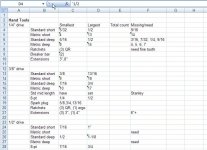
I used Excel. I started out simply by stating the smallest and largest sizes of a particular category. Also note any missing/needed sizes. Later, it kind of evolved into one line per item, when I got into the bigger stuff.

Remember to put a single quote in front of the fractional sizes, otherwise Excel may interpret them as dates or numbers. ('3/8)

You'll notice my Total Count column is blank. Haven't gotten around to that yet!

I figured it would be a nice thing to hand to the auctioneer when I go belly up. :lol_hitti
 

Attachments

  • inventory_example.jpg
    inventory_example.jpg
    70.9 KB · Views: 233
Last edited:

Busted_Knuckles

Well-known member
Joined
Oct 9, 2009
Messages
2,613
Location
Northwest Illinois
Ive got around 2000 tools inventoried via Microsoft Works, which I believe is just like excel, Id like to do pictures with mine, but I need to upgrade to do that. "Works", I think is the cheap little brother to excel? I keep track of specailty tools, transmission tools, axle tools, and so forth, I dont keep track of any of my hand tools, those are in a mental inventory (Ive got those hanson socket and wrench holders, you know when you are missing a size!)

The tools that dont fint into my tool box (about 90%) are stored in stackable nesting totes (used industrial strength models, not big box store totes). Ive got 30 totes on inventory. Without the spreadsheet, it would take forever to find anything, let alone being able to remember I have it!
 

mkdive

Well-known member
Joined
Oct 11, 2008
Messages
2,649
Location
NPB (Socal)
Remember to put a single quote in front of the fractional sizes, otherwise Excel may interpret them as dates or numbers. ('3/8)

You can change the properties of the cells or columns to not auto format it into a date.....so you wouldn't need the ( & ).

Heck I just finished 4 drawers of wrenches (20+ drawers to go).....maybe tomorrow I will have mine finished. I was sitting in the garage entering it into the laptop.....I looked around and figured when I get the boxes done.....I can enter all the freaking power tools surrounding me on the shelves.
scared.gif


Here is mine, looks like I will be doing at least one sheet per drawer (maybe 3 or 4 sheets when it comes time for my socket drawer). Here is my one Cman metric wrench drawer....still have 2 more drawers of metric wrenches to do....(SO & Gearwrench).

When its done....it will be handy to store and look at it on my phone....so I can double check at swapmeets, stores, etc..... to check for tools I need or duplicates I want to avoid.
approval.gif


Untitledaa.jpg
 
Last edited:

Keep

Well-known member
Joined
Jan 1, 2009
Messages
1,398
Location
Oshawa, Ontario
Okay if someone was to design a SIMPLE database what would you like to see?

Here is what I have so far:

Main form has boxes for: Manufacturer, Type (socket, ratchet), size1, size2 (for flare wrenches), model number, serial number, value, and image. Some of these fields will be pulled from the lists below.

Then there are the lists that you will be able to edit. You can tailor these to make entry easier
- manufacturer
- type (ratchet, socket)
- size (1/4, 1mm)
- model

I was thinking of adding a "Purchase date" or something along those lines as well.

This is in the very beginning stages and I am using Open Office (free) that I am not really familiar with but so far seems pretty close to MS Access in creation style.

We should also be able to import lists from say excel or a txt files. If we do this right then everyone here can contribute to the lists and we can have a fully stocked database just waiting for folks to select their own tools.
 

Toolhorder

Well-known member
Joined
Nov 9, 2009
Messages
5,711
Location
Montana
I did a list recently as the dealer I went to work for required it before I could work in the shop. Literally took 16 hours to complete and that was just my bigger Snappy box with my best tools and kits inside. I still have a KRA top/bottom at home with duplicates and mostly C-man and vintage stuff.
I used excell BTW and did what others have done above.
They also wanted prices and I about laughed. Even if all the companies listed the prices of discontinued items I would have taken me another 16 hours to input it all.
My box is the biggest in the shop now BTW...lol
 

Keep

Well-known member
Joined
Jan 1, 2009
Messages
1,398
Location
Oshawa, Ontario
Alright, since I am in the house watching bowl games all day I decided to play around some more with the inventory tool. I gave up on Open Office as it is just to slow and buggy for me to fight with. I instead fired up MS Access 07 and here is what I have so far for an entry screen:

This db currently has the following abilities:

Customizable lists that will allow you to tailor it to fit your needs, to include:

Manufacturers - I am working on adding all the ones listed in the tool section.
Catagories - These will have the most common, wrench, ratchet, sockets.
Type - this will have common types - 1/4 deep, 1/4 shallow, 3/8 shallow, Flex head, fine tooth etc.
Sizes - SAE, Metric, n/a
Model Number - You can add your own, or if I can find them I will import lists if I can get my hands on them

Item/tool image.

It will also allow you to store purchase info and even store a scanned image of the receipt. (Good so you can really show the insurance folks what things cost)

It has the ability to duplicate entries (including image and receipt info) that will allow for quick entry of items purchased at the same time and are just a different size.

I have not got into the reports yet but there will be the basics such as a listing by manufacturer or type or category.

I plan on using this once I am finished but figured I would share it with anyone that would like a copy.

Only real drawback(for you) is that you have to have a copy of MS Access 07 to run it.
 

Attachments

  • ssinventory.JPG
    ssinventory.JPG
    77.5 KB · Views: 194

shocksystems

Well-known member
Joined
Mar 17, 2007
Messages
497
Location
Ipswich, MA USA
Alright, since I am in the house watching bowl games all day I decided to play around some more with the inventory tool. I gave up on Open Office as it is just to slow and buggy for me to fight with. I instead fired up MS Access 07 and here is what I have so far for an entry screen:

This db currently has the following abilities:

Customizable lists that will allow you to tailor it to fit your needs, to include:

Manufacturers - I am working on adding all the ones listed in the tool section.
Catagories - These will have the most common, wrench, ratchet, sockets.
Type - this will have common types - 1/4 deep, 1/4 shallow, 3/8 shallow, Flex head, fine tooth etc.
Sizes - SAE, Metric, n/a
Model Number - You can add your own, or if I can find them I will import lists if I can get my hands on them

Item/tool image.

It will also allow you to store purchase info and even store a scanned image of the receipt. (Good so you can really show the insurance folks what things cost)

It has the ability to duplicate entries (including image and receipt info) that will allow for quick entry of items purchased at the same time and are just a different size.

I have not got into the reports yet but there will be the basics such as a listing by manufacturer or type or category.

I plan on using this once I am finished but figured I would share it with anyone that would like a copy.

Only real drawback(for you) is that you have to have a copy of MS Access 07 to run it.
Very nice looking, nice work. Have you tried opening it in Open Office Base now that you have created it in MS Office? If that works it might allow others without MS Access to use the database.

Cheers!

Jim
 

Dust

Well-known member
Joined
Nov 9, 2008
Messages
649
Location
Santa Ana, CA
That Access database is awesome. I had wanted to do something similar, but everything I learned about Access was probably ten years ago, so I had no idea on how to start.

I'm using OfficeXP, will I be able to run that database once you've released it? And I'm assuming that tool images would have to be manually added, since I doubt you'd want to spend the time to scrounge all the stock photos from different websites.
 
To avoid these ads, REGISTER NOW!
Top Bottom
