To avoid these ads, REGISTER NOW!

Liftmaster won't close at the bottom

Steve from Socal

Well-known member
Joined
Jan 27, 2009
Messages
3,501
Location
Hutchinson Ks.
I have a Liftmaster opener that will not close to the set position. We can reset the door and it closes, then it will rise up. The amount it rises is not consistent, it may rise a few inches or go up a couple of feet.

Steve
 
To avoid these ads, REGISTER NOW!

mikec35

Well-known member
Joined
Jun 17, 2011
Messages
1,258
Location
NC
You need to adjust either your limit switch or travel down settings. If these don’t help it’s possible the board is bad. Before I do any adjustments on doors I always pull the manual release and make sure that the door travels up and down easily without any issues. That eliminates the door hardware and possible binding from the equation.


Sent from my iPhone using Tapatalk
 

mikec35

Well-known member
Joined
Jun 17, 2011
Messages
1,258
Location
NC
Also, note the position of the switches and only make slight adjustments that way if it doesn’t help you can put the switches back where they were.


Sent from my iPhone using Tapatalk
 

gnpenning

Well-known member
Joined
Jan 25, 2015
Messages
2,754
Location
I have more questions than answers.
To give you any useful information we need to know the model of opener. Take pictures if you have to.

As mentioned how does it open when manually opening by hand?

Has anything been changed recently?

Does it open all the way as it should?

Just some starter questions
 

iamrfixit

Well-known member
Joined
Dec 1, 2012
Messages
141
Location
Iowa
You likely have a shredded drive gear. It's a pretty common problem with the chamberlain style openers. Chamberlain builds openers under many brand names such as liftmaster, craftsman and many others.

As the gear begins to fail the door position gets out of sync with the limit switches. The door may try to open up too far, close too far or stop short of fully closed or fully open at random distances. The gear often begins to slip quite easily so you may not even notice that it's trying to open or close too far but just the random stops in the wrong position. If you remove the cover you'll probably find white shavings from the gear and the gear will be visibly worn.

The gear works as somewhat of a sacrificial part to prevent more serious damage if the door is consistently opening or closing too hard. I've seen the gear last as long as 25 years on a smooth operating door or fail in as little as a few weeks on a door that does not operate well.


mikec35

Well-known member
Joined
Jun 17, 2011
Messages
1,258
Location
NC
It’s not on the side of the unit?


Sent from my iPhone using Tapatalk
 
OP
S

Steve from Socal

Well-known member
Joined
Jan 27, 2009
Messages
3,501
Location
Hutchinson Ks.
The door moves freely, it will stay put partially open. It is not the smoothest door but there are no tight spots.

The door will work fine for some period of time, then it either wont close or close and open partially.

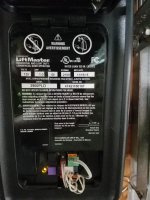
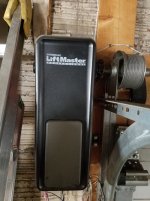
Here are a couple of pics

Steve
 

Attachments

  • 20200129_120221.jpg
    20200129_120221.jpg
    126.2 KB · Views: 27
  • 20200129_120138.jpg
    20200129_120138.jpg
    119.5 KB · Views: 23
To avoid these ads, REGISTER NOW!

gnpenning

Well-known member
Joined
Jan 25, 2015
Messages
2,754
Location
I have more questions than answers.
Thanks for the pictures. That particular model (3900) does NOT have any of the parts mentioned above. I had a feeling this is what you had but needed verification.

Generally when the encoder goes bad you will get more wild travel stops, but yours maybe on the verge of a more pronounced failure. You will need the latest Absolute Encoder. Very easy to replace. If you have another jackshaft opener you can do a quick swap to verify. I carry new ones with me when doing installs, even though it's not as common as a problem as it used to be.....


Edit. I forgot to mention your initial thoughts on the Encoder was correct. Good for you. Also when you call to order have your first picture handy, they will need that information.
 
Last edited:

gnpenning

Well-known member
Joined
Jan 25, 2015
Messages
2,754
Location
I have more questions than answers.
Pull the outer cover off, unplug old encoder, remove encoder, reinstall in reverse order and set limits.

If I get a chance later I'll take a picture of one with the cover off for you.

And yes, it is really that easy.
 

gnpenning

Well-known member
Joined
Jan 25, 2015
Messages
2,754
Location
I have more questions than answers.
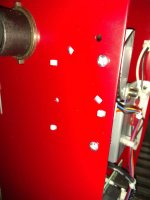
Steve, Don't let the red case throw you.

First picture is the screws on the bottom of the cover. Just the 2 , use a 1/4 nutdriver.

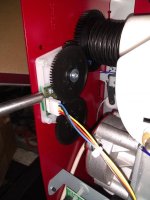
2nd picture the nutdriver is pointing to the Encoder.

3rd picture shows the 2 screws that hold the Encoder, the white pins are to help position the Encoder.

Hope that helps.
 

Attachments

  • IMG_20200129_133841196.jpg
    IMG_20200129_133841196.jpg
    74.8 KB · Views: 14
  • IMG_20200129_133631331.jpg
    IMG_20200129_133631331.jpg
    78.7 KB · Views: 15
  • IMG_20200129_133643717.jpg
    IMG_20200129_133643717.jpg
    54.5 KB · Views: 14

gnpenning

Well-known member
Joined
Jan 25, 2015
Messages
2,754
Location
I have more questions than answers.
To avoid these ads, REGISTER NOW!
Top Bottom