
You are using an out of date browser. It may not display this or other websites correctly.
You should upgrade or use an alternative browser.
You should upgrade or use an alternative browser.
Between 265 & 485 SQ/FT Nick's Two-Car Detached Vdub Garage
- Thread starter nicholam77
- Start date
Workspaces sized between 265 and 485 squarefeet.
isonic
Well-known member
Interested! Thanks for the explanation so far.
I heard the Prusa fan club was supposed to meet here?
Creality makes a lot of machines, and they wouldn't be so popular if they didn't work. Nick seems to have had more problems with his initial one then many, and there are several others on here with them working error free
The biggest downside to Prusa is cost(higher) and print area(smaller) but they are generally regarded as the most issue free ones out there in that hobbyist, sub $2k range. The best and really only upgrades out of the box on them I'd suggest is Octoprint running on a Pi so you can remotely manage it.
As @Denwood has more than proven his electrical and building skills in his thread, I don't think you'd have issues with any of the options. The Creality/Ender may have more machine troubleshooting, or may not and it just works effortlessly.
Another one to look at could be the Bambu X1, it's very new but initial feedback is very good and it brings some impressive capabilities to the offering at an attractive price point compared to the competitive set. I see my own collection eventually adding a large print area Creality and a Bambu X1 to my current Prusa
Creality makes a lot of machines, and they wouldn't be so popular if they didn't work. Nick seems to have had more problems with his initial one then many, and there are several others on here with them working error free
The biggest downside to Prusa is cost(higher) and print area(smaller) but they are generally regarded as the most issue free ones out there in that hobbyist, sub $2k range. The best and really only upgrades out of the box on them I'd suggest is Octoprint running on a Pi so you can remotely manage it.
As @Denwood has more than proven his electrical and building skills in his thread, I don't think you'd have issues with any of the options. The Creality/Ender may have more machine troubleshooting, or may not and it just works effortlessly.
Another one to look at could be the Bambu X1, it's very new but initial feedback is very good and it brings some impressive capabilities to the offering at an attractive price point compared to the competitive set. I see my own collection eventually adding a large print area Creality and a Bambu X1 to my current Prusa
OP
nicholam77
Well-known member
I've had Homeseer for many years, because it too checks your boxes. The reason I went with it is there were plugins for everything I wanted to connect/automate. I've been very happy with it. Literally zero issues. It just runs.
Very cool! I don't know anyone who runs Homeseer (until now), but I've always thought their light switches looked nice. Reliability is super important, nothing more frustrating than when things stop working!
I think @Denwood would be an excellent inductee to the Prusa cult!...er club I mean.
Can I use a Hubitat to automate cleaning my cat's litterbox?
Yeah I think he would, too.
Lol on the litterbox — that would be handy!
Interested! Thanks for the explanation so far.
Cool, I'll keep going then!
Cool, I'll keep going then!
Also very interested to see how this goes! I've got some smart devices but nothing tied together, even have some Caseta switches and the hub I had going at last house that haven't reinstalled(laziness, they worked great) but continue to think that some automation would be nice.
Daughter has figured out Alexa and how to get it to play her favorite song and make animal noises...so I probably have to watch the voice commands lol.
slodat
ALLIANCE MEMBER
I did an automation thread 5 or so years ago when I installed blue iris and HomeSeer. It has been rock solid since I initially set it up. I have a lot of little things implemented that are true quality of life enhancements, and some that have real energy savings.
spatchthepunk
Member
- Joined
- Feb 4, 2013
- Messages
- 18
I hope the tourney gets to happen.The Twin Cities has had 48 inches of snow this year and due to that there is a huge amount of slush under the snow, the lakes are just not building ice this year.I live 40 miles northeast of St Paul we have probably 12 lakes in a 10 mile radius and nobody is driving much less putting permanent ice houses out yet.If they can get the snow off they will need to flood the rinks heavily, if not they'll look like the city streets here(6 inches of rutty ice).Heed the waitress's advice at Matts to let the burger cool a bit .I still have a scar on my forearm from the molten cheese of my buddies burger when it squirted out.It is indeed! Snow also makes pond hockey extremely slow so as long as it is not actively coming down, I am fine with it! I would love some recs! We have an Air BNB for for 5 days and plan to explore the area a bit. Only rec I have so far is getting a Juicy Lucy burger haha. I am sure we will find the breweries one way or another but recs are always welcome!
I'll throw another vote for Creality @Denwood. Mine has worked perfect out of the box. I will heed my only advice. Don't got to far down the rabbit hole of modding. If you truly want certain options on your machine I suggest buying one that has most of the options you want. I think Nick just got a lemon out of the box unfortunately. Maybe his was built on a Friday before a holiday weekend. 
Nick the automation interest me on certain levels. On the other hand my conspiracy theory mind doesn't like the aspect that anyone that can hack into the system would have control of things. Not that we have ever seen that happen in a movie before. But now that you mention it. One thing I could probably build a system for is watering most of my plants with a timer so I wouldn't have to spend 30-45 min a day watering.
I also love LED's but I will be honest I hate them on cars. Damn headlights of new cars blind the hell out of me to were I can barely see at all until they pass. And I absolutely hate LEDS on older vehicles. It just doesn't have the right look in my opinion. Just my .02 I will get off my soapbox now.
I look forward to following along on your journey and seeing what I can learn from it.
Bret
Nick the automation interest me on certain levels. On the other hand my conspiracy theory mind doesn't like the aspect that anyone that can hack into the system would have control of things. Not that we have ever seen that happen in a movie before. But now that you mention it. One thing I could probably build a system for is watering most of my plants with a timer so I wouldn't have to spend 30-45 min a day watering.
I also love LED's but I will be honest I hate them on cars. Damn headlights of new cars blind the hell out of me to were I can barely see at all until they pass. And I absolutely hate LEDS on older vehicles. It just doesn't have the right look in my opinion. Just my .02 I will get off my soapbox now.
I look forward to following along on your journey and seeing what I can learn from it.
Bret
OP
nicholam77
Well-known member
Also very interested to see how this goes! I've got some smart devices but nothing tied together, even have some Caseta switches and the hub I had going at last house that haven't reinstalled(laziness, they worked great) but continue to think that some automation would be nice.
Daughter has figured out Alexa and how to get it to play her favorite song and make animal noises...so I probably have to watch the voice commands lol.
Nice. I don't have Lutron, but they play nice with a lot of controllers and are a good product.
I don't mind having a voice assistant as an additional method of control over physical switches, but lately I've been more of the mindset of cutting out that data aggregation by the Google's, the Amazon's etc. Not that I'm super worried about Jeff Bezos listening in on my farts, but more out of principal.
Pretty soon your daughter is going be saying "Alexa, unlock the front door! Alexa, turn on the oven!"

I did an automation thread 5 or so years ago when I installed blue iris and HomeSeer. It has been rock solid since I initially set it up. I have a lot of little things implemented that are true quality of life enhancements, and some that have real energy savings.
Are you able to dig that thread up? I wouldn't mind checking it out.
Automation
So it seems like a few of you have some smart home experience, but to anyone reading that is new, an automation is just a way of doing something without your own intervention. It usually is in the form of conditional logic, the most common and simple example being if this, then that. The "if" contains the trigger, and the "then" contains the action you want to happen. The trigger can be many different things, from a current device state, to a time of day, to a variable like sunset, etc etc.
Now to write that logic, or rule, or code, or whatever you want to call it, you need some sort "rules engine", and a hub that the code will live on and execute on your behalf.
Google, Amazon Echo, and Apple HomeKit, and many other self-contained ecosystems usually offer some form of hardware and an app that allows you to do this. The problem, though, is typically it ends at if this, then that. Which works for some things, but other automations require more advanced logic.
For example, let's say you want your lights to turn on when you open your back door upon arriving home. If you have a contact sensor in your back door like me, it would be pretty easy to set up an automation like:
Code:
if
    contact sensor changes to open
then
    with
        lights
    do
        turn on
But... what happens if you're leaving the house and you open the door? Or you just step outside to the patio for a minute? You might not want the lights to turn on then. Or what if you are coming home but someone else is already home and has the lights set a certain way? You might not want opening the door to change the current lighting.
So all of a sudden, something that was simple, is not so simple. Which is why in automations you typically use "conditions".
Conditions are requirements that also have to be true at the time the Trigger becomes true, for the action to happen. In the case of the above example, if I were to use my iPhone GPS as a presence sensor to let the hub know if I'm home or not, it could be rewritten as follows:
Code:
if
    contact sensor changes to open
    and
    Nick's iPhone changed to 'present' in the last 10 minutes
then
    with
        lights
    do
        turn on
This is still a simple example, but so far it's gotten smarter.
Hubitat has a number of built-in apps that run on its hub for automation. The most complex of these is called Rule Machine, and it is very powerful. Another one they recently adopted is called webCoRE (Web Community's Own Rules Engine) and is similarly powerful. webCoRE on Hubitat was ported from SmartThings, where it was originally developed by that community. Since I already have experience with it, that's what I'm predominantly going to use on Hubitat (for now). WebCoRE supports advanced conditional logic, variables, and expressions.
Here's a real example of a simple automation, using webCoRE, from my actual house.
In our bedroom we have a number of plants, including a baby lemon tree, which needs a lot of sunlight. Minnesota winter doesn't provide that, so we have an LED grow light on it. It has a switch with 4 levels of brightness you could toggle through. So every morning I had to press the switch to turn it on, and then press it 4 more times to set it to max brightness. And also turn it off at night. Not the end of the world... but a good opportunity to automate.
I re-wired the cord to remove the switch, and plugged it into a smart outlet.
The obvious "trigger" to use was time-of-day. With this I could set up a simple schedule:
Code:
Turn Plant Grow Light ON at 7:00 AM
Turn Plant Grow Light OFF at 7:00 PM
I lived with it like that for a few weeks, but something became extremely annoying. Sometimes, on the lucky occasion that my kids slept until 7:00 AM, I'd still be in bed when the light would come on. In a dark room. And the light is very bright and jarring and pointed right at the bed. That's the problem with scheduling things... schedules aren't always the same.
Now I could simply move the ON time later to something safe like 8:00 AM or 9:00 AM. But with a simple condition, I was able to make this automation a lot smarter.
What I did, was use my phone's charging status and my wife's phone's charging status to know if we've gotten up for the day. We both charge our phones overnight on the night stands, and presumably when we take the phone off the charger in the morning that means we're awake and getting out of bed.

Here is the webCoRE script, which in webCoRe terminology is called a Piston:


Now it only turns on when the last person takes their phone off the charger, and only when that happens between 5:00 AM - 9:00 AM.
This is really convenient and feels "smart". It's adapting to both of our schedules, and it's one less thing I have to remember to do in the morning.
Obviously I'm not going to do a full write-up on every automation I use, but I'll share a few more examples and a few that are more complicated.

Last edited:
OP
nicholam77
Well-known member
I hope the tourney gets to happen.The Twin Cities has had 48 inches of snow this year and due to that there is a huge amount of slush under the snow, the lakes are just not building ice this year.I live 40 miles northeast of St Paul we have probably 12 lakes in a 10 mile radius and nobody is driving much less putting permanent ice houses out yet.If they can get the snow off they will need to flood the rinks heavily, if not they'll look like the city streets here(6 inches of rutty ice).Heed the waitress's advice at Matts to let the burger cool a bit .I still have a scar on my forearm from the molten cheese of my buddies burger when it squirted out.
Oooh I didn't even think about that with the snow. I haven't really been out on any lakes.
100% on the Juicy Lucy warning! My friends from California came out to mpls for my wedding and one of them had a Juicy Lucy catastrophe. It sprayed molten hot juices all over him and the booth and the wall. I legitimately think he was traumatized lol.
I'll throw another vote for Creality @Denwood. Mine has worked perfect out of the box. I will heed my only advice. Don't got to far down the rabbit hole of modding. If you truly want certain options on your machine I suggest buying one that has most of the options you want. I think Nick just got a lemon out of the box unfortunately. Maybe his was built on a Friday before a holiday weekend.
Nick the automation interest me on certain levels. On the other hand my conspiracy theory mind doesn't like the aspect that anyone that can hack into the system would have control of things. Not that we have ever seen that happen in a movie before. But now that you mention it. One thing I could probably build a system for is watering most of my plants with a timer so I wouldn't have to spend 30-45 min a day watering.
I also love LED's but I will be honest I hate them on cars. Damn headlights of new cars blind the hell out of me to were I can barely see at all until they pass. And I absolutely hate LEDS on older vehicles. It just doesn't have the right look in my opinion. Just my .02 I will get off my soapbox now.
I look forward to following along on your journey and seeing what I can learn from it.
Bret
Bret, you would not be the only person to share the concern for privacy. While I think the likelihood of getting hacked like you describe is very low, I do think tech privacy is a legitimate concern, and it's one of the reasons I'm moving to Hubitat, and likely cutting voice assistants out of the picture. Certain smart home devices, like Alexa or Google Assistant speakers, are quite invasive and these companies have shown time and time again they do not care about your privacy at all. The pretend to, but of course they don't actually. To them, you are the product.
In my case, in order to get hacked, someone would have to hack my home network, as well as crack the password to my Hubitat, and figure out how to use the thing haha. Currently almost all my devices are Zwave or Zigbee, which I think is more secure than WiFi devices. Is it possible? I suppose. But very unlikely.
Everything runs locally on the hub, and doesn't even require internet, so no one is collecting data on me. Not even Hubitat.
Lastly, I'll add that if you own a smartphone, or use any form of social media, or a web browser, you're already being location tracked and your web traffic monitored and your information sold to advertisers. If you're ok with that compromise, you should be ok with something like Hubitat. It doesn't make it right, but it's pretty much unavoidable in this day and age without going off the grid. Just my .02
Re: watering your plants, I'm a big believer that there are "smart" solutions that aren't connected (i.e. connected to a network). In fact I'm about to install a "dumb" Lutron motion sensor switch in my laundry room, because that will automatically turn the lights on, but doesn't need to be tied into anything else. There are other things like regular old outlet timers to do a form of automation. Sometimes the simplest solution is best.
Definitely agree about LEDs not belonging on older cars. In @Denwood 's thread I was meaning new cars. The main thing for me with LEDs is longevity, and not mixing technologies (my GTI came with Bi-Xenon running lights, incandescent turn signals, and LED fogs). Also agree with you on brightness at night. That's a manufacturer issue, though, not intrinsic to LEDs. They could just make them less bright haha.
slodat
ALLIANCE MEMBER
This thread is about how I control electric shop heaters with Ecobee smart thermostats.Are you able to dig that thread up? I wouldn't mind checking it out.
This thread is the automation thread I mentioned. Didn't get a lot of interest when I posted about it, or in my shop thread.
I have Ubiquiti point to point link between my two properties, with the automation running there as well. I have iBeacons to detect where I am physically located, and it switches things up in Homeseer and my camera system (Blue Iris). It's completely automated and I rarely use any HMI type of thing.
The Ecobee thermostats will not let room temperature go below 45F by design. At my other property, it's just storage in the winter. I use Homeseer to enable that Ecobee thermostat when room temperature gets down to 38F. It then turns the system off at 40F. That unneeded additional heat in that space is saving me quite a bit alone.
I have ZWave light switches in that shop for the main lighting. Each row on it's own switch. By each door - two man doors and three roll up doors, is another ZWave switch. It doesn't switch power to any lights. It's just a trigger into Homeseer. Currently configured to turn all four rows on and off. This saved a TON of unneeded wire and complexity in the lighting circuits. These rows are 60' long of double fluorescent tube lights.
I have a scene in my shop for when I arrive and depart that sets temperatures, tells security and camera systems what to do, turns on/off ceiling fans, adjusts thermostat settings, etc. Additionally, I have a daily that turns certain things off for security purposes (like the power to garage door openers).
Denwood
Well-known member
@slodat , the Ecobee stats are great. I've installed 16 odd units now with zero issues, most in the commercial setting. In my own commercial building I used their presence sensing with remote sensors a lot to manually arm the alarm system (via DCS interface) etc.
@bj383ss (Bret), I hear you on the lights. The thing I do like about the LEAF LED headlights is that they are very much focused/aimed with a very defined top level cut off. The issue I think comes from folks putting stupidly bright bulbs into reflector systems that were never designed for them. You can also see in many OEM lights that there are areas of the bulb that are blacked out and specifically designed to control unintended light that may not exist in their replacements. We have a lot of moose and deer wandering the roads here at dusk/evening and for highway at least, you can never have enough light in my opinion as these guys have dark brown coats and are hard to spot.
@loganb and @MadeByMiller , thanks for the votes on the 3D machines. I continue to browse 3D printers, but the more pressing priority of my eldest heading off to school in the UK this month, and her sibling doing competitive dance conspire against me..ha. Save yer pennies Nick!
Nick, I'm with you on the voice assistants. I don't use them. I applaud your efforts to educate here with automation as often guys like me just jump in with some code, forgetting that the tech for someone not involved is pretty much Greek.
It's interesting on we all have a particular slant when it comes to motivation for automation. First and foremost, there is zero motivation to do any of it when the gear is not reliable. I had some X10 stuff back in the day and it was awful. My biggest interest in automation generally focuses around efficiency. In my commercial building that included, active night cooling (with automated clerestory windows, HVAC etc), automatic alarm arming (if tenants forgot), critical temperature monitoring for the slab heat, and things like AC systems off if windows were opened (via the alarm system integration). That was all Vera stuff and it worked quite well, although I had to get pretty good at LUA code to do it.
In our home, all lights are automated with various motion sensors, door locks, and the garage door as well. Now the HRV is fully managed with as well. Our pool and the solar heating system are 100% automated. Like Nick, I was on SmartThings and moved to Hubitat for exactly the same reason. It was actually you, Nick, who tipped me off to the groovy shut down! What I did find at home is that our electricity consumption dropped nearly 40% after automation, which suggests that across North America there is a lot of "low hanging fruit" when it comes to efficiency.
I think this is where automation is the most useful. Using resources (like lights) only when you need them. The HRV system only brings in air when we need it (which has a very defined energy cost) and otherwise either turns off or is gradually ramped down when not needed. It is for sure more efficient than anything you could buy today...only 23 watts running at low speed...and the trick is that it only runs at higher speeds when absolutely needed. Keeping lights off when not needed, but also running them at lower dim settings (during the day for example) can reduce consumption easily another 50%.
The other motivator for many is "security". This includes locking doors if left open, turning off the house water system if leaks are detected (a big one for us), and giving a heads up to house activity if we're away. Between the cameras and all the motion sensors, it's very easy to check in on things when we're away.
As far as security, it's always a concern and always a moving target. Hubitat is amongst the best for this and can be locked down on your home network further if desired via subnetting etc. I just use a VPN gateway to get to it remotely via the pFsense router OS I'm using at home. Many of the newer zWave devices use S2 enhanced security which give you an idea of where the industry is going to make the actual device security more robust.
Sorry for the long post Nick but you've prompted some good discussion here
@bj383ss (Bret), I hear you on the lights. The thing I do like about the LEAF LED headlights is that they are very much focused/aimed with a very defined top level cut off. The issue I think comes from folks putting stupidly bright bulbs into reflector systems that were never designed for them. You can also see in many OEM lights that there are areas of the bulb that are blacked out and specifically designed to control unintended light that may not exist in their replacements. We have a lot of moose and deer wandering the roads here at dusk/evening and for highway at least, you can never have enough light in my opinion as these guys have dark brown coats and are hard to spot.
@loganb and @MadeByMiller , thanks for the votes on the 3D machines. I continue to browse 3D printers, but the more pressing priority of my eldest heading off to school in the UK this month, and her sibling doing competitive dance conspire against me..ha. Save yer pennies Nick!
Nick, I'm with you on the voice assistants. I don't use them. I applaud your efforts to educate here with automation as often guys like me just jump in with some code, forgetting that the tech for someone not involved is pretty much Greek.
It's interesting on we all have a particular slant when it comes to motivation for automation. First and foremost, there is zero motivation to do any of it when the gear is not reliable. I had some X10 stuff back in the day and it was awful. My biggest interest in automation generally focuses around efficiency. In my commercial building that included, active night cooling (with automated clerestory windows, HVAC etc), automatic alarm arming (if tenants forgot), critical temperature monitoring for the slab heat, and things like AC systems off if windows were opened (via the alarm system integration). That was all Vera stuff and it worked quite well, although I had to get pretty good at LUA code to do it.
In our home, all lights are automated with various motion sensors, door locks, and the garage door as well. Now the HRV is fully managed with as well. Our pool and the solar heating system are 100% automated. Like Nick, I was on SmartThings and moved to Hubitat for exactly the same reason. It was actually you, Nick, who tipped me off to the groovy shut down! What I did find at home is that our electricity consumption dropped nearly 40% after automation, which suggests that across North America there is a lot of "low hanging fruit" when it comes to efficiency.
I think this is where automation is the most useful. Using resources (like lights) only when you need them. The HRV system only brings in air when we need it (which has a very defined energy cost) and otherwise either turns off or is gradually ramped down when not needed. It is for sure more efficient than anything you could buy today...only 23 watts running at low speed...and the trick is that it only runs at higher speeds when absolutely needed. Keeping lights off when not needed, but also running them at lower dim settings (during the day for example) can reduce consumption easily another 50%.
The other motivator for many is "security". This includes locking doors if left open, turning off the house water system if leaks are detected (a big one for us), and giving a heads up to house activity if we're away. Between the cameras and all the motion sensors, it's very easy to check in on things when we're away.
As far as security, it's always a concern and always a moving target. Hubitat is amongst the best for this and can be locked down on your home network further if desired via subnetting etc. I just use a VPN gateway to get to it remotely via the pFsense router OS I'm using at home. Many of the newer zWave devices use S2 enhanced security which give you an idea of where the industry is going to make the actual device security more robust.
Sorry for the long post Nick but you've prompted some good discussion here
OP
nicholam77
Well-known member
@slodat and @Denwood thank you for sharing overviews of your setups. Those are some great illustrations of what's possible with home automation.
Very interesting about the iBeacons. I am aware of them but didn't know you could use them for personal location automation. Pretty neat. That's something I'm struggling with a bit in Hubitat. At least my phone is geofencing perfectly, my wife's not so much. I think I need to dig through some more iOS settings.
Great example. I have several switches in my house, either battery powered or not, that do not directly control a load, and make possible some otherwise very difficult-to-wire lighting situations.
That is absolutely amazing! Your focus on efficiency is really powerful and it's awesome that you track it and have the stats to back it up!
I set maximum dim levels as well. LEDs are often simply too bright. The overhead pots in my kitchen never go above 60%. I also cap all my HUE bulbs at 90%. I read somewhere once, not sure how true it is, that running an LED at 90% or 95% will extend is life.
I don't use a fancy router like Ubiquiti or pFsense, but I'm still not worried. There's just as much likelihood my home computer would get hacked, and I still have one of those. In fact I'd probably rather a hacker turn my lights on and off than destroy my computer.
I have Ubiquiti point to point link between my two properties, with the automation running there as well. I have iBeacons to detect where I am physically located, and it switches things up in Homeseer and my camera system (Blue Iris). It's completely automated and I rarely use any HMI type of thing.
Very interesting about the iBeacons. I am aware of them but didn't know you could use them for personal location automation. Pretty neat. That's something I'm struggling with a bit in Hubitat. At least my phone is geofencing perfectly, my wife's not so much. I think I need to dig through some more iOS settings.
By each door - two man doors and three roll up doors, is another ZWave switch. It doesn't switch power to any lights. It's just a trigger into Homeseer. Currently configured to turn all four rows on and off. This saved a TON of unneeded wire and complexity in the lighting circuits.
Great example. I have several switches in my house, either battery powered or not, that do not directly control a load, and make possible some otherwise very difficult-to-wire lighting situations.
I continue to browse 3D printers, but the more pressing priority of my eldest heading off to school in the UK this month, and her sibling doing competitive dance conspire against me..ha. Save yer pennies Nick!
What I did find at home is that our electricity consumption dropped nearly 40% after automation, which suggests that across North America there is a lot of "low hanging fruit" when it comes to efficiency.
That is absolutely amazing! Your focus on efficiency is really powerful and it's awesome that you track it and have the stats to back it up!
Keeping lights off when not needed, but also running them at lower dim settings (during the day for example) can reduce consumption easily another 50%.
I set maximum dim levels as well. LEDs are often simply too bright. The overhead pots in my kitchen never go above 60%. I also cap all my HUE bulbs at 90%. I read somewhere once, not sure how true it is, that running an LED at 90% or 95% will extend is life.
I don't use a fancy router like Ubiquiti or pFsense, but I'm still not worried. There's just as much likelihood my home computer would get hacked, and I still have one of those. In fact I'd probably rather a hacker turn my lights on and off than destroy my computer.
Denwood
Well-known member
Nick, the HUE bulbs do run considerably cooler at 90%, and I do the same thing with them...they run at 90% max. Our electricity consumption values have slowly crept up, largely due to the EV, but we're still using considerably less than comparable homes.
In my thread I had posted the hydro savings observed over both my commercial building and home after automation was more or less complete. It was less (like 10%) at the commercial site as it was already quite efficient to start and only occupied for 8-10 hours/day.
On the Enbridge utility web site (gas), you can compare your home to others in your area. Our 1905 vintage (albeit, heavily retrofitted) home ranks surprisingly well with respect to heat as well..we're almost 50% less with respect to gas consumption than average. The furnace and on-demand water heat use gas. With natural gas prices crazy, and electricity costs steadily increasing, the cost benefit of automation is changing quickly.

In my thread I had posted the hydro savings observed over both my commercial building and home after automation was more or less complete. It was less (like 10%) at the commercial site as it was already quite efficient to start and only occupied for 8-10 hours/day.
On the Enbridge utility web site (gas), you can compare your home to others in your area. Our 1905 vintage (albeit, heavily retrofitted) home ranks surprisingly well with respect to heat as well..we're almost 50% less with respect to gas consumption than average. The furnace and on-demand water heat use gas. With natural gas prices crazy, and electricity costs steadily increasing, the cost benefit of automation is changing quickly.
Trapps
ALLIANCE MEMBER
Denwood
Well-known member
University here is a lot less expensive than US colleges. Tuition in the $8-10K per year average. My daughter has made it a lot easier for us with scholarships as she maintains a + 90% average and lives at home, so it's maybe 50% of that. The foreign exchange program with the UK maintains pretty similar pricing, but housing/food will add about $1000/month while she is there.@Denwood 's "save your pennies" advice is spot on.
My kids went to pretty expensive schools (his was almost stupid), I can't imagine foreign country expenses.
That said, we've been saving for both of them since birth with monthly contributions to RESPs (tax free investment account with government adding up to $500 per year if you contribute over $2500) so the financial impact today is much less
Sorry Nick...not very garagey of me to post this stuff...
Last edited:
OP
nicholam77
Well-known member
@Denwood 's "save your pennies" advice is spot on.
100%. We have savings accounts set up for both of them.
That said, we've been saving for both of them since birth with monthly contributions to RESPs (tax free investment account with government adding up to $500 per year if you contribute over $2500) so the financial impact today is much less
We have similar college-designated pre-tax investment accounts set up as well.
I will follow up with another home automation post or two, but first a quick detour of a couple random things.
I printed another (different model) Festool quick clamp holder that I like better.
One thing I've noticed is on the first few layers, the layer lines inside the walls/perimeters are raised and really rough to the touch in areas. Like raised enough I've almost been worried the nozzle will collide. It's strange because it doesn't seem to do this on the top of the model. I have the part cooling fan come on at layer 2. That's what I always did with the Ender 3v2 and it never made "ridges" like this.

You probably can't tell much from the pic, but a lot of those lines are raised and blobby.
Interestingly, the final print seems to come out really nice anyways.


Another thing I don't like is the textured bed. Adhesion is excellent, but the bottom edges of the models don't come out super clean, and it's really hard to remove tiny bits like the prime line and the brim.
Not sure where I'll put this yet, but here's what it looks like in action:

I know this isn't strictly tool-related, but everyone on here seems to score amazing tool deals and I've rarely had that good luck. But this weekend I did find a killer deal on an office chair I've been trying to locate forever, a Herman Miller Setu roller chair w/arms. Got it at a non-profit office furniture recycler in town for only $159 (it's an $800 chair!). Forgive the mess, but its new home is my home computer / 3d printer desk.
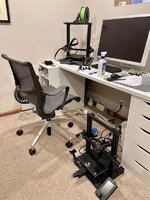
Printer also got a cheap, but official Creality, LED bar from Aliexpress.

Lastly, Bret ( @bj383ss ) this one is for you!!

Another XMAS gift, I got to relive my childhood Lego obsession with the 31132 Lego Creator "Viking Ship and the Midgard Serpent".


I built it in a couple of sessions, and even recruited my daughter to help which she had fun with.
Awesome set, and was even more nostalgic than I had hoped! Thought I would share since I know there are a few on here who like Legos!
I get easily distracted, but I'll try to get back to wrapping up the home automation stuff soon!
slodat
ALLIANCE MEMBER
Office area looks great! Congratulations on the Herman Miller chair. They are everything folks say they are.
Also.. I'm told you want to see lots of Bambu X1C posts and photos..
Also.. I'm told you want to see lots of Bambu X1C posts and photos..
MadeByMiller
Well-known member
Hey Nick, I'd try printing a first layer calibration print and dial in your initial Z height. It appears too low and as a result the extrusions are being too far squished, causing that raised blobby effect. That squish also seems to be causing a bit of elephant foot or excess width around the perimeter of the first layers as well. Raising the initial Z will also help a bit when it comes to removing parts from the build sheet.
Awesome score on that Herman Miller chair by the way! I would have been all over that for the price as well.
Awesome score on that Herman Miller chair by the way! I would have been all over that for the price as well.
Denwood
Well-known member
Ditto on the chair…the good ones are like art pieces in my book. The part looks pretty amazing too in the appropriate Koolaid colors
OP
nicholam77
Well-known member
Office area looks great! Congratulations on the Herman Miller chair. They are everything folks say they are.
Also.. I'm told you want to see lots of Bambu X1C posts and photos..
Thanks! I actually use that same model chair every day for work, but now I have one for my home computer, too! I've also had an Aeron at work, which I like as well, but for me the Setu is more comfortable even though it has less adjustability.
I need to catch up on your posts in depth, but I've been following along with your thread and the Bambu acquisition. Yes to pictures and yes I'm jealous.

Hey Nick, I'd try printing a first layer calibration print and dial in your initial Z height. It appears too low and as a result the extrusions are being too far squished, causing that raised blobby effect. That squish also seems to be causing a bit of elephant foot or excess width around the perimeter of the first layers as well. Raising the initial Z will also help a bit when it comes to removing parts from the build sheet.
Awesome score on that Herman Miller chair by the way! I would have been all over that for the price as well.
Thanks Austin, that is very helpful. I've struggled to wrap my head around leveling with this new printer. With the 3v2 I didn't have a bed probe, and all I ever did was level the 4 corners with a piece of paper. Never even touched the Z offset once. I never had issues with that method and it seemed so simple to me for how much bed leveling seems to be a challenge for people.
I followed some YouTube videos on how to dial in the Z offset on the Ender S1, and it still involved a piece of paper manually leveling the bed with the Z offset set to zero. And then running the bed probe to create a mesh. But upon printing after this, it was clear the nozzle was WAY too far away from the bed. I don't understand why, but I read other similar comments online. So... I tried to dial in the Z offset manually and I guess I went too far.
What you're saying totally makes sense and I'll try backing it off a little bit. I just wish there was a foolproof way to set the correct height like the paper method vs. eyeballing it.
Any tips for removing a prime line that was over-squished and really got embedded in the textured plate? There's a few sections I can't get fully clean but I'm not sure if isopropyl alcohol, dish soap, etc is recommended on these.
And on the chair... the guy said they started with 40 and when I got there they had 7 left. I was tempted to buy more than one at that price!
Ditto on the chair…the good ones are like art pieces in my book. The part looks pretty amazing too in the appropriate Koolaid colors
I agree Dennis. My day job is video editing so I spend a lot of time in a chair in front of the computer. It's important to have a good one.
So far I'm pretty happy with the print quality on the new printer!
MadeByMiller
Well-known member
As far as I understand and in my own experience, eyeballing the initial Z height is the best way to dial it in. Make or find an object with a broad first layer (the puzzle piece trays I just printed are excellent for this) and do a live Z adjust as the first layer is printing. As the first layer progresses, closely watch the way the extrusions are laying down. You obviously don't want to have any space between them, but there shouldn't be so much squish that the raised blobby effect is present. I'll run one right now and try to get some pictures of my first layer on my smooth build sheet.Thanks Austin, that is very helpful. I've struggled to wrap my head around leveling with this new printer. With the 3v2 I didn't have a bed probe, and all I ever did was level the 4 corners with a piece of paper. Never even touched the Z offset once. I never had issues with that method and it seemed so simple to me for how much bed leveling seems to be a challenge for people.
I followed some YouTube videos on how to dial in the Z offset on the Ender S1, and it still involved a piece of paper manually leveling the bed with the Z offset set to zero. And then running the bed probe to create a mesh. But upon printing after this, it was clear the nozzle was WAY too far away from the bed. I don't understand why, but I read other similar comments online. So... I tried to dial in the Z offset manually and I guess I went too far.
What you're saying totally makes sense and I'll try backing it off a little bit. I just wish there was a foolproof way to set the correct height like the paper method vs. eyeballing it.
Any tips for removing a prime line that was over-squished and really got embedded in the textured plate? There's a few sections I can't get fully clean but I'm not sure if isopropyl alcohol, dish soap, etc is recommended on these.
And on the chair... the guy said they started with 40 and when I got there they had 7 left. I was tempted to buy more than one at that price!
To remove the embedded filament, I have a couple of ideas. I haven't personally done this, but I've heard of people having luck by putting the build plate in the freezer for a while and then kind of carefully chipping the embedded filament off. Conversely, you can try carefully heating up the embedded filament with a heat gun or hair dryer and peel it up that way.
**EDIT: I made a post over on my Garage Gallery thread that hopefully will do a decent job at explaining initial Z height.
Last edited:
Nick are you spraying the bed with IPA between each print and wiping it off in one direction. I always do this and it helps adhesion and removal. Once my bed cools down I can literally hear the parts pop loose from the bed.
Bret
Bret
Finallygotit
ALLIANCE MEMBER
That seems like an awful waste of good beer there Bret.Nick are you spraying the bed with IPA between each print and wiping it off in one direction.
Bret


Those rough surfaces are due to over extrusion, which as was noted can be due to z-offset being incorrect, but can also be altered with the first layer extrusion multiplier. For good bed adhesion it is best practice to over extrude the first layer and squish it for the best contact. This will affect the second layer since the rough parts are filament that are squeezing up and around the edge of the nozzle, taking volume from where the second layer is being put down. It eventually evens out, but if it is bad it will cause failures of small features when the first layer is being put down as those rough edges will hit the nozzle as it goes by and lift the print off the bed. So if you are still having issues once your z-offset has been calibrated, you may want to see what your first layer extrusion settings are (typically 120% of the normal setting) and turn it down a little bit at a time until you get a better finish.
OP
nicholam77
Well-known member
As far as I understand and in my own experience, eyeballing the initial Z height is the best way to dial it in. Make or find an object with a broad first layer (the puzzle piece trays I just printed are excellent for this) and do a live Z adjust as the first layer is printing. As the first layer progresses, closely watch the way the extrusions are laying down. You obviously don't want to have any space between them, but there shouldn't be so much squish that the raised blobby effect is present. I'll run one right now and try to get some pictures of my first layer on my smooth build sheet.
To remove the embedded filament, I have a couple of ideas. I haven't personally done this, but I've heard of people having luck by putting the build plate in the freezer for a while and then kind of carefully chipping the embedded filament off. Conversely, you can try carefully heating up the embedded filament with a heat gun or hair dryer and peel it up that way.
**EDIT: I made a post over on my Garage Gallery thread that hopefully will do a decent job at explaining initial Z height.
Thank you, the picture guide you made is great. I will play around with this and try to dial it in.
I think over-squishing the Z is what's making the prime line so hard to remove in areas — I got it 99% clean but I might try your suggestions to get the last bits.
Nick are you spraying the bed with IPA between each print and wiping it off in one direction. I always do this and it helps adhesion and removal. Once my bed cools down I can literally hear the parts pop loose from the bed.
No, I am not. I used to do this occasionally with the carborundum bed on the 3v2. In my experience, whenever I alcohol'd the carborundum plate, adhesion was really good and parts took more effort to remove from the bed. But overall they released much easier than the textured plate that came with the S1. It's a bit of a different animal, and has really good adhesion without any aides. Almost... too good. Alcohol does help clean any PLA residue on it, but it's definitely not necessary every print. It does a fairly good job of releasing prints due to it's bendiness, but not as good as the carborundum bed, and small pieces like the brim and prime line really get embedded. But like @MadeByMiller and @Bakafish mentioned, my first layer is too squished so I'm pretty sure that's a big contributing factor.
Those rough surfaces are due to over extrusion, which as was noted can be due to z-offset being incorrect, but can also be altered with the first layer extrusion multiplier. For good bed adhesion it is best practice to over extrude the first layer and squish it for the best contact. This will affect the second layer since the rough parts are filament that are squeezing up and around the edge of the nozzle, taking volume from where the second layer is being put down. It eventually evens out, but if it is bad it will cause failures of small features when the first layer is being put down as those rough edges will hit the nozzle as it goes by and lift the print off the bed. So if you are still having issues once your z-offset has been calibrated, you may want to see what your first layer extrusion settings are (typically 120% of the normal setting) and turn it down a little bit at a time until you get a better finish.
Thanks! I've never played with with first layer extrusion multiplier. I'm hoping just adjusting the Z-offset will do the trick, but I'll keep that in mind.
OP
nicholam77
Well-known member
Fun times, on Monday evening we noticed water dripping from a light fixture in our living room, and a puddle on the floor.

I happened to have the day off work for MLK day, and my wife was working and the kids were at daycare. A rare occurrence to have a day off on my own, so I made the most of it and when to see a movie by myself (The Whale), and afterwards drove around a few nearby midcentury enclaves (Cedarhurst / South Tyrol Hills, North Tyrol Hills, and Forest Lake near Cedar Lake for my Minnesota readers). I'd never thoroughly explored these areas, and I was surprised I recognized at least 10 houses from my various architecture books and real estate listings I've seen. It was fun. But I spent most of the day away from home at the movies and driving around, and didn't notice the leak until evening.
I went up in the attic and could see it was dripping from where the gables come together.

That area on the roof is a major pit for ice dams. I do my best to roof rake, but we had multiple large snowfalls in a row, followed by a warm up this week. It was even raining yesterday. Well that melting from higher up on the roof formed a pretty sizable ice dam.
Was able to get someone out the next morning to melt it with low pressure steam.

2 hrs and $800 later and my roof is clear of ice and no longer leaking. Pretty lame way to spend $800.
I filed a homeowner's insurance claim, still waiting on the claims person to get in touch about possible damage. It didn't seem like a lot of water got in, to me, but I don't really know for sure, or if it went inside the wall below, etc. If there is damage our deductible is $1500 so I'm on the hook for that much. Hoping that's not the case.
I happened to have the day off work for MLK day, and my wife was working and the kids were at daycare. A rare occurrence to have a day off on my own, so I made the most of it and when to see a movie by myself (The Whale), and afterwards drove around a few nearby midcentury enclaves (Cedarhurst / South Tyrol Hills, North Tyrol Hills, and Forest Lake near Cedar Lake for my Minnesota readers). I'd never thoroughly explored these areas, and I was surprised I recognized at least 10 houses from my various architecture books and real estate listings I've seen. It was fun. But I spent most of the day away from home at the movies and driving around, and didn't notice the leak until evening.
I went up in the attic and could see it was dripping from where the gables come together.
That area on the roof is a major pit for ice dams. I do my best to roof rake, but we had multiple large snowfalls in a row, followed by a warm up this week. It was even raining yesterday. Well that melting from higher up on the roof formed a pretty sizable ice dam.
Was able to get someone out the next morning to melt it with low pressure steam.
2 hrs and $800 later and my roof is clear of ice and no longer leaking. Pretty lame way to spend $800.
I filed a homeowner's insurance claim, still waiting on the claims person to get in touch about possible damage. It didn't seem like a lot of water got in, to me, but I don't really know for sure, or if it went inside the wall below, etc. If there is damage our deductible is $1500 so I'm on the hook for that much. Hoping that's not the case.
MadeByMiller
Well-known member
Wow, the snow melting business is hot! $400/hr for hot water is not an easy pill to swallow.
Denwood
Well-known member
Nick, is that light fixture in an airtight box or open to the attic? Ice dams used to be an issue at times for us, but air sealing the attics with 2" of closed cell spray foam and then about R 80 of cellulose after fixed the issues. We're in a colder climate (but not that much colder) than you, and the trick here is keeping the attic cold with a combination of adequate ventilation, and careful air sealing/insulation. I ask about the light as the fixture itself may be heating the roof deck, along with air leakage there.
A lot of states/cities have pretty generous programs to fund some or all of that type of work as well. Probably would only take one or two emergency ice dam removal payments to fund someone else to crawl around up in the attic air sealing and blowing in extra cellulose.
OP
nicholam77
Well-known member
Wow, the snow melting business is hot! $400/hr for hot water is not an easy pill to swallow.
Seriously! They use low pressure steam which is fast and doesn't damage the roof. Technically I could have gone up there with a garden hose and a lot of patience, but I felt like time was of the essence and I had to work anyways. But yeah... would be a lucrative side business! The team came from a different one earlier in the morning... after some big storms and the right temperature swings I bet they do 10-15 houses in a row and make a bunch of cash in a couple days.
Nick, is that light fixture in an airtight box or open to the attic? Ice dams used to be an issue at times for us, but air sealing the attics with 2" of closed cell spray foam and then about R 80 of cellulose after fixed the issues. We're in a colder climate (but not that much colder) than you, and the trick here is keeping the attic cold with a combination of adequate ventilation, and careful air sealing/insulation. I ask about the light as the fixture itself may be heating the roof deck, along with air leakage there.
Open to the attic. I think the whole house is poorly insulated, but the living room where the leak was, in particular, loses a LOT of heat. It's by far the coldest room in the house. Part of that is the fireplace, and the bay window, and the front door, but I suspect the ceiling insulation is a problem, too. The house has been added onto over the years, a few times, and I think the original owner actually built the largest addition (kitchen bump out and 2nd story bedroom) himself. Not the best work, and it resulted it a really weird roofline with a lot of awkward intersections. In fact, the original roof of the house can be seen under the new gable over the living room, when inside the attic. Still has shingles on it and everything. What I'd really like to do is re-do the roofline to be more aesthetically pleasing and functional, and re-side the house, but then at that point it's like do you just add a a full second story? That's more of a pipe dream and not something I'm sure will ever be worth it at this property. Long way of saying — the loose fiberglass insulation over the living room does a very poor job I'm sure.
We've lived here for 5 1/2 years now, and while ice dams have formed in the past, I've been pretty good at mitigating them by raking the roof after a significant snowfall. This winter has been especially bad, and when researching ice dam removal companies I found that a LOT of people are having similar issues right now.
Getting it spray foamed is probably the right move. I'd probably wait until spring / summer, but definitely something I want to look into.
A lot of states/cities have pretty generous programs to fund some or all of that type of work as well. Probably would only take one or two emergency ice dam removal payments to fund someone else to crawl around up in the attic air sealing and blowing in extra cellulose.
Interesting, I'll look into that. And yeah, I don't want to be paying for this again (or have significant damage). Would be awesome to get some covered but even if not, like you said it would probably even out eventually. Plus maybe my living room won't be so cold.
Denwood
Well-known member
Of all the "retrofits" you could do, these would likely make the single largest difference:
1. Construct (or purchase) covers for any pot light penetrations into the attic (you don't want spray foam in direct contact). You can also do this yourself and take some time to seal the edges to the ceiling with canned spray foam.
2. Have a spray foam contractor that has lots of experience in your area to do 2" of closed cell spray foam to seal the attic ceiling from above.
3. Add in R60 or more of cellulose.
4. If the fireplace is open, fab up a nice cover for the front to block air going up the flue when not in use.
It's easy to spot houses with insulation issues in winter as you drive around. Look for:
1. Bare spots on the roof soon after a snow fall, or visible rafter lines after snow.
2. Large icicles hanging from eaves.
Both of those point to excessive heat loss into the attic, or poor insulation jobs on attic dormers etc. Venting plays into it, but job one in an attic is to stop warm/moist air getting in there in the first place. To add insult to injury, stack effect in winter creates a surprising amount of pressure that drives warm air into any gaps higher in a home, and pulls in replacement air from the basement/1st floor. Taller your house is, worse the problem is. Summer, you have exactly the opposite issue.
Your house is perfect for a retrofit program as it will show up with pretty bad air leakage when they do the initial blower door test. The worse the starting leakage is, the more of an effect (and with many programs more $$$ back) projects like the above will have
1. Construct (or purchase) covers for any pot light penetrations into the attic (you don't want spray foam in direct contact). You can also do this yourself and take some time to seal the edges to the ceiling with canned spray foam.
2. Have a spray foam contractor that has lots of experience in your area to do 2" of closed cell spray foam to seal the attic ceiling from above.
3. Add in R60 or more of cellulose.
4. If the fireplace is open, fab up a nice cover for the front to block air going up the flue when not in use.
It's easy to spot houses with insulation issues in winter as you drive around. Look for:
1. Bare spots on the roof soon after a snow fall, or visible rafter lines after snow.
2. Large icicles hanging from eaves.
Both of those point to excessive heat loss into the attic, or poor insulation jobs on attic dormers etc. Venting plays into it, but job one in an attic is to stop warm/moist air getting in there in the first place. To add insult to injury, stack effect in winter creates a surprising amount of pressure that drives warm air into any gaps higher in a home, and pulls in replacement air from the basement/1st floor. Taller your house is, worse the problem is. Summer, you have exactly the opposite issue.
Your house is perfect for a retrofit program as it will show up with pretty bad air leakage when they do the initial blower door test. The worse the starting leakage is, the more of an effect (and with many programs more $$$ back) projects like the above will have
Trapps
ALLIANCE MEMBER
I feel your pain I have a similar 'old roof inside the new addition roof situation' and a very poorly insulated attic.
Even with a brand new roof, my house is one where visible rafter lines are apparent after a light snow. Dennis is right on with his assessment. Sealing up air movement is a big step. We plan some major renovations and I don't want to correct the insulation until that work is completed just for ease of access. Home projects are on about a 2 year backlog now....
An alternative that is easy and relatively cheap is renting the machine from (insert big box store, free machine if you buy a certain quantity of loose cellulose from them) and blowing cellulose in yourself. We did this at our old home it it was almost unbelievable at how much difference it made. That home was a 1967 colonial with about 4" of dust that used to be fiberglass in the attic. We added about 12" of AttiCat Pink. Instant and huge difference in both heating and cooling. The hard part was placing the rafter channels to keep the loose cellulose away from the vented eaves. The blowing in was easy, Mrs. Trapps fed the machine from below and I donned the suit and mask for some sweaty, contortionistic masochism. YMMV, but for not a lot of money or time, it might be a good middle step.
Perhaps roof deicing cables for those odd intersections and valleys? Yes a pita to put up and take down, but might save future issues.
Even with a brand new roof, my house is one where visible rafter lines are apparent after a light snow. Dennis is right on with his assessment. Sealing up air movement is a big step. We plan some major renovations and I don't want to correct the insulation until that work is completed just for ease of access. Home projects are on about a 2 year backlog now....
An alternative that is easy and relatively cheap is renting the machine from (insert big box store, free machine if you buy a certain quantity of loose cellulose from them) and blowing cellulose in yourself. We did this at our old home it it was almost unbelievable at how much difference it made. That home was a 1967 colonial with about 4" of dust that used to be fiberglass in the attic. We added about 12" of AttiCat Pink. Instant and huge difference in both heating and cooling. The hard part was placing the rafter channels to keep the loose cellulose away from the vented eaves. The blowing in was easy, Mrs. Trapps fed the machine from below and I donned the suit and mask for some sweaty, contortionistic masochism. YMMV, but for not a lot of money or time, it might be a good middle step.
Perhaps roof deicing cables for those odd intersections and valleys? Yes a pita to put up and take down, but might save future issues.
OP
nicholam77
Well-known member
Thank you @Denwood and @Trapps , I think all of that applies. I'll look into doing the insulation.
The electric cabling is a possible option, although it might make roof raking that area tricky. And I don't like how they look in the summer if left up year round. But definitely an idea to explore.
We actually got more snow last night, so I spent the morning snow blowing and raking the roof.
And in other news... my daughter tested positive for Covid last night
Surprisingly no one in my family had gotten it up until this point, but I suppose it was probably coming for us eventually. I feel bad for her though, she just had a rough go of it with the Flu a week and a half ago.
Time to play the waiting game!
The electric cabling is a possible option, although it might make roof raking that area tricky. And I don't like how they look in the summer if left up year round. But definitely an idea to explore.
We actually got more snow last night, so I spent the morning snow blowing and raking the roof.
And in other news... my daughter tested positive for Covid last night
Surprisingly no one in my family had gotten it up until this point, but I suppose it was probably coming for us eventually. I feel bad for her though, she just had a rough go of it with the Flu a week and a half ago.
Time to play the waiting game!
OP
nicholam77
Well-known member
More Home Automation Stuff

I pretty much have Hubitat up and running the way I want, now. I figured I'd give an overview of what I have it programmed to do, give another coding example or two, and some future goals to wrap this topic up.
This is a list of automations I have currently set up and working (a lot were carried over from SmartThings).
Other automated devices that are either "dumb", or are standalone / not tied into Hubitat:
Future ideas I have, but haven't implemented yet. Some of it requires more hardware.
Lastly, here's a quick example of the WebCoRE code for the bedroom closet motion sensor automation I just configured.
The automation turns on the closet light with motion to 80% brightness during the day, and OFF after 2min, and on to 10% brightness at night and then OFF immediately.
To do this we need a Trigger (closet motion sensor becomes active). "Coding" in WebCoRE is very easy, you basically just visually pick options from contextual drop down menus. Here is an example of the available motion triggers:

And then when the Trigger is true, we need an action or multiple actions. Again, here is an example of the available actions for the closet light (HUE bulb):

I'm using Turn On, followed by Set Level.
Based on how you order these in the "script", the final code looks something like this:

So this post isn't completely devoid of pics, you can see I positioned the motion sensor in this cubby facing the closet door, so it's out of sight and only will trigger as someone goes through the door:

This is a simple one, but it's so slick and feels like magic.

No more bumbling around in the dark if my wife goes to bed before me. No more yanking the broken pull chain off the fixture. No more forgetting to turn off the closet night. In fact... no more thinking about it at all. It just does what I want.
That's really the goal of all this stuff. Less human intervention. Obviously it's a lot and I can't do a step-by-step for everything, nor would I expect anyone wants that, but if anyone has a question about how I did something feel free to ask!
I pretty much have Hubitat up and running the way I want, now. I figured I'd give an overview of what I have it programmed to do, give another coding example or two, and some future goals to wrap this topic up.
This is a list of automations I have currently set up and working (a lot were carried over from SmartThings).
- If someone arrives home and no one is currently home, set the main floor lighting to predefined levels when the front or back door opens
- If someone is home, set the main floor lighting to predefined levels at sunset
- Dim main floor lighting when kids go to bed (this is currently scheduled at 7pm, but in the future may run off a variable that is determined based off if the kids are actually in bed yet)
- Turn Kitchen lights ON with motion sensor, and OFF after 30min of no motion (lights come on at 60% brightness during the day, 10% brightness at night)
- Turn Living Room lights ON with motion sensor, and OFF after 1hr of no motion
- Kitchen Lights have maximum dim levels of 60% and 80% depending on the circuit, if this is exceeded they will automatically correct themselves
- Philips Hue Dimmer switches in Living Room, Hallway, Basement, and Master Bathroom that cycle through predefined HUE scenes with subsequent presses
- Master Bedroom closet light turns ON with motion sensor, to 80% brightness during the day, and 10% brightness at night, and OFF automatically after 2min of no motion
- Turn ON Plant Grow Light when all phones are off chargers between 5:00AM - 9:00AM
- Set main floor lighting to predefined levels and start Sonos radio station in the Kitchen when my phone comes off the charger in the morning, that way when I walk downstairs everything is lit and music is playing
- Goodbye Routine — turns off all lights, media players, and music. Can be called by phone app, or physical hardwired switch by front and back door, or if all phones leave the geofence
- Goodnight Routine — turns off all lights, media players, and music. Can be called by phone app, or physical hardwired switch by staircase
- Basement TV scene — turn on TV, receiver, and set entertainment room lighting. Can be called by Logitech Harmony remote, or physical hardwired switch at top of basement stairs (press on your way down and everything is ready to go when you're at the bottom!)
- When Basement TV is ON, turn off most of the upstairs lights, but only after Sunset
- When TV is turned OFF, basement lights go full bright
- Patio Lights come on at Sunset and turn OFF at 9:00PM
- Patio Lights can be toggled on or off with a physical hardwired switch by the back door
- Light inside back door turns on when the first phone arrives within the geofence, providing some light to unlock the door
- Guest Mode — can be turned ON to disable certain automations
- Vacation Mode — can be turned ON to disable certain automations, as well as activate lighting at night to simulate we're home
- NFC Tag in bathroom to set timer for filling the bath tub for kid baths
- NFC Tag in kitchen to set timer for macaroni / noodles (we do this a lot for kid lunches)
- NFC Tag on laundry machines to start laundry timers
Other automated devices that are either "dumb", or are standalone / not tied into Hubitat:
- Nest Video Doorbell for security and package alerts
- Nest Learning Thermostat, manages Home and Away temps, alerts, scheduling
- Nest Protect
- Amcrest IP Camera, front door security, records to NVR
- Exterior Front Door lights are automated by Sunset / Sunrise using a Honeywell 7-Day Programmable Light Switch
- Exterior Garage lights are automated with photo sensors
- Front and Back Doors have smart locks with keyless entry (these are NOT Zwave, and not connected to any voice assistant or automation platform)
- Handful of photo sensor LED nightlights in bathrooms, hallways, staircase, etc that automatically come on if it's dark enough and provide enough light to walk around at night — good for the kids coming upstairs in the middle of the night or using the bathroom etc
- Lutron motion sensor switch controls laundry room lights
Future ideas I have, but haven't implemented yet. Some of it requires more hardware.
- Start a Sonos preset when I arrive home, but only if my wife is NOT home, and the Kitchen Roku is NOT playing
- Text-To-Speech announce on Sonos speakers when I leave work (this need is somewhat deprecated as I mostly work from home)
- Trigger Nest Thermostat to start heating in the winter when I leave work (this need is somewhat deprecated as I mostly work from home)
- Automatically turn OFF basement staircase light after 5min (this ALWAYS gets left on, need another switch)
- Better alerts for laundry, possibly push notifications, speaker announce, maybe power metering plugs for more accuracy
- Run Goodnight Routine when Nick's phone goes on charger after 10:00PM
- Vitamin reminders — periodic reminders throughout the day when kitchen motion is detected, cancel if NFC tag is scanned
- Text-To-Speech alert on kitchen Sonos to run the dish disposal if it hasn't been run by the end of the day
- Virtual 3-way dish disposal switch (switch is under kitchen sink cupboard and hard to reach, want to place battery powered switch in better location that controls it)
- Contact sensor alerts... cleaning chemicals cabinet? Baby gate left open? Could send push notification or flash lights etc
- Reminder to bring kid's school stuff on Monday's (washed blankets and stuffed animals)
- Only execute kitchen Sonos to PLAY in automations if the kitchen Roku/TV is OFF, so they don't conflict
- Possibly smart bulbs or plugs for our bedroom table lamps / motion lighting for bedroom
- Turn on heated blankets for bed in the evening (would need something like the SwitchBot Bot)
- Motion-activated light strip under bed for night light if I get up in the middle of the night
- Motion-activated under cabinet lighting in the kitchen
- Temperature sensor in my son's bedroom to regulate a desk fan
- Bathroom fan ON/OFF automatically
- Set up a Home Assistant server so I can integrate things like my Octoprint Server, Synology, Brother Printer, etc
- automatic bias lighting for basement TV
- Reminder to check water softener salt
- Leak detection is susceptible areas
- Lights ON and push notification when Smoke or CO detectors go off
- Notifications of garage door status especially at night
Lastly, here's a quick example of the WebCoRE code for the bedroom closet motion sensor automation I just configured.
The automation turns on the closet light with motion to 80% brightness during the day, and OFF after 2min, and on to 10% brightness at night and then OFF immediately.
To do this we need a Trigger (closet motion sensor becomes active). "Coding" in WebCoRE is very easy, you basically just visually pick options from contextual drop down menus. Here is an example of the available motion triggers:
And then when the Trigger is true, we need an action or multiple actions. Again, here is an example of the available actions for the closet light (HUE bulb):
I'm using Turn On, followed by Set Level.
Based on how you order these in the "script", the final code looks something like this:
So this post isn't completely devoid of pics, you can see I positioned the motion sensor in this cubby facing the closet door, so it's out of sight and only will trigger as someone goes through the door:
This is a simple one, but it's so slick and feels like magic.
No more bumbling around in the dark if my wife goes to bed before me. No more yanking the broken pull chain off the fixture. No more forgetting to turn off the closet night. In fact... no more thinking about it at all. It just does what I want.
That's really the goal of all this stuff. Less human intervention. Obviously it's a lot and I can't do a step-by-step for everything, nor would I expect anyone wants that, but if anyone has a question about how I did something feel free to ask!
Lots of good stuff there!
Have you considered something like this: amazon.com/Garbage-Disposal-Aluminum-STAINLESS-CLEESINK/dp/B072L3VX57? Easy to install (especially if you already have an available hole in your sink or counter) and work well.
- Virtual 3-way dish disposal switch (switch is under kitchen sink cupboard and hard to reach, want to place battery powered switch in better location that controls it)
Denwood
Well-known member
It's quite surprising really how similar our setups are down to the Amcrest cameras, Logitech integration and HUE lightingMore Home Automation Stuff
I pretty much have Hubitat up and running the way I want, now. I figured I'd give an overview of what I have it programmed to do, give another coding example or two, and some future goals to wrap this topic up.
This is a list of automations I have currently set up and working (a lot were carried over from SmartThings)....
Logitech is no longer manufacturing remotes, which stresses me out a bit as the theatre relies on this for automation of the media rack, projector screen, lighting etc. The Harmony Elite touch screen remote/hub will be a huge PITA to replace with the integrations it needs to work nicely with Hubitat and HUE.
I've been quite impressed honestly with Webcore in the past (even on SmartThings) running our pool automation/solar heating system flawlessly for four years now. I've got the HRV ventilation system humming along nicely now in Rule Machine, but there is a pretty good list of tweaks that have been added. I would 100% agree that WebCore is far better for programming logic, particularly if you're using equations as I'm doing to set variables for heater power settings (calculated on temperature and air flow) as well as calculating HRV defrost times based on the outside temperature. I'm doing these calcs in Rule Machine where variable math is very, very basic.

I've done pretty much all of my lighting in the Hubitat built in app and while the GUI is not pretty, it works and manages all of the exceptions that required virtual switches etc. previously.
I'm curious on the NFC tags. How are you using them?
OP
nicholam77
Well-known member
Lots of good stuff there!
Have you considered something like this: amazon.com/Garbage-Disposal-Aluminum-STAINLESS-CLEESINK/dp/B072L3VX57? Easy to install (especially if you already have an available hole in your sink or counter) and work well.
I did not know these existed! Pretty cool. I don't have an extra hole in the counter currently (granite), but new counters are on the table eventually. I don't know that I need the garbage disposal tied into Hubitat
so I'll definitely consider something like this. Just browsing related products on Amazon I found this one, too, that is wireless and the button is kinetic so it doesn't have batteries (I love that!). I could get a Zwave switch and button for that price, but then it's controlled by the hub and I like to simplify and reduce reliability concerns where possible. A direct device-to-device wireless connection and a battery-free button might be the way to go. I like the sleek install of the one you linked me, but not sure about cutting into the countertop. I'm going to think about it, but thanks for the suggestion!It's quite surprising really how similar our setups are down to the Amcrest cameras, Logitech integration and HUE lighting
Yeah, haha! Because of that it's been really fun to follow along with all your automation posts. Out of the two of us you definitely have the more advanced automations. I used to have some complicated stuff set up before my kids were born, but after kids and especially the baby stages, schedules just weren't predictable and we couldn't stomach the less-than-perfect reliability with SmartThings, so I ended up un-building a lot of stuff. I'm pretty happy to have the fresh start with Hubitat and rethink things.
Logitech is no longer manufacturing remotes, which stresses me out a bit as the theatre relies on this for automation of the media rack, projector screen, lighting etc. The Harmony Elite touch screen remote/hub will be a huge PITA to replace with the integrations it needs to work nicely with Hubitat and HUE.
Yeah, this is a bummer. I'm a huge fan of their product. I just use the regular Harmony hub and remote, but it's been rock solid and it's impressive that an off beat product like that had so many flawless integrations (HUE, Sonos, SmartThings, etc). In fact my Harmony hub can see and start my Sonos "Favorites" and start a speaker Group playing, whereas Hubitat cannot. SmartThings couldn't either. Despite both claiming to officially support Sonos. I'll be clinging onto my Harmony setup as long as I can.
The other options I know of as a pseudo-replacement are the Broadlink RM4 Pro, and the SofaBaton X1.
The Broadlink RM4 Pro controls IR devices, and it looks like there is a Hubitat community integration. Also has IFTTT and Alexa support so you could probably hack together something even without the community integration. And I know there is a Home Assistant integration so if you ever go down that path you could possibly link it to Hubitat through Home Assistant. And on the plus side, they are cheap!
The SofaBaton X1 is very similar to Logitech Harmony with the hub, except it can't really link to Smart Home devices the way Harmony could. I see on their website it has Google Assistant and Alexa support, IFTTT, as well as iOS Shortcuts support, so again you could probably hack something together to integrate with Hubitat.
But let's just cross our fingers that Harmony keeps working forever
I've been quite impressed honestly with Webcore in the past (even on SmartThings) running our pool automation/solar heating system flawlessly for four years now. I've got the HRV ventilation system humming along nicely now in Rule Machine, but there is a pretty good list of tweaks that have been added. I would 100% agree that WebCore is far better for programming logic, particularly if you're using equations as I'm doing to set variables for heater power settings (calculated on temperature and air flow) as well as calculating HRV defrost times based on the outside temperature. I'm doing these calcs in Rule Machine where variable math is very, very basic.
Before the native WebCoRE was released, I started building stuff out with Rule Machine. I'm only doing simple things with it but the stuff that was working fine I haven't even moved to WebCoRE yet because no need to. I really like how the Hubitat interface shows all of the child apps so I can easily see what automation is where.

I don't have anything against Rule Machine... I bet you can probably achieve almost anything you can in WebCoRE, and if it was my only option I'd be satisfied. But WebCoRE is just more straightforward to me.
I'm curious on the NFC tags. How are you using them?
Right now I'm just using them to start timers in the Clock app on my iPhone. So... completely self-contained to iOS. They are set up in the Shortcuts app. I will say I have some trouble reading them sometimes when the phone is locked which is a minor annoyance.
If you haven't used Shortcuts, it's pretty awesome. There are a bunch of triggers for "Personal Automations", including scanning an NFC tag. These are unique to your phone, so you could even have the same NFC tag do different things for different people's phones.
Here's the Laundry Timer example:

But they could control anything you want in Hubitat. You can do this by using the cloud endpoint for either WebCoRE (the "open/execute" piston URL), or the MakerAPI cloud URL endpoint for Rule Machine. Then in Shortcuts you just set the Action to be an HTTP GET request which in Shortcuts is called "Get Contents Of URL".
I use this method to toggle a Hubitat virtual switch on and off when my phone connects or disconnects from power, respectively.

When you uncheck the bottom two options, "Ask Before Running" and "Notify When Run", this happens completely in the background.
So, you could do this, but use an NFC tag as the trigger.
Another way I use Shortcuts and WebCoRE cloud endpoints is for presence detection. My phone and my wife's phone execute pistons through shortcuts every time they enter or leave the geofence. The geofence is handled natively by HomeKit / the Home app, and the Shortcut (HTTP GET Request) is the action.
I have a whole section in my WebCoRE dashboard for these "iOS Shortcut Endpoints" pistons that only trigger through Shortcuts.

Another thing I love about WebCore which I'm sure you're aware of is you can display the value of variables next to the piston name by setting the piston state. Shows me at a glance the status of various things, like who's home, if the TV is on, if Guest Mode is on, etc. And I love how if you hover over a piston it tells you when it last executed.
Lastly, I'll leave these videos for some decent NFC tag ideas. I think they have huge potential and if they scanned more reliably for me I think I would be using them a lot more.
Thanks for chiming in!
Last edited:
MadeByMiller
Well-known member
Wow Nick, that's really impressive what you've implemented in your home automation. I love the nerdy sentiment and I think I can appreciate the utility even from my seat in my "dumb" house. I'm not sure if you realize it, but what you're doing with this automation is out of the ordinary and I'm willing to bet you could have a successful business setting up similar systems in folks' homes. I know that seeing what you and @Denwood have done with the automation systems in your homes has made me think about implementing it in my own, but I would be I admit that it is a daunting proposition to learn and apply.
P.S. I like to imagine that your Vacation Mode automation includes an entire scene of cardboard figures and mannequins dancing in front of the windows a la Home Alone ha
P.S. I like to imagine that your Vacation Mode automation includes an entire scene of cardboard figures and mannequins dancing in front of the windows a la Home Alone ha
Denwood
Well-known member
Nick, ah, I get it. You have the NFC tag on the device, and when your phone is near, the scan triggers an event. I've done zero with NFC devices (other then security token programming for 2 factor at work) and this application sounds intriguing.
Variable values (live) is a great feature with Webcore and thank goodness, Rule Machine does it too. Amazing how that little feature helps when you're trying to figure out automations.
I also like what you've done with presence..something I stopping automating around due to reliability with Smarthings with "Home" and "Away" modes. For me it's in the category of "nice to have" vs need to have with automation, but this is one of the best bits with regard to Homekit and Hubitat integration for me anyway. Certainly, to do home/away stuff reliably you need rock solid presence for all family members.
Austin, I've thought about the business case for automation. For high end (as in folks who have cash to burn) there is Control 4 which is a pretty closed setup requiring heavy vendor support. I have a few friends using it, and one in particular had it all removed due to the cost/frustration curve. Certainly automation and support is a thriving business on the commercial side but I wonder if the time/cost ratio works well for the residential market where automation is less of a need, and more of a want. That said, I've proven that significant energy savings can be had..so I suspect one useful vector will be a business service perhaps bundled more with energy retrofit programs.
It's a tough market because so many niche players have it covered in their segments, like Pentair/Hayward in the pool automation arena, or Ecobee/Nest for thermostats. I've had quite a few years in the IT integration market, so I can tell you I'm not chomping to fire up a new business on the automation side. I've spent a lot of time thinking about it though. There are quite a few guys like Nick and myself out there who have dived in, but if you factor in the learning curve and time spent, it is a significant investment required flexibility as the market changes around us. Like building a net zero-ish commercial property, I do often think about how much energy we waste duplicating challenges and then solving them individually. Automation falls into this category. Thank goodness for the interwebs and guys like Nick you share their knowledge
Variable values (live) is a great feature with Webcore and thank goodness, Rule Machine does it too. Amazing how that little feature helps when you're trying to figure out automations.
I also like what you've done with presence..something I stopping automating around due to reliability with Smarthings with "Home" and "Away" modes. For me it's in the category of "nice to have" vs need to have with automation, but this is one of the best bits with regard to Homekit and Hubitat integration for me anyway. Certainly, to do home/away stuff reliably you need rock solid presence for all family members.
Austin, I've thought about the business case for automation. For high end (as in folks who have cash to burn) there is Control 4 which is a pretty closed setup requiring heavy vendor support. I have a few friends using it, and one in particular had it all removed due to the cost/frustration curve. Certainly automation and support is a thriving business on the commercial side but I wonder if the time/cost ratio works well for the residential market where automation is less of a need, and more of a want. That said, I've proven that significant energy savings can be had..so I suspect one useful vector will be a business service perhaps bundled more with energy retrofit programs.
It's a tough market because so many niche players have it covered in their segments, like Pentair/Hayward in the pool automation arena, or Ecobee/Nest for thermostats. I've had quite a few years in the IT integration market, so I can tell you I'm not chomping to fire up a new business on the automation side. I've spent a lot of time thinking about it though. There are quite a few guys like Nick and myself out there who have dived in, but if you factor in the learning curve and time spent, it is a significant investment required flexibility as the market changes around us. Like building a net zero-ish commercial property, I do often think about how much energy we waste duplicating challenges and then solving them individually. Automation falls into this category. Thank goodness for the interwebs and guys like Nick you share their knowledge