To avoid these ads, REGISTER NOW!

3D CAD

To avoid these ads, REGISTER NOW!

CHI_Tool&Die

Well-known member
Joined
Jul 20, 2021
Messages
1,378
Location
Chicago, IL
Inventor is stupid easy to learn. I believe if you have student access you can download it for free.

I like AutoCAD. SolidWorks is used everywhere but I hate the interface. Everything is backward. I use Catia at work and it’s one of my favorites.
 

Cruzan80

Well-known member
Joined
Jul 22, 2015
Messages
4,154
Location
Denver, CO
I can't recommend OnShape enough for general CAD work. It is free, all the rendering is done off-site (biggest benefit of cloud-based), so I can run it on almost any computer (even my cellphone). I use Fusion 360 for CAM, but it struggles on the Surface Pro my school gave me (teacher).
 
OP
T

theoldwizard1

Well-known member
Joined
Feb 22, 2011
Messages
43,076
Location
SE MI
Waking up this thread to see if anything has changed (and it has),

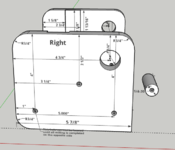
I'm going very "simply" 3D designs. This is a snap shot of my most complicated design

Screenshot 2024-09-05 102604.png

I started using Sketchup when Google owned it and it was free. Then they sold it to Trimble. It was free for awhile longer for DIY projects (some features disabled). Then last year, the free version was only available "online". Now even the online version is $119/year !

Looking for comments on FreeCAD and TinkerCAD or other FREE 3D CAD programs. Windows and Linux would be nice.
 

Cruzan80

Well-known member
Joined
Jul 22, 2015
Messages
4,154
Location
Denver, CO
Do you want a pencil based CAD, or Parametric CAD? Is online a want/need/hate? I would suggest OnShape, but it will require a bit of a mind-shift.

You can get the offline version of SketchUp still, and install it.
 

turnthewrench 2.0

Well-known member
Joined
Dec 23, 2017
Messages
518
Location
FL
Waking up this thread to see if anything has changed (and it has),

I'm going very "simply" 3D designs. This is a snap shot of my most complicated design

Screenshot 2024-09-05 102604.png

I started using Sketchup when Google owned it and it was free. Then they sold it to Trimble. It was free for awhile longer for DIY projects (some features disabled). Then last year, the free version was only available "online". Now even the online version is $119/year !

Looking for comments on FreeCAD and TinkerCAD or other FREE 3D CAD programs. Windows and Linux would be nice.
 

F-22

Well-known member
Joined
Jan 23, 2022
Messages
1,830
We have ProEngineer/Creo at work. I learned on Solidworks. Each has their own pros and cons. Though I definitely like SW more for how it handles file storage - Creo is a huge mess. But I think it uses less resources (RAM), SW can bring the pc to a halt.

Did many machines and prototypes for my factory in Creo. Here's an extrusion tool for ceramic, a special prototype made out of unconventional materials for what we're doing (combination of teflon and steel, plus unusual geometry, plus a honeycomb mesh to kill the memory effect in the ceramic).

trn.PNG
 

Citation

Well-known member
Joined
Jan 20, 2016
Messages
3,209
Location
Indy
We have ProEngineer/Creo at work. I learned on Solidworks. Each has their own pros and cons. Though I definitely like SW more for how it handles file storage - Creo is a huge mess. But I think it uses less resources (RAM), SW can bring the pc to a halt.

Did many machines and prototypes for my factory in Creo. Here's an extrusion tool for ceramic, a special prototype made out of unconventional materials for what we're doing (combination of teflon and steel, plus unusual geometry, plus a honeycomb mesh to kill the memory effect in the ceramic).

trn.PNG
Does Creo still work like Prose where each save is a new copy of the file? That was a feature that was great with paired with some management software but was a real pain if used on a typical stand alone system. That said, it saved my bacon a few times.
 

F-22

Well-known member
Joined
Jan 23, 2022
Messages
1,830
Does Creo still work like Prose where each save is a new copy of the file? That was a feature that was great with paired with some management software but was a real pain if used on a typical stand alone system. That said, it saved my bacon a few times.
Yes, it made sense when we had software called "Total Commander", but everything is locked down tight in work computers nowadays, and I guess that program gave too much access? It's a mess in normal Windows. I think Creo could solve it much more elegantly today - it's probably a leftover legacy thing. But my folders have a billion files due to that.

Locking down the system helps little if the people aren't educated. An elderly engineer about two years from retirement who is sitting across from me got a scam email a couple months ago from an "electrical technician" asking him to fill in some data on the provided link. He is just building some vacation home so he bit into the scam completely. The link would open an error page in the browser, so he thought something is wrong with his computer. Sure enough, he sent it to everyone in the office to open it for him, then to people in other departments cause of course the internet in "our room" is "wrong", then followed by sending it to his son who tried to open it at his job (in a completely different workplace) and to his wife who also did it at home.

I doubt he'd easily fall for it otherwise, but they included his name, address and signed it by some actual person he knew... :)
 

Citation

Well-known member
Joined
Jan 20, 2016
Messages
3,209
Location
Indy
20+ years back my employer had a CAD management package that made this work really nicely. The way it worked was your CAD work was done in a protected computer space. The CAD files were either reference files (released models/parts from vendors etc) or files you were working on. While you were working files could be physically saved to your local HD (at the time ProE files were 100% in computer RAM - it was fast but at the time required a top dollar computer). When you were working on CAD files you could save to your local HD during the day. At night you either had to check files into a vault on the server or lose the files. The net effect was all those "saves" you did during the day, each one creating a new copy of the file you were working on, would pile up on the local HD. However, only the last file of the day (assuming it was changed) would get checked into the server at night.

This was actually really nice. If your computer crashed during the day you could recover to your last save point by looking at the trail files on the local HD. However, if the whole computer crapped out you could find the vault would have copies from each time you checked the files in. It also meant you had a daily record of the changes to the files. This daily record could be really handy. When designing in CAD sometimes you are making things up as you create the final shape. Suppose you start by designing with 3 supports and you spend a day or two designing that version. Later you decide you need 4 so you delete the 3 supports (and two days of work) then start designing the 4 support version. Now a few days later into the modeling you really that 3 was correct after all. Well you already deleted the 2 days of work you spent on those 3 supports. However, since you have trail files you can simply restore a version of the model from the last time it was saved with 3 supports.

Of course you can do that without the fancy vault software. The problem I saw when my next employer didn't have the vault software is I might have 100+ copies of a single part on the HD. That was the part I was working on and changing a lot. Other parts might have just a few copies as they weren't changed much. Either way, I had a lot of copies of the same part. ProE didn't have a nice way to sort out those files (say automatically delete all but one file per each day or something). Like this posting, the list of copies was needlessly long. The upside is occasionally, you were saved when a previous version of the file could be opened.

I suspect many of the modern programs like Sharepoint have a similar system that never overwrites a file but instead only shows you the latest version. Earlier versions can be found via some menu pick.

All that said (and it was said with many words), I'm pretty used to Solidwork's conventional Windows file handling. If my choice were free Creo or pay for SW I would be happy to use Creo again. But I do think SW (despite becoming an evil software company) is the easier package to use.
 

tjansson

Well-known member
Joined
Apr 25, 2018
Messages
196
Location
Northern Vermont
I'm on Solidworks and Creo at work with Windchill for PDM. Our company has been getting forced onto Creo by our parent company. I do not like Creo. Just making dxf from a solid for laser is a hassle. I'll get used to it, I suppose. also used NX and Teamcenter for many years.

I have to migrate a bunch of personal projects from solidworks to creo, or something else, before we loose our SW license sometime this next year. From what I am reading, you can download the maker version of Solidworks with the $50/ year license, i.e., not just 3dexperience. If it includes drafting I might be inclined to purchase it for home use.
 

Citation

Well-known member
Joined
Jan 20, 2016
Messages
3,209
Location
Indy
I'm on Solidworks and Creo at work with Windchill for PDM. Our company has been getting forced onto Creo by our parent company. I do not like Creo. Just making dxf from a solid for laser is a hassle. I'll get used to it, I suppose. also used NX and Teamcenter for many years.

I have to migrate a bunch of personal projects from solidworks to creo, or something else, before we loose our SW license sometime this next year. From what I am reading, you can download the maker version of Solidworks with the $50/ year license, i.e., not just 3dexperience. If it includes drafting I might be inclined to purchase it for home use.
I did the $50 version. It's the student version. The limitations don't impact my personal work and they didn't really bother to verify I was a student (they used to be aggressive about it). I would also suggest saving your personal stuff as STEP files. They have limits but they are also an open format so you would lose your files if SW decides the only option is the full piece version. I want as worried about this in the old days when that software package didn't force you to upgrade reach year.
 
OP
T

theoldwizard1

Well-known member
Joined
Feb 22, 2011
Messages
43,076
Location
SE MI
Do you want a pencil based CAD, or Parametric CAD? Is online a want/need/hate? I would suggest OnShape, but it will require a bit of a mind-shift.

You can get the offline version of SketchUp still, and install it.
Okay, I am such newbie I don't understand what a "pencil based" CAD or "parametric based " CAD are !

I am looking for FREE ! SketchUp is no longer free.
 

dr_clyde

Well-known member
Joined
Jan 7, 2009
Messages
6,422
Location
Holland, MI
If all you’ve ever known is simple AutoCAD, the difference between “pencil cad” and parametric cad can be a bit difficult to understand but I’ll give it a shot.

“Pencil based” cad is like AutoCAD. Usually this is 2D cad. You’re simply generating drawings using a computer to move a digital pencil. This is primarily used to make engineering drawings commonly called blueprints. You can also use it as a design tool or to make files for CNC machines, but it’s intended as an automated pencil. The design exists elsewhere, you’re just making drawings of it.

To make a simple example, let’s say you want a drawing of a 2 inch hole in the center of a 4 inch square plate. In AutoCAD, you draw the lines for the plate and the circle for the hole, defining the size and location of the circle to the lines as you draw it and that’s that. It’s not driven by anything else other than the data you gave it as you drew it. The circle is not tied to the square in any way, and if you moved the square, the circle would stay where it is. In this instance, a dimension is a measurement. It shows how big you drew an object, but it does not drive the size of the object. I drew a 2 inch circle, the dimension on the drawing simply tells me how big it is and where it is in relationship to a datum. To change the size or location of the circle, I must draw a new circle of the correct size in the correct place, then re-draw the dimensions on the drawing reflecting the data.

Parametric CAD is like Solidworks. This is primarily 3D. Parametric CAD is primarily a design tool, but the models are usually used to make engineering drawings and data for CAM systems to generate CNC tool paths. It uses parameters and relationships such as tangency, concentricity or parallelism and driving dimensions to define a sketch, and then that sketch is used to create models. Those models then can generate the various views on drawings, which is what traditional CAD or draftsmen used to make. In this style of CAD the dimensions drive the design, and can be changed as the design grows and needs updating. In our plate and hole example, I simply would draw a box and circle of arbitrary size and location, then add in the dimensions and relationships later as I go. I can also go back and change these numbers as needed. I tell the sketch using construction lines and relations like midpoint to ensure that no matter what I do to the square, the circle stays centered.

Basically, both can draw things, but one is a computerized drafting board and one is a design tool that can make drawings.
 

Cruzan80

Well-known member
Joined
Jul 22, 2015
Messages
4,154
Location
Denver, CO
Yes, thanks Dr Clyde.

OnShape is free for home users, and is based in the cloud (Parametric CAD). Fusion 360 is another option (computer installed, cloud saves). You can still download SketchUp (2017 IIRC) for free and install it. It is only the cloud based version that now has a charge.
 

Citation

Well-known member
Joined
Jan 20, 2016
Messages
3,209
Location
Indy
Yes, thanks Dr Clyde.

OnShape is free for home users, and is based in the cloud (Parametric CAD). Fusion 360 is another option (computer installed, cloud saves). You can still download SketchUp (2017 IIRC) for free and install it. It is only the cloud based version that now has a charge.
Do you have a link for the older version of SketchUp?
 
To avoid these ads, REGISTER NOW!

jimbothecricket

Well-known member
Joined
Aug 15, 2023
Messages
96
Location
San Diego
FreeCAD has gotten so much better in the past few years. I have used SolidWorks and Inventor previously. In my last job they wouldn't give me a CAD license. I still needed to get work done so turned to FreeCAD and was pleasantly surprised. Getting used to the whole "workbench" thing took a little bit of time. The beefier computers at work run ubuntu linux making FreeCAD a great option.

For those curious, "FreeCAD" is a specific CAD software, not a generic term for free CAD applications: https://www.freecad.org/
 
OP
T

theoldwizard1

Well-known member
Joined
Feb 22, 2011
Messages
43,076
Location
SE MI
2017 Sketchup is still out there, for free.
I found a version on CNET named "SketchUp_Make_V2017.2.2555.nupkg"

I found out that a ".nupkg" file is a type of ZIP file and 7-Zip handled it perfectly. The contents are something I have never seem before. Under the tool subdirectory, I found "chocolateyInstall.ps1" which is a PowerShell script (which must be run in PowerShell) but it fails.

Got another source for SketchUp_Make_V2017.2.2555 ?
 
OP
T

theoldwizard1

Well-known member
Joined
Feb 22, 2011
Messages
43,076
Location
SE MI
I found a version on CNET named "SketchUp_Make_V2017.2.2555.nupkg"

I found out that a ".nupkg" file is a type of ZIP file and 7-Zip handled it perfectly. The contents are something I have never seem before. Under the tool subdirectory, I found "chocolateyInstall.ps1" which is a PowerShell script (which must be run in PowerShell) but it fails.

Got another source for SketchUp_Make_V2017.2.2555 ?
Found it here https://www.filehorse.com/download-sketchup-make-64/
 

RoninB4

Well-known member
Joined
Jul 22, 2020
Messages
3,479
Location
Under My House
-I started with 2D AC, then Pro-e 2000i with drop down menus. Have used most of the other 3D programs. The free CAD programs are fine to get your feet wet but I think they're free just to gain market population. Once it's popular enough it becomes pay-for-play. I prefer 3D over 2D, object to the strong arm tactics used for yearly fees, and distrust the cloud based storage/use so many are trending to. However, that's what it is so pick a program that will be around for a while if you intend to stay in the field with terms that suit your conditions. I have more opinions that are worth exactly what you pay for them.
 

F-22

Well-known member
Joined
Jan 23, 2022
Messages
1,830
Suppose you start by designing with 3 supports and you spend a day or two designing that version. Later you decide you need 4 so you delete the 3 supports (and two days of work) then start designing the 4 support version. Now a few days later into the modeling you really that 3 was correct after all. Well you already deleted the 2 days of work you spent on those 3 supports.

Yes I essentially do this myself - make V1, V2, V3... folders whenever I do a major revision or version of my current project. Oftentimes you get focused on a certain solution for days before you realize a completely different idea is better (e.g. I see myself often get caught up in trying to make things rotate instead of translate but end up overcomplicating due to that). We do a lot of unique production machines at work and I really enjoy this sort of iterative development, plus my hands are largely free because I usually make quite cheap designs (e.g. by using laser curring and sheet metal bending which costs pennies, while most of my coworkers often have big pieces milled which... is a waste of time in many cases, and in the end things that are supposed to be exact still aren't exact).

I'm on Solidworks and Creo at work with Windchill for PDM. Our company has been getting forced onto Creo by our parent company. I do not like Creo. Just making dxf from a solid for laser is a hassle. I'll get used to it, I suppose. also used NX and Teamcenter for many years.

I have to migrate a bunch of personal projects from solidworks to creo, or something else, before we loose our SW license sometime this next year. From what I am reading, you can download the maker version of Solidworks with the $50/ year license, i.e., not just 3dexperience. If it includes drafting I might be inclined to purchase it for home use.

We use Windchill too. Such a hassle to do absolutely anything in it. Then they threw in 3 or 4 other systems on the side as each division is a bit different and finding stuff just takes way too long. Every new system can be amazing but people just don't get used to it. Wish they just had some simple file storage with windows explorer that everyone knows how to use - I think you can easily lock files in it too anyway. Trying to be fancy but it ends up so much worse. For these file management softwares, you have to go all in and be completely strict about it, otherwise it's not worth doign it.

I would also suggest saving your personal stuff as STEP files. They have limits but they are also an open format so you would lose your files if SW decides the only option is the full piece version

That said I think most CAD software is capable of reading SW files, they are very common. step is the industry standard of course, but I wouldn't be too worried about SW files being incompatible. OnShape is free and can open and convert them online in a pinch.

I would definitely recommend SW for anyone starting out and learning to use CAD. It's very logical and easy to use. Companies use other programs like Creo cause they are considerably cheaper or due to legacy reasons (older employees who will not relearn to use SW instead of Creo).
 

RoninB4

Well-known member
Joined
Jul 22, 2020
Messages
3,479
Location
Under My House
Good info in the posting above that also describes the somewhat circular process of decision making during the design process. You start one design, change your mind, start new aspect/features, new features are too costly/complicated, realize you were right the first time, go back to first idea.......

I either try to "Save As" under different version names/numbers or work in different configurations that suppress/allow different ideas in the same base assembly for comparison until I decide which direction to go or team evaluation happens. Yes the configurations grow the file size and is more complicated to do but it allows instantaneous version change without switching to a different model and can also allow differences (range of motion, work envelope, etc,) to display on the same drawing (in dashed phantom lines) for evaluation or customer component purchases. I switch back and forth between SW and some PTC software per assignment so I don't recall if this is possible with ALL the CAD programs, it's just an option that may/may not be useful.

I don't like to toss out 2 hours of design work and certainly not 2 days of work. Just like voting in Chicago, save early and often.
 

F-22

Well-known member
Joined
Jan 23, 2022
Messages
1,830
Forgot to write it down before - what *really* bothers me with Proengineer/Creo is how convoluted it seems to be to do different "versions" while stuff is already incorporated into an assembly. Or to copy the whole thing - for example, SW has the "pack and go" option that just makes a neat .zip file if I remember right. On Creo, maybe I'm doing it wrong but it always seems like I'm jumping through hoops to achieve anything similar to that.
 
OP
T

theoldwizard1

Well-known member
Joined
Feb 22, 2011
Messages
43,076
Location
SE MI
2017 Sketchup is still out there, for free.
I have to come back here and say ThankYou, ThankYou, ThankYou !

I installed 2017 Sketchup, and the brain cells that I thought had died a couple of years ago came back to life ! I quickly remembered almost all of what I knew (not much) about it and am well on my way with my design !
 

ArcReactorKC

Well-known member
Joined
Jun 1, 2019
Messages
2,237
Location
Out in the county NE of KCMO
I have to come back here and say ThankYou, ThankYou, ThankYou !

I installed 2017 Sketchup, and the brain cells that I thought had died a couple of years ago came back to life ! I quickly remembered almost all of what I knew (not much) about it and am well on my way with my design !
I still use 2017 and have found lots of plugins still work. I get a lot from sketchucation
 

Citation

Well-known member
Joined
Jan 20, 2016
Messages
3,209
Location
Indy
Forgot to write it down before - what *really* bothers me with Proengineer/Creo is how convoluted it seems to be to do different "versions" while stuff is already incorporated into an assembly. Or to copy the whole thing - for example, SW has the "pack and go" option that just makes a neat .zip file if I remember right. On Creo, maybe I'm doing it wrong but it always seems like I'm jumping through hoops to achieve anything similar to that.
I don't recall those details. Then again I largely moved to SW with the release of Wildfire. We **** with i^2 for a years or so while they were trying to figure out Wildfire. I've really never used Creo professionally.
 

Steve_P

Well-known member
Joined
Sep 15, 2010
Messages
5,181
OP is looking for FREE There is no sense discussing Creo or SW which costs thousands of $ alone in yearly license fees - omitting initial purchase.
 

cleaner

Well-known member
Joined
Dec 22, 2018
Messages
134
Location
At home
Forgot to write it down before - what *really* bothers me with Proengineer/Creo is how convoluted it seems to be to do different "versions" while stuff is already incorporated into an assembly. Or to copy the whole thing - for example, SW has the "pack and go" option that just makes a neat .zip file if I remember right. On Creo, maybe I'm doing it wrong but it always seems like I'm jumping through hoops to achieve anything similar to that.
In Creo you want to use the backup function to save a copy of an object, and all dependencies associated with that object. It will not create a zip file but if you backup to a directory you can just zip all files in the directory.

Click File > Save As > Save a Backup.
https://support.ptc.com/help/creo/c...damentals/fundamentals/To_Back_Up_a_File.html

Creo can also call external scripts so you can automate the backup and creation of the zip file using a macro to make it an analog to SW pack and go.
 

cleaner

Well-known member
Joined
Dec 22, 2018
Messages
134
Location
At home
OP is looking for FREE There is no sense discussing Creo or SW which costs thousands of $ alone in yearly license fees - omitting initial purchase.
PTC offers an educational version of Creo Parametric at low cost. The education version files are not compatible with a commercial license, so no sharing files among educational and commercial licenses.

PTC also owns OnShape which is cloud based and I think they still offer a free version.
 

F-22

Well-known member
Joined
Jan 23, 2022
Messages
1,830
In Creo you want to use the backup function to save a copy of an object, and all dependencies associated with that object. It will not create a zip file but if you backup to a directory you can just zip all files in the directory.

Click File > Save As > Save a Backup.
https://support.ptc.com/help/creo/c...damentals/fundamentals/To_Back_Up_a_File.html

Creo can also call external scripts so you can automate the backup and creation of the zip file using a macro to make it an analog to SW pack and go.

That's what I resort to nowadays yes. It took me a while to figure it out and noone I asked would have an idea for it. Just feels a bit like a hack. Being referred to as a backup by proengineer also makes it harder to find when looking for a proper copy (although it is essentially a backup).
 

BCreekDave

Well-known member
Joined
Dec 17, 2015
Messages
206
Location
Dayton, OH
Just ran across this


Might be worth a look
 

RoninB4

Well-known member
Joined
Jul 22, 2020
Messages
3,479
Location
Under My House
Just ran across this


Might be worth a look
Would be interested in hearing reviews from any of the members just to keep up on things.
 

danski0224

Well-known member
Joined
Jan 29, 2005
Messages
13,325
Location
Near Naperville, IL
Just in case anyone reading this has an interest in SketchUp 2017 AND one of those fancy 3D controllers... be warned that there is an extension required for a 3Dconnexion controller that no longer exists in later versions of their drivers.

AND, Trimble has removed online access from the extension warehouse that is part of SketchUp 2017.

I have an old controller/navigator, and bought a new wireless one to use with the laptop.

New one was no go, full stop. Will not work with SketchUp because the driver package does not include the SketchUp extension.

It also won't work with an old driver, and a new driver will not play with the old one- it requires the old driver to be uninstalled.

3Dconnexion still has old drivers available, so I tried a couple of older ones out until the controller I have worked on the laptop, then I had to find another old controller.

The controller is a game changer, so I really wanted another one.

Edit:

My existing controller is USB.

New one I tried was wireless Bluetooth. That one didn't work.

There is a previous wireless version that is 2.4gHz (NOT Bluetooth), which *might* work because it is almost as old as the USB one I have. No way to find out unless I buy one, then there are possible battery problems. I could download the driver on a different computer and see if the extension is listed. If it is, it should work.
 
Last edited:
To avoid these ads, REGISTER NOW!
Top Bottom