RoninB4
Well-known member
Several potential issues with cloud based software, not something many companies/independents are in favor of. JMO


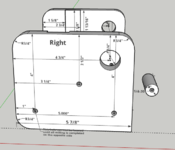
Waking up this thread to see if anything has changed (and it has),
I'm going very "simply" 3D designs. This is a snap shot of my most complicated design
I started using Sketchup when Google owned it and it was free. Then they sold it to Trimble. It was free for awhile longer for DIY projects (some features disabled). Then last year, the free version was only available "online". Now even the online version is $119/year !
Looking for comments on FreeCAD and TinkerCAD or other FREE 3D CAD programs. Windows and Linux would be nice.

Does Creo still work like Prose where each save is a new copy of the file? That was a feature that was great with paired with some management software but was a real pain if used on a typical stand alone system. That said, it saved my bacon a few times.We have ProEngineer/Creo at work. I learned on Solidworks. Each has their own pros and cons. Though I definitely like SW more for how it handles file storage - Creo is a huge mess. But I think it uses less resources (RAM), SW can bring the pc to a halt.
Did many machines and prototypes for my factory in Creo. Here's an extrusion tool for ceramic, a special prototype made out of unconventional materials for what we're doing (combination of teflon and steel, plus unusual geometry, plus a honeycomb mesh to kill the memory effect in the ceramic).
Yes, it made sense when we had software called "Total Commander", but everything is locked down tight in work computers nowadays, and I guess that program gave too much access? It's a mess in normal Windows. I think Creo could solve it much more elegantly today - it's probably a leftover legacy thing. But my folders have a billion files due to that.Does Creo still work like Prose where each save is a new copy of the file? That was a feature that was great with paired with some management software but was a real pain if used on a typical stand alone system. That said, it saved my bacon a few times.

I did the $50 version. It's the student version. The limitations don't impact my personal work and they didn't really bother to verify I was a student (they used to be aggressive about it). I would also suggest saving your personal stuff as STEP files. They have limits but they are also an open format so you would lose your files if SW decides the only option is the full piece version. I want as worried about this in the old days when that software package didn't force you to upgrade reach year.I'm on Solidworks and Creo at work with Windchill for PDM. Our company has been getting forced onto Creo by our parent company. I do not like Creo. Just making dxf from a solid for laser is a hassle. I'll get used to it, I suppose. also used NX and Teamcenter for many years.
I have to migrate a bunch of personal projects from solidworks to creo, or something else, before we loose our SW license sometime this next year. From what I am reading, you can download the maker version of Solidworks with the $50/ year license, i.e., not just 3dexperience. If it includes drafting I might be inclined to purchase it for home use.
Okay, I am such newbie I don't understand what a "pencil based" CAD or "parametric based " CAD are !Do you want a pencil based CAD, or Parametric CAD? Is online a want/need/hate? I would suggest OnShape, but it will require a bit of a mind-shift.
You can get the offline version of SketchUp still, and install it.
Do you have a link for the older version of SketchUp?Yes, thanks Dr Clyde.
OnShape is free for home users, and is based in the cloud (Parametric CAD). Fusion 360 is another option (computer installed, cloud saves). You can still download SketchUp (2017 IIRC) for free and install it. It is only the cloud based version that now has a charge.
2017 Sketchup is still out there, for free.SketchUp is no longer free.
I found a version on CNET named "SketchUp_Make_V2017.2.2555.nupkg"2017 Sketchup is still out there, for free.
Found it here https://www.filehorse.com/download-sketchup-make-64/I found a version on CNET named "SketchUp_Make_V2017.2.2555.nupkg"
I found out that a ".nupkg" file is a type of ZIP file and 7-Zip handled it perfectly. The contents are something I have never seem before. Under the tool subdirectory, I found "chocolateyInstall.ps1" which is a PowerShell script (which must be run in PowerShell) but it fails.
Got another source for SketchUp_Make_V2017.2.2555 ?
Suppose you start by designing with 3 supports and you spend a day or two designing that version. Later you decide you need 4 so you delete the 3 supports (and two days of work) then start designing the 4 support version. Now a few days later into the modeling you really that 3 was correct after all. Well you already deleted the 2 days of work you spent on those 3 supports.
I'm on Solidworks and Creo at work with Windchill for PDM. Our company has been getting forced onto Creo by our parent company. I do not like Creo. Just making dxf from a solid for laser is a hassle. I'll get used to it, I suppose. also used NX and Teamcenter for many years.
I have to migrate a bunch of personal projects from solidworks to creo, or something else, before we loose our SW license sometime this next year. From what I am reading, you can download the maker version of Solidworks with the $50/ year license, i.e., not just 3dexperience. If it includes drafting I might be inclined to purchase it for home use.
I would also suggest saving your personal stuff as STEP files. They have limits but they are also an open format so you would lose your files if SW decides the only option is the full piece version
I have to come back here and say ThankYou, ThankYou, ThankYou !2017 Sketchup is still out there, for free.
I still use 2017 and have found lots of plugins still work. I get a lot from sketchucationI have to come back here and say ThankYou, ThankYou, ThankYou !
I installed 2017 Sketchup, and the brain cells that I thought had died a couple of years ago came back to life ! I quickly remembered almost all of what I knew (not much) about it and am well on my way with my design !
I don't recall those details. Then again I largely moved to SW with the release of Wildfire. We **** with i^2 for a years or so while they were trying to figure out Wildfire. I've really never used Creo professionally.Forgot to write it down before - what *really* bothers me with Proengineer/Creo is how convoluted it seems to be to do different "versions" while stuff is already incorporated into an assembly. Or to copy the whole thing - for example, SW has the "pack and go" option that just makes a neat .zip file if I remember right. On Creo, maybe I'm doing it wrong but it always seems like I'm jumping through hoops to achieve anything similar to that.
I had one crash, but I save often !I still use 2017 and have found lots of plugins still work. I get a lot from sketchucation
In Creo you want to use the backup function to save a copy of an object, and all dependencies associated with that object. It will not create a zip file but if you backup to a directory you can just zip all files in the directory.Forgot to write it down before - what *really* bothers me with Proengineer/Creo is how convoluted it seems to be to do different "versions" while stuff is already incorporated into an assembly. Or to copy the whole thing - for example, SW has the "pack and go" option that just makes a neat .zip file if I remember right. On Creo, maybe I'm doing it wrong but it always seems like I'm jumping through hoops to achieve anything similar to that.
PTC offers an educational version of Creo Parametric at low cost. The education version files are not compatible with a commercial license, so no sharing files among educational and commercial licenses.OP is looking for FREE There is no sense discussing Creo or SW which costs thousands of $ alone in yearly license fees - omitting initial purchase.
That's what I resort to nowadays yes. It took me a while to figure it out and noone I asked would have an idea for it. Just feels a bit like a hack. Being referred to as a backup by proengineer also makes it harder to find when looking for a proper copy (although it is essentially a backup).In Creo you want to use the backup function to save a copy of an object, and all dependencies associated with that object. It will not create a zip file but if you backup to a directory you can just zip all files in the directory.
Click File > Save As > Save a Backup.
https://support.ptc.com/help/creo/c...damentals/fundamentals/To_Back_Up_a_File.html
Creo can also call external scripts so you can automate the backup and creation of the zip file using a macro to make it an analog to SW pack and go.

 hackaday.com
Would be interested in hearing reviews from any of the members just to keep up on things.Just ran across this
FreeCAD Is Near 1.0
The open-source parametric 3D modelling software, FreeCAD, is out in a release candidate for version 1.0. If you’ve tried FreeCAD before and found a few showstoppers, it might be a good time…
Might be worth a look