

You are using an out of date browser. It may not display this or other websites correctly.
You should upgrade or use an alternative browser.
You should upgrade or use an alternative browser.
3D CAD
- Thread starter theoldwizard1
- Start date
Man most of the stuff you guys are talking about is greek to me, funny thing is I drew on Autocad for a living for 11 years before I retired in 2008. Doing HVAC drawings. Although I never did any 3d stuff they were all 2d drawings.
I started out on autocad 14 and we upgraded a few times and I was using autocad 2002 in 2008 when I retired.
2002 probably had a 3d menu but we never used it.
I still have the program, I opened it up a few months ago to change a dwg drawing I had and for the life of me I couldn't remember how to change the text.........it's a ***** getting old, I did figure it out.
Yeah I'd be completely lost trying to use autocad now. There was a whole syntax for using the command line and layers and everything.
Use to chat with some guys that did architectural cadd on irc chat. Talk about a million layers
Last edited:
engineer2
Well-known member
SolidWorks Professional (I think that is one step up from basic) annual license is $1495 + sales tax. Two people can use it, but not at the same time.
dr_clyde
Well-known member
Yeah, you're basically just leasing the software at that point. If you're going to use it for more than a couple years, you're better off buying a perpetual seat and paying maintenance. The maintenance is cheaper than the lease, and you own a serial number should you decide to stop paying maintenance. Only downside is after a few years, the world moves on. I have an old computer with Solidworks 2013 on it. When we decided to get current, we had to buy a new seat because they won't let you skip years on the maintenance.SolidWorks Professional (I think that is one step up from basic) annual license is $1495 + sales tax. Two people can use it, but not at the same time.
On the plus side, 2013 is still perfectly fine for working on stuff at home and drawing my own stuff. It just won't open files from my customers or export anything current CAM software can use.
Damned if you do, damned if you don't.
For 2D cad, I just lease Draftsight for like, a hundred bucks a year. Basically Autocad without the Autodesk baggage.
Firebrick43
Well-known member
Fusion is alot like Creo.As a 20+ year user of Creo/ProE, my opinion is that most of the big name packages, NX, Catia, Creo, Solidworks are merging feature-sets and are now very similar to use. I am a big fan of the parametric nature of Creo and others like it. I have not used Fusion360, but hear very good things about it. I have a seat of Autocad and i hate it for anything that isn't strictly 2d. I have used Sketchup and don't care for it. I know lots of people like it. If i had to buy a seat of something myself, i'd probably try a lot harder to like the free stuff. YMMV.
This is what I find so frustrating about SW. It's clear that the upgrade treadmill is about making money, not a better product. I was using SW 2014 for a long time and I see no significant differences between it and SW 2021. Most people would be just fine sticking with something like 2014 but that would mean less money so screw that. Even though this actually harms customers they for it. Yes, free market etc but often when you abuse users they will dump you in a hurry if something better comes along.Yeah, you're basically just leasing the software at that point. If you're going to use it for more than a couple years, you're better off buying a perpetual seat and paying maintenance. The maintenance is cheaper than the lease, and you own a serial number should you decide to stop paying maintenance. Only downside is after a few years, the world moves on. I have an old computer with Solidworks 2013 on it. When we decided to get current, we had to buy a new seat because they won't let you skip years on the maintenance.
On the plus side, 2013 is still perfectly fine for working on stuff at home and drawing my own stuff. It just won't open files from my customers or export anything current CAM software can use.
Damned if you do, damned if you don't.
For 2D cad, I just lease Draftsight for like, a hundred bucks a year. Basically Autocad without the Autodesk baggage.
Cruzan80
Well-known member
So I teach Onshape, and have an edu licence for Fusion. Overall, for 3d modeling, Onshape does 99% of what I ask from Fusion. I dont play with sheet metal or Tsplines, so that may differ. Fusion is loaded for the CAM stiff for me.What kind of computer power is needed for fusion 360? I used inventor and was very proficient years ago. I stepped away and when I came back to it, a major investment in a new computer was needed to run it. I’d love to learn a new drawing program.
The bigeest thing thag differs is the level of computing required. While Fusion stores on the cloyd, all the rendering is done locally. OnShape does all rendering thru their servers, meaning I can literally do 3D CAD on my cell phone (they have an app for that!). There is no workload whatsoever on the host computer.
And I have a SW seat, courtesy of my HS counterpart (I teach MS).
Unigraphics and inventor is what I am familiar with. Early versions of Unigraphics was horrible during my college days. They were many generations behind, since they got it for free because of GM sponsoring it. They updated to UG NX my last semester and it was a lesser version of inventor polish at that time, but a huge upgrade. It did have a lot of cool features for having calculations dictate constraints for things.
I use fusion 360 now for a lot of things and it works just fine although a little gimped from full inventor. Exporting stl files from fusion360 works good for me and the 2D drawing feature for fabrication drawings is great.
I have also been trying out FreeCad for it FEA capabilities. FEA works, but can be frustrating getting it to work on some models that seem to have no problems or conflicts.
I use fusion 360 now for a lot of things and it works just fine although a little gimped from full inventor. Exporting stl files from fusion360 works good for me and the 2D drawing feature for fabrication drawings is great.
I have also been trying out FreeCad for it FEA capabilities. FEA works, but can be frustrating getting it to work on some models that seem to have no problems or conflicts.
i dont love solidworks licensing model but its not like their actually making the product better they are its multi nodal support, and simulations have improved substantially as has its step decompressionThis is what I find so frustrating about SW. It's clear that the upgrade treadmill is about making money, not a better product. I was using SW 2014 for a long time and I see no significant differences between it and SW 2021. Most people would be just fine sticking with something like 2014 but that would mean less money so screw that. Even though this actually harms customers they for it. Yes, free market etc but often when you abuse users they will dump you in a hurry if something better comes along.
dr_clyde
Well-known member
I will say I did notice some positive differences between 2013 and 2021 when I bought back in. Not saying I saw 6k worth of differences, but the program is definitely faster, smoother, has more UI improvements and is more intuitive than just a few years ago, and this is on the same computer. I imagine if I spent another 3k on a decent workstation I would see even more improvements.
It is gradual and not very noticeable when you get the maintenance every year. More dramatic when you skip a few years and get it all at once.
I will also say that the maintenance cost per year is pretty negligible for a business, especially one that is making money with CAD software. We charge $100/hr for our design time and in the shop, it doesn't take long for solidworks to pay for itself. Whole 'nother ballgame if you are just doing it for a hobby, which is not how it is intended.
It is gradual and not very noticeable when you get the maintenance every year. More dramatic when you skip a few years and get it all at once.
I will also say that the maintenance cost per year is pretty negligible for a business, especially one that is making money with CAD software. We charge $100/hr for our design time and in the shop, it doesn't take long for solidworks to pay for itself. Whole 'nother ballgame if you are just doing it for a hobby, which is not how it is intended.
Is anyone using Autocad for 3D? I think I'd shoot myself, or at least quit my job if that idea popped up. We sometimes draw hydraulic schematics in 2D Autocad and my blood pressure start to rise by just thinking about starting the software...
At work I use Inventor Pro, (2021 version), which is Autdesk's main 3D mechanical software. I haven't tried Fusion 360 but I have also heard good things about it. Cheaper and easier to get started on than Inventor.
At work I use Inventor Pro, (2021 version), which is Autdesk's main 3D mechanical software. I haven't tried Fusion 360 but I have also heard good things about it. Cheaper and easier to get started on than Inventor.
vavet
Well-known member
I've used SolidWorks both professionally and hobb-ily (for my hobbies). I've also used Sketchup. I could probably get better with Sketchup with some time, but it just doesn't work as well as SolidWorks.
I know plenty of people use Fusion for 3D prints, but since I have access to SW, I use that.
I know plenty of people use Fusion for 3D prints, but since I have access to SW, I use that.
LeonardY
Well-known member
I started with AutoCAD with Ver3. I have used ACAD my entire career. One of my colleges wrote a add on that allowed keyboard shortcuts. Now it's included and I still use it the same way.
I moved on to 3D back in 2000. I wanted to learn Soldiworks but the CAD manager didn't want a designer to use it.
I ended up learning Rhino, FormZ, Maya, and Zbrush. Which I do most of my 3D work in.
I also work in Polyworks, Solidworks, Inventor, Revit, and DesignX.
I moved on to 3D back in 2000. I wanted to learn Soldiworks but the CAD manager didn't want a designer to use it.
I ended up learning Rhino, FormZ, Maya, and Zbrush. Which I do most of my 3D work in.
I also work in Polyworks, Solidworks, Inventor, Revit, and DesignX.
seber
Well-known member
I see a lot of people here have used Autocad. I started with it on Autocad 1 when I was with ATT. Went all the way to Autocad 13 before I finally got Solidworks. Since I was chief engineer by then I got to make the decision. I checked out a number of types and decided Solidworks was far above the competition at the time. That has been some time ago but I wouldn't hesitate to choose it again. Anything that is similar at a reasonable cost would be a great choice. Solidworks, unfortunately is not a reasonable cost.
I might add that the third party add ons are not necessarily that great. The worst experience was a cam program. That is physical cams as in camshaft. It lacked options needed for true versatility. I finally had to write my own program. One of the companies I worked with told me they had done the same thing. Wish I had known that before I wrote mine.
I might add that the third party add ons are not necessarily that great. The worst experience was a cam program. That is physical cams as in camshaft. It lacked options needed for true versatility. I finally had to write my own program. One of the companies I worked with told me they had done the same thing. Wish I had known that before I wrote mine.
Last edited:
Agreed solidworks and first party add ones are pretty great the third party stuff is very variable from excellent to bad enough I'm writing my own versionI see a lot of people here have used Autocad. I started with it on Autocad 1 when I was with ATT. Went all the way to Autocad 13 before I finally got Solidworks. Since I was chief engineer by then I got to make the decision. I checked out a number of types and decided Solidworks was far above the competition at the time. That has been some time ago but I wouldn't hesitate to choose it again. Anything that is similar at a reasonable cost would be a great choice. Solidworks, unfortunately is not a reasonable cost.
I might add that the third party add ons are not necessarily that great. The worst experience was a cam program. That is physical cams as in camshaft. It lacked options needed for true versatility. I finally had to write my own program. One of the companies I worked with told me they had done the same thing. Wish I had known that before I wrote mine.
4 FN 27
ALLIANCE MEMBER
Lots of cool stuff here.
I got into the Cad world back in 1988 when an Engineer from 3M showed up one day and handed me a Floppy Disk with 164 Part Numbers on it and said we had 6 weeks to make the Prototypes...baptism by fire. At the time they were using Cadkey as a design package. So I signed up for Cadkey. Long story short I had 2 days of training on that software and flew to Los Angles for a weeks training on a CAM Software called Fabriwin, specific to Turret Punches and Lasers.
Worked 7 days a week, 18-20 hours a day and figured it all out and it was mission accomplished. That opened a door at 3M where they could just hand us a disk with a 3D Wireframe Model and we could unfold it assigning Bend Deductions and Neutral Axis as required and get a flat in minutes instead of hours or days minimizing the double checks. Right the first time at the Machine went from 68% average to 98%.
IBM was the next target to offer this service too. They work in Catia at the time and would send us Wireframe IGES Files on a Disk...same process and we were able to reduce our overhead from 14 guys doing Sheet Metal Layout, 1 guy typing the G Code in and spitting out Paper Tape to 2 of us programming 1 Laser, 2 Combo Punch-Laser Presses and 4 Turret Presses. The business grew and the former Layout guys moved to better jobs in the company as we grew.
I continued to use Cadkey until about a year ago. With Covid disrupting the business I was able to take the time to go to school and learn what I needed to be proficient at Solidworks . I knew enough about Solidworks to convert files to Cadkey but that was about it. The Cad world had passed me by. But I am catching up.
In Cadkey I produced almost a Terabyte of Files over 32 years. An entire Data Base of Car Parts, Shop equipment...pretty much everything I have ever built for myself or anyone.
Now with the experience in SW I wish I had taken the time earlier to learn it and apply it. Today I spend between 6 and 8 hours a day on SW at work or at home making things...and servicing our customers. I love the parametric capability. I can get lost in SW for hours and enjoy every minute of it.
The next venture is to take the stuff I did in Cadkey and create Solid Models from the Wire Frames through Key Creator and then convert them to Solidworks as needed. This will update the Database over time and provide plenty for me to do when I retire and start building Cars full time again.
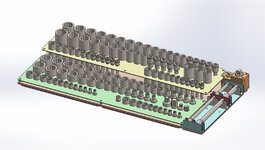
Last night I designed another Socket Tray for Tool Box that will go into a new Snowmobile Trailer when it arrives. Still need to add the Spacers, Rivets and 10-32 Screws...tonight's project.
Pick a software that works for you and gets the job done.
I got into the Cad world back in 1988 when an Engineer from 3M showed up one day and handed me a Floppy Disk with 164 Part Numbers on it and said we had 6 weeks to make the Prototypes...baptism by fire. At the time they were using Cadkey as a design package. So I signed up for Cadkey. Long story short I had 2 days of training on that software and flew to Los Angles for a weeks training on a CAM Software called Fabriwin, specific to Turret Punches and Lasers.
Worked 7 days a week, 18-20 hours a day and figured it all out and it was mission accomplished. That opened a door at 3M where they could just hand us a disk with a 3D Wireframe Model and we could unfold it assigning Bend Deductions and Neutral Axis as required and get a flat in minutes instead of hours or days minimizing the double checks. Right the first time at the Machine went from 68% average to 98%.
IBM was the next target to offer this service too. They work in Catia at the time and would send us Wireframe IGES Files on a Disk...same process and we were able to reduce our overhead from 14 guys doing Sheet Metal Layout, 1 guy typing the G Code in and spitting out Paper Tape to 2 of us programming 1 Laser, 2 Combo Punch-Laser Presses and 4 Turret Presses. The business grew and the former Layout guys moved to better jobs in the company as we grew.
I continued to use Cadkey until about a year ago. With Covid disrupting the business I was able to take the time to go to school and learn what I needed to be proficient at Solidworks . I knew enough about Solidworks to convert files to Cadkey but that was about it. The Cad world had passed me by. But I am catching up.
In Cadkey I produced almost a Terabyte of Files over 32 years. An entire Data Base of Car Parts, Shop equipment...pretty much everything I have ever built for myself or anyone.
Now with the experience in SW I wish I had taken the time earlier to learn it and apply it. Today I spend between 6 and 8 hours a day on SW at work or at home making things...and servicing our customers. I love the parametric capability. I can get lost in SW for hours and enjoy every minute of it.
The next venture is to take the stuff I did in Cadkey and create Solid Models from the Wire Frames through Key Creator and then convert them to Solidworks as needed. This will update the Database over time and provide plenty for me to do when I retire and start building Cars full time again.
Last night I designed another Socket Tray for Tool Box that will go into a new Snowmobile Trailer when it arrives. Still need to add the Spacers, Rivets and 10-32 Screws...tonight's project.
Pick a software that works for you and gets the job done.
billconner
Well-known member
I started with AutoCAD version 1.1 in late 1982 (first release version 1.0 was I think in June or July of 1982) and now am on 2018 - though I theoretically own 2021. Autodesk bought Revit and I never made the transition to Revit. If working in the architecture engineering world of construction as I did before retiring, not sure you have a choice. That said, AutoCAD to me is a drafting program. (I never seriously attempted the AutoCAD 3D.) Revit is more about design.
Most of the manufacturer's I know use Solidworks. It seems great for parts and machines and the requisite graphics for them. And quite a few folks I know - in my line of work - use Sketch-up for initial building designs, before transferring to AutoCAD (or Revit now.)
So you have to ask what you're going to use it for. It does not seem Solidworks is best for houses and garage, and several others that emphasize parts and machinery. Sketch-up is probably the low cost building and construction.
IOS vs Windows also a factor. I'm a DOS and now Windows guy for almost 40 years. (Victor 9000s anyone?) I just know when I was working that clients that were IOS based were very difficult to work with - their CAD (Turbocad?) just did not export well to AutoCAD and DOS. Hopefully that has changed.
Most of the manufacturer's I know use Solidworks. It seems great for parts and machines and the requisite graphics for them. And quite a few folks I know - in my line of work - use Sketch-up for initial building designs, before transferring to AutoCAD (or Revit now.)
So you have to ask what you're going to use it for. It does not seem Solidworks is best for houses and garage, and several others that emphasize parts and machinery. Sketch-up is probably the low cost building and construction.
IOS vs Windows also a factor. I'm a DOS and now Windows guy for almost 40 years. (Victor 9000s anyone?) I just know when I was working that clients that were IOS based were very difficult to work with - their CAD (Turbocad?) just did not export well to AutoCAD and DOS. Hopefully that has changed.
4 FN 27
ALLIANCE MEMBER
Back in the day I hated dealing with Autocad files. There were always broken lines to deal with and end point that did not meet. To the human eye on a Print they looked good but when it came to generating NC Code for a Laser we had to back up and fix things. Never happened with Cadkey.
The other issue was in the early days, and I am not sure if I am remembering this correctly but Autocad scaled a part to fit on the boarder of print. Thus we made quite a few parts 1/4 scale, 1/2 scale and so on. We always got paid to do it twice.
Or the designer that had a symmetrical part and would draw one side and mirror it to the other side. The Auto Unfolding software of the day would lock up when this was done.
Catia on the other hand had operator issues on large files. IBM had to make an EMI shield for one of it Computers and they called us. The drove a File up from Rochester, MN on a Thursday and needed 2500 parts by Tuesday. I did my thing with the file, made the Turret Program and we ran the first pallet of parts down there in the back of a pick-up on Monday after having a team work over the weekend on double time.
Get a call shortly after they looked at the first part: "Where is the Perf Pattern?". My stomach turned upside down thinking I did something wrong and the 2500 part were scrap on me...working for my ol'Man at the time I never would have heard the end of it.
I called the engineer after I looked at the IGES Wireframe he sent to let him know there one 4 holes on the surface that required the perf pattern. It was at that point he discovered he had suppressed the pattern to save the regen time and output the IGES with it suppressed. That was a **** show.
Today there is not a file that comes into us that does not need to be "unfucked"...not a one. Cad has crush Drafting Etiquette. Nobody teaches the art of conveying an idea using a print. Granted the Solid Model is great for creating code and producing a part but now try and get it built on the floor where they have to use the print or even get it through inspection.
Design on nominal. Never use bilateral tolerance without designing the model on nominal. Never use Ordinate Dimensioning especially when drawing sheet metal parts. Build clearances into the design and quit rounding fractions off. It causes all kinds of programming issues. 3/32 = .09375 not .094. If you need a radii use a whole fraction or whole millimeter to define it...I can buy a .125R cutter all day long but I cannot buy .13 without a special order!!! Some say use the .125 on the .130...yeah that will work if the draftsman allowed +/-.020 on a .*** callout instead of the +/-.005 they have on the print. In the automotive world it shows the process out of control based on the histogram falling off the chart on the low side.
I could go on and on...as the old school designers retire and the new Cad savvy rookies come on board without understanding Drafting Etiquette the unfuckery will continue until somebody asks "Why the long lead-time" and "why does it cost so much". 15 years ago the average turnaround in our Engineering Dept was 1 hour per part to program. Today we use the number 3.25 hours based on programs completed divided by the number of hours. I am going to say 2 hours of it is unfuckery.
The other issue was in the early days, and I am not sure if I am remembering this correctly but Autocad scaled a part to fit on the boarder of print. Thus we made quite a few parts 1/4 scale, 1/2 scale and so on. We always got paid to do it twice.
Or the designer that had a symmetrical part and would draw one side and mirror it to the other side. The Auto Unfolding software of the day would lock up when this was done.
Catia on the other hand had operator issues on large files. IBM had to make an EMI shield for one of it Computers and they called us. The drove a File up from Rochester, MN on a Thursday and needed 2500 parts by Tuesday. I did my thing with the file, made the Turret Program and we ran the first pallet of parts down there in the back of a pick-up on Monday after having a team work over the weekend on double time.
Get a call shortly after they looked at the first part: "Where is the Perf Pattern?". My stomach turned upside down thinking I did something wrong and the 2500 part were scrap on me...working for my ol'Man at the time I never would have heard the end of it.
I called the engineer after I looked at the IGES Wireframe he sent to let him know there one 4 holes on the surface that required the perf pattern. It was at that point he discovered he had suppressed the pattern to save the regen time and output the IGES with it suppressed. That was a **** show.
Today there is not a file that comes into us that does not need to be "unfucked"...not a one. Cad has crush Drafting Etiquette. Nobody teaches the art of conveying an idea using a print. Granted the Solid Model is great for creating code and producing a part but now try and get it built on the floor where they have to use the print or even get it through inspection.
Design on nominal. Never use bilateral tolerance without designing the model on nominal. Never use Ordinate Dimensioning especially when drawing sheet metal parts. Build clearances into the design and quit rounding fractions off. It causes all kinds of programming issues. 3/32 = .09375 not .094. If you need a radii use a whole fraction or whole millimeter to define it...I can buy a .125R cutter all day long but I cannot buy .13 without a special order!!! Some say use the .125 on the .130...yeah that will work if the draftsman allowed +/-.020 on a .*** callout instead of the +/-.005 they have on the print. In the automotive world it shows the process out of control based on the histogram falling off the chart on the low side.
I could go on and on...as the old school designers retire and the new Cad savvy rookies come on board without understanding Drafting Etiquette the unfuckery will continue until somebody asks "Why the long lead-time" and "why does it cost so much". 15 years ago the average turnaround in our Engineering Dept was 1 hour per part to program. Today we use the number 3.25 hours based on programs completed divided by the number of hours. I am going to say 2 hours of it is unfuckery.
I started on PRIME/Lundy PDGS, did CADDS 4X, UG (before NX), SDRC I-deas, and for the past 26 years Catia, both V5 and 6. It's all been automotive work and if I keep my eyes and ears open I can still learn something new every day on this software.
dr_clyde
Well-known member
I'm glad its not just me.Back in the day I hated dealing with Autocad files. There were always broken lines to deal with and end point that did not meet. To the human eye on a Print they looked good but when it came to generating NC Code for a Laser we had to back up and fix things. Never happened with Cadkey.
The other issue was in the early days, and I am not sure if I am remembering this correctly but Autocad scaled a part to fit on the boarder of print. Thus we made quite a few parts 1/4 scale, 1/2 scale and so on. We always got paid to do it twice.
Or the designer that had a symmetrical part and would draw one side and mirror it to the other side. The Auto Unfolding software of the day would lock up when this was done.
Catia on the other hand had operator issues on large files. IBM had to make an EMI shield for one of it Computers and they called us. The drove a File up from Rochester, MN on a Thursday and needed 2500 parts by Tuesday. I did my thing with the file, made the Turret Program and we ran the first pallet of parts down there in the back of a pick-up on Monday after having a team work over the weekend on double time.
Get a call shortly after they looked at the first part: "Where is the Perf Pattern?". My stomach turned upside down thinking I did something wrong and the 2500 part were scrap on me...working for my ol'Man at the time I never would have heard the end of it.
I called the engineer after I looked at the IGES Wireframe he sent to let him know there one 4 holes on the surface that required the perf pattern. It was at that point he discovered he had suppressed the pattern to save the regen time and output the IGES with it suppressed. That was a **** show.
Today there is not a file that comes into us that does not need to be "unfucked"...not a one. Cad has crush Drafting Etiquette. Nobody teaches the art of conveying an idea using a print. Granted the Solid Model is great for creating code and producing a part but now try and get it built on the floor where they have to use the print or even get it through inspection.
Design on nominal. Never use bilateral tolerance without designing the model on nominal. Never use Ordinate Dimensioning especially when drawing sheet metal parts. Build clearances into the design and quit rounding fractions off. It causes all kinds of programming issues. 3/32 = .09375 not .094. If you need a radii use a whole fraction or whole millimeter to define it...I can buy a .125R cutter all day long but I cannot buy .13 without a special order!!! Some say use the .125 on the .130...yeah that will work if the draftsman allowed +/-.020 on a .*** callout instead of the +/-.005 they have on the print. In the automotive world it shows the process out of control based on the histogram falling off the chart on the low side.
I could go on and on...as the old school designers retire and the new Cad savvy rookies come on board without understanding Drafting Etiquette the unfuckery will continue until somebody asks "Why the long lead-time" and "why does it cost so much". 15 years ago the average turnaround in our Engineering Dept was 1 hour per part to program. Today we use the number 3.25 hours based on programs completed divided by the number of hours. I am going to say 2 hours of it is unfuckery.
I spend a lot of time "un-*******" customer prints too.
LeonardY
Well-known member
That's not the program. That's the user not understanding object snaps.There were always broken lines to deal with and end point that did not meet. To the human eye on a Print they looked good but when it came to generating NC Code for a Laser we had to back up and fix things.
I've had to deal with that my entire career. And it didn't stop with AutoCAD. When Sketchup came out we would get models they wanted 3D printed. They weren't solids they were faces. We would explain that we can't print there models because they weren't solids. They would tell us they looked solid on the screen.
mrobins297aaa
Well-known member
This, you always have to use object snaps when ever you connect lines to make sure there connected.That's not the program. That's the user not understanding object snaps.
I've had to deal with that my entire career. And it didn't stop with AutoCAD. When Sketchup came out we would get models they wanted 3D printed. They weren't solids they were faces. We would explain that we can't print there models because they weren't solids. They would tell us they looked solid on the screen.
Even drawing in 2d anytime you'd try to hatch and area and it wouldn't go it was always somewhere a line was not connected.
dr_clyde
Well-known member
That’s one of the reasons I like Solidworks, it won’t let you extrude a shape or do much of anything with a sketch that isn’t drawn properly. It will give you a sketch error and force you to correct the broken lines or whatever first.That's not the program. That's the user not understanding object snaps.
I've had to deal with that my entire career. And it didn't stop with AutoCAD. When Sketchup came out we would get models they wanted 3D printed. They weren't solids they were faces. We would explain that we can't print there models because they weren't solids. They would tell us they looked solid on the screen.
billconner
Well-known member
This seems like a problem for cad drawings used to control machines. Will I've been a little fanatical on getting things exact, many architects and engineers are not (or were not with AutoCAD, I think Revit is object oriented, not just drafting). It really didn't matter for construction as they're just hard copy for workers to follow or manufactures and fabricators to look at.
laser3kw
Well-known member
I use to work with a guy who would not move out of Autocad 2d. We had been using Inventor 3d for over 14 years yet he would still do 80% of his work in 2d. His drawings were nothing but a hot mess of dotted lines. Machine shop hated his stuff.
cycle61
Well-known member
Sounds like time to take away his stapler.
bsaint
Well-known member
Siemens bought unigraphics so that's Siemens NX. Siemens bought Parasolid so that's Siemens Solid Edge. I like Solid Edge but it's expensive once you get to the features you want. I've never used Dessault Solid Works but I used Dessualt Catia in the form of Cenit for laser programming. You can tell it's powerful stuff. Onshape was started by Solidworks guys so I assume the controls and learning curve is the same. I love Onshape. Another vote for it. I used it the most. I used Inventor for 2 years and prob won't ever go back. I don't like Fusion 360 at all. It's just not how my brain is wired. I have a SpaceClaim trial which licenses Parasolid and ACIS kernel. SpaceClaim is a direct modeler instead of parametric.
ddawg16
Well-known member
Back in the day I hated dealing with Autocad files. There were always broken lines to deal with and end point that did not meet. To the human eye on a Print they looked good but when it came to generating NC Code for a Laser we had to back up and fix things. Never happened with Cadkey.
......
That is just a bad cad person....and lazy
We used to have a cad guy who did our electrical dwg's
He didn't know what snap or ortho was. On a typical power rail, instead of modifying the existing line and stretching it, he would just draw another line. In one line there might be 4 or 5 individual lines.
He would create a dwg in model space and print from model space. If it didn't fit within the paper size, he would just resize the whole sheet.
For anyone who is OCD....his dwg's were OCD overload.
billconner
Well-known member
I worked with some old time MEP engineers who never transitioned to papers space and model space. I struggled a little with it when they were introduced in R11 in 1990. Easier when you're younger. After 25 years I couldn't make the transition to Revit.
LeonardY
Well-known member
I was in charge of the Drafting CAD group. The project was fast paces and we were having trouble finding CAD guys that knew how to layout a drawing. I could find drafting guys but they weren't up on AutoCAD. I paired a CAD guy with a drafting guy. Each was to teach the other their skill set. The drafting guys picked up AutoCad faster than the CAD guys could learn how to draft.
Last edited:
billconner
Well-known member
The loss to the AEC industry of the experienced drafters that couldn't or wouldn't learn CAD was quite unfortunate.
sz0k30
Well-known member
The original post was a question about "free" CAD. Since this post quickly changed to discuss pretty much every non-free name brand (Creo, NX, SW, Catia), one name I have not seen mentioned is "Alibre".
In a former life I was a professional IDS, Gerber, Cadam, Catia and Unigraphics designer. In retirement I looked for a modestly affordable home/hobbyist CAD system that I could play with and found Alibre. It has 3 versions: Atom, Pro & Expert - something for everyone.
Take a look, while not "free", maybe a version that works for you.
In a former life I was a professional IDS, Gerber, Cadam, Catia and Unigraphics designer. In retirement I looked for a modestly affordable home/hobbyist CAD system that I could play with and found Alibre. It has 3 versions: Atom, Pro & Expert - something for everyone.
Take a look, while not "free", maybe a version that works for you.
Cruzan80
Well-known member
I did just bump another thread, where I put a tutorial on OnShape, if people are not sure how to get started. In there, I also linked to a tutorial for the same object using Fusion 360 (not from me).
dr_clyde
Well-known member
I suspect this is because a Draftsman had to learn a lot of rules, systems, layouts and styles, then practice it a LOT with pencils, erasers, templates, and rulers whereas the CAD jockeys had to just know how to use some software. Drafting is a skilled trade, while CAD is just a tool in the toolbox.I was in charge of the Drafting CAD group. The project was fast paces and we were having trouble finding CAD guys that knew how to layout a drawing. I could find drafting guys but they weren't up on AutoCAD. I paired a CAD guy with a drafting guy. Each was to teach the other their skill set. The drafting guys picked up AutoCad faster than the CAD guys could learn how to draft.
I know how to use Solidworks and Autocad, doesn't make me a Draftsman, Engineer or an Industrial Designer. It just makes me a welder and a machinist capable of making models and drawings to put into my tools.
Making good drawings is a quickly dying art, and it's a shame. Good prints are hard to make and expensive to make. Someone here said that the job of Draftsman was just tacked onto the end of the Engineer's job description to save money and it shows. We need real Draftsmen behind the mouse on a LOT of drawings generated today.
billconner
Well-known member
I would agree that the quality of drafting has declined since CAD. It's partly the training of CAD operators but I believe more the increase in drawing count. A building that might have been 50 drawings in 1970's may we'll be over a 1000 today. In 1970's an experienced senior person in the architects office would review and make notes for corrections on every drawing. Just is rarely possible not with so many drawings.
Manual drafting I was taught to emphasize the less ordinary - blacker, heavier, whatever - and de-emphasize the ordinary - smudge, lighter. Very hard to do that kind of emphasis in CAD.
I also liked when details were drawn on same sheet where they were referenced. Not practical in CAD.
I was lucky to work on a project where structural engineer still drew with liners and ink. Fantastic drawings that communicated. And the great thing about drafting by hand in ink - you are driven to think before you draw. With CAD, just throw out anything because it's easy to change.
Free CAD - competent artistic drawing
Manual drafting I was taught to emphasize the less ordinary - blacker, heavier, whatever - and de-emphasize the ordinary - smudge, lighter. Very hard to do that kind of emphasis in CAD.
I also liked when details were drawn on same sheet where they were referenced. Not practical in CAD.
I was lucky to work on a project where structural engineer still drew with liners and ink. Fantastic drawings that communicated. And the great thing about drafting by hand in ink - you are driven to think before you draw. With CAD, just throw out anything because it's easy to change.
Free CAD - competent artistic drawing
LeonardY
Well-known member
When I was in high school taking a drafting class, I did a drawing with "stylized" hand lettering.
My teacher gave me an F on the drawing because he said it wasn't standard lettering.
I said Frank Loyd Wright and Raymond Loewy didn't letter in standard lettering.
He said "When your as rich and famous as them, you can letter like them."
My teacher gave me an F on the drawing because he said it wasn't standard lettering.
I said Frank Loyd Wright and Raymond Loewy didn't letter in standard lettering.
He said "When your as rich and famous as them, you can letter like them."
jmarkwolf
Well-known member
Is the EAA offering a student license of Solid Works again?
No - there's big drama over now being in dasaults world - solidworks deal is goneIs the EAA offering a student license of Solid Works again?
If I was an individual Fusion 360 is the easy choice. My engineers have both SWX & Fusion 360. Fusion 360 is the future being cloud based, running on simpler PC's and having nice CAM and simulation packages at reasonable cost. SWX is a dinosaur in most ways but has a better drafting package. I'm on their *** to completely go Fusion 360 because I want to go full cloud with our computer systems. Alas they are stuck in their ways and don't make the effort to convert. I need to retire!
Fusion is complete disaster to work with and has a ton of weird issues regarding floating points, it's cam is nice but everything else in it is terrible. If you want to go cloud based try onshapeIf I was an individual Fusion 360 is the easy choice. My engineers have both SWX & Fusion 360. Fusion 360 is the future being cloud based, running on simpler PC's and having nice CAM and simulation packages at reasonable cost. SWX is a dinosaur in most ways but has a better drafting package. I'm on their *** to completely go Fusion 360 because I want to go full cloud with our computer systems. Alas they are stuck in their ways and don't make the effort to convert. I need to retire!