To avoid these ads, REGISTER NOW!

Between 485 & 705 SQ/FT 3rd time's a charm with a 3 car workshop

Workspaces between 485 and 705 squarefeet.

madison069

Well-known member
Joined
Nov 5, 2010
Messages
4,171
Location
Monroeville, PA
Seems like a better rule of thumb then a lot of folks who treat them like heavy truck lug nuts

This has the element in a remote mounted housing that is a bit of a PITA. Accessed from the top side, the power steering reservoir has to come out then the 36mm on a wobble socket with extension unscrews the top half to get to the element. I'm getting better at doing it with less mess but still not my favorite.
One nice thing about Subaru 2.5l engines is the oil filter is on top, an actual canister filter. It’s located by the oil fill cap and it’s very easy to access.

I do my best to steer from vehicles that have plastic liners that have to be removed to do oil changes. My Ranger had the 3.0L and it was accessible from the passenger side wheel well area. Just had to remember to turn the wheel to the right for easier access.
 
To avoid these ads, REGISTER NOW!
OP
L

loganb

ALLIANCE MEMBER
Joined
Dec 29, 2011
Messages
5,532
Location
Omaha, NE
One nice thing about Subaru 2.5l engines is the oil filter is on top, an actual canister filter. It’s located by the oil fill cap and it’s very easy to access.

I do my best to steer from vehicles that have plastic liners that have to be removed to do oil changes. My Ranger had the 3.0L and it was accessible from the passenger side wheel well area. Just had to remember to turn the wheel to the right for easier access.

I was definitely spoiled on the farm starting out doing oil changes on late 70/early 80 Chevy pickups, couple of grain trucks or tractors. It's all wide open, no jack's required, big filters in easy to reach places. Couldn't understand why some classmates complained about changing oil in their cars...I had an awakening the first time I changed it in a friend's front wheel drive with a v6 crammed in there.
 

bj383ss

Well-known member
Joined
Sep 29, 2011
Messages
3,166
Location
TX
I was definitely spoiled on the farm starting out doing oil changes on late 70/early 80 Chevy pickups, couple of grain trucks or tractors. It's all wide open, no jack's required, big filters in easy to reach places. Couldn't understand why some classmates complained about changing oil in their cars...I had an awakening the first time I changed it in a friend's front wheel drive with a v6 crammed in there.
That's what I love about trucks. Just slide under drain fluid, switch out oil filter, refill and your done. The wife's car I have to remove 6 bolts and a belly pan to drain. It has the canister filter on top as well. The Camaro I can barely get the jack under the cross member. And its at factory height.

Bret
 
OP
L

loganb

ALLIANCE MEMBER
Joined
Dec 29, 2011
Messages
5,532
Location
Omaha, NE
That's what I love about trucks. Just slide under drain fluid, switch out oil filter, refill and your done. The wife's car I have to remove 6 bolts and a belly pan to drain. It has the canister filter on top as well. The Camaro I can barely get the jack under the cross member. And its at factory height.

Bret

Exactly. Think it's 8 screws with the T25 to get the airdam off to get to the drain plug. A flip down access door was apparently too much to ask for
 

madison069

Well-known member
Joined
Nov 5, 2010
Messages
4,171
Location
Monroeville, PA
Growing up, I did the oil changes on the parents rigs. So that would be the 1999 suburban, 1994 F350 Diesel, my 1978 Chevy Crew cab with the 350 engine. Like yall said, it was a breeze to work on with all of the room.
 
OP
L

loganb

ALLIANCE MEMBER
Joined
Dec 29, 2011
Messages
5,532
Location
Omaha, NE
It lives!

20240902_143025.jpg

With the rest of the house sleeping off too much activity the prior days and my back encouraging me to not do too much...got back to the printer assembly.

Didn't time it but it was less than 30 minutes to complete the assembly and get it calibrating, this is on top of the 10 minutes I probably had getting it out of the box and in place. Instructions were good, steps in sequence and required parts were well labeled and easy to find. Feels like a slightly more involved setup than the P1/X1...but nothing compared to self assembly of a Prusa!

Won't get anything printing on it before we have to head out again...but tonight will likely be starting some hardware/fastener bins
 
OP
L

loganb

ALLIANCE MEMBER
Joined
Dec 29, 2011
Messages
5,532
Location
Omaha, NE
Trying to get a bit of progress on either sawdust or compressed air projects this weekend...see if it gets any farther then this

On the compressor I wasn't a huge fan of how it was plumbed up and wanted to be able to bypass the built in connectors/regulator for plugging into the plumbed in lines. A 1/4" NPT tapped bung on the top tank where the air line leading to the pressure switch goes, so with the help of a heat gun to soften the factory thread dope I backed the 90 degree fitting out, threaded in a ****** and T then screwed in the new quick connect and pushlock airline for the pressure switch. This now gives a direct to tank hookup for a jumper line to hook into the plumbed lines while not touching the built in manifold/guages/regulator in case I need to pull it off the shelf and take it somewhere or for the day I sell it for something bigger. In the end it's likely dramatic overkill....but it at least wasn't hard or expensive overkill :)

compressor t.jpg
 

slodat

ALLIANCE MEMBER
Joined
Feb 6, 2010
Messages
3,682
Location
Central-ish, WA
64 sq ft of kaizen drawer foam acquired....

20240902_103741.jpg

Now to figure out where it goes until I get it all used up! 2 sheets should find homes quickly....after that it may go a bit slower
I buy this stuff from the same supplier by the pallet. Lately a couple pallets at a time. CO2 laser does a great job with it. Router can as well.
 
OP
L

loganb

ALLIANCE MEMBER
Joined
Dec 29, 2011
Messages
5,532
Location
Omaha, NE
Scooter mechanic merit badge achieved

20240908_103920.jpg

But bonus in that it was free! So now little brother has a 2 wheel one when he's ready for it

Some shop organization brought to me by PBS kids in the garage this morning after breakfast....not really compressed air or dust collection related but was good to get some **** cleaned up and homes made

20240907_145510.jpg20240907_163943.jpg

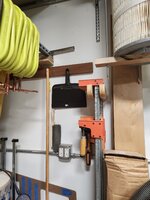
Some new dust pans were acquired which forced some other things to move....the drill guide was probably overkill but M5 button head screw was about perfect for the hand broom

Another set founds it's way in a dead corner

20240908_095525.jpg

And label maker got used to help with the visual aspect
 
OP
L

loganb

ALLIANCE MEMBER
Joined
Dec 29, 2011
Messages
5,532
Location
Omaha, NE

Thanks sir!

Maybe progress....fingers crossed....but the lines are pressurized! Might have missed tightening 1 fitting...blew it apart in a couple seconds. Once that was fixed and the drain valve was closed it cycled and compressor shut off....no obvious leaks and its been on for 5 minutes. Without any movement of the pressure gauge....

20240908_165412.jpg

Compressor needs up onto the shelf, but an outlet needs wired first. Also need the filter/regulator I had laying around plumbed up before I get the compressor up

But for now it's going to stay hooked up so I can see how it holds pressure
 
OP
L

loganb

ALLIANCE MEMBER
Joined
Dec 29, 2011
Messages
5,532
Location
Omaha, NE
@loganb what label maker you using?
According to Amazon it's a bought in 2015 Brother PT2730

Screenshot_20240909_222336_Firefox.jpg

Image from the interwebz, but same one.

It's been bulletproof so far. It's big and bulky but does the job and cheap, generic label cartridges are available on Amazon as well. Bonus I found out is there are shrink tubing cartridges that work for it for wiring...so that's been nice

A 2nd one that is smaller with some easier to do wire labels would be a nice to have and let me not put away 2 machines instead of just one! Maybe it ends up on the Xmas list...Epson PX700 would probably be the likely candidate. Panduit DOA trade in(a thread in Deals forum) can get a pretty nice labeler for less money, but their cartridges are spendy, fewer sources and no generics(yet). Epson seems to be pretty similar functionality, cheaper(printer and consumables) and well reviewed.
 

madison069

Well-known member
Joined
Nov 5, 2010
Messages
4,171
Location
Monroeville, PA
And after 10 hours....starting at 120 psi...ended at 50 psi....so will be breaking out the soapy water at some point
It's probably something simple. Every compressor I've had messed with always had a very small leak in its own plumbing. It's annoying cause it's usually in a spot that requires a lot of removal before you can get to the one spot.
 
To avoid these ads, REGISTER NOW!
OP
L

loganb

ALLIANCE MEMBER
Joined
Dec 29, 2011
Messages
5,532
Location
Omaha, NE
@loganb I was curious because I use this one because it's bluetooth and can print from my phone. I saw your vertical labels, but have not tried to figure out how to print vertical labels on this one. Is there a setting you can direct me to?

They kinda hid it...takes me a bit to find it again after not needing it in awhile. On mine it's hid under the "Text" Menu then as one of the options in "Style"....other options include bold, italic, shadow etc but if you scroll long enough there is a VRT option

label maker.jpg

How do you like the Bluetooth one? I've thought about those before, but I generally need fewer excuses to touch the phone when I'm in the garage so haven't gone there yet...

I Like the color of the hand broom and dustpan in the dead corner, makes it almost invisible when on the wall!!

:ROFLMAO:

It's that magic new invisible paint! Latest and greatest stuff! LOL

As I think about it...cant recall if I hung them back up after taking this picture or not.....
 

Bob Heine

ALLIANCE MEMBER
Joined
Oct 24, 2009
Messages
10,706
Location
Boca Raton, Florida
@loganb I was curious because I use this one because it's bluetooth and can print from my phone. I saw your vertical labels, but have not tried to figure out how to print vertical labels on this one. Is there a setting you can direct me to?
Marc, I threw out my Dymo label machine and all the plastic tapes it used when I bought my first Brother machine.
Label Maker Dymo 1.jpg
Because I had so much invested in the tape cartridges, I have upgraded from the skinny label maker and now have a gaggle of Brother P-touch label machines.
Label Printers.jpg
I run the one on the left attached to my desktop PC like yours but it also has a keyboard so I can use it anywhere. The Brother P-touch Editor I believe you are using has a button to select vertical and horizontal formats.
P-touch Editor.jpg
 
OP
L

loganb

ALLIANCE MEMBER
Joined
Dec 29, 2011
Messages
5,532
Location
Omaha, NE
@Bob Heine and @loganb Thanks guys. How did I manage before without youzz guys and GJ? :ROFLMAO:
I expect you managed it with more money in your wallet by having to see tools in the store or a neighbors or friends garage. Now you get to see tools all over the country and their uses while being able to buy it with a couple clicks and not needing to leave the house. Dangerous times!
 
OP
L

loganb

ALLIANCE MEMBER
Joined
Dec 29, 2011
Messages
5,532
Location
Omaha, NE
Found a couple leaks so far, haven't had much time this week....damn life and jobs and stuff

Reducer bushing in the elbow was bubbling decent
leak 1.jpg

And the old raggedy hose clamp on the barbed repair end was also leaking

leak 2.jpg

Cut the clamp rings off and lopped off a foot of the hose and redid it with 1/2" pex clamps with a piece of heat shrink over the top to reduce snagging on the clamp rings on my hand, associated **** etc

Neither leak was that loud, but with it dead quiet and your ear close (or my electronic stethoscope ear) not hard to find

Aired it back up to 120 psi and flipped off the compressor...see what it shows in a couple hours
 

Xti04

Well-known member
Joined
Nov 11, 2016
Messages
2,319
Im diggin the air system. Thats a big project for me this fall when it cools down. Need to gather another hose reel first and a good regulator.
 

nicholam77

Well-known member
Joined
Dec 18, 2016
Messages
2,659
Location
Minneapolis, MN
With the rest of the house sleeping off too much activity the prior days and my back encouraging me to not do too much...got back to the printer assembly.

Looking forward to hearing your thoughts on it after you put some hours on it.

My Ender has been doing fine after the custom firmware install, but I might be tempted if there is another sale (Black Friday perhaps?). I really don't see myself needing anything beyond PLA, so the A1 and its price point are appealing. I guess I'm just wondering since the Ender 3 S1 and Bambu A1 are a similar design and size, what makes the Bambu much better (if you don't count the AMS). Is it the quality of parts? Software / Firmware? I know everyone says the X1 / P1P/S are bulletproof, but they are slightly different design than the A1. Multicolor would be sweet, though.

13 hours overnight and lost about 5 psi....so major leaks solved.

Nice!
 
OP
L

loganb

ALLIANCE MEMBER
Joined
Dec 29, 2011
Messages
5,532
Location
Omaha, NE
My Ender has been doing fine after the custom firmware install, but I might be tempted if there is another sale (Black Friday perhaps?). I really don't see myself needing anything beyond PLA, so the A1 and its price point are appealing. I guess I'm just wondering since the Ender 3 S1 and Bambu A1 are a similar design and size, what makes the Bambu much better (if you don't count the AMS). Is it the quality of parts? Software / Firmware? I know everyone says the X1 / P1P/S are bulletproof, but they are slightly different design than the A1. Multicolor would be sweet, though.

Great question....my feedback will be somewhat limited just due to never having printed on a Ender...but initial thoughts on the A1 vs P1 vs old Prusa below...

The AMS is different than the P1/X1 style...but so far seems to work well. After using one, I don't envision ever going to a printer without one unless it was setup for some type of production mode. They're just that damn handy. Color changes, filament run out, printing different support material....but I especially like them for color changes. At some point I'll probably end up with another AMS for the P1 (you can put up to 4 together on a single machine)

Software is straight forward, works seamlessly with the Orca Slicer (derivative of Bambu Slicer) and switching between the P1 and A1 is just a quick drop down. One of the nicest (and laziest) features I personally like though is the ability to push prints from the phone. Even things you've never printed before, if you pull the file from Makerworld, there is generally a "plate" setup already so you can couch surf and push stuff to the print without leaving the spot....as long as the printer bed is clean and ready to go. Using Bambu filament which really isn't that expensive makes it easy as well as they've got RFID tags in the spools so when you drop it on the AMS it automatically sets the material type, color, temp settings etc

Build quality-Again...no personal experience with the Ender line, but it seems to be pretty well established that the quality of components being used there isn't as great as it could be. Maybe that's gotten better but the past experience has stuck? Fit and finish on this look very good, the nozzle change on the A1 is toolless and very slick(P1/X1 has 2 screws).

Print quality: So far....great. On the limited stuff I've printed the same part on both the A1 and the P1 I think the A1 might have looked a bit better...but both look great and are better quality than the Prusa mk3 was. The Prusa printed great and had no issues with the parts, but the ones off the Bambu do look better. I'd expect the new Prusa mk4 with Input Shaping would be better as well than the older mk3

I'm going to start down the #gridfinity rabbit hole so I'm printing some baseplates and test bins right now on a .6 nozzle, it should get a decent workout over the coming weeks as I figure out what all I'm going to do.
 

RickP

Well-known member
Joined
Jan 15, 2013
Messages
1,549
Location
Annapolis, MD
I'm going to start down the #gridfinity rabbit hole so I'm printing some baseplates and test bins right now on a .6 nozzle, it should get a decent workout over the coming weeks as I figure out what all I'm going to do.
I think you'll really like the gridfinity stuff. I just dipped my toe into it with some generic rectangular bins, and now I'm hooked. Those were easy to download/print, and customized tool trays will be next (when I have more time). Good luck navigating the rabbit hole!
 

Xti04

Well-known member
Joined
Nov 11, 2016
Messages
2,319
Gridfinity has me on the fence. I love the idea of modularity and gettingnmore use of box space. However my cad skills are terrible. I have watched several videos and even been shown some hacks to get what you need in there but I still struggle. I keep lookong for premade wrench holders and the like for my snap on wrenches and wrench drawers as a starting point but have yet to start anything. Maybe now that I have the AMS for the printer I will get going on the grids to pump myself up.
 
OP
L

loganb

ALLIANCE MEMBER
Joined
Dec 29, 2011
Messages
5,532
Location
Omaha, NE
First target for Gridfinity is the pliers...

20240914_155932.jpg

That's most of them....ugh

So printed a variety of organizer widths to see what seemed to make the most sense

20240914_160217.jpg


Printing the next round of dividers now. Looks like a narrow slot of around 3/8 and a wider one at around 3/4" will fit most
 
OP
L

loganb

ALLIANCE MEMBER
Joined
Dec 29, 2011
Messages
5,532
Location
Omaha, NE
Printer helping me feel productive in the garage on a day I was solo parenting and dealing with a cold...making some progress

20240914_203315.jpg

Also used the label maker...cause when one is making breakfast for 2 rowdy mini humans while having not yet gotten the benefit of coffee and also less then 100% from said cold like thing(likely thanks to mini humans)....not paying enough attention in the pantry and absentmindedly grabbing salt instead of sugar leads one to to remake pancakes....Oops

20240914_205918.jpg

Sugar was labeled....and is a larger container....so maybe this will prevent the same error again. I almost just covered the pancakes in jelly and syrup and fed them to them anyway....but I was hungry and didn't want to eat them
 
Last edited:
OP
L

loganb

ALLIANCE MEMBER
Joined
Dec 29, 2011
Messages
5,532
Location
Omaha, NE
So think the plier drawer is as done as it'll get for now...

drawer 1.jpg

drawer 2.jpg

Longer term I'd like to laser cut the baseplate out of 1/8" plywood, but that requires the laser working...so it's on hold for a bit ...wink wink
Also would like to move it to one of the slightly shallower drawers as there is a lot of "dead air" above these tools...but I need to rearrange those so I can make that happen....so in due time
The C clamp style Malco Eagle grips wedged in along the drawer front will also move to a yet to be built metal fab station freeing up a bit more space for something else

Quick glance thru the printing history tells me there is around 850 grams of filament in the blue dividers and around 85 or so grams in the white baseplate. This is all printed in PLA from Bambu which on sale I got for 13.99 a roll (1 kg per roll) so there is about 12 bucks of plastic here. My total time invested is probably an hour in and out over the course of the day....machine time is about 14 hours total, all on the A1.

There was 0 CAD work by me for this....all parts were just downloaded, found the one I wanted and hit print. Sources were:


And:


Next up is going to be the misc shallow/narrow drawer that has become a hangout space for the odd mashup of marking items and sharp cutty/stabby things....
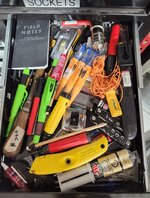
drawer 3.jpg

First step in the 5S process as made famous by Toyota is Sort...also known as what many of us fail miserably at which is toss **** out ;)

5s.jpg

As this is a very shallow drawer...and a handy location for pencils, markers and maybe some cutty cutty stuff....I think that is along the line of what I want here. So as I sort thru the stuff....going to start with something like this:

drawer 4.jpg

I will NOT be making a bunch of highly customized inserts with the exact form of the item modeled out....sorry lol. This is going to be mostly low height bins to store the items in, and when possible I'm going to insert text in the bottom of the bin as to what goes in it (Permanent Markers, Pica Pencil, deburr etc). The slicer software allows the ability to do this easily without delving into true CAD and the AMS/color changer on the machine makes it no more work for me to print them then doing it without text

Couple more drawers and I'll have @Xti04 "pushed" over the edge with me as I see how much of this I can get done without doing any CAD modeling of my own :)
 
Last edited:
To avoid these ads, REGISTER NOW!
Top Bottom