To avoid these ads, REGISTER NOW!

Cable TV experts ???

67 455 Bird ragtop

Well-known member
Joined
Jan 2, 2006
Messages
330
Location
Melbourne, FL
Just want to make sure I connect the new drop for my garage correctly. I have a 1ghz 3-way splitter. It has one port with -3.5db loss and two with -7db loss. The system currently has a 2-way splitter outside each is -3.5db. One is for my cable internet and the other is for cable tv. I would assume I would want to use the lower loss, -3.5db , for that main house cable tv and the -7db loss ports for my new garage drop and the internet drop.

Any help/feedback would be appreciated. Also the current tv cable set up does have an amp connected to it since the house is more than 100 yrds from the drop at the poll.
 
To avoid these ads, REGISTER NOW!

JMURiz

Well-known member
Joined
Dec 6, 2005
Messages
1,483
Location
NoVA
Each split is a -3.5bb loss so it doesn't really matter. You should be fine...I've found that setting up the system and seeing if the picture/sound quality is good enough works for me.

I've bought signal boosters before only to end up not needing them. So now I have 2 unused cable signal boosters in my house.
 

mrjsl

Well-known member
Joined
Oct 22, 2009
Messages
74
Location
Louisiana
Just want to make sure I connect the new drop for my garage correctly. I have a 1ghz 3-way splitter. It has one port with -3.5db loss and two with -7db loss. The system currently has a 2-way splitter outside each is -3.5db. One is for my cable internet and the other is for cable tv. I would assume I would want to use the lower loss, -3.5db , for that main house cable tv and the -7db loss ports for my new garage drop and the internet drop.

Any help/feedback would be appreciated. Also the current tv cable set up does have an amp connected to it since the house is more than 100 yrds from the drop at the poll.

Internet requires a cleaner/better/stronger signal than regular cable tv.

The strength of signal you get at the pole isn't the same everywhere, and it's not likely to stay the same as long as you have cable. It's possible for the signal to be too strong for the modem to connect too,. If you can get your cable modem to connect, everything else will work fine.

Troubleshooting:

cable modem won't connect but TV still works: Try putting an inline signal booster right before your modem. If you already have a signal booster, then take it out of the line. If none of this works, remove all splitters from your line, replace them with wal-mart chicoms, and call the cable company. They will send a guy out Thursday. He will scold you about the chicom splitters and replace them with the latest and greatest that you aren't allowed to buy in stores, and then he will figure out what the real problem is and correct it.

Cable modem connects to internet, but TV won't work: Impossible. You've just entered the Twilight Zone.

Neither modem nor TV work: Check to see if you paid the bill, if so, go look outside and see if there is a tree on the line anywhere near your house. If so, they will be out to fix it next Thursday.
 
OP
6

67 455 Bird ragtop

Well-known member
Joined
Jan 2, 2006
Messages
330
Location
Melbourne, FL
The splitter I have is made by the same company, Antronix, that my cable system uses. So I'll connect the -3.5 to the high speed cable feed and the two -7.0 connections to my tv lines.

Thanks
 

travisd

Well-known member
Joined
Feb 2, 2006
Messages
155
Location
Westminster, MD
Use the -7db ports for the runs that are longer or will have additional splits downstream. Think of using the -3.5 port as only taking the signal that you need for a single, close-by device and leaving as much as possible for the other runs.
 

Sammy7

Well-known member
Joined
Apr 20, 2009
Messages
49
Location
Greensboro, NC
Mrjsl's right on the Internet needing a stronger signal than the TV. My Internet was out at my last place and we traced it back to the junction box into the house, it was a series of splitters together to get six lines throughout the house. he swapped it with one six-way splitter and the signal was greatly improved. Bottom line: Keep the splitters to a minimum and make sure the modem gets the strongest signal.
 

Need4Speed

Member
Joined
Aug 27, 2007
Messages
12
The -3.5db is stronger. These negative numbers indicate the "loss" of signal across the splitter. My guess is that if a splitter has different loss numbers across the connections it actually has some passive circuitry internally that is really like 2 splitters in series connected together. In any event use the connection with the least amount of signal loss (e.g. db loss). By the way even any straight thru connections in the system have db loss as well as the actual cable runs so you always want to keep all the connections and cable runs to a minimum as well for the best signal.
 
To avoid these ads, REGISTER NOW!

Jaguar Fan

Well-known member
Joined
Mar 13, 2008
Messages
5,507
Location
Park City for Ski Season; Las Vegas for Poker Seas
Internet requires a cleaner/better/stronger signal than regular cable tv...

While generally true, the signal can be too strong for a cable modem. I was having intermittant internet outages; see the following pic of the cable modem status screen.

See the line for transmit power level? 11.1 dBmV is out of spec for my cable modem. It should be between -10 dBmV and +10 dBmV.

downstairssept19850am.jpg
 

mrjsl

Well-known member
Joined
Oct 22, 2009
Messages
74
Location
Louisiana
While generally true, the signal can be too strong for a cable modem. I was having intermittant internet outages; see the following pic of the cable modem status screen.

See the line for transmit power level? 11.1 dBmV is out of spec for my cable modem. It should be between -10 dBmV and +10 dBmV.

True, and I have that happen to me all the time. I have a signal booster, and sometimes I need it hooked up, and other times I need to bypass it - all to keep my modem happy. My signal booster is isolated on the line that feeds my modem only.

The problem at my house is that the signal strength available from the pole fluctuates constantly. Sometimes I go weeks with a signal that is in the acceptable range, and then go through a period where I need the booster, or need to unhook it as the case may be.

I lived through a major hurricane here (Katrina), and cable was down for months. After they got the poles up and the new cable equipment hung, they still didn't fix my drop and when I finally called them they said I had to make an appointment and the next available one was another month out, I just took salvaged drop cable and climbed up the pole and connected it myself. Made the TV work, but the modem wouldn't connect no matter what I tried. Eventually, they came and put up a proper drop, and the guy told me my patch drop wouldn't carry enough signal, although it's the exact same cable that was in place prior to the storm.

I really hate my cable company (Charter) because they are just so asinine to deal with. If a pole or line goes down around here, I am liable to be out for a week at least. 95% of what they tell you is officially made up BS.

Another Charter tech told me he needed 6 boosters in his house. When I asked him if Charter would give me signal boosters if I needed them, he said no. However, they are happy to charge you for the signal that you do get, even if it's unusable.

When I got internet originally, I went out and bought a motorola modem. However, Charter still charges me $5 a month for modem rental. When I try to point out that I own my modem outright, they kind of act like I'm not supposed to be smart enough to do that, or that I'm some kind of traitor.
 

mikeyr

Well-known member
Joined
Sep 16, 2005
Messages
1,971
Location
Santa Barbara, CA
here in S. Calif. Cox Cable hooked up the cable modem to the -3.5 and TV on the -7 side.

I did not even know there was a difference until a few weeks ago when he installed my cable phone line modem, that went to a -3.5 also.
 

shefler29

Active member
Joined
Sep 29, 2009
Messages
25
What Jaguar said is correct. I installed cable in Vegas for about 3 years. At first they said signal should be between -10 and +10. They later changed the the low side to -5 because with the heat out there the signal can drop significantly between morning and afternoon. Also for every 100' of cable the DB signal will go down about 5db. Just use the router IP address to check your signal strength to see if a booster is needed. (192.168.100.1) Make sure you use RG-6 cable. If you have any RG-59 cable replace it.

The also make splitters that have a 1.5db loss on one side and 6db loss on the other side.

I would just ask your local cable guy for one if needed.
 
Last edited:

Intel

Well-known member
Joined
Feb 12, 2008
Messages
263
Location
Chicago Northwest Suburbs, Illinois
Optimal setup with cable modems is keep the 2 way split 3.5db to cable modem and the other split to however big of a splitter you need for how many TV's you have.

Also never use an amplifier on the signal going into the cable modem as it usually won't work. Our internet kept on kicking out because the tech had set it on the 3rd leg of the second splitter. Once I moved it our upload speeds went up quite a bit and far less packet loss.
 

boro_boy70

Well-known member
Joined
Mar 29, 2009
Messages
627
Location
Whitesboro(Utica), NY
I work for a major cable co. did installs/trouble calls for 10+ years and currently I am a maint. tech. I work on just the main lines & fiber now. The modem should be on the first split, on the low loss leg (-3.5) of the splitter.

If you go to the modem diagnostic page 192.168.100.1 and look at the levels, the receive power ideally should not be over 5-8, we always try to get near 0. The transmit power should be in the 35 to 50 range. The modems are actually pretty forgiving, they work in a broad range of signal levels.

In my opinion, more important that the signal level, is the connectors. Make sure all your connections are clean and tight (about a 1/4 turn or so past finger tight with a 7/16 wrench) Also use compression fittings if poss. if you have to use crimp fittings do not over crimp them, and never use those push on connectors/jumpers that come with most new electronic equip. If in doubt just call the company and let them come over and put the connectors on. Our trouble calls are free, but check to make sure before having someone come. If you have any specific questions shoot me a PM and I'll try to help you if I can.

Good luck
 

ket-tek

Well-known member
Joined
Jan 28, 2009
Messages
1,289
As already cleared up above, the modem needs to have the best signal and should be on the fist split in the system before any tv splits.

What I didn't see mentioned was a little clearer info on using amplifiers, here's a couple tips to be aware of when using cable amps.

-You want to put the amp closest to the originating signal not at the device. Because you want a good signal feed to the amp and it will boost it up and send it down the long wire run and/or additional splitters. If you put it right at the back of the Tv the loss has already happened and your boosting a poor input. (you want to prepare the signal for the long run ahead, not try to fix the poor signal at the end after the damage is done..) (and putting it at the tv may fix the "snow" but introduce "herringbone")

-When using amps with cable modems and Digital cable boxes, make sure it is a Bi-Directional/Two-way amp. Some cheaper/older cable amps are only one way and will cause problems with the talk-back communication that the modem needs and the cable box can have issues with the DVR, Channel Guide, and On-Demand functions because you need to send data back to the cable company in those situations.

Here's some quick trouble shooting for tv picture quality that I've experienced over the years:

-"Snow" is from under amplification, general signal loss or bad grounding. Check your grounds, reconfigure or eliminate splitters, or add amplification.

-"Ghosting" or double image can be caused by bad grounding, poor wire shielding, or emi interference. I've found the problem is almost always crappy cabling and/or connectors. Always use "Quad Shield RG-6" wire and "Compression" connectors and you should never have this issue. Crimp-on, Push-on, or Twist-on connectors, or the use of RG-59 or standard RG-6 cabling is almost always the cause of ghosting.

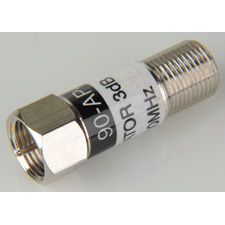
-"Herringbone" is a wavy looking disturbance in the picture (usually runs diagonal but not always) and is caused by to much signal or over-amplification, and can be reduced buy adding an inline attenuator at the device. If effectivly knocks down the db level by the amount specified on the attenuator labeling.
CZ-13503.JPG


-"Rolling Lines" if you have horizontal lines (usually 1 or 2) that start at the bottom of the picture and slow roll up the screen, sometimes refered to as 60-cycle roll, then this is Always a grounding problem, weather it is a device in the house on the same circuit as the tv or box causing it, or just the equipment or cable line not grounded or poorly grounded. Sometimes it will can also make lighter or darker bands in the picture. Either lines or bands, will always be horizontal, and will move vertical, though it may move fast or very very slow..

-"Audio Hum" if the video is ok, but the audio has a hum or buzz, it is again Always caused by a poor ground somewhere in the system. Could be your surround receiver or the cable system, troubleshoot this by hooking the cable box direct to the tv bypassing the stereo completely and see if it is still there. If you cannot get rid of the hum or buzz and your happy with the picture and everything else a "ground loop isolator" will work, this will more than likely eliminate the issue real fast and easy. And they are cheap. I've used them many times for cable boxes and sometimes for computers hooked to stereos as they sometimes produce the same ground noise problems.
pRS1C-2160121w345.jpg

http://www.radioshack.com/product/index.jsp?productId=2062214


One big 8-way splitter is much better than multiple smaller splitters, I've seen under many houses that have 4 or 5 small splitters all dangling near each other as stuff was added over the years, rip all that **** out and install one big splitter and it can make a huge improvment. And it is a good idea to use "terminators" on ANY unused ports on splitter or unused wallplates in the house or anywhere else in the cable system that has no device connected. This will help with ghosting, and emi induction thru open ports.
3237f280-43a5-440a-add9-488fab85007c_3.jpg


Always make sure your Cable entry point at the side of your house has a ground block and it is hooked to a real ground source. Alot of cable guys don't ground at all, or put in fake ground wires, or go to a spigot or other pipe that may turn into cpvc or pex elsewhere in the house and not be an effective ground. Ground it to the same location as your electric panel if possible. Most amps and cable boxes use 2-prong plugs without an equipment/chassis ground and rely on the coax connector and sheilding for grounding the chassis. And can be the root of alot of tv picture issues..

Hope this helps some people out there..
 
Last edited:
To avoid these ads, REGISTER NOW!
Top Bottom