As already cleared up above, the modem needs to have the best signal and should be on the fist split in the system before any tv splits.
What I didn't see mentioned was a little clearer info on using amplifiers, here's a couple tips to be aware of when using cable amps.
-You want to put the amp closest to the originating signal not at the device. Because you want a good signal feed to the amp and it will boost it up and send it down the long wire run and/or additional splitters. If you put it right at the back of the Tv the loss has already happened and your boosting a poor input. (you want to prepare the signal for the long run ahead, not try to fix the poor signal at the end after the damage is done..) (and putting it at the tv may fix the "snow" but introduce "herringbone")
-When using amps with cable modems and Digital cable boxes, make sure it is a Bi-Directional/Two-way amp. Some cheaper/older cable amps are only one way and will cause problems with the talk-back communication that the modem needs and the cable box can have issues with the DVR, Channel Guide, and On-Demand functions because you need to send data back to the cable company in those situations.
Here's some quick trouble shooting for tv picture quality that I've experienced over the years:
-"Snow" is from under amplification, general signal loss or bad grounding. Check your grounds, reconfigure or eliminate splitters, or add amplification.
-"Ghosting" or double image can be caused by bad grounding, poor wire shielding, or emi interference. I've found the problem is almost always crappy cabling and/or connectors. Always use "Quad Shield RG-6" wire and "Compression" connectors and you should never have this issue. Crimp-on, Push-on, or Twist-on connectors, or the use of RG-59 or standard RG-6 cabling is almost always the cause of ghosting.
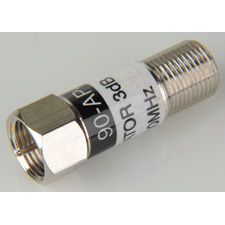
-"Herringbone" is a wavy looking disturbance in the picture (usually runs diagonal but not always) and is caused by to much signal or over-amplification, and can be reduced buy adding an inline attenuator at the device. If effectivly knocks down the db level by the amount specified on the attenuator labeling.
-"Rolling Lines" if you have horizontal lines (usually 1 or 2) that start at the bottom of the picture and slow roll up the screen, sometimes refered to as 60-cycle roll, then this is Always a grounding problem, weather it is a device in the house on the same circuit as the tv or box causing it, or just the equipment or cable line not grounded or poorly grounded. Sometimes it will can also make lighter or darker bands in the picture. Either lines or bands, will always be horizontal, and will move vertical, though it may move fast or very very slow..
-"Audio Hum" if the video is ok, but the audio has a hum or buzz, it is again Always caused by a poor ground somewhere in the system. Could be your surround receiver or the cable system, troubleshoot this by hooking the cable box direct to the tv bypassing the stereo completely and see if it is still there. If you cannot get rid of the hum or buzz and your happy with the picture and everything else a "ground loop isolator" will work, this will more than likely eliminate the issue real fast and easy. And they are cheap. I've used them many times for cable boxes and sometimes for computers hooked to stereos as they sometimes produce the same ground noise problems.
http://www.radioshack.com/product/index.jsp?productId=2062214
One big 8-way splitter is much better than multiple smaller splitters, I've seen under many houses that have 4 or 5 small splitters all dangling near each other as stuff was added over the years, rip all that **** out and install one big splitter and it can make a huge improvment. And it is a good idea to use "terminators" on ANY unused ports on splitter or unused wallplates in the house or anywhere else in the cable system that has no device connected. This will help with ghosting, and emi induction thru open ports.

Always make sure your Cable entry point at the side of your house has a ground block and it is hooked to a real ground source. Alot of cable guys don't ground at all, or put in fake ground wires, or go to a spigot or other pipe that may turn into cpvc or pex elsewhere in the house and not be an effective ground. Ground it to the same location as your electric panel if possible. Most amps and cable boxes use 2-prong plugs without an equipment/chassis ground and rely on the coax connector and sheilding for grounding the chassis. And can be the root of alot of tv picture issues..
Hope this helps some people out there..