To avoid these ads, REGISTER NOW!

Cat5 Roughed in How do I finish it?

VonMoldy

Well-known member
Joined
Apr 3, 2006
Messages
46
Location
Utah
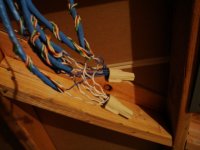
When the house was built Cat5 was run into the basement here is a photo. I want to put the router here.
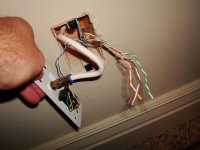
The next photo is out the wall outlet where I want to be able to plug in the cat5 cable for the computer. The wall outlet has a coaxial cable for cable TV and a regular phone jack. It looks like the phone is using the cat5 cable can I also use it for networking the PC's? Do I need to get a new outlet that has a phone jack and a cat5 jack and cable plug?

So my question is how do I get this to work for me?
 

Attachments

  • DSC00766.JPG
    DSC00766.JPG
    102.6 KB · Views: 152
  • DSC00769.JPG
    DSC00769.JPG
    96.7 KB · Views: 139
To avoid these ads, REGISTER NOW!

Gary S

Well-known member
Joined
Dec 27, 2008
Messages
2,972
Location
Bismarck, ND
My advice is, dump the wire nuts and put in some Cat 5 approved connectors. You want approved punch blocks, and approved RJ45 jacks. Random wiring parts won't deliver Cat5 standard speeds unless you wire everything to Cat5 standards with Cat5 approved parts. If you are using the Cat5 for phone, then it doesn't matter. If you want a 100mbps computer network, then it does matter.
In the real world we find that Cat5E wire done up with professional connections will usually support 1gb network signals in a home where you aren't running at max wire lengths.
 

Torque1st

MEMBER EMERITUS
Joined
Sep 14, 2008
Messages
5,668
Location
KC Metro, Kansas
You can buy wall plates with different function inserts and Cat-5 equipment at Home Depot, probably at Lowes also. I use the Leviton brand equipment. You can also buy punch down blocks for telephone equipment.
 
OP
V

VonMoldy

Well-known member
Joined
Apr 3, 2006
Messages
46
Location
Utah
Sorry I am totally new to this kind of thing.
Ok so I get rid of the twist on wire nuts. Replace with a punch block.

I use the RJ45 jacks instead of the current phone one? Or do I use a regular phone jack and add a seperate RJ45?

Can I leave the phone line as it is and use the rest of the cat5 wires for the network?
 

Torque1st

MEMBER EMERITUS
Joined
Sep 14, 2008
Messages
5,668
Location
KC Metro, Kansas
If the phone lines are working you can leave them alone.

A Cat-5 cable requires ALL the wires in the cable. You can not run the phone and a network in the same cable.

The Network RJ-45 jacks are 8 wire jacks. Phones use a 4 wire jack.
 
OP
V

VonMoldy

Well-known member
Joined
Apr 3, 2006
Messages
46
Location
Utah
The phone works just fine.

So basically when my builder listed cat5 wiring as an amenity it was bull **** because he just used part of it as the phone line and wasted a bunch of wire? Why didn't he just use phone wire if he didn't need all the other pairs of wire?

So If I want to use the existing Cat5 for data. I would need to run phone wires to every room along with buying all the connectors and outlet plates?
 

wantedabiggergarage

Member Emeritus
Joined
Feb 25, 2006
Messages
3,897
Location
Independence, MO, USA.
The phone works just fine.

So basically when my builder listed cat5 wiring as an amenity it was bull **** because he just used part of it as the phone line and wasted a bunch of wire? Why didn't he just use phone wire if he didn't need all the other pairs of wire?

So If I want to use the existing Cat5 for data. I would need to run phone wires to every room along with buying all the connectors and outlet plates?


They have been using cat5 for phone and network (separately) for some time now. A lot of installers, just keep one type on the vehicle (less to deal with). I believe cat 3 could be used for both phone and network (wiring scheme, not just the wire), but its speeds are MUCH slower.
 

ddawg16

Well-known member
Joined
Jul 11, 2008
Messages
21,005
Location
S. California
They have been using cat5 for phone and network (separately) for some time now. A lot of installers, just keep one type on the vehicle (less to deal with). I believe cat 3 could be used for both phone and network (wiring scheme, not just the wire), but its speeds are MUCH slower.

Yep....truth is, CAT5 works better than phone line....and you have more pairs....if one breaks, you have 3 more pairs to try.

But as noted above....if he has the phones on them....your screwed....you would have to run new wire....

'Unless' you have DSL that is using your phone lines...then you just need the filter and modem and your good to go.

In most cases where people are going to FIOS, they come up to your house with fiber...then use your house wiring for the rest.
 

porschedude996TT

Well-known member
Joined
Oct 28, 2007
Messages
2,384
Location
Santa Maria, California
If the phone lines are working you can leave them alone.

A Cat-5 cable requires ALL the wires in the cable. You can not run the phone and a network in the same cable.

The Network RJ-45 jacks are 8 wire jacks. Phones use a 4 wire jack.

Dispel this myth: "A Cat-5 cable requires ALL the wires in the cable." Not True

Local Area Networks only use two pairs (four wires). The other two pairs were intended to be used as Telephone Service. Most people use them as spare conductors.

So I believe that you are trying to get telephone and Local Area Network and cable into the same coverplate, correct? And that you plan to use a LAN Hub or Switch to connect several computers and maybe a printer and internet access, yes?

The original specification Cat5 uses two pairs for IT infrastructure and two pairs as communication (Telephone). The way it was designed is not widely used. Most people run them in separate cables because they don't know...my guess. You can use the Cat5 cable for both internet connection and the telephone all in one cable. It is the standard. Although the is not widely used, meaning running the telepone through the RJ-45 plug, but you can split the wiring in the wall.

I would suggest getting a wall plate that takes inserts rather than one that has everything molded in place. That way you can have your "F" connector for the cable, a RJ-45 for your Local Area Network, and a RJ-11 or RJ-12 for the communication (Telephone) You can break out the land-line (Telephone) and connect the other two or three pairs to the LAN.


Wall Plate: http://www.summitsource.com/channel...in-insert-connection-part-akfp3la-p-7754.html

RJ-45 Insert: http://www.summitsource.com/channel...apin-insert-computer-data-telecom-p-7707.html

RJ-12 Insert: http://www.summitsource.com/channel...lug-snapin-connector-part-ac3kjiv-p-8109.html

Type "F" Insert: http://www.summitsource.com/channel...ate-module-component-part-af81sla-p-7744.html

Wire it to interface with a straight type cable and you only need two pair to use for the computer LAN conncection. You only need wire in the connectors at pin 1, 2, 3, and 6. It would be best to follow the color codes so that when someone, maybe you, needs to figure out what is going on has a standard to follow. Make sure that the wire size is correct for the connectors and you may need the punch-down tool to get the best connection.

Good Luck!

See figure: http://www.duxcw.com/digest/Howto/network/cable/cable5.htm
 
Last edited:

porschedude996TT

Well-known member
Joined
Oct 28, 2007
Messages
2,384
Location
Santa Maria, California
The phone works just fine.

So basically when my builder listed cat5 wiring as an amenity it was bull **** because he just used part of it as the phone line and wasted a bunch of wire? Why didn't he just use phone wire if he didn't need all the other pairs of wire?

So If I want to use the existing Cat5 for data. I would need to run phone wires to every room along with buying all the connectors and outlet plates?

Not true, you don't need to run more cable...See my other comment above.
 

bry@n

Well-known member
Joined
Dec 29, 2008
Messages
2,785
Location
Ocean County, NJ
Okay,
here it goes..

Cat 5 e is industry standard. Since the VoIP world has come, phone wire needs to be up to par with networking cable. While there are many types of VoIP (not for this time), for all intense purposes, you have traditional phone service in your house.

Dump the wire connectors. It is not code for using for network. The jacket of the cable should be no more than 1/4 from the jack, so don't strip back the jacket too far.

A network cable uses pins 1,2 3 and 6 to operate. You only use 2 pairs of the cable for network use. You can use this set up but it'll be a little hokey and the speeds will be a slower.

I will go on record as saying I have split a cat 5 line and had no adverse affects. Is it the correct way, no, but possible.

1 and 2 are the blue pair. I believe 3 is the orange/ white strand and 6 being the white/green strand. I'm not 100% on the 3 and 6 pins, but pick upo a jack and it will tell you the color of the 3 and 6 strands.

Put all the cable on 66 block and use cut patch cords to terminate the network side.

All of these things can be gotten from Home Depot. The 66 block is about $20 and the bracket for the block is $5. Cat 5 e jacks are around $5-6 and a mini patch panel (12 port) should be about $40. Most electrical supply houses will have this stuff as well.
 

nate379

Banned
Joined
Feb 2, 2009
Messages
7,279
Location
Palmer, AK
My house is wired with CAT 5 for the phone. I just hooked up the DSL modem and a wireless router in one of the rooms and I have wireless internet.

I don't know networking, but CAT 5 is all we have here at work and it's 1 wire for a phone and computer. The wall plate has 2 plugs, one is phone, one is computer.
 

bry@n

Well-known member
Joined
Dec 29, 2008
Messages
2,785
Location
Ocean County, NJ
Dispel this myth: "A Cat-5 cable requires ALL the wires in the cable." Not True

Local Area Networks only use two pairs (four wires). The other two pairs were intended to be used as Telephone Service. Most people use them as spare conductors.

So I believe that you are trying to get telephone and Local Area Network and cable into the same coverplate, correct? And that you plan to use a LAN Hub or Switch to connect several computers and maybe a printer and internet access, yes?

The original specification Cat5 uses two pairs for IT infrastructure and two pairs as communication (Telephone). The way it was designed is not widely used. Most people run them in separate cables because they don't know...my guess. You can use the Cat5 cable for both internet connection and the telephone all in one cable. It is the standard. Although the is not widely used, meaning running the telepone through the RJ-45 plug, but you can split the wiring in the wall.

I would suggest getting a wall plate that takes inserts rather than one that has everything molded in place. That way you can have your "F" connector for the cable, a RJ-45 for your Local Area Network, and a RJ-11 or RJ-12 for the communication (Telephone) You can break out the land-line (Telephone) and connect the other two or three pairs to the LAN.


Wall Plate: http://www.summitsource.com/channel...in-insert-connection-part-akfp3la-p-7754.html

RJ-45 Insert: http://www.summitsource.com/channel...apin-insert-computer-data-telecom-p-7707.html

RJ-12 Insert: http://www.summitsource.com/channel...lug-snapin-connector-part-ac3kjiv-p-8109.html

Type "F" Insert: http://www.summitsource.com/channel...ate-module-component-part-af81sla-p-7744.html

Wire it to interface with a straight type cable and you only need two pair to use for the computer LAN conncection. You only need wire in the connectors at pin 1, 2, 3, and 6. It would be best to follow the color codes so that when someone, maybe you, needs to figure out what is going on has a standard to follow. Make sure that the wire size is correct for the connectors and you may need the punch-down tool to get the best connection.

Good Luck!

See figure: http://www.duxcw.com/digest/Howto/network/cable/cable5.htm

Your correct. The reason why people use 1 cable per network connection is:
1: ease
2: saves time, not having people figuring what pins to use etc...(knowledge)
3: have more strands on hand in case I have a cable failure of some sort.
4: usually phone and networking stuff are in the area (mdf) but not necessarily in the same room. With a 325 ft cap, fiber is usally run to the idf's.


Oh and Cat 3 was used way back in the day, It was new kid after token ring. Cat 3 cab be used but speeds are slower. Cat three used to be industry standard but cat 5 (more stwists in the cable, cat 6 etc...). The telephone companies are using cat 3 in the ground. That is what most dsl lines come through.

Also, the wire that has 4 strands that are Green, Red, black and yellow is called quad cable. If you have any, the cross chart would be
white/ blue = green
blue/ white = red
white/ orange = black
orange/ white = yellow.
 
Last edited:

Jeepskate

Well-known member
Joined
Apr 28, 2009
Messages
218
Location
Mid-Ohio
Not something I personally do since I'm kinda **** about having backups/redundancy and like the idea of keeping my signals separate from each other, but as has already been said, you can split off at each end of the CAT5e and run your phone and network down the same cable. In order to keep the network color coding correct, I'd wire that first, then use two of the leftover conductors for the phone. One question to ask yourself is do you really need all of those phone jacks? I didn't ask myself this before I wired up my house and at the end of the day, I wasted my time pulling wire for the phone (I had a spool of CAT3 leftover from an old employer that shut down, so at least it only cost me the jacks). I only use two phone jacks. My DSL is split after it enters the house in the basement, so my router & switch are down there. Like a lot of folks, I have one of the wireless phone systems with multiple handsets, so I just use the existing jack in the kitchen for the base unit and I use a jack that I added in the family room for my all-in-one (fax/print/scan). I guess at the end of the day, it's nice that the jacks are there if I sell the house anytime soon, but it's pointless if I don't.
 
OP
V

VonMoldy

Well-known member
Joined
Apr 3, 2006
Messages
46
Location
Utah
Dispel this myth: "A Cat-5 cable requires ALL the wires in the cable." Not True

Local Area Networks only use two pairs (four wires). The other two pairs were intended to be used as Telephone Service. Most people use them as spare conductors.

So I believe that you are trying to get telephone and Local Area Network and cable into the same coverplate, correct? And that you plan to use a LAN Hub or Switch to connect several computers and maybe a printer and internet access, yes?

The original specification Cat5 uses two pairs for IT infrastructure and two pairs as communication (Telephone). The way it was designed is not widely used. Most people run them in separate cables because they don't know...my guess. You can use the Cat5 cable for both internet connection and the telephone all in one cable. It is the standard. Although the is not widely used, meaning running the telepone through the RJ-45 plug, but you can split the wiring in the wall.

I would suggest getting a wall plate that takes inserts rather than one that has everything molded in place. That way you can have your "F" connector for the cable, a RJ-45 for your Local Area Network, and a RJ-11 or RJ-12 for the communication (Telephone) You can break out the land-line (Telephone) and connect the other two or three pairs to the LAN.


Wall Plate: http://www.summitsource.com/channel...in-insert-connection-part-akfp3la-p-7754.html

RJ-45 Insert: http://www.summitsource.com/channel...apin-insert-computer-data-telecom-p-7707.html

RJ-12 Insert: http://www.summitsource.com/channel...lug-snapin-connector-part-ac3kjiv-p-8109.html

Type "F" Insert: http://www.summitsource.com/channel...ate-module-component-part-af81sla-p-7744.html

Wire it to interface with a straight type cable and you only need two pair to use for the computer LAN conncection. You only need wire in the connectors at pin 1, 2, 3, and 6. It would be best to follow the color codes so that when someone, maybe you, needs to figure out what is going on has a standard to follow. Make sure that the wire size is correct for the connectors and you may need the punch-down tool to get the best connection.

Good Luck!

See figure: http://www.duxcw.com/digest/Howto/network/cable/cable5.htm

Yes this is exactly what I want to do. I forgot to mention that I am on a DSL connection. Hopefully this still applies.
Just for clarification. Currently the only wires used for the phone is the blue set.
Thank you for the time and effort it took to answer this for me I really appreciate it.

I need to do some shopping!
 
Last edited:

Torque1st

MEMBER EMERITUS
Joined
Sep 14, 2008
Messages
5,668
Location
KC Metro, Kansas
The reason I stated that ALL the wires are used is that the current wiring standard has 8 wires and who knows what they may do with the "extra" wires in the future. They may double the data path or add some controls etc at some future date. Of course you can always pull wires for the phone or any new standard at a future date.
 

mrb

Well-known member
Joined
Dec 31, 2008
Messages
3,734
I dont have the energy to respond to everything in this thread at the moment, but I will mention a couple things:

-if the builder sold you a 'cat5 package' for networking computers, you got screwed. He should have ran two cables to each location.

-10/100 ethernet does not use all 4 pairs of wire. It uses two.

-gigabit ethernet, and PoE (power over ethernet) uses all four pairs

-while not to spec, and not generally advised you can run network and phone in a single cable when you have no other choice. 10/100 ethernet uses the green and orange pairs. Blue for phone, and leave the brown empty.
 

MisterCMK

Well-known member
Joined
Nov 29, 2007
Messages
170
Location
USA
If the phone lines are working you can leave them alone.

A Cat-5 cable requires ALL the wires in the cable. You can not run the phone and a network in the same cable.

The Network RJ-45 jacks are 8 wire jacks. Phones use a 4 wire jack.


All cables require all of the wires inside of it. The application the cable is used for determines which conductors are used.
 

2_lude

Well-known member
Joined
Nov 13, 2008
Messages
104
Location
TX
Great info in this thread as I'm trying to run some Cat5e as well. That wiring job is pretty ghetto for a builder. Usually they would have a structured wiring panel for termination of all phone, cable and networking in one place.
 

bry@n

Well-known member
Joined
Dec 29, 2008
Messages
2,785
Location
Ocean County, NJ
Great info in this thread as I'm trying to run some Cat5e as well. That wiring job is pretty ghetto for a builder. Usually they would have a structured wiring panel for termination of all phone, cable and networking in one place.

Structured being the key word. :bounce:

A pacth panel for the ethernet connections and a 66 block for the phones is very neat.
 
To avoid these ads, REGISTER NOW!
OP
V

VonMoldy

Well-known member
Joined
Apr 3, 2006
Messages
46
Location
Utah
It turns out the builder didn't charge extra for the cat5e wiring. I don't think he really listed it as like a way to network the computers as some sort of amenity but it was listed in the features. I guess when I saw Cat5 listed I assumed it was for network use and there would be separate phone lines.

What would I use in place of those twist on connectors? Or will it be ok to leave that alone since it is for the phone?
 

rocketman

Well-known member
Joined
Jul 16, 2008
Messages
263
Location
Chicagoland
Use 3M Scotchlok's for the phone connections instead of wire nuts. That's what the phone company uses.

Personally, I'd run a single CAT5 to the location of the cable/dsl modem and the router and go Wireless N or G minimum. No need to mess with all that wiring in a house.
 

2_lude

Well-known member
Joined
Nov 13, 2008
Messages
104
Location
TX
Ok that makes more sense now. You could use the already existing phone Cat5 cable to create your LAN if speed isn't a concern. It's probably the easiest way to get a internal network going.
 

JOHNMAN

Well-known member
Joined
Aug 14, 2006
Messages
194
Location
Southwest Indiana
My house is all CAT5 wire as well.

I had these same questions some time ago when I bought my current house and found that a single CAT5 cable was also pulled from the house to the building when the previous owner built the outbuilding. They pulled the wire but did not terminate either end.

I wanted to find out if I could use it for both Ethernet and phone. I went to work one day and asked the controls guys how many pairs 100/10 Ethernet used as I believed it was 2 pairs. They did some research and found the same thing 2 pairs for 100/10. I then asked if I could use one of the spare pairs as analog phone and they were a bit unsure. I googled it and found that many people were doing this same thing so apparently it can be done.

The one common thread that I kept seeing while internet searching was structured wiring was utilized. I have been trying to figure out how to do this while at the same time not having to re-configure all the wiring in the house (not structured). My current plan is to run a wire CAT5 or CAT3 from the phone service entrance to a punch down block (66) where I will terminate the phone portion and separate the pairs. At this same punch down block (66) I will introduce a CAT5 cable (2 pairs) that runs to my switch. I will then land the CAT5 cable that leads to my out building to this same punch down block (66).

I have not finalized the colors of pairs that I should use for each, but this thread seems to repeat that phone should be on the blue pair, the brown pair should be empty and 100/10 should use the orange and green pairs.

In the outbuilding/shop, I will be doing the same thing only in reverse. The pair that is analog phone would be landed to a punch down block and then to the phone network and the (2) data pairs would punch down and then lead to either a hub or a switch and become the data network out there.

The only thing holding me back from doing this is a question that I have not yet seen answered very well, but I may have to try it and see what happens. My question is: Will doing this with the phone line create any issues with my DSL? Should I install a DSL filter before landing the phone line punches down on the house side of the punch down block or do I go along with how it is currently set up and install a filter at each phone that is plugged in when terminated out in the out building and no filter in-between?

I never found (outside this thread) that this was actually how the spec was written. I did find (as this thread also states) that 1Gb ethernet does use all 4 pairs, but my network stuff has no need for that speed and 100BaseT is faster than the degraded wireless that I am forced to use now.

By the way, most of the "structured wiring" boxes and devices I see at the big box stores sure seem over-priced. I plan on simply using a couple of generic panels and punch down blocks. I will probably also pull 120v to power a hub that I plan to install inside the panel I mount out in the shop.

I have not yet decided if I should wire the shop or simply mount a wireless access point once I get the cable terminated inside the building.

I see some myth in this thread.

Someone mentioned that no more than 1/2" of jacket should be removed from CAT5 cable per spec. This is an impossibility if punch down blocks are used. What I understand is that when landing pairs on a punch down block, that one should not untwist the pairs. Leave the pair twisted to within 1/2" of the end and punch down. I would agree that when making up CAT5 cable ends, that only about 1/2" or less of the jacket should be removed.
 

Jaguar Fan

Well-known member
Joined
Mar 13, 2008
Messages
5,507
Location
Park City for Ski Season; Las Vegas for Poker Seas
The reason I stated that ALL the wires are used is that the current wiring standard has 8 wires and who knows what they may do with the "extra" wires in the future. They may double the data path or add some controls etc at some future date. Of course you can always pull wires for the phone or any new standard at a future date.

It is possible but not standards compliant to run two networks over one physical cat5e cable, or to run one network and two separate telephone lines over one cat5e cable.

Future standards discussions seem to be focusing not on cat5e but cat6, cat 6a and cat7 and cat7a.

Cat6a can support 10 Gbit/s applications (especially 10GBaseT) up to a maximum distance of 100 meters (330 ft). Cat 7 and Cat7a support 10 Gbit/s even with high margins. Cat 7a is capable for 40 Gbit/s over copper.

Your guess is as good as mine if home applications will take off to actually use these.
 

67gto

Active member
Joined
Nov 3, 2008
Messages
37
Location
Connecticut
OK, What no one has mentioned is that within the cat 5e cable the twisted pairs are different. Take a piece of cat 5e and strip the jacket back about 6 inches. seperate the twisted pairs from one another, but leave each twisted pair alone. You will notice that some of the pairs have a tighter twist or more twists per inch. This is because the individual conductors need to be terminated at the outlet & the patch panel in a specific manner in order to obtain the proper network speeds & reliability. The office where I work was expanded a few years ago, and I talked in depth with the network cabling guys, picked thier brains, etc. The standard of the industry is cat 5e for data & cat 3 for voice. When I built my house, my neighbor up the street spent big money for cat 6 cable. he ran one cable to each room & has a birds nest of wire in his cellar. He eventually got disgusted and bought a wireless router.
When I built my house, I have "ports" in every room of my house. Some larger rooms have more than one, placed at oposite corners of the room. Each port has 2 cat 5e cables, 1 cat 3 cable and 2 RG6 Quad shield cables.
I do not like wireless, never have. Wireless speeds can vary due to many conditions. Where I live I can log onto a majority of my neighbors WiFi networks because they have been left unsecured, etc. I have 4 computers in my home; 1 in the home office, 1 in each of my kid's rooms, & a laptop in my living room. I have 2 printers running through print servers, so all the computers in the house can print to these network printers. Saves a bundle on printer ink & toner. In my cellar I have a cable modem feeding a firewall / router, which has an 8 port hub plugged into it. The whole thing has been running flawlessly for about 3 years now. Once every couple of months I will have to reset one of the print servers. My cat 5e is running at gigabit speeds, No problems. When you are wiring a house, the last thing you should be thinking about is cheaping out on the cable. It is being penny wise and dollar foolish. Once the sheetrock is up, you are basically all done. My toughest decision when running my home network, was weather or not to run fiber optic cable. But as of yet there is no real use for it, nor is there a any wide use of residential equipment that utilizes fiber. Fios is fiber to your house, but then it turns to copper once inside your home. Having my network configuration has many possible configurations. You could have both cable tv & satellite in each room, a computer in each room , & printers can be moved to multiple locations throughout the home. Also by using a network & phone patch panel in the basement, I can unplug my kids computers, or telephones at any given time. (which I have done). If they are misbehaving or not doing thier homework, etc. Overall, I have not encountered any issues where I was undercabled for any reason.
 
Last edited:

67gto

Active member
Joined
Nov 3, 2008
Messages
37
Location
Connecticut
OK, What no one has mentioned is that within the cat 5e cable the twisted pairs are different. Take a piece of cat 5e and strip the jacket back about 6 inches. seperate the twisted pairs from one another, but leave each twisted pair alone. You will notice that some of the pairs have a tighter twist or more twists per inch. This is because the individual conductors need to be terminated at the outlet & the patch panel in a specific manner in order to obtain the proper network speeds & reliability. The office where I work was expanded a year ago, and I talked in depth with the network cabling guys, picked thier brains, etc. The standard of the industry is cat 5e for data & cat 3 for voice. When I built my house, my neighbor up the street spent big money for cat 6 cable. he ran one cable to each room & has a birds nest of wire in his cellar. He eventually got disgusted and bought a wireless router.
When I built my house, I have "ports" in every room of my house. Some larger rooms have more than one, palced at oposite corners of the room. Each port has 2 cat 5e cables, 1 cat 3 cable and 2 RG6 Quad shield cables.
I do not like wireless, never have. Wireless speeds can vary due to many conditions. Where I live I can log onto a majority of my neighbors WiFi networks because they have been left unsecured, etc. I have 4 computers in my home; 1 in the home office, 1 in each of my kid's rooms, & a laptop in my living room. I have 2 printers running through print servers, so all the computers in the house can print to these network printers. Saves a bundle on printer ink & toner. In my cellar I have a cable modem feeding a firewall / router, which has an 8 port hub plugged into it. The whole thing has been running flawlessly for about 3 years now. Once every couple of months I will have to reset one of the print servers. My cat 5e is running at gigabit speeds, No problems. When you are wiring a house, the last thing you should be thinking about is cheaping out on the cable. It is being penny wise and dollar foolish. Once the sheetrock is up, you are basically all done. My toughest decision when running my home network, was weather or not to run fiber optic cable. But as of yet there is no real use for it, nor is there a any wide use of residential equipment that utilizes fiber. Fios is fiber to your house, but then it turns to copper once inside your home. Having my network configuration has many possible configurations. You could have both cable tv & satellite in each room, a computer in each room , & printers can be moved to multiple locations throughout the home. Also by using a network & phone patch panel in the basement, I can unplug my kids computers, or telephones at any given time. (which I have done). If they are misbehaving or not doing thier homework, etc. Overall, I have not encountered any issues where I was undercabled for any reason.
 

bry@n

Well-known member
Joined
Dec 29, 2008
Messages
2,785
Location
Ocean County, NJ
Do not strip the jacket back 6 inches when your terminating the cable. Cat 3 is not industry stanard for phone lines. Cat 5 e is. You can use cat 3 for phone in your house and you'll be fine, but cat 5 e is the standard in a commercial world.
 

Jaguar Fan

Well-known member
Joined
Mar 13, 2008
Messages
5,507
Location
Park City for Ski Season; Las Vegas for Poker Seas
Maybe 10 years ago it was...

Anymore everything is going Cat6

I believe (I was told this but am not 100% positive) that the difference between cat5e and cat6 is that the latter has much tighter manufacturing tolerances (twists, etc). Cat 6 is more expensive, of course, and is not a bad idea insofar as "future proofing" a new house, but as far as I know there are no home applications where you might actually use the higher speeds. For now.
 

ratman2

Well-known member
Joined
Nov 23, 2008
Messages
74
Dispel this myth: "A Cat-5 cable requires ALL the wires in the cable." Not True

Local Area Networks only use two pairs (four wires). The other two pairs were intended to be used as Telephone Service. Most people use them as spare conductors.

So I believe that you are trying to get telephone and Local Area Network and cable into the same coverplate, correct? And that you plan to use a LAN Hub or Switch to connect several computers and maybe a printer and internet access, yes?

The original specification Cat5 uses two pairs for IT infrastructure and two pairs as communication (Telephone). The way it was designed is not widely used. Most people run them in separate cables because they don't know...my guess. You can use the Cat5 cable for both internet connection and the telephone all in one cable. It is the standard. Although the is not widely used, meaning running the telepone through the RJ-45 plug, but you can split the wiring in the wall.

I would suggest getting a wall plate that takes inserts rather than one that has everything molded in place. That way you can have your "F" connector for the cable, a RJ-45 for your Local Area Network, and a RJ-11 or RJ-12 for the communication (Telephone) You can break out the land-line (Telephone) and connect the other two or three pairs to the LAN.


Wall Plate: http://www.summitsource.com/channel...in-insert-connection-part-akfp3la-p-7754.html

RJ-45 Insert: http://www.summitsource.com/channel...apin-insert-computer-data-telecom-p-7707.html

RJ-12 Insert: http://www.summitsource.com/channel...lug-snapin-connector-part-ac3kjiv-p-8109.html

Type "F" Insert: http://www.summitsource.com/channel...ate-module-component-part-af81sla-p-7744.html

Wire it to interface with a straight type cable and you only need two pair to use for the computer LAN conncection. You only need wire in the connectors at pin 1, 2, 3, and 6. It would be best to follow the color codes so that when someone, maybe you, needs to figure out what is going on has a standard to follow. Make sure that the wire size is correct for the connectors and you may need the punch-down tool to get the best connection.

Good Luck!

See figure: http://www.duxcw.com/digest/Howto/network/cable/cable5.htm

This is correct EXCEPT if you are going to set up for Gigabit Ethernet, Gigabit Ethernet needs all 8 pairs. If you are only going to have 100BaseT speeds you will be fine :)
 

67gto

Active member
Joined
Nov 3, 2008
Messages
37
Location
Connecticut
Sorry for the double post. As to stripping back the jacket 6 inches, I was referring to doing this to see & observe the different ways the cable is twisted, Not to do this when actually installing the cable. When you are in the actual process if installing & terminatiing the cable, I leave no more than 1/2" of exposed cable. If you were to take a piece of cat 6 and strip it back approx 6" along with a cat 5e, you will notice that the cat 6 has far more twists per inch that the cat 5e, this enables the cat 6 to carry data at a faster speed. This also requires cat 6 rated terminations. Like I said in my previous post, I am getting gigabit speeds out of my cat 5e. I have been told that this is due to my shorter cable runs. As for the cat 5e vs cat 3 issue. I see many commercial installations, and they are all still using cat 3 for voice & cat 5e for data. The only exception that I have seen is the new style PBX systems have one cat 5e outlet that the phone plugs into, and there is an ethernet outlet on the phone itself. The reason I was told this, is that whenever an office system is expanded. It is cheaper to keep & expand the exisiting system than to rip everything out and start over.
 

bry@n

Well-known member
Joined
Dec 29, 2008
Messages
2,785
Location
Ocean County, NJ
Sorry for the double post. As to stripping back the jacket 6 inches, I was referring to doing this to see & observe the different ways the cable is twisted, Not to do this when actually installing the cable. When you are in the actual process if installing & terminatiing the cable, I leave no more than 1/2" of exposed cable. If you were to take a piece of cat 6 and strip it back approx 6" along with a cat 5e, you will notice that the cat 6 has far more twists per inch that the cat 5e, this enables the cat 6 to carry data at a faster speed. This also requires cat 6 rated terminations. Like I said in my previous post, I am getting gigabit speeds out of my cat 5e. I have been told that this is due to my shorter cable runs. As for the cat 5e vs cat 3 issue. I see many commercial installations, and they are all still using cat 3 for voice & cat 5e for data. The only exception that I have seen is the new style PBX systems have one cat 5e outlet that the phone plugs into, and there is an ethernet outlet on the phone itself. The reason I was told this, is that whenever an office system is expanded. It is cheaper to keep & expand the exisiting system than to rip everything out and start over.

The reason is because they will use a VoIP system, plug the phone into the network and use the phone as the hub to connect the pc's. That is also a all eggs in one basket scenario. Cat 3 can be used, but it's not industry standard anymore. People just don't rip out there cable structure when standards change, they change when their application changes and they have a capital budget to do so. While this is going on or waiting ti happen, they run IS for new runs.

As per the one cable to each station and using the phone as a hub, it's not saving much. Most cablers only charge the extra cost of the cable and hardware, as the labor itself is the same for one cable or two, three or even four to the same drop. Not too much savings there.
 

MisterCMK

Well-known member
Joined
Nov 29, 2007
Messages
170
Location
USA
Sorry for the double post. As to stripping back the jacket 6 inches, I was referring to doing this to see & observe the different ways the cable is twisted, Not to do this when actually installing the cable. When you are in the actual process if installing & terminatiing the cable, I leave no more than 1/2" of exposed cable. If you were to take a piece of cat 6 and strip it back approx 6" along with a cat 5e, you will notice that the cat 6 has far more twists per inch that the cat 5e, this enables the cat 6 to carry data at a faster speed. This also requires cat 6 rated terminations. Like I said in my previous post, I am getting gigabit speeds out of my cat 5e. I have been told that this is due to my shorter cable runs. As for the cat 5e vs cat 3 issue. I see many commercial installations, and they are all still using cat 3 for voice & cat 5e for data. The only exception that I have seen is the new style PBX systems have one cat 5e outlet that the phone plugs into, and there is an ethernet outlet on the phone itself. The reason I was told this, is that whenever an office system is expanded. It is cheaper to keep & expand the exisiting system than to rip everything out and start over.

You are getting gigabit speeds out of Cat5e because Cat5e rated for gigabit. I can have a 328' total cable length that passes with my Lantek cable tester and have gigabit speeds on Cat5e.

Nobody uses Cat3 for new installations on data anymore. With IP phones becoming more common and the price of Cat5e and Cat6 dropping, there is no point to use Cat3. Cat6 by itself is pretty pointless IMO. One should use Cat6a.
 

babzog

Well-known member
Joined
Apr 20, 2009
Messages
2,117
Location
Eastern Ontario, Canada
You can strip the cable as much as you like. Do not however, untwist the wires! If you've ever seen a rack with a 19" 24 or 48 port RJ45 termination panel, you won't see anything but wire in the bundle feeding the panel. Sheaths on the Cat5 (or 24 pair bundle) are stripped back to the risers (otherwise, you'd quickly run out of room).

Keep the wires twisted as originally found until the very last fraction of an inch where you must separate them for termination.

Having the sheath off also makes manipulating the wire in the wall a heck of a lot easier. Leave lots of extra wire (about a foot or so) and coil it loosely inside the box or wall cavity (no sharp bends or kinks) when installing the wall plate.
 

babzog

Well-known member
Joined
Apr 20, 2009
Messages
2,117
Location
Eastern Ontario, Canada
Wow.. you builder did you a great service by running all that in! He just connected it up for phone, which is all most people required, but at least you have a structured wiring installation - the skeleton, if you will.

Here's my structured wiring panel as an example of what you can do. The house was never equipped with anything more than the standard telephone loop when it was built, I've added on the wiring to support my needs (ie: office, gaming, etc) and my office location has moved (due to kids). The panel has also undergone a few revisions over the years as I grew the network and consolidated the network and telephone to one location. It's pretty much outgrown the board and needs some neatening up, especially for when I add the satellite (RG6) network, but that's still a year or so away).

I like to have lots of extra wire at the panel, just is case I screw something up and need a fix. When I wired up the new office, I had a bit extra wire that I didn't want to cut back more, hence the difference in size between the loops.

The office has an adundance of RJ45 jacks to support pretty much any configuration I might require since I work from home quite a bit. There's 14 ports for a 16x20 room! :) The rest of the house has at least one jack in every room. I want to add another jack to the living room for when I add a kid's computer and then I'll probably want to add a couple in the basement plus another for the shop (need to replace the phone line there this summer so will bury some Cat5).

No wireless... not yet anyway. Everything I own is or can be hard wired and that's my preference. BIL is always harping on at me that his iPhone doesn't connect to wifi at my house. So buy me a wireless router and it will, I tell him. LOL

The incoming phone line terminates at RJ11 jacks, one for each pair (4 total in a cat5 cable). Then, I took one insert for my bix panel and made loops of wire connected to pairs of punchdowns (12 for the primary line, 4 ea for the additional lines). The pigtails were then wired to a second set of RJ11 jacks and a small patch cord made to connect the two jacks. This gives an internal demark, a way to cross connect lines, etc. Flexibility. The incoming cat5 cables from the various rooms were then split and wired (green and orange pairs) to a 24port bix RJ45 panel and to the upper insert on my telephone panel. Small bits of excess wire are then used to inconnect the lower supply to the upper destination. Again, the cross connect possibilities are endless, it's easy to disconnect a phone, temporarily reassign a phone to a different line, etc.

There are a few extra wires, particularly phone wires, that are loose, mostly because I wanted to leave room for expansion - I knew I'd be adding more cabling and didn't want to tie up all ports with pairs I'd never use. Ideally they should be terminated somewhere.

IMG_4798.jpg
 
Last edited:

MisterCMK

Well-known member
Joined
Nov 29, 2007
Messages
170
Location
USA
You can strip the cable as much as you like. Do not however, untwist the wires! If you've ever seen a rack with a 19" 24 or 48 port RJ45 termination panel, you won't see anything but wire in the bundle feeding the panel. Sheaths on the Cat5 (or 24 pair bundle) are stripped back to the risers (otherwise, you'd quickly run out of room).

Keep the wires twisted as originally found until the very last fraction of an inch where you must separate them for termination.

Having the sheath off also makes manipulating the wire in the wall a heck of a lot easier. Leave lots of extra wire (about a foot or so) and coil it loosely inside the box or wall cavity (no sharp bends or kinks) when installing the wall plate.

You will see the cable with the outer jacket still intact. Don't strip the jacket off further than you need to to punch it down.

Here are two 48 port patch panels in the rack in my office.

DSC03397.JPG


DSC03398.JPG
 
Last edited:

babzog

Well-known member
Joined
Apr 20, 2009
Messages
2,117
Location
Eastern Ontario, Canada
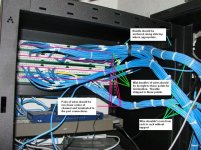
I would not do it that way nor would the installers I've known and worked with over the years. The cable is unsupported where it reaches over to the terminating panel. The weight of the bundle could easily pull wires out of the port connections causing mysterious connection issues. As well, the bundle overlaps the punchdown obscures the connections making inspection and maintenance more difficult.

That bundle should be firmly anchored at one side of the panel (right side, when looking at the back of the panel in this pic) and the appropriate # of wires brought to the center of each strip of ports. The sheaths should then be stripped to the anchor points. The wires will then be run run down the center of the punchdown strip and terminated as they reach the port. This will support the wire bundle and provide a neat, easily inspected and maintainable wiring installation.

Anyway, not trying to whizz in your cornflakes. Far be it from me to tell a professional he's wrong. Just talking from my own experience working in the IT and Telecom biz for many years. Your experience is obviously different.

BTW: I think there was a misunderstanding when I said "stripped to the risers". I meant to say, stripped to point where the bundle is anchored at the termination point. The bundle can and does often make a loop through the rack once exiting the riser. It was very late when I wrote that.

DSC03398.jpg
 
Last edited:

bry@n

Well-known member
Joined
Dec 29, 2008
Messages
2,785
Location
Ocean County, NJ
I would not do it that way nor would the installers I've known and worked with over the years. The cable is unsupported where it reaches over to the terminating panel. The weight of the bundle could easily pull wires out of the port connections causing mysterious connection issues. As well, the bundle overlaps the punchdown obscures the connections making inspection and maintenance more difficult.

That bundle should be firmly anchored at one side of the panel (right side, when looking at the back of the panel in this pic) and the appropriate # of wires brought to the center of each strip of ports. The sheaths should then be stripped to the anchor points. The wires will then be run run down the center of the punchdown strip and terminated as they reach the port. This will support the wire bundle and provide a neat, easily inspected and maintainable wiring installation.

Anyway, not trying to whizz in your cornflakes. Far be it from me to tell a professional he's wrong. Just talking from my own experience working in the IT and Telecom biz for many years. Your experience is obviously different.

BTW: I think there was a misunderstanding when I said "stripped to the risers". I meant to say, stripped to point where the bundle is anchored at the termination point. The bundle can and does often make a loop through the rack once exiting the riser. It was very late when I wrote that.

DSC03398.jpg


I'm in the telecom world, have many years of actual cabling experience, holds certifications from manufacturers on cabling practices etc..

You only strip back what you need to terminate. I would agree to anchor it securely and that is why there is little attachments that screw on the back of most patch panels. This way you can use small tie wraps to keep the cable "structured".
 
To avoid these ads, REGISTER NOW!
Top Bottom