To avoid these ads, REGISTER NOW!

Dead Beer Fridge

-SaltCreep

Member
Joined
May 6, 2024
Messages
13
Hey all,
I was never told you shouldn't tip a fridge on its back. Recent I was given a Marvel 61wc wine fridge and thought it would be a perfect beer fridge out in the garage. I quickly learned that even at its max, being a wine fridge, it would only cool down to ~41F. So I started to explore options and found that the thermostat, located on the bottom front of the unit, had two little set screws that could be adjusted to change the on/off points. I set to tipping the unit back so I could access the thermostat an make small adjustment to the screws and monitor the temps over several hours. After about a half dozen times doing this I eventually over shot just a bit and the fridge was sitting at 32F, so one more small adjustment and I should be perfect. As I tip the fridge back I hear a POP and some smoke comes out of the bottom rear.... and dawns on me I am an idiot.

The fridge stops running and the lights no longer work. Since then, I have learned just about everything about how refrigerators work and how to fix them but a few things still elude me. One of which is, if I damaged the compressor while tipping it back, would that cause the lights to also not function?
Here is what I have been able to test using multimeter:
Capacitor = 10.2 uf
PTC (3 pin) 4.6 Ohms on pins 5 & 6, testing from pin 7 has no continuity, no rattle. (more on this later)
Compressor: start + run = 10.4 Ohms, start + common = 6.2 Ohms, run + common = 4.2 Ohms. No shorts where detected any compressor pins.

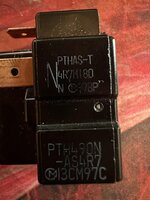
The PTC I am a bit unsure about. I am not sure if I should have any continuity to pin 7 or not, and I can not find this particular model or any PTC with a similar ping layout anywhere online. The model I have here is PTHAS-T4R7M180 or PTH490N-AS4R7 but the only documentation I can find online for the compressor shows a slightly differnt model number, but either way I can not find either of them
https://archive.org/details/Panasonic_SD43C90JAU6_Air_Compressor_User_Manual/mode/2up
HRb0laW.jpeg
CnFE9lx.jpeg
dqeakUR.jpeg

Thanks in advance for any advise you can give.
 
To avoid these ads, REGISTER NOW!

Steve W.

Well-known member
Joined
Mar 27, 2019
Messages
1,245
Location
Southwest oHIo
Now that THAT is out of the way, ... did you tip the unit while it was running? Usually not a good thing.

I used to be a furniture mover many MANY years ago and moved more than my share of refrigerators and freezers. Virtually all of them were tolerant of leaning over on a dolly for transport to the truck. A few had to be laid on their side for one reason or another, we just made SURE that they remained upright for as long as possible after that for all the refrigerant and lubricant to drain back where it needed to be before plugging it in. Never had a problem doing that.

By the way, welcome to the nuthouse. :thumbup:

.
 
OP
S

-SaltCreep

Member
Joined
May 6, 2024
Messages
13
Now that THAT is out of the way, ... did you tip the unit while it was running? Usually not a good thing.

I used to be a furniture mover many MANY years ago and moved more than my share of refrigerators and freezers. Virtually all of them were tolerant of leaning over on a dolly for transport to the truck. A few had to be laid on their side for one reason or another, we just made SURE that they remained upright for as long as possible after that for all the refrigerant and lubricant to drain back where it needed to be before plugging it in. Never had a problem doing that.

By the way, welcome to the nuthouse. :thumbup:

.
Thanks Steve!
Yeah, I was tipping it back while still plugged in, which I have since learned is a bad thing to do, but I am not clear on what could have broken and how to test/verify. I understand that the oil in the compressor could mix into the refrigerant and burn out the compressor, but I can not find if there is a way to confirm that. Also, I don't see why the lights would also not work if the compressor burnt out. :headscrat
 

dogdog

Well-known member
Joined
Nov 15, 2011
Messages
12,711
Maybe look up the compressor model for that PTC ( starter replay / over load kit ) Amazon have lots of them generic ones or otherwise.
or look up the part number from that starter relay ? most appliance parts online would have that part number... base on your wine/beer cooler model number.


I just replaced something similar for my whirlpool fridge when it was making loud buzzing noises. in my case the original cap went bad down to 7uf of the 12uf and the relay is questionable.... that is the bad component for me but the cause might be something else like bad temp sensor or frozen coils etc... (in my case)

something like these?
 
OP
S

-SaltCreep

Member
Joined
May 6, 2024
Messages
13
Maybe look up the compressor model for that PTC ( starter replay / over load kit ) Amazon have lots of them generic ones or otherwise.
or look up the part number from that starter relay ? most appliance parts online would have that part number... base on your wine/beer cooler model number.


I just replaced something similar for my whirlpool fridge when it was making loud buzzing noises. in my case the original cap went bad down to 7uf of the 12uf and the relay is questionable.... that is the bad component for me but the cause might be something else like bad temp sensor or frozen coils etc... (in my case)

something like these?
Those PTCs seem to come up in any search I do and I almost pulled the trigger on one until I realized in a different brand same model picture that there are only 2 holes on the back side, which my PTC has three holes. I can not seem to find a PTC that is three pin front with three holes in back. Am I missing something?

Also, I have looked up the compressor specs which list the PTC which I have linked in my original post.
 

dogdog

Well-known member
Joined
Nov 15, 2011
Messages
12,711
I dunno I have the other one (tds2 )and it will fit for whirlpool lg ge kenmore etc fridges and it looks different but fits. Your style (PTC) seems to have 1 pin 2 pin and 3 pin… not sure what that means.
 

fitter30

Well-known member
Joined
Jun 23, 2019
Messages
2,968
Location
Peace Valley,mo
Have hauled at least 6 fridges laying on their backs. Some have stayed that way for 2-3 days. Tipped them up let them sit for 12 hours plug them in and had no problems for years. Power tested with a meter at the relay? Does the fridge have a defrost timer usually in the front under the kick panel has a knob that can be manually turned to to take it in and out of defrost.
 

grounded-b

Well-known member
Joined
Oct 23, 2012
Messages
285
Location
Milwaukee, WI
If you heard a "Pop" and then nothing works, I would check continuity of every wire, starting at the plug end. There must be a fuse or circuit breaker that "blew". Maybe even a "fusible link" which looks just like an ordinary wire.
 
OP
S

-SaltCreep

Member
Joined
May 6, 2024
Messages
13
First of all, thank you all very much for taking the time to respond, its appreciated.
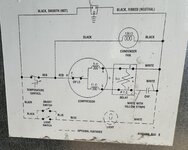
Today I got a new PTC and there was no change after putting it in. I am posting the wiring schematic below. I am no electrical engineer, so I am taking a guess here, but am I right that if the temp control popped then nothing would work?
YlDUREN.jpeg

I plan to put that on the multi meter tomorrow. Outside of that, I have gone through everything visually and can not see anything else fuse or junction like that would account for everything being dead. If the temp controller seems OK, then I guess I will start checking every run.
 

mm08822

Well-known member
Joined
Jan 13, 2012
Messages
5,894
Location
NJ
Start with simple probing using multimeter. Does it have a light? If yes, does it work?

Check other circuits in the diagram. If it should be calling for cooling, is there output voltage from the thermostat/temp controller?
 

dogdog

Well-known member
Joined
Nov 15, 2011
Messages
12,711
There is that over load switch / protector in your diagram connecting to the red wire, probably near the compressor. Have you tested that ?

It seems all of those switch sold as a kit comes with that over load ?
 
OP
S

-SaltCreep

Member
Joined
May 6, 2024
Messages
13
It does have a light that was working until the thing went "pop". I am going out right now to test the thermostat

There is that over load switch / protector in your diagram connecting to the red wire, probably near the compressor. Have you tested that ?

It seems all of those switch sold as a kit comes with that over load ?
The overload protector seems to have been build into the original PTC which had three pins and three pin holes on the back side. I can not find anything that matches that configuration, so I have a three pin, two hole PTC, but I am guessing it does not have the overload. I wasn't sure how that would work with the two separate pieces being so close together in those ones being sold on amazon.
 

dogdog

Well-known member
Joined
Nov 15, 2011
Messages
12,711
If your diagram is right... that red wire also powers the condenser fan,. and it is coming out from the thermostat. if it is spinning it won't be the problem with the thermostat. I mentioned the overload is because almost every Amazon link you check on those switch, almost 80% of them comes with the overload as part of the kit... usually it indicates a common problem component.

The lights goes through a the black wire to some door switch ... probably nothing to do with the compressor if it is on/off unless you just don't have power to that socket. or a common fuse that is not on the diagram is blown.
 
OP
S

-SaltCreep

Member
Joined
May 6, 2024
Messages
13
If your diagram is right... that red wire also powers the condenser fan,. and it is coming out from the thermostat. if it is spinning it won't be the problem with the thermostat. I mentioned the overload is because almost every Amazon link you check on those switch, almost 80% of them comes with the overload as part of the kit... usually it indicates a common problem component.

The lights goes through a the black wire to some door switch ... probably nothing to do with the compressor if it is on/off unless you just don't have power to that socket. or a common fuse that is not on the diagram is blown.
Ok, thanks for confirming that. The fan does not spin. Everything about the appliance behaves as though it’s not plugged in at all, but I have tested the outlet it’s plugged into and ran an extension cord to another outlet on a different breaker just to be sure.

If I am testing the thermostat correctly, I think it is the culprit. There is a red and black wire which I removed, set the multimeter to Ohms, turned the thermostat to 7, and put the probes on the red/ black pin and I am getting all zeros.
 

dogdog

Well-known member
Joined
Nov 15, 2011
Messages
12,711
If I am testing the thermostat correctly, I think it is the culprit. There is a red and black wire which I removed, set the multimeter to Ohms, turned the thermostat to 7, and put the probes on the red/ black pin and I am getting all zeros.
so it is good ? 0 ohms means the switch (thermostat) is connecting fine?
 
To avoid these ads, REGISTER NOW!

dogdog

Well-known member
Joined
Nov 15, 2011
Messages
12,711
Oh, I thought 0 was bad. I’ll watch the video again
usually on ohm readings 0 means no resistance.. with measuring contacts, 0 means continunity, and infinite ohm or mega ohm range means the contact is open or corrosion. ...
 
OP
S

-SaltCreep

Member
Joined
May 6, 2024
Messages
13
usually on ohm readings 0 means no resistance.. with measuring contacts, 0 means continunity, and infinite ohm or mega ohm range means the contact is open or corrosion. ...
Ok , I watch a few different videos and I can say for sure I get continuity when the thermostat is on, and none when it’s off, so I guess that is fine. I guess the only thing I have not checked is the compressor fan?
 

Wrench97

Well-known member
Joined
Jun 23, 2018
Messages
12,069
Location
Southeastern Pa
Stick with checking for voltage to get the light working, it's separate from all the cooling components and not working.
Is there voltage at the door switch and work your way back to the plug.
 

Crazyjake8493

Well-known member
Joined
Sep 26, 2014
Messages
3,953
Location
Upstate NY
You never want to tip or lay down a refrigerator when it's running.

When off, you can absolutely lay down a fridge or freezer for transport. Just leave it sitting upright for at least a few hours before plugging it in. Both refrigerators in our house were laid down to transport them home and they've been working fine for 7-10 years.
 

dogdog

Well-known member
Joined
Nov 15, 2011
Messages
12,711
Ok , I watch a few different videos and I can say for sure I get continuity when the thermostat is on, and none when it’s off, so I guess that is fine. I guess the only thing I have not checked is the compressor fan?

maybe you wanted to check for power, but that means it's working with live 120Vac... Not sure... dependents on your comfort and skill level.

like with the multimeter on AC voltage check ?


the black smooth Hot wire against the black ribbed neutral wire for 120V when plug in?
the Black smooth hot wire againist the white wire?

Then with the thermostat set to lowest so it is ON...

the Red wire against the White wire for 120Vac ?


check for any fuse / fuse link along the black smooth hot wire ?

unplug and check for continuity of that black wire to the plug?
unplug and check for continunity of that black ribbed neutral wire to the plug ?
 
OP
S

-SaltCreep

Member
Joined
May 6, 2024
Messages
13
maybe you wanted to check for power, but that means it's working with live 120Vac... Not sure... dependents on your comfort and skill level.

like with the multimeter on AC voltage check ?


the black smooth Hot wire against the black ribbed neutral wire for 120V when plug in?
the Black smooth hot wire againist the white wire?

Then with the thermostat set to lowest so it is ON...

the Red wire against the White wire for 120Vac ?


check for any fuse / fuse link along the black smooth hot wire ?

unplug and check for continuity of that black wire to the plug?
unplug and check for continunity of that black ribbed neutral wire to the plug ?
Thank you again for the detailed testing steps. I am obviously pretty green at this and have only used a multimeter a handful of times in my life.

So, this is what I am seeing
First, this is the outlet I am plugging into:

cPApBKP.jpeg

The plug enters the back of the appliance and splits apart. The natural (black with white stripe) plugs directly into that little junction box
The ground is pulled out and screwed to the frame
the hot continues towards the front
yIUYCme.jpeg

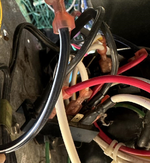
The hot then splits into two, one black going to the thermostat and the other going to the door switch for the light.

RLFEGrL.jpeg

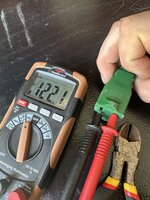
When I test using the neutral and the lead going to the thermostat, I get a reading of .609v
IDP6nVD.jpeg

There is nothing else in that path, just the plug, wire and that split in the hot. Testing the other lead from the junction shows about the same of .6v. Am I doing something wrong?
 

Attachments

  • cPApBKP.jpeg
    cPApBKP.jpeg
    461.1 KB · Views: 8

Wrench97

Well-known member
Joined
Jun 23, 2018
Messages
12,069
Location
Southeastern Pa
Yes plug head is what I meant, christmas light plugs come to mind with the hidden fuses.
If you have no current at the wire where it connects to the thermostat and no fuse before that then a broken wire in the cord?
 

dogdog

Well-known member
Joined
Nov 15, 2011
Messages
12,711
Thank you again for the detailed testing steps. I am obviously pretty green at this and have only used a multimeter a handful of times in my life.

So, this is what I am seeing
First, this is the outlet I am plugging into:

cPApBKP.jpeg

The plug enters the back of the appliance and splits apart. The natural (black with white stripe) plugs directly into that little junction box
The ground is pulled out and screwed to the frame
the hot continues towards the front
yIUYCme.jpeg

The hot then splits into two, one black going to the thermostat and the other going to the door switch for the light.

RLFEGrL.jpeg

When I test using the neutral and the lead going to the thermostat, I get a reading of .609v
IDP6nVD.jpeg

There is nothing else in that path, just the plug, wire and that split in the hot. Testing the other lead from the junction shows about the same of .6v. Am I doing something wrong?

The first pic is you tested there is incoming 120Vac which is good but that only says either power is not being delivered to the compressor or measurement was not taken properly.


The second pic might be Neutral not the Hot wire... if you look back to the diagram you posted. Black wire with ribbed is neutral , and black wire smooth ( I assum its complete black from the plug) is HOT ? maybe confirm ? usually if you are looking at the plug lets say 3 prong...
The round is ground.. the skinnier blade is usually HOT, the fatter blade is usually Neutral. Maybe confirm that black smooth is indeed what it says on the diagram ? This manufacture is terrible in selecting wire coloring for some reason... Not all black wires are HOT in that diagram.

what post#29 is asking is to take a measurement of AC voltage between the black smooth wire and Black ribbed wire for line voltage 120Vac.

The third pic sorry can't tell which of the black wire is split at least in that diagram both black Neutral and hot are black and both are tapped with another black wire... you might have probe the same neutral to neutral which would not give any voltage reading or very small amount..

Not sure.

The last pic it seems that your multimeter black lead is on the ribbed black wire ( neutral) and the red lead is on a connector that is with a black wire and red wire... only connection point that is red and black is the fan and compressor. that seems to be unplugged. you won't get any voltage measurements like that ...

Hope it is not confusing..

if you look at your diagram Each solid black dot is a connection point. Maybe unplug the fridge from wall, and do a continunity test on each segment of the wires to confirm nothing is broken in between ?

Not sure what else. the diagram is simple probably my post is confusing.

*** man ... the world black is used so much in this post..
 

gba2331

Well-known member
Joined
Sep 22, 2021
Messages
765
No offense, but I’d be offering a beer from another refrigerator to a friend who knows more about electricity and could educate you much more quickly than YouTube and a diy forum. It’s not hard to learn, but it’s hard to describe in text.
 
OP
S

-SaltCreep

Member
Joined
May 6, 2024
Messages
13
No offense, but I’d be offering a beer from another refrigerator to a friend who knows more about electricity and could educate you much more quickly than YouTube and a diy forum. It’s not hard to learn, but it’s hard to describe in text.
I agree, and if I had any such friends, that would already be the case. At this point I am just stumped as I cant seem to get power at the very first point in the path. Here are some more pictures with some explanations.

The plug and cable. There is no access anywhere, just solid rubber. If there is a fuse in there, its not replaceable.
plug.jpeg


this is the first stop along the cable. It splits the hot from neutral and the ground is pulled out of the middle.
cablesplit.jpeg

This is a look from that same spot with the hot continuing underneath the unit and you can see where it splits. you can see there is nothing in line before the split.

splithot.jpeg

This is a closeup of the hot split. its just some heat shrink sheathing over a Y split. One black leads off to the lights and the other black leads to the thermostat.
hotsplitclose.jpeg

Here is that location in the diagram and what the neutral is doing. There is a splitter/junction/bus (I do not know the proper term) where the neutral plugs in and then all other neutrals come back to as well. Also, the red that leaves the temp control also comes back to this bus.
YlDUREN.jpeg

this is the bus thing I am talking about. Pretty much every connection in the diagram comes from here minues the option path for the lights. The open pin is where the main neutral goes. Can this thing "pop" and smoke? it seems to simplistic to blow out.
yIUYCme.jpeg

At this point I think I am going to cut the main hot in front of that split and test from there. If I can not get a reading on the meter than I can only assume some how the cable or plug went bad and I’ll just cut an extension cord.
 

dogdog

Well-known member
Joined
Nov 15, 2011
Messages
12,711
At this point, I think the op should verify power and neutral is good at the (split) black and the black with white strip aka neutral or the bus in his updated drawing.
Or at least continuity to the plug.

This is because according to the drawing if thermostat is conducting the fan should at least work even if the compressor or the overload is bad. And he doesn’t have any lights either… that should be independents of thermostat control.
 
OP
S

-SaltCreep

Member
Joined
May 6, 2024
Messages
13
Well boy's, its alive! I cut the hot so I was testing directly on the main cable and still did not have power. So I cut the head off of an extra christmas extension cord I had on hand, and tied that in and when I plugged it in the fan immediate started spinning. I unplugged it right away, tipped it back upright and will give it 24 hours before I plug it in again to see if it will cool.

I want to thank you all again for taking the time to go through this with me and help me out along the way. I learned a lot, which is mainly why I spend so much time doing these types of things. Cheers to you all. :beer:
 
To avoid these ads, REGISTER NOW!
Top Bottom