To avoid these ads, REGISTER NOW!

Digital Photo Help

red vette mike

Well-known member
Joined
Nov 30, 2005
Messages
207
Location
Madison, Ms
I have been taking photos of my garage project from the start(I am about 90% through.) . The camera is a Canon Rebel SLR. When I try to move the photos onto this web site (actually my wife is doing it as she is more computer savvy than me) the photos are too "big"-that is they have to much 'mb's'. There is likely a way to reduce the 'size' of these pictures. Any of you folks know how would be the best way to amend the pictures so I can put them on this site? I am using the 'manage attachments' function. Thanks of any help.
 
To avoid these ads, REGISTER NOW!

Der Bugmeister

Well-known member
Joined
Dec 29, 2005
Messages
445
Did your camera come with a CD? There may be a photo editting program on there which will allow you to resize your photos (and fix redeye, and so on).

Remember to work from a copy of your photo so if you screw it up you've got an untouched backup!
 
OP
R

red vette mike

Well-known member
Joined
Nov 30, 2005
Messages
207
Location
Madison, Ms
Thanks for the help. I don't think the camera came with a cd. I have had the camera about 3 years. I will try the PhotoBucket site and see if I can't post these pictures for yall to see. Electricity is on, lift is in, all interior painting is done. Now I have to paint the exterior (I bought a good paint gun from HD-it works well but uses a bunch of paint.)
Mike
 

Satatic

Well-known member
Joined
Jan 12, 2005
Messages
425
Location
Bourbonnais, Illinois
Can you set up the picture size before taking the picture? Most people will use 640x480 for pictures they intend to use on the internet. Its just kinda a all around standard.
 
To avoid these ads, REGISTER NOW!

Cebby

Well-known member
Joined
Jul 17, 2005
Messages
310
Location
Pittsburgh, PA
You can also use Image Resizer from Microsoft if you run XP. It is one of their "Power Toys". It adds "resize pictures" to the right click menu on your PC. You can do one or hundreds at a time... You are limited to their preset sizes though. For the width of this forum, I'd use 640x480.
 

boiler7904

Well-known member
Joined
Apr 4, 2006
Messages
3,414
Location
NW IN
red vette mike said:
I have been taking photos of my garage project from the start(I am about 90% through.) . The camera is a Canon Rebel SLR. When I try to move the photos onto this web site (actually my wife is doing it as she is more computer savvy than me) the photos are too "big"-that is they have to much 'mb's'. There is likely a way to reduce the 'size' of these pictures. Any of you folks know how would be the best way to amend the pictures so I can put them on this site? I am using the 'manage attachments' function. Thanks of any help.


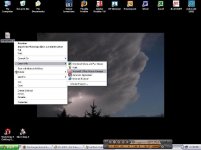
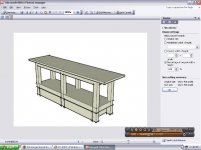
If you're using a pc with windows and microsoft office, you probably have a built-in photo editing tool on your computer that's easy to use. It's called Microsoft Office Picture Manager. Here's a quick step by step to get you started. Make sure you make a copy of the file so you're not destroying the original like Der Bugmeister said earlier.

If you right click on your image, you get a menu that has "open with" as an option. Select "open with" and then select Microsoft Office Picture Manager (MOPM).

In MOPM, select RESIZE from the PICTURE menu. This launches a control bar on the right side of the screen. You have three options for resizing that you can play with and see what works for you. Click OK. Save the file and your done.

I attached some screen shots for you as I was doing this so that you could see what I did.
 

Attachments

  • 1 file and menu.JPG
    1 file and menu.JPG
    34.1 KB · Views: 13
  • 2 resize screen.JPG
    2 resize screen.JPG
    42.1 KB · Views: 15

Rickster

Well-known member
Joined
Jun 26, 2005
Messages
6,218
Location
SE PA
You could also get a CarDomain website to host your pics. They will resize when you upload them. In my cardomain link at the top right is a 'register' icon.
 

JohnZ

Well-known member
Joined
Dec 28, 2005
Messages
475
Location
Washington, Michigan
Mods have stated in the past that they prefer uploading photos directly from your computer using the "Manage Attachments" feature so the images remain here on the site; if they're linked from a hosting site, if the host goes belly-up, the images are gone from this site.

Simplest cure is just to set your camera so it shoots at 640x480, and you don't have to do any re-sizing; that said, almost every digital camera has a re-size function built-in, and automatically saves the original (larger) image after re-sizing it smaller.

:beer:
 
To avoid these ads, REGISTER NOW!
Top Bottom