To avoid these ads, REGISTER NOW!

DRO's for Dummies

nine4gmc

Well-known member
Joined
Mar 24, 2012
Messages
14,357
Location
Dallas
Hey guys, a lot of you have machines with Digital Read Outs and a lot of us want them. I recently picked up one for my mill and just got it installed the other day. I have 0 knowledge or experience with a DRO and between that, the poorly written manual and poor comprehension skills, I am lost. I mean, I can use it as digital indicators but I'd like to be all fancy and be able to program other functions as well.

For instance, say I have a 1/2" end mill in the spindle and I want to punch and mill out a basic rounded corner rectangle. Taking into consideration the center of the end mill to edge is 1/4". If I want to cut a rectangle thats 3/4" wide x 2" long, outside dimensions, I would plunge and move the table 1/4" x 1.5".

How would I set that up in the DRO? Anyone with a DRO post your setup!
007bd3241b3df0a0f4e172765d976129.jpg

0f6ec7d9b52856ce6241ef41fd4879cc.jpg
 

Attachments

  • 007bd3241b3df0a0f4e172765d976129.jpg
    007bd3241b3df0a0f4e172765d976129.jpg
    59.7 KB · Views: 1
  • 0f6ec7d9b52856ce6241ef41fd4879cc.jpg
    0f6ec7d9b52856ce6241ef41fd4879cc.jpg
    65.7 KB · Views: 1
To avoid these ads, REGISTER NOW!

LXCam

ALLIANCE MEMBER
Joined
Apr 23, 2013
Messages
19,070
Location
AZ
I've never compensated for the diameter of the cut like that. Everything I do is based off the datum then plus or minus 1/2 the diameter. Pretty old school stuff but easy enough to do with a drawing handy. I have dry erase boards and a calculator next to all my machines for temp drawing/ cut calculations.

Ya know after rereading your post again your last statement sums up what I was talking about. The only time you would want to program and compensate for the tool dia is when cutting a radius. I've only ever done that a couple times but I have to refer to the manual for setting up the DRO.
 
Last edited:

astroracer

Well-known member
Joined
Jun 22, 2005
Messages
3,001
Location
Mid_Michigan
Using the DRO I would indicate the endmill in one corner and zero out the DRO. Then it's a simple matter to move the table 1/4" x 1 1/2", just as you mentioned, to mill a 3/4" x 2" pocket.
Mark
 
OP
N

nine4gmc

Well-known member
Joined
Mar 24, 2012
Messages
14,357
Location
Dallas
So how would you do a 5 hole lug pattern?

All you guys just look at them? No button pushing?


Sent from my iPhone using Tapatalk
 

American Locomotive

Well-known member
Joined
Jan 8, 2017
Messages
10,928
Location
Rhode Island
Well what DRO do you have? Some DRO are just that, and only give absolute positions. Some are fancier and let you assign new 0 points, etc... Others are fully programmable and can do all kinds of things.

Without knowing what you have, we can't really help you!
 

larry_g

Well-known member
Joined
Apr 28, 2007
Messages
16,858
Location
oregon
DRO's are like cars; all will get you down the road yet there are many different controls in them that are different. Like how do you change the time on the clock; all are a bit different. So knowing the exact DRO you have is important, and a link to the manual would also help.

lg
no neat sig line
 

astroracer

Well-known member
Joined
Jun 22, 2005
Messages
3,001
Location
Mid_Michigan
So how would you do a 5 hole lug pattern?

All you guys just look at them? No button pushing?


Sent from my iPhone using Tapatalk

Like this... posted in another forum a few months ago...

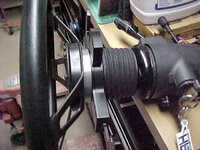
"Worked on the steering wheel adapters this past week. I was doing a test fit Monday night and found the wheel adapter I had in my stash was to small to fit the Astro column. I ordered an adapter kit from Summit. While I was waiting for that I got to work making the upper adapter plate. This is the piece that will go between the steering wheel and the PCS paddle shifter unit. It will use 5 #10-32 x 1 1/2" long SHCS to bolt the PCS unit onto the extension. The extension will bolt to the new adapter when it comes in. (hopefully)...
I dug out a chunk of 1/2" thick aluminum plate and laid out the bolt circles on it. One for the 5 bolts that go thru the PCS unit and one for the three bolts that hold on the steering wheel and horn button asm. After clamping the piece in the mill I drilled a center hole for "zero" for the next operation.
MVC001F-vi.jpg
Using the bolt pattern feature on the DRO made drilling both of the bolt patterns easy. This feature sure does save a lot of time over hand laying out all of these holes. With the piece clamped in and zeroed all I have to do is plug in the both circle diameter, the number of holes, the start and end angles (in this case 0 and 360) and hit enter. The first hole location is a dead straight move in the X out tot he radial position of the first hole. In the pic that would be the one to the right in the picture.
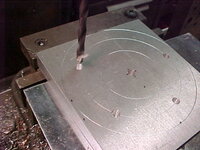
MVC013F-vi.jpg
Every consecutive hole after that is reached by simply pressing the down button to move the next hole and twisting the mill handles until both X and Y are zeroed out. It makes doing this a no brainer...
Here the five outer holes have been drilled and I am starting on the three inners.
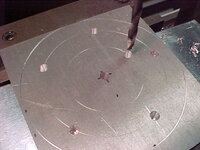
MVC017F-vi.jpg
Once all of the holes are drilled I re-zero the cutter, which has been changed out for a counter bore tool and re-run the program.
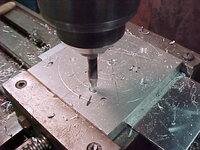
MVC016F-vi.jpg
With all of the holes done I could get the three inner holes tapped for 1/4-20's.

Chunking off the excess material so I can get the adapter turned round in the lathe.
MVC010F-vi.jpg
After a few minutes of trimming. Using the hold downs from a clamping kit on the saw makes this kind of off hand cutting a whole lot easier. Sure beats doing it by hand on the vertical. This way I can do other things while the H/V is cutting.
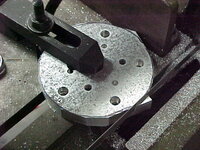
MVC017F-vi.jpg

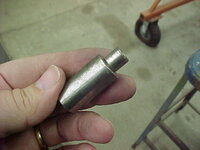
I made this mandrel years ago for another project. The small pilot is sized for the .422 dia. tap drill for a 1/2"-13 thread. I drilled the center hole out to that so I could use the mandrel to chuck the adapter in the lathe.
MVC005F-vi.jpg

MVC006F-vi.jpg

MVC008F-vi.jpg
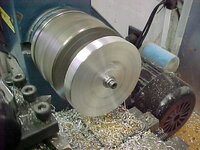
Spinning in the lathe. I use real light cuts here and take my time.
MVC017F-vi.jpg
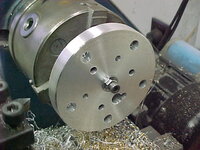
After it was good and round I chamfered the edges and cleaned up the surfaces with some ScotchBrite while it still spinning.
MVC018F-vi.jpg
All cleaned up and ready for a test bolting. This will get painted satin black to match the rest of the column.
MVC019F-vi.jpg

With everything bolted together it all fits and looks pretty good. I know it looks tall but this will put it right about where it needs to be for the new seat placement.
MVC005F-vi.jpg
MVC008F-vi.jpg
Gotten a lot done so far this week... Thanks for following.
Mark"
 
OP
N

nine4gmc

Well-known member
Joined
Mar 24, 2012
Messages
14,357
Location
Dallas
That's awesome astroracer! That's exactly what I'm talking about there. Nice pics and description.

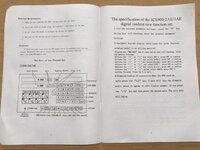
This is my cheap *** DRO but I think it has a lot of options?
675b5d8cf090ed7275c27c951acb1bca.jpg

f2f540901cdcbbf571c8470650001089.jpg

519594f3d2fd67f776a2d747bb39dc36.jpg

fd5231add886dcf9a403b6f4e53e3960.jpg


Sent from my iPhone using Tapatalk
 

Attachments

  • 675b5d8cf090ed7275c27c951acb1bca.jpg
    675b5d8cf090ed7275c27c951acb1bca.jpg
    371.8 KB · Views: 1
  • f2f540901cdcbbf571c8470650001089.jpg
    f2f540901cdcbbf571c8470650001089.jpg
    270.3 KB · Views: 1
  • 519594f3d2fd67f776a2d747bb39dc36.jpg
    519594f3d2fd67f776a2d747bb39dc36.jpg
    314.1 KB · Views: 2
  • fd5231add886dcf9a403b6f4e53e3960.jpg
    fd5231add886dcf9a403b6f4e53e3960.jpg
    265.9 KB · Views: 1
To avoid these ads, REGISTER NOW!

LXCam

ALLIANCE MEMBER
Joined
Apr 23, 2013
Messages
19,070
Location
AZ
"Circle hole". Lmmfao! Ya nice translation. I'm pretty sure that's where you'll find the directions for doing a bolt pattern.
 

JoeFin

Well-known member
Joined
Sep 13, 2013
Messages
717
Location
NorCal - where the Rednecks Race
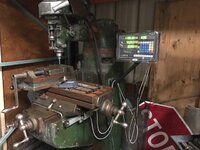
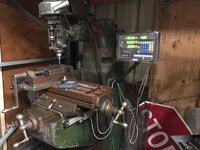
Here is mine

DSCF1990_zpskiuki1er.jpg


Except mine has a PC based control system and servo motors attached

All kidding aside, I would plunge the corners with an endmill the 1/2 the size of the radius I wanted making the first plunge my datum point and hollow out the round cornered rectangle from there.

Is it necessary to use all the functions of your DRO. Not if the possibility of "Fat-*********" the programming is more problematic then keeping a calculator on the tool cart.

Then of course you can get really lazy like me and just say screw it ....


LXCam

ALLIANCE MEMBER
Joined
Apr 23, 2013
Messages
19,070
Location
AZ
Well Nine's I was gonna download the manual and walk you thru a bolt pattern, but I didn't have any luck finding the PDF. So if you'll open up the pages to Circle Hole maybe I can give you some hints.

I have a acu-rite for my Mill and it's easy but I still need to refer to the manual every time I do a bolt circle. Who knows, it might be the same damn procedure.

Also hows the quality of that thing so far, I never did get one for my lathe and always wanted one. But dropping a grand wasn't worth it to me. When I looked up your part number I found one for like a buck and a half. Now that would be worth it to me.
 
OP
N

nine4gmc

Well-known member
Joined
Mar 24, 2012
Messages
14,357
Location
Dallas
LX, wait til you see the Chinglish operation steps! :D

JoeFin, that's a sweet setup! I looked into servos for this one and may eventually convert it but I'm going to enjoy it for a while first. It's my first real mill, I have an Atlas horizontal but I'm repairing it now.

LX, I got this 3 axis for $275, I heard they accept lower offers. It went on really easy. I have no basis of comparing, first mill, first DRO, only had it hooked up for a few days. I did make some test cuts and milled a couple rectangles but they were scribed and I just followed the lines occasionally looking at the numbers roll on the screen in joy.[emoji3]


Sent from my iPhone using Tapatalk
 

astroracer

Well-known member
Joined
Jun 22, 2005
Messages
3,001
Location
Mid_Michigan
I got my DRO from TPAC Tools. it was around 400 bucks for the 2 axis mill package with glass scales. The DRO itself is very versatile and I will never use all of the features it has...
photo-vi.jpg

Mark
 

NOZZLEMAN

Well-known member
Joined
Jul 10, 2010
Messages
143
Location
San Antonio, TX
Go to YouTube and watch a few videos on these things... I have one on my mill 3-axis and a 2 axis on the lathe. very simple once you get a few things understood
 
To avoid these ads, REGISTER NOW!
Top Bottom