To avoid these ads, REGISTER NOW!

Above 1200 Sq/FT Eastern Washington Workshop

Wokspaces above 1200 squarefeet.

Chrisb62

Well-known member
Joined
Jul 30, 2019
Messages
1,091
Location
southwest fl
Happy Birthday.....AARP will be contacting you shortly.

Don't comment much to your thread because most of the time you are on top of every facet of what you are doing......almost like you did lots of homework ahead of time.:unsure:
 
To avoid these ads, REGISTER NOW!

rattle_snake

Well-known member
Joined
Jun 25, 2015
Messages
5,145
Location
Chandler, AZ
Happy birthday old man!
Don't comment much to your thread because most of the time you are on top of every facet of what you are doing......almost like you did lots of homework ahead of time.:unsure:
yes this right here... I feel overwhelmed reading your automation related projects as they are non-trivial and and come out so perfect. I would like to do some of the same but upfront research to be as successful is a **** load of time. Keep it up.
 
OP
S

slodat

ALLIANCE MEMBER
Joined
Feb 6, 2010
Messages
3,679
Location
Central-ish, WA
Thank you all for the birthday wishes. It has been a very mellow week. Recharging and relaxing. Not getting a whole lot done and that's exactly what I need.

Happy Birthday.....AARP will be contacting you shortly.

Don't comment much to your thread because most of the time you are on top of every facet of what you are doing......almost like you did lots of homework ahead of time.:unsure:

Happy birthday old man!

yes this right here... I feel overwhelmed reading your automation related projects as they are non-trivial and and come out so perfect. I would like to do some of the same but upfront research to be as successful is a **** load of time. Keep it up.

Thank you for the kind words. I really enjoy sharing what I'm up to on here. I love the conversations, questions, and back and forth. I've gotten a lot of information, ideas, and joy from being on here!
 
OP
S

slodat

ALLIANCE MEMBER
Joined
Feb 6, 2010
Messages
3,679
Location
Central-ish, WA
Fiddy?! Daym your old. I don’t turn until March. So technically I have 6 months to fabricate and build which you’ve already wasted on other ****. Think you should skip sleepin tonight and finish a project. 😂
Hey now, respect your elders or some **** like that! Instead of doing what you suggested, I slept in past 7am this morning! Ha!
 
OP
S

slodat

ALLIANCE MEMBER
Joined
Feb 6, 2010
Messages
3,679
Location
Central-ish, WA
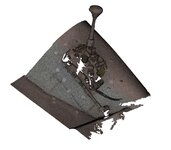
Went to a good buddy's shop yesterday to work with the scanner and help him with some Fusion 360 basics. This guy is one of the best upholsterers out there. He's working on a truck that will be a contender for top accolades. So cool to see it. No photos allowed.. This is the shifter section of the transmission tunnel.

28ACAB5E-4DA0-49AE-85B8-7FB1C5421C78.jpeg

scan 02-03.JPG

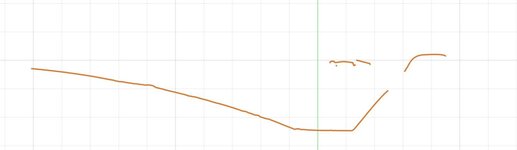
I figured out how to use the mesh (scanned data) to create a sketch that follows the shape of the tunnel on a vertical plane.
scan 2 02.JPG

scan 2 01.JPG

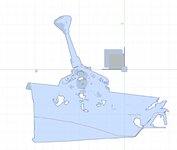
The orange line below is where the vertical plane is on the panel. The rest is a simple (silly?) profile of a center console. Obviously not a pretty part, just getting the process sorted out.

scan 02-04.JPG

That is used to make the console side panel.
scan 02-05.JPG

Eyeballed a plane in the center of the shifter and mirrored the part.
scan 02-06.JPG

Now we have two sides. The right side still needs to be trimmed to the floor using the same process as the left.
scan 02-07.JPG

This is a good example of how the scan data is useful in design using Fusion 360. More to follow..
 

GeddyT

ALLIANCE MEMBER
Joined
Jun 17, 2015
Messages
1,239
Location
Bellingham, WA
I'm late with the happy birthday wishes, but here they are nonetheless.

With the center console, have you thought about widening it to cover the whole tunnel and putting a phone tray or something to the right of the shifter?
 
OP
S

slodat

ALLIANCE MEMBER
Joined
Feb 6, 2010
Messages
3,679
Location
Central-ish, WA
That's exactly how I have envisioned using these scanned mesh clouds. It's awesome to see your process, thanks!
Happy to share the process! Thank you for following along and contributing to the conversation.
I'm late with the happy birthday wishes, but here they are nonetheless.

With the center console, have you thought about widening it to cover the whole tunnel and putting a phone tray or something to the right of the shifter?
Thank you!! This isn't an actual design. I'm not concerned about making a console, at all. This is learning and dialing in a workflow exercise only.
 

RickP

Well-known member
Joined
Jan 15, 2013
Messages
1,547
Location
Annapolis, MD
I've been catching up on your thread since I saw it referenced in GeddyT's shop thread, and I'm finally caught up to present day. Very impressive shop and machines -- the simple building interior puts the emphasis on the tools (right where it should be for a business). I can't wait to see more about the new direction you're going with work projects.

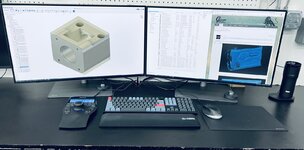
Really nice workstation -- I like the contrasting colors on the keyboard. And your eyes will appreciate those new monitors! With all the 3D processing you do, I'm sure you'll get a nice speed bump once you get the new computer hooked up. I couldn't believe the difference when I upgraded from a laptop to a real workstation with multiple monitors. I like how you carved out some dedicated space on the work bench for your computer station, rather than putting it in the little office area.

Keep up the excellent work!
 
OP
S

slodat

ALLIANCE MEMBER
Joined
Feb 6, 2010
Messages
3,679
Location
Central-ish, WA
Rick - thank you for the thoughtful reply! I really appreciate the GJ community!

You are right about the workstation. I've had dual monitor setups, and somewhat nice computers in the past, but never one of this caliber. The workstation has to be right in the middle of the shop as far as I'm concerned. This bay is clean, and all the mess is made in other closed off areas of the shop. Thanks again for checking out the shop and contributing to the conversation!
 

GeddyT

ALLIANCE MEMBER
Joined
Jun 17, 2015
Messages
1,239
Location
Bellingham, WA
Have you posted details on the new workstation yet? How 'roided up is it going to be? Computers are so amazingly powerful these days. It's crazy to think about what I was working with when I first started doing CAD a few decades ago. I remember my overclocking (and requisite giant coolers) days, chasing every last bit of performance so Pro/E and 3DSMax would have a prayer of running on a computer that was less powerful than the cheap phone I now carry in my pocket.

Currently, I'm moving the opposite direction: I have the badass workstation, but it's a PITA to bring it in to work with me (small enough, but weighs a ton), so I haven't been. And even if I did, I'd be hooking it up to a crappy monitor. You don't have to seriously break the bank to pack a lot of power on the go these days, so I'm currently waiting for ASUS to actually start selling the new 120 Hz OLED laptops that they "launched" all the way back in May. They're supposed to hit the market in Q3, so hopefully sometime soon. Once that happens, I'll have nearly the equivalent of my workstation in a package that fits in my backpack for bringing to work and slogging through learning CAM and improving CAD skills.
 

Bob Heine

ALLIANCE MEMBER
Joined
Oct 24, 2009
Messages
10,703
Location
Boca Raton, Florida
I'm currently waiting for ASUS to actually start selling the new 120 Hz OLED laptops that they "launched" all the way back in May.
Tom, I just checked and Costco has an ASUS 14.5" OLED VivoBook Intel Evo Platform Laptop - 12th Gen Intel Core i7-12700H - 2880 x 1800 Display 120HZ - Windows 11 - Midnight Black for $799 (after $300 rebate). That's almost cheap enough for me. :unsure:
 
OP
S

slodat

ALLIANCE MEMBER
Joined
Feb 6, 2010
Messages
3,679
Location
Central-ish, WA
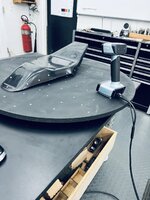
Had a blast scanning a fuel tank and seat pan for a very special motorcycle build for a fellow GJ member this morning.

Sorted out aligning the top and bottom scan of the tank. It all went really well. The scanning turntable worked well.

565BFADF-612E-43EF-A599-FF7CF31E8A41.jpeg

tank04.JPG

tank06.JPG

The scan data doesn't have an origin or relationship to 3D space until you define it. First the scans have to be aligned.
tank01.JPG

The software aligned the scans with no effort on our part. Amazing ****!
tank02.JPG

Final mesh.
tank03.JPG

tank05.JPG
 
OP
S

slodat

ALLIANCE MEMBER
Joined
Feb 6, 2010
Messages
3,679
Location
Central-ish, WA
Have you posted details on the new workstation yet? How 'roided up is it going to be?
Nothing too crazy.

Dell Precision 5820
Intel (R) Core (TM) i9-10980XE 3.0GHz,(4.8GHz Turbo, 18C, 24.75MB Cache, HT, (165W), DDR4-2933 Non-ECC)
128GB DDR4-2933
1tb NVMe drive
8tb 7200 hd
Nvidia RTX A5000, 24GB, 4DP

Dual BenQ PD3220U 32 inch displays

It’s unclear whether the Core motherboard can do 256gb or not. If it can, I may do that. Buying the additional RAM from Dell was stupid expensive. It can be bought for under half their price.

Currently, I'm moving the opposite direction: I have the badass workstation, but it's a PITA to bring it in to work with me (small enough, but weighs a ton), so I haven't been. And even if I did, I'd be hooking it up to a crappy monitor. You don't have to seriously break the bank to pack a lot of power on the go these days, so I'm currently waiting for ASUS to actually start selling the new 120 Hz OLED laptops that they "launched" all the way back in May. They're supposed to hit the market in Q3, so hopefully sometime soon. Once that happens, I'll have nearly the equivalent of my workstation in a package that fits in my backpack for bringing to work and slogging through learning CAM and improving CAD skills.
I haven't learned why I would care about more than 60hz in the display. My CAD laptop is a fully loaded Dell XPS17 w/64GB RAM and a 6GB RTX video card. It's what I use for scanning and it does a good job. It was time to update the shop computer. I knew I wanted more RAM. Ordered a week ago and no status change. Supposed to be here by Tuesday..
 
To avoid these ads, REGISTER NOW!

GeddyT

ALLIANCE MEMBER
Joined
Jun 17, 2015
Messages
1,239
Location
Bellingham, WA
Tom, I just checked and Costco has an ASUS 14.5" OLED VivoBook Intel Evo Platform Laptop - 12th Gen Intel Core i7-12700H - 2880 x 1800 Display 120HZ - Windows 11 - Midnight Black for $799 (after $300 rebate). That's almost cheap enough for me. :unsure:

Basically the exact same laptop my coworker just bought, and he absolutely loves it. The displays are so amazing. As a daily driver, I think you'd get a kick out of that, Bob. For me, though, that one lacks discrete graphics, so would struggle more with CAD. I'm pretty much waiting on that exact system only the Pro X model (Vivobook Pro 14X or 16X, haven't decided). All-metal chassis, RTX graphics.

Nothing too crazy.
..
It’s unclear whether the Core motherboard can do 256gb or not. If it can, I may do that. Buying the additional RAM from Dell was stupid expensive. It can be bought for under half their price.
...
I haven't learned why I would care about more than 60hz in the display.

"Nothing too crazy," he says, then describes something crazier than anything I've seen.

I'm not so sure RAM is the bottleneck. 32GB is the most I've ever had, and it's always something else holding it back (CPU/GPU/throughput). I'd bet 128GB is more than enough.

For CAD? 30hz is fine. This would be a do-it-all machine, though, so the fun activities definitely benefit from the higher refresh rates. I'm typing this from home (which is rare these days), which means I'm looking at an LG C1. I bought it to replace the TV my kids used as a trampoline at a track day last year. The TV in our living room is a 12 year old basic Samsung, and I don't mind it at all, so screens are not usually something I prioritize, but the mood caught me and I splurged. There's really no going back now. High-refresh-rate OLED is downright amazing, and seeing it available in a laptop with decent hardware specs has me willing to wait (to replace a Zenbook that I really liked but stepped on and broke while on a camping trip...).

You tend to go top-notch when you put something into your shop, and it looks like your computer gear is no exception. Congrats!
 
Last edited:
OP
S

slodat

ALLIANCE MEMBER
Joined
Feb 6, 2010
Messages
3,679
Location
Central-ish, WA
Fusion doesn't use the GPU for any calculations. The single thread score is what matters for Fusion speed wise. It does use up RAM. I want to manipulate models of full car interiors, so I will run the max RAM the motherboard can handle. Sadly, I don't play video games. The 24GB RTX A5000 will be great for use with the scanner and Geomagic Essentials.
 
OP
S

slodat

ALLIANCE MEMBER
Joined
Feb 6, 2010
Messages
3,679
Location
Central-ish, WA
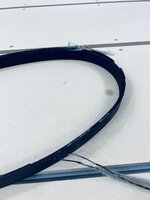
I bought the last set of 6,000 rpm pulleys ZPS had for the Tree J425 milling machine just after I got it home a few years ago. They have been in the bottom of the control enclosure since.. waiting for the day I install them. The belt gave up the ghost last weekend when I was running some of the tooling parts I make.

28D6C16F-D569-42D3-9A1B-ED821A201DE3.jpeg

Good thing I had it apart.. The holes in the existing motor pulley were oblong. I can only assume they were loose at some point. It didn't seem like they were when I disassembled today. No big deal, I was replacing anyway.

C83F56D6-7441-4271-8286-BF2CFE94B798.jpeg

New belt came this week and I need to finish the parts. So... today was the day. There's a set of super precision angular contact bearings on the spindle pulley. ZPS warned me they always fail when you remove the upper bearing housing. This is a big part of why I hadn't done the pully swap yet. Well.. I'm pleased to report that wasn't the case for me. Bearing housing pressed right off, pulleys went right on. Was as easy as it possibly could be. 6,000 rpm is about as fast as I want a pulley spinning anyway. The spindle motors rated full speed is 8,000.
 
OP
S

slodat

ALLIANCE MEMBER
Joined
Feb 6, 2010
Messages
3,679
Location
Central-ish, WA
Steven, thanks so much for your hospitality today. The 3D scans turned out much better than I could have imagined. Onward with the project!

Andrew
It was nice to meet you, Andrew. Thanks for visiting the shop! I'm glad the scans are going to work for you! Maybe you'll share your project with folks at some point?
 
Last edited:

gte718p

Well-known member
Joined
Mar 12, 2009
Messages
3,950
Fusion doesn't use the GPU for any calculations. The single thread score is what matters for Fusion speed wise. It does use up RAM. I want to manipulate models of full car interiors, so I will run the max RAM the motherboard can handle. Sadly, I don't play video games. The 24GB RTX A5000 will be great for use with the scanner and Geomagic Essentials.
That is partially true. Fusion does us the GPU and Directx for the real time model view. Especially with complex large models, I can definitely tell the difference as I rotate and zoom around the model on my laptop and desktop. The two are identically speced except the laptop has the integrated graphics card (don’t remember which one, but pretty well speced) and my low end 750.

That being said, Fusion doesn't use the GPU for rendering or ray tracing, so you don't get a huge benefit.

I use the Autodesk cloud rendering and it is awesome. It is expensive, definitely cost competitive to upgrading my system for the small number of high end renders that I need to do.
 
Last edited:

gearhead1960

ALLIANCE MEMBER
Joined
Mar 21, 2019
Messages
1,799
Location
Manassas, VA, a small blot in history
Steven,

Enjoy following along on your journey and your mad skills. Would like to see some updates on your other shop. As far as why you would want screens faster than 60hz, that is a measurement of the refresh rate of the display. I was alway told that the faster refresh rates are better for the eyes. It also reduces the flicker you see on the screen. Of course with these HD screens these days, my old experience with the CRT displays is showing it's age. Gamers are now getting into displays that have a refresh rate of up to 240hz that help make the graphics seamless and more realistic. Just my 2 cents.....
 

lilscorpion

Well-known member
Joined
Mar 15, 2010
Messages
3,599
Location
Colorado
Scanning is going to be quite the asset for fabbing. The shifter tunnel is the perfect example of how I’d use it 90* of the time. Can’t imagine how much time it would save in the prototyping department. 😎
 
OP
S

slodat

ALLIANCE MEMBER
Joined
Feb 6, 2010
Messages
3,679
Location
Central-ish, WA
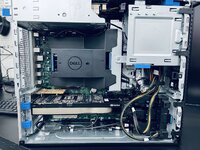
The new Dell Precision workstation arrived. It does not disappoint. It's larger than the cubby I had made for the previous tower. I knew if I left it at foot level it would get beat up bad and kicked a lot.


E5C9722D-1398-4553-B02D-ADAA5B9C696A.jpegMade a simple riser out of some scrap black melamine. Marsh spray ink to darken the raw edges and Festool dominos to hold it all together. Worked well and didn't take much time to put it together.

7CA2ED34-5E08-4AA5-81B5-875CD4CBB9B8.jpeg
 
OP
S

slodat

ALLIANCE MEMBER
Joined
Feb 6, 2010
Messages
3,679
Location
Central-ish, WA
All airflow is front to back. There are no openings on the sides. There are several variable speed fans. I can’t hear the machine and the temperatures are really low when I’ve checked them. I’m confident it’s good to go temperature wise. Excited to add the other 128GB RAM next week. Thus far it’s a very nice machine. The scanner will love it!

680A2348-1BFC-4B61-9005-912AF2E0401B.jpeg
 
OP
S

slodat

ALLIANCE MEMBER
Joined
Feb 6, 2010
Messages
3,679
Location
Central-ish, WA
Had a small job come in just in time for the weekend. Existing breaker testing kits don't have a 5/16" thick stab. That's what the client wanted. Supplier didn't have much at all in copper and that's what the job called for. I bought a very expensive 3/8 plate remnant. It's all they had.

I had read to use aluminum settings and run the speed about 1/2 for copper. I tried and it.. didn't work. I didn't want to burn up a bunch of time or the little bit of material I had, so I finished with the bandsaw and got my part blanks.

First op was in the vise, bore the holes, clean up the surface. Pretty simple. The tapped holes are a needed feature. Made my first fixture plate to hold it from the bottom so I could machine 5 sides in OP2. OP1 part and the fixture:

F4C296DB-4B43-4DAC-816A-ED0FB08734B5.jpeg

Fixture worked out really well.

77F36734-84EE-4D0F-BF49-42A9BD3B80B8.jpeg

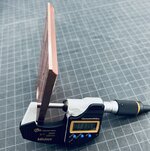
Even hit the only somewhat important dimension:

5811AD1F-92FC-4C2C-9DA4-AC5B27BF7AEE.jpeg
 

Attachments

  • A656D3AD-7C0F-4975-ACB6-35449163DAC2.jpeg
    A656D3AD-7C0F-4975-ACB6-35449163DAC2.jpeg
    369.6 KB · Views: 8
Last edited:
OP
S

slodat

ALLIANCE MEMBER
Joined
Feb 6, 2010
Messages
3,679
Location
Central-ish, WA
Some really exciting business and product development stuff happening. This is happening in the next couple weeks..

0298594F-55CB-46A0-8058-FF627A421A1F.jpeg

100 watt galvo fiber laser arrives Thursday. This brings deep engraving/marking capabilities for metals. It’s a MOPA laser, so it will be able to do colors as well.

I’m on the path to finding the niche for the shop and business! Or maybe it’s finding me!
 

loganb

ALLIANCE MEMBER
Joined
Dec 29, 2011
Messages
5,497
Location
Omaha, NE
The Crucial RAM upgrade came this morning. Was a little concerned about it all working out.. No need to be concerned after all.

1663002668377.png

Should be good for many years to come!

Nice upgrade! Ordered 64 gb for the work machine today which is max it can take and debating on 128 or 256 for the personal one.... I'm probably going 128 as not working with the meshes you are with scanning

And press brake and laser... gonna be a good month! Congrats!
 
OP
S

slodat

ALLIANCE MEMBER
Joined
Feb 6, 2010
Messages
3,679
Location
Central-ish, WA
I went with the additional 128 to max it out and be done with the machine. In 5-7 years when I replace it, I’m sure I’ll have been happy with it the entire time. Just as I have been with the 64GB I’ve had the past 5+ years.

There’s only so much I’m comfortable showing on here with product and client info. With that, excited doesn’t scratch the surface for how all this feels. I’ve been at this 15+ years in the current iteration. The laser adds a level of detail and quality that sets the shop apart. Things like the scanner do so as well, in a different way. The press brake isn’t as unique or ****. The combo is exciting for me.

Again, thank you, Logan, and everyone for following along and participating in the journey and conversation.
 

GeddyT

ALLIANCE MEMBER
Joined
Jun 17, 2015
Messages
1,239
Location
Bellingham, WA
Really looking forward to seeing what you have planned for the new machines. Your shop is like Mary Poppins' purse: It stays the same size on the outside, but you seem to be able to fit an infinite amount of machinery in it!
 
OP
S

slodat

ALLIANCE MEMBER
Joined
Feb 6, 2010
Messages
3,679
Location
Central-ish, WA
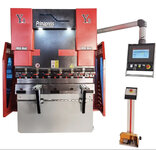
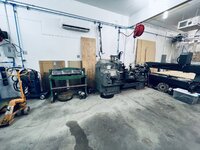
It’s definitely a Tetris game in here… initially I had thought the brake would go in the upholstery bay. Then, this evening I did a lot of measuring and came up with a new layout.. lathes can’t be kicked out.. as a design intent. Current plan is to move the Pacemaker 90 degrees up against the back of the router.

1C7C573B-4D36-427E-B369-87A1B279EA0F.jpeg

The brake would then go against the wall the where the Pacemaker was.

C1BBBCD9-C3CA-44B9-B18F-746A977EC62A.jpeg

This is the current plan… subject to change, of course. We all know how “management” lacks a clue on these matters ;)

Coincidentally.. the brake also weighs 6-7k lbs. weird weight class to play in…
 
Last edited:
To avoid these ads, REGISTER NOW!
Top Bottom