Denwood
Well-known member
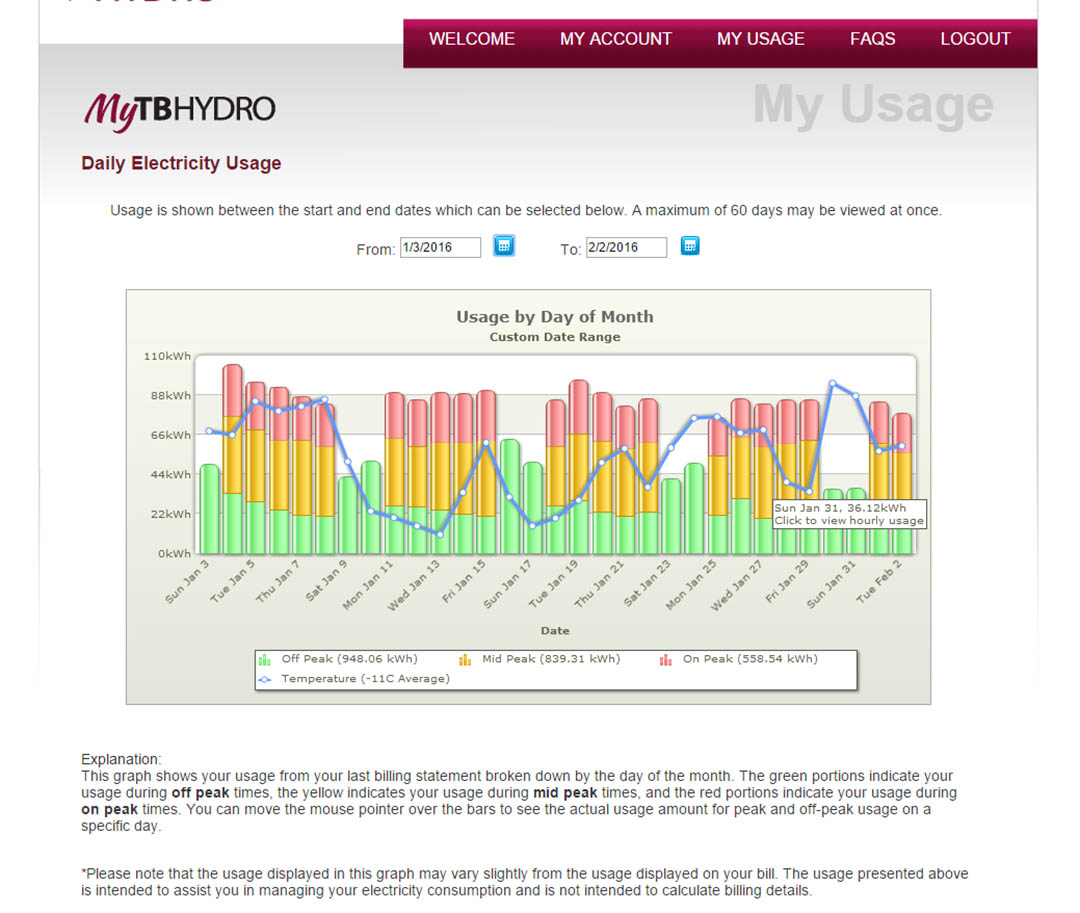
I've referred a few times on the journal to a project building we took on 4 years back. The idea was to take an existing 9500 sq/ft warehouse, gut it, and turn it into a net-zero(ish) building. Phase 1 was the most important, establishing a tight, very well insulated envelope. Temperatures here hit -35C in the winter, and commercial buildings much smaller than ours can cost $2000/month to heat. Last February with an average temp of -20C (-4F) our building used $228 of natural gas to heat. On days where the temp is above 5C (41F) the building requires no added heat due to the insulation level, passive solar, and heat added by my staff/computers during the day. We did solar modeling to optimize window placement, added a passive cooling clerestory, installed overhead light sensors (almost no light switches in the building) etc. Our electrical use is pretty steady at $350/month in the winter, $450/month in the summer when AC is active. This is approximately half of what a comparable commercial building would use.
The main floor radiant over-pour. Existing slab was insulated with 2" EPS, thermal reflective, and 2" concrete added.


The mechanical budget was not trivial for the retrofit, including insulating the existing main floor slab, and over-pouring with 4 zone radiant. We also installed 5 air handlers, two HRV units, and one mini-split to handle heating upper floors, cooling and fresh air circulation. The wall system is a "furred airspace assembly) which has a thermal break and radiant reflective air space component. Walls are approx R45, ceiling R80. Dual redundant Triangle Tube on-demand units provide heat via hot water to both the floor and air handlers at something like 98% efficiency. There are nine thermostats, none of them smart, something I'm finally addressing.
I've been watching the industry for the last few years, and zero'd in on Ecobee as their thermostats do all the wifi bells and whistles, but also have a web portal (free) which provides usage reports/graphs etc. Unlike Nest, Ecobee tracks local weather and can intelligently handle set-back times and recovery as it learns your building. With the Ecobee3 integrated wireless temp/occupancy sensors, automation integration (Wink, Smarthings, IFTTT, etc.) it was time to pull the trigger. Best Buy (Canada) actually had three units in stock locally, and give me a nice discount on nine. Installation was very straightforward as I have "C" wires to the old stats. Everything you need, including a PEK wiring kit (addes a virtual C wire if you need it), larger base plate cover (if you need it), screws, etc. is in the box.

You can pair up to 32 of these remote occupancy/temp sensors with each Ecobee3 thermostat. The sensors use the same battery as computer CMOS, and last for four years. If the battery needs replacing, the Ecobee3 will alert you.

In this climate, the highest possible set back ,for the longest time results in maximum savings. This study using twin R2000 homes exposed to identical conditions showed savings as high as 17% on the coldest days with a 62F set back.
http://www.healthyheating.com/downlo.../nrcc48361.pdf
My goal is to minimize both electrical and gas use by conditioning space only when necessary, and eliminate staff/tenants doing silly things.
I've installed 3 of the 9 units so far (covering our upper floors) and so far have been quite impressed with the product. I'll post more here as the other six are installed. The Ecobee3 stats have some key features that will enable them to cover our four zones of radiant, five air handlers, and space that varies from a film studio to tenant rental spaces:
1. Programming is done on the unit, via the free web portal, or via the free smartphone app. You can also view indivual sensor temp and occupied status from any of the three sources. As you add Ecobee3 units to the web portal, they show up with basic info. Selecting them allows you to program, view usage graphs, sensor data etc. You can group your thermostats and decide what characteristics are shared. This lets you program a holiday on one Ecobee, and have it affect all nine (in my case) in the building. You can also toggle sharing of schedules, HVAC modes, alerts, (and more) when you group thermostats.

There are quite few options in the web portal, but here is a basic view of one of the schedules.

and sensor data/options:

2. Ecobee's web portal allows you to manage the thermostat, but also offers up "Home IQ" which is a series of reports to monitor your system, view motion events, etc. I'll need to wait for 3 weeks until data is gathered to allow viewing runtime, community comparisons & home efficiency reports. However, it immediatly starts charting quite a few parameters. The raw data can be downloaded for any period in .csv format.
3. The Ecobee stats are weather aware, so correlate learned recovery rates for a building/zone with the weather forecast. Ecobee has been doing this for a number of years and is in my opinion, the best implementations of smart stats I've seen. This smart recovery or cooling behaviour can be turned on or off. This is the plot of this morning (day 2) and you can see the thermostat is "learning" about the building's zone recovery. It was set to recover from 15C to 20C, at 9am. You can see it anticipated a longer recovery than was required (outside temps, -20C), bumping the temp at 5am, 6am, 7:30am, then a push at 8:15am. It will be interesting to note the behaviour change as data is acquired over the next week or two. My expectation is that the recovery will tighten up a lot.

4. You can pair up to 32 remote temp/occupancy sensors with each Ecobee3 thermostat to bias temperature in occupied zones, and intelligently activate a set back if no occupancy is sensed. One of our building zones (serviced by an air handler) has a common area where the thermostat is located, and two closed rooms occupied by the tenants. The business tenants don't have a regular shedule, so previously the "dumb" stat was set to condition this space 9-5. With the Ecobee3 and a wireless temp/occupancy sensor in each space, this air handler will only run if the tenants are present, and turn off after they leave. If they show up, the sensor in their room detects occupancy, and the ecobee3 switches into "Home" mode where the temp is set up to 68F, otherwise, the space is kept at 15C. Essentially the tenant behaviour will determine the schedule. Because you can specify which sensors are active during different comfort levels (including the thermostat itself), the system will bias temps towards the occupied space if you set it up that way. If no occupancy is detected over a 2 hr window, the system will revert back to "Away" temps and settings. With these options, if one tenant is having a meeting (generating more heat) then the Ecobee3 will see this and stop heating the space.
I had a real struggle to sort this behaviour out, with several calls to tech support, but learned a lot about how the "Smart Home/Away" and "Follow Me" modes work. This is the "Follow Me" sensor data from earlier this evening. You can the system was in "Away" mode at 7pm, but Tenant1 sensor detected occupancy, and "Smart Home" mode (the blue bar at 7pm at top of chart) was activated. The sensor shows about 16.5C when the tenant arrived, and about 10-15 minutes the data shows a 20C average. Because no occupancy was detected at the Ecobee thermostat, or Tenant2 space, the temp would have been biased to Tenant 1. This is good.

5. You can lock down the thermostats completely with a pass-code, or alternatively choose a few options in terms of what's allowed. I also really like that you can define allowable cooling and heating values, and lock these down as well. This ensures that kids/tenants (wife!) can only adjust temps up or down as you define. I had a staff member who was feeling cold this week adjust the radiant heat up 2 degrees on a 4500 sq/ft slab on the basic stat controlling it. No idea how long it was set that way..but this won't happen with the Ecobee3
Ecobee3 support in the automation world is still in my opinion a work in progress, but Wink, SmartThings, Homeseer, and Vera can all control the thermostats. I also tried out IFTTT.com (If This, Then That) a free web-based service which allows very simple automation tasks to be performed. I tried a few "recipes" with mixed results, but managed to get iPhone notifactions of "Smart Home/Away" events, and also had the Ecobee3 stats logging the same events in a Google doc. Given that Ecobee's site already does a great job of keeping data for you, there is not much point in this task, however it illustrates the possibities for simple automation. It only took about 5 minutes to get IFFTT.com working as a newbie.

I'll update this as we make our way through the installation.
The main floor radiant over-pour. Existing slab was insulated with 2" EPS, thermal reflective, and 2" concrete added.
The mechanical budget was not trivial for the retrofit, including insulating the existing main floor slab, and over-pouring with 4 zone radiant. We also installed 5 air handlers, two HRV units, and one mini-split to handle heating upper floors, cooling and fresh air circulation. The wall system is a "furred airspace assembly) which has a thermal break and radiant reflective air space component. Walls are approx R45, ceiling R80. Dual redundant Triangle Tube on-demand units provide heat via hot water to both the floor and air handlers at something like 98% efficiency. There are nine thermostats, none of them smart, something I'm finally addressing.
I've been watching the industry for the last few years, and zero'd in on Ecobee as their thermostats do all the wifi bells and whistles, but also have a web portal (free) which provides usage reports/graphs etc. Unlike Nest, Ecobee tracks local weather and can intelligently handle set-back times and recovery as it learns your building. With the Ecobee3 integrated wireless temp/occupancy sensors, automation integration (Wink, Smarthings, IFTTT, etc.) it was time to pull the trigger. Best Buy (Canada) actually had three units in stock locally, and give me a nice discount on nine. Installation was very straightforward as I have "C" wires to the old stats. Everything you need, including a PEK wiring kit (addes a virtual C wire if you need it), larger base plate cover (if you need it), screws, etc. is in the box.
You can pair up to 32 of these remote occupancy/temp sensors with each Ecobee3 thermostat. The sensors use the same battery as computer CMOS, and last for four years. If the battery needs replacing, the Ecobee3 will alert you.
In this climate, the highest possible set back ,for the longest time results in maximum savings. This study using twin R2000 homes exposed to identical conditions showed savings as high as 17% on the coldest days with a 62F set back.
http://www.healthyheating.com/downlo.../nrcc48361.pdf
My goal is to minimize both electrical and gas use by conditioning space only when necessary, and eliminate staff/tenants doing silly things.
I've installed 3 of the 9 units so far (covering our upper floors) and so far have been quite impressed with the product. I'll post more here as the other six are installed. The Ecobee3 stats have some key features that will enable them to cover our four zones of radiant, five air handlers, and space that varies from a film studio to tenant rental spaces:
1. Programming is done on the unit, via the free web portal, or via the free smartphone app. You can also view indivual sensor temp and occupied status from any of the three sources. As you add Ecobee3 units to the web portal, they show up with basic info. Selecting them allows you to program, view usage graphs, sensor data etc. You can group your thermostats and decide what characteristics are shared. This lets you program a holiday on one Ecobee, and have it affect all nine (in my case) in the building. You can also toggle sharing of schedules, HVAC modes, alerts, (and more) when you group thermostats.
There are quite few options in the web portal, but here is a basic view of one of the schedules.
and sensor data/options:
2. Ecobee's web portal allows you to manage the thermostat, but also offers up "Home IQ" which is a series of reports to monitor your system, view motion events, etc. I'll need to wait for 3 weeks until data is gathered to allow viewing runtime, community comparisons & home efficiency reports. However, it immediatly starts charting quite a few parameters. The raw data can be downloaded for any period in .csv format.
3. The Ecobee stats are weather aware, so correlate learned recovery rates for a building/zone with the weather forecast. Ecobee has been doing this for a number of years and is in my opinion, the best implementations of smart stats I've seen. This smart recovery or cooling behaviour can be turned on or off. This is the plot of this morning (day 2) and you can see the thermostat is "learning" about the building's zone recovery. It was set to recover from 15C to 20C, at 9am. You can see it anticipated a longer recovery than was required (outside temps, -20C), bumping the temp at 5am, 6am, 7:30am, then a push at 8:15am. It will be interesting to note the behaviour change as data is acquired over the next week or two. My expectation is that the recovery will tighten up a lot.
4. You can pair up to 32 remote temp/occupancy sensors with each Ecobee3 thermostat to bias temperature in occupied zones, and intelligently activate a set back if no occupancy is sensed. One of our building zones (serviced by an air handler) has a common area where the thermostat is located, and two closed rooms occupied by the tenants. The business tenants don't have a regular shedule, so previously the "dumb" stat was set to condition this space 9-5. With the Ecobee3 and a wireless temp/occupancy sensor in each space, this air handler will only run if the tenants are present, and turn off after they leave. If they show up, the sensor in their room detects occupancy, and the ecobee3 switches into "Home" mode where the temp is set up to 68F, otherwise, the space is kept at 15C. Essentially the tenant behaviour will determine the schedule. Because you can specify which sensors are active during different comfort levels (including the thermostat itself), the system will bias temps towards the occupied space if you set it up that way. If no occupancy is detected over a 2 hr window, the system will revert back to "Away" temps and settings. With these options, if one tenant is having a meeting (generating more heat) then the Ecobee3 will see this and stop heating the space.
I had a real struggle to sort this behaviour out, with several calls to tech support, but learned a lot about how the "Smart Home/Away" and "Follow Me" modes work. This is the "Follow Me" sensor data from earlier this evening. You can the system was in "Away" mode at 7pm, but Tenant1 sensor detected occupancy, and "Smart Home" mode (the blue bar at 7pm at top of chart) was activated. The sensor shows about 16.5C when the tenant arrived, and about 10-15 minutes the data shows a 20C average. Because no occupancy was detected at the Ecobee thermostat, or Tenant2 space, the temp would have been biased to Tenant 1. This is good.
5. You can lock down the thermostats completely with a pass-code, or alternatively choose a few options in terms of what's allowed. I also really like that you can define allowable cooling and heating values, and lock these down as well. This ensures that kids/tenants (wife!) can only adjust temps up or down as you define. I had a staff member who was feeling cold this week adjust the radiant heat up 2 degrees on a 4500 sq/ft slab on the basic stat controlling it. No idea how long it was set that way..but this won't happen with the Ecobee3
Ecobee3 support in the automation world is still in my opinion a work in progress, but Wink, SmartThings, Homeseer, and Vera can all control the thermostats. I also tried out IFTTT.com (If This, Then That) a free web-based service which allows very simple automation tasks to be performed. I tried a few "recipes" with mixed results, but managed to get iPhone notifactions of "Smart Home/Away" events, and also had the Ecobee3 stats logging the same events in a Google doc. Given that Ecobee's site already does a great job of keeping data for you, there is not much point in this task, however it illustrates the possibities for simple automation. It only took about 5 minutes to get IFFTT.com working as a newbie.
I'll update this as we make our way through the installation.
Last edited: