To avoid these ads, REGISTER NOW!

HDMI question

luvtheheat

Well-known member
Joined
Jan 28, 2017
Messages
489
Location
Tucson AZ
Hi all,

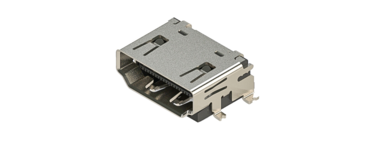
I'm looking at a new AV receiver (Yamaha) and noticed the HDMI ports each have a screw above them. I'm thinking it's a grounding screw, but don't know what to connect to it as HDMI cables don't have an auxiliary ground cable.

Can anyone out there explain the use of that grounding? screw?

TIA

Capture.JPG
 
Last edited:
To avoid these ads, REGISTER NOW!

cgrutt

Well-known member
Joined
Mar 4, 2016
Messages
8,200
I've never seen an HDMI cable with external ground. Old receivers used to have ground terminal for turntables but they were typically marked as ground. Are you sure they are just not physically holding terminals to the case?

Sorry was typing before @yatg posted above pic.
 

The Cobbler

Super Moderator
Staff member
Joined
Oct 24, 2013
Messages
25,835
Location
Niagara Region, Ontario, Canada
Probably not grounding screws, but holding the connector.

I've never seen an HDMI cable with external ground. Old receivers used to have ground terminal for turntables but they were typically marked as ground. Are you sure they are just not physically holding terminals to the case?

Sorry was typing before @yatg posted above pic.
I'm in the holding the terminal to the case camp too
 

yatg

Well-known member
Joined
Aug 16, 2019
Messages
2,769
Location
Southern Oregon
Is that part of the HDMI cable or ?? I've never seen such an attachment before on any HDMI I've bought, and I've bought a few in past few months.
That would be the connector inside the receiver, a screw and nut fasten it to the back panel.
The cable plugs into it.
 

PCustoms

Well-known member
Joined
Jul 23, 2011
Messages
22,398
Location
VT
Posts #2 & #3 nailed it, screws hold the HDMI receptacle to the case of the receiver.


Related question, is HDMI starting to phase out?
 

CoogarXR

Well-known member
Joined
Jan 11, 2016
Messages
6,849
Location
Ohio
Yep, it's a mounting screw for the jack. If it wasn't there the jack would be very weak and pop off the board with the slightest torque of the cable plugged into it. They are only soldered with surface pads.
 

PCustoms

Well-known member
Joined
Jul 23, 2011
Messages
22,398
Location
VT
The frame sometimes is through-hole for added stability, but the leads are surface soldered.

You said:

They are only soldered with surface pads.

Which is not true, and these are not normally considered SMT. I've been dealing with similar connections for months, I can't go into many details but can assure you these are not processed as SMT, and are usually fairly solid with the case soldered through. The fact that Yamaha is using additional mechanical mounting is good.
 

CoogarXR

Well-known member
Joined
Jan 11, 2016
Messages
6,849
Location
Ohio
Right, like I said the case is soldered through-hole sometimes. But the leads are surface-soldered always. I have never seen an HDMI lead connection through-hole soldered. I have seen HDMI connectors only surface-soldered with reinforcements that are also only surface soldered:
1730251129666.png
No through-hole mount, and no screw-ear, nothing. These are the jacks I was referring to, being easy to snap off the board. Having worked on literally thousands of consumer electronics, I have seen them ripped off or jammed backwards into cases more times than I can count.
 
To avoid these ads, REGISTER NOW!

PCustoms

Well-known member
Joined
Jul 23, 2011
Messages
22,398
Location
VT
Still alive and well. Usb-c is seeing more and more action, but for a/V specific stuff, HDMI is still the king
Kind of surprised, I'd bet my receiver is 15yrs old at this point. Was not cutting edge at the time, but was chock full of HDMI.
 

mike93lx

ALLIANCE MEMBER
Joined
Dec 9, 2013
Messages
37,418
Location
Richmond, VA
Kind of surprised, I'd bet my receiver is 15yrs old at this point. Was not cutting edge at the time, but was chock full of HDMI.
HDMI has grown up. What started at 5Gbps,is now 48. Pretty amazing that the connector has continued on


American Locomotive

Well-known member
Joined
Jan 8, 2017
Messages
10,935
Location
Rhode Island
Kind of surprised, I'd bet my receiver is 15yrs old at this point. Was not cutting edge at the time, but was chock full of HDMI.
Keep in mind that not all HDMI is the same. HDMI has been continuously upgraded. Your receiver can likely only pass 1080p60 and maybe 4k30 resolutions it it's HDMI 1.4. Modern HDMI 2.1 is significantly more capable. HDMI is still firmly entrenched in the AV space, and likely isn't going anywhere any time soon.

However in the desktop PC space, the competing DisplayPort technology is essentially the de-facto standard. All laptops internally use DisplayPort, most desktop computers are sold with DisplayPort outputs. DisplayPort shows up in other places too - not necessarily just a "DisplayPort Port". If you have a USB-C monitor, the USB port is actually sending the monitor DisplayPort data using a technique called "tunneling". Any USB-C to VGA/HDMI/Whatever adapter uses the same tunneling technique as well.

DisplayPort is the more technically advanced technology, and is royalty free, which is why its so dominant on the PC/Mobile space. HDMI has some features that make it well suited for AV use and has a lot of pre-existing infrastructure, so it's still relevant there.
 

wyliesdiesels

Well-known member
Joined
Aug 14, 2012
Messages
19,994
Location
Modesto, CA
Keep in mind that not all HDMI is the same. HDMI has been continuously upgraded. Your receiver can likely only pass 1080p60 and maybe 4k30 resolutions it it's HDMI 1.4. Modern HDMI 2.1 is significantly more capable. HDMI is still firmly entrenched in the AV space, and likely isn't going anywhere any time soon.

However in the desktop PC space, the competing DisplayPort technology is essentially the de-facto standard. All laptops internally use DisplayPort, most desktop computers are sold with DisplayPort outputs. DisplayPort shows up in other places too - not necessarily just a "DisplayPort Port". If you have a USB-C monitor, the USB port is actually sending the monitor DisplayPort data using a technique called "tunneling". Any USB-C to VGA/HDMI/Whatever adapter uses the same tunneling technique as well.

DisplayPort is the more technically advanced technology, and is royalty free, which is why its so dominant on the PC/Mobile space. HDMI has some features that make it well suited for AV use and has a lot of pre-existing infrastructure, so it's still relevant there.
learned something new today. thanks :thumbup:
 

rharman

Well-known member
Joined
Apr 22, 2012
Messages
8,753
Location
SoCal
Keep in mind that not all HDMI is the same. HDMI has been continuously upgraded. Your receiver can likely only pass 1080p60 and maybe 4k30 resolutions it it's HDMI 1.4. Modern HDMI 2.1 is significantly more capable. HDMI is still firmly entrenched in the AV space, and likely isn't going anywhere any time soon.

However in the desktop PC space, the competing DisplayPort technology is essentially the de-facto standard. All laptops internally use DisplayPort, most desktop computers are sold with DisplayPort outputs. DisplayPort shows up in other places too - not necessarily just a "DisplayPort Port". If you have a USB-C monitor, the USB port is actually sending the monitor DisplayPort data using a technique called "tunneling". Any USB-C to VGA/HDMI/Whatever adapter uses the same tunneling technique as well.

DisplayPort is the more technically advanced technology, and is royalty free, which is why its so dominant on the PC/Mobile space. HDMI has some features that make it well suited for AV use and has a lot of pre-existing infrastructure, so it's still relevant there.

Yep. My Dell Laptop has no HDMI output - just Dell ThunderBolt which is a USB-C superset. I have a Dell hub that includes Ethernet, HDMI, USB, VGA, DVI, and DisplayPort. I prefer using hard-wired Ethernet since I ran wire/jacks to each of our desks. The 24" Dell monitor I had (free from work) has HDMI and DVI connections available.

Oh yeah, the laptop has no CD/DVD - had to get an external. BIg changes from my previous HP.
 

country83

Well-known member
Joined
May 28, 2009
Messages
504
Odd that you say that DisplayPort is king in desktops, all ours at work use HDMI and my laptop has an auxiliary HDMI output. All the new monitors we have only have HDMI connections.
 

dscheidt

Well-known member
Joined
Apr 26, 2017
Messages
2,887
Odd that you say that DisplayPort is king in desktops, all ours at work use HDMI and my laptop has an auxiliary HDMI output. All the new monitors we have only have HDMI connections.
Displayport is superior for computer use, it has higher resolutions and refresh rates, supports mulitple screens per port, and is less encumbered with stupidity than HDMI is. HDMI, on the other hand, is king in the AV world, because it has features that are suitable for that use (like eARC for sending sound to the correct device etc). if something is going to have one port, it's most likely to be HDMI. But serious graphics devices for gaming or professional graphics use use display port (or displayport tunneled over usb-c/thunderbolt).
 

dcg9381

Well-known member
Joined
Jun 20, 2018
Messages
11,640
Location
Austin, TX
Related question, is HDMI starting to phase out?
As others have said, the answer is "no".

But now you have to watch compatibility if you're going up to 4k and beyond.. Compatibility of the source, compatibility of the TV, compatibility of the receiver (HDMI version AND resolution). And you have to make sure your cables are compatible. Just because the ends are HDMI does not mean it'll work at higher resolutions. That's not even considering "source encoding" compatibility.

There are "cool things" - HDMI can do bi-directional control (ARC and eARC), so now in a single cable my "TV" can control the volume of my receiver without a bunch of drama...
 
To avoid these ads, REGISTER NOW!
Top Bottom