To avoid these ads, REGISTER NOW!

Help with internet for shop

ed_v

Well-known member
Joined
Sep 15, 2007
Messages
1,418
Location
Kentucky
I need to get internet in my shop asap. My shop sits about 125 ft behind my house. It is a pole building with metal roof and siding. My wifi signal only goes about 100 feet (about where power pole is shown in photo below). Each building is on a separate meter service. Cat5 in conduit is a last resort option. I have done searches on this topic, but I'm not sure what exactly I need or where to mount them. Any help is much appreciated.


The shop

 
To avoid these ads, REGISTER NOW!

Beemer533

Well-known member
Joined
May 9, 2014
Messages
2,057
Location
Syracuse, NY
It is pretty straight forward ; if you don't want to do a cat5e get the following..

Two of these: http://www.amazon.com/dp/B004EGI3CI/?tag=atomicindus08-20

These will basically operate as a wireless cat5e cable. You just need line of sight between the 2.

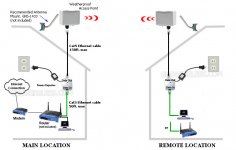
From your Internet router in your house, you need to run a cat5e cable out to the location you mount the CPE. In the shop you run the cat5e cable from the other CPE to either a switch or just one of the AP I link to below.

I am shipping over stuff like the poe injectors, but it is pretty simple stuff.


Inside your barn, you will need a wifi access point like this

http://www.amazon.com/dp/B00JIOG8CI/?tag=atomicindus08-20

Or this

http://www.amazon.com/dp/B004XXMUCQ/?tag=atomicindus08-20

If you want to connect hardwired devices in the barn, like a PC, you will also need a switch like this

http://www.amazon.com/dp/B0000BVYT3/?tag=atomicindus08-20
 
Last edited:

matsz

New member
Joined
Jul 27, 2012
Messages
4
Location
Quebec, Canada
If the powerline come from your house I think a cheap way is to user powerline adaptor like this :
http://www.walmart.com/ip/TP-LINK-AV500-Nano-Powerline-Adapter-Starter-Kit-TL-PA4010KIT/23148890

If not then you will need a wireless bridge:
http://www.ncixus.com/products/?sku=64114&vpn=ENH200&manufacture=EnGenius

If the bridge is not able to pickup the signal from your existing router you can buy 2 of those (they have a directional antenna) you put them face to face and the one on your shop will be in bridge mode, the one in your house connected to your router will be in access point mode. A model like this one can do ~1 mile

I hope you will be able to understand my explanation! Sorry for my english.

Math
 
OP
E

ed_v

Well-known member
Joined
Sep 15, 2007
Messages
1,418
Location
Kentucky
It is pretty straight forward ; if you don't want to do a cat5e get the following..

Two of these: http://www.amazon.com/dp/B004EGI3CI/?tag=atomicindus08-20

These will basically operate as a wireless cat5e cable.


Inside your barn, you will need a wifi access point like this

http://www.amazon.com/dp/B00JIOG8CI/?tag=atomicindus08-20

Or this

http://www.amazon.com/dp/B004XXMUCQ/?tag=atomicindus08-20

If you want to connect hardwired devices in the barn, like a PC, you will also need a switch like this

http://www.amazon.com/dp/B0000BVYT3/?tag=atomicindus08-20

Thank you.

I understand needing the antenna... but where would I place the two nanostations? One at the back of my house and one at the garage? Do I need to place one on a pole out in the yard? I can't figure out how they work and there's not much info on them on the internet.

Ed
 

Beemer533

Well-known member
Joined
May 9, 2014
Messages
2,057
Location
Syracuse, NY
One other thing to try is that you could just purchase one of the nanostations and install it outside pointed at the shop as I mentioned previously. In this case it would be setup as an access point instead of a bridge using 2.

You could see how the coverage is inside the shop is with just one.. Chances are though, with the metal siding you will need to set 2 of them up as a bridge with an AP inside the shop for best performance.
 

Beemer533

Well-known member
Joined
May 9, 2014
Messages
2,057
Location
Syracuse, NY
Thank you.

I understand needing the antenna... but where would I place the two nanostations? One at the back of my house and one at the garage? Do I need to place one on a pole out in the yard? I can't figure out how they work and there's not much info on them on the internet.

Ed

Basically, just line of sight. They need to be pointed at each other with no obstructions in the way.
 

Beemer533

Well-known member
Joined
May 9, 2014
Messages
2,057
Location
Syracuse, NY
If the powerline come from your house I think a cheap way is to user powerline adaptor like this :
http://www.walmart.com/ip/TP-LINK-AV500-Nano-Powerline-Adapter-Starter-Kit-TL-PA4010KIT/23148890

If not then you will need a wireless bridge:
http://www.ncixus.com/products/?sku=64114&vpn=ENH200&manufacture=EnGenius

If the bridge is not able to pickup the signal from your existing router you can buy 2 of those (they have a directional antenna) you put them face to face and the one on your shop will be in bridge mode, the one in your house connected to your router will be in access point mode. A model like this one can do ~1 mile

I hope you will be able to understand my explanation! Sorry for my english.

Math

His shop is on its own meter, so power line devices likely won't work.
 
OP
E

ed_v

Well-known member
Joined
Sep 15, 2007
Messages
1,418
Location
Kentucky
If the powerline come from your house I think a cheap way is to user powerline adaptor like this :
http://www.walmart.com/ip/TP-LINK-AV500-Nano-Powerline-Adapter-Starter-Kit-TL-PA4010KIT/23148890

Two separate power services.

If not then you will need a wireless bridge:
http://www.ncixus.com/products/?sku=64114&vpn=ENH200&manufacture=EnGenius

If the bridge is not able to pickup the signal from your existing router you can buy 2 of those (they have a directional antenna) you put them face to face and the one on your shop will be in bridge mode, the one in your house connected to your router will be in access point mode. A model like this one can do ~1 mile

I hope you will be able to understand my explanation! Sorry for my english.

Math

Thank you. I'm not up to speed on this stuff, but that made sense to me.

Ed
 

Beemer533

Well-known member
Joined
May 9, 2014
Messages
2,057
Location
Syracuse, NY
Here is a quick and dirty illustration...
 

Attachments

  • Screenshot_2015-07-04-00-36-52.jpg
    Screenshot_2015-07-04-00-36-52.jpg
    10.3 KB · Views: 112

Beemer533

Well-known member
Joined
May 9, 2014
Messages
2,057
Location
Syracuse, NY
Actually, here is a much better illustration than mine..
 

Attachments

  • GNS1150_Point_to_Point_Bridge.jpg
    GNS1150_Point_to_Point_Bridge.jpg
    67.6 KB · Views: 161

dogdog

Well-known member
Joined
Nov 15, 2011
Messages
12,711
check these guys out and get a good WIFI 2.4 GHZ or 5GHZ directional antenna and a wireless AP use it as a bridge... then you are all set........ to go... I am able to get McDonald Free Wifi about 1 miles away line of sight with a sector panel antenna.... should be no issue for you with 300 ft.... think there are few others that use Ubiquiti bridges here with great success, if you don't want to mess around with converting your access point to bridge mode... but it is simple to do.... most ap can do it... or get a set from them.... or look it up and get it from some where .......

http://www.fab-corp.com/home.php?cat=303
 

atty5420

Active member
Joined
Jun 30, 2014
Messages
43
Location
Kingman, Az
Beemer has it. Ubiquiti has the best products out there. I am running an entire store 5.5 miles away on a Bullet link from a lower elevation to the top of a mountain. My store feed is 30Meg, and I do not see one bit of degradation here on the mountain. In other words, the store and the mountain are all on the same network, printers, etc., and we see each other like we were there. There is no difference.

125 feet is a walk in the park......and a short walk at that.
 

CadillacJack

Banned
Joined
Aug 18, 2013
Messages
524
Location
Florence
Direct-bury Cat5e/Cat6 buried in 1/2" pvc...done. No add'l equipment, routers, switches (and no-one mentioned the cost of programming all this equipment if you aren't tech savvy).
 

Maticuno

Well-known member
Joined
Jun 15, 2015
Messages
54
Location
California High Deserts
Actually, here is a much better illustration than mine..

This is how we send our network at my office (which is spread out over 3 protected historic cottages, so digging trenches and drilling holes wasn't an option). With the power injectors, they have enough signal strength to travel through walls about 200' away. We use the Tranzeo TR-902 antennas though, which are rather pricey and probably overkill for what you need.
 

CadillacJack

Banned
Joined
Aug 18, 2013
Messages
524
Location
Florence
There is programming if you wish to secure the data and manage the traffic. There is also router programming involved. You have to scan the surrounding areas for conflicting signals/traffic/interference and adjust settings accordingly. I sell/install these.
 
Last edited:
OP
E

ed_v

Well-known member
Joined
Sep 15, 2007
Messages
1,418
Location
Kentucky
Thanks. You guys really simplified for me.

I really don't have to worry about security too much. We live out in the country on a farm. I don't see many people trying to hack in our network:lol:
 
To avoid these ads, REGISTER NOW!

TooMuchHair

Well-known member
Joined
May 25, 2014
Messages
64
Hmmm, I just ran Cat5 Direct Bury below frost in the same trench with my 3/4" PEX water line and my 3/4" RapidAir line, (about 150') NO conduit for the Cat 5. Was that a mistake? It was some nice looking, quality cable at least.
 

pcmeiners

Well-known member
Joined
Aug 13, 2009
Messages
7,848
Location
In the only town in Pennsylvania, Bloomsburg.
Power line adapter should work, what is an impediment to it would be a transformer, which I doubt you have.

Cat 5 is NOT a good idea, should lightning strike in the general area of the cable, the propagating lightning discharge will get to your wire, in PVC or even metal conduit; seen it fry servers and switches. The only safe cable is fiber, which is to expensive.
 

NUTTSGT

Super Moderator
Staff member
Joined
Sep 14, 2009
Messages
50,866
Location
Northern Central Ohio
Direct-bury Cat5e/Cat6 buried in 1/2" pvc...done. No add'l equipment, routers, switches (and no-one mentioned the cost of programming all this equipment if you aren't tech savvy).


Personally,I'd agree with the conduit as it's what I did but if you're doing it, I'd use 3/4" for the extra couple of bucks.

Got cable out in the garage ? You can feed it through the same conduit. You could do the same with a secondary wire for an alarm system also.

Rent a trencher to do it, and bury a water line out there too.
 

Beemer533

Well-known member
Joined
May 9, 2014
Messages
2,057
Location
Syracuse, NY
There is programming if you wish to secure the data and manage the traffic. There is also router programming involved. You have to scan the surrounding areas for conflicting signals/traffic/interference and adjust settings accordingly. I sell/install these.
Sorry, but he is not setting up a corporate network for 200 people with cisco hardware..

A simple network for a home like this doesn't require any "programming" or network management (unless he's got 20 kids streaming YouTube lol)

There is obviously some configuration needed, but There are plenty of resources to get help, not the least of which is Ubiquiti (assuming you use their hardware of course)

Security for the wireless bridge is just the shared key..

Im in the city and I didn't need to scan anything to set up my unifi AP properly.

I have an overly complicated network with vlans, L2 router's, etc just because I enjoy it, but it is far from necessary.

That being said, strong passwords are a must and shouldn't be taken lightly.

This post edited by the NSA
 

december45

Well-known member
Joined
Apr 13, 2009
Messages
1,580
I just upgraded to a router with 802.11 AC with a new internet extender also 802.11 AC fixed all problems. I am at about 500 feet distance from house to shop. Bought apple extreme and express, but any brand router with AC will do it. Just so they can see each other, my extender is just inside a window in the shop and the router is inside the house garage behind a window. The apple stuff was very very easy set up, just plug and play even for me.
 

Beemer533

Well-known member
Joined
May 9, 2014
Messages
2,057
Location
Syracuse, NY
Hmmm, I just ran Cat5 Direct Bury below frost in the same trench with my 3/4" PEX water line and my 3/4" RapidAir line, (about 150') NO conduit for the Cat 5. Was that a mistake? It was some nice looking, quality cable at least.
Really depends on your soil and what type of cat5e you ran..

I prefer conduit for any buried cables, but we have a lot of rocks around here is.

in fact I prefer hardwired whenever possible for several reasons, but sometimes wireless is the way go.

This post edited by the NSA
 

Beemer533

Well-known member
Joined
May 9, 2014
Messages
2,057
Location
Syracuse, NY
Power line adapter should work, what is an impediment to it would be a transformer, which I doubt you have.

Cat 5 is NOT a good idea, should lightning strike in the general area of the cable, the propagating lightning discharge will get to your wire, in PVC or even metal conduit; seen it fry servers and switches. The only safe cable is fiber, which is to expensive.
Already mentioned that his shop has a separate service, so power line is out..

Copper is fine, if worried about surge protection (which is definitely a concern) there are numerous products that will protect your equipment and facilities..

Fiber is definitely the best as it completely eliminates the issue, but as you say it isn't cheap..

This post edited by the NSA
 

CadillacJack

Banned
Joined
Aug 18, 2013
Messages
524
Location
Florence
Hmmm, I just ran Cat5 Direct Bury below frost in the same trench (about 150') NO conduit for the Cat 5. Was that a mistake?

Direct bury is OK without conduit. I like to run in conduit, because there's always that ONE landscaper, plumber, sprinkler guy who will cut it. :badteeth:
 

CadillacJack

Banned
Joined
Aug 18, 2013
Messages
524
Location
Florence
Im in the city and I didn't need to scan anything to set up my unifi AP properly.

Sorry, but you do. You have to determine how much traffic is on surrounding channels/frequencies then decide whether 2.4ghz or 5ghz is appropriate. 2.4 on Ch. 6 or 11 isn't going to work too well in a dense area (city, apartment complex, hi-rise, campus, etc.).

Correct. He's not setting up a sophisticated network. However, he ain't gonna figure this one out (with no offense to the OP).

wifianalyzer3.jpg
 
Last edited:

Beemer533

Well-known member
Joined
May 9, 2014
Messages
2,057
Location
Syracuse, NY
Sorry, but you do. You have to determine how much traffic is on surrounding channels/frequencies then decide whether 2.4ghz or 5ghz is appropriate. 2.4 on Ch. 6 or 11 isn't going to work too well in a dense area (city, apartment complex, hi-rise, campus, etc.).

Correct. He's not setting up a sophisticated network. However, he ain't gonna figure this one out (with no offense to the OP).

Well, I guess I should have qualified my statement.. I only had about 5 AP when I scanned my neighborhood. Judging by his photo, unless he has an apartment complex behind him, I don't think he needs to worry about it at all..


And we are here to help him figure it out... :)
 

NUTTSGT

Super Moderator
Staff member
Joined
Sep 14, 2009
Messages
50,866
Location
Northern Central Ohio
Direct bury is OK without conduit. I like to run in conduit, because there's always that ONE landscaper, plumber, sprinkler guy who will cut it. :badteeth:

The small cost of conduit vs. the large frustration of having to fix that misplaced shovel (or whatever), I believe the conduit wins every time. Atleast in my book it does.
 

dogdog

Well-known member
Joined
Nov 15, 2011
Messages
12,711
As long as you don't dig or have any gophers damaging those network cable / air line you are fine.... I think I called RapidAir asking about burying it (the airline) under ground, they say it is ok. Then I asked if it is ok for about 3 feet of it expose above ground. they say it is fine.... I say outside ? They hesitated.... basically that rapidAir Line expose to direct sunlight would deteriorate very fast just like any other Pex.
As far as your network, it is fine. actually better if you can make it wired than wireless from point to point.
 
Last edited:

dogdog

Well-known member
Joined
Nov 15, 2011
Messages
12,711
Not sure what OP's comfort level is or how much $$$ to play....

If you only have 1 computer on the other end... you could have just buy a USB wifi sitck with external antenna connection and buy a good antenna it will reach.,..... or make your own for the challenge....

you can always replace that biQuad with the USB stick.... and add USB extension cable.
Dependent on your situation.

http://wifirfexpert.com/wp-content/...STALL-BIQUAD-ONTO-DISH-BY-WIFI-EXPERT-LLC.pdf
 

pcmeiners

Well-known member
Joined
Aug 13, 2009
Messages
7,848
Location
In the only town in Pennsylvania, Bloomsburg.
"Copper is fine, if worried about surge protection (which is definitely a concern) there are numerous products that will protect your equipment and facilities"

There are NO surge protectors which will protect a line which has a high potential voltage difference between two buildings. I work networks and have seen what happens when lightning hits either the buildings or ground close to the buildings when cat5 is involved (in conduit, with expensive surge protection). Basically it does not work and equipment gets fried. Surge protection works on EMF or relatively low potential surges.
 
To avoid these ads, REGISTER NOW!
Top Bottom