To avoid these ads, REGISTER NOW!

How to type " ° " Degree symbol

To avoid these ads, REGISTER NOW!

Qualitytools

Well-known member
Joined
Apr 30, 2014
Messages
2,851
Location
SOCAL
Thanks for sharing, now I can search for how to place the double dot over some letters as in German. Much appreciate all of the info guys and girls :)
 

hdossett

Well-known member
Joined
Jun 22, 2009
Messages
384
Location
N. Central AZ
Another life ago, I used to use the extended ASCII table all the time. It is a bunch of not often used characters and symbols. There are 128 or 256 characters in the set. I used a text editor for programming and always had a cheat sheet with me. I think it has been 20 years since I have written a line of code. The ASCII table has been long forgotten. May have to dig one up just to impress my friends and family. If you want to play with it, just press the ALT key while entering numbers from 001 to 255. Interesting what you may find. You can also do a search for ASCII table and it will pop up!

http://www.theasciicode.com.ar/

Lately, I have just used the * for degrees, may have to change that now!

H
 
Last edited:

canux

New member
Joined
Feb 16, 2013
Messages
1
If you are using an iPhone or iPad you can just press and hold on the zero key and the degree symbol will pop up above it. Slide your finger up and: °


Sent from my iPad using Tapatalk
 

LennyTheLizard

Well-known member
Joined
Oct 25, 2010
Messages
325
Location
Southeast MO
Good Pointer, and a good place to put it.
I use this nearly everyday.

I actually created an Excel sheet that has all the ASCII short cut number and shows in the next column what it makes.

But
Alt+0176 - °
Alt+0177 - ±
are the only ones I really have memorized. Use them all the time.
 

Rarified27

Well-known member
Joined
Jan 22, 2010
Messages
763
Location
Between PA and NJ
I've been using Option K on my Mac for the ˚, which is higher and slightly smaller than the Shift Option 8 one. Side by side ˚°

Any ideas why there are two?
 

6PTsocket

Well-known member
Joined
Mar 12, 2014
Messages
4,593
Re: How to type " ° " Degree symbol

°°°° I recently accidentally discovered how to type fractions out so that they look better, but I can't figure it out again. I hate the way 1 1/2" looks.
I think some of the common fractions are in the alternate character set along with the other symbols. 1/2 would just be a single character printed the way you want it.

Sent from my SM-G900V using Tapatalk
 

bubinga

Well-known member
Joined
Jul 26, 2014
Messages
12,744
Location
Bridgeport Ohio. (Across River From Wheeling WV)
Re: How to type " ° " Degree symbol

I think some of the common fractions are in the alternate character set along with the other symbols. 1/2 would just be a single character printed the way you want it.

Sent from my SM-G900V using Tapatalk
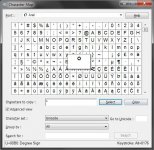
I'm not missing something , am I.
When using that wiget, you have to enter it into the box @ the bottom, and copy paste, correct?
I notice if you hover over the symbol, it shows what appears to be a keyboard shortcut, but They don't/didn't seem to work.
 

6PTsocket

Well-known member
Joined
Mar 12, 2014
Messages
4,593
Re: How to type " ° " Degree symbol

°°°° I recently accidentally discovered how to type fractions out so that they look better, but I can't figure it out again. I hate the way 1 1/2" looks.

You need a numeric keypad on your keyboard. The numbers on the main keyboard will not work and some compact keyboards do not have a number pad. There may be other ways to do it but I am not familiar with them. Just hold down the alt key and type the code. Codes 0188,0189, and 0190 are for ¼,½, and ¾ respectively. When you release the alt key, the character appears.I did not see codes for other fractions. Another thing you can do if you can find your fraction printed somewhere is to cut and paste. This is cut and pasted from the line above: ¾.
 
To avoid these ads, REGISTER NOW!

ddawg16

Well-known member
Joined
Jul 11, 2008
Messages
21,005
Location
S. California
°0°0°0°0°0°0°0°0°0°0°0°0°0°0°0°0°0°0°0°0°0°0°0°0°0°0°0°0°0°0°0°0°0°0°0°0°0°0°0°0°0°0°0°0°0°0°0°0°0°0°0°0°0°0°0°0°0°0°0°0°0°0°0°0°0°0°0°0°0°0°0°0°0°0°0°0°0°0°0°0°0°0°0°0°0°0°0°0°0°0°0°0°0°0°0°0°0°0°0°0°0°0°0°0°0°0°0°0°0°0°0°0°0°0°0°0°0°0°0°0°0°0°0°0°0°0°0°0°0°0°0°0°0°0°0°0°0°0°0°0°0°0°0°0°0°0°0°0°0°0°0°0°0°0°0°0°0°0
 

AnEv942

Well-known member
Joined
Sep 14, 2013
Messages
238
Location
Central Coast Ca
Re: How to type " ° " Degree symbol

I'm not missing something , am I.
When using that wiget, you have to enter it into the box @ the bottom, and copy paste, correct?
I notice if you hover over the symbol, it shows what appears to be a keyboard shortcut, but They don't/didn't seem to work.
mouse click on symbol, then click on select button, (or double click and it selects) then click copy button, go to text editor and past,
or just note the alt+*** key and type that...
charmap.jpg
the plus symbol isnt typed-just denotes holding down the alt key while entering the numbers

Most text editors/word processors have direct access to the charmap verse going to windows start/run
Then some programs have ther own methods like autocad %%d = °
 

6PTsocket

Well-known member
Joined
Mar 12, 2014
Messages
4,593
Thanks for sharing, now I can search for how to place the double dot over some letters as in German. Much appreciate all of the info guys and girls :)
You will notice that it cannot put an umlaut or a tilda and whatever that thing the French put under a C in facade on a pre existing letter. It actually replaces the letter and the extra symbol as a complete character

Sent from my SM-G900V using Tapatalk
 

bubinga

Well-known member
Joined
Jul 26, 2014
Messages
12,744
Location
Bridgeport Ohio. (Across River From Wheeling WV)
Re: How to type " ° " Degree symbol

mouse click on symbol, then click on select button, (or double click and it selects) then click copy button, go to text editor and past,
or just note the alt+*** key and type that...
charmap.jpg
the plus symbol isnt typed-just denotes holding down the alt key while entering the numbers

Most text editors/word processors have direct access to the charmap verse going to windows start/run
Then some programs have ther own methods like autocad %%d = °
OK, Good To Know, Thanks,
 

pedrodagr8

Well-known member
Joined
Aug 25, 2013
Messages
613
It's fun seeing others discover these little hacks. I use the alt-codes all the time for certain symbols and letters.
 

6PTsocket

Well-known member
Joined
Mar 12, 2014
Messages
4,593
It's fun seeing others discover these little hacks. I use the alt-codes all the time for certain symbols and letters.
I was using the codes I found on line with the alt key. I never noticed the map on the start menu. So I learned something, too. I think it is still quicker if you know the code for the character you want to use alt+ xxxx.

Sent from my SM-G900V using Tapatalk
 

DerekV

Well-known member
Joined
Oct 12, 2016
Messages
1,070
Location
Central TX
It's not really that much harder to do it correctly, is it?


Eh, no not really. But 99% of the time I'm on forums, I'm on my phone. An asterisk is easy to find, and more importantly: forum talk is informal. This isn't a graduate degree thesis or a peer reviewed publishing. We're just people casually talking about whatever the forum is (most of the time!). So if I said "I took out the infrared temp gun and it measured 237*F" ...come on now...you know what I'm trying to say.

I'll be sure to use the keyboard method for when I'm at a computer next time [emoji6]
 

pstemari

Well-known member
Joined
Jan 7, 2012
Messages
903
Location
Seattle
Android phones, at least, make the degree symbol easier to access than the computer keyboard.


Sent from my Nexus 6 using Tapatalk
 

6PTsocket

Well-known member
Joined
Mar 12, 2014
Messages
4,593
Eh, no not really. But 99% of the time I'm on forums, I'm on my phone. An asterisk is easy to find, and more importantly: forum talk is informal. This isn't a graduate degree thesis or a peer reviewed publishing. We're just people casually talking about whatever the forum is (most of the time!). So if I said "I took out the infrared temp gun and it measured 237*F" ...come on now...you know what I'm trying to say.

I'll be sure to use the keyboard method for when I'm at a computer next time [emoji6]
Non illigitimatus cararborundum. The asterisk is fine. No need to justify it. I agree. If having a discussion, there is better use of your time than importing a symbol. It falls in the same category of those that correct bad grammer and spelling. Most if us are more interested in the subject at hand. The person posting may have poor writing skills but might know a lot more about what is being discussed than I do.

Sent from my SM-G900V using Tapatalk
 

Mickey O

Well-known member
Joined
Oct 25, 2009
Messages
6,153
Location
Chicago, IL
Non illigitimatus cararborundum. The asterisk is fine. No need to justify it. I agree. If having a discussion, there is better use of your time than importing a symbol. It falls in the same category of those that correct bad grammer and spelling. Most if us are more interested in the subject at hand. The person posting may have poor writing skills but might know a lot more about what is being discussed than I do.

Sent from my SM-G900V using Tapatalk


You misspelled grammar.


.
 

Tundruz

Well-known member
Joined
Sep 29, 2015
Messages
405
Location
NorCal
° Thanks! New Mac trick for me! Otherwise i'd have to ask the Mrs. and she'd look at me like I was a 2nd grader. lol.
 
To avoid these ads, REGISTER NOW!
Top Bottom
