To avoid these ads, REGISTER NOW!

Ideas on best wifi setup...

kwoody51

Well-known member
Joined
Jan 19, 2010
Messages
215
Location
Twin Cities, MN
i wouldnt make much fuss about it personally. 90/10 rule.

10% effort gets you 90% the way to perfect.

you ready to become a network god to get the remaining 10%? :eyecrazy: youre not going to noticable a reasonable difference in internet life with that remaining 10% IMO

I am not :)

207 Mbps hardwired
191 Mbps WiFi with floor between router and phone
Good enough for me!

After this weekend my work PC will be hardwired so anything of importance will be hardwired. Kids can **** all the WiFi bandwidth up for school!
 
To avoid these ads, REGISTER NOW!

jeepxj

Well-known member
Joined
Mar 2, 2008
Messages
17,835
if you can hardwire their laptops in for home school stuff it will further make the house happier.
 

jeepxj

Well-known member
Joined
Mar 2, 2008
Messages
17,835
welp sounds like you're all set without going full network nerd on it.
 

PelicanPines

ALLIANCE MEMBER
Joined
Apr 30, 2014
Messages
38,106
Location
New Jersey, USA, Earth, My own reality
I guess I should be upgrading my house... dual band 12 years old... 4 wifi names... happy with it as 1 of the 4 always works... almost. Speed... I don't have an issue... I know better than to think my provider gives me 100mb... and everything should come at that speed...

My issue is ... wifi extenders... I need 3... I currently have one... don't think i want to buy 2 12 year old extenders to match my existing.

I miss the days when I had a dedicated T1 connection... That **** doesn't exist where I live now.
 

jeepxj

Well-known member
Joined
Mar 2, 2008
Messages
17,835
I guess I should be upgrading my house... dual band 12 years old... 4 wifi names... happy with it as 1 of the 4 always works... almost. Speed... I don't have an issue... I know better than to think my provider gives me 100mb... and everything should come at that speed...

My issue is ... wifi extenders... I need 3... I currently have one... don't think i want to buy 2 12 year old extenders to match my existing.

I miss the days when I had a dedicated T1 connection... That **** doesn't exist where I live now.

generally what exit off the parkway? I can loan you a UNIFI AC PRO to see coverage in your house and figure out what you need if you wanna go that route.
 

Showkey

"MEMBER EMERITUS"
Joined
Aug 9, 2014
Messages
8,638
Location
Wausau WI
I guess I should be upgrading my house... dual band 12 years old

^^^^^^^^^^^^^^^^^^

There no reason if your internet provider has 100 Mbps that you can’t have that speed and bandwidth over your interior property. For a reasonable cost.........with MESH.

Extenders are not your friend when it comes to Speed and bandwidth.
 

BigNuge

Well-known member
Joined
Feb 23, 2015
Messages
608
Location
Live Free or Die
Another vote for Google Pods (Mesh). I run a 4-pod system, with one pod in my barn workshop (45’ away from the house).

Lots of devices, I’ve gone full-on smart home (Interior and exterior lights/tstat/motion sensors).


Sent from my iPhone using Tapatalk
 

PelicanPines

ALLIANCE MEMBER
Joined
Apr 30, 2014
Messages
38,106
Location
New Jersey, USA, Earth, My own reality
generally what exit off the parkway? I can loan you a UNIFI AC PRO to see coverage in your house and figure out what you need if you wanna go that route.

I guess I should be upgrading my house... dual band 12 years old

^^^^^^^^^^^^^^^^^^

There no reason if your internet provider has 100 Mbps that you can’t have that speed and bandwidth over your interior property. For a reasonable cost.........with MESH.

Extenders are not your friend when it comes to Speed and bandwidth.

Thanks for your replies... Ive decided to ignore any issues I have at this time due to a discovery... one issue was troubleshooted back to a cisco device at a location I'm connecting to. (they convinced me it was my issue... when in reality... we now have proof it's their issue... all along. Moving up the Cisco tech chain for a solution now)

Gonna stick with my 12 year old system.
 

Denwood

Well-known member
Joined
Sep 22, 2014
Messages
4,183
Location
Thunder Bay, Ontario, Canada
I am not :)

207 Mbps hardwired
191 Mbps WiFi with floor between router and phone
Good enough for me!

After this weekend my work PC will be hardwired so anything of importance will be hardwired. Kids can **** all the WiFi bandwidth up for school!

You've illustrated the valid point that you always start at the bottleneck, and work your way back from there. These days it's often just a phone call to increase your house bandwidth to solve an issue, particularly during Covid. As I posted earlier, you only need (a reliable!!) 4Mbps to carry on four HD video feeds (assuming a family of four) which is much of what we're doing these days from home.

Just keep in mind that during voice/video conferencing, drops are easy to introduce via latency. So if you have four family members sharing a wifi connection via a single, older/slower access point, it has to share the bandwidth between all users fast enough to keep the data stream reasonably "timely" so you don't see drops.

Remember that many internet connections are asymmetric, so your upload speeds are much slower than download. It's upload that is almost always the issue with working from home, particularly during video collaboration. So if you have an older DSL connection with 2Mbps upload, WIFI updates likely won't resolve issues when four people are sharing that connection. Pretty much zero of the performance issues I've seen so far have been with WIFI speed at the staff's home aside from 1 or 2 whose home offices were too far from their home access point. Again, a speed test (like ookla) is all you need to diagnose this.

I've been in the midst of all this for the last six months as I have fibre pulled into buildings, installed new load balancing routers, VOIP system (blah blah) to ensure quality of service to all of our remote staff. I end up spending a lot of time with our staff, diagnosing home network issues and the first thing I do 100% of the time is query them on their ISP, plan, and then run a few speed tests via Logmein. For many of them, (before our internal updates) the issue was not them at all but the VPN method in use and forcing 100% of 60 people's bandwidth through our limited pipe. All fixed btw, but you don't want those details here.
 

wyliesdiesels

Well-known member
Joined
Aug 14, 2012
Messages
19,994
Location
Modesto, CA
yeah i had to call comcast to upgrade my speed as we were maxing out the 6Mbps (5Mbps speed tier and comcast gives 20% over that; Ive seen this with speed tests) upload that came with 200Mbps (240Mbps actual).

now we have 300/10Mbps (360/12Mbps actual) and it has made a big difference for uploading. I may even upgrade to 600/15mbps (720/18Mbps) just to get the extra 6Mbps upload....
 

kwoody51

Well-known member
Joined
Jan 19, 2010
Messages
215
Location
Twin Cities, MN
Good point on the upload speed! We have Comcast and it’s 200 down but only 6 up. Thus pretty close to the limit.

Also as you suspected there are times all 4 members in the house are on the same AP. Which likely doesn’t help.

Maybe need to see about a speed change.
 
To avoid these ads, REGISTER NOW!

jeepxj

Well-known member
Joined
Mar 2, 2008
Messages
17,835
Good point on the upload speed! We have Comcast and it’s 200 down but only 6 up. Thus pretty close to the limit.

Also as you suspected there are times all 4 members in the house are on the same AP. Which likely doesn’t help.

Maybe need to see about a speed change.

time to hardwire the backhaul from the AP. 4 users shouldn't load up an AP at all.
 

kwoody51

Well-known member
Joined
Jan 19, 2010
Messages
215
Location
Twin Cities, MN
I feel like something is wrong if you APs are hardwired and 4 people cause an issue. Are all 4 people using data heavy programs such as streaming or video chatting?

Notice the issue when 4 people are all on video meetings. Wife and I are on different Microsoft teams meetings and kids are on google meets.

My work PC is now hardwired so will see how that works out. As mentioned earlier upload is 6Mbps at best.

Totally different question... I terminated 4 cat 6 jacks. 3 of the 4 get same speed but one is 50% less down and ~75% less up than the other 3. Bad termination? Something else?

I'm only using 1 so it's not a huge deal but being **** I feel compelled to know what's wrong ... and maybe fix it :)

I'm using Leviton cat 6 jacks, same as rest of the house, so not cheapies.

Thanks!
 
Last edited:

loganb

ALLIANCE MEMBER
Joined
Dec 29, 2011
Messages
5,506
Location
Omaha, NE
If one jack is consistently and noticeable slower and you don't have a cable tester, yes repunching down would be a reasonable and easy thing, if nothing else it should eliminate one thing from the list of possibilities. If that doesn't fix it and assuming these are all laptops, swap them around and see if the slower speed moves with the machine or stays at the jack...should tell you if its a cabling or a hardware issue.

And good luck with the 6mb upload....also on Cox as they're the only game in our neighborhood for high speed and ended up bumping to the next speed tier just for the boost in upload rates. Really missing my AT&T fiber at the last house that had upload and download of 350-400MB consistent on a 300MB tier

Sent from The Garage Journal mobile app
 

Git

Well-known member
Joined
May 18, 2008
Messages
6,894
Location
S Cal
Good point on the upload speed! We have Comcast and it’s 200 down but only 6 up. Thus pretty close to the limit.

Also as you suspected there are times all 4 members in the house are on the same AP. Which likely doesn’t help.

Maybe need to see about a speed change.

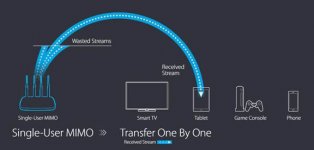
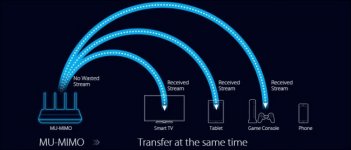
Do your Apple Airport Extremes support MU-MIMO (Multiple User – Multiple Input Multiple Output). I couldn't find a definitive answer, but it does not look like they do
 

Attachments

  • SU-MIMO.jpg
    SU-MIMO.jpg
    14 KB · Views: 13
  • mu-mimo.jpg
    mu-mimo.jpg
    31.8 KB · Views: 14

kwoody51

Well-known member
Joined
Jan 19, 2010
Messages
215
Location
Twin Cities, MN
If one jack is consistently and noticeable slower and you don't have a cable tester, yes repunching down would be a reasonable and easy thing, if nothing else it should eliminate one thing from the list of possibilities. If that doesn't fix it and assuming these are all laptops, swap them around and see if the slower speed moves with the machine or stays at the jack...should tell you if its a cabling or a hardware issue.

And good luck with the 6mb upload....also on Cox as they're the only game in our neighborhood for high speed and ended up bumping to the next speed tier just for the boost in upload rates. Really missing my AT&T fiber at the last house that had upload and download of 350-400MB consistent on a 300MB tier

Sent from The Garage Journal mobile app

Was a bad punch at the jack! My orange wasn't fully seated, was cutoff but backside was still up high. Just popped it in and all is well now.

Thanks everyone!
 
Last edited:

Denwood

Well-known member
Joined
Sep 22, 2014
Messages
4,183
Location
Thunder Bay, Ontario, Canada
Do your Apple Airport Extremes support MU-MIMO (Multiple User – Multiple Input Multiple Output). I couldn't find a definitive answer, but it does not look like they do

THis was something I was thinking as well (hence my sugggestion for the tp-links with mu-mimo...however the clients need to support this as well :-(

Kwoody, that 6Mbps upload is likely an issue with your loading. We've got 600/30 here and no issues during the time when all of us were at home.
 

larry4406

Well-known member
Joined
Jan 27, 2006
Messages
19,073
Location
Northern Virginia
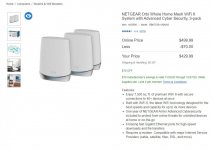
I ultimately bought the Orbi RBK753S-100NAS Whole Home Mesh WiFi 6 System with Advanced Cyber Security, 3-pack from Costco for $429.99. This purchase was based on the posts from Git and Denwood.

I am no IT guy but I got the system up and running in less than 15 minutes and no foul language was involved!

Once the Orbi was up and running on the default SSID, I logged into the Xfinity gateway and changed its SSID since I don't know how to turn its Wifi off. I then used the Orbi Ap to change its default SSID to the name and password that had been on the gateway and all devices now log on to the Orbi.

Its only been up and running not quite 24 hours but seems to be doing quite well. Out at the barn 300'+ away, my iphone 8 shows the wifi signal is full strength and the speedtest from the Orbi Ap shows 357.99/12.14 Mbps up/down with 16 ms ping. Nearly the same speedtest results as when my phone is literally right next to the satellite or main unit. I have Xfinity Blast 350/10 Mbps down/up.

The various devices (phones, printers, tablets, playstation, etc) each have figured out how to log onto the 2.4 GHz or 5 Ghz channels with zero intervention by me. There are 12-14 devices connected.

I placed one satellite on the far end of the ranch home in my daughters room and plugged her desk top into the ethernet port of the satellite which has solved her connection issues.

Crossing fingers but I am pretty pleased!

Now onwards to buying a modem to replace the Xfinity rental.
 

Git

Well-known member
Joined
May 18, 2008
Messages
6,894
Location
S Cal
Glad it worked out for you. That is the latest WIFI 6 version with up to 7,500 sq ft of coverage. (The 'S' in 753S stands for the free 1 year subscription to the Armor Service versus the 750 that doesn't come with it)

I would like to think that most of the things that Costco sells are of very qood quality - and they have to be with the Costco 'Satisfaction Guarantee'. If it doesn't work out, simply return it for a full refund and try something else.

Lastly, if your buying a router, make sure you check with your internet provider - usually they will only allow 'approved' modems to be connected to their system and they have a list somewhere you can download

this link might help
https://www.xfinity.com/support/devices/#unauth

attachment.php
 

Attachments

  • Tri -  1621.jpg
    Tri - 1621.jpg
    70.9 KB · Views: 69
To avoid these ads, REGISTER NOW!
Top Bottom