I’ve got an iPad and an Apple Pencil. I can draw things that are basic on the Notes program. But it doesn’t seem to be worth a **** for making detailed drawings of layout for electrical or anything else. My penmanship or drawing abilities don’t help.
Shirley, there’s a better application to help me realize the full potential of this combination.
I’ve seen some really good material drafted with Apple Pencils.
What do you guys use?
Thanks
My artistic abilities are … limited. Even Bob Ross would be embarrassed by my skills. I bought my ipad + pencil more for note taking than drawing pictures. I got basic blueprint drawing in jr. high.
Because my primary use is note taking, not art, I’m using GoodNotes. You can find it in the App Store.
It offers different tools, I really only use the “ball pen”. It offers colours, which I use. It allows writing, drawing, typing, and does a pretty good job of handwriting-to-text recognition if you want it to. You can use different ”papers”, though the lines on them are only guidelines, not actual ruled lines.
When I was planning my plumbing project, I drew it out in overhead and elevation views. Here is the front view elevation of my laundry room:

It does a snap-to, so if you draw a box, it’ll make it a box and fill it in. Same with lines, arcs, circles, ovals. Here’s the dimensions of the bathroom we’re about to remodel:
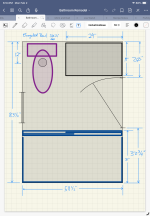
It doesn‘t combine shapes in to a single object, like the toilet drawn above. That might be nice, if I was doing more formal drawings with it. For my needs, this works.

