To avoid these ads, REGISTER NOW!

iPad/Apple pencil

bluedog225

Well-known member
Joined
Jan 31, 2012
Messages
3,241
Location
Texas
I’ve got an iPad and an Apple Pencil. I can draw things that are basic on the Notes program. But it doesn’t seem to be worth a **** for making detailed drawings of layout for electrical or anything else. My penmanship or drawing abilities don’t help.

Shirley, there’s a better application to help me realize the full potential of this combination.

I’ve seen some really good material drafted with Apple Pencils.

What do you guys use?

Thanks
 
To avoid these ads, REGISTER NOW!

y'sguy

Well-known member
Joined
May 1, 2010
Messages
1,307
Location
Tulsa, Oklahoma
yeah, you will need software I believe specific to drawing and illustration programs. There are many in the apple store to download and you should be able to preview them or trial them for a month or so. There are programs as well that just use a mouse or iPad for the creation of whatever you want.
 

Quickstep192

Well-known member
Joined
Aug 16, 2025
Messages
73
I’ll be following this discussion.

I’m also looking for a sketching app. I’ve tried several free ones with minimal success. I didn’t want to pony up for a pay app until I knew it was good.
 

75gmck25

Well-known member
Joined
Jul 21, 2014
Messages
1,317
Location
Alexandria, VA
When you make drawings with a Pencil or a mouse you need to have software that allows you draw straight lines and/or curved lines, copy parts of a drawing, snap lines to certain angles, etc.

I would look for a relatively basic CAD/CAM app for the iPad, and make sure it supports the Apple Pencil. As already mentioned, you can probably download one and use it free for a week or two if you aren't sure which product you want.
 

steed

ALLIANCE MEMBER
Joined
Nov 27, 2025
Messages
38
ProCreate. It's easy to use and has loads of "brushes" to add to your repertoire. Its great for technical drawing and plain old illustration.
I use it to illustrate a lot of artwork that can be used by printers (shirts, prints, etc) but professionally, I still use regular old pencil and paper. but its got its place, for sure!
 
To avoid these ads, REGISTER NOW!

kbuhagiar

Well-known member
Joined
Dec 27, 2005
Messages
1,732
Location
Escondido, CA
I’ve got an iPad and an Apple Pencil. I can draw things that are basic on the Notes program. But it doesn’t seem to be worth a **** for making detailed drawings of layout for electrical or anything else. My penmanship or drawing abilities don’t help.

Shirley, there’s a better application to help me realize the full potential of this combination.

I’ve seen some really good material drafted with Apple Pencils.

What do you guys use?

Thanks
Waiting for the inevitable "Airplane!" joke...oh, what the heck.

"Yes, there is a better application. And don't call me Shirley."

 
  • Haha
Reactions: TJT

DGersic

Well-known member
Joined
Mar 12, 2017
Messages
6,265
Location
DeKalb, IL
I’ve got an iPad and an Apple Pencil. I can draw things that are basic on the Notes program. But it doesn’t seem to be worth a **** for making detailed drawings of layout for electrical or anything else. My penmanship or drawing abilities don’t help.

Shirley, there’s a better application to help me realize the full potential of this combination.

I’ve seen some really good material drafted with Apple Pencils.

What do you guys use?

Thanks

My artistic abilities are … limited. Even Bob Ross would be embarrassed by my skills. I bought my ipad + pencil more for note taking than drawing pictures. I got basic blueprint drawing in jr. high.

Because my primary use is note taking, not art, I’m using GoodNotes. You can find it in the App Store.

It offers different tools, I really only use the “ball pen”. It offers colours, which I use. It allows writing, drawing, typing, and does a pretty good job of handwriting-to-text recognition if you want it to. You can use different ”papers”, though the lines on them are only guidelines, not actual ruled lines.

When I was planning my plumbing project, I drew it out in overhead and elevation views. Here is the front view elevation of my laundry room:

IMG_5691.png

It does a snap-to, so if you draw a box, it’ll make it a box and fill it in. Same with lines, arcs, circles, ovals. Here’s the dimensions of the bathroom we’re about to remodel:
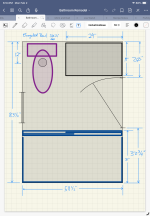
IMG_5692.png

It doesn‘t combine shapes in to a single object, like the toilet drawn above. That might be nice, if I was doing more formal drawings with it. For my needs, this works.
 

GN4WHLN

Well-known member
Joined
May 8, 2009
Messages
2,073
Location
Alta Loma, CA
Shaper 3D. I think it is expensive, but I get it for free as an educator. If you have or know someone with an educational email, you can get signed up.
 
To avoid these ads, REGISTER NOW!
Top Bottom