To avoid these ads, REGISTER NOW!

Laser Engravers-Anyone Using "LaserGRBL" Software?

To avoid these ads, REGISTER NOW!

DocsMachine

Well-known member
Joined
Sep 16, 2006
Messages
1,930
I just got a laser engraver and I am having trouble with the software.

-I have a typical eBay K40 laser, if that's anything like what you're dealing with.

Even before I got it, I was warned that the supplied software was not the best, and it was suggested I switch to something called "K40 Whisperer". I did so, having never tried the stock software (which turned out to be missing from my kit, anyway) and I'm quite happy with it.

Might give that a look.

Doc.
 

gte718p

Well-known member
Joined
Mar 12, 2009
Messages
3,988
I just got a laser engraver and I am having trouble with the software.
It might help to be a little more specific. Is the software crashing, not producing the image you expect, or you don't know how to use the software?

I use LaserWeb. Free, Open source. decent community support. I've been very happy with it on my generic chinese laser.

https://github.com/LaserWeb/LaserWeb4
 

DocsMachine

Well-known member
Joined
Sep 16, 2006
Messages
1,930
The typical setup when using K40 Whisperer is to pair it with a drawing program called Inkscape- both of which are free downloads, by the way.

In my case, I find it a lot easier to use a bog-standard graphics program to draw my initial item as a standard black-and-white (no greyscale) TIF image.

Of course, that's mostly just cosmetic things, logos and the like, rather than anything requiring precise dimensions, but there's ways around that too.

You run the TIF file through Inkscape which converts it to a Vector, and that Vector file drops right into Whisperer.

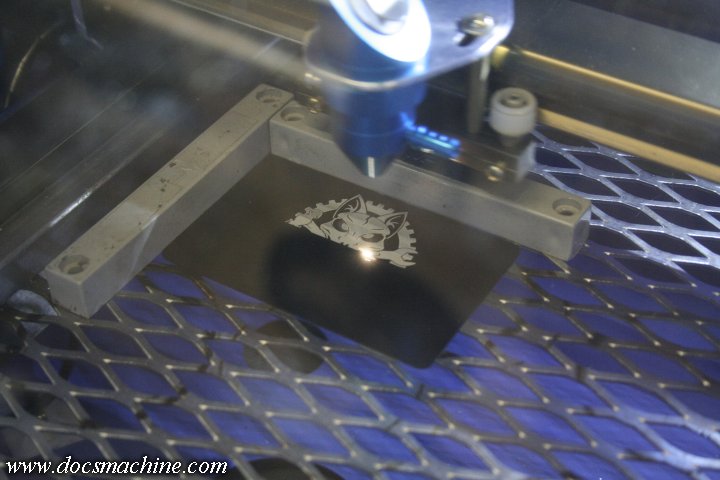
K40laser108.jpg


Doc.
 

gte718p

Well-known member
Joined
Mar 12, 2009
Messages
3,988
The typical setup when using K40 Whisperer is to pair it with a drawing program called Inkscape- both of which are free downloads, by the way.

In my case, I find it a lot easier to use a bog-standard graphics program to draw my initial item as a standard black-and-white (no greyscale) TIF image.

Of course, that's mostly just cosmetic things, logos and the like, rather than anything requiring precise dimensions, but there's ways around that too.

You run the TIF file through Inkscape which converts it to a Vector, and that Vector file drops right into Whisperer.

K40laser108.jpg


Doc.

For a workflow that seems horribly inefficient. On the other hand inkscape and vector image creation is not the easiest thing in the world.

Logos by Nick has a great Youtube channel on learning how to use Inkscape properly. Once you can work efficiently in vector, you will wonder how you managed before.

I converted my laser to a standard GRBL control so I can't speak to the nuisances of dealing with the K40 hardware.
 
To avoid these ads, REGISTER NOW!

DocsMachine

Well-known member
Joined
Sep 16, 2006
Messages
1,930
For a workflow that seems horribly inefficient.

-It is not in the least.

Yes, you can draw or import an object directly to Inkscape, but personally, as I'm already very familiar with the graphics software, I find it easy to import/draw/modify/etc. the image in that.

My workflow is draw, save to folder, open in Inkscape, convert to Vector (about five mouse clicks) save to folder, open in Whisper, burn.

Takes way longer to draw/generate the art in the first place.

Not saying Ink/Whisper is the best solution, I don't have enough experience with other options to be able to tell. But, I can say I knew zero about running a laser engraver before I bought one, and this software has been easy and intuitive. The only problems I've had have been due to my inexperience.

Doc.
 

gte718p

Well-known member
Joined
Mar 12, 2009
Messages
3,988
-It is not in the least.

Yes, you can draw or import an object directly to Inkscape, but personally, as I'm already very familiar with the graphics software, I find it easy to import/draw/modify/etc. the image in that.

My workflow is draw, save to folder, open in Inkscape, convert to Vector (about five mouse clicks) save to folder, open in Whisper, burn.

Takes way longer to draw/generate the art in the first place.

Not saying Ink/Whisper is the best solution, I don't have enough experience with other options to be able to tell. But, I can say I knew zero about running a laser engraver before I bought one, and this software has been easy and intuitive. The only problems I've had have been due to my inexperience.

Doc.

Not that it is relevant, most people are not going to do this in a production environment but it is pretty bad work flow. I am really bored at work today. I so I looked into to it. There are standards for analysis, that topic is beyond boring, so I will not dive into it. However, assuming you are as efficient in inkscape as you are in your paint program (that is a big assumption), you spend on average 30 minutes with a drawing, and you have an industry standard (read a mid range computer) it would be about a 20% more efficient to use one program and not convert it. If you spend less time on the drawing efficiency goes up even more.

That is huge in industry and companies would spend big money for that kind of improvement if it is what they do all day everyday. As an individual or a small business that does it infrequently, it is probably irrelevant. It is however one of the the things I do for a living, so that is what I think about.
 

DocsMachine

Well-known member
Joined
Sep 16, 2006
Messages
1,930
Yes, and?

It might be worth pointing out that anyone asking about LaserGRBL software, is not in any way in a "production" environment, and could likely not care less if their "workflow" isn't up to corporate tons-per-hour-throughput standards.

GRBL variants are used in cheap desktop DIY machines, like $200 3D printers, $400 laser engravers, and $150 "engraving mills", NOT industrial fiber lasers.

Doc.
 

gte718p

Well-known member
Joined
Mar 12, 2009
Messages
3,988
Yes, and?

It might be worth pointing out that anyone asking about LaserGRBL software, is not in any way in a "production" environment, and could likely not care less if their "workflow" isn't up to corporate tons-per-hour-throughput standards.

GRBL variants are used in cheap desktop DIY machines, like $200 3D printers, $400 laser engravers, and $150 "engraving mills", NOT industrial fiber lasers.

Doc.

Actually you might be surprised. A lot of high volume internet shops use cheap equipment to keep overhead down. I know of one shop that has over 100 of those stupid K40 lasers.

Sorry to upset you. It just struck me as really inefficient. If it works for you, go for it.
 

DocsMachine

Well-known member
Joined
Sep 16, 2006
Messages
1,930
Sorry to upset you. It just struck me as really inefficient. If it works for you, go for it.

-Hardly "upsetting". :D

It just always strikes me as absurd when a hobbyist asks about some shop thing or other, and virtually all the replies try to point him to some industrial-level equipment.

Dude needs a lathe? He's told to buy a Southbend Heavy 10, a Monarch 10EE or a LeBlond Regal. (And those only if he can't find a Dean, Smith and grace or a Pacemaker. :D )

I saw that right here a few years ago. Guy asked about what lathe he should buy, and virtually everyone recommended staying away from the import ****, and buying the Heavy 10 or 10EE or something.

Guy then noted he lived in a third-floor apartment. :D

Need a milling machine? Absolutely nothing less than a Bridgeport will suffice. Welder? If it's not a 200-amp TIG, it's a piece of junk. Bench grinder? Needs to be at least 3/4HP, and if it's not American made, you might as well be knapping your part out of flint. :)

Seen it a million times, your example is just one more of the same. Yes, there's times when better, faster software is the solution, but there's also plenty of cases where cheap/free works just fine.

Doc.
 

gte718p

Well-known member
Joined
Mar 12, 2009
Messages
3,988
Mine is a cheap Ortur laser, $200 from Gearbest, just a hobbiest, but I would find use for the machine at work. My CAD drawings are already vectors. I'll give Inkscape a shot, thanks guys.

I got derailed on the K40 discussion. Sorry different laser different set of problems. You have a lot of options.

Inkscape has a plug in that converts vector files to Gcode. It is not exactly user friendly so you need to watch some YouTube tutorials. Then you can send it to the laser using an number of programs, I personally use the Universal GCode sender or BCNC. This works really well for outlines and cutting but the inkscape Gcode generator falls on its face trying to fill areas. There is a new version of GcodeTools out that may have improved that, but I haven't tried it yet.

For that I use pictures that I want to shade areas. I export from inkscape and use LaserWeb to generate the Gcode and send to the laser.
 
Last edited:
To avoid these ads, REGISTER NOW!
Top Bottom