To avoid these ads, REGISTER NOW!

Above 1200 Sq/FT LilScorpion’s Fab Space

Wokspaces above 1200 squarefeet.

cccoltsicehockey

Well-known member
Joined
Apr 3, 2014
Messages
1,372
Location
Charlotte, NC
Not really. SketchUp is a pencil in 3D space. Fusion 360 is a parametric CAD software, where things are drawn on 2d planes, then brought into 3D via extrusion, revolving, etc. MOST parametric modelers behave similarly (F360, SW, OnShape, Inventor, etc), with some workflow differences.

But going from SketchUp to Fusion would be like going from DOS to Windows 10. There may some similarities if you dig (you can sketch in 3D panes in F360), but not ideal to force it thru, and not the general design intent.


As I have previously said, it really seems like people fall under one of two main camps. Either AutoDesk or Dassault "flavored". I would try a free version of both (F360 vs onShape, for example for generic modeling to 3D print), and see what clicks more. Just about anything one of these can do, another can as well (nobody makes the "perfect" version).
Appreciate the insight. Knowing it isn't the same going in will help me be less frustrated trying to make it behave as such and focus on learning it as its own tool.
 
To avoid these ads, REGISTER NOW!

Cruzan80

Well-known member
Joined
Jul 22, 2015
Messages
4,150
Location
Denver, CO
Short technical answer is that SketchUp only creates surfaces (without any mass), whereas parametric CAD creates solids, and can assign mass and other properties. If you make a "board" in SketchUp, it is only the outside "walls", without any "interior stuff". You can erase one of the sides and "see inside" the board. Parametric CAD doesn't let you "erase" a side, as it knows there is material throughout.
 

slodat

ALLIANCE MEMBER
Joined
Feb 6, 2010
Messages
3,679
Location
Central-ish, WA
A few thoughts from a guy that works in Fusion all day every day.. Avoid working with meshes in solid modeling spaces. It's almost always avoidable and it generally doesn't work well. It should be trivial to make a parameterized Gridfinity component that you can use as your starting point. As much as you're not loving it, once you understand how to use Fusion, a tool like other tools, you will hopefully find it to be fast and powerful. I'm happy to help.

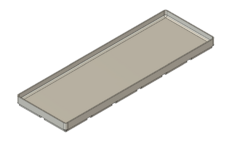
This is my approach with the Gridfinity Fusion plugin. I use the plugin to make the bin that will fit my part:
1741986899308.png

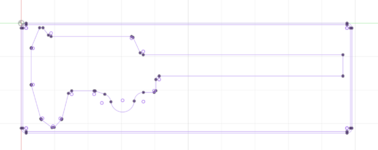
Next I draw a sketch on the top face of the bin:
1741986956924.png

In this case I imported a solid of this cutout because I've used it elsewhere. Then extrude the sketch to taste:
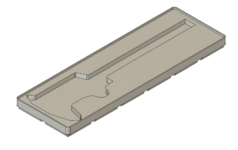
1741987010859.png

I like the plugin because it makes the base so quickly.

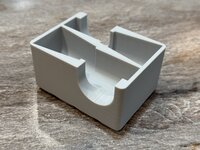
This is my parts bin with tab for a label:
1741987089139.png

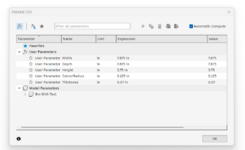
This model is fully "parameterized":
1741987116573.png

When I change a parameter the model changes:
1741987172997.png

I've printed over a thousand of these in all sorts of sizes. There are limits to how small the side with the label tab can be, obviously.

The base sketch that shows parameters (fx) instead of numbers for the dimensions:
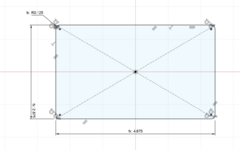
1741987266904.png

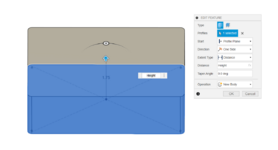
The extrude with the height:
1741987302402.png

It takes almost zero additional effort to use a configuration to control all this:
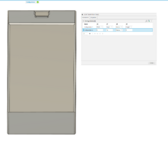
1741987432182.png

You can have as many configurations as you'd like.
 

LeonardY

Well-known member
Joined
Apr 16, 2011
Messages
5,020
Location
Southern California
OP
L

lilscorpion

Well-known member
Joined
Mar 15, 2010
Messages
3,599
Location
Colorado
Curious if the printer software or the computer "Auto-updated". Or did you accept an update without realizing the change it would have? Or was the first half "forced"?

AFAIK, there is no way to "roll-back" firmware on the printer at this point. But I haven't heard of a "required" update (except to match) to be able to keep running in general (aka if printer and software are on identical 1.5 releases, it works, and doesn't force you to update to 2.0 to print. But if one half is on 2.0, the other needs to as well). Firmware numbers are made up as an example.
Between prints I was notified that there was a firmware update for the printers. Didn't think much about it and accepted it on all 3. THen when I went to push the next print to the printer(s) I received a notification on the desktop something like MQTT Fail (which is an open source Queuing/Messaging framework) and that I'd need to take the latest software update on my laptop. That's how I got here.

It's all good. I'll get into Fusion just fine. The things I'm struggling with is working thru how to do things that to me should be intuitive but end up not being. e.g. getting an imported part to move to the origin. Follow the instructions and I can't figure it out...probably because it's a Mesh Body (look at me using the lingo now!) and not a Fustion Body but still...killing me. I'm getting it to work but the parts aren't yet very sophisticated. That may be ok tho, the parts aren't any less sophisticated than I was making in Bambu Studio and the fusion tools are working much better.

Another issue I'm finding is that the online documentation I'm finding isn't always up to date with the software. More than a few times I look something up, find the solution, only to not find it in the menu where they tell me to look. Searching more I end up back at Autodesk's website which let's me know that feature is no longer available and instead is a different feature in a different menu. Now I clearly need to figure out how to use Autodesk's documentation first and then look online second. Good lesson for the day I guess.
 

slodat

ALLIANCE MEMBER
Joined
Feb 6, 2010
Messages
3,679
Location
Central-ish, WA
Hoping this may help: A mesh is not a body and therefore not a solid. It is a mesh. A bunch of triangles or polygons. In solid modeling software, the solid is defined. This is where sketch dimensions, constraints, planes, etc come into play. They contribute to the definition of the body (solid). Fusion, and the others, have features to work with meshes, and I think that blurs things for folks new to modeling. Your mesh doesn't have an origin, because it's not defined.
 
OP
L

lilscorpion

Well-known member
Joined
Mar 15, 2010
Messages
3,599
Location
Colorado
A few thoughts from a guy that works in Fusion all day every day.. Avoid working with meshes in solid modeling spaces. It's almost always avoidable and it generally doesn't work well. It should be trivial to make a parameterized Gridfinity component that you can use as your starting point. As much as you're not loving it, once you understand how to use Fusion, a tool like other tools, you will hopefully find it to be fast and powerful. I'm happy to help.

This is my approach with the Gridfinity Fusion plugin. I use the plugin to make the bin that will fit my part:

1741986899308.png

Next I draw a sketch on the top face of the bin:
1741986956924.png

In this case I imported a solid of this cutout because I've used it elsewhere. Then extrude the sketch to taste:

1741987010859.png

I like the plugin because it makes the base so quickly.

This is my parts bin with tab for a label:
1741987089139.png

This model is fully "parameterized":
1741987116573.png

When I change a parameter the model changes:
1741987172997.png

I've printed over a thousand of these in all sorts of sizes. There are limits to how small the side with the label tab can be, obviously.

The base sketch that shows parameters (fx) instead of numbers for the dimensions:
1741987266904.png

The extrude with the height:
1741987302402.png

It takes almost zero additional effort to use a configuration to control all this:
1741987432182.png

You can have as many configurations as you'd like.
Full disclosure: Gonna read thru your notes and do the same/follow now that I'm actively using. Need to go back to the session notes you sent me too and spend some time there. That will help a lot.

REgarding the fusion plugin - it's nice, easy maybe. But it lacks features that are critical for organizing and then someday reorganizing your drawers if you plan to dive all in on Gridfinity. The plugin doesn't allow adjustments to the base configuration. It only offers the 42mm spacing full width/full size. I'm finding already that the most ideal solution for drawer management is to leverage half grids on the bottoms of your organizers with full grid bases. That allows you more flexibility in how you can move things around in your drawer in half bin increments. Using halves also allows you to more efficiently size your organizers to the tools and parts you want to organize.

Not using the plugin isn't a big deal tho. You can switch back and forth between mesh and Fusion Solids by using built in functions in the Mesh menu. This will allow you to utilize the custom Gridfinity bin builders in Makersworld and import them. In some regards, the advantage of doing so is significant over using the plugin and it's really fast. Only trick ATM is that I'm having to resize the bins I import...which feels like a MM vs. Imperial issue (per someone above) I can live with because I'd much rather not use metric if I don't have to.
 
OP
L

lilscorpion

Well-known member
Joined
Mar 15, 2010
Messages
3,599
Location
Colorado
Here's the two functions, agree with @slodat, doing stuff with Meshs *****. Now I know why I struggled so much initially trying to combine something I made in Fusion to a bin I opened. Once I was able to convert, all became easy(ish).

If you want to convert a Fusion Body to a mesh, use "Tessellate"

Tessellate.png

And a mess to a solid use "ConvertMesh":

ConvertMesh.png
 
OP
L

lilscorpion

Well-known member
Joined
Mar 15, 2010
Messages
3,599
Location
Colorado
Here’s the outcome of my first organizer in Fusion.

IMG_5540.jpeg

Here it is along side the same organizer I made in Bambu Studios which was much simpler because the new mesh errors prevented me from going further.

IMG_5541.jpeg

I might make some adjustments but it’s good enough for now.
 
Last edited:

Cruzan80

Well-known member
Joined
Jul 22, 2015
Messages
4,150
Location
Denver, CO
This is incorrect. Sketchup has solid tools and it is capable of making solids. Sketchup can be a powerful tool. It's not a parametric modeler.


Personally, I dislike Sketchup. It is very easy to create poor non manifold geometry.
Sorry, but the link you posted simply refers to a "solid" as a closed volume without any missing faces. I don't know of a way to create a "Solid" in SketchUp without making surfaces that then "group" into a "solid". So what they call "solid", I would call a "watertight external group of surfaces". This is fundamentally different that parametric solids, even if the wording is the same.

Not saying SketchUp can't work for things, but just because it calls a watertight shell a "solid" doesn't mean it is the same thing.
 

Cruzan80

Well-known member
Joined
Jul 22, 2015
Messages
4,150
Location
Denver, CO
Another issue I'm finding is that the online documentation I'm finding isn't always up to date with the software. More than a few times I look something up, find the solution, only to not find it in the menu where they tell me to look. Searching more I end up back at Autodesk's website which let's me know that feature is no longer available and instead is a different feature in a different menu. Now I clearly need to figure out how to use Autodesk's documentation first and then look online second. Good lesson for the day I guess.
Now you know why some of us like Solidworks. The fact you can take the CSWA (Associate exam) using anything back to SW 2011 means that while new stuff is added, they (usually) don't break the previous stuff doing so. :lol_hitti
 
OP
L

lilscorpion

Well-known member
Joined
Mar 15, 2010
Messages
3,599
Location
Colorado
Now you know why some of us like Solidworks. The fact you can take the CSWA (Associate exam) using anything back to SW 2011 means that while new stuff is added, they (usually) don't break the previous stuff doing so. :lol_hitti
That’s a really nice benefit of using it.
 

CGohring

ALLIANCE MEMBER
Joined
Apr 22, 2011
Messages
53
Location
Vegas
REgarding the fusion plugin - it's nice, easy maybe. But it lacks features that are critical for organizing and then someday reorganizing your drawers if you plan to dive all in on Gridfinity. The plugin doesn't allow adjustments to the base configuration. It only offers the 42mm spacing full width/full size. I'm finding already that the most ideal solution for drawer management is to leverage half grids on the bottoms of your organizers with full grid bases. That allows you more flexibility in how you can move things around in your drawer in half bin increments. Using halves also allows you to more efficiently size your organizers to the tools and parts you want to organize.
I hadn't even though about reducing the base grid into halves, but it sounds like a great idea that I will need to test out. In my plugin I have this parameter. It seems to me that changing this base unit to 21mmx21mm will do what you are looking for? - I haven't had a chance to test it out yet (printer is busy), but it seems like it's worth a shot.
1742052090054.png
 
OP
L

lilscorpion

Well-known member
Joined
Mar 15, 2010
Messages
3,599
Location
Colorado
I still have half a dozen big projects I need done in the next few months so yesterday I got after one of them. Didn’t take build pics because I spent so much time in the machine and was in the zone.

IMG_5550.jpeg

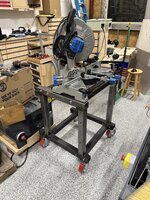
Building another cart after building the base for the press brake I was able to go much faster. I used the same design give it’ll fit in the blast cabinet and powder coating oven.

IMG_5551.jpeg

This was project #2 on the Fireball Tool Dragon Wagon. I almost the fixturing process as much as the dab process. Pieces went in and out maybe a dozen or so to work everything out was incredibly helpful.

IMG_5552.jpeg

Cleaning off the table and putting everything away is much more fun when the storage is hyper organized. Almost have drawer one of the fixture table accessories complete.

IMG_5558.jpeg

I ran up against midnight last night but got it done. Will be so nice not having to cut on an improvised table in the driveway or on the ground. This is phase 1.

IMG_5557.jpeg

Here’s the plan breakdown:

Phase 1: base cart build
Phase 2: roller in feed and out feed tables
Phase 3: Kentucky rule digital scale
Phase 4: chip tray, scrap drawers, and accessory racks.

Plenty of work ahead of me
 
OP
L

lilscorpion

Well-known member
Joined
Mar 15, 2010
Messages
3,599
Location
Colorado
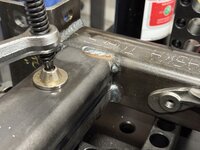
Tonight’s plan was to get the powder coating oven’s base made. My shop floor where the oven will sit is on has a slight downgrade originally designed for drainage for rv parking. This isn’t ideal for machines so everything has to have leveling feet. Also, the epoxy can’t handle direct heat in the 500* range so spacing under will help.

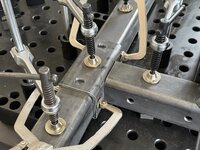
The base will be made out of 2 x 4 x .120 rectangle tubing and the leveling feet will run in sleeves installed thur the tubing. This will allow the .120 to manage much more load. Drilling was fast.

IMG_5560.jpeg

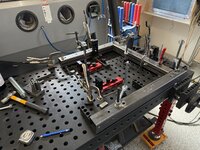
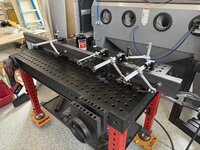
I’m making a rectangle so there wasn’t a lot of fancy design work necessary. This is the first part that really needed a larger fixture table but I made it work.

IMG_5561.jpeg

I sequenced the welds and bounced around allowing a full cooldown between. The Miller is running fantastic.

IMG_5562.jpeg

Flipped it and hit the other side. The outside dimensions of the oven will be 44” x 36”. Inside will be 37” x 29”. Tomorrow I’ll get the leveling feet sleeves made and set it up.

IMG_5563.jpeg

Stripped down the fixture table and put everything away so I’m ready to go tomorrow night.

IMG_5565.jpeg

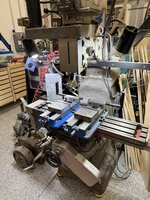
@zmotorsports always cleans up his mill so well it looks like you could eat off of it. Makes me feel like a slob. I decided to follow suit or at least try. Even after cleaning it, my mill doesn’t look as clean. Huh.

IMG_5564.jpeg
 
Last edited:

zmotorsports

ALLIANCE MEMBER
Joined
Oct 20, 2009
Messages
21,308
Location
Northern Utah
Love the organization Matt, makes me feel like a hack if I'm being honest. :unsure: Love the cleanliness of machine equipment.

Just last night I had to make a small "tweak" to an adapter for the case spreader to the Ford 8.8 rear end I'm working on. I knew in my heart that I needed to set it up in the mill and elongate the hole slightly to get the fasteners to fit properly. However, I didn't want to use the mill because it was clean. After fiddling with the adapter and wondering about hand filing it, yes, I actually considered hand filing to avoid making chips on my mill :rolleyes: , I finally bit the bullet and clamped it in the mill vise and grabbed an end mill to elongate the hole. I also grabbed the shop vac and stuck it right at the cutter's edge to catch everything coming off so it kept the mill as clean as possible though. I'm not a complete slob. :bounce:
 

b-dog

Well-known member
Joined
Apr 24, 2015
Messages
238
Location
Lakewood, CO
Love the organization Matt, makes me feel like a hack if I'm being honest. :unsure: Love the cleanliness of machine equipment.

Just last night I had to make a small "tweak" to an adapter for the case spreader to the Ford 8.8 rear end I'm working on. I knew in my heart that I needed to set it up in the mill and elongate the hole slightly to get the fasteners to fit properly. However, I didn't want to use the mill because it was clean. After fiddling with the adapter and wondering about hand filing it, yes, I actually considered hand filing to avoid making chips on my mill :rolleyes: , I finally bit the bullet and clamped it in the mill vise and grabbed an end mill to elongate the hole. I also grabbed the shop vac and stuck it right at the cutter's edge to catch everything coming off so it kept the mill as clean as possible though. I'm not a complete slob. :bounce:

Brother, if you're a hack, the rest of us should just quit now!
I typically blow the chips off the bed of the mill after each use and put the cover over the mill. However, I sweep the chips to the side of the base, back towards the wall. This is the longest I've gone without cleaning up that mess, I bet there's a 100lbs of chips down there right now 😧
 
To avoid these ads, REGISTER NOW!
OP
L

lilscorpion

Well-known member
Joined
Mar 15, 2010
Messages
3,599
Location
Colorado
Love the organization Matt, makes me feel like a hack if I'm being honest. :unsure: Love the cleanliness of machine equipment.

Just last night I had to make a small "tweak" to an adapter for the case spreader to the Ford 8.8 rear end I'm working on. I knew in my heart that I needed to set it up in the mill and elongate the hole slightly to get the fasteners to fit properly. However, I didn't want to use the mill because it was clean. After fiddling with the adapter and wondering about hand filing it, yes, I actually considered hand filing to avoid making chips on my mill :rolleyes: , I finally bit the bullet and clamped it in the mill vise and grabbed an end mill to elongate the hole. I also grabbed the shop vac and stuck it right at the cutter's edge to catch everything coming off so it kept the mill as clean as possible though. I'm not a complete slob. :bounce:
I do that all the time and I know that I’m better if just setting up the mill but I still go manual with a hand drill. Then when the hole isn’t perfect I kick myself. What I need is a partial enclosure.
Then I’d not get chips all over the floor and it’s easier to vacuum up.

It’s funny you held a vacuum to the cutter to collect the chips. 😆
 
OP
L

lilscorpion

Well-known member
Joined
Mar 15, 2010
Messages
3,599
Location
Colorado
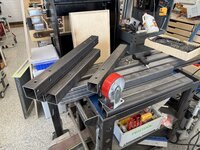
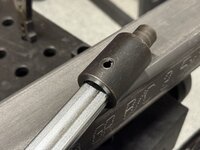
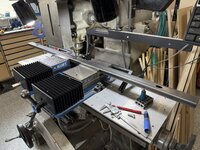
Today I worked on the material cart a bit more. Need it done so I can get the plywood out of the garage. I needed to make some brackets for the beams to attach to the side rails. I’m making them out of 1/4 wall dom tubing that has the same ID as the OD of the cart rails. I start by machining the corner out of two opposing corners.

IMG_5584.jpeg

Here’s a zoom in so you can see better

IMG_5584.jpeg

Then, while still intact, I machine the slots in all four sides.

IMG_5594.jpeg

Here’s a fully machined piece.

IMG_5595.jpeg

Then I run a cut of wheel in the root of the groove on both corners to split the tube and clean it uo a bit.

IMG_5596.jpeg

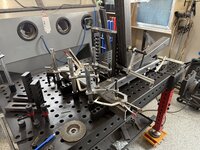
I then used a piece of left over tubing to mock the rails on the welding table.

IMG_5590.jpeg

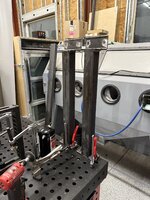
Fixturing the larger part was easy using the extra tall blocks I got from Fireball. This allowed me to stand up the piece on the table and support the vertical keeping it perfectly perpendicular to the table.

IMG_5591.jpeg

What’s nice about making brackets like this is the natural shape of them conforms perfectly around the fixture tube making it a snap to get perfectly in place.

IMG_5592.jpeg

Then burned it home.

IMG_5598.jpeg

All 3 are now done and ready to go.

IMG_5599.jpeg
 
OP
L

lilscorpion

Well-known member
Joined
Mar 15, 2010
Messages
3,599
Location
Colorado
While I had the fixture on the table I welded up a few more cross tubes for another cart I’ll be making in the future for metal sheet goods.

IMG_5600.jpeg

Had one more thing I wanted to get done. When I cut the thing for the powder coating booth I wasn’t paying attention and mis-cut one of the pieces too short…so I gotta lengthen it. Set up a fixture to line up the tube perfectly.

IMG_5587.jpeg

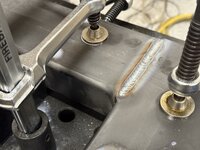
Then, over the next half hour, I made short welds to minimize the heat I put into the tube allowing each weld to fully cool before welding more. One side will need to be sanded flat but the other 3 ill leave the full weld. Should be strong enough to support the wall that will be on it.

IMG_5586.jpeg

Pulled it from the table and set it aside to be recut next time I’m in the shop.
 

Bad Mojo

Well-known member
Joined
Sep 2, 2012
Messages
113
Now that your getting some time with the Fireball Dragon Wagon do you have a opinion or pros and cons? The table and system as a whole has my attention but it being the only 3/4" system has me looking for opinions/feedback. Also really like that you already have the pins and such laid out in gridfinity, well done!
 
OP
L

lilscorpion

Well-known member
Joined
Mar 15, 2010
Messages
3,599
Location
Colorado
Now that your getting some time with the Fireball Dragon Wagon do you have a opinion or pros and cons? The table and system as a whole has my attention but it being the only 3/4" system has me looking for opinions/feedback. Also really like that you already have the pins and such laid out in gridfinity, well done!
So far I like it. I’m worried about the coating on the table long-term. It seems durable, but I’m already starting to notice scratches and such which makes sense given most of the materials I put on the table are bare metal with rough and or semi sharp edges.

On the three-quarter inch system part - I’ll admit I never even realized that this was the only table that utilizes that dimension. I’ve looked around, and it doesn’t appear as though anyone else sells clamps that use three-quarter inch which means you’re going back to fireball to buy everything. In hindsight, I would’ve selected a different system that had more common tooling… but I’m where I am, so 3/4” it is.

As for the clamps - they’re all cheap import stuff. These are junk. Same reviews as the imports on Amazon. They’re assembled/welded crooked and some so offset that they’re unusable.

IMG_5073.jpeg

All the tooth blocks are marked made in the USA so I’m guessing thats why the machined stuff os really nice.

image.jpg

The aluminum stuff isn’t marked however…

image.jpg

And none of the pins are. But that doesn’t mean they aren’t. There may just not be room. Overall the stuff is stout and the table is very heavy duty and very level. It’s more than I need maybe. The stuff is pricy bit on par with others with similar quality/durabilty. That said, there are not many on the market that are small-ish with similar features like the dragon wagons.

Since you liked the pins drawer, here’s another - took me a bit to figure out how to nest things and not waste space. Some of the fixtures are on the table thus the gaps. 😉

image.jpg
 
OP
L

lilscorpion

Well-known member
Joined
Mar 15, 2010
Messages
3,599
Location
Colorado
This is what I did. It works really well.
1742588467224.png

The details are in this post.

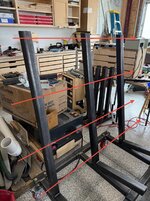
That’s kinda what I’ve been working on. You can see the base made out of 6061 for it beneath the vises in this pic

IMG_5593.jpeg

I want to get back to it. Actually thought about taking the next step a couple days ago until I could t find some of the damn pieces in the various containers in the basement. Need to tho
 
Last edited:

Bad Mojo

Well-known member
Joined
Sep 2, 2012
Messages
113
So far I like it. I’m worried about the coating on the table long-term. It seems durable, but I’m already starting to notice scratches and such which makes sense given most of the materials I put on the table are bare metal with rough and or semi sharp edges.

On the three-quarter inch system part - I’ll admit I never even realized that this was the only table that utilizes that dimension. I’ve looked around, and it doesn’t appear as though anyone else sells clamps that use three-quarter inch which means you’re going back to fireball to buy everything. In hindsight, I would’ve selected a different system that had more common tooling… but I’m where I am, so 3/4” it is.

As for the clamps - they’re all cheap import stuff. These are junk. Same reviews as the imports on Amazon. They’re assembled/welded crooked and some so offset that they’re unusable.

IMG_5073.jpeg

All the tooth blocks are marked made in the USA so I’m guessing thats why the machined stuff os really nice.

image.jpg

The aluminum stuff isn’t marked however…

image.jpg

And none of the pins are. But that doesn’t mean they aren’t. There may just not be room. Overall the stuff is stout and the table is very heavy duty and very level. It’s more than I need maybe. The stuff is pricy bit on par with others with similar quality/durabilty. That said, there are not many on the market that are small-ish with similar features like the dragon wagons.

Since you liked the pins drawer, here’s another - took me a bit to figure out how to nest things and not waste space. Some of the fixtures are on the table thus the gaps. 😉

image.jpg
Thanks for the feedback, I appreciate it. I agree the size hits a sweet spot for the prosumer that would love a 4'x8' table but doesn't have the room to dedicate that level of space. The 3/4" hole spacing is the only thing that holds me up a little bit because in the off chance the company goes under I don't want to loose support for bringing in additional tooling. That is helpful feedback on the finish of the top, and I think a realistic look on it. It is a welding table after all.

I love me the tool organization via 3D printing that is going on. Just placed an order for more filament to keep working through hardware storage, myself.

That is a bit disappointing on the clamps, but they seem like a rebrand item for them with a 3/4" base instead of the typical 5/8". I will be curious if they come out with their own at some point. I get they can't develop everything overnight and starting with the table makes the most sense.
 
OP
L

lilscorpion

Well-known member
Joined
Mar 15, 2010
Messages
3,599
Location
Colorado
Thanks for the feedback, I appreciate it. I agree the size hits a sweet spot for the prosumer that would love a 4'x8' table but doesn't have the room to dedicate that level of space. The 3/4" hole spacing is the only thing that holds me up a little bit because in the off chance the company goes under I don't want to loose support for bringing in additional tooling. That is helpful feedback on the finish of the top, and I think a realistic look on it. It is a welding table after all.

I love me the tool organization via 3D printing that is going on. Just placed an order for more filament to keep working through hardware storage, myself.

That is a bit disappointing on the clamps, but they seem like a rebrand item for them with a 3/4" base instead of the typical 5/8". I will be curious if they come out with their own at some point. I get they can't develop everything overnight and starting with the table makes the most sense.
Was welding and thinking about what having 3/4” stuff really means. Even if fireball tool went out of business it wouldn’t be that big of a deal. All
The camps have adapters to get them to work with 3/4” system.

IMG_5630.jpeg

It’s a simple piece that could easily made on a lathe.

IMG_5628.jpeg

And the clamp is held in with nothin more than a roll pin. Hell, the hole the clamp goes in is round too. No complex machine work necessary.

IMG_5629.jpeg

All of the other tooling is the same way. The blocks have adapters that are 3/4” thread on one side and the hole diameter on the other. The ONLY part that would be a problem is the lock pins but the ones I have should never wear out. Dunno, May not be a problem.
 
OP
L

lilscorpion

Well-known member
Joined
Mar 15, 2010
Messages
3,599
Location
Colorado
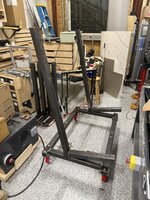
Made further progress on the plywood sheet cart. Know how you can work on something for an entire day only to feel like you barely made progress? Yesterday was like that. It was more or less half a dozen operations over and over. Lots of machining and final welding.

IMG_5627.jpeg

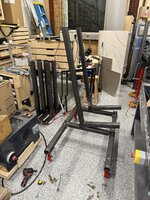
Just to get to assembly and find I needed to clearance a few spots where I had planned things too tight.

IMG_5624.jpeg

One by one I then removed the uprights and made adjustments.

IMG_5626.jpeg

But in the end, it was compete. Today I’ll get a final wipe down and load the material on it. The original plan was to make this cart about 2 months ago when I purchased 35 sheets of 3/4” Baltic birch but since time got away from me, I’ve already chewed thru 31 of those sheets! 😂

IMG_5632.jpeg
 
OP
L

lilscorpion

Well-known member
Joined
Mar 15, 2010
Messages
3,599
Location
Colorado
Got up early and made the panel supports/stretchers.

IMG_5633.jpeg

There made out of 1x2. They’ll attach to the cart and span these threaded inserts.

IMG_5636.jpeg

Machined slots just so I’d have adjustability even tho the uprights on the cart appear to be exactly the same distance apart. Front is big enough for a socket and the rear just slightly wider than the bolt. The aerial view -

IMG_5634.jpeg

Took about 5 minutes per slot. Felt like forever.

IMG_5637.jpeg

Cart ready to load.

IMG_5638.jpeg

Took it into the garage where Ive been temporarily storing the extra sheets. Got it loaded it up. Made it dimensionally the same as the other cart so I knew it would fit thru the door easily with plenty of room to spare.

IMG_5639.jpeg

It’s heavy loaded but rolls and changes direction well.

IMG_5641.jpeg
 

zanyad

ALLIANCE MEMBER
Joined
Apr 26, 2018
Messages
2,755
Location
NE Ohio
Took about 5 minutes per slot. Felt like forever.
I'm curious on what your machining strategy was. If possible, I'd drill two holes at the ends, then plunge with a smaller endmill (I go .020-.030 stepover on a 1/4 4-flute endmill with a corner radius on M2 tool steel FWIW), and run the endmill around the perimeter for finish. I'd also do the top first complete, then the bottom. Hopefully the top slot has clearance for the toolholder when machining the bottom, otherwise you've stuck with a really long tool....
 
OP
L

lilscorpion

Well-known member
Joined
Mar 15, 2010
Messages
3,599
Location
Colorado
I'm curious on what your machining strategy was. If possible, I'd drill two holes at the ends, then plunge with a smaller endmill (I go .020-.030 stepover on a 1/4 4-flute endmill with a corner radius on M2 tool steel FWIW), and run the endmill around the perimeter for finish. I'd also do the top first complete, then the bottom. Hopefully the top slot has clearance for the toolholder when machining the bottom, otherwise you've stuck with a really long tool....
Similar. My mill is CNC so I center drill the slits with a drill bit that’s shut undersized fro finished slot dimensions which, for the small slot is 3/4Lx3/8W. So center drill at 7/16 really only to relieve the end mill from having to plunge: center drill is 2 ops (but one CNC program that drills top wall, then plunges all the way down to the lower/outter wall.

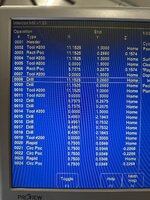
Here’s a sample of how I do it on my Centroid CNC knee mill - once a part is fixtured, I find the location of where I need to drill and then…

image.jpg

The CNC figures out how to drill based on the parameters. “Chop Breaking” means that the controller will back off the feed for “Increment” to break the chip allowing the chip to break prolonging tooling life. Freakin works.

Since I use (for now) conversational programming (someday full fusion), I drill both ends on all pieces first which is running the program 4x2=8 times.

(For those who don’t know) What is conversational programming? You answer a few questions and the controller makes magic.

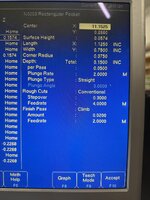
image.jpg

Where you see “INC”, that means it’s an offset from another value. Or “incremental”. So width is based on calculations off of center point.

Then for machining the ovals or elongated slots on the top - ends is one op x 8 times. I program the slots to be 3/4Lx3/8W. The machine handles step over, plunge rate, etc (based on my parameters). It’s a cycle start walk away after I get it right. Then I find center and change X. Same program otherwise.

On the bottom side is the same program but different parameters. I change the slot to be 1 1/8Lx3/4W. This makes the end mill work a little more so I program a finish pass of .020. This more or less leaves .020 for the end and switches to a climb pass cleaning up the edge. Repeat in the center slot same as above.

Now, to be clear, it’s not like my programs are going to net me $1,000,000 someday. They’re really one time run wonders. I move ops around as needed to perform the function of the moment. In the end they are archived under some name I’ll ultimately forget. More or less junk.
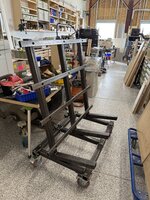
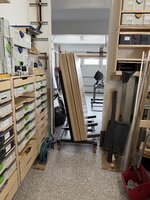
image.jpg

Since I can redo anything in less than 15 minutes it doesn’t matter. In software I refer to this kind of product as “disposable”.

Conversational CNC is 20% machining, 80% CNC. Multiple setups for parts like this but same outcome. After when your parts are longer than the table travel
 
OP
L

lilscorpion

Well-known member
Joined
Mar 15, 2010
Messages
3,599
Location
Colorado
worked on finishing up the sheet goods cart tonight. Even tho I was bouncing around welding things together the uprights were pulling up to 1/2” which was visibly painful too look at. I responded to user by counter heating the base with the tig. More or less, run a ghost pass just below where I welded to top which causes the bottom to expend/contract opposing the weld.

IMG_5658.jpeg

The first one was the worst. Looked hacked when I got the thing back square. Nothing a little metal
Finishing before powder won’t solve (hide).

IMG_5647.jpeg

On the next one I tried shortening the welds to reduce the heat that gets into the part. It helped but didn’t solve the pulling completely. Still had to counter heat the part

IMG_5651.jpeg

Ultimately I was able to get all the verticals with. 1/16” which is probably better than it needs to be.

IMG_5648.jpeg

At this moment I only have a couple half sheets of material that’s ready for the cart. I have some 8’ sheets of 18ga I need to half tomorrow.

IMG_5660.jpeg

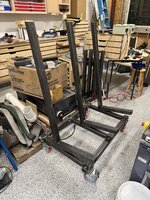
Its
The same as the other cart at the base and fits thru the doorway between the shop and garage nicely. It’ll make unloading sheets much easier now.

IMG_5661.jpeg

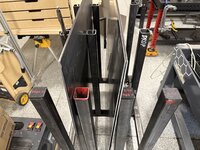
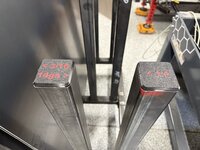
Final touch - I 3D printed these tubing caps for the cart which will make finding what I’m looking for a snap. Here’s the prototype in red.

IMG_5615.jpeg

Here’s all black for the middle row.

IMG_5612.jpeg

Each bin can have a few different sizes making it very easy to identify what I need when I’m looking for it. For example: I’ll keep 1/4” with 14ga and 16ga with 3/16”. Keeping it simple, the caps will identify what’s to the side of each post.

IMG_5662.jpeg

Kinda doesn’t work if I end up having 3 sizes per slot but I’ll cross that bridge if/when I get there.

IMG_5663.jpeg
 
Last edited:
To avoid these ads, REGISTER NOW!
Top Bottom