To avoid these ads, REGISTER NOW!

Between 265 & 485 SQ/FT Made By Miller Studios

Workspaces sized between 265 and 485 squarefeet.
To avoid these ads, REGISTER NOW!
OP
M

MadeByMiller

Well-known member
Joined
Dec 29, 2018
Messages
1,230
Location
Rapid City, SD
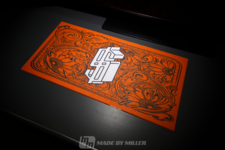
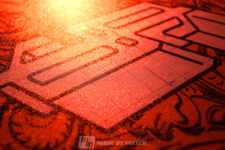
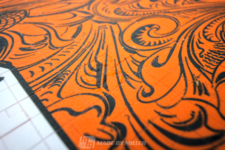
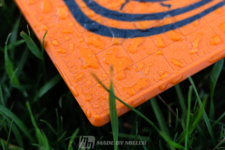
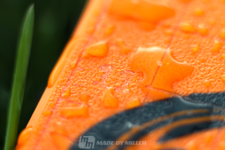
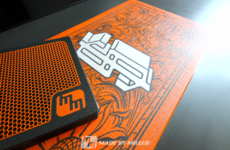
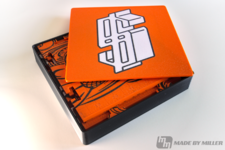
A couple of months ago I made a post showing off the custom desk mat that I designed and 3D printed for myself with my logo. My good friend Dave (@davemoneysign on Instagram) has helped me a lot over the years with advice and knowledge, and is the biggest reason why I even got into 3D printing. With that being said, I decided to surprise him with a custom desk mat of his own. I asked him for a file of his logo without telling him what I needed it for, and placed it in the center of the mat. I added a cool western flourish background design that I got off of Etsy and set it up with Dave's signature orange and dark gray filament colors, printed in PETG. This was a very demanding print as the first layers had a ton of interruptions with the grid lines and the intricate background pattern, but after a few failed attempts and many tweaks in the print settings it turned out pretty good! To make the unboxing experience a bit more enjoyable, I designed and printed a matching box with Dave's logo as well.

During the photoshoot it rained on me, but I didn't mind because it made for some interesting photos!
IMG_6462editlogo.png
IMG_6429editlogo.png
IMG_6451editlogo.png
IMG_6423editlogo.png
IMG_6418editlogo.png
IMG_6434editlogo.png
IMG_6468editlogo.png
IMG_6479editlogo.png
IMG_6502editlogo.png
IMG_6509editlogo.png
 
Last edited:

bdbecker

ALLIANCE MEMBER
Joined
Nov 18, 2015
Messages
5,543
Location
Iowa
Dude... I'm not sure how I missed this thread, but wow! Love the shop, love the tools, love the house, and I seriously appreciate the attention to detail you put into your projects. Truly an inspiration to us all. Keep up the great work and I can't wait to see what comes next.
 
OP
M

MadeByMiller

Well-known member
Joined
Dec 29, 2018
Messages
1,230
Location
Rapid City, SD
Dude... I'm not sure how I missed this thread, but wow! Love the shop, love the tools, love the house, and I seriously appreciate the attention to detail you put into your projects. Truly an inspiration to us all. Keep up the great work and I can't wait to see what comes next.
That's high praise, thank you very much! I'm doing the best I can with what I've got.
 
OP
M

MadeByMiller

Well-known member
Joined
Dec 29, 2018
Messages
1,230
Location
Rapid City, SD
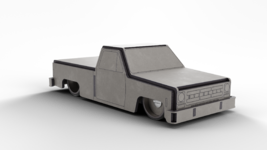
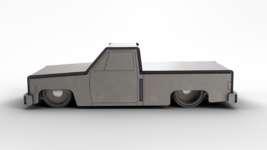
After a successful launch day for the Square Body Truck kits, I set my focus on making a proper promo animation to post on social media. Using Blender, I created what I believe to be my best animation yet. I had a lot of fun working on it, but unfortunately Instagram decided not to show it to many folks (algorithms are sooo cool...). If you'd like to watch it, here is a link to the post on my Instagram. I'll put some stills from the animation here too.
0028.png
NOWAVAILABLE001.png
End Splash Page.png

Continuing on the project, my partner Joel and I agreed that we needed to create a cool sticker to include with the kits that would have our joint logo on it. Almost immediately, my mind went to plastic model kit sprue. I modeled up a rough draft in Fusion 360:
Sprue Logo Design 001.png

We were pretty happy with this outcome, but I knew I needed to create a higher quality rendering in Blender, and there were still aspects missing. I needed a clever way of advertising the website (Joel's especially) and we felt it was important to display our pride for USA manufacturing as well. It hit me that a decal sheet would be a neat way of tying into the plastic model kit theme, so I headed into Inkscape to create one. Here was the rough draft in Blender:
Sprue Logo Design 004.png

I don't even need to point out how bad the lighting is in that render, but it was a start. I thought the decal sheet would look better underneath the sprue, so I adjusted it and slightly tweaked the decals themselves a bit more as well. The final step was to set up some better lighting, and then render the final image. Some compositing to boost the contrast and I was happy!
Sprue Logo Design FINAL BGsm.png

I'm hoping to get the design printed on a clear sticker, so when applied it will have a photorealistic 3D effect.

Thanks for looking!
 
OP
M

MadeByMiller

Well-known member
Joined
Dec 29, 2018
Messages
1,230
Location
Rapid City, SD
I've begun to bring my fancy camera with us more often as we go to family activities as a way to get more reps in and try to improve as a wannabe photographer. I don't necessarily care about what I'm taking a photo of as much as I care about just trying to get better. Am I getting better? I don't know. Many of these photos were edited to help boost colors and contrast more, they just seem quite flat without editing. Maybe I can change the camera settings such as exposure metering or white balance to help with this? Please chime in!

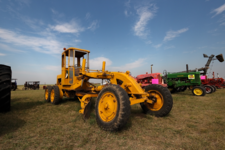
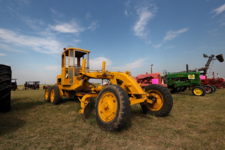
This first grouping is from the Threshing Bee in Sturgis, SD.
IMG_6983edit.png
IMG_7123edit.png
IMG_7130edit.png
IMG_7049edit.png
IMG_7057edit.png

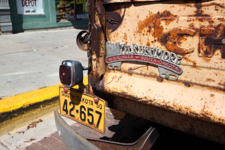
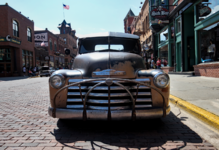
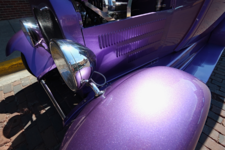
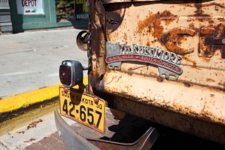
This past Sunday we went to a car show in downtown Deadwood:
IMG_7223edit.png
IMG_7226.JPG
IMG_7230.JPG
IMG_7234edit.png
IMG_7236edit.png
 
OP
M

MadeByMiller

Well-known member
Joined
Dec 29, 2018
Messages
1,230
Location
Rapid City, SD
Continued from the car show. I found that bringing the camera along brought me a new layer of enjoyment for car shows. As I've gotten older I've become less interested in cars in general, but the camera helps me to look at them with a new perspective.
IMG_7177.JPG
IMG_7185.JPG
IMG_7220.JPG
IMG_7244edit.png
IMG_7246.JPG

This Cadillac was my neighbor's, he ended up selling it at the show. It sat for 40 years before he got it.
IMG_7198edit.png
IMG_7200.JPG
IMG_7202edit.png
 

zmotorsports

ALLIANCE MEMBER
Joined
Oct 20, 2009
Messages
21,312
Location
Northern Utah
Austin, the lawn looks fantastic.

Unfortunately, our club isn't going to South Dakota this year so I'll miss getting to your wonderful state for the first time in 4 years. We've loved our annual Spearfish, SD Jeep gathering but the club opted to go every other year now instead of every year so it looks like we'll be back in 2024, God willing.
 
OP
M

MadeByMiller

Well-known member
Joined
Dec 29, 2018
Messages
1,230
Location
Rapid City, SD
Lastly, the Dakota had a spa treatment over the weekend. I am embarrassed to say that I haven't washed it since spring, and it hasn't had a fresh coat of wax since last fall. It's hard to find the time to keep up on it, but it's even harder to find the motivation to do when the truck spends 100% of it's life uncovered and in the elements. I did the right thing and hand washed and waxed it though, finally. I loaded up the family and drove down the road to the creek for a photo op.
IMG_7270edit.png
IMG_7288edit.png

There's so many little things that I want to fix on it, but I can't justify spending the time (or money) on it right now. I still love this truck.
 
OP
M

MadeByMiller

Well-known member
Joined
Dec 29, 2018
Messages
1,230
Location
Rapid City, SD
Austin, the lawn looks fantastic.

Unfortunately, our club isn't going to South Dakota this year so I'll miss getting to your wonderful state for the first time in 4 years. We've loved our annual Spearfish, SD Jeep gathering but the club opted to go every other year now instead of every year so it looks like we'll be back in 2024, God willing.
Thank you!

Funny you bring up your annual South Dakota trip Mike, I was just talking to my wife this weekend thinking that you guys were about due to come out here. I'd love an opportunity to meet you and your wife in person in 2024 if you're able! You're missing a great year to come out, probably the overall best year weather wise since my wife and I moved to the Hills in 2016. It's just starting to get a little dry and brown here, but if we make it through the next few weeks without things getting much worse this could be the first year that's been nice and green from spring through fall!
 

nicholam77

Well-known member
Joined
Dec 18, 2016
Messages
2,655
Location
Minneapolis, MN
Am I getting better? I don't know.

I think you're getting better 😁

But admittedly there's a level of subjectivity to photography.

I think you're doing a great job finding those angles and visual interest.

What you said about finding new perspective in the car shows is my favorite thing about photography. Photos, especially stylized ones, are often NOT how we see things in real life. In real life you get to walk around the whole car and the absorb the distractions around it, and your eyes aren't packing a telephoto or wide option, and basically have infinite depth of field. Photography on the other hand is biased. You get to choose what we see, the amount of color, which detail we focus on, what's in focus, the mood, etc. Someone else who brought their camera to the same car show would get a completely different set of photos. And like you said, it can totally help you see regular objects in ways you haven't considered before.

Many of these photos were edited to help boost colors and contrast more, they just seem quite flat without editing. Maybe I can change the camera settings such as exposure metering or white balance to help with this? Please chime in!

Editing is part of the process. I would be editing every single photo — it's half the battle in getting a great image. Even with analogue, photos are manipulated in the darkroom to come out a certain way. Cameras are incredible, but not as incredible as our eyes, and sometimes photos need to be edited for realism and sometimes they need to be edited for style.

Again, it comes down to personal preference, but for most digital photos a very basic recipe I do on every photo, even iPhone photos, is to raise the shadow detail, sometimes the overall exposure/brightness a tiny bit, give contrast a bump, correct any white balance issues, and depending on how the shot came out add a touch of saturation (or maybe take a touch away).

For me a key aspect is raising the shadows, otherwise if you add contrast it will just crush the blacks and you'll lose a bunch of detail in the dark areas of the image.

A 30-sec example of that with your truck (my edit on bottom):
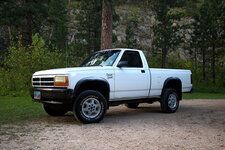
IMG-7270-orig.jpg
IMG-7270edit2.jpg

I did this down and dirty in the Mac Preview pdf viewer app (not a photo editor), so it's crude. But with the raw you have a lot more control and you could also do something like throw a vignette on that to highlight the truck more. It's subtle changes, but they have an overall effect that hopefully you can see.

At the end of the day though, it's figuring out how you like your photos to look visually, and then figuring out which sliders to adjust to make that happen.

And yes you should white balance, but my .02 is editing is always going to be part of the process.

🍻
 

zmotorsports

ALLIANCE MEMBER
Joined
Oct 20, 2009
Messages
21,312
Location
Northern Utah
Thank you!

Funny you bring up your annual South Dakota trip Mike, I was just talking to my wife this weekend thinking that you guys were about due to come out here. I'd love an opportunity to meet you and your wife in person in 2024 if you're able! You're missing a great year to come out, probably the overall best year weather wise since my wife and I moved to the Hills in 2016. It's just starting to get a little dry and brown here, but if we make it through the next few weeks without things getting much worse this could be the first year that's been nice and green from spring through fall!

Austin, the first year we came with the club was 2018 and although it was quite nice, the trees in 2019 were absolutely spectacular. I have not seen the colors so vibrant as we did in 2019 due to the wet and extended winter. We were hoping this year would have been the same way but were disappointed when we heard the club was not going to Spearfish this year and had taken a vote to make it an every other year trip.

Sad we're going to miss this year and the wife and I had discussed going on our own to Spearfish in September when we found out the club was skipping this year. However, we opted to go somewhere else next month and we should be back with the club in 2024.
 
OP
M

MadeByMiller

Well-known member
Joined
Dec 29, 2018
Messages
1,230
Location
Rapid City, SD
I think you're getting better 😁

But admittedly there's a level of subjectivity to photography.

I think you're doing a great job finding those angles and visual interest.

What you said about finding new perspective in the car shows is my favorite thing about photography. Photos, especially stylized ones, are often NOT how we see things in real life. In real life you get to walk around the whole car and the absorb the distractions around it, and your eyes aren't packing a telephoto or wide option, and basically have infinite depth of field. Photography on the other hand is biased. You get to choose what we see, the amount of color, which detail we focus on, what's in focus, the mood, etc. Someone else who brought their camera to the same car show would get a completely different set of photos. And like you said, it can totally help you see regular objects in ways you haven't considered before.


Editing is part of the process. I would be editing every single photo — it's half the battle in getting a great image. Even with analogue, photos are manipulated in the darkroom to come out a certain way. Cameras are incredible, but not as incredible as our eyes, and sometimes photos need to be edited for realism and sometimes they need to be edited for style.

Again, it comes down to personal preference, but for most digital photos a very basic recipe I do on every photo, even iPhone photos, is to raise the shadow detail, sometimes the overall exposure/brightness a tiny bit, give contrast a bump, correct any white balance issues, and depending on how the shot came out add a touch of saturation (or maybe take a touch away).

For me a key aspect is raising the shadows, otherwise if you add contrast it will just crush the blacks and you'll lose a bunch of detail in the dark areas of the image.

A 30-sec example of that with your truck (my edit on bottom):
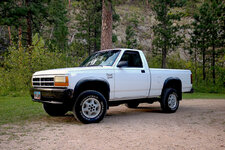
IMG-7270-orig.jpg
IMG-7270edit2.jpg

I did this down and dirty in the Mac Preview pdf viewer app (not a photo editor), so it's crude. But with the raw you have a lot more control and you could also do something like throw a vignette on that to highlight the truck more. It's subtle changes, but they have an overall effect that hopefully you can see.

At the end of the day though, it's figuring out how you like your photos to look visually, and then figuring out which sliders to adjust to make that happen.

And yes you should white balance, but my .02 is editing is always going to be part of the process.

🍻
Nick, thank you very much for yet another instance where you've gone far out of your way to give me some kind reassurance and some much needed advice! You did a great job of capturing my thoughts on photography beyond the subject matter. I'm going to post some photos here along with some new information I learned about my camera settings before I address your very helpful information on editing.

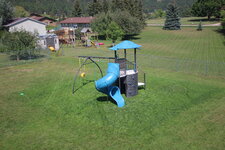
The following photo represents the Standard Canon Picture Style:
IMG_7388.JPG

This setting is inside the setup menu of the camera, not something that I have really investigated much. I shoot in full manual mode and I didn't realize there was a "Picture Style" setting that was affecting my photos so much. This Standard Picture Style is all that I've ever used with my Canon Rebel T3i, and I feel that this is the culprit for all of the flat, bland looking shots I've struggled to remedy in post.

A brief internet search led me to set up my own custom Picture Style, and here is the first image using the settings suggested in the article (Sharpness +7, Contrast -2, Saturation +2):
IMG_7389.JPG

Mind you, this is with nothing else changed - what a massive difference! I think it's safe to say though that the pendulum had swung perhaps a bit too far in the opposite direction though. My eyes think it's oversaturated.

So I adjusted the Saturation to +1 and took another shot:
IMG_7390.JPG

That's looking better to me, but I decided to try to bump the Contrast up a notch to -1:
IMG_7391.JPG

To me, this is looking just about right. Notice the slight increase in contrast in the grass and especially on the blue plastic components of the swing set. It's got so much more "pop" than the Standard Picture Style that the camera had preset. Here's a side-by-side comparison:
IMG_7388.JPG
IMG_7391.JPG

That's a HUGE difference, and I think absolutely for the better.

So, back to the topic of editing.

I do realize that editing is an important part of photography, but I was getting discouraged because I felt that I had to tweak the photos so much that what I was doing was altering the foundations of the photo. I felt that I should at least have a better base photo to start with, and I was blaming myself and my inexperience for this. Another frustration was seeing photos that I thought compositionally were pretty decent, but required significant effort in Darktable editing to make them even presentable. If I'm going to edit photos, I would much prefer to just make quick small adjustments rather than spend a bunch of time on each photo, because the editing process is nowhere near as enjoyable to me as is the actual shooting.
I really like what you did to my already edited truck photo, you're totally right about bringing the shadows up. Using the old Standard Picture Style I had a really hard time getting the exposure right when there were really bright objects (such as white paint..) next to really dark objects. Hopefully decreasing the contrast in the Picture Style setting will help with this in the future. Here is the unedited image:
IMG_7270.JPG
and my edit:
IMG_7270edit.png

I definitely need to put more effort into learning Darktable properly, I've just gotten where I have so far in the software using trial and error. No doubt I could become much more proficient and efficient if I research more the proper ways of doing things.

Lastly, am I wrong for not shooting RAW? Maybe I'm lazy and or dumb for capturing JPEGs...
 

SilverJimmy

Well-known member
Joined
Apr 14, 2012
Messages
1,627
Location
Prescott/Flagstaff, AZ
I took a photography class when I was younger, the class was on black and white from exposure to developing the print. I just remember the instructor stressing that the farther from noon you get the better your pictures will be. Maybe that doesn’t apply to digital, but I try to think about light always when taking pictures. YRMV!
 
To avoid these ads, REGISTER NOW!

racer-john

Well-known member
Joined
Apr 1, 2008
Messages
1,461
Location
Newmarket, ON Canada
I've begun to bring my fancy camera with us more often as we go to family activities as a way to get more reps in and try to improve as a wannabe photographer. I don't necessarily care about what I'm taking a photo of as much as I care about just trying to get better. Am I getting better? I don't know. Many of these photos were edited to help boost colors and contrast more, they just seem quite flat without editing. Maybe I can change the camera settings such as exposure metering or white balance to help with this? Please chime in!

This first grouping is from the Threshing Bee in Sturgis, SD.
IMG_6983edit.png
IMG_7123edit.png
IMG_7130edit.png
IMG_7049edit.png
IMG_7057edit.png

This past Sunday we went to a car show in downtown Deadwood:
IMG_7223edit.png
IMG_7226.JPG
IMG_7230.JPG
IMG_7234edit.png
IMG_7236edit.png
Could you post any of those pics side by side as shot, show any difference. You might sent them to my email addy if this would your preference. Thanks, from a fellow photographer.
 

nicholam77

Well-known member
Joined
Dec 18, 2016
Messages
2,655
Location
Minneapolis, MN
No problem Austin!

This Standard Picture Style is all that I've ever used with my Canon Rebel T3i, and I feel that this is the culprit for all of the flat, bland looking shots I've struggled to remedy in post.

A brief internet search led me to set up my own custom Picture Style, and here is the first image using the settings suggested in the article (Sharpness +7, Contrast -2, Saturation +2):

Yeah, it looks much better where you landed for “out-of-the-box” / no editing. Baking in a look can give you less flexibility to change the look later, but if your goal is to get it as close as to how you like in-camera, this is a good approach.

I do realize that editing is an important part of photography, but I was getting discouraged because I felt that I had to tweak the photos so much that what I was doing was altering the foundations of the photo. I felt that I should at least have a better base photo to start with, and I was blaming myself and my inexperience for this.

Now that you have your camera settings more dialed in to how you like them, you should be able to make smaller changes in software. I don’t know Darktable, but it’s common to be able to create presets. You could set up a preset with your default “starting point” for editing adjustments, and paste that on a photo or batch of photos with a couple clicks, or probably even assign to a keyboard shortcut. This will save you a lot of time, and then you can make any further tweaks to each individual shot.

Same with more specific edits… if you take 10 photos of the same object in the same session, after editing one to your liking, you can copy-paste those settings to the rest from the same setup and get pretty close.

Another frustration was seeing photos that I thought compositionally were pretty decent, but required significant effort in Darktable editing to make them even presentable. If I'm going to edit photos, I would much prefer to just make quick small adjustments rather than spend a bunch of time on each photo, because the editing process is nowhere near as enjoyable to me as is the actual shooting.

Somewhat the same answer as above, but some of this is dialing in camera settings, and some of it is more efficiency with the software. If you ever get into more stylistic images vs realistic, you’re going to need to rely on editing more heavily.

Using the old Standard Picture Style I had a really hard time getting the exposure right when there were really bright objects (such as white paint..) next to really dark objects. Hopefully decreasing the contrast in the Picture Style setting will help with this in the future.

I’ve noticed that in some of your photos but didn’t know if it was the camera or the edit. This is one reason I actually prefer to capture a flatter image, and do most of the work in editing, because once you bake in crushed blacks or blown out whites, you can’t fix them.

Lastly, am I wrong for not shooting RAW? Maybe I'm lazy and or dumb for capturing JPEGs...

Not necessarily. RAW takes up more file space, takes more processing power to compute, and most importantly for you, requires the most editing work to make it look good.

The pros are nothing is baked in, so you have a lot of flexibility, which if you know how to edit really well can lead to better images.

I’ve shot both and I would say if you’re pretty happy with how your camera is set up, RAW might not be worth it for a hobbyist. I did the RAW thing in the beginning, and eventually decided JPEG worked for me most of the time.

At some point it’s probably worth giving a try, just to experience it. Too nerdy and lengthy for me to explain here, but if you’re not familiar with what RAW formats actually are, give it the ol’ Google 😁

I took a photography class when I was younger, the class was on black and white from exposure to developing the print. I just remember the instructor stressing that the farther from noon you get the better your pictures will be. Maybe that doesn’t apply to digital, but I try to think about light always when taking pictures.

It definitely applies to digital, if not more so. Digital cameras have made great strides, but typically film has more latitude than digital has dynamic range. And handles the highlights better. Not to say you can’t take good or interesting pics in harsh light, but they call it “magic hour” for a reason.
 
OP
M

MadeByMiller

Well-known member
Joined
Dec 29, 2018
Messages
1,230
Location
Rapid City, SD
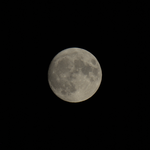
The moon has been simply gorgeous the last few days, so with all of this photography talk I felt in the mood to take another crack at capturing it. Using my 55-250mm kit lens, I set up the tripod and used my remote shutter outside. I opted to capture RAW + JPEG to see what the hubbub was about. ISO set to 100, aperture to f/16, shutter speed at 1/15s. The focus is finicky when zoomed out to 250mm, but I got it pretty decent.

Here was the RAW output from my best shot:
IMG_7396cropped.png

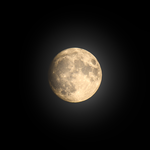
I sort of disregarded the accompanying JPEG and just brought the RAW file into Darktable to edit. I'm pretty pleased with this edit:
IMG_7396edit.png

The moon really was that golden last night, and the left side was pretty dark to the naked eye. I took the artistic liberty of adding some bloom that I think is a neat look.

Since I wondered a few posts back whether or not I'm getting better at this whole wannabe photographer thing, I thought I would bring back my first moon shots and compare. These moon shots were some of my first attempts at photography and editing.

1st attempt:
IMG_4547_01.jpg
2nd attempt:
IMG_4580_01.jpg
Now:
IMG_7396edit.png

Well, I can't say there's really a big improvement between the 2nd attempt and now photography wise (a monkey could take that shot), but the editing I do believe is better. It's more interesting to look at in my opinion.
 
OP
M

MadeByMiller

Well-known member
Joined
Dec 29, 2018
Messages
1,230
Location
Rapid City, SD
My eye prefers the "crisper" look of the 2nd edit. 3rd is cool, but prefer the extra detail on the edge of the moon in the 2nd.
It's okay, you're allowed to be wrong!

Haha kidding of course. Just for you I made a version with the bloom toned down:
IMG_7396edit2.png
Full bloom:
IMG_7396edit.png

I totally get what you're saying about it not being as crisp with the glowing bloom effect, but I still prefer it. It makes it look more real (well, they are photos after all) and three dimensional to me. Like you could reach into your screen and grab it.
 

Boostingaz

Well-known member
Joined
May 21, 2018
Messages
3,668
Location
Indiana
I ment to ask before and forgot. What size are those desk mats and what would one cost if you wanted a little side project? I could send you logo files and you could design a simple border or some fill-in around it?
 
OP
M

MadeByMiller

Well-known member
Joined
Dec 29, 2018
Messages
1,230
Location
Rapid City, SD
I ment to ask before and forgot. What size are those desk mats and what would one cost if you wanted a little side project? I could send you logo files and you could design a simple border or some fill-in around it?
Hey, thank you! The desk mats are 12"x24". I do plan on offering them for sale in the near future, but I haven't had the time to dedicate to making that a reality yet. If you don't mind waiting a bit I'll be sure to post when they're available for sale. Hopefully it will be soon, I'm still ironing out things with the future of the model kit stuff so that's taking up all of my time I would normally have to work on things like this - hope you understand!
 

Boostingaz

Well-known member
Joined
May 21, 2018
Messages
3,668
Location
Indiana
Hey, thank you! The desk mats are 12"x24". I do plan on offering them for sale in the near future, but I haven't had the time to dedicate to making that a reality yet. If you don't mind waiting a bit I'll be sure to post when they're available for sale. Hopefully it will be soon, I'm still ironing out things with the future of the model kit stuff so that's taking up all of my time I would normally have to work on things like this - hope you understand!

Oh I totally understand. Keep us posted. 🍺

The kids just started Awana (a church program) again for the year......so free Wednesday nights for me! I've got until 8:30pm alone, so much time for activities 🤣
 

zanyad

ALLIANCE MEMBER
Joined
Apr 26, 2018
Messages
2,756
Location
NE Ohio
Hey, thank you! The desk mats are 12"x24". I do plan on offering them for sale in the near future, but I haven't had the time to dedicate to making that a reality yet. If you don't mind waiting a bit I'll be sure to post when they're available for sale. Hopefully it will be soon, I'm still ironing out things with the future of the model kit stuff so that's taking up all of my time I would normally have to work on things like this - hope you understand!
Please put me on the list, too!
 
OP
M

MadeByMiller

Well-known member
Joined
Dec 29, 2018
Messages
1,230
Location
Rapid City, SD
Oh I totally understand. Keep us posted. 🍺

The kids just started Awana (a church program) again for the year......so free Wednesday nights for me! I've got until 8:30pm alone, so much time for activities 🤣

Please put me on the list, too!
Thank you guys, stay tuned!

Since it was a Blue Moon, I got the camera back out last night.

Here's your "blue" moon:
IMG_7418edit2.png

But in reality it was of course much more of a warm hue:
IMG_7418edit.png

I took several photos of the moon without the pine tree in the foreground, but it's kind of boring to do another solo moon photo post.
 
OP
M

MadeByMiller

Well-known member
Joined
Dec 29, 2018
Messages
1,230
Location
Rapid City, SD
Still working away at Square Body Truck kit stuff. Trying my best to get some momentum going and get more kits into folks' shops! I made a quick promo animation in Blender today to advertise a sale we're running this week. Here is a link to the animation on my Instagram page, and a link to the kits if you're interested!

A frame from the animation:
LaborDaySaleStill.png

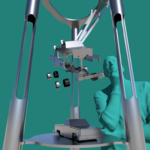
Putting together all of these short animations is good practice, I'm trying to get better anyways. I'm also working on a display for Fabtech, which is coming up very quickly (one week from today). The design isn't quite finished, but here are some in progress renderings from Fusion:
Exploded View Display 002.png
Exploded View Display 001.png

Lastly, here's a still from another quick animation I made. An exploded view of the kit which matches the display. Here is a link to the full animation on my Instagram page.
0200.png

I'm sensitive to the fact that pretty much all of my content has been centered around the trucks lately, but that is a direct reflection of what basically all of my time has been dedicated towards. Thanks for looking guys!
 
OP
M

MadeByMiller

Well-known member
Joined
Dec 29, 2018
Messages
1,230
Location
Rapid City, SD
I ended up having to go back and alter the exploded display from my last post and remove the bends from the tubes. I think the coped joints look better anyways. I added some details and wrapped that design up.
Exploded View Display 009.png
Exploded View Display 010.png

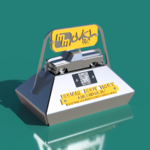
I then designed a tabletop display as well. Simple, but hopefully catches some eyeballs at Fabtech.
Tabletop Display 001.png
 

bdbecker

ALLIANCE MEMBER
Joined
Nov 18, 2015
Messages
5,543
Location
Iowa
Do you know which booth this will be at? I don't see Overkill on the exhibitor list... assuming they'll be with one of the weld equipment companies? I'm heading to Chicago tomorrow afternoon will be sure to try and find it and snap some pics for you.
 
OP
M

MadeByMiller

Well-known member
Joined
Dec 29, 2018
Messages
1,230
Location
Rapid City, SD
Do you know which booth this will be at? I don't see Overkill on the exhibitor list... assuming they'll be with one of the weld equipment companies? I'm heading to Chicago tomorrow afternoon will be sure to try and find it and snap some pics for you.
Oh cool, that would be great! There is not an Overkill booth, they will be featured in others'. The exploded display, if finished on time (unlikely) will be in the BLM Group booth and the tabletop displays should be in the Fronius and OTC Daihen booths.
 
To avoid these ads, REGISTER NOW!
Top Bottom