To avoid these ads, REGISTER NOW!

Made the Decision Fiber Optic

vmusch

Well-known member
Joined
Nov 29, 2013
Messages
201
Location
Warrenton MO
Garage will be 400 feet from the house since I am trenching for water, electric and sewer decided to run something for internet. Since it appears I am past the recommended distance for cat 5/6 and Fiber does not appear that expensive I am want to go ahead and run the fiber. Even with the additional switches needed and conduit not out of the question as far as cost. Fiber will meet any needs in the future, well this month.

Question is when I look at fiber as with everything there are different types? Since I want a 500 foot run with connectors thoughts? guidance? and most of all opinions.
 
To avoid these ads, REGISTER NOW!

MixManSC

Well-known member
Joined
Jan 6, 2014
Messages
154
Location
South Carolina
Choose your transceivers first !

Yep. For any sort of fiber run you are going to be looking at needing an enterprise grade switch on each end. If you are on a budget that is really not too big of a deal as you can easily find truly top notch switches on eBay all day long that while several years old will be perfectly fine for your needs. Cisco is of course generally excellent but there are plenty of alternatives. At my graphics shop I am running all Extreme Networks Summit 400 series switches which have an option 10GB fiber uplink port but also have 2 transceiver ports for 1GB uplinks.

Most semi-current switches that you are going to be looking at will likely have a couple of SFF or GBIC transceiver slots. The transceivers themselves are for different speeds and ranges. http://en.wikipedia.org/wiki/Small_form-factor_pluggable_transceiver

I'd personally find a pair of switches that support at least gigabit and already have the transceivers for each end that you will want to go with, probably SX or LX which would be fine for the distance you need. You could go to higher levels but the cable costs also go up. 10GB would be overkill for a shop unless you are really looking to future-proof and think you might be downloading or streaming massive amounts of content on a frequent basis. You also need to be sure of what the actual fiber connectors are (LC/LC will be a very common and budget friendly one) and get a pretty accurate measurement of the total distance you will need so you can get the right cable already terminated (you don't want to try and terminate fiber yourself).

The switches will also likely be full layer 3 and have a lot of management capabilities you will realistically have no use for but defaulting the switches configuration and just plugging them in should work just fine for your needs. Also make sure on the switches for each end - many advertise them as "gigabit" when really ONLY the uplink transceiver ports are gigabit, the regular copper ports are all 10/100. Even then it will likely fit your needs since even most internet services cannot fully saturate a 100 base-t connection but that is quickly changing with faster and faster internet speeds becoming available. Time Warner and ATT Uverse are both now starting to push out 50Mbit connections here! But - if a commercial swithes copper ports are all 10/100 it is probably getting pretty dang old.

There are also fiber only switches but then you would have no easy way to connect it to your network.... There are few smaller options that have both gigabit copper ports plus transceiver uplink ports - like a Linksys SRW2008. Most options are going to be 12, 24, and 48 port switches. I'd personally go with an enterprise class one over a smaller one like the Linksys. All this is just my personal thoughts and opinions though.... others likely will also have some very valid suggestions as well.
 
Last edited:

ishiboo

Well-known member
Joined
Oct 27, 2010
Messages
9,481
Location
Oshkosh, WI
Or you could go with a media converter and a cheap switch. I'd look at doing gigE now as well as what current 10gigE products are using.

Since it's only 400', have you considered running 4" drain tile between the two with pull strings? It'd only be about $140 in materials and would give you a decent conduit for future upgrades... no matter how big they are! :)
 

5mall5nail5

Well-known member
Joined
May 23, 2010
Messages
1,174
Location
Bucks County, PA
I wouldn't use media converters. You also do not need super expensive switches. Get two of these http://www.dell.com/us/business/p/powerconnect-2800/pd get 2824's which have two SFP ports on each end. You'll trunk the two switches together with a single pair of fiber. You need the fiber transceiver for them (2) from Dell. You could use media converters but I have had mixed results. For a PTP like your setup maybe a media converter config will get you started and you can go to a real SFP switch solution in the future.
 

Dhughes

Member
Joined
Jun 23, 2010
Messages
21
Go with 62.5 multimode with sc connectors. I would just do a couple of gig media converters and use whatever switch you want.

Sent from my GT-P5113 using Tapatalk
 

Slednut

Well-known member
Joined
Dec 20, 2012
Messages
2,550
Location
Washington state
Use media converters with LC connectors. Be very careful when pulling the fiber in. I splice fiber daily and get a call once a month to fix pre-terminated ends on someone’s fiber run because the ends were damaged while being installed. For your distance multi-mode (usually cheaper) will work fine, just make sure the lasers in the media converters match the type (multi-mode/single-mode) of fiber you use.

BTW, I would order 6 fiber cable, I would also get 50 feet more than what you think you need.
 
OP
V

vmusch

Well-known member
Joined
Nov 29, 2013
Messages
201
Location
Warrenton MO
Thanks gentlemen, so as technology changes you have to pull new fiber cable to match the converter box's and switches used, wow. For my application I do not ever see that a problem at my age a lifetime warranty has a new definition.
 

justsam

Well-known member
Joined
Aug 20, 2010
Messages
1,267
Location
Penngrove, California
Thanks gentlemen, so as technology changes you have to pull new fiber cable to match the converter box's and switches used, wow. For my application I do not ever see that a problem at my age a lifetime warranty has a new definition.

Actually no! The beauty of fiber, that if selected and installed properly, has allowed greater and greater bandwidth via changes in terminating equipment, without the huge cost of changing media. This has been great from the perspective of the service providers where terminating equipment is far less costly to change out than media.
 

ABSTIFFGS

Well-known member
Joined
Feb 4, 2014
Messages
304
Location
Twin Cities, MN
Laser optimized 50 micron 10 gig multimode fiber would definitely future proof the install. I prefer LC connectors. Compact and very secure.
 
Last edited:

Dhughes

Member
Joined
Jun 23, 2010
Messages
21
The 62.5 is cheaper than 50 micron but not as cheap as 9micron singlemode. Problem with singlmode is the cost of electronics and connectors. If under 500 feet 62.5 will be all you ever need.

Sent from my GT-P5113 using Tapatalk
 

ABSTIFFGS

Well-known member
Joined
Feb 4, 2014
Messages
304
Location
Twin Cities, MN
True. I just figured for a 500 foot run the cost difference between 50 and 62.5 would not be terrible. Honestly either route would serve the purpose just fine.
 

larry4406

Well-known member
Joined
Jan 27, 2006
Messages
19,166
Location
Northern Virginia
I hope to be doing something similar soon. Keep up the installation details please with pictures and dumb it down so people like me can pull it off.
 

ForceFed70

Well-known member
Joined
Apr 27, 2010
Messages
3,441
Location
BC, Canada
As others have mentioned: Choose transceiver 1st. Pick something that uses a common cable standard. Problem with fiber optic is that while the cable itself can pass a lot of data it's not like CAT 5/6 where everything is universal. More than likely it'll be the cable type/connectors that are obsolete before you actually run out of bandwidth.

For a 1 time job like this - order the cable custom length from a local supplier. Depending on the cable/standard - putting the connections on the ends isn't easy (can actually be dangerous) and requires special expensive tools.
 
To avoid these ads, REGISTER NOW!

rlitman

Well-known member
Joined
Oct 18, 2010
Messages
24,596
Location
Long Island
Unlike copper which is counted in pairs, fiber is done in individual strands. Never get less than 4, because you don want to run a fiber and have to rerun it if you get one bad strand.
 

whatuusay1

Well-known member
Joined
Jun 15, 2009
Messages
106
Actually - if you want to do fiber cheap you can get pre-terminated LC-LC fiber on Amazon/eBay - 200m LC-LC for less than 200 bucks. If its in conduit it'll be fine. Still expensive but after you exceed the capabilities of UTP Ethernet you dont really have many options.

http://www.ebay.com/itm/OUTDOOR-LC-...ical_Fiber_Network_Cables&hash=item56565b2af7

Another option would be MoCA - you can do 100+mbps over RG6 coax up to 300m, granted a few more moving parts but youd probably save youself a few hundred bucks. I'd spring for fiber myself. You get faster speed - lower latency and its electrically isolated.

I've been looking at doing the same thing at my parents place - 150m. The NetGear ProSafe GS110TP is a good option for those needing fiber. That switch is an 8port gigabit SMB switch (lifetime warranty) and has support for 2 SFPs. The SFP's run about $20 bucks. That switch is around 180 on Amazon/eBay. The switch also runs POE so if you have a phone, camera or wireless access point that support POE it'll power it all too. Great deal in my opinion.

- Just a network engineers perspective.
Andrew
 
Last edited:

Overlord66

Member
Joined
Aug 26, 2013
Messages
23
Location
Montana
Why not run wireless? Modern WiFi outdoor AP's can easily span that distance with more than enough speed. You can also look at a backhaul wireless solution like Ubiquiti airmax.
 
OP
V

vmusch

Well-known member
Joined
Nov 29, 2013
Messages
201
Location
Warrenton MO
My experience with wireless is while it works it has problems, drops, speeds affected by gremlins, interference. Plus I need to run cameras back the to house and again wireless will be a problem. I run wireless in the house but again for my video streaming I get much better speeds and downloads via my cat 5 cable.
 

mrjaw14

Well-known member
Joined
May 22, 2012
Messages
1,958
Location
Nashville, TN
Fiber is the "best" option for this. Here's the deal-e-o on fiber sizes: the 62.5 micron is good for 10/100/1000 multi-mode ethernet. 50 micron is good to 10Gbe multi-mode. multi-mode fiber does it's "light" with LEDs usually, and single mode is illuminated with lasers and is much more expensive. 1000base SX or LX is gigabit multi-mode, with SX being good to 200-500M, and LX for longer distances. SX will work for you and is what most "1Gb" SFP gbics actually are. Most terminations now days for this sort of cable are "LC" conenctors. They're smaller than SC or ST connectors.

that takes care of the cable. now for the electronics on each end. You can use fiber to ethernet converters, and these work fine, but you can probably get an old cisco switch with a fiber uplink for cheaper on ebay than you can get the converters. Depending on your gbics (the fiber uplink modules) they may have LC or SC connectors. If that's the case, you have to either get a different GBIC, or terminate your fiber on a "patch panel" and use a "patch cable" to go from the patch panel to the fiber module. If you go this route just ensure the fiber patch cable is the same micron diameter as your feeder cable. 62.5 and 50 micron dont mix well and is not recommended. If you buy the pre-made LC terminated cable, you don't have to worry as much with that and can plug straight into your converter or switch. If you do that, be super carefull with that fiber end. if you break it, you're hosed unless you call someone to re-terminate it. using a patch panel, then the end of the feeder cable doesn't really move or get stressed. that is taken up by the patch cable which is replaceable in the event you pull on the conenctor.

Don't let configuring a switch scare you. You don't need a "full L3 swtich", you can get a pair of cheap cisco switches off ebay for cheap and buy an uplink module for your conenctor type. A factory defaulted switch will work as a basic switch out of the box, and might even recognize the gbic and just work with default settings. If it doesn't, only the uplink port ususally needs to be configured, and there's tons of info on basic port configuration online, and even people on this forum can tell you how to do it. (must have a computer with a serial port or db9 to usb adapter though) you can probaly do the config with one or two lines of actual config. It's easy! something like
enable (goes to enable mode)
conf t (goes to config mode)
ethernetx/y (identify the interface where x and y are the port you're configuring)
exit (choose all the default port options like default vlan, auto negotiation, access port)
write mem (saves the config changes)
 

mrjaw14

Well-known member
Joined
May 22, 2012
Messages
1,958
Location
Nashville, TN
Also, no matter what you do, don't go "light to light". if you look into a gbic in a running fiber connecor, put a piece of paper over it to protect your eyes from the light, or turn off the light and look at it from the side, and you'll see one half of the connector is illiminated and one is dark. similarly the fiber cable when plugged in on one side you can look and one side of the patch cable will be illuminated and one will be dark. when you plug the cable into the converter or switch, you may have to swap the fiber pairs in the connector so you don't go "light to light". The light is the transmit strand, and the dark is the receive side. you want to ensure you're not going tx to tx and rx to rx. tx on one side goes to rx on the other side. That's the only caveat to fiber.

Just remember this no matter if you go switch or converter and it'll save you a lot of time
 

syzygy

New member
Joined
Aug 23, 2009
Messages
2
Jesus Christ, don't look, into any connector, gbic or fibre port, whether single-mode or multi. You can't see the light as any modern light comms are in wavelengths that are invisible, yet can cause irrepairable damage to your eye. Cap all open ports and patch cord ends when not in use.

There is some good advice here, and some, well, not... IMHO, of course. However, I do have a couple decades working with fibre networks, cable and all the equipment with lots of pretty flashing lights, and currently splice fibre full time for a large telco in western Canada.

For a 400 foot distance, multi-mode is fine. I'd recommend 62.5 micron strands as it's the most common in use in North America. Single-mode is over kill and expensive and will require even pricier electronics at the ends.

Pull in some more strands than you need. Four or six would be ideal. This will give you some redundancy and room for any possible future expansion. Plus it will allow for recovering from cable damage, which brings me to another point...

I assume that it gets cold there in the winter? Unless you install some sort of continuous unjointed plastic duct or conduit like core line or liquid tight, you need to use outdoor rated cable. Any water ingress into your duct, which will happen with EMT or metal conduit and possible with PVC, can damage the fibre if it freezes. You can get outdoor cable with tight buffer strands which will make it easier to mount connectors directly to the end of the fibres. With loose tube, it's a bit more complicated and expensive.

Speaking of connectors, it really doesn't matter which you use. It's best to have the same as your electronics, but adapter cords with the same core size of your fibre and the correct type connectors are available. Common types are SC and LC and a plethora of others. SC is still pretty common on older work group switches or consumer grade stuff. LC is now almost all that's available on devices for high density requirements like server rooms. ST is still quite common, but I'd avoid them if you can. The connector type will not affect the speed or bandwidth of your connection.

I'd pull in some unconnectorized cable so you can get the outside rated stuff and then not have to try to store (and not damage) a bunch of slack because you overestimated the distance. For the termination of the cable, look up a local network cable company that works with fibre and hang around their shop at the end of day to ask if any of them is interested in a couple hours of work for a C-note and an armload of their favourite alcoholic beverage. Find out the type/brand of connector they are familiar with and if you should supply them or if they will. A mechanical type connector runs about $15 each and a 3M hot melt is about $10. You'll need one for each strand. Terminate more than you need. I'd recommend four. That will give you two transmit/receive pair or enough for two connections. The hot melts are more robust, but take about twice as long (and require more skill) to install and are not all that common any longer. The mechanical types take no longer than 5 minutes to install for each, but that still requires a bit of cable prep work before hand.

For your application, I'd recommend a pair of media converters of the same model and manufacturer. Most will work with other brands, as the technology is supposed to be universal, but some boxes don't play nice with those from other builders. And any copper switch or hub will work with the converters. You can probably even plug your computer directly into the garage end converter, though it may require a cross-over patch cable. If you can find some switches with built in fibre ports that aren't too pricy, I'd suggest that route. This solution is inexpensive and easy to manage.

Good luck and if you have any specific questions, drop me a note. I'll help if I can.
 

wyliesdiesels

Well-known member
Joined
Aug 14, 2012
Messages
20,000
Location
Modesto, CA
As others have mentioned: Choose transceiver 1st. Pick something that uses a common cable standard. Problem with fiber optic is that while the cable itself can pass a lot of data it's not like CAT 5/6 where everything is universal. More than likely it'll be the cable type/connectors that are obsolete before you actually run out of bandwidth.

For a 1 time job like this - order the cable custom length from a local supplier. Depending on the cable/standard - putting the connections on the ends isn't easy (can actually be dangerous) and requires special expensive tools.


Yes. The ends are NOT easy at all. Definitely NOT DYI. This is just th rason why at work we buy short custom made pigtails with the right connectors on one end and bare fiber on the other. We then use our fiber splicer and splice the pigtails onto the fiber trunk. Much much easier then trying to do the ends.
 

Slednut

Well-known member
Joined
Dec 20, 2012
Messages
2,550
Location
Washington state
[/b]

Yes. The ends are NOT easy at all. Definitely NOT DYI. This is just th rason why at work we buy short custom made pigtails with the right connectors on one end and bare fiber on the other. We then use our fiber splicer and splice the pigtails onto the fiber trunk. Much much easier then trying to do the ends.

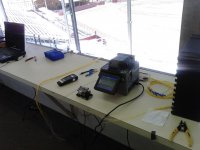
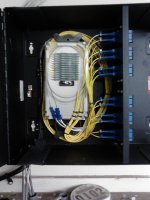
This is what I'm doing in this picture (splicing pigtails to the raw fiber). I did it for free for the local fair grounds. The old splicer and cleaver in the picture cost around $30,000 back in the 90s. The new ones cost almost half as much. The other picture is the end product.

BTW, the little wire to the left of the cleaver is 12 fibers.
 

Attachments

  • P82A0064.jpg
    P82A0064.jpg
    132.1 KB · Views: 60
  • P82A0065.jpg
    P82A0065.jpg
    129.7 KB · Views: 55

gh0st

Active member
Joined
Jan 3, 2014
Messages
32
Why not run wireless? Modern WiFi outdoor AP's can easily span that distance with more than enough speed. You can also look at a backhaul wireless solution like Ubiquiti airmax.

Completely agree. Especially with 802.11ac (gigabit speeds) available now. Just get two APs with patch antennas. That will be way cheaper than running fiber. You could probably put something together for ~$500.

A cabled connection will always give better results, but you pay for it.
 

kossuth

Well-known member
Joined
Sep 16, 2012
Messages
1,787
I'm alittle late to the party but I'll throw my 2 cents worth in. Ebay is your friend here. Plenty of US government surplus gear that has been life cycled that is perfectly viable for what you are wanting to do here. Like others have said, 62.5 micron cable should be good for that length. Here is an auction for a Cisco 3550 switch http://www.ebay.com/itm/Cisco-Catal...94?pt=US_Network_Switches&hash=item3a8eab018e . Then you just need the fiber GBICs which are here. http://www.ebay.com/itm/Lot-of-2-Ge...US_Network_Switch_Modules&hash=item20e326858d If you have a nerd friend to help you out then it will make your life alittle easier, but two of those switches plus two of those modules plus what the rest of the guys were saying about the fiber and such and you should be AOK. The fiber itself will probably be the most expensive part of this.
 
Last edited:

kossuth

Well-known member
Joined
Sep 16, 2012
Messages
1,787
Jesus Christ, don't look, into any connector, gbic or fibre port, whether single-mode or multi. You can't see the light as any modern light comms are in wavelengths that are invisible, yet can cause irrepairable damage to your eye. Cap all open ports and patch cord ends when not in use.
Definitely agree here and want to expand on this. I've worked with fiber on and off for 15 years now and fiber isn't something to screw around with guys. Even the SX/SR/SW standards which use the lowest wavelength of light ( 850 nm LED/Laser) to transmit data. In case you didn't know, even the S standard has a wavelength that is 600 nm higher than the laser used to perform Lasik on your eyes. CASE IN POINT, YOU WILL PERMANENTLY INJURE YOURSELF FOR LIFE IF YOU DO SOMETHING STUPID LIKE STARE DIRECTLY INTO A CABLE/TRANSCEIVER. The L standard has a wavelength up around 1310 nm and the E standards use lasers up around 1550 or so. Just because it seems kinda cute and harmless, it can really hurt you.
 

kossuth

Well-known member
Joined
Sep 16, 2012
Messages
1,787
My experience with wireless is while it works it has problems, drops, speeds affected by gremlins, interference. Plus I need to run cameras back the to house and again wireless will be a problem. I run wireless in the house but again for my video streaming I get much better speeds and downloads via my cat 5 cable.
Taking note of this post it might make sense for you to look for a PoE capable switch. That way if you use PoE cameras you are set. Now, those switches I showed you in the prior post won't work if you want/need PoE and you will spend more for them, but the convenience might definitely be worth it. If that is something you are interested in PM me and I'll point you in a direction on PoE switches depending on the cameras you plan to use.
 

86turbodsl

Well-known member
Joined
Jul 1, 2005
Messages
6,556
Location
Michigan
I have a 300' run to my pole barn. I bought a 320' LC-LC multimode fiber cable already terminated on ebay for $65. Added 2 brand new 100BT-LC converters for $5 each. Has worked perfect ever since. I did this about 6-7 years ago. Buried in 1" plastic conduit for some safety.
 

whatuusay1

Well-known member
Joined
Jun 15, 2009
Messages
106
I have a 300' run to my pole barn. I bought a 320' LC-LC multimode fiber cable already terminated on ebay for $65. Added 2 brand new 100BT-LC converters for $5 each. Has worked perfect ever since. I did this about 6-7 years ago. Buried in 1" plastic conduit for some safety.

Smart! I'm doing the same thing for my parents outbuildings :) very reliable and not all that expensive if you do your home work.

- Andrew
 
To avoid these ads, REGISTER NOW!
Top Bottom