To avoid these ads, REGISTER NOW!

My RF30 mill to CNC conversion - the cheap way

gte718p

Well-known member
Joined
Mar 12, 2009
Messages
3,974
Really cool project, let me know if you have solid modeling questions. I havent used a lot of autodesk, but solidworks has good extensions for CAM

Sent from my SM-G920V using Tapatalk

@gte718p, thanks man, I appreciate the detailed info and I like your method vs. my quick and dirty I did. Interestingly enough Paul (the gentleman who I got my kit from) says he doesn't use backlash for the Z axis, I haven't quite understood it yet but I quote for the benefit of others and reference:
"I tend to use zero for Z backlash because of the upward spring force. That force gets bigger as you lower the quill and this becomes very important when you CNC. The problem occurs when the down force from the endmill exceeds the spring return and it pulls it down a backlash amount. The pulling force is from the helix of the flutes screwing it down. If you aren't aware, it can be frustrating. If the quill is extended, the problem doesn't show up. I usually leave enough material so a drop doesn't ruin the part. Taking off the return spring would do the job but it doesn't feel good in manual. You can semi- tighten the lock and use backlash comp or just take light cuts.."

@Aroberson77, thanks! I'm somewhat committed to learning F360 now because it's kinda the defacto CAD standard these days and the fact that its free and very powerful makes me think it's worth the initial pain of learning it. Kinda like learning to play the guitar, did I already mention I have too many dang hobbies and not enough time?

I'm not sure about the comments on the Z axis. I use backlash comp on Z. It is by far the best of the axis and backlash is generally the least noticeable.

I use F360. I've been using Autodesk since I was 15. I'm comfortable with their products.

If you are starting from scratch it is worth checking out SolidEdge. They are pretty liberal with their definition of "student" for their free student version. It is full featured and in a lot of ways better then F360. They are a sponsor of mine so I'm a little biased. Ironically I don't use their tools, but I teach others to. It is not a reflection of the product, I'm just not as comfortable with the interface after 25 years of Autodesk products.

Also Solidworks is $20 if you happen to be prior military. In terms of capability it blows F360 away. You may not need all the features, but the CFD, FEA, and Kinematics.
 
To avoid these ads, REGISTER NOW!
OP
S

stioc

Well-known member
Joined
May 2, 2005
Messages
1,317
Location
SoCal
I think I'm far enough down the F360 route that I'd rather just stick with it now but those do look like good alternatives for someone who's not too far down the F360 hole.

Speaking of F360, here's another simple one I'm stuck on a bit. I want to cut out these numbers so the rectangular plate becomes my sign which I'll then put on a wooden backing/frame. This works great for the most part doing either Trace or Contour except for the numbers 6 and 4 which have centers that will simply fall out of space as the numbers' outside profile is cut. My first thought was 'tabs' but the tabs will also be hanging on to the parts that'll be cut out. My next thought is, remove the centers and redraw them using circles and lines then attach them to the numbers outside profile. Or am I over thinking this and there's an easier way? :lol_hitti

39895513455_2002a2642c.jpg
 
Last edited:

kkroger

Well-known member
Joined
Apr 21, 2013
Messages
1,143
I tab stuff for Plasma all the time, do you want to cut all the way through. You could do a couple operations one that cuts most of the way through then leave some tabs to be blackened or what have you later or you could tab the entire thing which would leave thicker tabs or just let them fall out then recover them and use adhesive to apply them to the board... I use H8000 Methacrylate adhesive from Henkle/Loctite... good stuff.
 
OP
S

stioc

Well-known member
Joined
May 2, 2005
Messages
1,317
Location
SoCal
I was envisioning something like this where the sign floats in front of the backing frame.

Sign2.jpg


I'll find another font that doesn't cut out so much stuff to look hollow.
 

kkroger

Well-known member
Joined
Apr 21, 2013
Messages
1,143
You can pretty easily tab what you have Send it over if you want and I will make some nice little tabs... LOL!
 

kkroger

Well-known member
Joined
Apr 21, 2013
Messages
1,143
Or just tell me the font you have there and I will do a drawing and send it to you then you can pull the DXF into Fusion and CAM it...
 

gte718p

Well-known member
Joined
Mar 12, 2009
Messages
3,974
I was envisioning something like this where the sign floats in front of the backing frame.

Sign2.jpg


I'll find another font that doesn't cut out so much stuff to look hollow.

This is one of those project fusion might be to much of a program for.

In fusion, make a block, pick the font, extrude the font into the block, make a plane on the bottom surface of the cut, draw were you want your tabs, and then extrude them back out, radius the corners nicely, CAM.

Inkscape may be a better program. Insert the text, convert to path, and it the path by dragging points to tweak until you are happy with it. Then use the built in functions to convert to Gcode.
 
OP
S

stioc

Well-known member
Joined
May 2, 2005
Messages
1,317
Location
SoCal
Or just tell me the font you have there and I will do a drawing and send it to you then you can pull the DXF into Fusion and CAM it...

Haha, awesome, thanks! :beer: The font in the Fusion screenshot was just your basic Arial (I bolded it but doesn't matter), about 3.5" high and approx 10" wide with those numbers but it doesn't really matter. I'm more interested in seeing your tabs technique.

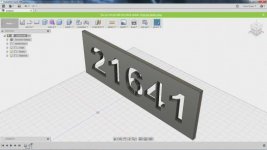
My next font I was going to try was French Script MT.

EDIT: Oh I "Exploded" the text to get the outline from Arial but you probably knew that already.
 
Last edited:
OP
S

stioc

Well-known member
Joined
May 2, 2005
Messages
1,317
Location
SoCal
This is one of those project fusion might be to much of a program for.

In fusion, make a block, pick the font, extrude the font into the block, make a plane on the bottom surface of the cut, draw were you want your tabs, and then extrude them back out, radius the corners nicely, CAM.

Inkscape may be a better program. Insert the text, convert to path, and it the path by dragging points to tweak until you are happy with it. Then use the built in functions to convert to Gcode.

I do have Inkscape but I haven't played with it much, I didn't even know it could generate toolpaths/g-code. I mostly heard people converting to svg then bringing that into F360 or something else to CAM it. I'll have to check it out. As the saying goes, the more I learn, the more I realize how little I know.
 

gte718p

Well-known member
Joined
Mar 12, 2009
Messages
3,974
I do have Inkscape but I haven't played with it much, I didn't even know it could generate toolpaths/g-code. I mostly heard people converting to svg then bringing that into F360 or something else to CAM it. I'll have to check it out. As the saying goes, the more I learn, the more I realize how little I know.

You do need to add the gcodetools or gcodeplot extensions. Super easy and lots of good tutorials. It is my preferred tool for engraving.

The CAD programs are much more powerful, but sometime it is inconvenient to us a Ferrari to go to the grocery store. It uses a lot gas, you have to find a safe place to park it, it doesn't have a lot of storage and it requires a lot maintenance.

I also like that you can import JPEGs and bitmaps and convert them to paths.
 

kkroger

Well-known member
Joined
Apr 21, 2013
Messages
1,143
For something like that I would just use other software then save as a .DXF R14 and import to Fusion... then I could extrude etc... here is what it would look like tabbed I could go in and make tabs anywhere and any shape, I could do it in CAD or other design software... I don't use Fusion a lot unless I need a 3D model... I did .100 width tabs, like I say I could place them anywhere on the 6 but that seems to be the logical place on the 4... then I just imported it to 360 and for sake of doing it extruded it .250 I use the rendering functions on 360 a bit...
attachment.php

attachment.php
 

Attachments

  • Tabbed Address.jpg
    Tabbed Address.jpg
    17.6 KB · Views: 505
  • 360 Example.jpg
    360 Example.jpg
    19 KB · Views: 508
Last edited:
OP
S

stioc

Well-known member
Joined
May 2, 2005
Messages
1,317
Location
SoCal
That came out nicely! So what did you use to sketch it out first?
Yeah I'm going to give Inkscape a try and see if I can make something similar then import it into Fusion for the CAM part.
 

kkroger

Well-known member
Joined
Apr 21, 2013
Messages
1,143
Inkscape was the quick and dirty to get tabs in, make a rectangle the size you need, type in the text, select the text and drag it over the rectangle, then size the text as you wish it, then select all, Path, Exclusion, then you can make "Tab" bars with the shape tool rectangles if you will lay them where you want them and select all/Path/Union and voila... save as File type R14 DXF or SVG you can import either one just make sure your "Units" in Inkscape are correct or your SVG will come out HUGE!!!
 
OP
S

stioc

Well-known member
Joined
May 2, 2005
Messages
1,317
Location
SoCal
Inkscape was the quick and dirty to get tabs in, make a rectangle the size you need, type in the text, select the text and drag it over the rectangle, then size the text as you wish it, then select all, Path, Exclusion, then you can make "Tab" bars with the shape tool rectangles if you will lay them where you want them and select all/Path/Union and voila... save as File type R14 DXF or SVG you can import either one just make sure your "Units" in Inkscape are correct or your SVG will come out HUGE!!!

Dude, you're my hero! :beer:
I was messing around with it last night but I didn't know about the Path/Exclusion trick! I kept converting it to Path Objects to manipulate it. This was easy, I can't thank you enough!

39914572235_5196ff5dfd_n.jpg

40809421641_ffc04874a4_n.jpg
 

kkroger

Well-known member
Joined
Apr 21, 2013
Messages
1,143
Yeah it is rocket surgery! LOL! When you fixture that to your mill put a thick aluminum spoil board on your table and clamp it down with dogs or whatever you want even drill it for counter sunk screws and bolt it down that way... Then attach your plate to it with Superglue just a few dots where it won't be all cut away and let it cure good... then you can mill all the way through and around without colliding with the table or the clamps...
to take the plate off you can just heat the plate with a propane or butane torch it will just pop off... I use Inkscape all day every day... doing renderings and logo conversions....

This one was done in inkscape from start to finish, the letters on the upper sign were all waterjet the pizza pieces were Plasma all powder coated in house and the frames secured to the structure were fabricated and welded in house, interestingly the signs are secured to the frames with Henkle/Loctite H8000 and the devices on the face are all adhered with H8000 Methacrylate Adhesive... Top part of sign is 10' wide the slice is 7' long.
 

Attachments

  • Homeslice Sign.jpg
    Homeslice Sign.jpg
    65.7 KB · Views: 68
  • Homeslice Signs.jpg
    Homeslice Signs.jpg
    52.8 KB · Views: 52
OP
S

stioc

Well-known member
Joined
May 2, 2005
Messages
1,317
Location
SoCal
Haha, everything's rocket surgery when you don't know it, I've never touched a graphics software in my life (never had the need or interest in it) other than MS Paint lol

So you do this for a living? That sign is awesome, how big is your waterjet table or was it done in sections i.e. cut x amount, move the sign over, cut another x amount - rinse and repeat?

I have a plasma cutter but it doesn't have the cnc torch option (it's a Hypertherm 30) I now wish I had bought the 45 or something that do have that option but then again I don't have room in my garage for anything anymore. In fact, I need to get rid of my wood bandsaw and possibly my benchtop drill press to make room for a belt/disc sander. I digress.
 

kkroger

Well-known member
Joined
Apr 21, 2013
Messages
1,143
I hire out Waterjet work $65 Minimum but their table is about 10x20??? my plasmas are 5x5 AND 5X10... The 5x5 started this mess as a home built CNC back in 2014 now it is my job.... and we have a 5x10, powder coating, metal fab and weldering.. and so forth...

Originally I had to adapt my PM30 to do CNC work...
 

Attachments

  • Pays the Bills.jpg
    Pays the Bills.jpg
    127.8 KB · Views: 116
OP
S

stioc

Well-known member
Joined
May 2, 2005
Messages
1,317
Location
SoCal
You're living the dream my friend, that's a nice shop! You should post more pics of your work!

Yeah mine's a PM30xp, I guess you could tap in to the controls for the torch gun trigger so the CNC system can turn it on/off huh?
 

kkroger

Well-known member
Joined
Apr 21, 2013
Messages
1,143
The conversion requires a card to install inside and tap into the torch switch circuit and the work lead voltage... for the THC... And of course fabbing up a mount for the torch.
 
OP
S

stioc

Well-known member
Joined
May 2, 2005
Messages
1,317
Location
SoCal
Cool thanks. It's good to know that I can hack the PM30 if I get interested in making a CNC plasma table. I wouldn't mind having a 2x4 table some day but like most things I have it'll sit mostly unused. It's like a neighbor came over the other day when he saw me running the RF30. He thought it was pretty cool but then he said 'Nice, you can make a $50 part with your $2k+ machine now' hahaha, he was joking of course but there's a lot of truth to that. I just don't use my machines enough to justify the cost but hey it's mostly for my personal quest for learning and wanting to do things on my own.
 
Last edited:
To avoid these ads, REGISTER NOW!

kkroger

Well-known member
Joined
Apr 21, 2013
Messages
1,143
True enough I make lots of parts with my $5000 machine and my $18000 machine and my other $5000 machine... so when I make my $50 parts on them it is kinda like free right? Right?
 

kkroger

Well-known member
Joined
Apr 21, 2013
Messages
1,143
True Story, when I built my Plasma Table back in 2014 I never envisioned it being more than a side job, But like everything I TRY my hardest to be the BEST at it. So through word of mouth making **** because people buys **** my table paid for itself in 6 months, then work upheaval took place at my "Day" Job and I stood to have an $11 per hour decrease in pay due to a union moving into my workplace. I eventually departed that company Orbital/ATK and went to work for Norfolk Southern Railway, while I was working at NS I got out of the blue a Text message from a number I didn't recognize asking about CNC Plasma Cuttting signage for a guy, who got my number from a former co-worker... Well I responded and began making about $1000 - $2000 a week as side money in addition to the pitiful amount of money I made working with Trains (which is pretty cool by the way) and on November 29th 2015 I parted company with NS because a rookie Rail Coordinator put my west and east crews on both ends of the same train, almost killing both of my conductors in the process, a 250000 pound DRY GP38 is pretty unforgiving... I handed in my cards and Railsafe ID and walked away and began doing the plasma cutting and design work full time. so all of 2016 and 2017 this is what I have done, I am driving a 2017 Silverado Rally 2 edition pickup and living in my $250k home on 5 acres doing something that I actually ENJOY! can't ask for more, we do anything metal.

attachment.php
 

Attachments

  • Boulevard Prototype.jpg
    Boulevard Prototype.jpg
    140.6 KB · Views: 87
  • Bead Powder Coated.jpg
    Bead Powder Coated.jpg
    116.7 KB · Views: 89
  • 19.jpg
    19.jpg
    156.1 KB · Views: 91
  • IMG_20150807_202343_329.jpg
    IMG_20150807_202343_329.jpg
    58.5 KB · Views: 93
  • Bead Weldering.jpg
    Bead Weldering.jpg
    116.8 KB · Views: 94
  • Weldering.jpg
    Weldering.jpg
    19.8 KB · Views: 471
  • IMG_20160727_102520747.jpg
    IMG_20160727_102520747.jpg
    147.8 KB · Views: 95
Last edited:
OP
S

stioc

Well-known member
Joined
May 2, 2005
Messages
1,317
Location
SoCal
What a great story! I enjoyed reading it. Hard work, good customer service and making honest choices in life rewarded you nicely, congrats! Well done and well deserved :beer:
 

kkroger

Well-known member
Joined
Apr 21, 2013
Messages
1,143
Things I wish? I WISH I had bought a bigger Plasma Cutter when I bought the 30, Then I bought the PM65 and I suddenly wished I had gotten a PM85 instead so NEXT time I buy a Plasma Cutter it will be an 85 or a 105 or maybe a 125... When I built my 5x5 Plasma Table I WANTED a 5x10 I wish I had had the room to have a 5x10... When we bought the new one it is a 5x10, and another PM65, I TRIED to do an 85 on that one but it was not to be... I wish I had bought that Bridgeport that was offered to me one time for $2500 with a full set of collets, and a Chrome Table... I am slowly hunting for a Bridgeport Boss and would likely put Centroid MACH Motion Controls on it... along with new Servos. I am also looking for a HAAS Mini Mill but that has to go in a shop with a fairly high ceiling, Perhaps a HAAS Turning center with a bar feeder... I have a contract with a fairly well known tool manufacturer to make some items for them, Waiting for an order right now, Providing some of my tool racks to a fairly well known (here) tool vendor.
 

Attachments

  • Ardent Construction.jpg
    Ardent Construction.jpg
    148.4 KB · Views: 45
  • Badge 475.jpg
    Badge 475.jpg
    86.2 KB · Views: 47
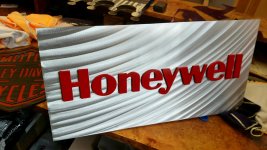
  • Honeywell Sign.jpg
    Honeywell Sign.jpg
    150.5 KB · Views: 49
  • Manners Stocks.jpg
    Manners Stocks.jpg
    97.7 KB · Views: 47
  • Martin Energy Sign.jpg
    Martin Energy Sign.jpg
    127.1 KB · Views: 50
OP
S

stioc

Well-known member
Joined
May 2, 2005
Messages
1,317
Location
SoCal
Yeah, in a production shop bigger is generally better. You do really nice work, thanks for sharing the examples!
 

kkroger

Well-known member
Joined
Apr 21, 2013
Messages
1,143
Thanks man! I wish I had had the time needed to do a conversion on my own, I probably would have ran CandCNC controls on it and made my own box Brackets and belt reductions... would have been simple... but I needed everything RIGHT NOW!
 
OP
S

stioc

Well-known member
Joined
May 2, 2005
Messages
1,317
Location
SoCal
I didn't get notified of your last post, dangit. Yeah but if I could justify buying a pre-made tool I'd rather do that than take on a project and spend days, weeks, months fine tuning it. Sometimes, especially in a business, time is money. For a hobbyist that's another story. Like I've said before I'd love to have loaded Tormach 770 or so but for my needs it's way too much, kinda like driving a Ferrari at 5pm on our 405 fwy.
 
OP
S

stioc

Well-known member
Joined
May 2, 2005
Messages
1,317
Location
SoCal
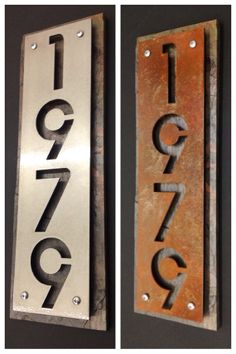
I finally got around to cutting the address sign. I still need to finish mounting it and such but at least it's cut. Believe it or not took me 4 tries, I'm such a noob!

Broke one 2 flute 1/8" carbide bit. Then had a better luck with 3/16" HSS 4 flute bit but even that broke while cutting the second number. Then tried a 1/4" bit, and each time had to generate a new gcode file, good thing I saved my touch-off points as G28 so I could always get back to the starting point. Anyway, so this time I let it get drenched in WD40, all I had, and I'd better buy their stocks! I think I ran 7 ipm and .125" depth per pass. It worked except it didn't go through the material. So another gcode tweaking for a single pass at -.15 of stock bottom. That worked. I'm pretty sure the problem was the way I clamped the stock, it was flexing and not perfectly square so some parts were higher than the others hence the smaller bits broke...my best guess. But hey, I'm learning.

Ready with the fogger/mister installed.
39209087100_e88db0ab8c_o.jpg


$30 worth of scrap alum for this and future projects :thumbup:
40309114514_f53a77255d.jpg


Now this will be fun cleaning up! :scared:
40976390092_7ab74b81f3_z.jpg


But here's the final piece - thinking of scrotch-brite'ng it for the brushed alum look?
40309115374_85dd621b2a_z.jpg


Last but not least, here's a quick 20sec video:
https://streamable.com/bbab2
 

kkroger

Well-known member
Joined
Apr 21, 2013
Messages
1,143
I told you that your shop would be covered in Machinist Glitter....
 
OP
S

stioc

Well-known member
Joined
May 2, 2005
Messages
1,317
Location
SoCal
Haha, Machinist Glitter...after scooping what looked like a pound of aluminum chips I couldn't help wonder why not make a small casting setup so it doesn't get thrown in the trash like that :( I'm also considering boxing the mill table somehow to help contain the chips. Too many projects, so little time!
 

gte718p

Well-known member
Joined
Mar 12, 2009
Messages
3,974
I finally got around to cutting the address sign. I still need to finish mounting it and such but at least it's cut. Believe it or not took me 4 tries, I'm such a noob!

Broke one 2 flute 1/8" carbide bit. Then had a better luck with 3/16" HSS 4 flute bit but even that broke while cutting the second number. Then tried a 1/4" bit, and each time had to generate a new gcode file, good thing I saved my touch-off points as G28 so I could always get back to the starting point. Anyway, so this time I let it get drenched in WD40, all I had, and I'd better buy their stocks! I think I ran 7 ipm and .125" depth per pass. It worked except it didn't go through the material. So another gcode tweaking for a single pass at -.15 of stock bottom. That worked. I'm pretty sure the problem was the way I clamped the stock, it was flexing and not perfectly square so some parts were higher than the others hence the smaller bits broke...my best guess. But hey, I'm learning.

Ready with the fogger/mister installed.
39209087100_e88db0ab8c_o.jpg


$30 worth of scrap alum for this and future projects :thumbup:
40309114514_f53a77255d.jpg


Now this will be fun cleaning up! :scared:
40976390092_7ab74b81f3_z.jpg


But here's the final piece - thinking of scrotch-brite'ng it for the brushed alum look?
40309115374_85dd621b2a_z.jpg


Last but not least, here's a quick 20sec video:
https://streamable.com/bbab2

Looking at the chips, I might go slightly more aggressive in the cut and slightly slower on the feeds. That way you end up with less glitter.
 

DocsMachine

Well-known member
Joined
Sep 16, 2006
Messages
1,864
Haha, Machinist Glitter...after scooping what looked like a pound of aluminum chips I couldn't help wonder why not make a small casting setup so it doesn't get thrown in the trash like that[.]

-Problem is most of is is lost to oxidation and skimmed off as slag. Too much surface area versus volume, without a proper furnace with some way to control oxidation, you'll melt down 10 lb of chips to get half a pound of melt. (Okay, it's probably not that bad, but a LOT gets wasted.)

Sweep it up, keep it segregated in a bag or can, take it to the recycler. You won't get much these days, but as you say, it beats throwing it in the trash.

Doc.
 
OP
S

stioc

Well-known member
Joined
May 2, 2005
Messages
1,317
Location
SoCal
Looking at the chips, I might go slightly more aggressive in the cut and slightly slower on the feeds. That way you end up with less glitter.
Very insightful and a keen eye to read the chips! Yeah I definitely need to dial in the right feeds, speeds and cutters for this machine. It's easy to wing it when you're doing things manually but with CNC it makes a difference since you can't slow down if you feel the feed is too fast or when you're going around the turns etc. You RF30 guys, what's your go-to cutters in terms of endmills (or even dovetail cutters, saws etc.). I have several endmills ranging from 1/8" all the way up 3/4" but I 'think' for CNC work anything beyond 1/4" is too much for this machine? In fact, I'd like to use as small a cutter possible without sacrificing the speed (time to finish a part) too much.

I can always come by and help you out with your setups and we can go over some stuff.
Dude, that'd be awesome! I'll txt you, for possibly this or next weekend or whatever weekend you're available next.

-Problem is most of is is lost to oxidation and skimmed off as slag. Too much surface area versus volume, without a proper furnace with some way to control oxidation, you'll melt down 10 lb of chips to get half a pound of melt. (Okay, it's probably not that bad, but a LOT gets wasted.)

Sweep it up, keep it segregated in a bag or can, take it to the recycler. You won't get much these days, but as you say, it beats throwing it in the trash.

Doc.
Ah! didn't know, thanks. I didn't even know you could bring shavings to a recycler :eek:

It’s about .30 a lb around here. Just took 100lbs the other day.
Wow, 100lbs would take me like 10yrs but that's a couple of nice steak dinners...err...or more tools :p
 

gte718p

Well-known member
Joined
Mar 12, 2009
Messages
3,974
Very insightful and a keen eye to read the chips! Yeah I definitely need to dial in the right feeds, speeds and cutters for this machine. It's easy to wing it when you're doing things manually but with CNC it makes a difference since you can't slow down if you feel the feed is too fast or when you're going around the turns etc. You RF30 guys, what's your go-to cutters in terms of endmills (or even dovetail cutters, saws etc.). I have several endmills ranging from 1/8" all the way up 3/4" but I 'think' for CNC work anything beyond 1/4" is too much for this machine? In fact, I'd like to use as small a cutter possible without sacrificing the speed (time to finish a part) too much.

All the little tiny particles sticking to the plastic is the give a way. I'm far from an expert, but I know that is not good and recognize the mistakes I've made. You are grinding instead of cutting and it causes excessive wear on the tool. Small tools are a pain to get dialed in. You can spin them super fast, but you have to run them fast. Until you get them dialed in that ends up breaking a lot of tools. You also correctly identified that your work holding has to be super rigid with the small tools. They break so easily if the part flexes and they bind just a little bit.

I run 1/2 and 3/8 end mills fairly often. Obviously you don't have the HP or rigidity to run them super aggressively, but I have not problem running them through AL. For run time, I would hog out material with a larger cutter, and then come back with a smaller cutter to do the clean up and detail work. It is rare that there is a 1 tool solution that is both time and wear efficient.

I'm trying to remember who I order my cutters from. It is the folks NYCNC pimps. They make reasonably price 3 flute TiAIN or TICN coated end mills that have worked really well for me. I was looking for my last order in my email and can't find it.
 
Last edited:
OP
S

stioc

Well-known member
Joined
May 2, 2005
Messages
1,317
Location
SoCal
Yeah, my next big thing is to sort out the feeds/speeds and cutters. There's crazy amounts of stuff out there and it's hard to pick things that will work for your work/material/machine vs. what works for others. For e.g. the Shear hog looks so tempting but that thing is designed for 5k+ RPM and around 30IPM or so, not happening on my machine and for the cost I can't justify running it at 2000 RPM and 10ipm. I'm just using that as an example btw.

I have cheap flycutters, face mill and a boring head but no good cutting bits for any of them, that sort of stuff drives me nuts :willy_nil

Would like to add a couple of slitting saws.

I recently ordered the involute gear cutting set, it's on the slow boat from the south eastern continent. Those will need an arbor.

EDIT: I bought the Tormach TTS adapter and a ER20 collet chuck...only to find out that i need several more collet chucks to really make use of the 'quick change' and height setting advantages of it.

I finally grabbed an older edition of Machinery Handbook for $20 on ebay (after resisting buying this for so long lol).

Right now I have these things in my ebay cart:

41058254321_9cd5b3c77b_o.jpg


Angle fixture plates, engraving bits, 10 different types of tooling for lathe I can think of adding...oh man it just doesn't end.
 
Last edited:

kazlx

Well-known member
Joined
Oct 30, 2012
Messages
2,851
Location
Tustin, CA
To avoid these ads, REGISTER NOW!
Top Bottom