To avoid these ads, REGISTER NOW!

Need help! 3D printing ratchet holder fail

qqzj

Well-known member
Joined
Nov 28, 2017
Messages
3,747
Following the discussion here a couple of days ago, I tried to print the ratchet holder yesterday.


But sadly I failed. I used the following file: 12_Holder_No_Magnets.stl

There are three issues.

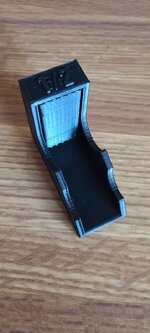
First and the most significant one is that I failed to create an empty space in the holder. So I cannot stuck the ratchet head into the holder. I am pretty surprised at it. Or maybe I should break that panel? This panel might have been created so that the printer can print the top layer? What is the best way to break it?
20220114_084928.jpg

1642179483020.png

Second, there are some unwanted stuff. Look at the 1/2 size mark, there are some extra stuff there. What happened?


20220114_084937.jpg

Finally, I got some burrs. Look here.

20220114_084948.jpg
I used MatchBox PLA filament and set the settings to Nozzle 205, Bed 70, Fill Rate 50 and Fan 80. There is also a line there. I am wondering why these perfection happen and how to adjust my setting so that I can get a perfect print. Thanks!
 
To avoid these ads, REGISTER NOW!

vwpieces

Well-known member
Joined
Apr 28, 2020
Messages
5,925
Location
Hills, PA
Space where the head fits into needs to be broken out. Those space fillers are called supports because the printer can't print in mid air.

Looking at that print, you have a lot of set-up and testing to do to fine tune that printer.
 
Last edited:
OP
Q

qqzj

Well-known member
Joined
Nov 28, 2017
Messages
3,747
Thanks! That support is quite some materials to remove. Not very easy at all. I have been trying with a utility knife for a while. Not fun. Will try to avoid printing stuff with a hollow space in the future.

The PLA filament instruction says max temp is 210. So we set it to 205. I can see the missing line is due to a clogged extruder. But why does the burrs show up?
 

vwpieces

Well-known member
Joined
Apr 28, 2020
Messages
5,925
Location
Hills, PA
I see over extrusion, and acceleration needing to be increased. Both are the result of those bulging corners.
 

vwpieces

Well-known member
Joined
Apr 28, 2020
Messages
5,925
Location
Hills, PA
There are a ton of settings to change support settings. Can make removal easier but there is a line where the support becomes less effective.
 

vwpieces

Well-known member
Joined
Apr 28, 2020
Messages
5,925
Location
Hills, PA
Burs might be where the printer changes layers. Retraction settings being too low or non existent might be the problem there. Printer still squirting filament as it moves up a layer. Still part of over extrusion in a way.
 

vwpieces

Well-known member
Joined
Apr 28, 2020
Messages
5,925
Location
Hills, PA
I'm sure others can help better than I can. I haven't turned my printer on for more than a year. I would need to re-learn everything myself when I need to use it again.

But I would look into if there is a ready-made printer configuration setting for Your printer, in your slicer or if anyone else has it available. Most settings will be close to what you need. Save that config... tune from there.
 

Cruzan80

Well-known member
Joined
Jul 22, 2015
Messages
4,200
Location
Denver, CO
So that file has errors in it. First run it thru 3D builder, and it will clean up the top. You shouldnt actually need supports on for this. The top "overhang" is short enugh you are fine. The back burrs is probably a tuning setting.

FWIW, I printed the 1/4, 3/8, and 1/2 at the same time (all no magnet) and the 1/3 was the roughest of the bunch. Wonderjng if the file needs rebuilt.
 

txvwnut

Well-known member
Joined
Jan 1, 2015
Messages
7,616
Location
Bedford, Texas
I wonder if it might be better to flip it 90 degrees where the socket is on the build plate then all you would need support for is the finger cutouts.
 

MadMechMaster

Well-known member
Joined
Sep 5, 2008
Messages
779
Location
Frankfort, IL
I was going to print these when I get around to a re-org this spring.

Turning 90° would give a better result. I wouldn't sweat the appearances for a working part like that though. It's something that I would work to improve the slicer settings for though going forward.

Also, you can try no supports. I've had some success with bridging gaps like that. The slicers have settings to slow movement and crank up the fans for this.
 

will335i

Well-known member
Joined
Feb 18, 2020
Messages
497
Location
IL
What printer do you have and what software are you using to slice it? I was using Cura and recently swapped to Prusa slicer and the quality has been a lot better.

Those supports should be easy to break out but you can adjust what side is on the build plate so you don't need any supports. Depending on your parts cooling setup you could easily print as is without any supports too.

Since this is just tool organization print quality isn't a huge deal but I would run some calibration test before printing something that you want to look good.

Calibrate your e-steps then print the following,

Heat tower - look up how to adjust temp with print height for your given slicer - its not a bad idea to print one for each filament you use until you get use to them.
20mm calibration cube

These should give you some fast tweaks to getting better prints.
 

Attachments

  • zelda 1.jpg
    zelda 1.jpg
    225.9 KB · Views: 121
  • zelda 2.jpg
    zelda 2.jpg
    271.6 KB · Views: 79
  • metric sorter.jpg
    metric sorter.jpg
    182.3 KB · Views: 137

ihateminimumwage

Well-known member
Joined
Jan 26, 2012
Messages
3,960
Support is easy to remove with needlenose pliers, just crunch it and usually will all come out in one piece. As others have said, probably need to take the time to get ecerything dialed in. Should be an XYZ 20mm cube to print, check with calipers and adjust as needed.
 
To avoid these ads, REGISTER NOW!

sebmtl

New member
Joined
Aug 11, 2022
Messages
1
Hi ,
Is it possible to have the STL, the link is dead.
have you the 1/2, 1/4 and the 3/8 ?

thanks a lot
 

jake 5280

New member
Joined
Dec 11, 2022
Messages
1
any way anyone can email the STL files. I cant find them any where, Please let me know thanks!
 

mteague

New member
Joined
Aug 8, 2023
Messages
1
Can someone send me the stl files please PM me and I’ll send my email address thanks
 
To avoid these ads, REGISTER NOW!
Top Bottom