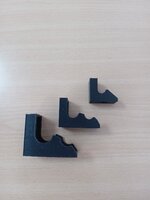
Following the discussion here a couple of days ago, I tried to print the ratchet holder yesterday.

 www.thingiverse.com
But sadly I failed. I used the following file: 12_Holder_No_Magnets.stl
There are three issues.
First and the most significant one is that I failed to create an empty space in the holder. So I cannot stuck the ratchet head into the holder. I am pretty surprised at it. Or maybe I should break that panel? This panel might have been created so that the printer can print the top layer? What is the best way to break it?
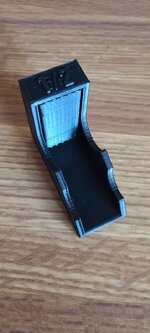

Second, there are some unwanted stuff. Look at the 1/2 size mark, there are some extra stuff there. What happened?

Finally, I got some burrs. Look here.

I used MatchBox PLA filament and set the settings to Nozzle 205, Bed 70, Fill Rate 50 and Fan 80. There is also a line there. I am wondering why these perfection happen and how to adjust my setting so that I can get a perfect print. Thanks!
Ratchet Holders by SamBossert
Holders to keep your ratchets organized on their side to maximizer space. The Magnet ones fit a 2mmx12mm magnet and will need a small bit of glue to keep them in. The 1/4" holder fits 1 magnet, 3/8 & 1/2 take 2 each and keep the holders from moving around when there's no ratchet in them. They...
www.thingiverse.com
But sadly I failed. I used the following file: 12_Holder_No_Magnets.stl
There are three issues.
First and the most significant one is that I failed to create an empty space in the holder. So I cannot stuck the ratchet head into the holder. I am pretty surprised at it. Or maybe I should break that panel? This panel might have been created so that the printer can print the top layer? What is the best way to break it?
Second, there are some unwanted stuff. Look at the 1/2 size mark, there are some extra stuff there. What happened?
Finally, I got some burrs. Look here.
I used MatchBox PLA filament and set the settings to Nozzle 205, Bed 70, Fill Rate 50 and Fan 80. There is also a line there. I am wondering why these perfection happen and how to adjust my setting so that I can get a perfect print. Thanks!