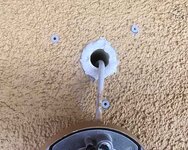
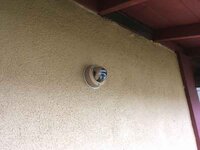
Several types of mounts, the bullet-type cameras will have a cable extension with a friction coupling that encapsulates the RJ45 connector of the network cable, but it will be exposed. So a hole thru the soffit will need some sort of grommet.
Dome cameras may or may not have a wire dongle on them, but it will typically be central in their baseplate and after the cable is connected you feed it all back in the hole and fasten the camera baseplate over the hole, so nothing is exposed.
And just in case it is not understood, the cabling is not a service loop as with electrical. You do not daisy-chain the cameras. Each camera location is a home run to your PoE switch / router location. A star topography.
So if you are pre-wiring during construction it isn't a loop you pull thru. It's an end. If you've run one network cable all around the periphery of your building for multiple cameras, you've done it wrong. That works for multiple unpowered network jacks on interior walls, but the camera connections are not usually done the same way. Likewise for security cameras, you want a star topo, so deliberate damage to one camera location doesn't disable multiple cameras.
And a large PoE switch gets pretty expensive. You might have better economy by getting a PoE switch with enough ports (and a couple spares for growth or failure) for your intended number of cameras, then connect that switch to your main router / switch. It also may help if your network design structure helps isolate the large amount of camera traffic from say your main home entertainment or daily use internet access point. If your camera-recording device or PC is say on the same switch as the cameras, then all that data traffic stays in that secondary switch, instead of choking the rest of your network.
Data flow works differently from simple electrical flow. Similar but different. You can make a functional network easily. But optimizing it calls for different arrangements. And as camera resolution continues to improve, the amount of data moving thru goes up quite a bit as well.
eta
That's a 3/4" sched40 sprinkler pipe stuck thru my stuccoed exterior wall into and thru the interior drywall. You might get away with smaller, depends on the wiring built into the cameras and where along the setup the Cat5 / RJ45 coupling is. Some dome cameras have an RJ45 in the back plane, so you could get away with a 1/4" hole and terminate the cable working close up under the soffit, plug the connect in and mount the baseplate, feeding the slack wire back into the wall.
Sometimes the cameras have a long pigtail with the RJ45 coupling in a barrel-shaped weather housing, in which case you will need a much larger hole.
I would suggest finding the camera management software you want to work with, then the best cameras you can get which will readily work with it, and then accommodate whatever install fiddling you have to do, rather than letting the physical camera install drive the whole thing. There's a wide range of camera mgmt software and most of it is not easy or intuitive to use.