To avoid these ads, REGISTER NOW!

Network Connector for Security Camera's?

Augus7us

Well-known member
Joined
Jan 14, 2017
Messages
1,190
Location
Central Ohio
I'm struggling with how to word this.

I'm planning on mounting security camera's on the corners of my shop. I have 12" soffits and I ran ethernet cable to the corners. I don't own the camera's yet and I'm trying to figure out the best way to run the cable through the soffit so I can finish insulating my building.

My initial thought was to use a threaded connector for pvc electrical conduit. Just drill a hole in the soffit lattice and have a buddy on the other side that can hold the connecter in place while I thread the nut on the other side. Then just run a bit of cable through or a pull string, until I purchase the camera's.

Thoughts?
 
To avoid these ads, REGISTER NOW!

loganb

ALLIANCE MEMBER
Joined
Dec 29, 2011
Messages
5,521
Location
Omaha, NE
Since you ran ethernet cable I'm asking PoE cameras, and again assuming you plan to install cameras in the not so distant future I would just drill thru the soffit where you intend the camera to go, stick a grommet in the hole if needed/desired, pull a couple feet of cable down thru the hole and loop it and let it hang or temporarily attach it to the bottom side of the soffit with tape. Before insulation is done I'd suggest terminating the cable ends and testing them to make sure things are good while it's still easier to run replacement cable.

When you're ready to install cameras just cut down a bit, terminate the end if necessary, push the extra back up for future service, seal the hole and screw the camera mount up and move on. For outdoor applications in corners under soffit I personally like the dome style that the thru hole for the cable is concealed by the dome as in makes it a bit cleaner looking with no visible wire. Read up on the connector size for the cameras you intend to use, last ones I installed I needed a roughly 3/4 size hole to pass the connector thru ad it had a roughly 8" lead on it that needed to pass up and into the soffit.
 
OP
A

Augus7us

Well-known member
Joined
Jan 14, 2017
Messages
1,190
Location
Central Ohio
So I did some googling of the cameras I was considering and you guys are correct. I guess I assumed there was an industry standard mount for cameras.

They all seem to mount like a thermostat, just cut a hole and run the cable through. You are correct couch, I was thinking I'm going to need a thin strip of plywood or something as a backer. That perforated aluminum my soffits use is not up to task by itself.
 

rayra

Well-known member
Joined
Dec 1, 2014
Messages
4,724
Location
Escaped from Los Angeles
Several types of mounts, the bullet-type cameras will have a cable extension with a friction coupling that encapsulates the RJ45 connector of the network cable, but it will be exposed. So a hole thru the soffit will need some sort of grommet.
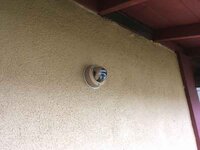
Dome cameras may or may not have a wire dongle on them, but it will typically be central in their baseplate and after the cable is connected you feed it all back in the hole and fasten the camera baseplate over the hole, so nothing is exposed.

And just in case it is not understood, the cabling is not a service loop as with electrical. You do not daisy-chain the cameras. Each camera location is a home run to your PoE switch / router location. A star topography.
So if you are pre-wiring during construction it isn't a loop you pull thru. It's an end. If you've run one network cable all around the periphery of your building for multiple cameras, you've done it wrong. That works for multiple unpowered network jacks on interior walls, but the camera connections are not usually done the same way. Likewise for security cameras, you want a star topo, so deliberate damage to one camera location doesn't disable multiple cameras.
And a large PoE switch gets pretty expensive. You might have better economy by getting a PoE switch with enough ports (and a couple spares for growth or failure) for your intended number of cameras, then connect that switch to your main router / switch. It also may help if your network design structure helps isolate the large amount of camera traffic from say your main home entertainment or daily use internet access point. If your camera-recording device or PC is say on the same switch as the cameras, then all that data traffic stays in that secondary switch, instead of choking the rest of your network.

Data flow works differently from simple electrical flow. Similar but different. You can make a functional network easily. But optimizing it calls for different arrangements. And as camera resolution continues to improve, the amount of data moving thru goes up quite a bit as well.

eta

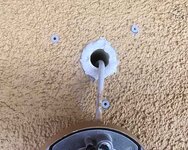
That's a 3/4" sched40 sprinkler pipe stuck thru my stuccoed exterior wall into and thru the interior drywall. You might get away with smaller, depends on the wiring built into the cameras and where along the setup the Cat5 / RJ45 coupling is. Some dome cameras have an RJ45 in the back plane, so you could get away with a 1/4" hole and terminate the cable working close up under the soffit, plug the connect in and mount the baseplate, feeding the slack wire back into the wall.
Sometimes the cameras have a long pigtail with the RJ45 coupling in a barrel-shaped weather housing, in which case you will need a much larger hole.

I would suggest finding the camera management software you want to work with, then the best cameras you can get which will readily work with it, and then accommodate whatever install fiddling you have to do, rather than letting the physical camera install drive the whole thing. There's a wide range of camera mgmt software and most of it is not easy or intuitive to use.
 

Attachments

  • smallbrother003.jpg
    smallbrother003.jpg
    67.7 KB · Views: 47
  • smallbrother004.jpg
    smallbrother004.jpg
    30.3 KB · Views: 47
  • newcam11.jpg
    newcam11.jpg
    53.3 KB · Views: 47
Last edited:

rharman

Well-known member
Joined
Apr 22, 2012
Messages
8,786
Location
SoCal
< snip
And a large PoE switch gets pretty expensive. You might have better economy by getting a PoE switch with enough ports (and a couple spares for growth or failure) for your intended number of cameras, then connect that switch to your main router / switch. It also may help if your network design structure helps isolate the large amount of camera traffic from say your main home entertainment or daily use internet access point. If your camera-recording device or PC is say on the same switch as the cameras, then all that data traffic stays in that secondary switch, instead of choking the rest of your network.
< /snip >

FWiW, my NVR has the POE injector built into the ports - OP may not need a switch - depending on the NVR and/or the topology.
 

rayra

Well-known member
Joined
Dec 1, 2014
Messages
4,724
Location
Escaped from Los Angeles
FWiW, my NVR has the POE injector built into the ports - OP may not need a switch - depending on the NVR and/or the topology.
did you get that recorder as part of a security camera package, or separate?
Would sure help in a mixed network home environment.
I need to re-hang my system still, since our move. Haven't got around to it, too damned hot in the attic in Summer and been laid up both winters since we moved. I probably ought to be using such a recorder, instead of the old micro PC and PoE switch I was using.
 
OP
A

Augus7us

Well-known member
Joined
Jan 14, 2017
Messages
1,190
Location
Central Ohio
Good advice. I’m in the tech field so the network part is easy and the storage will be nas. Trying to avoid the all in one packages.
 

rharman

Well-known member
Joined
Apr 22, 2012
Messages
8,786
Location
SoCal
did you get that recorder as part of a security camera package, or separate?
Would sure help in a mixed network home environment.
I need to re-hang my system still, since our move. Haven't got around to it, too damned hot in the attic in Summer and been laid up both winters since we moved. I probably ought to be using such a recorder, instead of the old micro PC and PoE switch I was using.

NVR was part of the whole package we had done 4 years ago. Found a local guy who was EXCELLENT. Super pleased with his work. Even had him run some extra CAT-6 I needed for our alarm system upgrade. I can't deal with going under the house anymore.
 

dogdog

Well-known member
Joined
Nov 15, 2011
Messages
12,711
Not sure what network connector you are asking or if you are asking for mounts.

Mounts, different company have different patterns from 3 hole, 4 hole and the placement is just awful, different camera size also have different size mounts also.. so..... I just bought the $35 for 5 or 6 universal 4" ones that fit my cameras base and ended up having to tap them myself and upgrade to stainless steel machine screws.

The network connectors are just RJ45 and choose your standard you wanted to crimp... T568A or T568B, I believe the cabling came with the cameras that I have is T-568B , you can be special and do the T-568A just make sure you match the standard on the other end. I used through hole connectors to make my life easier, even though I have about 2000 pcs of non through hole connectors around.

There is a network protective cap on the ones I got , they have the cap on the default wires that came with it 300' per camera wires. you can easily figure out how to take that network cap off without cutting out the RJ45 connectors... if not, you can order them from Ebay. Cheap, but ships from China. Dunno of those are standards. I know Lorex cameras that I have uses them. Not sure the other brands.


The cable that came with the camera is 300' Cat5E... good enough for most applications, at least the cameras I bought came with the cable. I opted to run the Cat6 direct burial / outdoor cable instead, portions of the cable that is accessible by standard human is protected with metal conduit. and A small portion of the run that needed flexible and unreachable by human without a ladder is just tack to the brick wall. YMMV on this part.
 

dogdog

Well-known member
Joined
Nov 15, 2011
Messages
12,711
Also a bit comment about thinking about using your NAS as storage on newer nvr systems. Your NAS might not be able to do the job well, unless you are installing only one camera. There is a reason the major drive manufacture both came up with the purple drives maybe it’s marketing ****, not sure. I have 3 camera recording at 4K and 15fps, it’s about 120GB per day or more already. I have to upgrade to 12tb + original 4tb to get some decent time. Maybe for backup to your nas maybe.
There is a calculator for storage somewhere.
 
To avoid these ads, REGISTER NOW!

kj_mustang

Well-known member
Joined
Feb 9, 2011
Messages
1,213
Location
Harrisonburg, VA
dogdog,

You should be using motion only recording to reduce the storage needs. I have about 80-90 cameras on one system at work and have 30 days of recordings totaling only 800 GB.
 

dogdog

Well-known member
Joined
Nov 15, 2011
Messages
12,711
dogdog,

You should be using motion only recording to reduce the storage needs. I have about 80-90 cameras on one system at work and have 30 days of recordings totaling only 800 GB.
Thanks for the advise . I have no problem throwing drives at it, it’s cheap, but only two drives supported by most light commercial system. Newer cheap ones only support one. Still trying to figure out this Lorex nocturnal nvr, it ***** on remote apps, anything you do would need to be at the console with a 4K monitor. I have had other issues with various people and entity that I need to search date and time. You wouldn’t believe the lies people swear under oath even when you counter smack them with evidents

Not sure 80 to 90 cameras system. That is a large system(s) probably 3 of the 32 camera systems. Nice to have fun with those.
 
Last edited:

adrenalinejeeper

Well-known member
Joined
Jan 30, 2018
Messages
191
Location
Ventura County, CA
dogdog,

You should be using motion only recording to reduce the storage needs. I have about 80-90 cameras on one system at work and have 30 days of recordings totaling only 800 GB.

As a Forensic Video Analyst who is the end user of surveillance video for criminal prosecutions, I loathe motion only recording systems. Unless you absolutely need long retention and cannot afford more storage, please just record constant. I have seen countless cases not be filed or questioned during trial due to lack of evidence because of motion activated recording that didn't capture what it should have or what was needed.

Most people never need to export their video and hand it over to law enforcement. Until you do, and until they use it in trial, you never really know the full performance(or lack thereof) of your system. Many systems are designed to look pretty up to that point, then when it is time to really "go to work" the video is less than desirable. If you have never done it, run a mock case by exporting video and taking it to a computer you have never played it on. See how it works. See if there are any shortcomings that are simply a setting you can change. (Like turning off the manufacture's logo that overlays on the video when you export it, that may just happen to overlay right where you want to see)
 
OP
A

Augus7us

Well-known member
Joined
Jan 14, 2017
Messages
1,190
Location
Central Ohio
Mounts as in how the camera mounted to the wall. I assumed there was a bracket or industry standard mount of some kind. Its not, as mentioned you run the cable through a hole and screw the camera in to the wall like a thermostat. At least on the ones I looked at.

As far as performance goes it comes down to I/O workload and I deal with this daily. Worse case with the nas I would write to SSD and destage to HDD. All NVR's are just NAS boxes, there is no magic there.

Good tips from adrinalinejeeper. I don't plan on using the motion only feature, read of too many issues and it defeats the purpose for my needs.
 

dogdog

Well-known member
Joined
Nov 15, 2011
Messages
12,711
not every one needs a mounting box... if you are able to tug the wires and connectors into the wall like pictured earlier on post #6 then you don't needed it, having a mounting box will look more cleaner installation.

you can buy specific boxes for your cameras, or buy a universal one if you don't mind tapping one or two screws to make it fit..
I got them from Amazon.


if I were to buy manufacture specific boxes, it would have costed about $25 per box. ....

as far as IO.. you'll find out soon enough... Not too sure about enterprise NVRs, but home to light duty commercial ones are not that great for hardware.
 
Last edited:

dogdog

Well-known member
Joined
Nov 15, 2011
Messages
12,711
run a mock case by exporting video and taking it to a computer you have never played it on.

yes I did that a few times, crappier laptop and setups I can't even read the license plate numbers, but on higher end 4K monitor and better computer, I can read the plate and faces with exporting the raw data and using their playback apps... I can't say for enterprise systems, but Lorex ***** **** on their apps and searches for events.... worse system to get IMO... I still like the Hikvision ones ...
 

kj_mustang

Well-known member
Joined
Feb 9, 2011
Messages
1,213
Location
Harrisonburg, VA
My last job for a bank, I had Hikvision systems and I was not a fan of their interface. Also had some cameras that would randomly drop connection and still not come back after unplugging/replugging and then start working on their own a few days later.
 

rayra

Well-known member
Joined
Dec 1, 2014
Messages
4,724
Location
Escaped from Los Angeles
dogdog,

You should be using motion only recording to reduce the storage needs. I have about 80-90 cameras on one system at work and have 30 days of recordings totaling only 800 GB.
Yep and most modern cameras' control software will let you define a smaller area of the whole image to trigger that motion alert video capture. Maybe block out a view of the road or part of it, so incidental traffic doesn't trigger.
There's lots of ways, frame rate, resolution, to reduce data throughput or storage requirements but they all reduce quality.

And like car cameras, your system will usually allow you to overwrite the oldest video when you run out of storage, but storage is relatively inexpensive, so max that out whenever you can.
 

rharman

Well-known member
Joined
Apr 22, 2012
Messages
8,786
Location
SoCal
Interesting info here. I never heard of "purple drives" but I knew the NVR's feature a more robust drive. I originally wanted SSD but, at the time, it was not anywhere near cost justified for the storage I wanted. Nowadays, maybe so but not sure of the "robustness" factor due to constant use.

In the IBM environment that I was in for years before retirement, IBM offered select drives intended for a highly "read intensive" usage but the lifespan went way down in a heavy read/write environment.
 

couch67

Well-known member
Joined
Mar 18, 2016
Messages
1,401
Location
Ontario Canada
One site that really helped me with sourcing and setting up cameras was IP Cam Talk. Search them on google for their 'cliff notes' blog, it is a great resource you should read before buying anything.
 

kj_mustang

Well-known member
Joined
Feb 9, 2011
Messages
1,213
Location
Harrisonburg, VA
Interesting info here. I never heard of "purple drives" but I knew the NVR's feature a more robust drive. I originally wanted SSD but, at the time, it was not anywhere near cost justified for the storage I wanted. Nowadays, maybe so but not sure of the "robustness" factor due to constant use.

In the IBM environment that I was in for years before retirement, IBM offered select drives intended for a highly "read intensive" usage but the lifespan went way down in a heavy read/write environment.
https://www.westerndigital.com/products/internal-drives/wd-purple-sata-hdd#WD10PURZ
 
To avoid these ads, REGISTER NOW!
Top Bottom