I went through a similar experience with my MK7 Golf R although mine was after the battery died and left me stranded. I'd driven for 5 hours out of state, then went out to get pizza and it wouldn't start. It's a 2017 with 38k miles, which apparently isn't unusual for a battery failure in these cars. Had to Uber to an Autozone to get a new battery. As far as I could tell doing similar research, the dealer reprogram was limited to cars that have the auto start/stop, which mine doesn't (not sure if that's a thing with a manual?). I think I took a guess and went with the smaller of the two options and it seemed to be a direct fit.

You are using an out of date browser. It may not display this or other websites correctly.
You should upgrade or use an alternative browser.
You should upgrade or use an alternative browser.
Between 265 & 485 SQ/FT Nick's Two-Car Detached Vdub Garage
- Thread starter nicholam77
- Start date
Workspaces sized between 265 and 485 squarefeet.
OP
nicholam77
Well-known member
Hah! Leave it to the Germans to over-complicate something as easy as changing a battery. Glad you got it all sorted, and were able to upgrade the battery in the process! Good thing you had the tool as well.

Yeah, I've used the coding tool to tweak a bunch of other stuff which is neat. Handy to have with a Volkswagen Group vehicle.
I went through a similar experience with my MK7 Golf R although mine was after the battery died and left me stranded. I'd driven for 5 hours out of state, then went out to get pizza and it wouldn't start. It's a 2017 with 38k miles, which apparently isn't unusual for a battery failure in these cars. Had to Uber to an Autozone to get a new battery. As far as I could tell doing similar research, the dealer reprogram was limited to cars that have the auto start/stop, which mine doesn't (not sure if that's a thing with a manual?). I think I took a guess and went with the smaller of the two options and it seemed to be a direct fit.
That's what I was worried about! Getting stranded in sub-zero temps with a couple of kids in back. As I was reading about cases like yours I'm surprised mine lasted 5 yrs! Mines a MY 2016 with ~35k miles. Guess you don't drive much either haha.
Mine doesn't have start-stop either. I don't *think* that exists for manuals. From what I read I'm almost positive you don't need to do any coding if you don't have start-stop or the battery monitoring system (ROW markets), so I'm sure you're perfectly fine. I have no idea if changing the serial number actually triggers anything in cars without the battery monitoring system, but again I figured can't hurt. I did want to modify the battery type since I got the AGM battery, since I read those could use different charge cycles or are treated a little differently, and my car came with a standard EFB lead acid battery. I'm hoping that since these parameters were available in the CAN Gateway that they will actually do something. Worse case scenario my new battery won't charge as well as it should and might not last as long as it should. No problems so far, though.
Jealous of the R... I think with the AWD and closer ratios on the manual it would be the perfect car for me.
jbrentd
Well-known member
Reminds me of the battery I had to have a mechanic replace on my son's e90. I felt pretty worthless that I had to pay someone else because of the coding part. And it had me regretting I didn't persuade him more on getting a VAG, since I could have done it with my VCDS.
Denwood
Well-known member
Funny thing on the battery as I replaced the one in my daughter's CRV yesterday. We've been seeing -30C at night and the "old" one (at only 2 years old) was replaced by the parts store free over the counter.
I kinda of miss my A3, but I don't when I see the coding issue. I do have a $500 VCDS cable/software if anyone wants it...ha.
I kinda of miss my A3, but I don't when I see the coding issue. I do have a $500 VCDS cable/software if anyone wants it...ha.
Mine doesn't have start-stop either. I don't *think* that exists for manuals.
I drive a Ford Focus ST with a push-button start/stop and manual transmission. It doesn't start & stop the engine when the car is stationary (for fuel efficiency) like my Toyota does though.
I have not driven one here in the US, but back in 2017 in Ireland I did drive a VW Polo manual that had the auto stop/start for fuel economy. If I recall, it only turned off when you put it in neutral and let off the clutch while stopped and would restart when you depressed the clutch pedal again.
OP
nicholam77
Well-known member
Reminds me of the battery I had to have a mechanic replace on my son's e90. I felt pretty worthless that I had to pay someone else because of the coding part. And it had me regretting I didn't persuade him more on getting a VAG, since I could have done it with my VCDS.
Yeah, I'd be pissed! Not sure if BMW has an equivalent coding platform for enthusiasts, but VCDS is pretty neat.
Funny thing on the battery as I replaced the one in my daughter's CRV yesterday. We've been seeing -30C at night and the "old" one (at only 2 years old) was replaced by the parts store free over the counter.
I kinda of miss my A3, but I don't when I see the coding issue. I do have a $500 VCDS cable/software if anyone wants it...ha.
We've dipped down to those temps overnight a few times, too. No one understands how cold that is unless they've experienced it. That's why I'm adamant about parking in the garage, it's so much easier on the cars to start at 15-20° F vs negative 20° F.
I've actually never used VCDS. I use OBD11 which is an android app that connects wirelessly to an OBD dongle. It's sort of slow, and I'm an iPhone user so I have a very old and slow android phone for that express purpose. And you must be connected to WiFi. But it's way, way cheaper than VCDS, and essentially does all the same stuff.
I drive a Ford Focus ST with a push-button start/stop and manual transmission. It doesn't start & stop the engine when the car is stationary (for fuel efficiency) like my Toyota does though.
Nice! The Focus ST was at the top of my list when looking for fun but somewhat practical cars. This was before the Mk7 GTI came stateside even. I was in a VW at the time (Jetta 2.slow 5 speed) and when "Dieselgate" happened the VW dealerships were offering some excellent pricing especially to current VW owners. I thought I was going to move away from VW, but then I kind of fell in love with the Mk7 and never even test drove anything else. Always regretted that a bit. The Mk7 is a great car, but because it has that upscale baby-Audi feel it is a bit "boring". I both like and don't like that about it. How do you like the ST? A bit of a unicorn now that they are discontinued.
My car has push-to-start as well. For the battery stuff I was referring to it shutting off the engine at stoplights etc like your Toyota. Which I don't have.
I have not driven one here in the US, but back in 2017 in Ireland I did drive a VW Polo manual that had the auto stop/start for fuel economy. If I recall, it only turned off when you put it in neutral and let off the clutch while stopped and would restart when you depressed the clutch pedal again.
Interesting. That would bother the heck out of me but cool to know the manuals can get it too!
I enjoy the ST lots. Lucked out and my wife found a certified pre-owned locally for a decent price. I had a manual Gen 1 Scion xB before that, which was great on practicality but much less fun to drive than the STNice! The Focus ST was at the top of my list when looking for fun but somewhat practical cars. This was before the Mk7 GTI came stateside even. I was in a VW at the time (Jetta 2.slow 5 speed) and when "Dieselgate" happened the VW dealerships were offering some excellent pricing especially to current VW owners. I thought I was going to move away from VW, but then I kind of fell in love with the Mk7 and never even test drove anything else. Always regretted that a bit. The Mk7 is a great car, but because it has that upscale baby-Audi feel it is a bit "boring". I both like and don't like that about it. How do you like the ST? A bit of a unicorn now that they are discontinued.I drive a Ford Focus ST with a push-button start/stop and manual transmission. It doesn't start & stop the engine when the car is stationary (for fuel efficiency) like my Toyota does though.
 . Could certainly have used the xB's hauling capacity when we moved late last year though. It was super easy to pack lots in it because it was just a box. ¯\_(ツ)_/¯
OP
nicholam77
Well-known member
More 3D Printer Stuff
After installing the part cooling fan, my prints were coming out dimensionally accurate with no warping or melting, but I was still getting these gaps and weird stringing artifacts in certain places. I thought it might have to do with my retraction settings, but I also suspected maybe the Bowden tube shifted.
I had upraded Capricorn PTFE tube sitting around, and had printed the hot end fix @Bakafish told me about. I figured it was worth a shot.
Taking apart the nozzle and cleaning out the hot end there was minor residue. Nothing that would cause shock and alarm, and after 1 pass it came through clean. But enough to be visible on a paper towel.
When heating the nozzle to remove it (using the printer's LCD control panel, to 220°C), I got loud beeping and a thermal runaway error twice!!

Never had that before and I don't like it!!
Then I cut the new Capricorn tube with the 3D printed jig. The new tubing is quite slippery to hold, hopefully that bodes well for friction.

I got it seated in the hot end and placed the plastic spacer. About to put my nozzle back and it's all full of hardened plastic.

I wish there was a good way to keep it clean when disassembling. I wanted to start fresh, so I went to Microcenter on my lunch hour since it's 5min from my house and got some new brass Creality nozzles. They were all sold out of hardened nozzles.
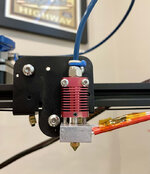
You can't really tell what was done from the pic but this video describes it in detail for anyone interested or who has a 3D printer.
For kicks I decided to switch the build plate to the smooth glass side since @T-handle likes it. Thought I'd give it a try.

I printed one of the bench dog files I recently made, because those had obvious gaps and issues. You can even see them if you look close in my earlier post.
The new one came out flawless.

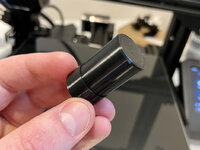
And the top part that was on the bed is like glass itself. You can even see a reflection in it it's so shiny and smooth.
I think I'm a believer on the smooth glass side of the bed.
I'm printing a Benchy now for a more detailed test, but if this was the answer to some of my problems, I'm extremely happy with the results so far.
After installing the part cooling fan, my prints were coming out dimensionally accurate with no warping or melting, but I was still getting these gaps and weird stringing artifacts in certain places. I thought it might have to do with my retraction settings, but I also suspected maybe the Bowden tube shifted.
I had upraded Capricorn PTFE tube sitting around, and had printed the hot end fix @Bakafish told me about. I figured it was worth a shot.
Taking apart the nozzle and cleaning out the hot end there was minor residue. Nothing that would cause shock and alarm, and after 1 pass it came through clean. But enough to be visible on a paper towel.
When heating the nozzle to remove it (using the printer's LCD control panel, to 220°C), I got loud beeping and a thermal runaway error twice!!
Never had that before and I don't like it!!
Then I cut the new Capricorn tube with the 3D printed jig. The new tubing is quite slippery to hold, hopefully that bodes well for friction.
I got it seated in the hot end and placed the plastic spacer. About to put my nozzle back and it's all full of hardened plastic.
I wish there was a good way to keep it clean when disassembling. I wanted to start fresh, so I went to Microcenter on my lunch hour since it's 5min from my house and got some new brass Creality nozzles. They were all sold out of hardened nozzles.
You can't really tell what was done from the pic but this video describes it in detail for anyone interested or who has a 3D printer.
For kicks I decided to switch the build plate to the smooth glass side since @T-handle likes it. Thought I'd give it a try.
I printed one of the bench dog files I recently made, because those had obvious gaps and issues. You can even see them if you look close in my earlier post.
The new one came out flawless.
And the top part that was on the bed is like glass itself. You can even see a reflection in it it's so shiny and smooth.
I think I'm a believer on the smooth glass side of the bed.
I'm printing a Benchy now for a more detailed test, but if this was the answer to some of my problems, I'm extremely happy with the results so far.
Denwood
Well-known member
Wow...that looks about perfect. Nice job tuning that print!
I'm glad it is all working again! When printing cylindrical objects like bench dogs I like to set "Z Seam Alignment" to 'random' in Cura to eliminate the vertical seam on the part. It makes the surface a little less clean looking as each layer starts in a different place, but I think creates a more accurate shape and you don't get a big line along the side. I also like to make a recess and press fit M8 nutserts into my dogs to allow them to be used with Festool style knobs.
OP
nicholam77
Well-known member
Wow...that looks about perfect. Nice job tuning that print!
Thanks, Dennis! A pretty simplistic part, so it should be perfect haha. It's been a long road so far.
I'm glad it is all working again! When printing cylindrical objects like bench dogs I like to set "Z Seam Alignment" to 'random' in Cura to eliminate the vertical seam on the part. It makes the surface a little less clean looking as each layer starts in a different place, but I think creates a more accurate shape and you don't get a big line along the side. I also like to make a recess and press fit M8 nutserts into my dogs to allow them to be used with Festool style knobs.
Thanks @Bakafish . That bench dog came out as what I would describe as perfect, but despite it 'all working again', I'm still chasing some issues.
I think I actually had Z Seam Alignment on 'random', but changed it away from that because of all the little gaps / blobs I was seeing in a random pattern. Good idea for cylindrical objects, though.
Looking at a Benchy I just did last night, and a fan shroud (I might try a fan duct?), the overall shape and accuracy is there, but there are some rough bits. Especially on the Benchy. In fact I think I achieved a better Benchy before the part cooling fan fix. It looks like under extrusion I think? And a few random strings. But then the hull is quite smooth.


At this point I'm chasing perfection but don't really know how. I've done PID auto-tune, e-steps, attempted flow calibration, and endlessly played with temperature and retraction, slowed down the print speeds, upgraded the extruder, did the hot end fix, and so on.
Funny enough, I forgot to add in my previous post that I got a text from DHL shipping the other day. I was trying to rack my brain on what I had ordered from China but couldn't think of anything. To my surprise when I clicked the link to view the delivery details... it's from Creality!

And then two days later I get this email:

I'm kind of shocked. Silence and no response for weeks, but it looks like they may actually be sending me a new board after all.
Question is... will it be worth the swap. If it's a 4.2.7 board, I think I might go for it. If it's a replacement 4.2.2. I'm not sure there's a point. I don't think there's an issue with having the fans tied together like I do now.
OP
nicholam77
Well-known member
LR32 Prototyping
About that in a minute. First more 3D printer complaining.
Despite feeling like the bench dogs were perfect and I had solved most of the problems, I didn't think that latest Benchy (previous post) looked too good. My co-worker sent me a pic of his first ever Benchy with the default profile in Cura for his Ender 3 Pro he got from Microcenter for $99. It was way, way better. Perfect, really.
So out of curiosity I printed one with the default Cura profile. Here it is:

Honestly it might have been a bed adhesion issue, I didn't keep an eye on it.
On to the bigger complaint. The layer shifts are back.
I did notice some shocks when touching the frame, so I wonder if it really is a static electricity and grounding issue.
First it happened on this screw organizer, which I printed because I've taken the printer apart so many damn times and figure I'll be doing it more, it would be helpful to keep track of all the tiny screws.

It was a longer 2-3 hr print. I tried a different model, a cool Raspberry Pi mount that replaces the tool drawer in the printer:

More bad layer shifting:
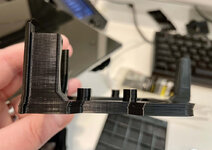
I've been wanting to continue my Fusion 360 journey, but it doesn't make sense to put effort into that when I can't even get results on the printer.
That being said, if you'll recall my wife got me a 55" Festool LR32 "holey" guide rail for XMAS. Not too useful on its own. Recently I added the LR32 router sled, not 100% knowing if my router would even fit.
Well, it does!


The sled is made for Festool routers only, and even though it physically fits, there is no way to attach it.
Btw I debated making my own "sled" with indexing pin. It probably would have saved some money. In the end I decided it would be quickest and most accurate to get the real product. I'd rather it just work and not mess about.
I do, however, need to make an "adapter plate" to secure the plunge base. I saw another person use a piece of acrylic to do a similar thing:
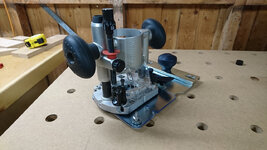
I even ordered a piece of acrylic on Amazon and everything. But then Fusion 360 and the 3D printer drew me in, again.
I started by taking measurements and making a little hand sketch on paper.

Then hacked together a Sketch in Fusion 360. I'm sure any engineer-types would cringe, but for me, it's a win.

Extruded that 1mm thick for testing.
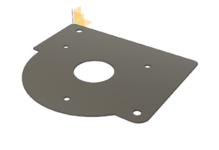
And sliced it up in Cura.

Only printing 2 layers, very thin, to see how the holes will line up. Don't want to waste a bunch of filament.
Octoprint looking good with my new dark theme

And about 50min later it's done.

Surprisingly, on the first try, it did technically fit!


It does need some small tweaks to the hole positions, though. I've been making small adjustments and reprinting tests. Some of those tests have been wasted and screwed up by LAYER SHIFTS. Some did fine. I think I've printed 5 in total so far and getting pretty close.
Once it's perfect the whole thing will be extruded to roughly the height of the stock acrylic router baseplate, and the mounting holes will be counterbored on the bottom.
Then I'll just have to figure out how to print it without errors, because I know it will be a long print.
Thanks for reading.

About that in a minute. First more 3D printer complaining.
Despite feeling like the bench dogs were perfect and I had solved most of the problems, I didn't think that latest Benchy (previous post) looked too good. My co-worker sent me a pic of his first ever Benchy with the default profile in Cura for his Ender 3 Pro he got from Microcenter for $99. It was way, way better. Perfect, really.
So out of curiosity I printed one with the default Cura profile. Here it is:
Honestly it might have been a bed adhesion issue, I didn't keep an eye on it.
On to the bigger complaint. The layer shifts are back.
I did notice some shocks when touching the frame, so I wonder if it really is a static electricity and grounding issue.
First it happened on this screw organizer, which I printed because I've taken the printer apart so many damn times and figure I'll be doing it more, it would be helpful to keep track of all the tiny screws.
It was a longer 2-3 hr print. I tried a different model, a cool Raspberry Pi mount that replaces the tool drawer in the printer:
More bad layer shifting:
I've been wanting to continue my Fusion 360 journey, but it doesn't make sense to put effort into that when I can't even get results on the printer.
That being said, if you'll recall my wife got me a 55" Festool LR32 "holey" guide rail for XMAS. Not too useful on its own. Recently I added the LR32 router sled, not 100% knowing if my router would even fit.
Well, it does!
The sled is made for Festool routers only, and even though it physically fits, there is no way to attach it.
Btw I debated making my own "sled" with indexing pin. It probably would have saved some money. In the end I decided it would be quickest and most accurate to get the real product. I'd rather it just work and not mess about.
I do, however, need to make an "adapter plate" to secure the plunge base. I saw another person use a piece of acrylic to do a similar thing:
I even ordered a piece of acrylic on Amazon and everything. But then Fusion 360 and the 3D printer drew me in, again.
I started by taking measurements and making a little hand sketch on paper.
Then hacked together a Sketch in Fusion 360. I'm sure any engineer-types would cringe, but for me, it's a win.
Extruded that 1mm thick for testing.
And sliced it up in Cura.
Only printing 2 layers, very thin, to see how the holes will line up. Don't want to waste a bunch of filament.
Octoprint looking good with my new dark theme
And about 50min later it's done.
Surprisingly, on the first try, it did technically fit!
It does need some small tweaks to the hole positions, though. I've been making small adjustments and reprinting tests. Some of those tests have been wasted and screwed up by LAYER SHIFTS. Some did fine. I think I've printed 5 in total so far and getting pretty close.
Once it's perfect the whole thing will be extruded to roughly the height of the stock acrylic router baseplate, and the mounting holes will be counterbored on the bottom.
Then I'll just have to figure out how to print it without errors, because I know it will be a long print.
Thanks for reading.
Last edited:
Trapps
ALLIANCE MEMBER
This. Is. Awesome!
OP
nicholam77
Well-known member
LR32 Adapter Plate Continued
I have a pseudo-update to share on this. A lot of futzing and inching towards a result.
But first, for those that have followed the printer nonsense, after a full week of "failed delivery attempts" and "package on hold" alerts, despite no one actually coming to my door, DHL finally delivered my surprise from Creality.


Unfortunately it's another 4.2.2 board, not the newer 4.2.7
So kudos to them for actually sending me a new motherboard without much fuss.
Still debating on installing it. If the layer shifts persist, I think I will. BUT... I did do this silly fix for an undisclosed issue suggested by Creality after sales, by placing a piece of conductive tape to bridge the connection between the Y-motor body and the aluminum chassis. I did not do the power supply cover screw fix. But to my complete surprise, after many consecutive layer-shifting prints, after applying the tape, I haven't had a single one. Not holding my breath, but I think as long as it's working I'll leave the existing board in.
That's not to say I have been without additional printer drama. I tried to print the full LR32 adapter plate model, a 6 hour print, and 4 hours in at 1am it turned into a massive spaghetti monster. One corner was warping up a little, and I figure the nozzle may have collided as it was getting dragged around the print bed.
Started it again, and after half of the first layer it became detached, and I noticed it was massively under-extruded. Like gaps between the lines. Upon inspecting the nozzle there was some goo, from the aforementioned spaghetti monster.
So I popped the nozzle off, wiped off the hot end, and put a brand new nozzle in. While in trouble shooting mode, I recalibrated my E-Steps as I hadn't done that after upgraded to the metal extruder, as well as re-did the PID autotune, as I've been getting some thermal runaway alerts when preheating the nozzle for removal. Curiously only when I do it through the printer LCD.
E-Steps were off by a whole 5mm (95mm extruded when should be 100mm). Got that corrected. During the test the printer extruded fine with the G-Code. And printer extruded fine manually. Feeling good.
Then I try to print the model again. Nothing comes out the nozzle, the extruder gear keeps making a horrible popping and skipping sound, and the hot nozzle permanently etched the "skirt" lines into the carborundum side of my bed. WTF.
I power cycled the printer and tried again. Same result. The extruder gear has contact and pressure, it moved the filament just fine on a retraction, and I am able to move it by hand and the filament feeds. But nothing comes out the nozzle. I assumed a blockage, but decided to try one of my bench dog files, and that printed!!. What?!?
I really have no idea. I went back to the LR32 model and then it worked fine. Scratching my head.
Ok back to some specifics about the model.
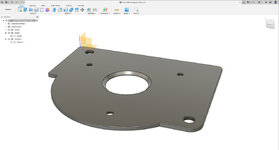
After about 20 versions getting the hole positions perfect (or close enough), I extruded it to 4mm thick, added some little fillets and chamfers, and counterbored the router baseplate holes on the bottom so the screws sit flush.
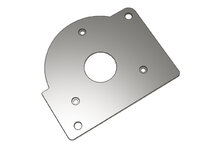
And then set up the 6 hr print. I don't think my printer has every successfully completed a 6 hr print, lol.
One cool thing is I've been playing around with some iOS Octoprint clients that let me monitor the print. This one called Polymer has a nice iOS look and feel:

But there's another called Octopod that has an Octoprint plugin and push notification server, which is amazing. It can send all sorts of notifications, including "rich" notifications about the print progress including a webcam snapshot:

Speaking of webcams, I loaded a custom firmware on my Wyze V2 Cam that generates an MJPEG stream that's compatible with Octoprint. So now they are integrated.
et voilà ! It completed!

Of course my measurements were off a little so the router baseplate screws still protrude a tiny bit!
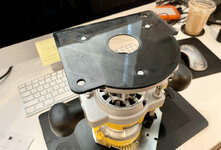
So I have to print it again. But we are getting closer.


But everything fits and I can tell it's going to function properly. Yay!
I have a pseudo-update to share on this. A lot of futzing and inching towards a result.
But first, for those that have followed the printer nonsense, after a full week of "failed delivery attempts" and "package on hold" alerts, despite no one actually coming to my door, DHL finally delivered my surprise from Creality.
Unfortunately it's another 4.2.2 board, not the newer 4.2.7
So kudos to them for actually sending me a new motherboard without much fuss.
Still debating on installing it. If the layer shifts persist, I think I will. BUT... I did do this silly fix for an undisclosed issue suggested by Creality after sales, by placing a piece of conductive tape to bridge the connection between the Y-motor body and the aluminum chassis. I did not do the power supply cover screw fix. But to my complete surprise, after many consecutive layer-shifting prints, after applying the tape, I haven't had a single one. Not holding my breath, but I think as long as it's working I'll leave the existing board in.
That's not to say I have been without additional printer drama. I tried to print the full LR32 adapter plate model, a 6 hour print, and 4 hours in at 1am it turned into a massive spaghetti monster. One corner was warping up a little, and I figure the nozzle may have collided as it was getting dragged around the print bed.
Started it again, and after half of the first layer it became detached, and I noticed it was massively under-extruded. Like gaps between the lines. Upon inspecting the nozzle there was some goo, from the aforementioned spaghetti monster.
So I popped the nozzle off, wiped off the hot end, and put a brand new nozzle in. While in trouble shooting mode, I recalibrated my E-Steps as I hadn't done that after upgraded to the metal extruder, as well as re-did the PID autotune, as I've been getting some thermal runaway alerts when preheating the nozzle for removal. Curiously only when I do it through the printer LCD.
E-Steps were off by a whole 5mm (95mm extruded when should be 100mm). Got that corrected. During the test the printer extruded fine with the G-Code. And printer extruded fine manually. Feeling good.
Then I try to print the model again. Nothing comes out the nozzle, the extruder gear keeps making a horrible popping and skipping sound, and the hot nozzle permanently etched the "skirt" lines into the carborundum side of my bed. WTF.
I power cycled the printer and tried again. Same result. The extruder gear has contact and pressure, it moved the filament just fine on a retraction, and I am able to move it by hand and the filament feeds. But nothing comes out the nozzle. I assumed a blockage, but decided to try one of my bench dog files, and that printed!!. What?!?
I really have no idea. I went back to the LR32 model and then it worked fine. Scratching my head.
Ok back to some specifics about the model.
After about 20 versions getting the hole positions perfect (or close enough), I extruded it to 4mm thick, added some little fillets and chamfers, and counterbored the router baseplate holes on the bottom so the screws sit flush.
And then set up the 6 hr print. I don't think my printer has every successfully completed a 6 hr print, lol.
One cool thing is I've been playing around with some iOS Octoprint clients that let me monitor the print. This one called Polymer has a nice iOS look and feel:
But there's another called Octopod that has an Octoprint plugin and push notification server, which is amazing. It can send all sorts of notifications, including "rich" notifications about the print progress including a webcam snapshot:
Speaking of webcams, I loaded a custom firmware on my Wyze V2 Cam that generates an MJPEG stream that's compatible with Octoprint. So now they are integrated.
et voilà ! It completed!
Of course my measurements were off a little so the router baseplate screws still protrude a tiny bit!
So I have to print it again. But we are getting closer.
But everything fits and I can tell it's going to function properly. Yay!
OP
nicholam77
Well-known member
We've had a bit of a warm spell (read: approaching 40°F for a high) recently, so I took advantage yesterday and popped out to the garage to work on my dad's cabinet doors.


These are the upper doors to one of the pantry units. I have the rails and stiles cut for the lower pair, but haven't prepared the plywood panels yet.
Today my dad stopped by to take a look, and I drilled the hinge cups and gave them a 120 grit sand so he could take them with him. No pics, I usually forget to when someone else is with me.
It felt good to do something woodworking related. Now after I get the lower doors for this section done, just 6 more doors to make after that. I really need to get this project off my plate, for both my own and my dad's sanity, and so I can move onto something else this summer!

These are the upper doors to one of the pantry units. I have the rails and stiles cut for the lower pair, but haven't prepared the plywood panels yet.
Today my dad stopped by to take a look, and I drilled the hinge cups and gave them a 120 grit sand so he could take them with him. No pics, I usually forget to when someone else is with me.
It felt good to do something woodworking related. Now after I get the lower doors for this section done, just 6 more doors to make after that. I really need to get this project off my plate, for both my own and my dad's sanity, and so I can move onto something else this summer!
kaymccampbell
Well-known member
Nice shop. What happened to your floor?
Krfjkm
Well-known member
nice job on the cabinet doors! What is the thickness of you rail material, 3/4”?
I have a lot of those Bessey clamps and really like them, good to see you spent a little extra for a quality item It looks like you are wet wiping the squeeze out though. I used to do the same thing and was frustrated with the mess that creates as it just spreads diluted glue over a larger area that needs to be sanded and can deeply penetrate the grain and affect finishes. I started waiting for the glue to firm up a bit, then just cleanly scraping it off with a plastic scraper with much better results. I've even been known to throw a thin strip of masking tape on the edges of the exposed face, just to keep it super clean.
I'm not crazy about you defaulting to the backside of the glass plate, I understand that for some items the lack of texture could be nice, but the other side has coatings and texture that really increase the adhesion (especially if you activate it with a wipe of 95%+ alcohol) and you have experienced spaghetti several times. At least think about hair spray or glue sticks if you are going to play with fire like that. If your printer is working for now, keep the new board in reserve. Grounding issues could certainly cause the drivers to lose steps, Creality would likely know if that's an issue. Without some impedance testing it would be wrong to speculate, but the proof is in the pudding they say, so fingers crossed it continues to perform. I think the differences between the 4.2.2 and 4.2.7 are really not significant, and honestly the 4.2.2 may even be better in some ways, the drivers on that board are well proven. Keep in mind that a lot of changes to boards are often driven by constrained chip availability rather than actual improvements. Newer isn't automatically better.
That adaptor plate is exactly the sort of thing these printers shine at. Yes, you could make the same thing out of a nice piece of Aluminum or Bakelite, but the easy precision and ability to iterate to improve any mistakes is its strength. I treat these items as 'working prototypes' and always design them to be able to be remanufactured out of more durable materials if required, but almost never have to. And if you do, printing out a template and drill guide is trivial. Really happy to see you creating your own solutions!
It looks like you are wet wiping the squeeze out though. I used to do the same thing and was frustrated with the mess that creates as it just spreads diluted glue over a larger area that needs to be sanded and can deeply penetrate the grain and affect finishes. I started waiting for the glue to firm up a bit, then just cleanly scraping it off with a plastic scraper with much better results. I've even been known to throw a thin strip of masking tape on the edges of the exposed face, just to keep it super clean.I'm not crazy about you defaulting to the backside of the glass plate, I understand that for some items the lack of texture could be nice, but the other side has coatings and texture that really increase the adhesion (especially if you activate it with a wipe of 95%+ alcohol) and you have experienced spaghetti several times. At least think about hair spray or glue sticks if you are going to play with fire like that. If your printer is working for now, keep the new board in reserve. Grounding issues could certainly cause the drivers to lose steps, Creality would likely know if that's an issue. Without some impedance testing it would be wrong to speculate, but the proof is in the pudding they say, so fingers crossed it continues to perform. I think the differences between the 4.2.2 and 4.2.7 are really not significant, and honestly the 4.2.2 may even be better in some ways, the drivers on that board are well proven. Keep in mind that a lot of changes to boards are often driven by constrained chip availability rather than actual improvements. Newer isn't automatically better.
That adaptor plate is exactly the sort of thing these printers shine at. Yes, you could make the same thing out of a nice piece of Aluminum or Bakelite, but the easy precision and ability to iterate to improve any mistakes is its strength. I treat these items as 'working prototypes' and always design them to be able to be remanufactured out of more durable materials if required, but almost never have to. And if you do, printing out a template and drill guide is trivial. Really happy to see you creating your own solutions!
jar944
Well-known member
Nice looking doors there.
OP
nicholam77
Well-known member
Nice shop. What happened to your floor?
Thanks, Kay.
Re: the floor, if you're referring to how it's wet and dirty, that's runoff from the cars. When it's cold and snowy the cars come in with a lot of snow and ice trapped in the fenders and under the door sills. A lot of times it just falls off in big chunks and I shovel them out. But if the garage gets above freezing with a temperature swing, everything melts into a big dirty puddle. One of the many perks of Minnesota winters.
If you're referring to how the concrete looks as though it's suffered an earthquake or two, well, I'm pretty sure my garage was built on a sink hole. And I mean that literally. I found record of fixing a "sink hole" that caused the driveway to partially collapse in the previous homeowners records. I don't know long ago, probably 20+ years ago at least, maybe more. I've only lived here for about 5 years, and I inherited the garage floor as an uneven fractured abomination. It's one of the reasons I don't post wide shots very often... I hate the look and function of it.
nice job on the cabinet doors! What is the thickness of you rail material, 3/4”?
Thanks! Yes it's 3/4". Was purchases S4S from a lumberyard.
I have a lot of those Bessey clamps and really like them, good to see you spent a little extra for a quality item
I'm not crazy about you defaulting to the backside of the glass plate, I understand that for some items the lack of texture could be nice, but the other side has coatings and texture that really increase the adhesion (especially if you activate it with a wipe of 95%+ alcohol) and you have experienced spaghetti several times. At least think about hair spray or glue sticks if you are going to play with fire like that. If your printer is working for now, keep the new board in reserve. Grounding issues could certainly cause the drivers to lose steps, Creality would likely know if that's an issue. Without some impedance testing it would be wrong to speculate, but the proof is in the pudding they say, so fingers crossed it continues to perform. I think the differences between the 4.2.2 and 4.2.7 are really not significant, and honestly the 4.2.2 may even be better in some ways, the drivers on that board are well proven. Keep in mind that a lot of changes to boards are often driven by constrained chip availability rather than actual improvements. Newer isn't automatically better.
That adaptor plate is exactly the sort of thing these printers shine at. Yes, you could make the same thing out of a nice piece of Aluminum or Bakelite, but the easy precision and ability to iterate to improve any mistakes is its strength. I treat these items as 'working prototypes' and always design them to be able to be remanufactured out of more durable materials if required, but almost never have to. And if you do, printing out a template and drill guide is trivial. Really happy to see you creating your own solutions!
Yeah, the parallel clamps worked great. I ponied up for the 24" pair when they were on sale at Home Depot, and got the 31" for XMAS. My assessment is they are overkill (too heavy, big, and more pressure than needed) for most things, but are perfect for drawers, cabinet carcasses, and doors. Which I seem to be making a lot of. I was impressed how my doors actually turned out nice and flat, probably thanks to the clamps.
I did wipe the glue. I do a two-step process trying to carefully wipe most away with my finger, and then with a wet rag. I've done it the other way, too, letting it partially dry and scrape. The only trouble I have with that is sometimes it's hard to get a scraper in there if the clamps are in the way, or I can't move the piece. Tape is a good idea.
The glass bed plate is interesting. I'm not sure what I think yet. I will say I've noticed it's actually more difficult to remove the finished piece from the smooth side. But I'm not sure how I feel about the super smooth surface it leaves. On either side, I should probably try the hair spray or glue stick as insurance on longer prints.
I'm still a total novice with Fusion, but it is definitely exciting to create something from scratch. I hadn't even considered making it out of a different material — I said prototyping but I intended it to be the finished functional piece. But I suppose knowing the software side of things I could send a file to sendcutsend or similar to have it professionally made in the future, after getting it right with the 3d printing. Something to think about for sure.
Nice looking doors there.
Thanks Jar. I'm pretty happy considering they are my first ever set. I think with a nicer table saw and a miter gauge like you mentioned I could get even better joints.
Grumblebum
Well-known member
Hi Nick, just been catching up I was so far behind. Congrats on the new family member, I know you are feeling the time pinch at the moment but the kids will be calling themselves tweenagers before you know it (apparently thats a thing  )
)
The living area cabinets came out awesome, that is such a beautiful space you have created there.
I have started helping my Dad work on building a new bedroom suite and as he has the TS55 with 2 of the 55" rails we had to join them for a few 6' rips. We used a long 9' straight edge to align them as we tighted up the rail joiners and that worked well. I was thinking a 7' straightedge would be handy for you as you will definitely use that on other projects on the house. I have a 7' one and it's super handy. Maybe not so critical now that you scored the big boy and are going to part with one of the 55's. Also his TS55 does not seem to have the little anti tip over lock that stops the saw lifting out of the track when set at an angle for beveled cuts like our makitas do so I was constanly having to lay it on it's side while getting ready for the cut.
I need to find some wall space to hang my big rail, I'm not happy where I have it sitting currently as it's not laying flat. Also festool have clear replacement splinterguard available, I did pickup a 5mtr roll during the week as my Dad's rails splinterguard needs replacing. It's supposed to allow you to see your pencil lines etc, I'll have to cut a sample to see if it fits the makita rails and report back.
Also have you seen the festool gecko suction cups ? I noticed them the other day when looking for what splinteredge I needed. You can use them on the rails to suction it down on the surface where you can't clamp, no idea what they would be like.
I was going to suggest you would make good use of the LR 32 with the amount of cabinetry you are doing following the pros and cons write up you did, but you have it now so will be good to get your thoughts after you get the router adapter plate sorted and try it out.
Might try to get the 3d printer in the office recalibrated this week and print some of those parallel guide thingies, I could have really used a set of parallel guides last Sunday.
Take care GB
)The living area cabinets came out awesome, that is such a beautiful space you have created there.
I have started helping my Dad work on building a new bedroom suite and as he has the TS55 with 2 of the 55" rails we had to join them for a few 6' rips. We used a long 9' straight edge to align them as we tighted up the rail joiners and that worked well. I was thinking a 7' straightedge would be handy for you as you will definitely use that on other projects on the house. I have a 7' one and it's super handy. Maybe not so critical now that you scored the big boy and are going to part with one of the 55's. Also his TS55 does not seem to have the little anti tip over lock that stops the saw lifting out of the track when set at an angle for beveled cuts like our makitas do so I was constanly having to lay it on it's side while getting ready for the cut.
I need to find some wall space to hang my big rail, I'm not happy where I have it sitting currently as it's not laying flat. Also festool have clear replacement splinterguard available, I did pickup a 5mtr roll during the week as my Dad's rails splinterguard needs replacing. It's supposed to allow you to see your pencil lines etc, I'll have to cut a sample to see if it fits the makita rails and report back.
Also have you seen the festool gecko suction cups ? I noticed them the other day when looking for what splinteredge I needed. You can use them on the rails to suction it down on the surface where you can't clamp, no idea what they would be like.
I was going to suggest you would make good use of the LR 32 with the amount of cabinetry you are doing following the pros and cons write up you did, but you have it now so will be good to get your thoughts after you get the router adapter plate sorted and try it out.
Might try to get the 3d printer in the office recalibrated this week and print some of those parallel guide thingies, I could have really used a set of parallel guides last Sunday.
Take care GB
OP
nicholam77
Well-known member
Hi Nick, just been catching up I was so far behind. Congrats on the new family member, I know you are feeling the time pinch at the moment but the kids will be calling themselves tweenagers before you know it (apparently thats a thing
Thank you GB, good to hear from you. My baby boy is already growing up way too fast, and so is my daughter for that matter. It's a lot to juggle, but I'm not wishing myself out of this phase in a hurry by any means. In fact I often wish I could slow time down.
Despite having our main media/TV setup in the basement, the living room has become a default hang out area for my wife and I after the kids are asleep. Definitely one of my favorite rooms in the house, now. I appreciate the kind words, those cabinets were certainly an adventure.
You're right, if I had a super long level I probably would get better results aligning two guide rail tracks, but a huge issue for my specific tracks was the mismatched Makita extrusions. I think Festool rails probably are identical in machining and thus would align better. I've rarely cut miters with the track saw, but you are 100% right the anti-tip is great to have. For what it's worth, you can 3D print one for the TS55 if you need to
Comparing the splinter guard on my Makita rails to the LR32 rail, the Festool one seems more rigid and brittle. I'm not sure what I think about black vs. clear.
I'll definitely post some sort of review on the LR32 system once I get to use it. I know I could have gotten away with something cheaper like the Woodpecker jig, but I think I kind of had my heart set on it from the beginning. Hopefully it works out well.
I have seen the gecko suction cups. They are neat. I've also seen people use rail attached vacuum pods to do a similar thing (even cooler in my opinion!). Festool's new rails also have sticky strips that can hold them to vertical surfaces, etc.
The 3D printed parallel guides work... surprisingly well. Loads cheaper than any commercial solution. I haven't found a good way to "calibrate" them, or make sure the scales are equally placed, though.
_____________________________
Some small updates.
My dad sent me some pics of the first pair of pantry doors installed.

And with finish applied (General Finishes Arm-R-Seal Semi Gloss)

I happened to go over to their house tonight and saw them in person. I don't know why I'm surprised... but I was kind of shocked at how good they look. The hinges are Blum w/blumotion, and the doors look and function like a legit pair of professionally made ones. I guess we did the math right because all the reveals and gaps lined up perfect. The cherry wood looks so nice with the Arm-R-Seal. Overall I'm really pleased.
Next, I wish I could say I've had no more 3D printer issues, but after a few successful prints, the weird issue returned where no filament would come out, and the extruder would be skipping and clicking loudly. Ok, time to take it apart.
As I was thinking, there was a blockage. The small section of Capricorn PTFE tubing I installed in the hot end for the Bowden tube fix, was completely clogged at one end. No wonder the extruder couldn't push anything through.

I thought shoving this bit of tubing in the hot end was literally supposed to fix this very issue, of molten filament weeping around the end where it butts against the back of the nozzle. I guess it wasn't seated perfectly? I don't really know.
Anyways, threw on a fresh nozzle, cut a new piece of PTFE, made sure the cut was square, and pushed it in there really good. This time I cranked more pressure on the Bowden fitting threaded hex nut, I'm hoping more pressure will keep it pressed against the nozzle.
One thing that is driving me nuts is every time I heat the hot end to swap nozzles, I get a thermal runaway error message. It doesn't do this when I preheat for a print, or during a print, only when I set the hot end to 210° or 215° on its own for a nozzle change. Grrrrr.
But with the blockage cleared I was able to get a nice clean print again:

Still some weird little bubbles and gaps in areas that I need to tune out somehow, but overall nice and clean.
This is a model I found on Thingiverse that caps off the end of Woodpecker's Dual Purpose Track, such as the stuff used on my drill press fence.

Just a little shop safety thing. The edges of the aluminum extrusion are sharp, and due to cramming everything into this corner of the garage, I've often snagged my arm or clothes on it when shuffling things around.
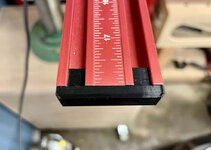

Much better.
They are a perfect pressure fit. I had to dial that in with a Cura setting called "Horizontal Expansion" in the Walls section. I think it reduces or increases the size of the whole model by a definable amount. Like -0.1mm for example. A bit easier than trying to modify a 3D file when the fit is close.
That's all for now!
Trapps
ALLIANCE MEMBER
The cabinet doors really do look good, Nick! That extrusion cap is great! Exactly the kind of thing that returns my focus to the mysterious creature that is 3D Printing.

mikev12345
Member
- Joined
- Jul 30, 2021
- Messages
- 7
So I had looked the Hatfield fix but avoided it. According Chep the templates don't work because there is variation between the various creality printers so the length of tube required will be different. I'm not sure if you took this into account but here is the video where he discusses it:
BTW love your workshop progess. You've inspired be to pivot from the direction I was going with mine.
BTW love your workshop progess. You've inspired be to pivot from the direction I was going with mine.
OP
nicholam77
Well-known member
The cabinet doors really do look good, Nick! That extrusion cap is great! Exactly the kind of thing that returns my focus to the mysterious creature that is 3D Printing.
Thanks Mark! I want to make an end cap for my table saw fence now... that thing is just waiting to take a bite out of my side. Or scratch my wife's car if she pulls in too far.
If you skip the CAD stuff, 3D printing isn't that hard to pick up. I've done a deeper dive because of some of my issues (just unlucky with the machine perhaps, or user error ??
). But to give another data point, my coworker grabbed an Ender 3 Pro for $99 on sale at Microcenter, which has less features out of the box, no glass bed etc, and he's just using the default Cura profile and it's all working perfectly. Better than mine I'd say. Just sayin'...So I had looked the Hatfield fix but avoided it. According Chep the templates don't work because there is variation between the various creality printers so the length of tube required will be different. I'm not sure if you took this into account but here is the video where he discusses it:
I hadn't seen that video, but he gives a pretty easy solution for measuring the length of tube yourself. Mine seemed to be an appropriate length using the template. As long as it's not too short I'm not sure what the functional difference would be over having the original Bowden tube go all the way, except less forces on the end bit from retraction, which is the whole point.
I think the reason mine clogged up was either:
1) the end wasn't cut perfectly square, or wasn't seated perfectly (which could also happen with normal full Bowden tube setup)
2) the Bowden clamp fitting on top of the hot end wasn't tight enough, or backed off over use with vibrations etc
I kind of suspect #2 because it was working perfectly fine for awhile.
That being said, if you aren't having issues with the stock setup, no reason to change it.
BTW love your workshop progess. You've inspired be to pivot from the direction I was going with mine.
Thanks!! It's definitely been an evolution.
OP
nicholam77
Well-known member
Finishing Up The LR32 Adapter Plate + Test Run
This is going to be a long post.
After some "successful" prints, my extruder started clicking again. Seemed like another clog. So I opened it up once more.

It did seem like the Bowden fitting on top of the heat sink was not that tight. @mikev12345 I re-did the Hatfield fix using CHEP's method of measuring the tube section. And this time I put some Loctite Blue 242 Threadlocker on the Bowden fitting. Seems to be ok so far.
Back to the LR32 adapter plate design. The plate is good to go. But I needed a way to fasten it to the Festool sled. I could have just gotten some M6 wingnuts from the hardware store, but I wanted to try designing some knobs in Fusion 360. This is what I came up with:
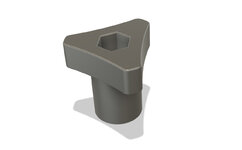
Due to the nature of the threaded posts on the sled, and the height of my router base, I needed a specific clearance, and the hex nut that goes inside had to be quite low.
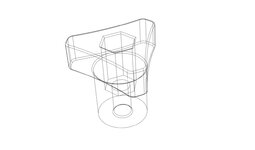
It printed ok. I'm getting blobs where a layer is started or stopped. They completely match up with the z-seam alignment in Cura (set to random). I haven't had time to do a bunch of tests again, but I'm thinking either over-extrusion, or not enough retraction.

The last thing I designed is a "pin lock", which I got the idea from someone on Festool Owner's Group forums. Basically it's a spacer that locks the indexing pin "up", so the sled can slide freely back and forth and not index the 32mm holes on the guide rail. Could be useful for non-32mm operations, like cutting slots or dados.

This could have easily been plywood, but again, trying to practice Fusion 360 and it looks nicer.
Using The Jig
The following isn't a tutorial or anything, but should give you an idea of how my pieces work and what's involved in setting up the LR32 system, as well as a mini-review and accuracy test.
First I attach my 3D-printed baseplate to the router, with the screws that came with it.

Next I had to calibrate the router sled to the guide rail, by tightening a screw on either side so there is no play.

Then the router + adapter plate slides on the LR32 sled with the two M6 threaded studs going through the holes on the adapter plate.
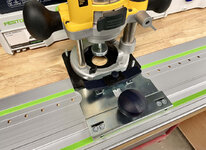
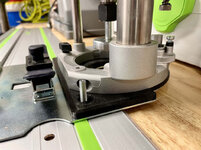
I intentionally left these oversized, so the whole thing can be centered. Speaking of that, here is the 40mm centering mandrel that comes with the sled kit:

This gets plunged through the center hole in the sled, ensuring the router spindle is perfectly centered with the sled. And then it is tightened down (with my 3D-printed knobs).


Then the router motor can be removed from the plunge base, and the centering mandrel is swapped for a 5mm brad point boring bit. And the drilling depth is set on the plunge base turret.
To configure the guide rail, there are two "end stops", that align the row of holes a certain distance from the edge of the cabinet gable. Options for 32mm, 16mm, and 9.5mm. I picked 32mm.


I did not purchase the "front stops", which set back the row of holes the appropriate amount from the edge of the cabinet (usually 37mm). Instead I am using a Paolini Pocket Rule to push the rail back. I figure I'll use it for lots of stuff, but this is one of the reasons I got it.

Then the rail should be clamped down on either side, from underneath.

Which results in this kind of goofy, diagonal, hanging-off-the-edge-of-the-MFT setup.
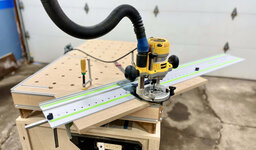
Front row of holes drilled:

Flip the cabinet slab around and drill the back row of holes.

Time for some accuracy checks.


I couldn't get my caliper to lock in on the exact values of 32.00mm and 37.00mm, but you get the idea. As far as I can tell... perfect.
My thoughts:
— set up is not that bad, I feel like it would take me 10min, totally worth it to batch out a bunch of shelf pins
— accuracy is dead on
— it's everything I loved about my homemade jig (fast, tight tearout-free holes, perfect dust collection with the router), but accurate and repeatable
— the 3D-printed parts work well, and look fairly "OEM"
— this was by no means a cheap solution (having to buy the guide rail was a bit of a tough pill to swallow as a hobbyist), but I'm planning on a good amount of future cabinets for the house so I think it will be worth it. If you for some reason already have the holey rail, this "essentials kit" and using a non-Festool router is actually not that bad of a proposition I think

For kicks here's a pic of the "pin lock"

Hopefully this was mildly interesting to someone
This is going to be a long post.
After some "successful" prints, my extruder started clicking again. Seemed like another clog. So I opened it up once more.
It did seem like the Bowden fitting on top of the heat sink was not that tight. @mikev12345 I re-did the Hatfield fix using CHEP's method of measuring the tube section. And this time I put some Loctite Blue 242 Threadlocker on the Bowden fitting. Seems to be ok so far.
Back to the LR32 adapter plate design. The plate is good to go. But I needed a way to fasten it to the Festool sled. I could have just gotten some M6 wingnuts from the hardware store, but I wanted to try designing some knobs in Fusion 360. This is what I came up with:
Due to the nature of the threaded posts on the sled, and the height of my router base, I needed a specific clearance, and the hex nut that goes inside had to be quite low.
It printed ok. I'm getting blobs where a layer is started or stopped. They completely match up with the z-seam alignment in Cura (set to random). I haven't had time to do a bunch of tests again, but I'm thinking either over-extrusion, or not enough retraction.
The last thing I designed is a "pin lock", which I got the idea from someone on Festool Owner's Group forums. Basically it's a spacer that locks the indexing pin "up", so the sled can slide freely back and forth and not index the 32mm holes on the guide rail. Could be useful for non-32mm operations, like cutting slots or dados.
This could have easily been plywood, but again, trying to practice Fusion 360 and it looks nicer.
Using The Jig
The following isn't a tutorial or anything, but should give you an idea of how my pieces work and what's involved in setting up the LR32 system, as well as a mini-review and accuracy test.
First I attach my 3D-printed baseplate to the router, with the screws that came with it.
Next I had to calibrate the router sled to the guide rail, by tightening a screw on either side so there is no play.
Then the router + adapter plate slides on the LR32 sled with the two M6 threaded studs going through the holes on the adapter plate.
I intentionally left these oversized, so the whole thing can be centered. Speaking of that, here is the 40mm centering mandrel that comes with the sled kit:
This gets plunged through the center hole in the sled, ensuring the router spindle is perfectly centered with the sled. And then it is tightened down (with my 3D-printed knobs).
Then the router motor can be removed from the plunge base, and the centering mandrel is swapped for a 5mm brad point boring bit. And the drilling depth is set on the plunge base turret.
To configure the guide rail, there are two "end stops", that align the row of holes a certain distance from the edge of the cabinet gable. Options for 32mm, 16mm, and 9.5mm. I picked 32mm.
I did not purchase the "front stops", which set back the row of holes the appropriate amount from the edge of the cabinet (usually 37mm). Instead I am using a Paolini Pocket Rule to push the rail back. I figure I'll use it for lots of stuff, but this is one of the reasons I got it.
Then the rail should be clamped down on either side, from underneath.
Which results in this kind of goofy, diagonal, hanging-off-the-edge-of-the-MFT setup.
Front row of holes drilled:
Flip the cabinet slab around and drill the back row of holes.
Time for some accuracy checks.
I couldn't get my caliper to lock in on the exact values of 32.00mm and 37.00mm, but you get the idea. As far as I can tell... perfect.
My thoughts:
— set up is not that bad, I feel like it would take me 10min, totally worth it to batch out a bunch of shelf pins
— accuracy is dead on
— it's everything I loved about my homemade jig (fast, tight tearout-free holes, perfect dust collection with the router), but accurate and repeatable
— the 3D-printed parts work well, and look fairly "OEM"
— this was by no means a cheap solution (having to buy the guide rail was a bit of a tough pill to swallow as a hobbyist), but I'm planning on a good amount of future cabinets for the house so I think it will be worth it. If you for some reason already have the holey rail, this "essentials kit" and using a non-Festool router is actually not that bad of a proposition I think
For kicks here's a pic of the "pin lock"
Hopefully this was mildly interesting to someone
Trapps
ALLIANCE MEMBER
Nice work, Nick! These are exactly the types of things that demonstrate the value of 3D printing in my opinion.
I find it interesting that Festool has the need for the Pin Lock; it would seem a simple solution to include a lock out of some sort from the factory. Bosch has a rail router adapter and the indexing pin component can be simply lifted (spring loaded like the Festool) and rotated out of the way or it can be removed completely.
I wish I had done the SAE/Metric PPR as you did...
When do you get the metric T-Square to go with it?
I find it interesting that Festool has the need for the Pin Lock; it would seem a simple solution to include a lock out of some sort from the factory. Bosch has a rail router adapter and the indexing pin component can be simply lifted (spring loaded like the Festool) and rotated out of the way or it can be removed completely.
I wish I had done the SAE/Metric PPR as you did...
When do you get the metric T-Square to go with it?
OP
nicholam77
Well-known member
Nice work, Nick! These are exactly the types of things that demonstrate the value of 3D printing in my opinion.
I find it interesting that Festool has the need for the Pin Lock; it would seem a simple solution to include a lock out of some sort from the factory. Bosch has a rail router adapter and the indexing pin component can be simply lifted (spring loaded like the Festool) and rotated out of the way or it can be removed completely.
I wish I had done the SAE/Metric PPR as you did...
When do you get the metric T-Square to go with it?
Thanks!
The pin lock idea hadn't even occurred to me until I saw someone else do it. I'm sure the bright minds at Festool could have figured something out, but I'm guessing it was intentional, or they don't view it as a sled to cut grooves and dados, or basically any other operation than system holes. They have a different router rail adapter with a micro-adjust — they probably expect you to buy and use that instead. But, I'm hoping to kill two birds with one stone. I'd prefer one with a micro-adjust for dados, but I actually bought the DeWalt one at one point, and couldn't get a good fit on the Makita rail so it went on eBay. The Makita rail guide looks good and is affordable, but my DeWalt router doesn't fit it. Of course there's your Bosch FSN OFA, which looks great, but since I went the Festool route I'm committed to that for now. Btw I was looking at the FSN OFA the other day and I don't know if it's supply and demand or what, but the prices on that have really skyrocketed!
The SAE/Metric combo was very intentional for the pocket rule... I waited about 6 months for that configuration to come in stock in 8". After working on this pantry, I'm ready to go full metric for cabinets. My dad can add and subtract fractions all day but it just doesn't come easy for me. Unfortunately I've already invested in a handful of imperial measuring tools, and I don't intend to abandon that, but I'm consciously trying to incorporate dual-scales where I can in the future. So far it's the pocket rule and the MFT fence, but I've been trying to find a scale that fits my table saw as well.
______________________________________
The weather has been teasing us here lately. 50° F and melty one day and then more snow and back to 0° the next. But slowly it's gravitating towards warmer temps and I feel Spring is around the corner.

I've had a slow work week and I spent some time trying to clean the garage a bit.

I threw away a bunch of packaging, put misc hardware back in the organizer boxes, did some neglected maintenance stuff like emptied the overflowing dust collection, cleaned the shop vac filter, changed out the air filter in the overhead unit.
I've accumulated a lot of stuff over the past 5 years and despite some efforts, I've never been able to fully get ahold of organization. Not on the level I'd like. Basically every drawer in my red Craftsman unit is a mess. I always have stuff spread out on every surface and have to shuffle it around nonstop. Eager to take advantage of deals, I've purchased Systainers (at a good price) but that are still empty after years. Some elements are working for me, that I've made to be efficient over time, but some things are not. It seems like an insurmountable task to get "everything in its place".
But that's a "project" that will likely continue to nag me forever. What's more important now is that I finish these pantry doors. After a few weeks away I consulted the drawings again, trying to remember what the heck I'm doing.

Got the lower doors of the first carcass done. Only had enough parallel clamps to glue one at a time.

I delivered them to my dad yesterday and he texted me a pic with the first coat of Arm-R-Seal.

In the background you'll see some white shaker doors. In a separate project he's replacing about 20 doors and drawer fronts on a built-in library unit. Originally he suggested I help make those too, but I politely declined. Fortunately he found a good place to buy them to custom specs. This weekend I did help him drill all the hinge cups to match the old ones.
Lastly, we ripped down the MDF template doors slightly to test the fitment on the next carcass. They came out just right.
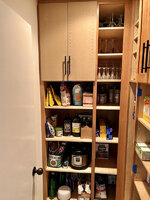
But... looking at this pic I came to the realization that I actually have eight more doors to make, when I was thinking it was six!
I'm a little burnt out on this one, but also feeling guilty that it's been over a year since we started. I'm going on a family vacation next week — I'm hoping that when I get back I'll have a new boost of energy to push forward and get these doors done!
Grumblebum
Well-known member
Hey Nick,
So it looks like your rail has that clear festool splinter guard, I'll be trying that on my Dad's rails tomorrow (rain here for the last few weeks has hampered play and travel - it's been a super wet summer). I really like how that LR32 system has come up. The basic kit here is over $600, so I'm trying to work out what way to go either biting the bullet or something like what Bakafish did.
Do the festool rail clamps fit the makita rails ? I think I'd prefer a clamping force rather than a turning force when buttoning down the rails.
Cheers GB
So it looks like your rail has that clear festool splinter guard, I'll be trying that on my Dad's rails tomorrow (rain here for the last few weeks has hampered play and travel - it's been a super wet summer). I really like how that LR32 system has come up. The basic kit here is over $600, so I'm trying to work out what way to go either biting the bullet or something like what Bakafish did.
Do the festool rail clamps fit the makita rails ? I think I'd prefer a clamping force rather than a turning force when buttoning down the rails.
Cheers GB
Playing catch up here, great to see you're making progress on the printer and the garage projects... those doors look great!
As to the discussion on making it more hospitable out there in winter.... no easy solution but its worth it in my book.
For heat only, it's was mentioned about a vented propane heater running on 100 lb bottles which is something I have done before. Not swapping bottles as often as with 20 lb bottles and cheaper per pound, but it's more work to change them and as you don't have a truck its a lot more work to get them filled up as they can't go in the trunk. Also if you get nat gas to the garage down the road, an orfice swap and your likely in business burning gas instead of propane which is nice.
Mini split would give heat and cool plus the added benefit of act as a dehumidifier in the summer thanks to the AC side. Downside is I think you mentioned before you only have 120v out there which isn't probably enough service for a unit with enough electric heat capability for your winter. I'm loving mine so far though....
Either way you go, it'll be far cheaper to operate and more comfortable if the ceiling is closed up and insulated. If it was mine or if i was redoing my last Chicago garage again which was similar to yours, the ceiling would get metal liner panel, then blown in insulation on top of that. The metal panel is cost effective, easy to install and doesn't require paint or mudding The white ceiling also brightens up the space and helps keep the light where it's more needed!
Don't recall, have you ever thought about upgrading the electric and adding gas service to the garage? Could you put in 1 trench from the house gas meter area and relatively easily get to the garage? Could then upsize the electric, get gas and wired internet for hopefully a not horrible bill and really open up the potentials down the road
As to the discussion on making it more hospitable out there in winter.... no easy solution but its worth it in my book.
For heat only, it's was mentioned about a vented propane heater running on 100 lb bottles which is something I have done before. Not swapping bottles as often as with 20 lb bottles and cheaper per pound, but it's more work to change them and as you don't have a truck its a lot more work to get them filled up as they can't go in the trunk. Also if you get nat gas to the garage down the road, an orfice swap and your likely in business burning gas instead of propane which is nice.
Mini split would give heat and cool plus the added benefit of act as a dehumidifier in the summer thanks to the AC side. Downside is I think you mentioned before you only have 120v out there which isn't probably enough service for a unit with enough electric heat capability for your winter. I'm loving mine so far though....
Either way you go, it'll be far cheaper to operate and more comfortable if the ceiling is closed up and insulated. If it was mine or if i was redoing my last Chicago garage again which was similar to yours, the ceiling would get metal liner panel, then blown in insulation on top of that. The metal panel is cost effective, easy to install and doesn't require paint or mudding
The white ceiling also brightens up the space and helps keep the light where it's more needed!Don't recall, have you ever thought about upgrading the electric and adding gas service to the garage? Could you put in 1 trench from the house gas meter area and relatively easily get to the garage? Could then upsize the electric, get gas and wired internet for hopefully a not horrible bill and really open up the potentials down the road
OP
nicholam77
Well-known member
I really like how that LR32 system has come up. The basic kit here is over $600, so I'm trying to work out what way to go either biting the bullet or something like what Bakafish did.
Thanks, even bare bones it wasn't cheap for a glorified shelf pin jig, but it does the job very well, and it can do other things, like make MFT dog hole patterns, drill hinge cups, etc.
By the 'basic' kit I assume you mean the sled and the stops? If so that's an insane price. Just from my little test I feel like the sled, holey rail, and end stops are the key components. What @Bakafish did is awesome... I just didn't think I could pull it off with perfect accuracy. I thought about just buying the rail, and making the whole sled and everything, but in the end decided to value my time and just get the bits I thought necessary.
I don't know what it would cost for me to ship to you (obviously not the rail, but the smaller bits), but if you're serious about it we could try to figure something out. It's a lot cheaper here.
Do the festool rail clamps fit the makita rails ? I think I'd prefer a clamping force rather than a turning force when buttoning down the rails.
They do! They are fiddly in their own way, but no more so than a screw handle clamp. They work well, and super awesome in the MFT, too. Pricey for their size but I use the two I have all the time.
Playing catch up here, great to see you're making progress on the printer and the garage projects... those doors look great!
Thanks! Good to hear from ya
As to the discussion on making it more hospitable out there in winter.... no easy solution but its worth it in my book.
Well it cracked 60° F today so I've long forgotten about heating... until next winter.

A buried gas line would not be a close or easy route from the house meter. I do have just 120v, only two circuits. One has the lights and the other has 3 outlets. So I run concurrent tools (like shop vac and table saw) together off the same circuit. It's been tripped before mid-cut...
I've absolutely thought about increasing the electrical service, or getting separate service to the garage. Since it's an alley garage it's right by the power lines and I'm sure a discrete drop and separate panel would be fairly easy for an electrician to do. Just some surgery on my plywood walls. I don't have the knowledge or time to do either a gas or electrical upgrade myself, so being in the city I'm sure I'd pay a lot for either.
In all likelihood, as nice as it would be, I don't see myself doing a major upgrade like that, or mini-split, etc, any time soon, or maybe ever. If it was a larger space, I had a better parking setup, could leave stationary tools set up, was more energy efficient (attached to a house), and didn't have a cracked sinking slab, I'd be way more inclined to put money into it. In the meantime I'll continue to freeze my fingers off and hope in the next 5-10 yrs I might be in a position to make a move.
___________________________
Spent the whole weekend with the kids. Fortunately my dad got some work done varnishing the latest pantry doors and getting them installed. He sent me another pic:
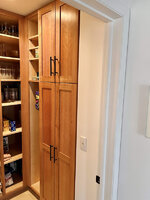
The Modernist in me probably would have defaulted to flat panel doors if this was going in my own house, but even though the rail and stile are more work to make, I am really liking the way it's looking. In fact, I'm kind of jealous.
In all likelihood, as nice as it would be, I don't see myself doing a major upgrade like that, or mini-split, etc, any time soon, or maybe ever. If it was a larger space, I had a better parking setup, could leave stationary tools set up, was more energy efficient (attached to a house), and didn't have a cracked sinking slab, I'd be way more inclined to put money into it. In the meantime I'll continue to freeze my fingers off and hope in the next 5-10 yrs I might be in a position to make a move.
Sounds very much like my past Chicago garage! I didn't have a closed in ceiling till my last winter there, what I did to reduce the layers and make it slightly less bulky was stapled vapor barrier plastic up on the ceiling to keep the heat down, then used a ventless propane heater. New the heaters are 150 to 250 or so depending on size, but they don't require exterior ventilation so they're easy to install! I was running mine off 20 lb propane cylinders most of the time and for a weekend of intermittent work out there I could normally make a cylinder last the weekend. Wasn't warm enough to take off the sweatshirt and vest but at least made it more comfortable
https://www.northerntool.com/shop/tools/product_200664865_200664865
Downside of them vs the vented is that water vapor is a byproduct of combustion, so with it being ventless that extra moisture stays inside raising the humidity of the space. In your case that's probably not a bad thing and may even be good, but in a metalworking shop with lots more cast iron or a space that was tighter sealed/fewer "natural" leaks that humidity could be problematic. I never had an issue with it in Chicago as the ambient humidity was so low and the space wasn't tight enough(or having enough metal things) to matter.
And that pantry looking awesome!
jar944
Well-known member
The pantry is looking good.
OP
nicholam77
Well-known member
I didn't have a closed in ceiling till my last winter there, what I did to reduce the layers and make it slightly less bulky was stapled vapor barrier plastic up on the ceiling to keep the heat down, then used a ventless propane heater.
Interesting — maybe next season I will get motivated to install something like that.
And that pantry looking awesome!
The pantry is looking good.
Thanks guys!
OP
nicholam77
Well-known member
I don't have a "real" update, but as mentioned in a previous post, last week I was on vacation with my wife's family in Palm Springs. It was a much needed reset, as I feel like I've been on the grind with work, projects, and raising kids especially since my son was born last summer. Plus work-from-home, the Omicron surge, and a particularly cold winter season have made me feel like even more of a shut-in than normal.
We had plenty of sunshine, heat, swimming, and relaxing, but I'll share a few personal highlights that might be mildly related to this thread??
I've written about this before, but since becoming a homeowner 6 yrs ago, I'm not sure how it happened but I became really interested in Modernism as it relates to architecture. Which is kind of bizarre since our house is poorly designed, was just a basic post-WW2 builder house, and is not modern, or a piece of architecture, in any way.
But the cool thing about Modernism is it's not a "style" like Spanish Colonial, Georgian, Arts & Crafts, etc. It's an abstraction of a set of design principles. So... modernist houses do not all look the same. Modern furniture does not all look the same. But they follow a set of core beliefs. I'm definitely no professor on this subject but a few basic ones are:
— connection to the outdoors, indoor/outdoor living
— maximizing natural light
— clean lines / form follows function / lack of adornment
— use of natural materials like wood, stone, etc
I've tried to implement some of those things into my own house, by replacing the profiled door and window trim with plain boards, choosing simple or natural materials for flooring options, etc. And it's driven the design of projects like my daughter's bed, the toy cubby, the fireplace built-ins, even stuff for the garage like the table saw cart
The reason it pertains to Palm Springs is there is a high concentration of Modernist buildings there, both commercial and residential, so I was excited to see that in person. I was able to escape the AirBnb we stayed at one morning to drag my wife on a self-guided tour of some houses by architects like Hugh Kaptur, E. Stewart Williams, William Kriesel, and Richard Neutra, to name a few.
Richard Neutra's Kauffman House:

Frank Sinatra's Twin Palms Residence - E. Stewart Williams:

I also visited the Architecture & Design Center, an off-shoot of the Palm Springs Art Museum, which is itself a former bank and Modernist commercial building.

The exhibit they had going was called "The Modern Chair", which is another area of interest for me. I won't bore you with too many details, but here are some photos.



And here's some cacti


Back to regularly scheduled programming soon, I hope.
We had plenty of sunshine, heat, swimming, and relaxing, but I'll share a few personal highlights that might be mildly related to this thread??
I've written about this before, but since becoming a homeowner 6 yrs ago, I'm not sure how it happened but I became really interested in Modernism as it relates to architecture. Which is kind of bizarre since our house is poorly designed, was just a basic post-WW2 builder house, and is not modern, or a piece of architecture, in any way.
But the cool thing about Modernism is it's not a "style" like Spanish Colonial, Georgian, Arts & Crafts, etc. It's an abstraction of a set of design principles. So... modernist houses do not all look the same. Modern furniture does not all look the same. But they follow a set of core beliefs. I'm definitely no professor on this subject but a few basic ones are:
— connection to the outdoors, indoor/outdoor living
— maximizing natural light
— clean lines / form follows function / lack of adornment
— use of natural materials like wood, stone, etc
I've tried to implement some of those things into my own house, by replacing the profiled door and window trim with plain boards, choosing simple or natural materials for flooring options, etc. And it's driven the design of projects like my daughter's bed, the toy cubby, the fireplace built-ins, even stuff for the garage like the table saw cart
The reason it pertains to Palm Springs is there is a high concentration of Modernist buildings there, both commercial and residential, so I was excited to see that in person. I was able to escape the AirBnb we stayed at one morning to drag my wife on a self-guided tour of some houses by architects like Hugh Kaptur, E. Stewart Williams, William Kriesel, and Richard Neutra, to name a few.
Richard Neutra's Kauffman House:
Frank Sinatra's Twin Palms Residence - E. Stewart Williams:
I also visited the Architecture & Design Center, an off-shoot of the Palm Springs Art Museum, which is itself a former bank and Modernist commercial building.
The exhibit they had going was called "The Modern Chair", which is another area of interest for me. I won't bore you with too many details, but here are some photos.
And here's some cacti
Back to regularly scheduled programming soon, I hope.
Looks like a fun time, thank you for sharing! A week in Palm Springs just wandering around looking at architecture is on our list of future adventures.
Good timing on catching that chair exhibit. I would have probably spent way too long staring at that Nakashima lounge chair.
Good timing on catching that chair exhibit. I would have probably spent way too long staring at that Nakashima lounge chair.
OP
nicholam77
Well-known member
Good timing on catching that chair exhibit. I would have probably spent way too long staring at that Nakashima lounge chair.
I was not expecting the Nakashima chair! I guess I view it as more traditional than some of the examples they had curated, but definitely stood out as a beautiful design. I think the only chair there that was completely made of wood.
For a while I've been meaning to make it to the Minnesota Landscape Arboretum in Chanhassen, MN, which apparently has a good collection of Nakashima furniture for the public to see and even use (it's in a library space). If you're ever up this way it might be worth checking out if you're a fan!
jar944
Well-known member
I was not expecting the Nakashima chair! I guess I view it as more traditional than some of the examples they had curated, but definitely stood out as a beautiful design. I think the only chair there that was completely made of wood.
For a while I've been meaning to make it to the Minnesota Landscape Arboretum in Chanhassen, MN, which apparently has a good collection of Nakashima furniture for the public to see and even use (it's in a library space). If you're ever up this way it might be worth checking out if you're a fan!
I accidentally ran into a Nakishima and Eshrick exhibit a few years back at a modernism museum in Florida. It's not my aesthetic (modernism in any form) but I can certainly appreciate the work.


I had a coworker that was really into the modernism look, but to the point of almost industrial. His dream was a concrete and glass house, no wood anywhere. He commented more than once that the break room in our office (white hi gloss euro commercial cabinets and white quartz counters) was his vision of the perfect kitchen. It was funny how opposite stylistically we were. He would comment about my grandparent looking furniture, and I'd comment on his abandoned ikea dream home.
OP
nicholam77
Well-known member
I accidentally ran into a Nakishima and Eshrick exhibit a few years back at a modernism museum in Florida. It's not my aesthetic (modernism in any form) but I can certainly appreciate the work.
I think I've deduced that from the amount of shapers you own
Yeah, a lot of the chairs at that exhibit I went to I wouldn't put in my own home. Of course some I would
But they are all still a source of inspiration. I do find the Nakashima furniture beautiful and appreciate his philosophy on woodworking, but it definitely looks more at home in a Japanese building with the shoji screens, etc.I had a coworker that was really into the modernism look, but to the point of almost industrial. His dream was a concrete and glass house, no wood anywhere. He commented more than once that the break room in our office (white hi gloss euro commercial cabinets and white quartz counters) was his vision of the perfect kitchen. It was funny how opposite stylistically we were. He would comment about my grandparent looking furniture, and I'd comment on his abandoned ikea dream home.
None of that is my cup of tea, either. From your co-worker's description of wanting pure concrete and glass, plus materials like high gloss laminates and quartz, I would say they might be more interested in contemporary, or minimalism, than modernism. Not that they don't have some overlap.
I think when people hear the word 'modern' as it relates to architecture, they often think austere and cold. Which most of the time, in my opinion, couldn't be farther from the truth. Yes, there are some extreme examples like the Glass House or the Farnsworth House, or Villa Savoye etc, but all of those were intentionally trying to push the envelope to make an architectural statement. Exposed wood is actually very common in modernist houses and brings a lot of warmth. To prove my point, here are a few Neutra interiors



I'm probably getting my thread way off track here... but I can't help but engage when it comes to this stuff.