
OP
nicholam77
Well-known member
Obviously, figuring out the layered multicolor print is the ideal solution, but have you considered painting the tops of the letters if you can't? A light touch with a brush, or stamping with a sponge applicator should get you the same effect, though not as much bragging rights. You can also print as negative and fill void with needle and paint/epoxy.
Yes, I have. I've done some Googling but I'm not sure what would be best. I've read things like enamel model paints, nail polish, etc. Would probably require buying a bunch of stuff (paint, brushes, sponges) to do testing. I did see a video of someone filling (a much larger void) with a blunt tip syringe and some model paint.
Multi-color printing on a single extruder setup is advanced level, I outlined my approach in an earlier post. Instead of pausing I did two separate prints and use z-hop to clear the existing material. Registration of the prints in Cura was a bit challenging, but solvable by putting unprintable registration features below the bed depth to align everything with a corner of the print bed. z-hop (on retract) lifts up the extruder whenever it is moving to another location, so it doesn't hit the colored parts you previously printed, but it slows things down on the subsequent layers where it isn't required. A tall print like the socket set tray would take a really long time to print. The workaround being, slice it with and without z-hop and replace the first 3 layers of g-code in the non-hop file (g-code is plain text) with the lines that have z-hop moves. Again, this is fairly advanced stuff, but it is doable if you are determined enough.
Interesting approach. Maybe I'll try that next if I can't get success, although I'm really close with the Octoprint script. This is from this morning:

The little stringies can be cleaned up... it's really just "8" that looks bad. I think I need to manually pull back the filament a couple millimeters before resuming the print so it doesn't ooze on the first number.
I worry about successfully performing this maneuver on a larger model that took hours to print, all to be ruined in the final moments. I wonder if I should split up the labeling index into a smaller piece that gets glued on the socket tray to save myself some headache.
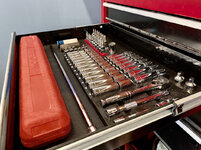
I'm impressed! Pretty awesome how you are able to take a photo and translate it into dimensions to build a 3D model. On something like that ratchet/extension tray. Is that solid inside, or hollow?
Thanks! Yeah, the image tracing was pretty neat! You can "calibrate" the image by measuring two known points and telling F360 the value. It worked pretty well, but the biggest issue is lens distortion (minor) and perspective (this is a bigger problem). I'm sure there's a way to compensate for perspective with software but I don't know it off the top of my head.
The ratchet tray is mostly hollow. Usually 3D prints have solid "walls" and tops and bottoms, and you specify how many layers thick they are. Then the inside void is printed with "infill", which is like a honeycomb support structure. It can actually be many shapes (grid, triangles, hexagons, etc) and you set the density. For this one I used an infill pattern called Gyroid, set at only 5%.
Here's a screen shot of the sliced model halfway through so you can see what it looks like on the inside:
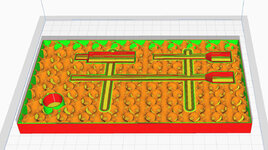
If I printed something this large, solid, it would take up my whole roll of filament @ ~$20, and probably take 3 yrs to print

As sliced, this cost about $1.40 and took 8 hrs.


















 — I need to revisit that as it's pretty similar to what I'm doing.
 , it even connected to my Octoprint instance and loaded about 15 "sensors" that can be used as automation triggers. (Print finished... blink lights... etc). I also have a few status icons set up in my dashboard:


