

You are using an out of date browser. It may not display this or other websites correctly.
You should upgrade or use an alternative browser.
You should upgrade or use an alternative browser.
Recommend a 3D printer?
- Thread starter mv213
- Start date
IndyGarage
Well-known member
Same experience with the Ender 3 for me.I also went with creality and bought an Ender 3 pro a couple months ago. It printed perfectly right out of the box but I wanted to bulletproof it and be able to print high temp filaments.
Using the printer is the easy part, figuring out a cad program, slicer settings, and how to modify your firmware takes some time but has been well worth it IMO
If you're just looking to print STL files off the internet you should be up and running in 2-3 hours its pretty amazing really
I bought one six months ago and the first print out of the box was good and I've made dozens since with virtually no adjustments. It literally took less than an hour to set up.
Recommendations come down to what your goals are and what kind of features you have to have along with your ability to modify the printer and understanding of coding.What everyone using for 3D printer? What are some things you with you got or mistakes you learned. Looking to get one here soon.
Thanks
If you want something out of the box ready to print and reliable with some high end features, i.e. dual extruder, built in enclosure, go with a Prusa or a Flashforge. They are pricier for the build volume you get but they just plan work and take out some of the frustration you get when you are just starting.
If you are fine with tinkering the Creality printers and their clones are a good value for what you get plus there is a ton of upgrades made for them as you grow with the hobby. While I like creality printers, the creality branded "upgrades" are junk.
If you really want to start from the ground up you can look at doing one of the Voron kits and customize every bit of it. These are corexy based and can print very large volumes at very high speeds. I would not recommend this route for someone new to 3D printing since it can take some work to get them up and running and more tweaking to start printing.
I don't have any experience with resin printers so someone else will need to chime in here.
No matter what route you go you are going to have failed prints, the key is understanding why it failed and some times it is simply it was beyond the capabilities of your printer.
Note about custom firmware. It can be very intimidating but if you go with one of the more popular printers there is probably a custom firmware already close to what you are looking for. There are lots of good videos and resources out there too.
I am running a modified Ender 5. I am running a Big Tree Tech SKR E3 mini board, Dual Z, Linear rails, Microswiss direct drive and all metal hot end and a wham bam flex plate. I am running custom Marlin firmware but I have plans to swap to klipper.
4 FN 27
ALLIANCE MEMBER
Recommendations come down to what your goals are and what kind of features you have to have along with your ability to modify the printer and understanding of coding.
@will335i hits the nail on the head here.
I just got into 3D Printing about a year ago. The design side of things I have been doing forever. I learned the hard way and bought a Makerbot Replicator as my first printer. Complete waste of time (and money) unless you like using glue to get your prints to stick to a cold bed (no heat option). Makerbot does not allow you to access the G-Code thus you cannot see anything other than a result and nearly impossible to tune other than factory calibrations.
I made the choice based on a Consumer Reports and wished I had looked else where for a second opinion. Lesson learned.
After doing research and looking here on GJ I ended up with a Pursa i3 MK3S+. Bought it assembled. Arrived August 24th and I have done 300+ hours of printing since without a hick-up. I did recalibrate the Bed from Zero once just to try it.
I love having the ability to add a program stop to add hardware, magnets or bearing where needed. Color changes are a nice feature too. Reliability and safe are a concern. More so the safety side of things. Most of my prints run overnight in the shop while I am up at the house.
The only thing I don't like about it is the Print Size is limited. But I have made it work by doing multi-part assemblies. Hoping the come out with a bigger foot print. I would like a 24+ x 24+ bed with about 16 min height. 2 Color printing would be a plus too.
This one was finished at about 6 am after 19 hours of printing:
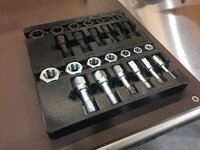


Used Solidworks 2021 to create the design. Took about 4 hours to measure everything and create the assembly. Out putting the STL took about 10 seconds. Slicing took me about 15 minutes. I tried to add a program stop first to add 6 Magnets @ 2.6mm. That worked.
Next I tried adding a Color change stop at .6mm from the top. That didn't work? Not sure what happened??? Probably operator error. I'll dig into that when I get home tonight. I printed the base in black and wanted to do the lettering in white.
Everyday I try something new with either Solidworks, slicing or the printer.
On the hunt for a large format printer...and still looking at the 3D Metal Printing. Really want to get into that!!!
Cruzan80
Well-known member
To be clear, the Replicator 2 (and Flashforge Creator X) do have a heated bed. And with Sailfish firmware (most modern ones are already loaded with this), you can look at regular G-code, and then simply run it thru a converter program to export out .x3g (what the printer actually reads). Running a heated bed with simple single pane glass means (at most) hairspray, and often simply dry.@will335i hits the nail on the head here.
I just got into 3D Printing about a year ago. The design side of things I have been doing forever. I learned the hard way and bought a Makerbot Replicator as my first printer. Complete waste of time (and money) unless you like using glue to get your prints to stick to a cold bed (no heat option). Makerbot does not allow you to access the G-Code thus you cannot see anything other than a result and nearly impossible to tune other than factory calibrations.
I made the choice based on a Consumer Reports and wished I had looked else where for a second opinion. Lesson learned.
The original Replicator is a decade old printer, which is no longer being produced.
I have the Prusa i3 mk3 since I think 2018 (preordered in 2017). Really satisfied, I load up and it works practically always. Only time I had issues was with fine tuning the flexible materials but they work too. I think I paid around 700-800€ back then. Didn't intentionally make stuff to sell, but eventually I did put some things I modelled (for motorcycles) on ebay and must've earned a couple grand with it by now, there's some 40€ every month...
4 FN 27
ALLIANCE MEMBER
To be clear, the Replicator 2 (and Flashforge Creator X) do have a heated bed. And with Sailfish firmware (most modern ones are already loaded with this), you can look at regular G-code, and then simply run it thru a converter program to export out .x3g (what the printer actually reads). Running a heated bed with simple single pane glass means (at most) hairspray, and often simply dry.
The original Replicator is a decade old printer, which is no longer being produced.
From Makerbot Support:
"Hello,
Thank you for contacting MakerBot Support.
Unfortunately, our Replicator+ printers do not have a heated bed feature. Sorry, for any inconvenience this might be causing.
-Dee
MakerBot Support"
Mine does not have a heated bed. I have warmed it up using a heat gun and taping cardboard over the openings which has allowed for a couple of good prints. Running it in an 80°+ environment helps too.
The Pursa on the other hand I turn it on, preheat the system while I load up the SD card, start the print and walk away.
Prusa has incredible instructions and comes with gummy bears.
They also have 24/7 tech support via chat that is invaluable.
OP, I was in your position about a year ago and decided to get a Prusa and don't regret it one bit. These days, though, everyone is talking about the Bambu Lab X1 that is supposed to make most other 3D printers appear obsolete. It is almost out, so you may want to wait for some independent reviews before making a decision.
Cruzan80
Well-known member
Again, I was referring to the Replicator 2, a printer first released in 2012, with a wood frame. The Flashforge Creator Pro was rleased in 2016, and the Creator Pro 2 was released in 2020.
The Replicator Plus shows a review date of 2016 via PC Mag, which is a different printer.
Hence my.comment about clarifying any confusion. Sounds like the one you have doesnt have a heated bed, but most of the Makerbots and Flashforges I have encountered do.
The Replicator Plus shows a review date of 2016 via PC Mag, which is a different printer.
Hence my.comment about clarifying any confusion. Sounds like the one you have doesnt have a heated bed, but most of the Makerbots and Flashforges I have encountered do.
Aaron_W
Well-known member
Again, I was referring to the Replicator 2, a printer first released in 2012, with a wood frame. The Flashforge Creator Pro was rleased in 2016, and the Creator Pro 2 was released in 2020.
The Replicator Plus shows a review date of 2016 via PC Mag, which is a different printer.
Hence my.comment about clarifying any confusion. Sounds like the one you have doesnt have a heated bed, but most of the Makerbots and Flashforges I have encountered do.
This also highlights something important with 3D printing. It is a new technology that is seeing rapid improvements. There was a big shift around 2016-17 that has seen big increases in quality and a crash in prices.
There are $1000-1500 3D printers available today that can match the performance of pro level printers from just 7-8 years ago.
$200 printers have reached a level where they are quite useful, a huge jump in quality from the rather crude $1000+ hobby machines that were available 10-12 years ago.
This is because some patents ran out in late 2000's or early 2010's. The company which held the patent was I think the only one that made them before (for industrial use only, and extremely expensive...).This also highlights something important with 3D printing. It is a new technology that is seeing rapid improvements. There was a big shift around 2016-17 that has seen big increases in quality and a crash in prices.
There are $1000-1500 3D printers available today that can match the performance of pro level printers from just 7-8 years ago.
$200 printers have reached a level where they are quite useful, a huge jump in quality from the rather crude $1000+ hobby machines that were available 10-12 years ago.
milkovich
Well-known member
+1 ender 3 pro. Bought it for the kids and I use it as much as they do. The knowledge base is pretty deep and the aftermarket is huge. Right out of the box it was making useable prints, but there's a learning curve if you're a perfectionist or run into issues.
I think it's a great first (and then backup) printer if you get really into it.
I think it's a great first (and then backup) printer if you get really into it.
The new kid on the block is the Bambu X1; it uses lidar, vibration calibration, optional automated material system (AMS), and is in the $1000-1500 range. The big difference is the speed in which it can print; magnitudes faster.
Before Bambu rolled on the scene, it was really a choice between Prusa, Flashforge and Creality as the main players. Prusa and Creality are open printers and Flashforge being enclosed. There are filaments that like enclosed printing; so keep that in mind.
You can grab a first gen Flashforge Creator Pro on ebay for ~$330 USD; which is a pretty good deal, considering these were $1200 printers just a few years ago.
The upgrade path is Magnetic PEI spring steel build plate > Microswiss all metal hot end > TMC 2208 steppers (for near silent printing).
Before Bambu rolled on the scene, it was really a choice between Prusa, Flashforge and Creality as the main players. Prusa and Creality are open printers and Flashforge being enclosed. There are filaments that like enclosed printing; so keep that in mind.
You can grab a first gen Flashforge Creator Pro on ebay for ~$330 USD; which is a pretty good deal, considering these were $1200 printers just a few years ago.
The upgrade path is Magnetic PEI spring steel build plate > Microswiss all metal hot end > TMC 2208 steppers (for near silent printing).
byoungblood
Well-known member
I've had an Ender 3 Pro for about two and a half years now, before that I briefly owned an Anycubic Delta printer. While the Delta is faster and (arguably) can do a little better with fine detail, it was a pill when it came to leveling and other mechanical quirks that made me spend more time working on it than printing. Ender 3 does everything I really need a 3D printer for.
My only "upgrades" have been to connect it to a Raspberry Pi to use with Octoprint, a PEI bed, and solid silicone bed mounts. It stays in the basement so noise isn't an issue. An enclosure has been a "'round 'tuit" project for a while. I have had some prints warp or come partially loose from the bed because of the temperature variations down in my basement. Usually has only happened when printing with PETG, PLA doesn't seem to be as picky.
My only "upgrades" have been to connect it to a Raspberry Pi to use with Octoprint, a PEI bed, and solid silicone bed mounts. It stays in the basement so noise isn't an issue. An enclosure has been a "'round 'tuit" project for a while. I have had some prints warp or come partially loose from the bed because of the temperature variations down in my basement. Usually has only happened when printing with PETG, PLA doesn't seem to be as picky.
Same here. Larger prints with sharp corners and high infill density can pull up slightly with PLA and PETG on my non-enclosed Prusa. I'd like to build an enclosure, but will probably just go with one from Clearview Plastics. They look alright to me.I have had some prints warp or come partially loose from the bed because of the temperature variations down in my basement. Usually has only happened when printing with PETG, PLA doesn't seem to be as picky.
I've had an Ender 3 Pro for about two and a half years now, before that I briefly owned an Anycubic Delta printer. While the Delta is faster and (arguably) can do a little better with fine detail, it was a pill when it came to leveling and other mechanical quirks that made me spend more time working on it than printing. Ender 3 does everything I really need a 3D printer for.
My only "upgrades" have been to connect it to a Raspberry Pi to use with Octoprint, a PEI bed, and solid silicone bed mounts. It stays in the basement so noise isn't an issue. An enclosure has been a "'round 'tuit" project for a while. I have had some prints warp or come partially loose from the bed because of the temperature variations down in my basement. Usually has only happened when printing with PETG, PLA doesn't seem to be as picky.
Same here. Larger prints with sharp corners and high infill density can pull up slightly with PLA and PETG on my non-enclosed Prusa. I'd like to build an enclosure, but will probably just go with one from Clearview Plastics. They look alright to me.
Surprised you guys are having problems with PETG; it normally sticks so hard it breaks apart print bed surfaces.
PEI textured heated bed at 80c and Overture black PETG at 255c (white/grey at 240-245c) has been producing nothing but perfect bed adhesion.
Surprised you guys are having problems with PETG; it normally sticks so hard it breaks apart print bed surfaces.
Heated bed at 80c and Overture black PETG at 255c (white/grey at 240-245c) has been producing nothing but perfect bed adhesion.
It's only very specific-shaped parts that lift a little on me, and it's only a very small portion of the part. I've asked around and the general consensus is that it's just a fact of life that's impossible to completely prevent without an enclosure for the type of parts I'm printing.
byoungblood
Well-known member
Surprised you guys are having problems with PETG; it normally sticks so hard it breaks apart print bed surfaces.
PEI textured heated bed at 80c and Overture black PETG at 255c (white/grey at 240-245c) has been producing nothing but perfect bed adhesion.
I haven't had a problem in a while, but I had a couple of moderate sized PETG prints warp at the corners. But yes, the rest of the print was very firmly attached to the bed. That's where the magnetic PEI build surfaces shine, I just lift the whole thing off the bed, give it a small flex, and usually the part comes off without any damage.
4 FN 27
ALLIANCE MEMBER
Pursa i3 MK3S+: Embedded Magnets and a color change.
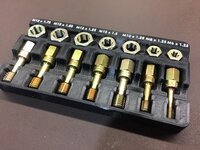
I see I mixed up the M10 Taps.
I see I mixed up the M10 Taps.
My wife surprised me with a Ender 3v2 for my birthday this year and I couldn’t be happier. As a novice it’s easy to setup and tweak and the interface is pretty straight forward. I’d say it’s a great entry level machine and will serve past just novice honestly. My brother in law guided her and he’s pretty heavy into printing. I had to muck with my bed at the beginning but once I switched out the springs it’s been golden since. And I bet you can get a heck of a deal this goofy season on one since a new model is out (or will be soon I think).
BeansBaxter
Active member
- Joined
- Jun 3, 2008
- Messages
- 33
The upgrade path is Magnetic PEI spring steel build plate > Microswiss all metal hot end > TMC 2208 steppers (for near silent printing).
Is that still the best FFCP hotend upgrade?
86turbodsl
Well-known member
Dang that's a lot of time to reverse engineer those parts. Nice result though!@will335i hits the nail on the head here.
I just got into 3D Printing about a year ago. The design side of things I have been doing forever. I learned the hard way and bought a Makerbot Replicator as my first printer. Complete waste of time (and money) unless you like using glue to get your prints to stick to a cold bed (no heat option). Makerbot does not allow you to access the G-Code thus you cannot see anything other than a result and nearly impossible to tune other than factory calibrations.
I made the choice based on a Consumer Reports and wished I had looked else where for a second opinion. Lesson learned.
After doing research and looking here on GJ I ended up with a Pursa i3 MK3S+. Bought it assembled. Arrived August 24th and I have done 300+ hours of printing since without a hick-up. I did recalibrate the Bed from Zero once just to try it.
I love having the ability to add a program stop to add hardware, magnets or bearing where needed. Color changes are a nice feature too. Reliability and safe are a concern. More so the safety side of things. Most of my prints run overnight in the shop while I am up at the house.
The only thing I don't like about it is the Print Size is limited. But I have made it work by doing multi-part assemblies. Hoping the come out with a bigger foot print. I would like a 24+ x 24+ bed with about 16 min height. 2 Color printing would be a plus too.
This one was finished at about 6 am after 19 hours of printing:
Used Solidworks 2021 to create the design. Took about 4 hours to measure everything and create the assembly. Out putting the STL took about 10 seconds. Slicing took me about 15 minutes. I tried to add a program stop first to add 6 Magnets @ 2.6mm. That worked.
Next I tried adding a Color change stop at .6mm from the top. That didn't work? Not sure what happened??? Probably operator error. I'll dig into that when I get home tonight. I printed the base in black and wanted to do the lettering in white.
Everyday I try something new with either Solidworks, slicing or the printer.
On the hunt for a large format printer...and still looking at the 3D Metal Printing. Really want to get into that!!!
No, there are a lot of better options than the microswiss. The 3d printing subreddits are a good place to stay on top of the latest and greatest but things have been moving fast.Is that still the best FFCP hotend upgrade?
BeansBaxter
Active member
- Joined
- Jun 3, 2008
- Messages
- 33
Yeah, I’m relatively up-to-date on the scene but I don’t know about the FFCP specifically. I thought it might have some proprietary carriage that couldn’t use the more recent hotends for some reason.No, there are a lot of better options than the microswiss. The 3d printing subreddits are a good place to stay on top of the latest and greatest but things have been moving fast.
Sorry I missed the FFCP part. That I don't know but I have found if there is a desire to make it work the 3D printing community will find a way. Whether it's retailers designing adapters or the community creating prints to cobble things together. I have the microswiss hotend and direct drive carriage but wanted to make the jump to linear rails. Luckily I found a print that makes it work so I didn't have to get a new direct drive or wait for microswiss to finally release their version.
LeeG
Well-known member
I just ordered a Prusa MK3S+. Hopefully I’ll be able to give some input in a few weeks.
I guess it depends on what your definition of best is. Is there another you prefer?Is that still the best FFCP hotend upgrade?
BeansBaxter
Active member
- Joined
- Jun 3, 2008
- Messages
- 33
My knowledge of Micro Swiss all metal hotends is from their kits for Creality printers. In that arena, I would say any of the newer style hotends with bimetallic, thin-wall heatbreaks are going to give better performance. The Dragonfly, for example, is a drop-in replacement with a similar price to the Micro Swiss and generally regarded as a better performer. But the FFCP is a bit of a different beast and one that I'm not familiar with which is why I asked.I guess it depends on what your definition of best is. Is there another you prefer?
My knowledge of Micro Swiss all metal hotends is from their kits for Creality printers. In that arena, I would say any of the newer style hotends with bimetallic, thin-wall heatbreaks are going to give better performance. The Dragonfly, for example, is a drop-in replacement with a similar price to the Micro Swiss and generally regarded as a better performer. But the FFCP is a bit of a different beast and one that I'm not familiar with which is why I asked.
It sounds like by better performance you mean high flow rates (for faster printing). I haven't messed around with any bimetallic thin walled heatbreaks (not even sure anyone makes them for ffcp), but likely wouldn't consider it for my own use because the hardened steel used in the microswiss hotends gives me the longevity (abrasive filaments) and heat limits im looking for.
BeansBaxter
Active member
- Joined
- Jun 3, 2008
- Messages
- 33
Higher flow rates are definitely one aspect of it. But the thin-walled heatbreaks are also better at preventing heat creep, which is a frequently-reported problem with the Micro Swiss hotend, or at least the Creality replacement kit ones.It sounds like by better performance you mean high flow rates (for faster printing). I haven't messed around with any bimetallic thin walled heatbreaks (not even sure anyone makes them for ffcp), but likely wouldn't consider it for my own use because the hardened steel used in the microswiss hotends gives me the longevity (abrasive filaments) and heat limits im looking for.
I'm not aware of any differences in abrasive filament performance. As far as I know, the bimetalic thin-walled heatbreaks don't suffer any longevity issues with abrasives, it's all about nozzle wear. And the heat limits are between 450–500 ºC, depending on the particular hotend.
I'm certainly not the expert at these things. But I do see that the various BOM printers like Annex Engineering, Voron, RatRig, etc. appear to all spec this style of hotend. I haven't seen any of them spec a Micro Swiss.
But as you said, if something's working well for you there's not much reason to look for something else. Thanks for the discussion.
sh944
ALLIANCE MEMBER
Qidi X-Plus here, it is my first machine and I have been running it about two years now. I had a logic board fail on it within the first year, they got a replacement out to me quickly, aside from that, it’s been consistently good. I’ve been working with TurboCAD for years so that’s what I draft in, and I use the Qidi slicer software to prepare the gcode. I haven’t done some of the really nice work that some of y’all have posted but it’s been very handy for a lot of small parts, brackets, spacers, etc for various projects I do. No yoda heads here… lol. For example, I just completed a pergola for my house, welded steel with vertical walls of composite decking. I made about 150 spacers that lock in the slats for that project, see the picture below.
One of my engineers has been telling me to switch to ASA filament, anyone else using it? I’ve printed mostly PLA+ that I get from 3D-Fuel and it’s done well by me but I think I am ready to step my game up and start playing with other materials.
One of my engineers has been telling me to switch to ASA filament, anyone else using it? I’ve printed mostly PLA+ that I get from 3D-Fuel and it’s done well by me but I think I am ready to step my game up and start playing with other materials.
Last edited:
The biggest problem with PLA is that it is exceptionally hygroscopic and fails quickly when placed under prolonged tension.Qidi X-Plus here, it is my first machine and I have been running it about two years now. I had a logic board fail on it within the first year, they got a replacement out to me quickly, aside from that, it’s been consistently good. I’ve been working with TurboCAD for years so that’s what I draft in, and I use the Qidi slicer software to prepare the gcode. I haven’t done some of the really nice work that some of y’all have posted but it’s been very handy for a lot of small parts, brackets, spacers, etc for various projects I do. No yoda heads here… lol. For example, I just completed a pergola for my house, welded steel with vertical walls of composite decking. I made about 150 spacers that lock in the slats for that project, see the picture below.
One of my engineers has been telling me to switch to ASA filament, anyone else using it? I’ve printed mostly PLA+ that I get from 3D-Fuel and it’s done well by me but I think I am ready to step my game up and start playing with other materials.
PETG, ABS and ASA is where you want to aim; PETG is odorless and easy to print compared with ABS or ASA.
Anecdotally, I have a bunch of PETG outdoor railing attachments that are under tension holding a wire that I put up about 5 years ago and they still look the same from the day I printed them. Direct sunlight, Canadian winters, humid summers, rain, etc.
Overture Black PETG (Amazon); printed at 255c.
Oldbear
Well-known member
Late to the party but I like my Creality Ender 3 v2. I have added a metal extruder assembly with an improved Bowden tube, a CR leveller, better bed springs, moved the roll holder to the side of the machine and a few other 3D printed items. I still have the printer head fan conversion to do (I'm printing parts for it right now) and the stepper motor smoother install. I'm happy with the results so far.
niget2002
Well-known member
I can not recommend my printer at all.
It was a cheap Chineese knock off of the prusa i3 made by Geeetech. It works great now, but took a ton of work to get it to this point. New controller, mods to the design. I even have it mounted in an enclosure now.
It works well with PLA and ABS, but the hot end can't support printing with anything hotter. The best thing it has going for it is that there's no 3d printed parts on it, so no worries about parts getting soft when printing hotter materials.
I'm at the point with it where I'm thinking it's time to replace it with something better. Not sure when I'll get around to that, though.
It was a cheap Chineese knock off of the prusa i3 made by Geeetech. It works great now, but took a ton of work to get it to this point. New controller, mods to the design. I even have it mounted in an enclosure now.
It works well with PLA and ABS, but the hot end can't support printing with anything hotter. The best thing it has going for it is that there's no 3d printed parts on it, so no worries about parts getting soft when printing hotter materials.
I'm at the point with it where I'm thinking it's time to replace it with something better. Not sure when I'll get around to that, though.