To avoid these ads, REGISTER NOW!

Remote Temp Sensor, Ethernet Connected?

paulsomlo

Well-known member
Joined
Jul 16, 2013
Messages
3,859
Location
Northern Colorado
I spend a few days a week at the girlfriends house, 60 miles away. I'd like some assurance that my furnace at home is working and my pipes aren't freezing.

There are lots of wifi solutions, here's the one sitting in my cart at Amazon: https://www.amazon.com/gp/product/B0872ZWV8X/ref=ox_sc_act_title_1?smid=A2KZ7X05DCDJDL&psc=1

Maybe I'm being pessimistic here, but I'm anticipating wifi problems, dropped connections, etc.. Is there any cheap solution that will plug directly into an ethernet port on my router and allow me to read the temp in the room from anywhere? I've seen industrial type sensors, but big $$$ - I'd like something under $40.
 
To avoid these ads, REGISTER NOW!

klassenl

Well-known member
Joined
Feb 20, 2016
Messages
713
Location
Southern Alberta
The other option is to get a wifi enabled thermostat. I have 2 simple Honeywell stats. They work very well and they will send temp alerts
 
OP
P

paulsomlo

Well-known member
Joined
Jul 16, 2013
Messages
3,859
Location
Northern Colorado
The other option is to get a wifi enabled thermostat. I have 2 simple Honeywell stats. They work very well and they will send temp alerts

I looked at that - but that gets me back to wifi, and I'd rather have some kind of solution that's hardwired to my router, if possible. And right now, I've got this ancient mercury bubble thermostat, and while not hi tech, it's certainly been reliable. And when I'm away for a few days at a time, I need reliable more than anything.
 

DeeKay

Well-known member
Joined
Nov 25, 2020
Messages
448
Location
Colorado
I looked at that - but that gets me back to wifi, and I'd rather have some kind of solution that's hardwired to my router, if possible. And right now, I've got this ancient mercury bubble thermostat, and while not hi tech, it's certainly been reliable. And when I'm away for a few days at a time, I need reliable more than anything.

If your wifi is out more than likely your ethernet will be dead as well.

It sounds like you're looking for something like an auto-dialer that uses a dedicated phone line or cellular to send messages. We use them on our remote plants to send alarms if we loose power, internet or have other communication problems. Unfortunately for you these things cost way more than $40 plus you need a dedicated land line.

maybe something like this would work but it's wifi, I haven't seen any POE products that aren't over like $150. The temperature + water sensor might be a good idea though; pipes can break even if the furnace is running fine...**** happens.
https://www.amazon.com/dp/B07TS93Z94/?tag=atomicindus08-20
 
Last edited:

Yankeefarmer

Well-known member
Joined
Jul 25, 2011
Messages
1,169
Location
Connecticut
It just so happens that I ordered one of those Govee devices earlier today to monitor temperatures in my shop. It’s due to arrive on Sunday, so I’ll post an update/review sometime next week.
For the last few years, I’ve had a MRCOOL mini split in my original shop, and an Emerson Sensi WiFi thermostat in the same building controlling the propane furnace. Both give me current temperature information on demand, but neither actually log the temperature readings over time. That’s why I decided to give the Govee thing a try.

I would not be concerned about signal drops over WiFi if you locate the device close enough to your router/access point. Only once over the last 10+ years have we lost WiFi, and that was because the router power supply failed, so a wired Ethernet connection would have been down too. It is not uncommon for our internet connection to go down for a short period of time, but that is on our ISP’s system, so our wired SmartThings hub goes down at those times too.
 

Yankeefarmer

Well-known member
Joined
Jul 25, 2011
Messages
1,169
Location
Connecticut
Paulsomlo, you may have jinxed the Govee!🙂 Mine arrived yesterday, and I set it up at about 4 pm. It looks like a slightly different model, because the one I bought has a local LCD display.
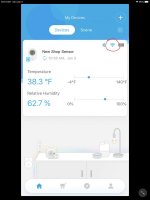
Around 10 pm, I noticed that the WiFi indicator in the app was red with an exclamation point, suggesting that the WiFi connection had dropped. But a download of logged temperature and humidity data indicated the data was up to date. This morning, when I checked around 8 am, it was clear that the WiFi had gone down, because a data export showed no data after around 10 pm.

I walked out to the shop around 10 am, and the local display on the device indicated WiFi was online. If I recall correctly, the app was still indicating the device was offline. When I checked the device’s WiFi settings (which I could not do remotely) I noticed that it apparently resent them to the device, because the local WiFi indicator flashed, went steady, and the app told me WiFi connection was successful. After this, the app indicated correctly, and a download showed that the entire period’s history was intact and available.

Based on the above, it looks like the device is going to serve the purpose for which I bought it, but has already confirmed the OP’s fear of losing WiFi. This is weird, because I have numerous WiFi IOT devices, including Nest cams, SmartThings switches, Leviton WiFi switches, a Schlage WiFi deadbolt, MyQ garage door hub, Sensi thermostat, and others, and they are all reliable through WiFi. I’ll provide an update here later in the week after I get more run time on this thing.

The pictures posted below show the device just propped up in my shop, and the app display where I circled the WiFi status indicator in red.
 

Attachments

  • 3EA68773-6024-4E2C-BFAE-5EEC14C7F7D5.jpg
    3EA68773-6024-4E2C-BFAE-5EEC14C7F7D5.jpg
    44.2 KB · Views: 44
  • 65CB9AD3-40A3-48C9-9293-7FB605B35BFC.jpg
    65CB9AD3-40A3-48C9-9293-7FB605B35BFC.jpg
    114.9 KB · Views: 51
OP
P

paulsomlo

Well-known member
Joined
Jul 16, 2013
Messages
3,859
Location
Northern Colorado
That was my fear - I just haven't had good experiences with wifi. The computer I'm on right now loses connection periodically, the TV in the other room loses it's connection now and then, and at home, I sometimes can't connect to wifi with my phone.

What I need, is a cat who can read the thermostat, answer the phone, and speak.
 

Yankeefarmer

Well-known member
Joined
Jul 25, 2011
Messages
1,169
Location
Connecticut
That was my fear - I just haven't had good experiences with wifi. The computer I'm on right now loses connection periodically, the TV in the other room loses it's connection now and then, and at home, I sometimes can't connect to wifi with my phone.

What I need, is a cat who can read the thermostat, answer the phone, and speak.
:beer:

Well, if your various devices lose their WiFi at the same time, you might consider replacing your router/access point. If they lose it at different times, maybe a simple standalone digital thermometer and a camera aimed at it. If I had a WiFi camera looking at this Govee device, I am confident I could have read it, because my other devices out there were all online throughout.
 
OP
P

paulsomlo

Well-known member
Joined
Jul 16, 2013
Messages
3,859
Location
Northern Colorado
:beer:

Well, if your various devices lose their WiFi at the same time, you might consider replacing your router/access point. If they lose it at different times, maybe a simple standalone digital thermometer and a camera aimed at it. If I had a WiFi camera looking at this Govee device, I am confident I could have read it, because my other devices out there were all online throughout.

That's actually a pretty good idea! And I can see if the house is burning down as well!
 

bonneyman

Well-known member
Joined
Apr 22, 2010
Messages
8,757
Location
Desert SW
That was my fear - I just haven't had good experiences with wifi. The computer I'm on right now loses connection periodically, the TV in the other room loses it's connection now and then, and at home, I sometimes can't connect to wifi with my phone.

What I need, is a cat who can read the thermostat, answer the phone, and speak.

Robots are getting better all the time ya know! :lol_hitti
 

ripperd

Well-known member
Joined
Jul 2, 2014
Messages
2,041
Location
Twin Cities, MN
I looked at that - but that gets me back to wifi, and I'd rather have some kind of solution that's hardwired to my router, if possible. And right now, I've got this ancient mercury bubble thermostat, and while not hi tech, it's certainly been reliable. And when I'm away for a few days at a time, I need reliable more than anything.

Honestly, a wifi thermostat is just what you need, and will actually improve your life given your situation.

I have a honeywell something or another and it (with its cloud app) can do exactly what you want to do. It can alert you about problems and such. And it can also alert you that the device no longer is sending cloud updates indicating your device dropped offline. I have had it 3 years and have never had it drop offline. If you have poor wifi you might want to investigate that in and of itself. The other thing that you can do with it that you can't do with your existing setup is remotely change the setpoint. Say you are going to be gone for a few days. Once you arrive at your destination you can then turn down the temp a few degrees. Then a few hours before you get home, you can set it back to the normal temperature. This will save you $$$.
 

jlv03

Well-known member
Joined
Jan 19, 2020
Messages
343
Location
SE IA
There are certain models of Honeywell that connect to the Internet via an Ethernet Gateway. From the Redlink Gateway it communicates to the thermostats and other sensors using a proprietary (not WiFi) wireless signal. Maybe that might work?
 
OP
P

paulsomlo

Well-known member
Joined
Jul 16, 2013
Messages
3,859
Location
Northern Colorado
Honestly, a wifi thermostat is just what you need, and will actually improve your life given your situation.

I have a honeywell something or another and it (with its cloud app) can do exactly what you want to do. It can alert you about problems and such. And it can also alert you that the device no longer is sending cloud updates indicating your device dropped offline. I have had it 3 years and have never had it drop offline. If you have poor wifi you might want to investigate that in and of itself. The other thing that you can do with it that you can't do with your existing setup is remotely change the setpoint. Say you are going to be gone for a few days. Once you arrive at your destination you can then turn down the temp a few degrees. Then a few hours before you get home, you can set it back to the normal temperature. This will save you $$$.

My concern is that I would be giving up reliability - does it have a failsafe, where it defaults to say, 50 deg F?

I do turn the thermostat down to 58 when I leave, but it is awfully cold when I come home. Might be nice to be able to turn down to 50 even, then turn it back up before I leave for the hour plus drive.
 
OP
P

paulsomlo

Well-known member
Joined
Jul 16, 2013
Messages
3,859
Location
Northern Colorado
There are certain models of Honeywell that connect to the Internet via an Ethernet Gateway. From the Redlink Gateway it communicates to the thermostats and other sensors using a proprietary (not WiFi) wireless signal. Maybe that might work?

I'll look into that, thank you.
 

Yankeefarmer

Well-known member
Joined
Jul 25, 2011
Messages
1,169
Location
Connecticut
My concern is that I would be giving up reliability - does it have a failsafe, where it defaults to say, 50 deg F?

...

The nice thing about a WiFi thermostat is that it functions just like a regular programmable thermostat, and doesn’t need WiFi to function. The WiFi is just a convenient way to program it or control it without having to physically be in the room.
 

TonyG109

Well-known member
Joined
Aug 22, 2016
Messages
93
Location
Maryland's Eastern Shore
I know you said you don't want WIFI, but I have used a Honeywell RTH6580WF thermostat (or one of it's many variants) in the house for maybe 10? years or so and it's been absolutely reliable. I replaced a Nest in the garage when it died after a short period with the same style Honeywell thermostat about a year ago and, again, it's been totally reliable.

Even if internet or just the WIFI goes down, the thermostat will pick up again right where it left off when the connections is automatically re-established.

If many of your devices keep intermittently losing a WIFI connection, you may need to troubleshoot that issue. Good luck!
 
OP
P

paulsomlo

Well-known member
Joined
Jul 16, 2013
Messages
3,859
Location
Northern Colorado
The nice thing about a WiFi thermostat is that it functions just like a regular programmable thermostat, and doesn’t need WiFi to function. The WiFi is just a convenient way to program it or control it without having to physically be in the room.

My biggest concern, is what happens when the batteries die? Will it default to some temp where my pipes won't freeze?
 
To avoid these ads, REGISTER NOW!

bonneyman

Well-known member
Joined
Apr 22, 2010
Messages
8,757
Location
Desert SW
My concern is that I would be giving up reliability - does it have a failsafe, where it defaults to say, 50 deg F?

I do turn the thermostat down to 58 when I leave, but it is awfully cold when I come home. Might be nice to be able to turn down to 50 even, then turn it back up before I leave for the hour plus drive.

Most electronic thermostats of the past had default minimums and maximums programmed in. Say 45 and 90. If the indoor temp hit one of those limits the stat would automatically bring on the appropriate unit. I don't think they were adjustable but perhaps some models were - surely the new fangled units have something similar.
 

Yankeefarmer

Well-known member
Joined
Jul 25, 2011
Messages
1,169
Location
Connecticut
A WiFi thermostat is powered by 24 vac, coming from the transformer built into your heating system (unless you have electric resistance heat with a 240 volt thermostat.) No worries about batteries dying. If there’s no power for the tstat, there’s none to turn your heat on, and you won’t likely have an internet connection to know about it anyway. Wouldn’t you head back there if you knew there was a situation to deal with?
 

ripperd

Well-known member
Joined
Jul 2, 2014
Messages
2,041
Location
Twin Cities, MN
My biggest concern, is what happens when the batteries die? Will it default to some temp where my pipes won't freeze?

Wifi uses too much power to really work well with batteries. So you will need the C wire extended from your furnace to the thermostat location if it isn't already.
 

TonyG109

Well-known member
Joined
Aug 22, 2016
Messages
93
Location
Maryland's Eastern Shore
Wifi uses too much power to really work well with batteries. So you will need the C wire extended from your furnace to the thermostat location if it isn't already.

Excellent point about the C wire that I forgot all about. The C wire is what provides low voltage to power the thermostat. I'm assuming that any type of smart or internet enabled thermostat will require a power source. If it doesn't, and batteries are optional as the main power source, then you may run into the dead battery issue.
 

Plump

Well-known member
Joined
Dec 22, 2009
Messages
537
Location
SE Wisconsin
Paulsomlo, you may have jinxed the Govee!🙂 Mine arrived yesterday, and I set it up at about 4 pm. It looks like a slightly different model, because the one I bought has a local LCD display.

Around 10 pm, I noticed that the WiFi indicator in the app was red with an exclamation point, suggesting that the WiFi connection had dropped. But a download of logged temperature and humidity data indicated the data was up to date. This morning, when I checked around 8 am, it was clear that the WiFi had gone down, because a data export showed no data after around 10 pm.

I walked out to the shop around 10 am, and the local display on the device indicated WiFi was online. If I recall correctly, the app was still indicating the device was offline. When I checked the device’s WiFi settings (which I could not do remotely) I noticed that it apparently resent them to the device, because the local WiFi indicator flashed, went steady, and the app told me WiFi connection was successful. After this, the app indicated correctly, and a download showed that the entire period’s history was intact and available.

Based on the above, it looks like the device is going to serve the purpose for which I bought it, but has already confirmed the OP’s fear of losing WiFi. This is weird, because I have numerous WiFi IOT devices, including Nest cams, SmartThings switches, Leviton WiFi switches, a Schlage WiFi deadbolt, MyQ garage door hub, Sensi thermostat, and others, and they are all reliable through WiFi. I’ll provide an update here later in the week after I get more run time on this thing.

The pictures posted below show the device just propped up in my shop, and the app display where I circled the WiFi status indicator in red.


Not saying this is an issue or not since I'm not sure about the Govee, but several camera, thermostat, etc. appliances only work on the 2.4 ghz band and not the 5ghz that newer routers are working on. I have a dual-band and even then, my old Google Chromecast won't switch to the 2.4 ghz band automatically. Just something to check out.
 

Yankeefarmer

Well-known member
Joined
Jul 25, 2011
Messages
1,169
Location
Connecticut
Not saying this is an issue or not since I'm not sure about the Govee, but several camera, thermostat, etc. appliances only work on the 2.4 ghz band and not the 5ghz that newer routers are working on. I have a dual-band and even then, my old Google Chromecast won't switch to the 2.4 ghz band automatically. Just something to check out.

Yeah, and this Govee device states that it only works on the 2.4gHz band. No worries, though, it has remained online since Sunday morning and is working well. My shop has a Ubiquiti dual band access point centrally located, so there’s great connectivity everywhere inside.
 
OP
P

paulsomlo

Well-known member
Joined
Jul 16, 2013
Messages
3,859
Location
Northern Colorado

Yankeefarmer

Well-known member
Joined
Jul 25, 2011
Messages
1,169
Location
Connecticut
I was looking at the website for my natural gas provider - they've got a $75 instant rebate on this, a Honeywell T5 wifi thermostat: ...
So, what's a "C-wire"? Is that the other lead from the 24 volt transformer secondary?

Yes, that’s all it is. Ensures 25 vac is available to the thermostat at all times. I had to add one to the propane furnace in my shop when I added my WiFi tstat. Not hard to do, but the transformer was in a different location on the furnace than the other two tstat leads.
 

Yankeefarmer

Well-known member
Joined
Jul 25, 2011
Messages
1,169
Location
Connecticut
Since back in post #8 I reported that my Govee sensor had lost WiFi connectivity within hours of configuring it, I thought it was only fair to provide a one week update. It has remained online since I reconnected it a week ago. Below is a screenshot from the app showing temperature and humidity trends inside the unseated building over the past week. I think the app graphs are a bit goofy because they are scaled by the min and max readings over the period in question, and so they tend to exaggerate the changes over the period in question. You can clearly see the daily warm up and cool down cycles. The hiccup in the humidity plot occurred when I picked the sensor up and repositioned it. It must have been sensitive to moisture in my breath. What’s nice is that you can generate a .CSV file for any period in question and it arrives in your email almost as soon as you press the export button. You can then graph it in Excel for further analysis.
 

Attachments

  • 83FA71B1-B705-4DE6-BBBA-024A707A83CC.jpg
    83FA71B1-B705-4DE6-BBBA-024A707A83CC.jpg
    17.3 KB · Views: 27
OP
P

paulsomlo

Well-known member
Joined
Jul 16, 2013
Messages
3,859
Location
Northern Colorado
A whole lot more functionality than I need, but pretty cool nonetheless!

Still debating what to do. Maybe a wifi thermostat AND the Govee, for peace of mind. My old mercury thermostat looks pretty crappy in the remodeled room, and I never did reattach it to the wall, because I planned on replacing it. It's been that way for probably 8 years now; such is bachelorhood.
 

HoosierBuddy

Well-known member
Joined
May 9, 2006
Messages
2,915
Location
Southern Indiana
In the olden days (25 years ago), we were doing exactly what you want to do using a box that connected to the phone system. It would auto dial out if the temperature dropped or rose above preset values OR if contacts were made (we used pressure switches for the equipment we were monitoring)....it would dial out and play a pre-recorded message like, "Temperature Low alarm from station 4....listen for 30 seconds" and then you could hear what was going on at the site for 30 seconds and then it would hang up.

They still sell boxes that work like that, but it would require a landline.

Likely you don't have a landline....but just thought I'd pass that along AND

had a thought that if you used a wired webcam that you could access remotely you could use that as well. Just put that thermometer you already have in good view of the webcam. Sure it wouldn't contact you automatically, but you could check it anytime you want.

Phil
 
OP
P

paulsomlo

Well-known member
Joined
Jul 16, 2013
Messages
3,859
Location
Northern Colorado
They still sell boxes that work like that, but it would require a landline.

Likely you don't have a landline....but just thought I'd pass that along AND

had a thought that if you used a wired webcam that you could access remotely you could use that as well. Just put that thermometer you already have in good view of the webcam. Sure it wouldn't contact you automatically, but you could check it anytime you want.

Phil

Actually, I do still have a landline - but it's VoIP.

Wired webcam, as in ethernet?
 

HoosierBuddy

Well-known member
Joined
May 9, 2006
Messages
2,915
Location
Southern Indiana
Actually, I do still have a landline - but it's VoIP.

Wired webcam, as in ethernet?

My webcam plugs into a usb port on my PC. If you have a laptop or PC there you'd leave it on and (I'm assuming here) you'd set up software to remotely access the pc or laptop and view the webcam.
 

littleboss

Well-known member
Joined
Feb 2, 2018
Messages
134
I have a vacation home in CO and we live in Texas. I control the propane furnace with a Nest thermostat which has a Safety temperature which you can set. If the room reaches that point it will notify you via the app.
Because I also believe in backups I bought this. https://www.amazon.com/gp/product/B088M2PZ8F/ref=ppx_yo_dt_b_asin_title_o08_s00?ie=UTF8&psc=1

It will notify me via the app if the temp drops below 40.

Then you have to worry about your wifi not working. I use a Mofi 4500 modem on Verizon tied to a TP LINK router. I have a power strip that both are plugged into. Then I have this plugged into an EZOutlet. it pings ever so often looking for a return, if not I have it rebooting my modem and router. Now all I have to worry about is the router or modem failing.

I also have a baseboard heater in my Mech room that is set to come on at 41 degrees if the furnace fails. Also a Generac that kicks in if the power fails. If I can keep the mech room from freezing the Pex in the rest of the house should be ok. I also pour rv antifreeze in the traps and toilets before we leave- just in case!

If my wifi goes down my devices will notify me. At that point I will look at the feed from my ARLO GO camera. It's running on the Verizon network and the camera is aimed at the mechanical equipment in the Mech room and also a large round dial thermometer on the wall.
My only problem would be if Verizon goes down completely I lose both my camera feed and the internet to my wifi but if that happens the chance of my furnace not working, or the Generac not kicking on is about 1,000,000 to 1.
 

cahilj

Member
Joined
Dec 30, 2018
Messages
7
Location
KS
The American Standard (Trane) 824 thermostat can use a hardwired ethernet connection.

Also- not all WiFi stats require a C (common 24vac) wire. There are multiple Honeywell models that use only battery.

I'm a HVAC guy :)
 

bigenos

Well-known member
Joined
Jul 20, 2012
Messages
218
What kind of computer do you have and is it at the house and left on? If so, find a way to interrogate the air intake temp and maybe send you an hourly email with that info.
 
OP
P

paulsomlo

Well-known member
Joined
Jul 16, 2013
Messages
3,859
Location
Northern Colorado
The American Standard (Trane) 824 thermostat can use a hardwired ethernet connection.

Also- not all WiFi stats require a C (common 24vac) wire. There are multiple Honeywell models that use only battery.

I'm a HVAC guy :)

Umm... if I'm searching correctly, that's a $350 thermostat. What I really need, is an ethernet connected remote temp sensor.

What kind of computer do you have and is it at the house and left on? If so, find a way to interrogate the air intake temp and maybe send you an hourly email with that info.

I generally shut down the computer when I leave.
 
To avoid these ads, REGISTER NOW!
Top Bottom