To avoid these ads, REGISTER NOW!

Run ethernet cable or do wireless?

jpcjguy

Well-known member
Joined
Jan 6, 2014
Messages
1,473
Location
Richmond, VA
Hi all,

So I am nearing the completion of my garage which is about 200 feet from the house. I ran extra conduit for cable/internet/etc. with the thought of running cable out to the garage. After reading a ton of posts, my head is swimming - not only on which Cat cable (5/6/6A/7/etc.) but wondering if going with a ubiquiti solution would be easier/better.
I am not running any server farm or anything - not even a gamer. Just want solid internet out there. (ok, maybe the kids will drag their Xbox out there...)
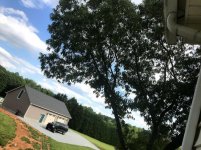
I have attached a pic that shows the corner of the house in relation to the garage and the one tree that is nearby.

On the house side, I have comcast for internet and a netgear R6400v2 router in an upstairs bedroom. I am not sure how I would route an ethernet cable to the crawlspace easily to go in the conduit to the garage, but going into the attic and to something mounted below the soffit would not be too bad.

What would be nice is a solution that one that would extend the wifi into the backyard better. Right now when I have a Sonos speaker on the patio and I am in the yard, I don't get good connection to control it.

What would y'all do as a solution? Could the ubiquiti product be suited for better yard coverage and to the garage?

Thanks!
 

Attachments

  • wifi- house.jpg
    wifi- house.jpg
    154.8 KB · Views: 140
To avoid these ads, REGISTER NOW!

Git

Well-known member
Joined
May 18, 2008
Messages
6,894
Location
S Cal
I ran extra conduit for cable/internet/etc. with the thought of running cable out to the garage.

For me personally, running 2 pairs of cat6 would be the way to go since you already ran the conduit. If you eventually wanted to get into a mesh wifi network like an Orbi, or just add an access point for wifi you would be covered. What about security cameras, etc? Hard wired is the way to go

You can use an access point like this to get wifi from your cat6
attachment.php


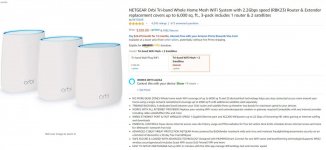
Or if your looking to upgrade your existing router, something like an Orbi with two satellites. Place one out in your garage

attachment.php
 

Attachments

  • TRI-361.jpg
    TRI-361.jpg
    85.9 KB · Views: 822
  • TRI-362.jpg
    TRI-362.jpg
    107.2 KB · Views: 810
Last edited:

wyliesdiesels

Well-known member
Joined
Aug 14, 2012
Messages
19,983
Location
Modesto, CA
Well even if you go with a wireless point to point with ubiquiti radios, you will still need to route a cable from the router to the outside. So either way you will have to do that. The radios would be less labor...

Go with CAT6 if you want to hardwire it. 6a, 7, and 8 is not necessary
 

BamaJohn911

New member
Joined
May 5, 2020
Messages
1
Location
Montevallo, AL 35115
I've been using Ubiquity for years and it is rock solid. It is not hard to install and just works. I use the point to point and then run a wi-fi access point inside the barn. It behaves like a wire between the buildings. You could put one near the router on your second floor and the other end at the shop will see it fine, maybe a touch of up-tilt at the shop. It has signal strength display so you can tune if needed. The radios can be inside a window if you don't have specific kinds of glass.

I'm having trouble with the link but search for Nano on the website, that is the current model of what I use.
 

wyliesdiesels

Well-known member
Joined
Aug 14, 2012
Messages
19,983
Location
Modesto, CA
I've been using Ubiquity for years and it is rock solid. It is not hard to install and just works. I use the point to point and then run a wi-fi access point inside the barn. It behaves like a wire between the buildings. You could put one near the router on your second floor and the other end at the shop will see it fine, maybe a touch of up-tilt at the shop. It has signal strength display so you can tune if needed. The radios can be inside a window if you don't have specific kinds of glass.

I'm having trouble with the link but search for Nano on the website, that is the current model of what I use.

nanostation M5 AC is the latest model

https://www.amazon.com/dp/B07BFJBJQ7/?tag=atomicindus08-20
 

pgray007

Well-known member
Joined
Jul 25, 2007
Messages
573
Location
Charlotte, NC area
I’ve had great luck with the UniFi/Ubiquiti stuff as well. Here’s what would be the bees knees:

UniFi UAC (replaces your router in the house)
UniFi switch in the detached. Then you can run as many hardwired things as needed and they connect to a central point in your house
UniFi AP hardwired in your house and shop (there are a bunch of permutations)
If needed, UniFi outdoor mesh AP. This can be hardwired or will “extend” your existing WiFi and cover your backyard
UniFi cloudkey manages the whole thing
Add UniFi cameras as wanted

This will give you a enterprise grade network with coverage all over your property, and seamless roaming between access points, but it’s also the most costly and requires some knowledge to configure, although it’s the easiest of the enterprise stuff, and one done basically “set and forget.” This is what I have in my house/detached after messing with everything from Cisco to consumer stuff.

Alternatively, Ubiquiti and others make “mesh” products that basically extend your WiFi from one central point. Think of this like a game of telephone where you need someone to “repeat” the message and be close enough to the origin. This is the easier/cheaper route but potentially less reliable and lower bandwidth.


Sent from my iPhone using Tapatalk
 

Git

Well-known member
Joined
May 18, 2008
Messages
6,894
Location
S Cal
I’ve had great luck with the UniFi/Ubiquiti stuff as well. Here’s what would be the bees knees:

UniFi UAC (replaces your router in the house)
UniFi switch in the detached. Then you can run as many hardwired things as needed and they connect to a central point in your house
UniFi AP hardwired in your house and shop (there are a bunch of permutations)
If needed, UniFi outdoor mesh AP. This can be hardwired or will “extend” your existing WiFi and cover your backyard
UniFi cloudkey manages the whole thing
Add UniFi cameras as wanted

This will give you a enterprise grade network with coverage all over your property, and seamless roaming between access points, but it’s also the most costly and requires some knowledge to configure, although it’s the easiest of the enterprise stuff, and one done basically “set and forget.” This is what I have in my house/detached after messing with everything from Cisco to consumer stuff.

Alternatively, Ubiquiti and others make “mesh” products that basically extend your WiFi from one central point. Think of this like a game of telephone where you need someone to “repeat” the message and be close enough to the origin. This is the easier/cheaper route but potentially less reliable and lower bandwidth.


Sent from my iPhone using Tapatalk

I am just curious - what would be the estimated cost for all this UniFi hardware?
And, what would it do better than a $300 Orbi 3 piece system?
 

jeepxj

Well-known member
Joined
Mar 2, 2008
Messages
17,831
I am just curious - what would be the estimated cost for all this UniFi hardware?
And, what would it do better than a $300 Orbi 3 piece system?

your basic 2 nanostations and 1 ap in the shop is 190 bucks. to add an AP in the house in another 80 bucks or so. the unifi AP's have much better processors in them for handling multiple devices at once.

nanostations go much much further. more stable link. more bandwidth.

edit: to go all in on the platform you'd need another 120 for a "USG" router. and 10-40 bucks for a switch.
 

pgray007

Well-known member
Joined
Jul 25, 2007
Messages
573
Location
Charlotte, NC area
I am just curious - what would be the estimated cost for all this UniFi hardware?
And, what would it do better than a $300 Orbi 3 piece system?


You can price it out on the inter webs, but I’d guess it’s probably a grand.

With the Omni (or any other “mesh” system) you’re basically using a portion of the available RF spectrum to communicate between the mesh nodes. Depending on what your environment looks like in terms of interference and structures, you might need 2-4 mesh units to “hop” from your base station out to where you need WiFi. With hardwired access points, you drop a cable to where you need WiFi, and you have full bandwidth back to your internet connection, and no worried about the intermittent mesh points losing communication or one breaking/getting unplugged and killing a significant portion of your network.

You can also use PoE (Power over Ethernet) gear and send power of the CatX cable as well. I have my central network gear on a uninterruptible power supply, so all our network gear and WiFi points stay powered and we don’t lose networking if there’s a power outage.

UniFI also strikes a good balance between “easy enough” to setup but having lots of advanced features. If you care about this stuff it’s probably 90% of a Cisco setup that costs 10X as much. If you don’t care and just want some reasonably reliable WiFi stuff in your shop the mesh stuff is OK, but if the OP already has CatX in his shop, then why not do it right?


Sent from my iPad using Tapatalk
 

MBfreak

MEMBER EMERITUS
Joined
Dec 10, 2010
Messages
2,301
Location
Linkoping , Sweden
Buy a system so you can use buried optofiber over the 200 ft distance.
This will save the system from being fried by lightning.

Ola
 

red

Well-known member
Joined
Feb 20, 2009
Messages
719
Location
Hudson Valley, NY
Had this same discussion with my brother years ago . . . he was on wifi.
After a few speed tests and "other" issues he ran cat6. Less money more reliable and faster connection with running wire.
 

Showkey

"MEMBER EMERITUS"
Joined
Aug 9, 2014
Messages
8,638
Location
Wausau WI
Another vote for a mesh system like the ORBI.
That back haul with the ORBI is NOT issue........the argument is total non sense.

As for a few years ago, mesh systems was not an option.


There are at least 10 other threads where PoE have problems especially to a separate Shop.
 

slow

Well-known member
Joined
Feb 26, 2006
Messages
2,596
Location
near Orlando
Buy a system so you can use buried optofiber over the 200 ft distance.
This will save the system from being fried by lightning.

Ola

This, Living in FL lighting is a major personal concern. So if I was do to this job, it would be 2 runs of fiber (one as a spare)
 
OP
J

jpcjguy

Well-known member
Joined
Jan 6, 2014
Messages
1,473
Location
Richmond, VA
Lots of varying opinions - but I appreciate the feedback!
If I do CAT6 cable - that is pretty straight forward with pre-terminated cable.
I don't know anything about fiber - what kind would I need - comes pre-terminated? What kind of routers/switches do I need?
 

Git

Well-known member
Joined
May 18, 2008
Messages
6,894
Location
S Cal
Another vote for a mesh system like the ORBI.
That back haul with the ORBI is NOT issue........the argument is total non sense.

As for a few years ago, mesh systems was not an option.
.

that was my thinking also...
With the Orbi type system, you have the option to run a hardline (cat6) for the backhaul if you wanted to. One Orbi satellite in the garage/shop, the main router in the house and you still have one to spare

That is why I like buying electronics like Routers, etc from Costco. You can take your time and play around with it to see if it works, and if it is not to your satisfaction, you just return for a full refund

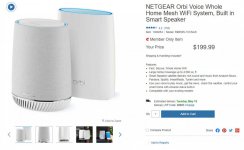
2 piece system for $200
attachment.php
 

Attachments

  • TRI-363.jpg
    TRI-363.jpg
    64.6 KB · Views: 665

jeepxj

Well-known member
Joined
Mar 2, 2008
Messages
17,831
You can price it out on the inter webs, but I’d guess it’s probably a grand.

With the Omni (or any other “mesh” system) you’re basically using a portion of the available RF spectrum to communicate between the mesh nodes. Depending on what your environment looks like in terms of interference and structures, you might need 2-4 mesh units to “hop” from your base station out to where you need WiFi. With hardwired access points, you drop a cable to where you need WiFi, and you have full bandwidth back to your internet connection, and no worried about the intermittent mesh points losing communication or one breaking/getting unplugged and killing a significant portion of your network.

You can also use PoE (Power over Ethernet) gear and send power of the CatX cable as well. I have my central network gear on a uninterruptible power supply, so all our network gear and WiFi points stay powered and we don’t lose networking if there’s a power outage.

UniFI also strikes a good balance between “easy enough” to setup but having lots of advanced features. If you care about this stuff it’s probably 90% of a Cisco setup that costs 10X as much. If you don’t care and just want some reasonably reliable WiFi stuff in your shop the mesh stuff is OK, but if the OP already has CatX in his shop, then why not do it right?


Sent from my iPad using Tapatalk

a grand?!?! not even close.
 

wyliesdiesels

Well-known member
Joined
Aug 14, 2012
Messages
19,983
Location
Modesto, CA
I am just curious - what would be the estimated cost for all this UniFi hardware?
And, what would it do better than a $300 Orbi 3 piece system?

you really cant compare Orbi to the Unifi system

Orbi is a mesh wifi system with some basic controls.

UniFi on the other hand is an enterprise grade network system and has tons more features, security, etc. You can integrate your firewall, APs, switches, etc all into one controller and access it remotely either via the web or app on your phone.

Orbi only does WiFi....

If you went with 2 hardwired UniFi APs and a cloud key controller, youre looking at about $420. Another $120 will give you a security appliance.

BTW Ubiquiti makes a mesh system as well....Ive installed it before and it works well.

You can price it out on the inter webs, but I’d guess it’s probably a grand.

Not even close.

I just priced it out (see above)...

Another vote for a mesh system like the ORBI.
That back haul with the ORBI is NOT issue........the argument is total non sense.

As for a few years ago, mesh systems was not an option.

There are at least 10 other threads where PoE have problems especially to a separate Shop.

I've seen issues with the backhaul on mesh systems. This is due to interference. Using WiFi for a backhaul, no matter how good the product or brand is, will always be susceptible to noise, interference and spectrum crowding.

And if the shop walls are metal, you can kiss your wireless backhaul performance goodbye.

In regards to POE being sent to a remote building, it is not advisable to run POE between buildings so just set a POE switch up in the shop.

Not sure what your point was with that in regards to unifi vs orbi mesh.

Lots of varying opinions - but I appreciate the feedback!
If I do CAT6 cable - that is pretty straight forward with pre-terminated cable.
I don't know anything about fiber - what kind would I need - comes pre-terminated? What kind of routers/switches do I need?

You can use pre-terminated CAT6 but it will most likely be patch cord and not rated for underground use

It would be better to get bulk underground rated CAT6 and terminate it yourself. Its not hard to terminate

As for fiber, you can buy pre-terminated fiber. you would need a switch on either end that has an SFP slot for an SFP fiber transceiver. Or you can get media converters that will take the fiber signal and convert to copper ethernet.

The media converter below is for multimode OM3, the aqua colored fiber. Whatever fiber you get, make sure the hardware matches. Single mode or multimode.

https://www.amazon.com/dp/B0716XT1QT/?tag=atomicindus08-20
 

jeepxj

Well-known member
Joined
Mar 2, 2008
Messages
17,831
To avoid these ads, REGISTER NOW!

pgray007

Well-known member
Joined
Jul 25, 2007
Messages
573
Location
Charlotte, NC area
Not sure if you were thinking I was way high or way low, but couple APs, a security appliance, a cloud key, and a couple 24 port switches and you're close. That may be overkill for his application but that's the "maximum capability and expansion" option.

Also on the "backhaul not an issue on WiFi" comment, there's only so much data you can cram into Wifi spectrum. Yes there are tricks to maximize and they keep finding more, but if I'm sending 100 mb/sec of data to an access point with a wired backhaul, I'm using 100 mb/sec of RF bandwidth. If that AP now has to also backhaul over wifi, it's using the 100 mb/sec to the client, and another 100 mb/sec to relay that data back to the base station. Despite the marketing hyperbole there's no free lunch here in that you have to consume limited RF to backhaul data that would wouldn't need to do with a wired backhaul.

This isn't to say mesh is no Bueno... I use the Unifi mesh product (forget its name) at a family vacation home, but if you're essentially trying to network a larger site with two discrete buildings mesh could limit you quite a bit in the future.

a grand?!?! not even close.
 

Git

Well-known member
Joined
May 18, 2008
Messages
6,894
Location
S Cal
you really cant compare Orbi to the Unifi system

Orbi is a mesh wifi system with some basic controls.

Thanks for the reply. I have heard of the Unifi system but always thought of it more as an Apple vs PC kind of thing...

Frankly, with my 3 piece Orbi system running behind pfSense on my home server, I have had zero problems. WiFi is exceptionally strong anywhere on my property and pfSense does all the work. (The Orbi system is just basically 3 access points for me - most of my stuff is hard wired and on separate subnets)

At this point, even if I was having problems, I couldn't see spending that kind of money on a home network. I bet half the people on this forum are problem still using some ancient $100 router :)
 

Git

Well-known member
Joined
May 18, 2008
Messages
6,894
Location
S Cal
Also on the "backhaul not an issue on WiFi" comment, there's only so much data you can cram into Wifi spectrum. Yes there are tricks to maximize and they keep finding more, but if I'm sending 100 mb/sec of data to an access point with a wired backhaul, I'm using 100 mb/sec of bandwidth. If that AP now has to also backhaul over wifi, it's using the 100 mb/sec to the client, and another 100 mb/sec to relay that data back to the base station.

This isn't to say mesh is no Bueno... I use the Unifi mesh product (forget its name) at a family vacation home, but if you're essentially trying to network a larger site with two discrete buildings mesh could limit you quite a bit in the future.

Well, the reason why I brought it up is with a simple 2 piece Orbi system (one in the house one in the shop) he could run cat6 to be used as a backhaul (not that he probably needs it) but it would probably help. And having the Orbi satellite out in the shop would help his coverage. Easy peasy and fairly reasonable in cost
 

u3b3rg33k

Well-known member
Joined
Dec 18, 2017
Messages
4,047
already got conduit installed? 2x UTP cat6 or fiber. vacuum in a string if you there isn't one in now and get pullin'.

stay away from shielded. most people can't terminate it properly and end up worse off than UTP. cat6 has more than enough headroom for you, and it can do 5Gbps now with M-gig gear.
 

Denwood

Well-known member
Joined
Sep 22, 2014
Messages
4,180
Location
Thunder Bay, Ontario, Canada
already got conduit installed? 2x UTP cat6 or fiber. vacuum in a string if you there isn't one in now and get pullin'.

stay away from shielded. most people can't terminate it properly and end up worse off than UTP. cat6 has more than enough headroom for you, and it can do 5Gbps now with M-gig gear.

I ran 10Gbps on plain old CAT5e at my commercial site. Distance between the 10Gbps switch and 5 video editing workstations was about 120 feet of cable. I was surprised honestly during testing that it worked so well.

I wrote this six part series on the topic, getting 1000 MB/s of video data moving over a CAT5e network:
https://www.smallnetbuilder.com/lan...ions-of-a-10-gbe-network-newbie-part-1-basics

To the OP, if you can run a few Cat6 or CAT5e, in that conduit, do it. Make sure you install surge arrestors on both sides. Fibre if your budget allows. Wired is always preferable to wireless if it is an option. You never know how handy extra cables are until you need them. Case in point, I ran Satellite HDMI/IR Remote repeaters signal using some powered baluns ($75 for the set) that encode and send signal about 80 ft over 40 year old RJ6 Tv cable on a happy wife/kitchen TV project this week. That saved me hours of wire fishing in a 100 yr old house. Those four pairs of wire in a CAT5/6 Cable are remarkably versatile. Think security sensors, HVAC dry contacts, thermostats etc. ...all of which I’ve used spare CAT5e runs for in the past.

I use multiple Ubiquiti wireless bridges and a four site network of AC Pros for a commercial client with near zero issues over the last few years. That said, I would still choose wired intersite links if practical.
 
Last edited:

jeepxj

Well-known member
Joined
Mar 2, 2008
Messages
17,831
Not sure if you were thinking I was way high or way low, but couple APs, a security appliance, a cloud key, and a couple 24 port switches and you're close. That may be overkill for his application but that's the "maximum capability and expansion" option.

Also on the "backhaul not an issue on WiFi" comment, there's only so much data you can cram into Wifi spectrum. Yes there are tricks to maximize and they keep finding more, but if I'm sending 100 mb/sec of data to an access point with a wired backhaul, I'm using 100 mb/sec of RF bandwidth. If that AP now has to also backhaul over wifi, it's using the 100 mb/sec to the client, and another 100 mb/sec to relay that data back to the base station. Despite the marketing hyperbole there's no free lunch here in that you have to consume limited RF to backhaul data that would wouldn't need to do with a wired backhaul.

This isn't to say mesh is no Bueno... I use the Unifi mesh product (forget its name) at a family vacation home, but if you're essentially trying to network a larger site with two discrete buildings mesh could limit you quite a bit in the future.

he doesn't need POE 24 port switches. poe injectors and a cheapo 5/8 port is more than enough. also the new dream machine puts an AP, cloudkey, USG into a single device for 200 bucks. then he can adopt the AP in the shop on the dream machine cloud key. significant cost savings.
https://store.ui.com/collections/routing-switching/products/unifi-dream-machine

mesh has its place I agree. Trying to do mesh between buildings that arn't connected by a breezeway is where I draw the line. :beer:

edit: I'd suggest going 24 port poe if he wants to step up into a POE home/shop security camera system. That's the point usually when mesh backhaul used to show its bottleneck. I'm not sure on the newer mesh stuff. they may have fixed that bottlenecking.
 
Last edited:

Showkey

"MEMBER EMERITUS"
Joined
Aug 9, 2014
Messages
8,638
Location
Wausau WI
The backhaul:

Netgear adds a second 5-GHz, 1.7Gbps radio that's exclusively dedicated to the backhaul, the data being transmitted from the router Orbi unit to the satellite Orbis and back again. Because of this side channel, the main links between the Orbi units and your devices stay strong and fast.
 

Denwood

Well-known member
Joined
Sep 22, 2014
Messages
4,180
Location
Thunder Bay, Ontario, Canada
Backhaul discrete frequencies are part of most mesh systems, but they do suffer a large performance hit over two hops, worse over 3. Latest systems (the expensive ones) are quite fast on one hop at 800-900Mbps so over 2-3 hops may still be tolerable in a shop.

Wired or Fibre is alwY best if you can do it
 

dcg9381

Well-known member
Joined
Jun 20, 2018
Messages
11,627
Location
Austin, TX
Hi all,

What would y'all do as a solution? Could the ubiquiti product be suited for better yard coverage and to the garage?


I've done the ubiquiti system twice.
1) For a remote "gate" and associated IP security cameras. Worked well enough.

2) When I built my shop, the easiest way for me to get internet was to point an ubiquiti at my neighbors house... It was good for about 16Mb down with a single radio, good enough to get us by for a while.

With a residence going up, it's CAT6 all the way.. And it's hard to dig here, so we've done a lot of work adding conduit to handle it. If I just needed a cheap way to get the the kids xbox working, it'd be be ubiquit..
 

ScaldedDog

Well-known member
Joined
Jan 15, 2008
Messages
1,065
Location
Sedalia, CO/NSB, FL
One good rule of thumb is that, where possible, things that don't move get wired connections, and things that move get wireless ones. Since your garage isn't going anywhere, and the conduit is in place, running the wire is a no brainer.

I violated this principle with our new place, because running the wire was going to be relatively complex. I think what we have is fine (Ubiquity 5ghz bridge), but I'd rather have a wired connection.

Mark

Sent from my SM-G986U using Tapatalk
 

Showkey

"MEMBER EMERITUS"
Joined
Aug 9, 2014
Messages
8,638
Location
Wausau WI
One good rule of thumb is that, where possible, things that don't move get wired connections, and things that move get wireless ones. Since your garage isn't going anywhere, and the conduit is in place, running the wire is a no brainer
Mark

Sent from my SM-G986U using Tapatalk

That rule thumb might be dated..........I have exactly 5 of the 30 devices on the network that has a wired connection, non that actually need a wired connection and 25 that have no wired connection. So when wireless works it’s a perfect solution.

Example .......a modern hotel has no wired connection they left years back.:beer:
 
Last edited:

fteufert

Well-known member
Joined
Oct 24, 2013
Messages
382
Location
Near Scranton, PA
Run the CAT 6.

Run 2, even 3

Do whatever many stated above, you have plenty of choices.

But start with running a few CAT 6 lines out there, because they will give you plenty of options in the future
 

ScaldedDog

Well-known member
Joined
Jan 15, 2008
Messages
1,065
Location
Sedalia, CO/NSB, FL
That rule thumb might be dated..........I have exactly 5 of the 30 devices on the network that has a wired connection, non that actually need a wired connection and 25 that have no wired connection. So when wireless works it’s a perfect solution.

Example .......a modern hotel has no wired connection they left years back.[emoji481]
True, but hotel guests only stay a night or seven, and don't have to put up with the network every day for years. They are also not responsible for network troubleshooting.

I love me some wifi, and have a fairly elaborate home network (UDM Pro, 3 APs, a couple of switches and a wireless bridge). Like you, I also have more wireless devices than wired, but will choose a copper connection every time I reasonably can. In the OP's case, it's a no brainer.

Mark

Sent from my SM-G986U using Tapatalk
 

Showkey

"MEMBER EMERITUS"
Joined
Aug 9, 2014
Messages
8,638
Location
Wausau WI
Hotel guest also expect 50-100 Mbps for streaming and work. When they don’t get it they complain. Hotels now often supply a tiered internet Speed choice.

My point on mesh is a very good DIY System for $200-$400 and literally 10-15 minutes install start to finish. Right now the capability is often capped by the internet provider at 100-225 Mbps not the WiFi.
 
Last edited:

jeepxj

Well-known member
Joined
Mar 2, 2008
Messages
17,831
Run the CAT 6.

Run 2, even 3

Do whatever many stated above, you have plenty of choices.

But start with running a few CAT 6 lines out there, because they will give you plenty of options in the future

a box of cat 6 is 1000'. you should always run at least 3 runs between. the trench is the expensive part. the cable is not. ideally run 1" conduit between for com lines in case you wanna upgrade in the future.
 

benjamintmiller

Well-known member
Joined
Feb 8, 2011
Messages
284
Location
IA
I think you would be well served and happy with the Ubiquiti solution. I have two of the cheapest Ubiquiti devices (Nanostation M2 Loco) pointed at each other over 200 ft with trees, and get around 100 Mbps in all weather conditions. IMO, the higher end Nanostations and the 5 ghz bands are unnecessary for most people (and much less likely to work in rain!).

My Ubiquiti devices cost $50 each, plus about $10 for a wall mount, so I spent around $120 in total. On both ends, I ran a cable into the building, to the switch/router in the house and to an access point in the building.
 

Dredwolf

Member
Joined
Aug 16, 2011
Messages
22
Location
South Carolina
I install Ubiquiti solutions at least once a week. That being said, where possible, we still run cable....buried, aerial or fiber...its still considered the most dependable option. But we have many clients with parts of their facility or operations depending on either a bridge or a WiFi connection to operate each day.
I'm personally running two Nanostation M2 Loco's to provide Internet to my elderly mother over 350' away from my home, but will be installing another set of Nanostation 5AC's for a client if the weather clears this week.
 

wyliesdiesels

Well-known member
Joined
Aug 14, 2012
Messages
19,983
Location
Modesto, CA
I think you would be well served and happy with the Ubiquiti solution. I have two of the cheapest Ubiquiti devices (Nanostation M2 Loco) pointed at each other over 200 ft with trees, and get around 100 Mbps in all weather conditions. IMO, the higher end Nanostations and the 5 ghz bands are unnecessary for most people (and much less likely to work in rain!).

My Ubiquiti devices cost $50 each, plus about $10 for a wall mount, so I spent around $120 in total. On both ends, I ran a cable into the building, to the switch/router in the house and to an access point in the building.

The 5Ghz radios are most certainly necessary for areas where 2.4Ghz spectrum is overcrowded. And rain does NOT affect these radios. Ive probably installed 100+ ubiquiti radios (almost all types) and i dont have one radio that is affected by rain.
 

jeepxj

Well-known member
Joined
Mar 2, 2008
Messages
17,831
The 5Ghz radios are most certainly necessary for areas where 2.4Ghz spectrum is overcrowded. And rain does NOT affect these radios. Ive probably installed 100+ ubiquiti radios (almost all types) and i dont have one radio that is affected by rain.

to be fair most people here that are in need of a PtP setup are rural enough 2.4 isnt crowded. if they are urban enough to have 2.4 crowding issues chances are the lot is small enough to trench in ethernet. and if they can afford big land in the area with 2.4 crowding I don't think budgets matter much to them. Kinda a self fixing problem.

but I agree: rain is a non issue for both 2.4 and 5 for the use cases here. generally under a mile and not pushing the limits of the gear.
 

wyliesdiesels

Well-known member
Joined
Aug 14, 2012
Messages
19,983
Location
Modesto, CA
to be fair most people here that are in need of a PtP setup are rural enough 2.4 isnt crowded. if they are urban enough to have 2.4 crowding issues chances are the lot is small enough to trench in ethernet. and if they can afford big land in the area with 2.4 crowding I don't think budgets matter much to them. Kinda a self fixing problem.

but I agree: rain is a non issue for both 2.4 and 5 for the use cases here. generally under a mile and not pushing the limits of the gear.

Distance doesnt matter either

I setup a 45mile link using 5Ghz Ubnt airfibers with a 4200' elevation difference. Get 100Mbps on the station side in the mountains.
 
To avoid these ads, REGISTER NOW!
Top Bottom