To avoid these ads, REGISTER NOW!

Running Wires for Security Cameras

like2wheel

Well-known member
Joined
Oct 29, 2014
Messages
1,693
Location
On an as needed basis
Trying to think of everything I need to run before I start installing the ceiling in my pole barn.
I know little about security cameras today but it seems to me that wired ones would be more reliable. So I figured I should run some ethernet cable but not sure what/where/how.

Is this a good choice? https://www.amazon.com/gp/product/B016YS99X0/?tag=atomicindus08-20

Run it to the outside corners of the building? Can it just lay in the soffit?
Are the cameras daisy chained, or do I need to home run to each location?

Recommend a crimper & terminals?

Anything else you think I should do would be appreciated

Thanks
 
To avoid these ads, REGISTER NOW!

jtetterton

Member
Joined
Oct 10, 2017
Messages
8
Trying to think of everything I need to run before I start installing the ceiling in my pole barn.

I know little about security cameras today but it seems to me that wired ones would be more reliable. So I figured I should run some ethernet cable but not sure what/where/how.


Is this a good choice? https://www.amazon.com/gp/product/B016YS99X0/?tag=atomicindus08-20


Run it to the outside corners of the building? Can it just lay in the soffit?

Are the cameras daisy chained, or do I need to home run to each location?


Recommend a crimper & terminals?


Anything else you think I should do would be appreciated


Thanks


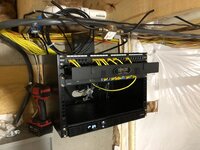
Go ahead and home run to every location you think you’ll need a camera in the future. My house has about 20 home runs and only about 6 are being used right now. Bring it all back to a patch panel in your utility room. Similar to attached image.

The cable you selected will work just fine for any interior stuff. You’ll want outdoor rated cable for any outdoor runs or direct burial for burial runs without conduit.

I prefer sentinel crimper and connectors. http://www.sentinelconn.com/tl_fr.html


9790967194ec33a77f9e2d1f66cb5071.jpg


Sent from my iPhone using Tapatalk
 

Attachments

  • 9790967194ec33a77f9e2d1f66cb5071.jpg
    9790967194ec33a77f9e2d1f66cb5071.jpg
    103.8 KB · Views: 6

Kaizen

Well-known member
Joined
Jan 9, 2015
Messages
6,948
Location
New England
Highly suggest running terminated cables back to a center point where you will use a poe switch. The switch will connect back to the house network via cable.
I had tons of issues terminating my cat6 cables. Started using terminated 100 ft cables from amazon and coiling leftover.
Cams can be mounted high to get big view but preferred at about 8-9 feet. Better chance of getting face then high.


Sent from my iPhone using Tapatalk
 
Last edited:

jtetterton

Member
Joined
Oct 10, 2017
Messages
8
Highly suggest running terminated cables back to a center point where you will use a poe switch. The switch will connect back to the house network via cable.
I had tons of issues splicing my cat6 cables. Started using terminated 100 ft cables from amazon and coiling leftover.
Cams can be mounted high to get big view but preferred at about 8-9 feet. Better chance of getting face then high.


Sent from my iPhone using Tapatalk


Splicing Ethernet is not recommended. The twisted pairs are critical for proper data transmission. Any run should be one piece from device to patch panel for optimal performance. While Ethernet is similar to old phone wire or “POTS”, Ethernet cannot be daisy chained or spliced. As recommended, if you’re not comfortable terminating your own cables then buy premade cable and coil the excess. I do it for a living so it’s second nature to me.


Sent from my iPhone using Tapatalk
 

imjustdave

Well-known member
Joined
Apr 9, 2014
Messages
204
Location
Sumner WA
cat5e should work, could do cat 6 but that would be overkill.
Home run only!!!
I would run 2 lines to each location, never know you might want another camera.
POE = Power over Ethernet basically you can power your camera from the central location.
Be careful if you staple, aka don't crush the cable, they make J hooks that work great and you can zip tie.
don't untwist more wire they you need, the twists actually are part of how it works :)
Youtube is full of videos on how to crimp ETC.
For a beginner the female ends are epic easy, and if you setup a patch panel like shown above both ends are female, then you buy shorter cables to patch FYI online you can get just about any length commercially made for a few $.
 

ddawg16

Well-known member
Joined
Jul 11, 2008
Messages
21,005
Location
S. California
Use Cat6.

Larger gauge of wire....less chance of issues with the POE power.

With Ethernet, only 4 of the 8 wires are actually used for signal. Hence, the other 4 are available for 'other' uses. In the case of POE, DC power. The larger the gauge, the less drop.

Cat6 has a tighter twist on on the center wires which gives a slightly higher freq range.

As for 'splicing'....I would NOT directly splice a cable. But you will be fine doing a proper termination into a RG45 male connector and use a coupler to connect the ends.

I have a Lorex camera system....uses POE. No issues....including the 'splices' using RG45 connectors.....AKA and Ethernet plugs.
 

Kaizen

Well-known member
Joined
Jan 9, 2015
Messages
6,948
Location
New England
Splicing Ethernet is not recommended. The twisted pairs are critical for proper data transmission. Any run should be one piece from device to patch panel for optimal performance. While Ethernet is similar to old phone wire or “POTS”, Ethernet cannot be daisy chained or spliced. As recommended, if you’re not comfortable terminating your own cables then buy premade cable and coil the excess. I do it for a living so it’s second nature to me.


Sent from my iPhone using Tapatalk


Sorry should have not said splicing. Terminated is what I meant. Those damn plugs gave me such an issue


Sent from my iPhone using Tapatalk
 

Innovate1

Well-known member
Joined
Jul 28, 2014
Messages
4,283
Location
Illinois near St. Louis, Missouri
Gigabit ethernet uses all 8 connectors for data and sends power and data over some pairs. Lower speed uses only 4 wires for data and the others for power and is likely what the cameras use.

The connectors for ethernet are RJ45. RG designations are used for coax as far as I can tell.

Definitely want home runs to a central location - 1 cable for each camera. Put in a few more than you think you want now. Much easier now than later. You can also put in conduit for places that are hard to get to - much easier to add or change cable later.

I am about to this stage. But building eave is 14'. Would be nice to tuck the cameras under the roof overhang for weather protection but much higher than the recommended 8-9 ft. May mount at least one low.
 
Last edited:

Denwood

Well-known member
Joined
Sep 22, 2014
Messages
4,183
Location
Thunder Bay, Ontario, Canada
POE is 100% the way to go. Use Cat6 if new, CAT5e is fine too. Use 4K cameras.

If individual runs to your utility room are a problem, you can also cascade a POE switch from your attic. In that case you'd take all your eave runs to the attic POE switch, then run CAT6/5e from attic to your home router/switch.

This is a POE camera with 4K for $100, with a local record option to SD..but can also connect to an NVR if you want.

https://amcrest.com/amcrest-ultrahd...roof-microsd-recording-black-ip8m-2496eb.html

For under eaves:

https://amcrest.com/4k-ip-camera-poe-security-camera-dome-ip8m-2493eb.html

I've had a lot of recent experience with LOREX 4K POE + NVR systems of late..and they are fine too. The two Amcrest models I linked to can record to local SD, a network NAS, paid cloud account, FTP...or an NVR box. Their iOS app will provide offsite live access to the cams and recorded footage.

For home, I record (on motion events only) to local SD for video but upload jpgs to my my web server via FTP in case of fire, theft etc. The web server runs a CRON job that cleans up the jpgs every 2 weeks or so.
 

Taycan

Active member
Joined
Feb 24, 2020
Messages
36
Location
out back
For cameras in the lower end of the price range, I wouldn't necessarily pick something that is capable of 4k video. It all depends on what your trying to accomplish though. If all your after is a good pic during daylight hours or the area is very well illuminated at night, go for it. But, if your concerned about what happens after dark and the area is not very well illuminated, you would probably be better off using something like a 2mp 'starlight' from Dahua or one of their branded cams

You can 'splice' Ethernet, they make a junction box which costs about $8 on Amazon which would be preferable to using rj45 jacks into some type of cheapo coupler. Search for 'cat6 junction box' on Amazon
 

Denwood

Well-known member
Joined
Sep 22, 2014
Messages
4,183
Location
Thunder Bay, Ontario, Canada
For cameras in the lower end of the price range, I wouldn't necessarily pick something that is capable of 4k video. It all depends on what your trying to accomplish though. If all your after is a good pic during daylight hours or the area is very well illuminated at night, go for it. But, if your concerned about what happens after dark and the area is not very well illuminated, you would probably be better off using something like a 2mp 'starlight' from Dahua or one of their branded cams

You can 'splice' Ethernet, they make a junction box which costs about $8 on Amazon which would be preferable to using rj45 jacks into some type of cheapo coupler. Search for 'cat6 junction box' on Amazon


After pulling both 4K and older DI res from the systems for police investigations, the reason I really like the 4K res is that you can zoom in digitally to get a much better face, license plate etc. as there are a lot more pixels to play with. The only downside is that offloading 4K footage from the NVR remotely can be painful due to file size.
 

ddawg16

Well-known member
Joined
Jul 11, 2008
Messages
21,005
Location
S. California
HD 4K is the way to go. It really pays off when you can read the plate on the car parked in front of your house.

My system is HD....I can read a plate of a car parked in front of my house....but if I had 4K, I'd be able to read the plates on those cars across the street.

This is the view in front of my house right now....I can monitor from work or my phone.
 

Attachments

PWC Repair

Well-known member
Joined
Dec 27, 2012
Messages
3,171
Location
Arkansas
All I can add is that I have a a lower end "Night Owl" system on the house and another on the shop and they DO NOT use ethernet wire. It's a 2pc wire that comes with the system.
 

Denwood

Well-known member
Joined
Sep 22, 2014
Messages
4,183
Location
Thunder Bay, Ontario, Canada
All I can add is that I have a a lower end "Night Owl" system on the house and another on the shop and they DO NOT use ethernet wire. It's a 2pc wire that comes with the system.

Those are direct wired so the video signal goes directly to the recorder. Nothing wrong with those for your application :)

We don't use direct wired any longer..IP POE cams only. This way you can upgrade the cams later without running new signal cable. Also makes camera access and control remotely via iOS a lot easier.
 

pmiranda

Well-known member
Joined
Jul 15, 2008
Messages
1,504
Location
Austin, TX
I second Cat6 wiring. We are having to replace SOME of our Cat5e due to some issues we are seeing on the longer runs. Future proofing is always good and I USUALLY recommend installing the latest and greatest.

Future proofing for HD video or 10Gb ethernet is fine, but if you're having trouble with a run that's less than 300 feet, CAT6 isn't as important as what's around the cable and if the cable is shielded. The nice thing about direct-burial cat6 is it's usually shielded, so if you remember to ground the shield, then it can help with outside noise. The cost is pretty high, so I'm not sure I'll bother using it on the 300 foot run to my gate for a security camera.
 

Taycan

Active member
Joined
Feb 24, 2020
Messages
36
Location
out back
HD 4K is the way to go. It really pays off when you can read the plate on the car parked in front of your house.

My system is HD....I can read a plate of a car parked in front of my house....but if I had 4K, I'd be able to read the plates on those cars across the street.

This is the view in front of my house right now....I can monitor from work or my phone.


Call me a little skeptical, but I would like to see a pic from that camera where you can actually read a license plate on a parked car. Bonus points if you can read the license plate on a moving car in front of your house (but I don't think that will happen for sure)

Lastly, stationary objects in broad daylight are pretty easy, how about a pic from the the middle of the night?
 

kj_mustang

Well-known member
Joined
Feb 9, 2011
Messages
1,213
Location
Harrisonburg, VA
Call me a little skeptical, but I would like to see a pic from that camera where you can actually read a license plate on a parked car. Bonus points if you can read the license plate on a moving car in front of your house (but I don't think that will happen for sure)

Lastly, stationary objects in broad daylight are pretty easy, how about a pic from the the middle of the night?


Parked across from his house at an angle to see the plate, it would be easy just zoom in and enhance it a little. If you have the right day/night camera, you can read it just fine at night. I am looking at a camera at work right now in a parking garage. I can read the license plate on a car leaving the garage from about 30-40 feet from the camera with no zoom or enhancement.
 

Taycan

Active member
Joined
Feb 24, 2020
Messages
36
Location
out back
Parked across from his house at an angle to see the plate, it would be easy just zoom in and enhance it a little. If you have the right day/night camera, you can read it just fine at night. I am looking at a camera at work right now in a parking garage. I can read the license plate on a car leaving the garage from about 30-40 feet from the camera with no zoom or enhancement.

I think you have been watching too mutch TV. We are talking about fairly inexpensive cameras for residential use, not something in a commercial location.

Hey, it's the internet. You can say whatever you want, but I am still waiting for the pics from DD where you can read a license plate on a car parked in front of his house from his camera that probably has a 4mm lens

attachment.php
 

Attachments

  • a32.jpg
    a32.jpg
    44.1 KB · Views: 520
To avoid these ads, REGISTER NOW!

ddawg16

Well-known member
Joined
Jul 11, 2008
Messages
21,005
Location
S. California

Earp69

Well-known member
Joined
Sep 20, 2016
Messages
859
Looks like there are some decent options on Amazon for poe cameras that claim 4k/hd on average of 100 dollars. I would like one that I can move the lens with my phone, maybe we should start a updated camera thread if there isn't one already?
 

jseymour

Active member
Joined
Nov 20, 2019
Messages
39
Location
S.E. Michigan
Cat5e is more than sufficient for surveillance cameras. As for connectors: Make sure you use connectors rated the same as or better than the cable. Make sure you're using the right connectors for the wire--they are different for solid and stranded. Use a ratcheting crimper to ensure proper crimping force. Monoprice has a decent one that won't break the bank. A Klein LAN Scout Jr. or the like will save you a bunch of heartache--allowing you to verify at least that you've the correct wires terminated to the correct pins. Speaking of which: You'll want to use the EIA/TIA 568B pinouts.

Unless you're very experienced with a wire stapler, I recommend you not use one on network cables. It's far too easy to apply too much force and distort the cable geometry.

As others have recommended: Home-run every cable to a good spot in the structure. Put a small network switch there and run a single back-haul from that to the LAN in the house. I'd put a UPS on all powered devices (network switches, etc.). Not only to prevent downtime, but to protect them from powerline anomalies wrecking stuff.

Do not run network cables parallel to power cables any closer than two or three feet apart.

The backhaul from the barn can be done a number of ways: Buried cable (I'd use bury-rated cable inside PVC conduit if I went that way), fiber (I'd also put it in conduit), or a point-to-point wireless link (Ubiquiti makes some fine purpose-designed devices for that last solution that won't break the bank).

Speaking of conduit: Never run UTP cabling inside metal conduit.
 
Last edited:

Taycan

Active member
Joined
Feb 24, 2020
Messages
36
Location
out back
Nobody said anything about price level of camera. A couple hundred bucks will buy you a good quality camera. Ddawg's picture looks like it came off a pretty high resolution IP camera. So I suspect it could. This 4 mm lens camera could do it.

https://www.amazon.com/HIKVISION-Camera-DS-2CD2042WD-I-high-resolution/dp/B06WRSVXKW

DD said he has a "Lorex camera system that is HD". Nothing wrong with Lorex, but when you get 4 cameras and a NVR for $300 (or 8 cams for $500), your not exactly talking about high end.

'4K' is the new buzz word. But out of all the specs, that is probably the least important. #1 would be the sensor size. Just like in a digital camera, the bigger the sensor the better. Just google 'lorex sensor size' - you will have to do some digging to actually find the size, because all they mention is how may megapixels it has. I finally found one listing that indicated 1/1.8” which is on the low end side of things and will definitely affect low light conditions

#2 would be the lens size. When you buy one of those prepackaged system, you don't really have any choice, and they don't even spec the lens size. 4mm is probably the most common, but to pickup a license plate or an identifiable face of someone walking down the sidewalk, your going to need something more powerful.

The Hikvision camera you linked to is a pretty decent camera, but even then, I don't think it is going to show a legible license plate at a distance.

I said I was skeptical - let DD post a picture with a legible license plate and prove me wrong.

"Pulling into a driveway" is completely different that a car being parked on the street. With the way that camera is mounted, it ain't going to happen - the angles are all wrong
 
Last edited:

yatg

Well-known member
Joined
Aug 16, 2019
Messages
2,771
Location
Southern Oregon
Here's how I installed a few cameras several years ago.

Most cameras have a pigtail with an rj45 jack on the end along with other connections. These cameras didn't have an integrated mounting, so the pigtail passes through a wall plate into the inside box.

On the inside, there's a 3 gang box to contain the wiring. The orange cat5e cable comes in, is terminated with a jack (not a plug), and a 1' patch cord connects to the camera pigtail.

I hate crimping rj45 plugs. Stick with patch panels, jacks, and premade patch cords. Skip the crimper and get a decent 110 punchdown tool.
 

Attachments

  • 20200310_111737_25pct.JPG
    20200310_111737_25pct.JPG
    112.4 KB · Views: 75
  • 20200310_111840_25pct.JPG
    20200310_111840_25pct.JPG
    44.5 KB · Views: 67

e36jon

Well-known member
Joined
May 2, 2013
Messages
237
Location
San Francisco CA
I just did some camera / NVR work here and hit a few speed bumps:

1.) I struggled to get my existing NVR to work with a new non-matching-brand camera. Since my existing NVR was 5+ years old I upgraded and got the new H265 encoding standard and compatibility with 4K cameras. The new NVR worked fine with the old camera and drives. I wish the on-board PC was more powerful as the UI runs really slowly...

2.) I ****, badly, at terminating ethernet cables. Specifically the step where all of the individual conductors, in the right order, at the ideal length, are inserted into a tiny plastic connector body. While on a ladder. I finally ended up using the 'pass through' style connectors and my quality of life improved greatly: https://www.amazon.com/gp/product/B07TT7WSP2/?tag=atomicindus08-20

3.) Once I had everything up and running I noticed that my fancy new 4K camera was recording a ton of "motion detect" activity. Turns out the IR illuminators in the camera attract every small flying thing known to man, which then look like fireworks to the camera. D'oh! The solution is a remote illuminator, which can be located such that the bugs don't show up anymore. And you can get WAY more illumination than what the camera came with: https://www.amazon.com/dp/B075F7NV56/?tag=atomicindus08-20 The catch? You'll either need an AC outlet nearby, or you'll need to pull some 2-conductor cable to power it. I didn't pull the cable and I don't have an outlet, so I am sad. Don't be sad like me.

Bonus: I hit my new camera out front with some spray paint that was close to my trim color and it essentially vanished. That might be at odds with the preventative effect of visible cameras but since mine takes in some sidewalk and parking in front of my house I didn't want any angry neighbors...

Cheers,

Jon
 

scottm

Well-known member
Joined
Aug 3, 2009
Messages
51
Those pass through connectors are pretty nifty. Never saw those before. I bought 100ft cables with terminals already attached, and cut them to length. The factory end went in the eve where it would be a pain to crimp on a ladder and the cut ends went in the attic where I have my POE switches, and all my crimping was done there. In most cases my runs were under 50 feet and I was able to use both halves of the cable.

I also have one of those stand alone IR lights but never actually used it. Like you said, you never have an outlet where you want to mount it. I have a problem with the camera's built in IR reflecting off of the dome and washing out the night view if there is any dirt on the dome at all.
 

Denwood

Well-known member
Joined
Sep 22, 2014
Messages
4,183
Location
Thunder Bay, Ontario, Canada
DD said he has a "Lorex camera system that is HD". Nothing wrong with Lorex, but when you get 4 cameras and a NVR for $300 (or 8 cams for $500), your not exactly talking about high end.

'4K' is the new buzz word. But out of all the specs, that is probably the least important. #1 would be the sensor size. Just like in a digital camera, the bigger the sensor the better. Just google 'lorex sensor size' - you will have to do some digging to actually find the size, because all they mention is how may megapixels it has. I finally found one listing that indicated 1/1.8” which is on the low end side of things and will definitely affect low light conditions

#2 would be the lens size. When you buy one of those prepackaged system, you don't really have any choice, and they don't even spec the lens size. 4mm is probably the most common, but to pickup a license plate or an identifiable face of someone walking down the sidewalk, your going to need something more powerful.

The Hikvision camera you linked to is a pretty decent camera, but even then, I don't think it is going to show a legible license plate at a distance.

I said I was skeptical - let DD post a picture with a legible license plate and prove me wrong.

"Pulling into a driveway" is completely different that a car being parked on the street. With the way that camera is mounted, it ain't going to happen - the angles are all wrong

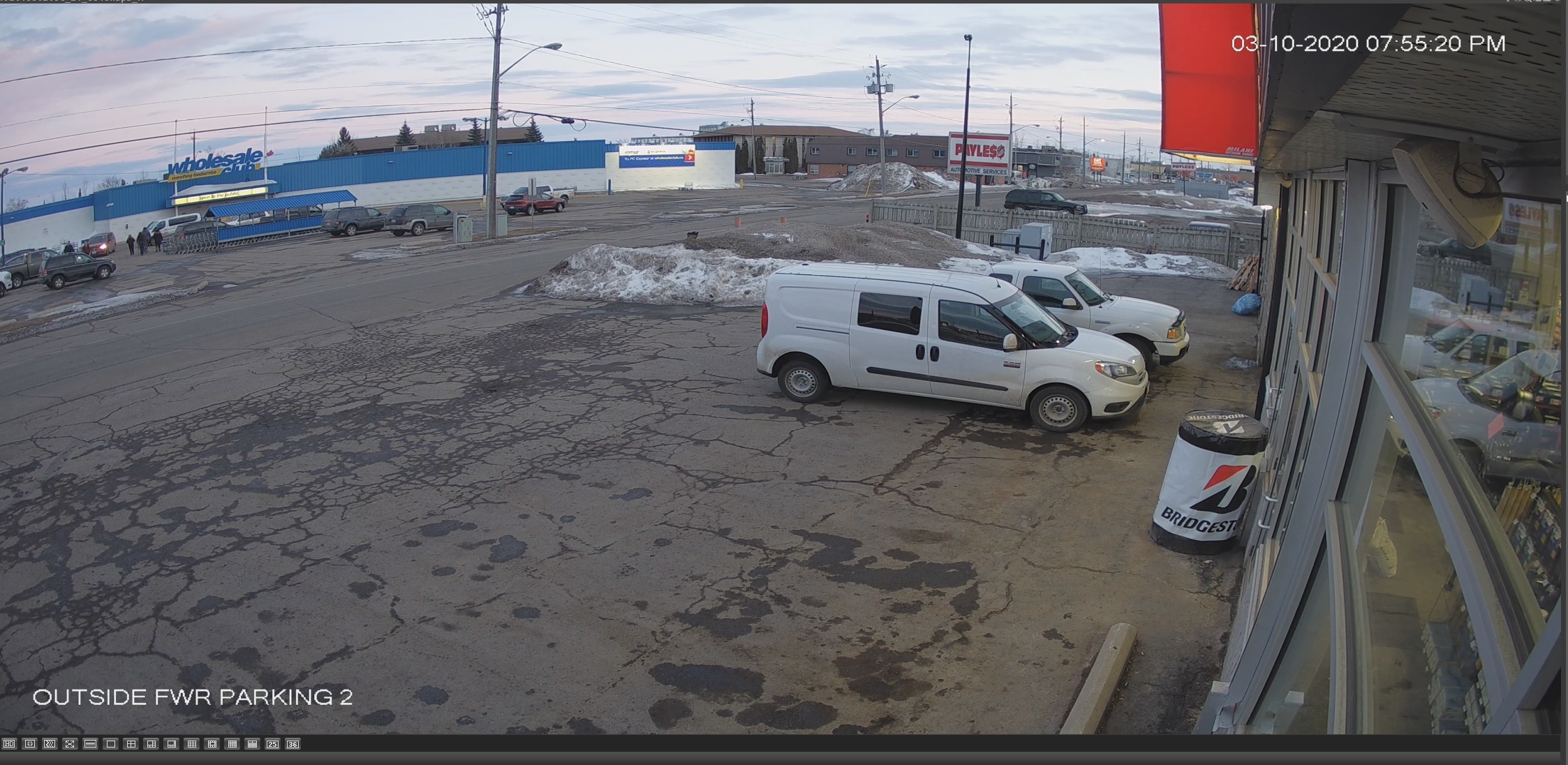
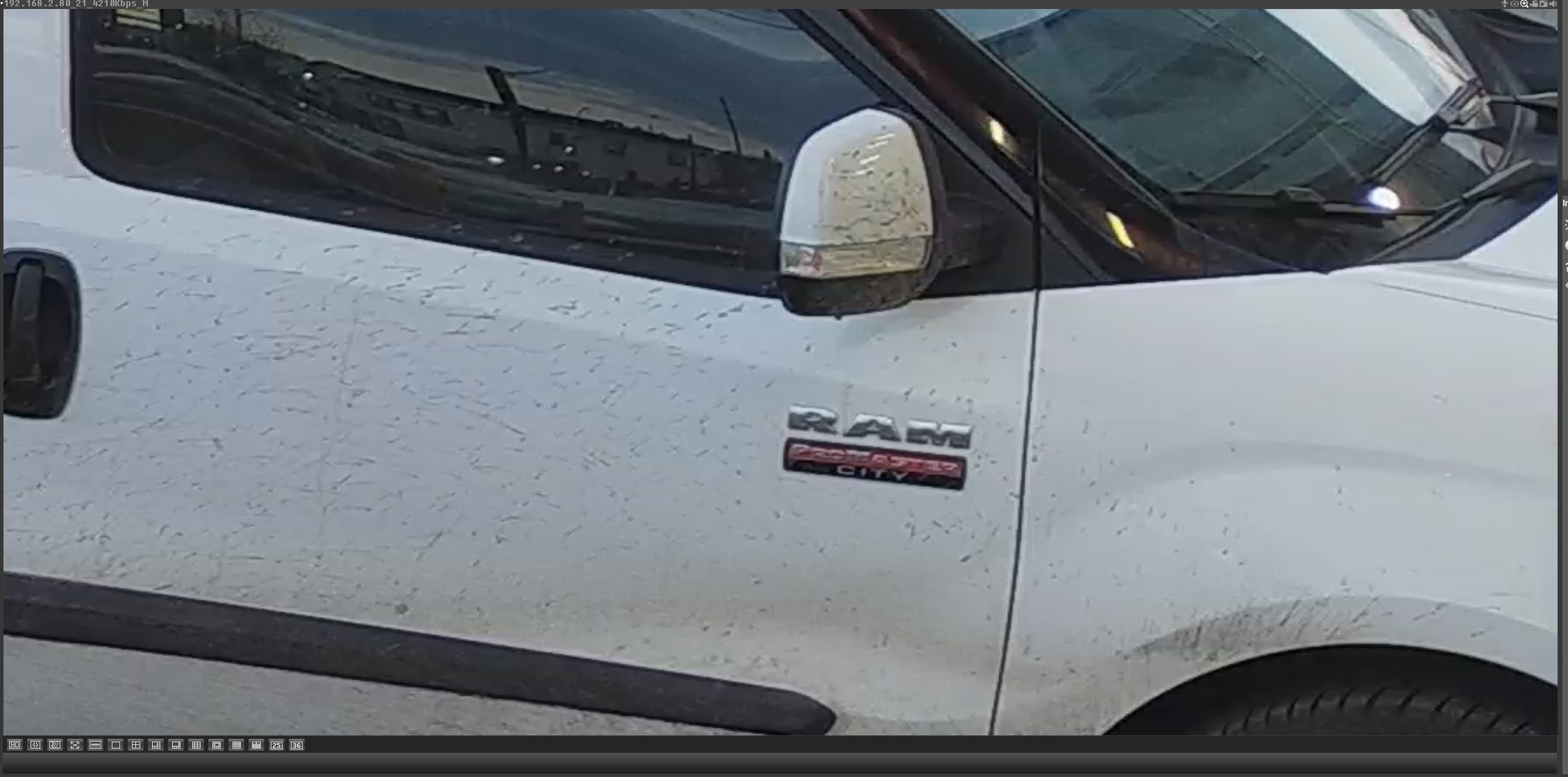
I grabbed these off one of our 4K Lorex cams. They are 3840 x 2160 res. Image 1 is a full frame grab, image 2 is a digital zoom. Cams are about $250 each, but cheaper if you buy them (as we do) in sets of 24 or 32 with the NVR. 4K at 15fps is fine for our needs.

Pics are cropped/compressed for web (still caps from the software are 3-4MB), but you get the idea. Click the pic to enlarge:

4kview1.jpg


4kview2.jpg


We have another site that I can't post pics of..but trucks about 60ft way I can read the plates no problem with a digital zoom (night). Pushing 100ft, not easy without software...

We have one overhead at the sales desk..about 20ft up. A few weeks back the manager asked me to pull footage to review a sales transaction where the customer argued over his change (cash). Turns out we could pick out the denomination of bills the sales person (correctly) handed back to the customer. CAD bucks a bit easier with the colors to ID.
 
Last edited:

ddawg16

Well-known member
Joined
Jul 11, 2008
Messages
21,005
Location
S. California
Here's how I installed a few cameras several years ago.

Most cameras have a pigtail with an rj45 jack on the end along with other connections. These cameras didn't have an integrated mounting, so the pigtail passes through a wall plate into the inside box.

On the inside, there's a 3 gang box to contain the wiring. The orange cat5e cable comes in, is terminated with a jack (not a plug), and a 1' patch cord connects to the camera pigtail.

I hate crimping rj45 plugs. Stick with patch panels, jacks, and premade patch cords. Skip the crimper and get a decent 110 punchdown tool.

I don't mind crimping the RJ45 plugs.....I have the equipment....and the Cat6 connectors make it a little easier....and I have a tester.

The problem with 5e....on long runs, the DC power loss for POE could be enough to cause issues.

This is how I did most of my under eave cameras...I took a 2x4 cut to the same size as the existing roof 2x4....I then routed a groove for the Cat6 cable and sister'd the 2x4 to the existing. This hides the cable making it kinda hard to cut....and gives me a nice landing spot for the camera.

Which reminds me....I need to re-paint my eaves....
 

Attachments

  • IMG_20200310_173452044.jpg
    IMG_20200310_173452044.jpg
    118.2 KB · Views: 79
Last edited:

Taycan

Active member
Joined
Feb 24, 2020
Messages
36
Location
out back
I grabbed these off one of our 4K Lorex cams. They are 3840 x 2160 res. Image 1 is a full frame grab, image 2 is a digital zoom. Cams are about $250 each, but cheaper if you buy them (as we do) in sets of 24 or 32 with the NVR. 4K at 15fps is fine for our needs.

I will admit - I am impressed with those daylight shots, although $250 per cam for DYI/Residential use is getting up there in price.

When I go to the Lorex website - I can't really determine which camera your using for that $250 (you didn't mention anything about it being a motorized varifocal for example). Do you have a model number or link?


https://www.lorextechnology.com/4k-security-cameras/N-9ei7q9Z1mnuc3d#page-nav-wrapper
 

rayra

Well-known member
Joined
Dec 1, 2014
Messages
4,724
Location
Escaped from Los Angeles
Put in Cat6, 'future-proofing'. PoE. I'm using inexpensive TrendNET cameras, they're working fine. Get the highest pixel count you can afford. Or at least at the most likely entry point
 

Denwood

Well-known member
Joined
Sep 22, 2014
Messages
4,183
Location
Thunder Bay, Ontario, Canada
I will admit - I am impressed with those daylight shots, although $250 per cam for DYI/Residential use is getting up there in price.

When I go to the Lorex website - I can't really determine which camera your using for that $250 (you didn't mention anything about it being a motorized varifocal for example). Do you have a model number or link?


https://www.lorextechnology.com/4k-security-cameras/N-9ei7q9Z1mnuc3d#page-nav-wrapper

It's the LNB8973-C, similar to this: https://www.lorextechnology.com/4k-security-camera/4k-ultrahd-8mp-ip-nocturnal-camera/LNB8973BW-1-p

I ordered few of these Amcrest 4K cams (POE with SD record) for $100/each....willl post a review when they arrive: https://amcrest.com/amcrest-ultrahd...roof-microsd-recording-black-ip8m-2496eb.html
 
Last edited:

tedo2007

Well-known member
Joined
May 19, 2014
Messages
104
Call me a little skeptical, but I would like to see a pic from that camera where you can actually read a license plate on a parked car. Bonus points if you can read the license plate on a moving car in front of your house (but I don't think that will happen for sure)


Lastly, stationary objects in broad daylight are pretty easy, how about a pic from the the middle of the night?


This is actually quite common anymore to be able to read plates and store the data....


Sent from my iPhone using The Garage Journal mobile app
 

Taycan

Active member
Joined
Feb 24, 2020
Messages
36
Location
out back
This is actually quite common anymore to be able to read plates and store the data....

Sure it's common - but it usually takes a dedicated camera, zoomed in (optical zoom not digital) and specifically set up do it

You quoted me - but I was talking about DD's setup where he claimed with his Lorex camera, which probably has a 2.8 or 4mm lens, "I can read a plate of a car parked in front of my house....but if I had 4K, I'd be able to read the plates on those cars across the street". I replied that I was skeptical that his system was able to do it and I have yet to see any photo's showing otherwise.

Denwood is using a very nice Lorex camers (Lorex is owned by Dahua), but again, at that price range, it is geared more towards the commercial market. Also, it has a motorized varifocal lens, which basically gives you a 4x optical zoom. Motorozed varifocal cameras aren't really intended to be zoomed in and out like a pzt, it's more for when you setting up the camera to make sure you can see the area that you want to capture, but it does have that capability. And when you get down to what really matters - that camera has a 1/2.5" sensor which is a decent size and will definitely help in low light conditions. Again, you get what you pay for. It doesn't seem that most people on this forum want to pop for a $250 cameras for their house or shop, it seems they are more interested in the $25 Wyze cams.
 

Denwood

Well-known member
Joined
Sep 22, 2014
Messages
4,183
Location
Thunder Bay, Ontario, Canada
Zoom, and PTZ to be honest is more a setup tool than anything useful. I do use the PTZ 1080 cams a bit if say an alarm is going off and I want to have look around the commercial space..100% of the alarms so far have been false ones.

I have tried the "patrol" on motion settings that send the cam to predefined zoom pan/tilt points on motion detection, but I question the longevity of this behaviour on the camera PTZ motors. You can make one camera behave like 3 this way..but you'll miss viewpoints while the camera is patrolling.

A decent read on security cameras vs licence plates :)

https://reolink.com/can-1080p-ip-security-cameras-identify-license-plate-and-people/

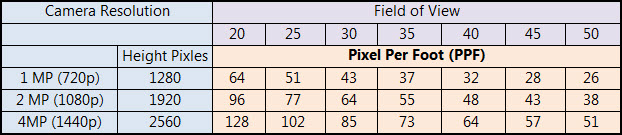
So that comment i made about reading a plate at 60ft with a 4K cam and 28mm lens is about right zoomed out at 112 degree viewing angle. They are saying 40 PPF as the threshold for a plate read.

From that post:
facial-and-license-plate%20recognition-chart.jpg


The image I posted previously was from an 8MP camera. Field of view is pretty much dictated by the lens focal length and effective zoom on the camera. In other words, the wider the lens angle, the shorter the 40PPF threshold will become.
 
Last edited:

Deude_Mann

Well-known member
Joined
Feb 7, 2020
Messages
113
Location
Laredo, TX
OK so I have a newb to security cameras question... Assuming a camera is PoE, what is the cross-brand compatibility between the cameras, the NVRs, and the monitoring software/apps?
 

Denwood

Well-known member
Joined
Sep 22, 2014
Messages
4,183
Location
Thunder Bay, Ontario, Canada
Look for ONVIF Compliant gear. That's your best bet for compatibility across devices.

4K is a lot more demanding than 1080P for recording so in many cases gear designed for 1080P is not going to do so well at 4K, if at all.

Otherwise, the KISS rules says use gear from one manufacturer that they have clearly indicated is compatible. If you're not tech minded, just use cloud recording (from the camera vendor!!) either paid or free. A few weeks is fine in my book. Cloud recording avoids the router hassles you would otherwise need to sort for live remote viewing and camera control/playback from your phone.
 
Last edited:

ddawg16

Well-known member
Joined
Jul 11, 2008
Messages
21,005
Location
S. California
Sure it's common - but it usually takes a dedicated camera, zoomed in (optical zoom not digital) and specifically set up do it

You quoted me - but I was talking about DD's setup where he claimed with his Lorex camera, which probably has a 2.8 or 4mm lens, "I can read a plate of a car parked in front of my house....but if I had 4K, I'd be able to read the plates on those cars across the street". I replied that I was skeptical that his system was able to do it and I have yet to see any photo's showing otherwise.

Denwood is using a very nice Lorex camers (Lorex is owned by Dahua), but again, at that price range, it is geared more towards the commercial market. Also, it has a motorized varifocal lens, which basically gives you a 4x optical zoom. Motorozed varifocal cameras aren't really intended to be zoomed in and out like a pzt, it's more for when you setting up the camera to make sure you can see the area that you want to capture, but it does have that capability. And when you get down to what really matters - that camera has a 1/2.5" sensor which is a decent size and will definitely help in low light conditions. Again, you get what you pay for. It doesn't seem that most people on this forum want to pop for a $250 cameras for their house or shop, it seems they are more interested in the $25 Wyze cams.

Looks like I need to wait for someone to park in front of my house so I can send you a snap shot of the plate....

Like I said....mine is HD 1080...it works for me....and worked well enough for the police to arrest a guy who walked past my house to steal a neighbors truck....he made the mistake of going to the 7-11 at the corner for a few min and getting into his GF's truck...they got the plate for that truck...which showed who she was.....and then they were able to ID him...

Poor neighbor....he got his truck and trailer back....but no luck on the race car that was in it.
 
To avoid these ads, REGISTER NOW!
Top Bottom