To avoid these ads, REGISTER NOW!

Security Cameras

Git

Well-known member
Joined
May 18, 2008
Messages
6,894
Location
S Cal
I don't know if I would say that you 'wasted your money'

Again, I was very happy with Foscam - I think I had 4 of them all told. Started out with one for use as a baby monitor and went from there. I just didn't realize the difference until I started buying Hikvision

Let's face it - Foscam are cheap. Easy to install - most people just use WiFi and plug them in. Currently selling on Amazon for around $60. But look at the specs - resolution is 640 x 480 Pixels

A very popular Hikvision for use indoors - the 2432 (also called the cube), has built in audio, 2048×1536 resolution, and is a true PoE camera. (I am pretty sure with the Foscam you still have to have a splitter at the camera to split out the power and then feed it back into the jack for it)

We can't all afford to drive Ferrari's - you have to buy something that your comfortable with

Here is the Hik. This one has a 2mm lens, they also make it 4mm
http://www.amazon.com/dp/B011R4NYAA/?tag=atomicindus08-20
 

Attachments

  • cube.jpg
    cube.jpg
    114.2 KB · Views: 56
To avoid these ads, REGISTER NOW!

Kaizen

Well-known member
Joined
Jan 9, 2015
Messages
6,938
Location
New England
Newb Alert! I've been considering a security camera system for my home and have/had many of the same questions as checkthisout. Thanks everyone for the info thus far and for letting me troll.

So it sounds like the consensus is that you need a dedicated PC? Are there any NVRs that are up to the task of managing a handful of cameras?

Just to clarify for you an nvr is like a dvr for your tv or normal cameras. It has a hard drive and an operating system. I have 4 cameras running and blowing through 1 terabyte in about a week. if I change it to just motion i'm sure i'd get longer. get the biggest drive you can. also make sure what cams work with the nvr program. as I said earlier I can see my hikavision cams on the nvr but lost the motion detection on them while my el cheapo and my dahua ones will do everything.
 

stioc

Well-known member
Joined
May 2, 2005
Messages
1,317
Location
SoCal
How much money are you guys dropping on these setups? As I mentioned on the previous page I'm totally satisfied with my setup that ran me $250 and took all of half a day from un-boxing to recording. I firmly believe security is done in layers, cameras is just one layer. Point being give some thought to other things and not spend all your energy and money in one place.
 

Ilikeike

ALLIANCE MEMBER
Joined
Jan 8, 2015
Messages
2,452
Location
Northern Ca.
How much money are you guys dropping on these setups? As I mentioned on the previous page I'm totally satisfied with my setup that ran me $250 and took all of half a day from un-boxing to recording. I firmly believe security is done in layers, cameras is just one layer. Point being give some thought to other things and not spend all your energy and money in one place.

A decent (IMOP) 8 channel NVR with 1~2 T storage is $800
 
OP
C

checkthisout

Well-known member
Joined
Sep 5, 2008
Messages
5,232
How much money are you guys dropping on these setups? As I mentioned on the previous page I'm totally satisfied with my setup that ran me $250 and took all of half a day from un-boxing to recording. I firmly believe security is done in layers, cameras is just one layer. Point being give some thought to other things and not spend all your energy and money in one place.

So far, 2 4mp Reolink 2560x1440P cameras @ $79.99 each. (IP POE Cameras)

1 3mp Hikvision 1080P camera $134.00 (IP POE Camera)

1000' spool full copper cat6 along with crimper and connectors $180.00

8 Port PEO switch $79.99

The Cat5 cable and switch will also be used for making a home network between some buildings and a couple of devices (TV and a Hub and maybe a few others) in the house.

No NVR yet but the cameras come with some cloud storage.

So $552.00 with cable, switch and cameras and no NVR
 
OP
C

checkthisout

Well-known member
Joined
Sep 5, 2008
Messages
5,232
How much money are you guys dropping on these setups? As I mentioned on the previous page I'm totally satisfied with my setup that ran me $250 and took all of half a day from un-boxing to recording. I firmly believe security is done in layers, cameras is just one layer. Point being give some thought to other things and not spend all your energy and money in one place.

Yup. I recently added Zwave with motion and window/door sensors that notify me on my mobile when one is tripped as well activate motion lighting.

I also have alert neighbors.

No big dog though.
 

dw1

Well-known member
Joined
Jan 26, 2015
Messages
1,335
Location
Ky
Well.... I bought this system: http://www.reo-link.com/productshow/25/13/1.html

I hope to install it this weekend in my barn, I called the cable company to get my internet installed, now it seems they dont want to install underground (it is up to the discretion of the installer) I dont want an overhead cable drop on my barn, that is why I put the electric service underground. I hope this camera system will be reliable/good enough. Mine has 4 cameras, POE and NVR and will take up to 8. I want to tear down an old farmhouse and eventually build a new house on this property, adding a camera or two in/on the house. I live about a mile away. Anyone have this camera setup?
 

wyliesdiesels

Well-known member
Joined
Aug 14, 2012
Messages
19,983
Location
Modesto, CA
Recently purchased this for my home after a number of thefts in the area.. one key incident left a man dead after he was confronted by the home owner while stealing a truck and shot. ( here in Canada you can't protect anything you own) :dunno: So this is my next best alternative..
4 Foscam HD cameras, 720P H 264 video compression, Motion detection, POE RJ45 port ( transfers power and data via single cable), 1 NVR , 4-ch 720P/960P HD IP camera access, H.264 main profile video compression, Supports HDMI and VGA local display. I'll also be running blue iris software to my phone etc.

A good family friend installs these systems, and should have it installed next week. The system, installed and configured along with reprogramming my computer etc will still have me just under $1000 which won't break the bank for some extra piece of mind while I'm away at work. Plus I have the option of adding cameras which I'll likely do in the near future after I get the hang of this!.

One thing u didnt list is POE injectors or a POE switch.

If you're buying drives just for this, look for DVR or NAS models. They tend to run a slower spindle speed but you don't need high performance as much as you need reliability. Sign up on the newegg email list and watch for some on sale.

Thats a good point to bring up. Male sure the drives are security rated.
 

stioc

Well-known member
Joined
May 2, 2005
Messages
1,317
Location
SoCal
Yup. I recently added Zwave with motion and window/door sensors that notify me on my mobile when one is tripped as well activate motion lighting.

I also have alert neighbors.

No big dog though.

That sounds interesting and something I might do too- what're you using for the Zwave controller?
 

NewShockerGuy

Well-known member
Joined
Oct 12, 2010
Messages
2,481
Location
Northern Virginia / DC
How is everyone running power and or data lines to these cameras after a house is built? IE: If I wanted to install a camera on the porch and on the garage front side facing the street... I can't think of a way where it would NOT involve cutting numerous holes in the ceiling/walls and then trying to pull cable, and at that point would I have to drill through each stud like they do for electric wires?

I am in IT, so setting this up to me would be the easy part, but running power to the cameras outside that there is zero cabling/outlets would be the more difficult part.

That's the only thing holding me back is figuring out how to not cut open the house everywhere just to run cat5e/cat6 cable...

-Nigel
 
OP
C

checkthisout

Well-known member
Joined
Sep 5, 2008
Messages
5,232
How is everyone running power and or data lines to these cameras after a house is built? IE: If I wanted to install a camera on the porch and on the garage front side facing the street... I can't think of a way where it would NOT involve cutting numerous holes in the ceiling/walls and then trying to pull cable, and at that point would I have to drill through each stud like they do for electric wires?

I am in IT, so setting this up to me would be the easy part, but running power to the cameras outside that there is zero cabling/outlets would be the more difficult part.

That's the only thing holding me back is figuring out how to not cut open the house everywhere just to run cat5e/cat6 cable...

-Nigel

Run the wires down from the attic. You can practice your fishing skills!

I would suggest finding someone with an alarm system that was installed after the house was built and then studying how the tech ran those wires.

Those guys can be pretty sneaky with the way they route that stuff.
 

Git

Well-known member
Joined
May 18, 2008
Messages
6,894
Location
S Cal
At least one of the advantages of running cat5/cat6 is your dealing with a fairly small diameter cable versus something like bnc cable. And with PoE you only have to run one wire

You just have to creative. I have a camera on the wall by my front door - about 7' above ground, which required some drywall work on the inside, but it was well worth it.

Most of my cameras are exterior and I was able to use the attic area above the garage but I will eventually add some more interior cameras and plan to hide the cables behind crown molding
 

stioc

Well-known member
Joined
May 2, 2005
Messages
1,317
Location
SoCal
I ran my cables through the attic and as I said in my earlier posts it was the hardest part of the whole job- still only took 3-4 hrs doing it alone with no help.

I have a friend with a two story house who ran his BNC cables along the eaves of the roof, high up, tucked away and stapled in place for a nice clean job. He had to use a few BNC adapters to join two cables for the added length he needed for a few of the cameras but says there's absolutely no quality loss between the cables that were joined (two 60ft cables) vs. the single 60ft cables he ran.
 

willf650

Well-known member
Joined
Mar 10, 2010
Messages
781
That sounds interesting and something I might do too- what're you using for the Zwave controller?


The blue Iris software that has been mentioned here for cameras integrates right into a Vera home automation controller. You can use the cameras motion detectors in your zwave system or use the zwave sensors to trigger camera functions in the Vera.


Here is the same camera snap shot I posted earlier when viewed via the Vera controller.

e223c3782c58feefe3d45a24a0a9ede2.jpg
I need to clean my basement.


Someone asked about price and I'm probably about $2000 into my system but it's doing lights, cameras, water detectors, exterior doors and garage doors. The Vera also has an app to integrate the Chamberlin my-q garage door system into it which I've done as well.

Sent from my iPad using Tapatalk
 
Last edited:

dw1

Well-known member
Joined
Jan 26, 2015
Messages
1,335
Location
Ky
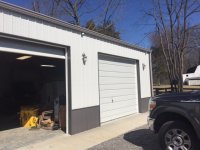
Well, it seems I have looked at more camera systems than I care to mention, but, I did buy a 4 camera NVD Reo Link system, I can add 4 more cameras, I have a link above in my post last week. I did get cable internet into my barn yesterday, I finished installing the camera system today, it is pretty neat I will say. Here a few pics of it, I am suppose to get an email alert on motion.
 

Attachments

  • reo1.jpg
    reo1.jpg
    113.1 KB · Views: 95
  • reo2.jpg
    reo2.jpg
    121.6 KB · Views: 116

bfr57

Well-known member
Joined
May 31, 2013
Messages
133
So, lot's of talk of POE. How about wireless systems?
We recently had some packages/mail stolen at our front gate which is about 300' from the house.
I would like a system with a NVR, motion detected cameras (4 max), weather resistant of course, no audio, and night vision.
I've researched Lorex products, but they have mixed reviews.
Any other systems to look at?
I've also heard wireless cameras can really affect a wireless router. Can I run a separate wireless router just for the cameras? I really don't need to able to see video over the internet as long as it's recorded, so I don't see a reason I couldn't just use the wireless signal to connect cameras to NVR.
 

stioc

Well-known member
Joined
May 2, 2005
Messages
1,317
Location
SoCal
How would you supply power to the wireless cameras? if batteries, how often would they need to be changed/charged etc?
 

bfr57

Well-known member
Joined
May 31, 2013
Messages
133
Good point! There is a 15 amp service at the gate for accent lighting, so I can use that for cameras.
 
To avoid these ads, REGISTER NOW!

ADSR

Well-known member
Joined
Jan 12, 2013
Messages
10,713
Anyone use the Lorex from costco? Pretty cheap at 520 canadian. That's like 200 USD.
350-877588-894__1.jpg


http://www.costco.ca/.product.10023...rypageHorizontalTop|PopularProductsInCategory
 
OP
C

checkthisout

Well-known member
Joined
Sep 5, 2008
Messages
5,232
So, lot's of talk of POE. How about wireless systems?
We recently had some packages/mail stolen at our front gate which is about 300' from the house.
I would like a system with a NVR, motion detected cameras (4 max), weather resistant of course, no audio, and night vision.
I've researched Lorex products, but they have mixed reviews.
Any other systems to look at?
I've also heard wireless cameras can really affect a wireless router. Can I run a separate wireless router just for the cameras? I really don't need to able to see video over the internet as long as it's recorded, so I don't see a reason I couldn't just use the wireless signal to connect cameras to NVR.

300' is a long ways to try and shoot a wireless signal without some more spendy equipment, but I don't know the environmental conditions and terrain you're working with.

If I was you I would go on Amazon and get a wifi outdoor camera and just plug it in and see what happens. Set it up in the house close to the router and then carry it down your gate and place it around the height you think you want it.

If it won't work out at your gate then box it up and return it.
 
OP
C

checkthisout

Well-known member
Joined
Sep 5, 2008
Messages
5,232
OP
C

checkthisout

Well-known member
Joined
Sep 5, 2008
Messages
5,232
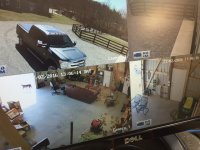
I'm also going to backpedal on my "wowing" of the Hikvision over the Reolink (which I think is Amcrest, the camera bodies look the same but the specs are different).

The Hikvision picture looks better because their software is enhancing the video stream and you can't "unenhanced" it in the settings. In other words, think of a fancy TV where you can change between picture modes. It's like the Hikvision is stuck in "vivid" or "movie" mode.

The part I like about it is the wider field of vision and slightly better night vision but I can buy two Reolinks for the price of the 1 Hikvision and cover the same area. Reolink's app and pc software is also more stable and user-friendly for common computer-illiterate folk like me.
 

bfr57

Well-known member
Joined
May 31, 2013
Messages
133
300' is a long ways to try and shoot a wireless signal without some more spendy equipment, but I don't know the environmental conditions and terrain you're working with.

If I was you I would go on Amazon and get a wifi outdoor camera and just plug it in and see what happens. Set it up in the house close to the router and then carry it down your gate and place it around the height you think you want it.

If it won't work out at your gate then box it up and return it.

May have to try that. It's not a direct line of sight with some shrubbery in between. Won't a wireless signal go through shrubbery?
 

ADSR

Well-known member
Joined
Jan 12, 2013
Messages
10,713
It's fine but it's 1080p and not megapixel.

You'll be able to see people stealing or breaking your stuff but you won't be able to make out who it is.

All your runs also have to be home runs back to the DVR.

The IP systems are just more versatile and give a better picture.


Thanks for the advice. Sounds like IP is the way to go.:beer:
 

Beemer533

Well-known member
Joined
May 9, 2014
Messages
2,057
Location
Syracuse, NY
So, lot's of talk of POE. How about wireless systems?
We recently had some packages/mail stolen at our front gate which is about 300' from the house.
I would like a system with a NVR, motion detected cameras (4 max), weather resistant of course, no audio, and night vision.
I've researched Lorex products, but they have mixed reviews.
Any other systems to look at?
I've also heard wireless cameras can really affect a wireless router. Can I run a separate wireless router just for the cameras? I really don't need to able to see video over the internet as long as it's recorded, so I don't see a reason I couldn't just use the wireless signal to connect cameras to NVR.

Regarding your gate, using a wireless camera as opposed to running a CAT5e won't really help you as you still need power at the camera, so unless you already have power or are planning on solar you will still need to run a line out..
Also most cameras that include WiFi won't work very well, if at all, at that distance.

If you already have power at the gate and don't want to run a cable, I recommend a seperate wireless bridge, like the Ubiquiti Nanostation.

If you are going to have more than one wireless camera, you won't want to use the same wireless network that you use to surf the Web.. Several 1080p cameras will really affect your wireless network unless you segregate it properly (separate AP) ... Also, performance won't really be that great for the camera system over wireless regardless, and it has nothing to do with watching the video over the Internet.

If you can avoid it, I would stay away from wireless cameras....
 

Beemer533

Well-known member
Joined
May 9, 2014
Messages
2,057
Location
Syracuse, NY
May have to try that. It's not a direct line of sight with some shrubbery in between. Won't a wireless signal go through shrubbery?

It's might, it depends on how dense it is.. WiFi doesn't penetrate that we'll, especially when you need that kind of distance..
 

dw1

Well-known member
Joined
Jan 26, 2015
Messages
1,335
Location
Ky
I've been fine tuning the Reo Link System I bought, this is the first camera system that I have messed with, so I cant really compare it to others. it works pretty good, it will send a motion email alert, you can zoom in on play back, I had my wife pull in there on her way from work, I could zoom in and read her license plate, you can also take pictures. It works pretty good, not bad for $549
 

bfr57

Well-known member
Joined
May 31, 2013
Messages
133
I've been fine tuning the Reo Link System I bought, this is the first camera system that I have messed with, so I cant really compare it to others. it works pretty good, it will send a motion email alert, you can zoom in on play back, I had my wife pull in there on her way from work, I could zoom in and read her license plate, you can also take pictures. It works pretty good, not bad for $549

What kind of distance between cameras and router?
 

dw1

Well-known member
Joined
Jan 26, 2015
Messages
1,335
Location
Ky
This is a night pic of the 116 Y.O farm house over there

Well, I was trying to post a pic from there to here??
 

dw1

Well-known member
Joined
Jan 26, 2015
Messages
1,335
Location
Ky
What kind of distance between cameras and router?
Actually I have a cable from my router to the NVR which is inside a gangbox at the barn, then the cable to each camera. POE/NVR system 8 channel, mine came with 4 cameras so I can add 4
I want to say it comes with 60' cat 5 cables. This is a mile down the road from me, I can bring it up on my phone and laptop at home. I'll have to look on the 60' length to be sure.
I'll see if i can figure out the pic
 
Last edited:

dw1

Well-known member
Joined
Jan 26, 2015
Messages
1,335
Location
Ky
Had to convert pic to jpg file to get it on here
 

Attachments

  • farmhouse.jpg
    farmhouse.jpg
    145.6 KB · Views: 123

Pwrgeek

Well-known member
Joined
Oct 18, 2015
Messages
288
Location
Texas USA
So, lot's of talk of POE. How about wireless systems?

We recently had some packages/mail stolen at our front gate which is about 300' from the house.

I would like a system with a NVR, motion detected cameras (4 max), weather resistant of course, no audio, and night vision.

I've researched Lorex products, but they have mixed reviews.

Any other systems to look at?

I've also heard wireless cameras can really affect a wireless router. Can I run a separate wireless router just for the cameras? I really don't need to able to see video over the internet as long as it's recorded, so I don't see a reason I couldn't just use the wireless signal to connect cameras to NVR.


Since you have power at the gate this sounds like a good job for a Ethernet over Powerline system (HomePlug). Also be careful on Lorex Cameras. I have some that are essentially expensive paperweights now because their consumer cams don't do RTSP which my DVR system needs.


Sent from my iPhone using Tapatalk
 

Git

Well-known member
Joined
May 18, 2008
Messages
6,894
Location
S Cal
I'm also going to backpedal on my "wowing" of the Hikvision over the Reolink (which I think is Amcrest, the camera bodies look the same but the specs are different).

The Hikvision picture looks better because their software is enhancing the video stream and you can't "unenhanced" it in the settings. In other words, think of a fancy TV where you can change between picture modes. It's like the Hikvision is stuck in "vivid" or "movie" mode.

The part I like about it is the wider field of vision and slightly better night vision but I can buy two Reolinks for the price of the 1 Hikvision and cover the same area. Reolink's app and pc software is also more stable and user-friendly for common computer-illiterate folk like me.


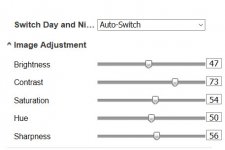
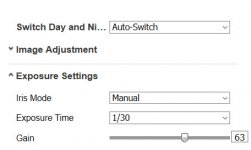
Sorry - but I don't think you really know what your talking about when it comes to the Hikvision cameras and that you can't "unehanced it in the settings"

I have attached a couple of screen shots of the settings page - everything is adjustable

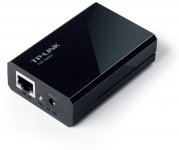
also I looked at the "Reolink RLC-420 4MP HD 2560x1440P IP Camera Outdoor Night Vision Motion Detection Email Alert" on Amazon. Not sure if this is the one your considering, but it reminds me of the Foscam. This is not a true PoE camera. Add the cost of a SPLITTER to each camera if you want to use it with your PoE Switch. If your lucky, the power cord out of the splitter will have the proper jack on it to plug into your camera, if not you will have to find the right size. Splitters are around $18 each for a decent one
http://www.amazon.com/dp/B003CFATQK/?tag=atomicindus08-20
 

Attachments

  • SNAG-0043.jpg
    SNAG-0043.jpg
    30.2 KB · Views: 30
  • SNAG-0044.jpg
    SNAG-0044.jpg
    26.7 KB · Views: 31
  • Reolink.jpg
    Reolink.jpg
    55.2 KB · Views: 29
  • splitter.jpg
    splitter.jpg
    65.4 KB · Views: 30

dw1

Well-known member
Joined
Jan 26, 2015
Messages
1,335
Location
Ky
Sorry - but I don't think you really know what your talking about when it comes to the Hikvision cameras and that you can't "unehanced it in the settings"

I have attached a couple of screen shots of the settings page - everything is adjustable

also I looked at the "Reolink RLC-420 4MP HD 2560x1440P IP Camera Outdoor Night Vision Motion Detection Email Alert" on Amazon. Not sure if this is the one your considering, but it reminds me of the Foscam. This is not a true PoE camera./QUOTE]


I started fine tuning and am trying to increase my knowledge on these camera systems, I cant comment on any system, this is the first one I have installed, but it was a piece of cake in a pole barn. I turned the "Motion Detect" on last night, for some reason I thought it would capture and send a picture, but it just sends an email alert, and I had many of them when I checked my email this morning, 39 to be exact. I turned it off for now, but will adjust the settings, it has a screen for that. My camera system has a 2TB NVR if I am looking at this right, it seems to be burning through this recorder very quickly, I thought a 2TB recorder would record for a long time? I am actually planning on adding a couple of cameras or lets say I was to add 4 more cameras inside/outside the house, what would be the best way to do that, 4 individual CAT 5 cables, one to each camera? My NVR is 8 channels, it was just came with 4 cameras.
 
OP
C

checkthisout

Well-known member
Joined
Sep 5, 2008
Messages
5,232
Sorry - but I don't think you really know what your talking about when it comes to the Hikvision cameras and that you can't "unehanced it in the settings"

I have attached a couple of screen shots of the settings page - everything is adjustable

also I looked at the "Reolink RLC-420 4MP HD 2560x1440P IP Camera Outdoor Night Vision Motion Detection Email Alert" on Amazon. Not sure if this is the one your considering, but it reminds me of the Foscam. This is not a true PoE camera. Add the cost of a SPLITTER to each camera if you want to use it with your PoE Switch. If your lucky, the power cord out of the splitter will have the proper jack on it to plug into your camera, if not you will have to find the right size. Splitters are around $18 each for a decent one
http://www.amazon.com/dp/B003CFATQK/?tag=atomicindus08-20


I played with the adjustments for about an hour and couldn't get as good of a picture out of it as I can out the Reolink. You can't get the pastelling of the colors out of the image. Also bear in mind that the Hik is 3MP with a 2.8MM lense so I think it's simply not capable of showing as good of detail but it does take a in larger field of view which I like. I also think they are cheating a little bit by modifying the image to make it look more impressive...better first impression ya know.

Reolink doesn't make any cameras that aren't IP POE (except for maybe the wireless ones), so I am unsure of what you were looking at?

I'm currently running two of them POE off my BVlink switch. The camera comes with the option to power it with the supplied adapter (as does the Hikvision, only they don't supply an adapter).


http://www.amazon.com/dp/B0147XLVIU/?tag=atomicindus08-20
 
Last edited:
OP
C

checkthisout

Well-known member
Joined
Sep 5, 2008
Messages
5,232
Sorry - but I don't think you really know what your talking about when it comes to the Hikvision cameras and that you can't "unehanced it in the settings"

I have attached a couple of screen shots of the settings page - everything is adjustable

also I looked at the "Reolink RLC-420 4MP HD 2560x1440P IP Camera Outdoor Night Vision Motion Detection Email Alert" on Amazon. Not sure if this is the one your considering, but it reminds me of the Foscam. This is not a true PoE camera./QUOTE]


I started fine tuning and am trying to increase my knowledge on these camera systems, I cant comment on any system, this is the first one I have installed, but it was a piece of cake in a pole barn. I turned the "Motion Detect" on last night, for some reason I thought it would capture and send a picture, but it just sends an email alert, and I had many of them when I checked my email this morning, 39 to be exact. I turned it off for now, but will adjust the settings, it has a screen for that. My camera system has a 2TB NVR if I am looking at this right, it seems to be burning through this recorder very quickly, I thought a 2TB recorder would record for a long time? I am actually planning on adding a couple of cameras or lets say I was to add 4 more cameras inside/outside the house, what would be the best way to do that, 4 individual CAT 5 cables, one to each camera? My NVR is 8 channels, it was just came with 4 cameras.

Gotta turn down the FPS in your recording.

Yes, individual cables to each camera from your NVR since it's POE.
 

dw1

Well-known member
Joined
Jan 26, 2015
Messages
1,335
Location
Ky
Gotta turn down the FPS in your recording.

Yes, individual cables to each camera from your NVR since it's POE.

Thanks, FPS is set at 25 (Max) how long would it take to fill a 2 TB NVR with 4 cameras recording (I dont live here, but I am there throughout the week, my only concern would be if we were on vacation, if this fills up, will it start recording over itself?
 

Git

Well-known member
Joined
May 18, 2008
Messages
6,894
Location
S Cal
Reolink doesn't make any cameras that aren't IP POE (except for maybe the wireless ones), so I am unsure of what you were looking at?

I was looking at the camera description - I didn't see anywhere where it said that it was PoE along with the fact that it has a pigtail connection for power, like you would use with a transformer. If it is working for you with your PoE switch then obviously I was wrong

Not sure which Hik you were looking at, but since it appears your looking at bullets, most of the Hik bullets are sold with a 4mm lens and they also have the option for an 8mm or 12mm lens - which gives you more flexibility, depending on the location. (Some of their indoor cameras have a 2.8mm lens for a wider view of a room)

Don't get caught up in the "MegaPixel" trap - more in not always better - especially when it comes to low light performance

I haven't seen much for specs when it comes to the Reolink. For example, scroll down towards the bottom of the page to see the Hik specs: sensor size, etc etc

http://www.amazon.com/dp/B015YHZYPO/?tag=atomicindus08-20

If you are happy with what you have, that is all that really counts
 
To avoid these ads, REGISTER NOW!
Top Bottom