To avoid these ads, REGISTER NOW!

Security Cameras

Doug19

Well-known member
Joined
Mar 7, 2006
Messages
229
Location
Pittsburgh, PA
Any chance you have a review on this after a year? Im looking at the below from amazon

https://www.amazon.com/gp/aw/d/B01A...ds=ReoLink&dpPl=1&dpID=41rQvnwSqIL&ref=plSrch

Id love to lut together my own system but I dont think I have the time or knowledge to put together a complete package.

I really like the ReoLink ones on Amazon for the price and quality. I installed them a few months ago. Ran the CAT 5e cable myself which was a pain since we don't have an attic. Well worth it though. They've held up great so far and have a nice picture. This pic was a screen shot of their app from my phone while at work. It's much clearer at full resolution on the NVR. 2236ffaac7b921657cca98d4bda93c00.jpg


Sent from my iPhone using Tapatalk
 

Attachments

  • 2236ffaac7b921657cca98d4bda93c00.jpg
    2236ffaac7b921657cca98d4bda93c00.jpg
    241.5 KB · Views: 0
To avoid these ads, REGISTER NOW!

Frontierajl

Well-known member
Joined
Oct 31, 2015
Messages
292
Location
Northern California
Any chance you have a review on this after a year? Im looking at the below from amazon


https://www.amazon.com/gp/aw/d/B01A...ds=ReoLink&dpPl=1&dpID=41rQvnwSqIL&ref=plSrch


Id love to lut together my own system but I dont think I have the time or knowledge to put together a complete package.


I don’t have an in depth review but other than a few problems with the mobile app the system has been solid and running non stop. I really like it for the price.


Sent from my iPhone using Tapatalk
 

Frontierajl

Well-known member
Joined
Oct 31, 2015
Messages
292
Location
Northern California

slodat

ALLIANCE MEMBER
Joined
Feb 6, 2010
Messages
3,679
Location
Central-ish, WA
I was going to buy the ReoLink system linked above, but I went back and re-read this thread. Ended up buying Hikvision NVR, 4TB drive, and cameras. Can't wait to get this going! Thanks to everyone for sharing the info!
 

dw1

Well-known member
Joined
Jan 26, 2015
Messages
1,335
Location
Ky
Also, that’s the same system I have. I added a PTZ camera to it also.


Sent from my iPhone using Tapatalk

X2, I have the same system and also added a PTZ camera. No problems with anything other than I have rebooted it maybe twice in 2 years.
 

slodat

ALLIANCE MEMBER
Joined
Feb 6, 2010
Messages
3,679
Location
Central-ish, WA
First camera arrived today. Looks like really nice stuff for the price point.

525d2b1562383e204b094c38c00cf3ba.jpg

2e603398da4d29be9d705cf431ed8f59.jpg
 

Attachments

  • 525d2b1562383e204b094c38c00cf3ba.jpg
    525d2b1562383e204b094c38c00cf3ba.jpg
    599.4 KB · Views: 0
  • 2e603398da4d29be9d705cf431ed8f59.jpg
    2e603398da4d29be9d705cf431ed8f59.jpg
    676.3 KB · Views: 0

Git

Well-known member
Joined
May 18, 2008
Messages
6,894
Location
S Cal
Where did you buy it?

You have to be a little careful with Hiks nowadays. A backdoor has been discovered that makes it pretty easy to hack the camera and gain access. The solution is to update the firmware - but that is where some people run into problems.

In the US, Hikvision will usually only sell to installers and most DIY types end up buying the cameras on Amazon, eBay or directly from China. There are basically three different versions of the camera - China, International and USA.

Some vendors will take a Chinese version camera (all the menus, etc are in Chinese) and hack the firmware so that everything is now in English - but if you try to update the firmware you end up bricking the camera

So first check to see what firmware version the camera is running. You should be able to go to the Hik USA website and see what the latest firmware is for that camera. For example - here is the page for the Hik 2032 bullet (I have a couple of these)

http://www.hikvision.com/us/Products_1_10533_i7696.html

Then look at the serial number of the camera and see if you see the letters CH or WR 8 or 9 digits in from the end. (You don't want to see CH)

More info:
https://threatpost.com/hikvision-patches-backdoor-in-ip-cameras/125522/
 

smalltown

Well-known member
Joined
Jul 9, 2015
Messages
985
Location
Western Maine
Always wondered about camera with that "dome shape" does that mean the camera can be rotated inside the dome with software ?
 

dneiding

Well-known member
Joined
Jan 16, 2017
Messages
161
Location
North Central Ohio
I bought some cheap ($35.00) Chinese Foscam knock offs from Amazon and use Milestone xProtect Free as my NVR. I have a $250 all-in-one Windows PC that serves as my Plex server and my NVR. Works GREAT. Maintains 5 days worth of recordings.

Just a few problems. First, it took a while to find the right configuration in xProtect to connect to the camera video stream. Since they are not a name brand I had to fool around until I finally found the JPEG stream URL.

Second issue was the cameras would just lock up every few hours. They were still on the network but the JPEG stream would stop and just be black. To solve this, I wrote a Windows service that pings the cameras every few seconds (configurable) and verifies the camera is still on the network and that there is still a picture coming from the JPEG stream. If not, it sends a network command to the camera to reboot the camera. If it tries three times and the camera still won't work it texts me; usually one reboot fixes the problem though.

This also proved useful when one of the kids would go to the pantry to steal a snack, they'd unplug the camera so as not to be recorded. They stopped doing that when I would come walking into the pantry 9 seconds after they unplugged it to ask them what they were doing :)
 

klassenl

Well-known member
Joined
Feb 20, 2016
Messages
713
Location
Southern Alberta
Has anyone tried to get support from Hik. I have on 2 occasions tried to talk to tech support and both times I waited and hour to talk to a guy who told me he couldn't help me. Then I had a long email exchange with a guy who told me to call tech support..........
 

OCD

Well-known member
Joined
Dec 30, 2014
Messages
1,316
Location
Edmonton, Ab. Canada
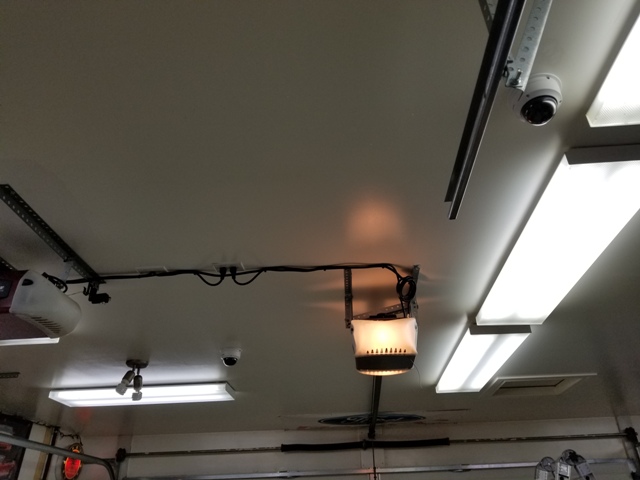
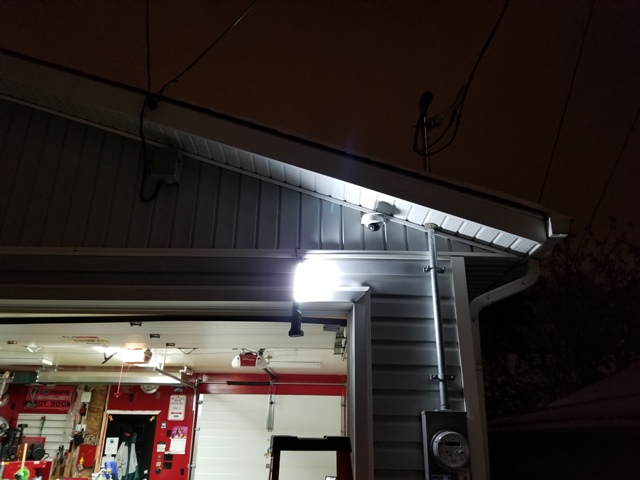
I am installing a HIK Vision 4 camera system in the garage...

20171108_173222.jpg

Two facing each door from the inside, and two facing each way down the driveway and alley...

20171116_205320.jpg


20171116_203321.jpg


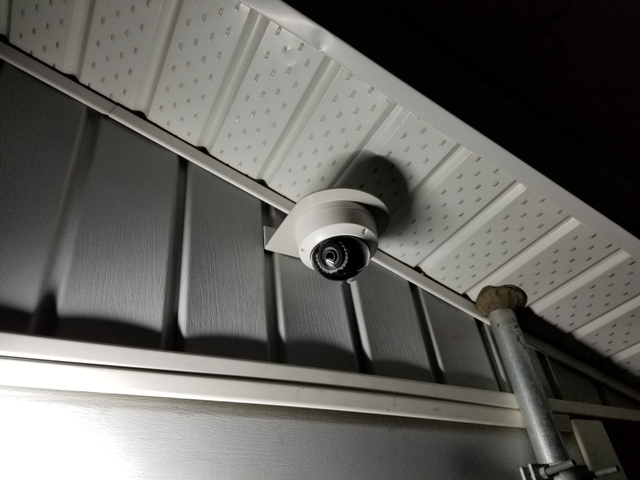
I didn't want to hang them on the angled soffit, so I made the brackets to mount them on the wall...

20171116_203420.jpg


I ran Cat6 cable and am going with poe... I still need to get a 25 foot hdmi cable so I can put a monitor for them on my tool box... Then get my IT buddy over to set it all up and get them recording!!
 

slodat

ALLIANCE MEMBER
Joined
Feb 6, 2010
Messages
3,679
Location
Central-ish, WA
Hik 4k NVR and three different dome cameras (2.8mm, 4mm & 2.8-12mm zoom) arrived. It’s pretty nice stuff! Still learning about what camera is best for each location. Looking like I’ll buy the rest from AliExpress. Leaning toward turrets outside and a dome PTZ with IR that is shielded so it works well outside.
 

slodat

ALLIANCE MEMBER
Joined
Feb 6, 2010
Messages
3,679
Location
Central-ish, WA
Where did you buy it?

You have to be a little careful with Hiks nowadays. A backdoor has been discovered that makes it pretty easy to hack the camera and gain access. The solution is to update the firmware - but that is where some people run into problems.

In the US, Hikvision will usually only sell to installers and most DIY types end up buying the cameras on Amazon, eBay or directly from China. There are basically three different versions of the camera - China, International and USA.

Some vendors will take a Chinese version camera (all the menus, etc are in Chinese) and hack the firmware so that everything is now in English - but if you try to update the firmware you end up bricking the camera

So first check to see what firmware version the camera is running. You should be able to go to the Hik USA website and see what the latest firmware is for that camera. For example - here is the page for the Hik 2032 bullet (I have a couple of these)

http://www.hikvision.com/us/Products_1_10533_i7696.html

Then look at the serial number of the camera and see if you see the letters CH or WR 8 or 9 digits in from the end. (You don't want to see CH)

More info:
https://threatpost.com/hikvision-patches-backdoor-in-ip-cameras/125522/


I bought all of it through amazon. All are WR.

937a92caf1e68b3dec556c042dbacf4e.jpg
 

Attachments

  • 937a92caf1e68b3dec556c042dbacf4e.jpg
    937a92caf1e68b3dec556c042dbacf4e.jpg
    768.4 KB · Views: 0

JohnnieMo

Well-known member
Joined
Nov 25, 2014
Messages
1,175
Location
Calgary, Alberta
These on sale now at Costco. Price in CAD. I have the older 1080p version and am happy. 2TB won’t last long with 6 2x1080 cameras

9112d0f7050506bdf9c8be0362493ff8.jpg

They also have a 4 camera version.

c860038a1fc5c9ef7f877dcab782388e.jpg
 

Attachments

  • c860038a1fc5c9ef7f877dcab782388e.jpg
    c860038a1fc5c9ef7f877dcab782388e.jpg
    698.8 KB · Views: 0
  • 9112d0f7050506bdf9c8be0362493ff8.jpg
    9112d0f7050506bdf9c8be0362493ff8.jpg
    751.6 KB · Views: 0

wyliesdiesels

Well-known member
Joined
Aug 14, 2012
Messages
19,981
Location
Modesto, CA
Hikvision is good stuff.

:+1: yup

These on sale now at Costco. Price in CAD. I have the older 1080p version and am happy. 2TB won’t last long with 6 2x1080 cameras

9112d0f7050506bdf9c8be0362493ff8.jpg

They also have a 4 camera version.

c860038a1fc5c9ef7f877dcab782388e.jpg

Looks like analog system.

My local costco no longer carries analog camera systems from Lorex. All they have now is Lorex IP camera systems.
 

Attachments

  • 9112d0f7050506bdf9c8be0362493ff8.jpg
    9112d0f7050506bdf9c8be0362493ff8.jpg
    113.8 KB · Views: 0
  • c860038a1fc5c9ef7f877dcab782388e.jpg
    c860038a1fc5c9ef7f877dcab782388e.jpg
    103.5 KB · Views: 0
To avoid these ads, REGISTER NOW!

metaj

Member
Joined
Oct 24, 2016
Messages
17
They are good, my sister has them but they don't have the two-way sound ability. That is the only advantage IMHO

That's the only thing I saw that it was lacking, and that doesn't bother me. Mine are coming in on Thursday. Can't wait!
 

Tmart86

Well-known member
Joined
Jul 12, 2017
Messages
151
Location
Cedar Rapids Iowa
My problem with those are they usually have a vary narrow FOV.

I went with two Hikvision 2.8mm cameras with a 106'FOV.


DS-2CD2342WD-I
http://amzn.to/2hNSoA1


Narrow field of view isnt an issue if setup properly they help you get more pixels on target and increase the ability to identify people. proper lens choice is critical

That said I use 2.8mm lenses in bullets and dome cameras for "general coverage" and tell customers to never expect them to get faces or license plates instead you will just know where people went etc. this of course changes if the area of coverage is small enough that the distance from the camera still allows good pixels on target numbers with a 2.8mm lens.
 

JohnnieMo

Well-known member
Joined
Nov 25, 2014
Messages
1,175
Location
Calgary, Alberta
I usually find the FOV is too wide. My Lorex bullet cams are 90 degrees. I wish they were a bit less. To each his own I guess.

One size fits all usually isn’t great. The lorex kit is nice as you can buy additional cameras to fill it out as you see it. I added a PTZ cam to mine to zoom in on my truck to do facial identification.
 

tdott

Well-known member
Joined
Jan 1, 2016
Messages
191
Location
South FL / Toronto
Yes that is true, depends on the area you are trying to cover. For me I needed a wider field of view to cover my driveway otherwise one camera couldn't cover my driveway from each direction and more than 2 cameras would be needed just to see the driveway.

Indoors I find the wider FOV also useful, but again all depends on usage. I don't have wide open spaces or able to place the cameras far away enough.
 

KatanaKid

Active member
Joined
Feb 13, 2010
Messages
29
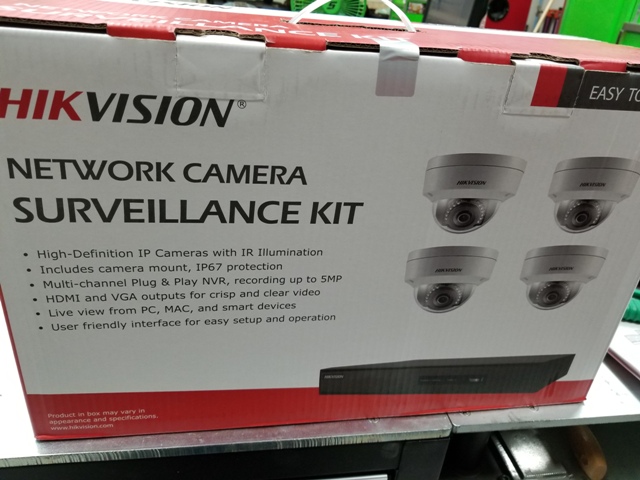
I purchased this at Sams club Although it will be 2 years ago this christmas . Just have not found time to install it . I still have not opened the box . it was a $750 item BUT they were on sale at the time . Now the same price only has 10 cameras . Id like any comments on just what I have here in the box . If there is any better system for the price point of 600 available at present . I could always return this
 

Attachments

  • PC060707.jpg
    PC060707.jpg
    132.4 KB · Views: 35
  • PC060706.jpg
    PC060706.jpg
    136.6 KB · Views: 45

IMStuner

Well-known member
Joined
Nov 6, 2012
Messages
483
Location
MA
There are so many choices.


I've narrowed it down to stationary 2-4 megapixel POE cameras....probably hikvision or reolink.


Questions and statements:


1) Can you buy an NVR and simply plug it into your router and set it to record from any given camera, even if you have a combination of types and brands? How hard is that to do?

I use a Synology disk station +DS1515+ for my DVR and it’s also a NAS.


2) Should I use a POE switch or an Injector?

Would use a decent POE Switch for easy wiring.


3) I don't really want to buy a complete system. I want to buy one or two pieces at a time so I can test out different brands and types.


There a lot of compatible POE cameras that works with the surveillance station app on the Synology box.


4) These will all be for outdoors.


5) With a POE switch I can simply plug all the cameras into the switch and then I just plug 1 wire into the router. The switch combines all camera feeds into one, yes?

Yes you can and I would recommend you have at least decent Cat5E or 6. All my camera go into a Poe switch which some are powered and some of using the Poe adapter, than it goes into my DVR. The Synology box has 4 ethernet port fail over so if one dies it will automatically switch to the next port.


6) Two of the cameras will be wifi. With an NVR, I can record from wifi cameras and hardwired, correct?

Yes you can but but you better have good WiFi coverage and I don’t mean a pretty WiFi router.


So here is what I envision. 4 POE cameras running into a POE switch, one wire coming out of the switch and plugging into the router, and the NVR hooked to another port on the router. The two wifi cameras will obviously be connected wirelessly to the router but the NVR will record from all cameras.


How will I access the NVR? Do I ignore the apps that come with the cameras themselves and find an NVR with it's viewing software?


Some cameras come with SD cards. Do you recommend these and no NVR?


Thanks....it's jumbled but you should be able to see what I'm getting at.


Sent from my iPhone using Tapatalk
 

Hpozzuoli

Well-known member
Joined
Dec 11, 2013
Messages
3,428
Location
Rhode Island
Anyone ever have this happen. I have a set of cameras at one of my stores. Everything works fine with the exception of mobile viewing. It was fine until they tried to update the app and messed it up. Now they can’t fix it and don’t care. Effectively cancelling my mobile viewing. Is there a third party that allows viewing?
 

Git

Well-known member
Joined
May 18, 2008
Messages
6,894
Location
S Cal
Anyone ever have this happen. I have a set of cameras at one of my stores. Everything works fine with the exception of mobile viewing. It was fine until they tried to update the app and messed it up. Now they can’t fix it and don’t care. Effectively cancelling my mobile viewing. Is there a third party that allows viewing?

If they are Hikvision cameras - they have a problem with their app, and the suggested work around (which you don't want to do) is port forwarding. Hik cameras have been known to have some security flaws that make them pretty easy to hack. You need to be running the latest firmware if you have one on this list

This link is to Homeland Security:
https://ics-cert.us-cert.gov/advisories/ICSA-17-124-01


For you guys who want to play around with Field Of View, IPVM has a pretty cool calculator where you can look up your address and place cameras to see the coverage

https://calculator.ipvm.com/
 
OP
C

checkthisout

Well-known member
Joined
Sep 5, 2008
Messages
5,232
Sent from my iPhone using Tapatalk

I think I made this post over a year ago!

7 cameras up and running. Went with the Reolinks. Couldn't beat their prices on Amazon when they go on sale from time to time.

And, I couldn't ever get the Hik setup so I could view it outside my network. Nice little cameras but not for laypeople like me. Its also difficult to get their cameras consistently, at least with the way I like to buy stuff which is Amazon and Ebay. Too many non USA models etc.

Reolinks are plug and play along with good prices and what I believe is good video quality.
 

Capt Chrysler

Well-known member
Joined
Mar 6, 2011
Messages
1,160
Location
Middle of nowhere.
FYI:

Make sure if you get outside cameras, headlights do not wash out the picture.

Here is why. Last Sunday AM a buddy had a pick up drive through his fence. The cameras caught the action, but the headlights wash out the image so bad we couldn't ID the pu.

New cameras are on order.


Capt. Chrysler
 

Tmart86

Well-known member
Joined
Jul 12, 2017
Messages
151
Location
Cedar Rapids Iowa
FYI:

Make sure if you get outside cameras, headlights do not wash out the picture.

Here is why. Last Sunday AM a buddy had a pick up drive through his fence. The cameras caught the action, but the headlights wash out the image so bad we couldn't ID the pu.

New cameras are on order.


Capt. Chrysler

This is a camera adjustment issue.
 
To avoid these ads, REGISTER NOW!
Top Bottom