To avoid these ads, REGISTER NOW!

Setting up for cameras questions

Magna86

Well-known member
Joined
Apr 28, 2020
Messages
70
Location
VA
Good Morning,

I'm in the process of building a house and shop and want to get Cat cable run through the house before the insulation and drywall start going up but I have a few questions.

Should I run cat 5 or 6 cable?

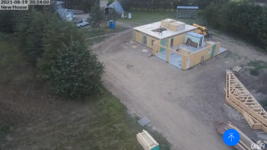
I plan to run 6 cameras at the house. One at each corner on the soffit and one at each door.

For the soffit cameras they will be about 40ft off the ground so looking for recommendations for those cameras. I've read alittle about 5442 Dahua series cameras and heard about Hikivision cameras as an options for better than entry level. These would be near a flood light if that makes a difference. Flood lights are switch operated at the moment but would be updated to motion sensor.

The garage will have soffit cameras as well but those are only 12-13ft off the ground and I have one by the entry door plus inside. My goal is to have two separate systems with their own NVRs. I'll be able to run internet from the house to the garage and it's about a 60-70ft run.

I'm interested in being able to view these without them dialing back home to China or whatever countries servers they came from. Which systems can that be turned off on?

Look forward to hearing what you guys think and if I'm missing something.

Thanks,
Magna
 
Last edited:
To avoid these ads, REGISTER NOW!

Bretny

Well-known member
Joined
Jul 31, 2017
Messages
3,918
Location
Dutchess county NY
Cameras at 40ft high will be next to useless. You will be looking down on peoples head or 100ft out to get a good view of there face or licence plate. My 4k IP cameras are ran of cat5 and at 15ft and 50ft away I can just barely read a licence plate that's not moving.
 

Yankeefarmer

Well-known member
Joined
Jul 25, 2011
Messages
1,200
Location
Connecticut
Like Bretny wrote, cameras at 40 ft will be useless for identifying any perps. If you possibly can, run some conduit so your cable choice can change at a later date as technology constantly changes. Give serious consideration to installing cameras at about 7 ft height for perp identification. And consider running Blue Iris on a refurbished business computer. I did that when I was exasperated with my Nest cams where just viewing is dependent on an internet connection. Blue Iris was very easy to set up, everything is within my own LAN, and camera choices are large, vs. an NVR that requires same brand cameras. If you haven’t already done so, the experts on this subject are at Ipcamtalk.com.
 

Neggy

Well-known member
Joined
May 30, 2021
Messages
754
I went with Blink wireless cameras, if you watch Amazon they go on sale once a month

I got to see a repair person try to rip me off big time, all caught on camera..... with audio

my only gripe is when it rains my pool camera gets tripped by the sound/raindropsScreenshot_20210701-135515.png
 

rdoty

ALLIANCE MEMBER
Joined
Feb 7, 2018
Messages
648
Location
Massachusetts
I prefer Cat6 cable - it is generally 23ga, vs. 24ga for Cat5. I like the heavier wire for POE. There isn't much price difference between Cat5 and Cat6 if you get it from someplace like Monoprice.com.

6 POE cameras will pull quite a bit of power. If you aren't using a DVR with multiple camera connections I would suggest getting a dedicated high power POE switch just for the cameras - something like this Netgear switch. If you think you might have more than 7 cameras get the 16 port version.

For security you can isolate the POE switch from the Internet. I set up the monitoring PC with two ethernet cards: one goes to the isolated POE switch and just talks to the cameras and the other ethernet connects to the Internet.
 

Git

Well-known member
Joined
May 18, 2008
Messages
6,894
Location
S Cal
I don't see the need for two separate NVR's? Personally, I would run BlueIris on a PC instead. 'Best Practices' for an IP Security Cam system is to keep them on their own, separate physical network that does not have internet access. So I would suggest you 'home run' all you IP Cam wiring back to one specific point where you would have your DVR or Blue Iris PC. Then if you wanted to, you would run ethernet from that point to a location where you could connect to your main home network if needed. The computer would need to have two different ethernet adapters. The one that would be used for your IP Cams would not have a gateway assigned to it - so nothing could get out to the internet

At this point, I don't think there is much price difference between Cat5 or Cat6 - I would go with Cat 6
 

e36jon

Well-known member
Joined
May 2, 2013
Messages
237
Location
San Francisco CA
I would second Rdoty's heavier gauge Cat6 call. I would also recommend running some parallel power lines as independent IR illuminators are awesome but need their own juice to work. My own cameras are almost useless at night because of dust/floaters near the lens that are over-illuminated. A separate illuminator in a better position would fix this but I don't have any non-heroic ways to get power up to the camera position...
 
Last edited:

dcg9381

Well-known member
Joined
Jun 20, 2018
Messages
11,883
Location
Austin, TX
The cost difference between Cat 5 and 6 - I just went with Cat 6. Make sure you pay attention to gauge for longer runs. The really thick cable (22 ga?) is made for punch-down only and will not fit into a RJ-45 connector (ask me how I know). Under 100 feet, you're fine with 23 gauge. Construction can often damage a cable, so consider running a spare for critical path.

The other thing - you may want to consider - unshield cable is susceptible to induction from lightening. Prior house, we had lightening take out a few jacks (stike hundreds of feet away). Current house - I still have a lot of unterminated cable, I got a call from my daughter when the ends actually showed sparks during a storm. Shielded cable may do better. And there is a way to ground this stuff.

Cameras, I've done it 3 ways:
1) Generic IP cams (HIKVision from Nellys Security) - you can roll your own setup or use something like Blue Iris
2) WyzeCam - these are dead easy, but are wifi only and need USB power. They require a $10 (or so) subscription per camera per year.
3) Ubiquiti - I'm trying this now. They will lock you into their hardware, but their networking equipment is excellent and it's just easy. I use UDM-Pro (about $400) and you'll need a POE switch to power their cameras. I'm just really impressed with their system, but I'm now
locked to their hardware.
 
Last edited:

yatg

Well-known member
Joined
Aug 16, 2019
Messages
2,836
Location
Southern Oregon
Make sure you're only looking at POE cameras or you'll need an electrical outlet nearby.
Here's an example of a $50 camera that's NOT POE.
You have to plug in a wall wart.

Dedicate some space in your house for a wiring closet/area. Bring all your wiring to there for connection. Leave slack. Consider a 19" rack or cabinet for the equipment.
 
To avoid these ads, REGISTER NOW!

jmdirk

Well-known member
Joined
May 4, 2015
Messages
710
With regards to flood lights and positioning of cameras, be careful and test it before you permanently install. The lights can cause the cameras to be pretty much useless depending on where they are positioned. Make sure the camera can see the lighted area, but not the light itself.
 
OP
M

Magna86

Well-known member
Joined
Apr 28, 2020
Messages
70
Location
VA
Ok Cat 6 it is then. Yes to the garage the line will be in pvc/conduit. Two NVR or PC so if one is taken there is still possible camera footage of the incident. Yes I would like them on their own network separate from the internet but so I we can still view them. The higher cameras would be more for the overall property view and driveway coverage. I'm 200ft off the road.. Should I mount more cameras at the 7ft area than just at the doors? Ok so have to research some more on Blue Iris.. Maybe use that for the house and and a NVR for the garage for now. Yes I was planning on running the cable all to the mechanical room in the house which is also where the internet would come into the house. All the house internet and tv wiring already goes there.

Yes I started a thread on ipcamtalk as well.

Thanks keep it coming
 

rdoty

ALLIANCE MEMBER
Joined
Feb 7, 2018
Messages
648
Location
Massachusetts
If you are looking at Blue Iris you could set it up to save or mirror the video to a separate NAS (Network Attached Storage - looks like a disk over Ethernet). Even a low end NAS would work for this. Set the NAS up in a remote location, perhaps even conceal it. Perhaps the PC in the house and a NAS in the garage? An entry level NAS is small and relatively low power.

Another option is to save the video to the cloud.
 

dcg9381

Well-known member
Joined
Jun 20, 2018
Messages
11,883
Location
Austin, TX
Yes I would like them on their own network separate from the internet but so I we can still view them.
IP cams can saturate a 2.4G network for sure. Been there done that.. You're talking about wired cams, so CAT6 has a lot of bandwidth to play with. There is a concept to do what you want to do - it's called "VLAN" - so you can isolate the cameras on their own "network".

To me, there are two issues. The bandwidth required to write to the NVR and the bandwith required to view the camera(s) over the internet. Two different choke points.
 

Git

Well-known member
Joined
May 18, 2008
Messages
6,894
Location
S Cal
I have no experience with a NVR but one of the more recent features of Blue Iris is the ability to use sub streams. A sub stream is a secondary video stream from a camera, but it is of lower quality. For example, the 'main stream' of most of my cameras are set to 1920 x 1080 (1080p) while the sub streams are set to 704 x 586 (586p). So, when I pull up a web browser that is showing 10 or 12 cameras, they are set to view the sub streams (which still look good), but they drastically cut the bandwidth needed to view all the cams. Then when I click on a single camera, it will switch the the main stream (1080p) for clearer live viewing. Blue Iris can record both streams or just the main stream if you want

vlans - I think they get to complicated for most home users. Cat6 is cheap - just run more cables to keep the ip cam network isolated imo

Here is an example of main streams and sub streams. Main streams are using around 1,000 kB/s while the sub streams are around 60 kB/s max. And before anyone says it - don't chase megapixels especially in low light conditions
T- 400.jpg
 

Bretny

Well-known member
Joined
Jul 31, 2017
Messages
3,918
Location
Dutchess county NY
Since this is all a new install I suggest putting a motion light in areas that you will see the most normal traffic. The IR on these cameras tend to get alot of IR bounce back from things like spider webs, bugs and even trees 20ft away. Having motion activated lights really helps being able to see things on the cameras at night.

With a say 5-10min off delay on motion lights it also gives you a visual time stamp to easily see when fast forwarding through possibly hours of video.
 

Bretny

Well-known member
Joined
Jul 31, 2017
Messages
3,918
Location
Dutchess county NY
I have no experience with a NVR but one of the more recent features of Blue Iris is the ability to use sub streams. A sub stream is a secondary video stream from a camera, but it is of lower quality. For example, the 'main stream' of most of my cameras are set to 1920 x 1080 (1080p) while the sub streams are set to 704 x 586 (586p). So, when I pull up a web browser that is showing 10 or 12 cameras, they are set to view the sub streams (which still look good), but they drastically cut the bandwidth needed to view all the cams. Then when I click on a single camera, it will switch the the main stream (1080p) for clearer live viewing. Blue Iris can record both streams or just the main stream if you want

vlans - I think they get to complicated for most home users. Cat6 is cheap - just run more cables to keep the ip cam network isolated imo

Here is an example of main streams and sub streams. Main streams are using around 1,000 kB/s while the sub streams are around 60 kB/s max. And before anyone says it - don't chase megapixels especially in low light conditions
T- 400.jpg
I never really understood the sub stream thing. Thanks for explaining it. My 4yr old Lorex system has that also.
 

jblnut

ALLIANCE MEMBER
Joined
Jan 17, 2015
Messages
7,125
Location
In the Middle of MN
Please please please run at least 2, 3 is better, wires to each location if you're not running conduit to each spot. Needs change and mice chew.

I've installed hundreds of Ubiquiti cameras over the last 6yrs and have had very very good luck and very positive reviews from them. They do lock you into their hardware though. Not a horrible thing as it's good hardware but feeling trapped *****. It is all super easy to set up though.

This is a Ubiquiti UVC-G3 mounted 50' up for a visual reference for you. You can see my fat *** on top of the house. The camera is about 100' from the house.Screenshot_20210822-073124.png
 
To avoid these ads, REGISTER NOW!
Top Bottom