We are in the process of buying a new home. Shop is 100ft or so from the house. Need to have internet in the shop and curious what the best /easiest way to get it out there will be. Previous owners said they already have a landline out there. We plan on goin with CenturyLink as a supplier (thats who we currently use). Can I add another modem out there li ke inside the house even tho it would be on the same phone line?


You are using an out of date browser. It may not display this or other websites correctly.
You should upgrade or use an alternative browser.
You should upgrade or use an alternative browser.
Shop internet
- Thread starter Reit38
- Start date
Tbender78
Well-known member
I ran cat 5 in pvc under ground. Pugged that into my router in my house and into a second router in the garage. Works great.
KenB
Well-known member
Ask Century Link what your options are.
niget2002
Well-known member
Find out how the existing phone line is ran out there. Hopefully it's running through an underground pipe. If so, use the phone line to pull a cat6 line through the same pipe.
Other options go up in cost from there.
Alternatively, when you have your internet setup on the house, ask how much they charge to run network cables. Then ask if they can run you a network cable out to the shop for you.
I did it this way when we moved into our current house. The guy said $75/run... I said, great. I need one from 'here' to 'here' and pointed at the garage one the house and the front of the shop. Guys aid 'ok'. I think it cost more than $75 in cable to run the length I wanted. I was lucky in that there was already a cable run ran between the two buildings. They just had to run the cable and terminate them.
Other options go up in cost from there.
Alternatively, when you have your internet setup on the house, ask how much they charge to run network cables. Then ask if they can run you a network cable out to the shop for you.
I did it this way when we moved into our current house. The guy said $75/run... I said, great. I need one from 'here' to 'here' and pointed at the garage one the house and the front of the shop. Guys aid 'ok'. I think it cost more than $75 in cable to run the length I wanted. I was lucky in that there was already a cable run ran between the two buildings. They just had to run the cable and terminate them.
finn
Well-known member
Ditch the land line phone in the shop and use the existing CAT 5 cable to connect your modem.
Us voice over Internet to get a signal for your cell phone.
No trenching or pulling wired required. Fifteen minute job.
Us voice over Internet to get a signal for your cell phone.
No trenching or pulling wired required. Fifteen minute job.
mike93lx
ALLIANCE MEMBER
For just 100ft, why would you want to pay for another service?
nadogail
Well-known member
Have your preferred provider give you a proposal and a quote.
BORING HOP YARD
Well-known member
If you have Cat5 or better you can have both a land line and ethernet in the shop.
Ethernet only uses 4 of the 8 wires (two pairs) in a CAT5 cable, your land line runs on 2 wires (one pair)
I built my own Cat6 cables and it was pretty easy to do this, I have both land line and ethernet in my shop that is about 200 feet away from my router.
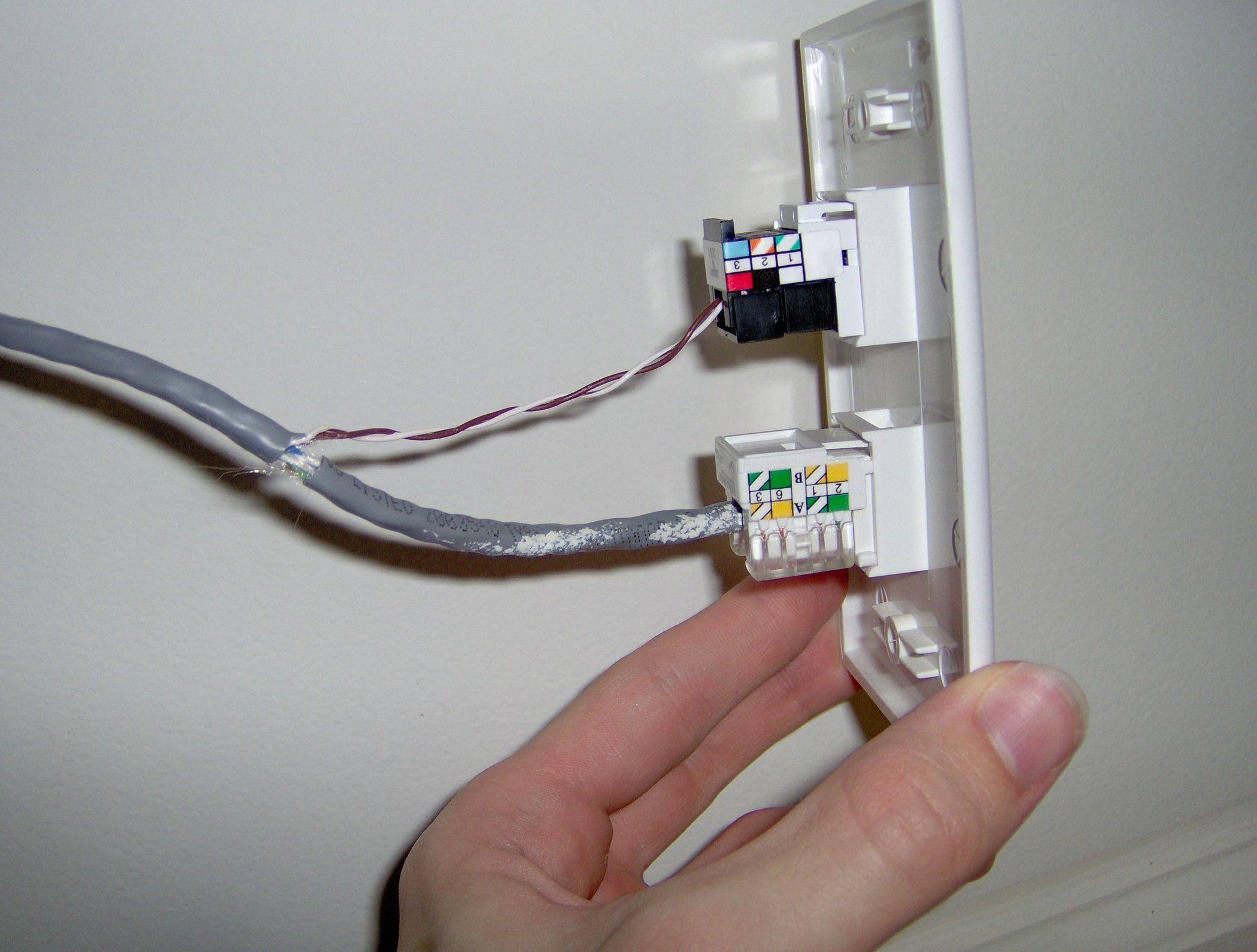
 www.instructables.com
Ethernet only uses 4 of the 8 wires (two pairs) in a CAT5 cable, your land line runs on 2 wires (one pair)
I built my own Cat6 cables and it was pretty easy to do this, I have both land line and ethernet in my shop that is about 200 feet away from my router.
Hack Your House: Run Both Ethernet and Phone Over Existing Cat-5 Cable
Hack Your House: Run Both Ethernet and Phone Over Existing Cat-5 Cable: The new fad when building a house is to run Cat-5 cable to every wall jack. These jacks can then be used for either ethernet or phone. When we got our new house built, we chose to get four of these jacks, and we intended to...
www.instructables.com
Augus7us
Well-known member
I just bought a spool of gel filled direct burial cat 6 500' for 126$ at true cable.
khnitz
Well-known member
I use a ubiquity wireless ethernet bridge between our house and shop. It works great and looks no different than an ethernet port to either side of the network. The picture below is of the receiving end of the wireless bridge in my shop. I'm actually shooting through walls to make the connection. I could mount them both outside, too (the house-side end is also indoors and shooting through a window pane), but I have had sufficient speeds with this configuration so far. The distance between the points is about 125-150' and they could support a longer distance, too.

Last edited:
dcg9381
Well-known member
Summary:
1) Call the cable company and ask what it costs to add additional service there (yea, probably 2x cost of single service)
2) Run a cat5 or cat6 wire to a <$75 wifi device configured as an "access point" from your existing router. 100 feet is no problem, 33% of usable range of this stuff.
3) If you have power fed from the house to the shop (or vice versa), you *may* be able to do ethernet over power lines (I haven't had much luck with this)
4) You can do it without wires, but it requires oat least one, better with two, ubiquity wireless ethernet bridges
1) Call the cable company and ask what it costs to add additional service there (yea, probably 2x cost of single service)
2) Run a cat5 or cat6 wire to a <$75 wifi device configured as an "access point" from your existing router. 100 feet is no problem, 33% of usable range of this stuff.
3) If you have power fed from the house to the shop (or vice versa), you *may* be able to do ethernet over power lines (I haven't had much luck with this)
4) You can do it without wires, but it requires oat least one, better with two, ubiquity wireless ethernet bridges
khnitz
Well-known member
For #4, there is one ubiquity device on each side (one in the house, one in the shop). 2 devices=1 wireless bridge. Only one set is needed.
And is it in in a conduit ?You say landline but need to be more specific about what it is. Cable coax, phone line, or is it 8-conductor ethernet?
rockcrawler
Well-known member
I ran CAT6 in underground PVC, a switch in the shop and hardwired a wireless access point on the ceiling. Works great.
finn
Well-known member
My shop is probably 200’ plus from the house. A WiFi extender that we have in the yard works, but I normally have it set up with one of those powerline transmitters, which is pretty robust, too.
Metal-Marc
Well-known member
The best way to fry electronics in both buildings in case of a lightning strike nearby is to run copper cables between both buildings.
Fibre optic is not that expensive if you are going to dig a trench. You can also go wireless.
Fibre optic is not that expensive if you are going to dig a trench. You can also go wireless.
65ranchero
Well-known member
WiFi is what I use if I need the laptop in the garage
it's about 50ft from the office where the modem sits.
we are using Hughesnet Gen5 and it works for what I need it for.
it's about 50ft from the office where the modem sits.
we are using Hughesnet Gen5 and it works for what I need it for.
fuggle
Well-known member
The power lines are orders of magnitude lower resistance and inductance, so adding ethernet is in the noise.The best way to fry electronics in both buildings in case of a lightning strike nearby is to run copper cables between both buildings.
Fibre optic is not that expensive if you are going to dig a trench. You can also go wireless.
rockcrawler
Well-known member
I also added an ethernet surge suppressor to each line going to the shop and grounded those to a rod driven three feet or so into the ground just outside the house. Hopefully this will provide some protection for equipment inside the house.
gayler
Well-known member
Can I use any ordinary router or does it need to be something special?We ran a Cat 5 too with another router......works great!
Jmonnty
Well-known member
Meshing routers work best that way when you walk from one location to the other you won't have issues.Can I use any ordinary router or does it need to be something special?
gayler
Well-known member
With only 1200sq ft and no interior walls would mesh be necessary?
PassnThru
Well-known member
I'm not familiar with CenturyLink - is that DSL so that it uses an actual phone line?
I would investigate the existing phone line to the garage - if it's in conduit then I would use it to pull two new ethernet cables out to the garage. You will only use one but it's good to have a spare. If you have a DSL modem then it's likely connected to your network which means that all of the computers in your house have access. If you don't have a network then go buy a gigabit network switch and make one. Then connect the cable to the garage inside the house to the switch - and buy a wireless router/switch for the garage and connect it to the other end. Turn off DHCP on that router so it doesn't give out IP addresses and give it a static IP address one greater than the in house equipment. Don't connect it by the WAN port - leave that empty. Connect it at one of the LAN ports and now you have wired and wireless in the garage. All you really have to do at the end of the day is to expand your network into the garage by running a cable. From there it's just like inside the house.
I would investigate the existing phone line to the garage - if it's in conduit then I would use it to pull two new ethernet cables out to the garage. You will only use one but it's good to have a spare. If you have a DSL modem then it's likely connected to your network which means that all of the computers in your house have access. If you don't have a network then go buy a gigabit network switch and make one. Then connect the cable to the garage inside the house to the switch - and buy a wireless router/switch for the garage and connect it to the other end. Turn off DHCP on that router so it doesn't give out IP addresses and give it a static IP address one greater than the in house equipment. Don't connect it by the WAN port - leave that empty. Connect it at one of the LAN ports and now you have wired and wireless in the garage. All you really have to do at the end of the day is to expand your network into the garage by running a cable. From there it's just like inside the house.
smackey05
Well-known member
This is what I would do if you don't run an ethernet cable.I use a ubiquity wireless ethernet bridge between our house and shop. It works great and looks no different than an ethernet port to either side of the network. The picture below is of the receiving end of the wireless bridge in my shop. I'm actually shooting through walls to make the connection. I could mount them both outside, too (the house-side end is also indoors and shooting through a window pane), but I have had sufficient speeds with this configuration so far. The distance between the points is about 125-150' and they could support a longer distance, too.
dcg9381
Well-known member
Ubiquity has some great point-to-point options if you are line of sight and just want to do wireless. You can even get away with a single unit pointed at your main source of wifi in the house.
But running conduit is really the way to go. The downside of CAT5/CAT6 is that it's highly inductive and lightening strikes simply nearby (say within 800 feet or so) can induce current that can easily fry both end. So fiber optic is really the way to go if you're in storm prone area...
But running conduit is really the way to go. The downside of CAT5/CAT6 is that it's highly inductive and lightening strikes simply nearby (say within 800 feet or so) can induce current that can easily fry both end. So fiber optic is really the way to go if you're in storm prone area...
23ford
Well-known member
you can run direct burial grounded cat 5 or 6 no induction......
I tried to setup one of those and was WAY over my head. Ended up sending it back to the Amazonians.I use a ubiquity wireless ethernet bridge between our house and shop. It works great and looks no different than an ethernet port to either side of the network. The picture below is of the receiving end of the wireless bridge in my shop. I'm actually shooting through walls to make the connection. I could mount them both outside, too (the house-side end is also indoors and shooting through a window pane), but I have had sufficient speeds with this configuration so far. The distance between the points is about 125-150' and they could support a longer distance, too.
khnitz
Well-known member
That's unfortunate, but yeah, I can see how that can happen if you're not somewhat familiar with IP configuration. I've been very happy with that Ubiquity bridge and with the Netgear Orbi mesh network on our property. I do have fixed IP addresses configured for the things on my network that are always there (the Ubiquity bridge endpoints, the Orbi satellites, our network-connected printers, etc.). For the devices that come and go, then I leave it to DHCP to take care of those. The other biggest improvement to the quality of the internet connection at our house was when I found a loose connection on a cable feed into a splitter before it reached our cable modem. It was a connection I hadn't touched since we moved in to the house some years ago, so it had always been a little loose (not a bad move to double-check those now and again).I tried to setup one of those and was WAY over my head. Ended up sending it back to the Amazonians.
Last edited:
MerlinsBeard
Well-known member
I'm looking to run fiber between house and detached workshop, do you have a recommendation? I already have 1" conduit, still trying to get smart on fiber options. I have house runs of CAT6, but switching between CAT and fiber and having the transitions to fiber work is a little out of my comfort zone.Ubiquity has some great point-to-point options if you are line of sight and just want to do wireless. You can even get away with a single unit pointed at your main source of wifi in the house.
But running conduit is really the way to go. The downside of CAT5/CAT6 is that it's highly inductive and lightening strikes simply nearby (say within 800 feet or so) can induce current that can easily fry both end. So fiber optic is really the way to go if you're in storm prone area...
I was thinking of running fiber with coax (not sure if I'll use the coax, but nice to run it just in case). Is there any issues with coax and lightning?
All I know about internet weefees is when I clicky click on the phone, boobie girl pics come up and I'm happy.That's unfortunate, but yeah, I can see how that can happen if you're not somewhat familiar with IP configuration. I've been very happy with that Ubiquity bridge and with the Netgear Orbi mesh network on our property. I do have fixed IP addresses configured for the things on my network that are always there (the Ubiquity bridge endpoints, the Orbi satellites, our network-connected printers, etc.). For the devices that come and go, then I leave it to DHCP to take care of those. The other biggest improvement to the quality of the internet connection at our house was when I found a loose connection on a cable feed into a splitter before it reached our cable modem. It was a connection I hadn't touched since we moved in to the house some years ago, so it had always been a little loose (not a bad move to double-check those now and again).
 No boobie pics and I'm sad.
 I was expecting I could plug stuff in and it'd be self explanatory, not that I need a college degree in networks to make it work.
dcg9381
Well-known member
I don't - I source most of my stuff through Monoprice (who does have fiber options) - you need to match fiber type / connector to what you're terminating it to. I know there are simple fiber to CAT6 modules.I'm looking to run fiber between house and detached workshop, do you have a recommendation? I already have 1" conduit, still trying to get smart on fiber options. I have house runs of CAT6, but switching between CAT and fiber and having the transitions to fiber work is a little out of my comfort zone.
I was thinking of running fiber with coax (not sure if I'll use the coax, but nice to run it just in case). Is there any issues with coax and lightning?
If I was going to do it, I'd find fiber modules compatible with my Cisco switch (SFP) - single-mode fiber-optic - but my guess is that you're not terminating to a cisco switch...
Someone else will be along (I hope) to tell you how they do it...
MerlinsBeard
Well-known member
Nope, got plenty of cisco gear at work, not in my price range for home network.
I have two simple switches (I think both netgear) on entertainment centers that connect to an home office that go to a netgear wifi router and cable modem. Probably going to branch off the living room entertainment center switch, make a cat6 feed down to the basement, then try to switch to fiber through conduit to the shed.
Having a way to hide that stuff in a stud cavity and making it solid and look clean is not as easy as I thought.
I have two simple switches (I think both netgear) on entertainment centers that connect to an home office that go to a netgear wifi router and cable modem. Probably going to branch off the living room entertainment center switch, make a cat6 feed down to the basement, then try to switch to fiber through conduit to the shed.
Having a way to hide that stuff in a stud cavity and making it solid and look clean is not as easy as I thought.
dcg9381
Well-known member
All of my Cisco gear came from work. I do get a "good deal" on it, but if you look online (ebay) for commercial surplus, think <10% of what these switches cost originally. I just checked and a 2950X can be had for under $100.Nope, got plenty of cisco gear at work, not in my price range for home network.
What I have does POE (by far much cheaper than buying any 24-port POE switch I could find new) and would handle fiber modules. Switch is on battery backup, as is all this equipment. If I lose power, I don't lose security monitoring. They even have POE powered "hubs" so you can get a few more powered ports at a remote location out of one Cisco POE port.
Course, you have to struggle through "speaking Cisco" or have a friend that does... But it's a one time deal in most cases.
If you wanted to hide it in a stud cavity, I'd probably just get a fiber to CAT6 module and put in an access panel.
Why not install a simple wall-mount rack in the basement and centralize there? If it'll run in my Texas closet, I'm sure it'll run in your basement just fine...
kj_mustang
Well-known member
Cisco hardware for under $100 may not have an ios installed which does require a license.
rooster59
Well-known member
Post #9 Boring Hop Yard. Give that a look. If you have the extra pairs you’re good. Good chance cat5 was used for the phone. If not, you might be able to pull 1-2 cat5/6 from the house using the phone wire. You can find a used linksys or netgear router for the magical 5 bucks on Craigs, marketplace, goodwill, etc. Look for a vid on YouTube like “how to connect 2 routers on the same wifi”, or find a kid. You will get Wi-Fi plus 3-4 switch ports In the garage.
Last edited:
BORING HOP YARD
Well-known member
First, I want to apologize for not responding sooner.
Rooster59 is right on the money.
I ran cat5 in about 100 feet of conduit underground, I did this so I could have a phone in the shop.
I purchase cat5 because it was the latest and greatest at the time of installation.
At first, I started doing research on intercoms so my wife could get a hold of me rather than walking out to the shop.
Then I started thinking I wanted internet and looked at options.
The process can be confusing first time around, the "hack your house" link I shared was the process I followed.
Rooster59 is right on the money.
I ran cat5 in about 100 feet of conduit underground, I did this so I could have a phone in the shop.
I purchase cat5 because it was the latest and greatest at the time of installation.
At first, I started doing research on intercoms so my wife could get a hold of me rather than walking out to the shop.
Then I started thinking I wanted internet and looked at options.
The process can be confusing first time around, the "hack your house" link I shared was the process I followed.