To avoid these ads, REGISTER NOW!

Software for Designing garage/building

motofool33

Well-known member
Joined
Feb 2, 2013
Messages
1,634
Location
Currently North of Houston
Tried searching and cant find the key words to bring this subject up.

But im looking for some software that i can render/design my garage layout.

i used autocad many years ago but now too unfamilar with it need something simpler, Free would be cool but im open to buying some software.

What software do you guys have some knowledge on?

Thanks,
-W
 
To avoid these ads, REGISTER NOW!

Falcon67

Well-known member
Joined
Jun 11, 2009
Messages
18,371
Location
Merkel, TX
I used Vision because 2D was plenty for me. Before I put anything in visio I burned up a lot of graph paper and pencils. Quicker and cheaper than any software. And I'm a computer guy.
 
To avoid these ads, REGISTER NOW!

bczygan

Well-known member
Joined
Nov 4, 2009
Messages
22,002
Location
DETROIT! Arsenal of Scrappers
Why let software get in the way of your designing and thinking. I recommend this:

writting-pencil-graph-paper-11067162.jpg


It's like hoping a hammer will make you a carpenter.

First you need to make lists.
Lists of functions.
Lists of tools and materials and items that need storing.
Then do a functional relationship diagram:
functional+relationship+diagram.jpg


This can be done for a garage, or shop or any space that is used for any combination of functions.

You are creating the best process flow for materials and projects from machine to machine and from work area to work area. Ancillary tooling and materials are grouped at each workstation.

After all this planning is done, then you turn each function into a space adequate for it. Then separate functions with walls where necessary and wrap the whole shebang with outer walls and roofs.

Most people design a building and try to fit functions inside. That is backwards.

So you don't need any CAD system to design a building. Just a few sheets of lined paper for lists, and some plain paper for the functional relationship diagram and some checked paper to turn the spaces into areas and rooms.

Then you choose structure to enclose the whole. You poke holes in walls for doors and windows where the traffic patterns and access dictate and where views are available.

This assures that you have everything relate to everything else in the most efficient way.

Small thumbnail sketches are the best way to begin. Draw macninery and needed work areas to scale. Start your planning in the 2 dimensions of a plan. Then try to extend it into three dimensions. To think in three dimensions, imagine standing in the space and walking around in it. Imagine sitting or standing at a work station and reaching for tools and materials you need. Plan for most used things to be closest at hand. This will allow you to utilize spaces above you.

At the end of all this, you can use a program to make it into a pretty picture. But you have already done all the planning.

Got it?

Bill
 
Last edited:
OP
M

motofool33

Well-known member
Joined
Feb 2, 2013
Messages
1,634
Location
Currently North of Houston
Why let software get in the way of your designing and thinking. I recommend this:

writting-pencil-graph-paper-11067162.jpg


It's like hoping a hammer will make you a carpenter.

First you need to make lists.
Lists of functions.
Lists of tools and materials and items that need storing.
Then do a functional relationship diagram:
functional+relationship+diagram.jpg


This can be done for a garage, or shop or any space that is used for any combination of functions.

You are creating the best process flow for materials and projects from machine to machine and from work area to work area. Ancillary tooling and materials are grouped at each workstation.

After all this planning is done, then you turn each function into a space adequate for it. Then separate functions with walls where necessary and wrap the whole shebang with outer walls and roofs.

Most people design a building and try to fit functions inside. That is backwards.

So you don't need any CAD system to design a building. Just a few sheets of lined paper for lists, and some plain paper for the functional relationship diagram and some checked paper to turn the spaces into areas and rooms.

Then you choose structure to enclose the whole. You poke holes in walls for doors and windows where the traffic patterns and access dictate and where views are available.

This assures that you have everything relate to everything else in the most efficient way.

Start your planning in the 2 dimensions of a plan. Then try to extend it into three dimensions. To think in three dimensions, imagine standing in the space and walking around in it. Imagine sitting or standing at a work station and reaching for tools and materials you need. Plan for most used things to be closest at hand. This will allow you to utilize spaces above you.

Got it?

Bill


If i was designing the whole thing i would agree but the dimensions are set 40' wide 43' deep 19' high

here is the basic look i know it(pic) is smaller then the unit im looking at.

its a garage condo community


So far, i probably will put in bathroom and a mezzinine, forsure 2 post lift
 

Attachments

  • 2976326sstbuses-general-storage23111.jpg
    2976326sstbuses-general-storage23111.jpg
    103.8 KB · Views: 17

bczygan

Well-known member
Joined
Nov 4, 2009
Messages
22,002
Location
DETROIT! Arsenal of Scrappers
If i was designing the whole thing i would agree but the dimensions are set 40' wide 43' deep 19' high

here is the basic look i know it(pic) is smaller then the unit im looking at.

its a garage condo community


So far, i probably will put in bathroom and a mezzinine, forsure 2 post lift

Ahhhhhh!

Sorry, you are the exception then. The main structure is set.

The listing of functions and breaking them down into sub functions and creating a flow still applies.

And I don't know about you, but I think and plan and weigh alternatives more easily with a pencil and paper and eraser. Unless I an very fluent with a software program, it adds another layer between me and my design work.

I just finished designing a machine shop with aircraft manufacturing space. First, I used the smallest thumbnails to work on relationships. A thumbnail about 2" square for the whole shop of about 40x60.
Once the basic flow was determined, I blew the thing up and made it to a scale to allot space for machines and work tables and aisles.

Is this a long term lease? You have a lot of space for just a lift and bathroom. What other functions do you plan?

BTW, I've played around with Sketchup, and if you are proficient, it can be a tool, but small pieces of checked paper work just as well or better.

Please tell us more about your project...

Bill
 
Last edited:

600SL

Well-known member
Joined
Apr 26, 2012
Messages
1,794
Location
Connecticut
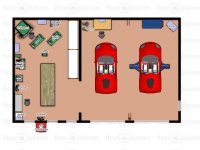
I used this. You get one project for free.

It is kind of limited. They don't have all the equipment you need for a real garage. But for example I made a drill press real big and called it a milling machine. They also did not have a Mercedes 560SL so I used 2 Ferrari's.

https://www.floorplanner.com/

John
 

Attachments

  • 2D Layout.jpg
    2D Layout.jpg
    67.9 KB · Views: 23
  • 3D Layout.jpg
    3D Layout.jpg
    43.2 KB · Views: 18

600SL

Well-known member
Joined
Apr 26, 2012
Messages
1,794
Location
Connecticut
Why let software get in the way of your designing and thinking. I recommend this:

writting-pencil-graph-paper-11067162.jpg


It's like hoping a hammer will make you a carpenter.

First you need to make lists.
Lists of functions.
Lists of tools and materials and items that need storing.
Then do a functional relationship diagram:
functional+relationship+diagram.jpg


This can be done for a garage, or shop or any space that is used for any combination of functions.

You are creating the best process flow for materials and projects from machine to machine and from work area to work area. Ancillary tooling and materials are grouped at each workstation.

After all this planning is done, then you turn each function into a space adequate for it. Then separate functions with walls where necessary and wrap the whole shebang with outer walls and roofs.

Most people design a building and try to fit functions inside. That is backwards.

So you don't need any CAD system to design a building. Just a few sheets of lined paper for lists, and some plain paper for the functional relationship diagram and some checked paper to turn the spaces into areas and rooms.

Then you choose structure to enclose the whole. You poke holes in walls for doors and windows where the traffic patterns and access dictate and where views are available.

This assures that you have everything relate to everything else in the most efficient way.

Small thumbnail sketches are the best way to begin. Draw macninery and needed work areas to scale. Start your planning in the 2 dimensions of a plan. Then try to extend it into three dimensions. To think in three dimensions, imagine standing in the space and walking around in it. Imagine sitting or standing at a work station and reaching for tools and materials you need. Plan for most used things to be closest at hand. This will allow you to utilize spaces above you.

At the end of all this, you can use a program to make it into a pretty picture. But you have already done all the planning.

Got it?

Bill

The pencil and paper is no doubt an excellent tool. But I often found the rough sketch's I made were so far off scale that the stuff didn't fit. This becomes particularly true in small shops with limited space. Once you commit to making your sketches to scale the simple cad programs make a lot more sense.

One of the ways I used to get around this before I had CAD available was to make cutout foot prints of items I intended to have in the space and place them on graph paper of the same scale.

In most general use garages the process flow is not as specific as it is in the corporate manufacturing environment, but most of us do have a particular hobby of focus, and process flows should lean to those interests with awareness of other activities that may take place.

John
 
To avoid these ads, REGISTER NOW!
Top Bottom