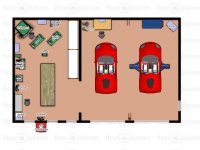
Why let software get in the way of your designing and thinking. I recommend this:
It's like hoping a hammer will make you a carpenter.
First you need to make lists.
Lists of functions.
Lists of tools and materials and items that need storing.
Then do a functional relationship diagram:
This can be done for a garage, or shop or any space that is used for any combination of functions.
You are creating the best process flow for materials and projects from machine to machine and from work area to work area. Ancillary tooling and materials are grouped at each workstation.
After all this planning is done, then you turn each function into a space adequate for it. Then separate functions with walls where necessary and wrap the whole shebang with outer walls and roofs.
Most people design a building and try to fit functions inside. That is backwards.
So you don't need any CAD system to design a building. Just a few sheets of lined paper for lists, and some plain paper for the functional relationship diagram and some checked paper to turn the spaces into areas and rooms.
Then you choose structure to enclose the whole. You poke holes in walls for doors and windows where the traffic patterns and access dictate and where views are available.
This assures that you have everything relate to everything else in the most efficient way.
Small thumbnail sketches are the best way to begin. Draw macninery and needed work areas to scale. Start your planning in the 2 dimensions of a plan. Then try to extend it into three dimensions. To think in three dimensions, imagine standing in the space and walking around in it. Imagine sitting or standing at a work station and reaching for tools and materials you need. Plan for most used things to be closest at hand. This will allow you to utilize spaces above you.
At the end of all this, you can use a program to make it into a pretty picture. But you have already done all the planning.
Got it?
Bill